
nginx的高级用法
一、根据url中的参数来确定缓存的key
set_by_lua_block $dataArg {

local enc = ngx.req.get_uri_args()["enc"]

local key = ngx.req.get_uri_args()["key"]

local name = ngx.req.get_uri_args()["name"]

local str = tostring(enc)..tostring(key)..tostring(name)

return str

}

proxy_cache_key $host$uri$dataArg;
二、根据源站传过来的跨域头做判断
set $cors_origin "*";

if ($http_origin != ""){

set $cors_origin $http_origin;

}

more_set_headers "Access-Control-Allow-Origin:$cors_origin";
三、根据不同的运营商走不同的upstream
1、下层传递一个请求头:

 location / {

             proxy_buffer_size  128k;

             proxy_buffers   32 32k;

             proxy_busy_buffers_size 128k;

             proxy_set_header  Host $host;

             proxy_set_header CDN ctyun;

             proxy_set_header X-Forwarded-For $remote_addr;

             proxy_set_header isp cm;   #传递一个请求头为cm(移动)

             add_header Powered-By-ctcdn "$server_addr";

             proxy_cache $cache_store;

             proxy_pass $scheme://test-upstream_$scheme$server_port;

    }

2、上层做判断

server {

    listen 80;

    server_name www.test.com;

    resolver 8.8.8.8 114.114.114.114;

    underscores_in_headers on; #nginx开启客户读取自定义头部的值

    error_log  /data/log/nginx/error.log;

    access_log /data/log/nginx/access.log nginxlog;

    location / {

             proxy_buffer_size  128k;

             proxy_buffers   32 32k;

             proxy_busy_buffers_size 128k;

             proxy_set_header  Host $host;

             proxy_set_header CDN test;

             add_header Powered "$server_addr";

             proxy_cache $cache_store;

   ##此处即下层如果有移动联通电信设备;在上层需要移动回移动的upstream;联通回联通的upstream;电信回电信的upstream;

            if ($http_isp = "ct") {

               proxy_pass $scheme://test-ct_$scheme$server_port;

        }

            if ($http_isp = "cn") {

               proxy_pass $scheme://test-cn_$scheme$server_port;

        }

            if ($http_isp = "cm") {

               proxy_pass $scheme://test-cm_$scheme$server_port;

        }

    }

3、上层upstream配置

upstream test-cm_http80 {

        server 1.1.1.1:80;

    }

upstream test-cn_http80 {

        server 2.2.2.2:80;

    }

upstream test-ct_http80 {

        server 3.3.3.3:80;

    }
四、proxy_cache_use_stale模块的作用
缓存过期,但是源站有问题,可以直接返回用户旧的内容,返回旧文件总比报错强,一般应用在源站有问题的情况;

Syntax: proxy_cache_use_stale error | timeout | invalid_header | updating | http_500 | http_502 | http_503 | http_504 | http_403 | http_404 | http_429 | off ...;

Default:  proxy_cache_use_stale off;

Context:  http, server, location

官网介绍:http://nginx.org/en/docs/http/ngx_http_proxy_module.html#proxy_cache_use_stale

测试过程:

upstream test_http80 {

    server 1.1.1.1:8085;

}

server {

    listen       80;

    server_name  www.test.com;

    resolver 8.8.8.8 114.114.114.114;

    proxy_cache $cache_store;

    error_log  /log/error.log;

    access_log /log/access.log nginxlog;

    location ~*\.(txt|jpg|gif|png|bmp|ico)$ {

        more_clear_headers -s '200 206 304' 'Set-Cookie' 'Server' 'X-Varnish' 'x-hits' 'X-Cache' 'Via' 'Age';

        proxy_ignore_headers   "Cache-Control" "Set-Cookie" "Expires" "Vary";

             proxy_cache_valid  200 206 5s;

             proxy_cache_key $host$uri;

             proxy_set_header Host $host;

             proxy_set_header X-Forwarded-For $remote_addr;

             proxy_set_header CDN test;

             age_header;

             expires  5s;

             proxy_cache_use_stale error timeout http_500 http_502 http_503 http_504;

             proxy_http_version 1.1;

             proxy_set_header Connection "keep-alive";

             add_header Powere-test "$upstream_cache_status from $ipadd";

             proxy_pass "${scheme}://test_${scheme}${server_port}";

    }

}
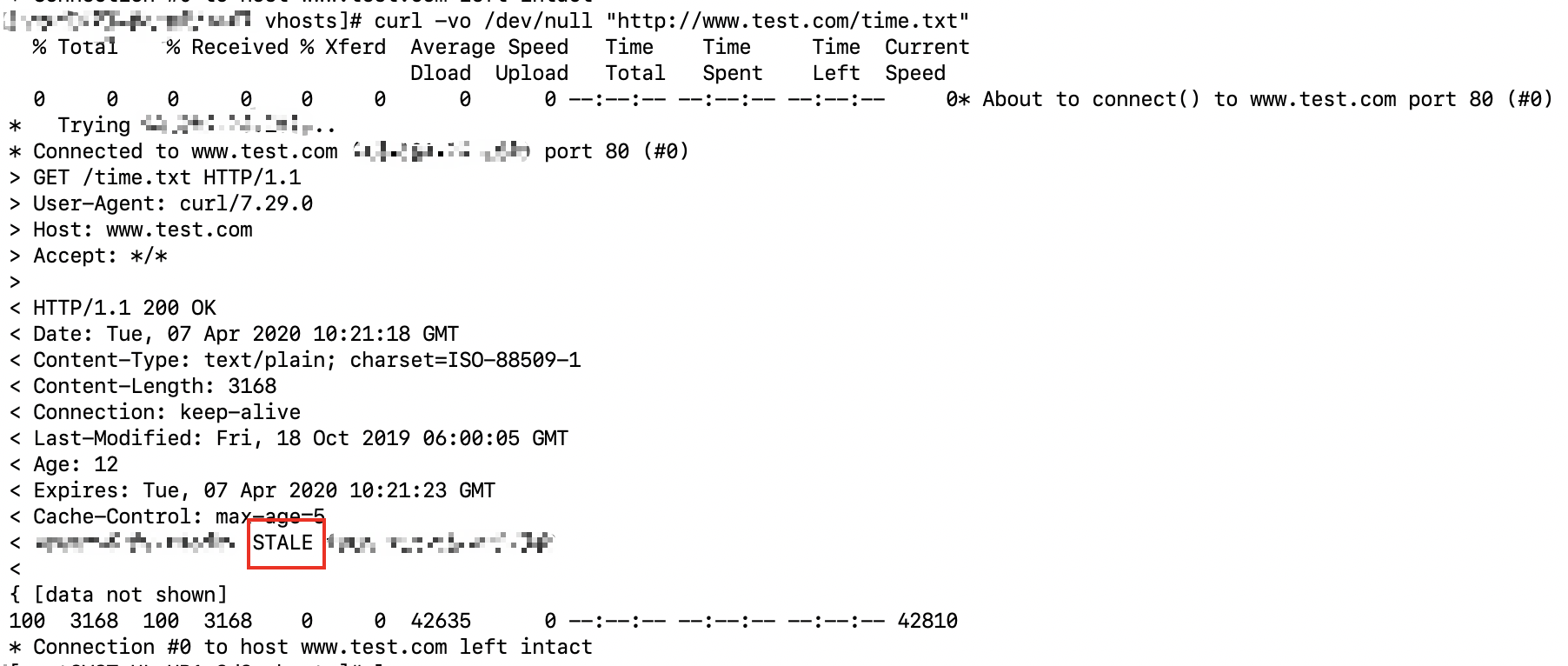
最终效果:当上游服务器1.1.1.1无法访问时,返回旧内容;
五、当访问资源404时,对url做改写
server {

    listen 80;

    server_name www.zhide666.cn;

    location / {

        proxy_pass http://www.upstream.com;

    }

#当资源不在本地,但是访问该资源的时候资源不存在,当上游服务器返回404状态码时,也需要通过error_page rewrite到指定的url;

    location ~/portal/(.*)$ {

        proxy_intercept_errors on;  #当error_page和proxy_proxy_pass同时存在时则需要加该配置;

        #recursive_error_pages on;

        proxy_pass http://www.upstream.com;

        error_page 404 https://www.zhide666.cn/ketang/$1$is_args$args;  #不加is_args和args会忽略url中的参数;

    }

#当资源在本地,但是访问该资源的时候资源不存在,则通过error_page rewrite到指定的url;

    location ~/movie/(.*)$ {

        root /data/movie/;

        error_page 404 https://www.zhide666.cn/ketang/$1$is_args$args;

    }

}
p.p1 { margin: 0; font: 12px Menlo; color: rgba(0, 0, 0, 1) }
span.s1 { font-variant-ligatures: no-common-ligatures }
p.p1 { margin: 0; font: 12px Menlo; color: rgba(0, 0, 0, 1) }
p.p2 { margin: 0; font: 12px Menlo; color: rgba(0, 0, 0, 1); min-height: 14px }
span.s1 { font-variant-ligatures: no-common-ligatures }
span.s2 { font-variant-ligatures: no-common-ligatures; background-color: rgba(224, 228, 9, 1) }
p.p1 { margin: 0; font: 12px Menlo; color: rgba(0, 0, 0, 1) }
p.p2 { margin: 0; font: 12px Menlo; color: rgba(0, 0, 0, 1); min-height: 14px }
span.s1 { font-variant-ligatures: no-common-ligatures }
span.s2 { font-variant-ligatures: no-common-ligatures; background-color: rgba(224, 228, 9, 1) }
p.p1 { margin: 0; font: 12px Menlo; color: rgba(0, 0, 0, 1) }
span.s1 { font-variant-ligatures: no-common-ligatures }
span.s2 { font-variant-ligatures: no-common-ligatures; background-color: rgba(224, 228, 9, 1) }
p.p1 { margin: 0; font: 12px Menlo; color: rgba(0, 0, 0, 1) }
span.s1 { font-variant-ligatures: no-common-ligatures }
span.s2 { font-variant-ligatures: no-common-ligatures; color: rgba(180, 36, 25, 1) }
nginx的高级用法的更多相关文章
- nginx篇高级用法之基于TCP/UDP的四层调度
nginx 从1.9版本开始支持基于TCP/UDP的四层调度,在编译nginx时使用--with-stream开启该模块 支持TCP/UDP调度时,支持给所有的软件做调度器,例如:nfs smb ft ...
- redis的Linux系统安装与配置、redis的api使用、高级用法之慢查询、pipline事物
今日内容概要 redis 的linux安装和配置 redis 的api使用 高级用法之慢查询 pipline事务 内容详细 1.redis 的linux安装和配置 # redis 版本选择问题 -最新 ...
- Visual Studio 宏的高级用法
因为自 Visual Studio 2012 开始,微软已经取消了对宏的支持,所以本篇文章所述内容只适用于 Visual Studio 2010 或更早期版本的 VS. 在上一篇中,我已经介绍了如何编 ...
- SolrNet高级用法(分页、Facet查询、任意分组)
前言 如果你在系统中用到了Solr的话,那么肯定会碰到从Solr中反推数据的需求,基于数据库数据生产索引后,那么Solr索引的数据相对准确,在电商需求中经常会碰到菜单.导航分类(比如电脑.PC的话会有 ...
- sqlalchemy(二)高级用法
sqlalchemy(二)高级用法 本文将介绍sqlalchemy的高级用法. 外键以及relationship 首先创建数据库,在这里一个user对应多个address,因此需要在address上增 ...
- Solr学习总结(六)SolrNet的高级用法(复杂查询,分页,高亮,Facet查询)
上一篇,讲到了SolrNet的基本用法及CURD,这个算是SolrNet 的入门知识介绍吧,昨天写完之后,有朋友评论说,这些感觉都被写烂了.没错,这些基本的用法,在网上百度,资料肯定一大堆,有一些写的 ...
- 再谈Newtonsoft.Json高级用法
上一篇Newtonsoft.Json高级用法发布以后收到挺多回复的,本篇将分享几点挺有用的知识点和最近项目中用到的一个新点进行说明,做为对上篇文章的补充. 阅读目录 动态改变属性序列化名称 枚举值序列 ...
- Jquery remove 高级用法
Jquery remove 高级用法 html 代码 <div class="file-image">abc1111</div><div class= ...
- Newtonsoft.Json高级用法(转)
手机端应用讲究速度快,体验好.刚好手头上的一个项目服务端接口有性能问题,需要进行优化.在接口多次修改中,实体添加了很多字段用于中间计算或者存储,然后最终用Newtonsoft.Json进行序列化返回数 ...
随机推荐
- 为 ASP.NET Core (6.0)服务应用添加ApiKey验证支持
这个代码段演示了如何为一个ASP.NET Core项目中添加Apikey验证支持. 首先,通过下面的代码创建项目 dotnet new webapi -minimal -o yourwebapi 然后 ...
- mongodb 复杂查询
记录一下工作中用到的 mongodb 复杂查询 aggregate 筛选 === 等于 { $match: { name: "bob" } } !== 不等于 { $match: ...
- 107_Power Pivot员工效率监控
博客:www.jiaopengzi.com 焦棚子的文章目录 请点击下载附件 1.背景 在劳动密集型行业中,员工效率是一个永恒的话题. 今天把零时用工的效率提升展示及效率监控建一个PP模型并输出. 达 ...
- 基于Proxmox平台搭建3D云教室
背景 本文介绍了在 Proxmox VE 虚拟化平台上使用NVIDIA A16 GPU,开启vGPU特性,利用DoraCloud 搭建3D云教室的方案. Proxmox virtualization ...
- K8S 部署Dashboard UI
Kubernetes Dashboard是Kubernetes集群的通用.基于Web的UI.它允许用户管理集群中运行的应用程序并对其进行故障排除,以及管理集群本身. 访问到DashBoard有两种方式 ...
- Python Django 功能模块
Python Django模块 Django模块,是针对有django基础,对django功能进行模块化,方便下次使用. 一.注册模块 该注册采用邮箱验证,注册成功后会发送激活链接到邮箱. 邮箱验证参 ...
- 从零开始实现lmax-Disruptor队列(一)RingBuffer与单生产者、单消费者工作原理解析
1.lmax-Disruptor队列介绍 disruptor是英国著名的金融交易所lmax旗下技术团队开发的一款java实现的高性能内存队列框架 其发明disruptor的主要目的是为了改进传统的内存 ...
- .NET C#基础(3):事件 - 不便处理的事就委托出去
0. 文章目的 本文面向有一定.NET C#基础知识的学习者,介绍.NET中事件的相关概念.基本知识及其使用方法 1. 阅读基础 理解C#基本语法(方法的声明.方法的调用.类的定义) 2. 从 ...
- WIN32 API 获取文件版本信息
CString strVersion; CString strPath(_T("xxxxxxxx.exe")); // 读文件信息 DWORD dwVerHnd = 0; DWOR ...
- 使用 content-visibility 优化渲染性能
最近在业务中实际使用 content-visibility 进了一些渲染性能的优化. 这是一个比较新且有强大功能的属性.本文将带领大家深入理解一番. 何为 content-visibility? co ...