
common-fileupload上传图片并显示图片
效果图如下:
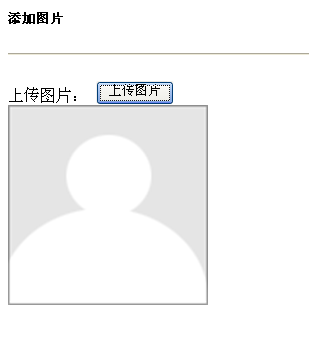
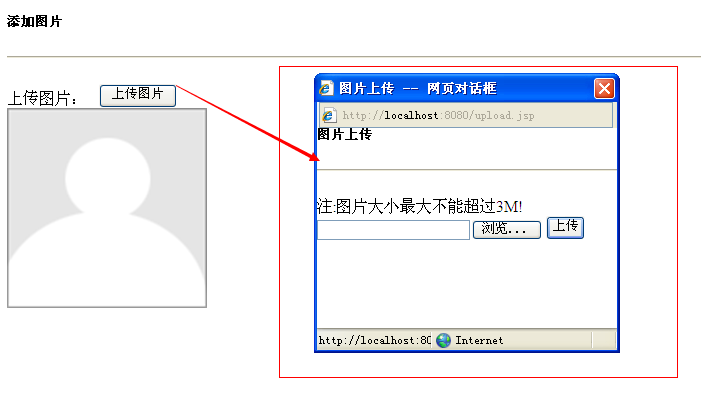

代码:
注意:需要jar包:commons-fileupload-1.2.1.jar 和 commons-io-1.4.jar
index.jsp
<!DOCTYPE HTML PUBLIC "-//W3C//DTD HTML 4.01 Transitional//EN">

<html>

    <head>

        <title>添加图片</title>

        <script type="text/javascript">

            //打开上传页面

            function openUpload(){

                var win = window.showModalDialog("/upload.jsp","","dialogWidth:300px;dialogHeight:200px;scroll:no;status:no");

                if(win != null){

                    document.getElementById("photo_id").value = win;

                    document.getElementById("img_id").src = "/"+win;

                }

            }

        </script>

    </head>

    <body>

        <h5>添加图片</h5><hr/>

            <p>

                上传图片:

                <label>

                    <input type="hidden" id="photo_id" name="photo" value="images/default.gif">

                    <input type="button" onclick="openUpload()" value="上传图片"/><br/>

                    <img id="img_id" alt="" src="/images/default.gif" width="200px" height="200px">

                </label>

            </p>

      </body>

</html>
upload.jsp
<!DOCTYPE HTML PUBLIC "-//W3C//DTD HTML 4.01 Transitional//EN">

<html>

    <head>

        <meta http-equiv="Content-Type" content="text/html; charset=GBK">

        <meta http-equiv="pragma" content="no-cache" />

        <span style="color: #ff0000;"><base target="_self"></span>

        <title>图片上传</title>

    </head>

    <body>

        <h5>图片上传</h5><hr/>

        <p style="color: red">${requestScope.errorMsg}</p>

        <form id="form1" name="form1" action="/servlet/Upload" method="post" enctype="multipart/form-data">

            <div>注:图片大小最大不能超过3M!</div>

            <div>

                <input type="file" name="file_upload"/>

                <input type="submit" value="上传"/>

            </div>

        </form>

    </body>

</html>
Upload.java 中的主要代码:
public class Upload extends HttpServlet {

    private String uploadPath = "aa/upload/"; // 上传文件的目录

    private String tempPath = "aa/uploadtmp/"; // 临时文件目录

    private String serverPath = null;

    private int sizeMax = 3;//图片最大上限

    private String[] fileType = new String[]{".jpg",".gif",".bmp",".png",".jpeg",".ico"};

    public void doPost(HttpServletRequest request, HttpServletResponse response)

            throws ServletException, IOException {

        response.setContentType("text/html");

        response.setCharacterEncoding("utf-8"); //设置编码,方式返回的中文乱码

        serverPath = getServletContext().getRealPath("/").replace("\\", "/");

        //Servlet初始化时执行,如果上传文件目录不存在则自动创建

        if(!new File(serverPath+uploadPath).isDirectory()){

            new File(serverPath+uploadPath).mkdirs();

        }

        if(!new File(serverPath+tempPath).isDirectory()){

            new File(serverPath+tempPath).mkdirs();

        }

        DiskFileItemFactory factory = new DiskFileItemFactory();

        factory.setSizeThreshold(5*1024); //最大缓存

        factory.setRepository(new File(serverPath+tempPath));//临时文件目录

        ServletFileUpload upload = new ServletFileUpload(factory);

        upload.setSizeMax(sizeMax*1024*1024);//文件最大上限

        String filePath = null;

        try {

            List<FileItem> items = upload.parseRequest(request);//获取所有文件列表

            for (FileItem item : items) {

                //获得文件名,这个文件名包括路径

                if(!item.isFormField()){

                    //文件名

                    String fileName = item.getName().toLowerCase();

                    if(fileName.endsWith(fileType[0])||fileName.endsWith(fileType[1])||fileName.endsWith(fileType[2])||fileName.endsWith(fileType[3])||fileName.endsWith(fileType[4])||fileName.endsWith(fileType[5])){

                        String uuid = UUID.randomUUID().toString();

                        filePath = serverPath+uploadPath+uuid+fileName.substring(fileName.lastIndexOf("."));

                        item.write(new File(filePath));

                        PrintWriter pw = response.getWriter();

                        pw.write("<script>alert('上传成功');window.returnValue='"+uploadPath+uuid+fileName.substring(fileName.lastIndexOf("."))+"';window.close();</script>");

                        pw.flush();

                        pw.close();

                    }else{

                        request.setAttribute("errorMsg", "上传失败,请确认上传的文件存在并且类型是图片!");

                        request.getRequestDispatcher("/upload.jsp").forward(request,response);

                    }

                }

            }

        } catch (Exception e) {

            e.printStackTrace();

            request.setAttribute("errorMsg", "上传失败,请确认上传的文件大小不能超过"+sizeMax+"M");

            request.getRequestDispatcher("/upload.jsp").forward(request,response);

        }

    }

}
<p style="color: red">${requestScope.errorMsg}</p>
表示变量的作用域,一共4种。
pageScope: 表示变量只能在本页面使用。
requestScope:表示变量能在本次请求中使用。
sessionScope:表示变量能在本次会话中使用。
applicationScope:表示变量能在整个应用程序中使用。
源码下载地址:http://download.csdn.net/detail/u011518709/7885625
common-fileupload上传图片并显示图片的更多相关文章
- COS上传图片和显示图片
写这篇文章之前,我也是刚刚实现COS上传和显示图片.我百度了好多相关文章,COS上传图片成功的文章不少,上传后显示图片的文章几乎没有.于是写一篇记录下. COS上传图片推荐链接:https://blo ...
- springmvc上传图片并显示图片--支持多图片上传
实现上传图片功能在Springmvc中很好实现.现在我将会展现完整例子. 开始需要在pom.xml加入几个jar,分别是: <dependency> <groupId>comm ...
- javaweb中上传图片并显示图片,用我要上传课程信息(里面包括照片)这个例子说明
原理: 从客户端上传到服务器 照片——文件夹——数据库 例如:桌面一张照片,在tomacat里创建upload文件夹,把桌面照片上传到upload文件夹里,并且把照片的 ...
- input[type="file"]上传图片并显示图片
<!DOCTYPE html> <html> <head> <meta charset="UTF-8"> <title> ...
- Java web项目 上传图片保存到数据库,并且查看图片,(从eclipse上移动到tomact服务器上,之路径更改,包括显示图片和导出excel)
//项目做完之后,在本机电脑运行完全正常,上传图片,显示图片,导出excel,读取excel等功能,没有任何问题,但是,当打成war包放到服务器上时,这些功能全部不能正常使用. 最大的原因就是,本机测 ...
- 02-20 winform 上传图片并读取图片
建立一个windows窗体应用程序,在form1界面中拖入两个按钮和一个pictureBox,通过输入输出流来上传图片和显示图片.需要添加一下openFileDialog1. 界面如下: 在cs中写上 ...
- 关于百度world 编辑器改变上传图片的保存路径图片不显示的问题
在ueditor.mini for asp.net 中,将上传的图片保存的路径更改了,可图片在 world 编辑器中不显示,但却可以上传到指定的保存目录下,解决这个问题的方法 是: 在udditor_ ...
- 基于ASP.Net +easyUI框架上传图片,实现图片上传,提交表单
<body> <link href="../../Easyui/themes/easyui.css" rel="stylesheet" typ ...
- 使用ajax上传图片,支持图片即时浏览,支持js图片压缩后上传给服务器
使用ajax上传图片,支持图片即时浏览,支持js图片压缩后上传给服务器 ajax上传主要使用了 var reader = new FileReader() 此方法 js图片压缩主要是利用canvas进 ...
随机推荐
- POJ2752【KMP-next数组含义】
题意: 给一个字符串,求满足既是这个字符串的前缀,又是这个字符串的后缀,从小到大输出长度 思路: 细讲next数组含义博文:点我 首先要满足前缀的呀. KMP的next数组干的是子串最长后缀. 所以从 ...
- lightoj1259 【素数预处理】
题意: 输出有多少对满足条件的(a,b) both a and b are prime; a+b=n a<=b; 思路: 一开始想的就是打表一个素数数组,然后还去二分..mdzz..直接判断一下 ...
- 51nod1402(贪心)
题目链接:http://www.51nod.com/onlineJudge/questionCode.html#!problemId=1402 题意:中文题诶- 思路:贪心 对于一个桩点,如果我们只考 ...
- Nginx实现负载均衡(nginx + tomcat应用分布式)
一. 工具 nginx-1.8.0 apache-tomcat-6.0.33 二. 目标 实现高性能负载均衡的Tomcat集群: 三. 步骤 1.首先下载Nginx ...
- iOS开发 - 多线程实现方案之NSOperation篇
NSOperation简介 1.实现多线程编程步骤: 配合使用NSOperation和NSOperationQueue实现多线程编程,我们不用考虑线程的生命周期.同步.加锁等问题,如下: 先将需要执行 ...
- mysql ERROR 2003 (HY000): Can't connect to MySQL server on '' (10060
关闭防火墙即可连接成功: systemctl stop firewalld
- js截取文件名不带后缀
利用正则表达式是匹配后缀名 一般文件后缀都为.xxx,也就是说从尾部匹配的话首先是字母,接着应该有一个. 那么我们就开始写正则表达式 利用在线工具 方便我们编写边测试 一般都是小写字母,所以我们用[a ...
- JSP && Servlet | AXIS 0配置 入门
Axis2是目前比较流行的WebService引擎.WebService被应用在很多不同的场景.例如,可以使用WebService来发布服务端 Java类的方法,以便使用不同的客户端进行调用.这样可以 ...
- BZOJ2440(容斥+莫比乌斯函数)
题目本质: 首先有如下结论: 而通过写一写可以发现: 举例来讲,36及其倍数的数,会被1的倍数加一遍,被4的倍数扣一遍,会被9的倍数扣一遍,而为了最终计数为0,需要再加回来一遍,所以在容斥里面是正号. ...
- SpringMVC-高级参数绑定
绑定数组 需求 在商品列表页面选中多个商品,然后删除. 需求分析 此功能要求商品列表页面中的每个商品前有一个checkbook,选中多个商品后点击删除按钮把商品id传递给Controller,根据商品 ...