
ADO1
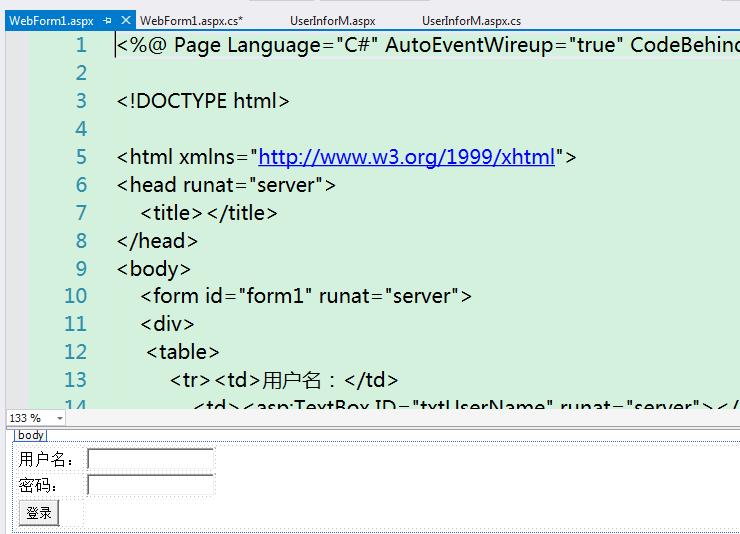
1. 新建Web窗体

客户端控件:html控件
服务器控件:用的比较少
2. 数据库连接
        protected void btnLogin_Click(object sender, EventArgs e)

        {

            try //这里做检测,是因为如果没有检测,连接错误后会把数据库里的内容显示在出错网页中

            {

                string username = txtUserName.Text.Trim(); //删除空白字符

                string pwd = txtPwd.Text.Trim();

                if (string.IsNullOrEmpty(username) || string.IsNullOrEmpty(pwd))

                {

                    //Response.Write("用户名或者密码不能为空");

                    Response.Write("<script>alert('用户名或者密码不能为空');</script>");

                }

                else

                {

                    //写Sql语句

                    string sSql = string.Format("select UserID from TestDB.dbo.UserInfor Where UserName='{0}' and Pwd='{1}'", username, pwd);

                    //数据库连接语句

                    //DataBase:要连接的数据库名称;  Server:服务器名称,'.'代表本机服务器,如果服务器在其他地方,这里输入IP地址

                    //Integrated Security: ture代表windows身份验证,登录名和密码就不需要了;false代表SQL Server身份验证

                    //Uid用户名;Password密码

                    //string connStr = "Database=TestDB;Server=.;Integrated Security=false;Uid=sa;Password=123;";

                    //读取配置文件中的数据库连接语句

                    string connStr = ConfigurationManager.ConnectionStrings["TestDB"].ToString();

                    //普通写法,需要自己释放资源

                    {

                        //和数据库建立连接,并打开连接

                        SqlConnection con = new SqlConnection(connStr);

                        con.Open();

                        //执行语句,要传两个参数,一个是SQL语句,一个是数据库连接类

                        SqlCommand cmd = new SqlCommand(sSql, con);

                        //把查询结果赋值给SqlDataReader对象

                        SqlDataReader read = cmd.ExecuteReader();

                        //查看是否有记录

                        if (read.HasRows)

                        {

                            Response.Redirect("UserInforM.aspx");

                        }

                        else

                        {

                            Response.Write("用户名或者密码错误");

                        }

                        //释放资源,并关闭

                        read.Dispose();

                        read.Close();

                        con.Dispose();

                        con.Close();

                    }

                    //用Using可以自动释放资源

                    {

                        using (SqlConnection con = new SqlConnection(connStr)) //自动释放con

                        {

                            con.Open();

                            SqlCommand cmd = new SqlCommand(sSql, con);

                            using (SqlDataReader read = cmd.ExecuteReader())  //自动释放read

                            {

                                if (read.HasRows)

                                {

                                    Response.Write("登录成功");

                                }

                                else

                                {

                                    Response.Write("用户名或者密码错误");

                                }

                            }

                        }

                    }

                }

            }

            catch (Exception ex)

            {

                Response.Write("网站正在维修中");

            }

        }
配置文件:
<connectionStrings>

    <add  name="TestDB" connectionString="Database=TestDB;Server=.;Integrated Security=false;Uid=sa;Password=123;" providerName="System.Data.SqlClient"/>

  </connectionStrings>
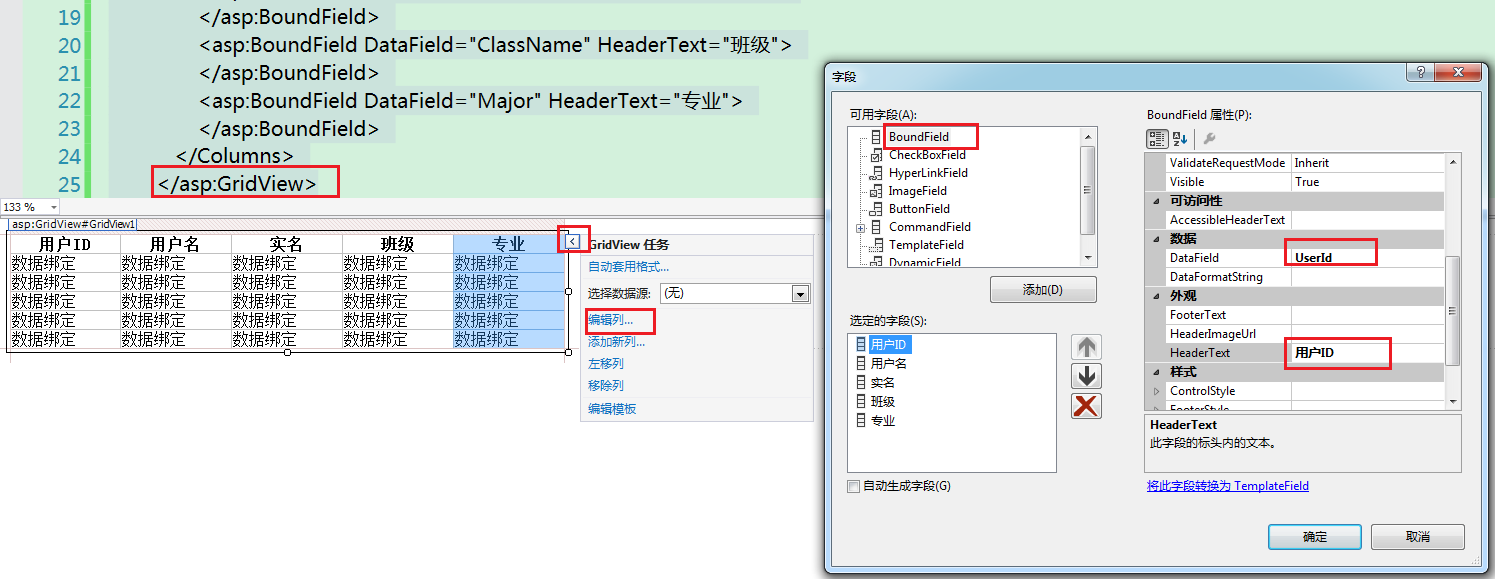
3. 绑定服务端控件显示数据库内容
 public partial class UserInforM : System.Web.UI.Page

    {

        protected void Page_Load(object sender, EventArgs e)

        {

            try

            {

                string sSql = string.Format("select UserID,UserName,RealName,ClassName,Major from TestDB.dbo.UserInfor");

                string connStr = ConfigurationManager.ConnectionStrings["TestDB"].ToString();

                using (SqlConnection con = new SqlConnection(connStr)) //自动释放con

                {

                    con.Open();

                    SqlCommand cmd = new SqlCommand(sSql, con);

                    using (SqlDataReader read = cmd.ExecuteReader())  //自动释放read

                    {

                        GridView1.DataSource = read;

                        GridView1.DataBind();

                    }

                }

            }

            catch (Exception ex)

            {

                Response.Write("错误");

            }

        }

    }
ADO1的更多相关文章
- django之form表单验证
django中的Form一般有两种功能: 输入html 验证用户输入 #!/usr/bin/env python # -*- coding:utf- -*- import re from django ...
- ADO数据库操作方式
微软公司的ADO (ActiveX Data Objects) 是一个用于存取数据源的COM组件.它提供了编程语言和统一数据访问方式OLE DB的一个中间层.允许开发人员编写访问数据的代码而不用关心数 ...
- ADO.NET DBHelper 类库
using System; using System.Collections.Generic; using System.Linq; using System.Text; using System.D ...
随机推荐
- 堆栈(栈stack)的实现和基本用法(二)
个人网站http://www.ravedonut.com/ 栈的应用: #include <iostream> #include <stack> using namespace ...
- opencv MatExpr MatOp
opencv提供了很多Mat的操作,其中涉及到两个重要的类:MatOp和MatExpr C++: MatExpr abs(const Mat& m) C++: void absdiff(Inp ...
- python GUI尝鲜(但当涉猎,见往事耳)
第一步:简单的窗口和内容 import tkinter as tk window = tk.Tk() # 窗口obj对象 window.title('my TK') # 窗口名字 window.geo ...
- 继承映射关系 joinedsubclass的查询
会出现下面这样的错一般是配置文件中的mapping和映射文件中的package路径或者class中的name路径不一致 org.hibernate.MappingException: Unknown ...
- shell脚本函数与数组
前言 之前写过一篇关于shell脚本流程控制总结,这次继续写关于shell脚本的问题.本篇文章主要包含shell脚本中的函数以及数组的用法介绍.同时也涵盖了一些字符串处理以及shell脚本比较使用的小 ...
- C#基础:使用Thread创建线程
Thread类可以创建和控制线程,Thread类的构造函数重载为接受ThreadStart和ParameterizedThreadStart类型的委托参数.下面我们用一个例子来解释怎样用Thread类 ...
- 跟我学: 使用 fireasy 搭建 asp.net core 项目系列之二 —— 准备
==== 目录 ==== 跟我学: 使用 fireasy 搭建 asp.net core 项目系列之一 —— 开篇 跟我学: 使用 fireasy 搭建 asp.net core 项目系列之二 —— ...
- 【废弃中】JavaScript 式与运算符
创建: 2017/09/25 更新: 2019/01/14 修改标题 [JavaScript 式与运算符] -> [JavaScript 式与主要Object的方法] 更新: 2019/02/ ...
- bzoj 2597: [Wc2007]剪刀石头布【最小费用最大流】
脑子不太清楚一个zz问题调了好久-- 首先正难则反,因为三元环好像没什么特点,就考虑让非三元环个数最小 考虑非三元环特点,就是环上一定有一个点的入度为2,联系整张图,三元环个数就是每个点C(入度,2) ...
- javascript 数组、json连接
json(或数组).concat(需要添加的json(或数组))