
SharePoint 2010 搜索结果没有显示部分文件
Why SharePoint 2010 search does not show some results?
Since search is very comportment in SharePoint adoption, there are many cases users reported they could not find the expected items in the search result. I would like to share the tips we found since August 2010 so you could explain and resolve those "issues" quickly.
Before we dig into some specific search "issues", first you should take a look of the different SharePoint Versions Search Comparison before implement it in your company. Searches like People Search, Social, Taxonomy integration not included in Search Server 2010 Express. Second, verify search services have been setup and associated with webapp and crawling process has been completed without errors. Incremental crawling process has also been scheduled. You could verify from central admin and refer some instructions. Now let's dig into some specific search "issues" users reported frequently.
1. Why documents or items did not displayed in my search result while is for some other people? This is very common questions people complain and most of the cases, it's the permission issue. Specific users may not have permission to read those documents and as a result, it will not be displayed in the search result.
2. Why documents on one site do not show in the search result but others shown?
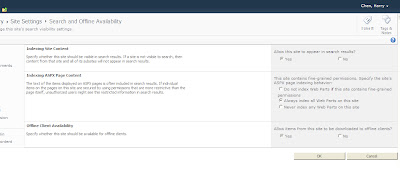
Besides the permission checking, this is typical site search disabled setting issue. Go to "Site Actions"->"Site Settings"->Site Administration"->"Search and offline availability" to verify "Allow this site to appear in search results" is set to yes as shown in the screen shot. This is site setting and site owners could hide the items on the site intentionally not to display in the search result.
3. Why search not showing any results for anonymous users?
This is similar site search disabled setting issue described above and you could change site settingand set "Always index all Web Parts on this site" to true.
4. Why some of my documents did not show in the search result?
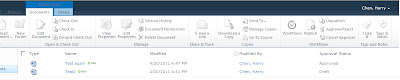
Yes, this happens to several users and this may be related to Draft documents that are in document library that requires approval. You could check whether your document library enabled the approval process by going to "Document Library Settings"->"Version Settings" and whether "Require content approval for submitted items?" is set to yes as in the screen shots.
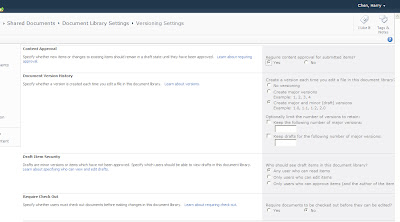
There is another interesting setting on the Document Library setting "Draft Item Security" that will impacting your search result.
Here is the case if you have file 1 has version 1.0 that is in published status and version 1.1 checked-in but not approved.
If "Draft Item Security"is set to "Only users who can edit items", file 1 will NOT in any search result as designed since the crawling process will only index the latest version. In this case, the latest version has not been published and as a result, this file will not be indexed and will not in search result.
However, people reported if "Draft Item Security" is set to "Any user who can read items", file 1 with version 1.0 is still in the index and will be displayed in the search result. However, my testing does NOT display this file in the search result that is consistent with the golden rule - only latest published version will be indexed and if latest version is in draft version, none of the versions will be indexed as designed.
4. Why PDF files not show in the search result?
This is easy answer. You need to install PDF iFilter to index PDF files. You could follow Microsoft instruction to install it.
5. Why social tagging and discussion not show in the result?
You may check whether jobs to index the social tagging are running correctly. The jobfor this is scheduled hourly and you could change it from central admin as administrator. The job is named as "User Profile Service - Social Data Maintenance Job" that is to Aggregates social tags and ratings and cleans the social data change log.
6. Why people search not show any result?
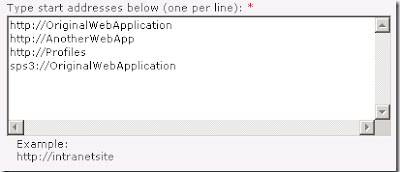
Besides you need to have check whether you are NOT running Search Server 2010 Express, this may be the mysite search index issue. You should included the MySite in the index content as in the screen shot. You may refer the instruction listed in some bogand verify it.
7. Why no result show in the default simple search but show in advanced search?
If you can see your items in advanced search but not in default simple search, this might be the webapp zone setting bug described in MSDN discussion boardwe identified during testing. If you have multiple zones setup for the same webapp. Please mask sure the default zone is Intranet NOT other settings. This seems to be a bug you could not get search result if the default zone is NOT Intranet. We may need to submit this bug to Microsoft.
8. Why my external line of business data not show in the result even we have BCS setup already?
If you have setup BCS to bring external data to SharePoint through external content type and did not find those in search result, this might be the search setting issue. You could configure this in SharePoint Central Administration as described in previous blog.
9. Why documents or items did not displayed in my search result even I have the permission through SharePoint?
If you have implemeted some security policy like NextLabs and enabled Search Result Trimming, it will allows SharePoint to limit the display of search results to only those web parts or documents (i.e., list items) which the search user is authorized to view based on NextLabs entitlement policy. On the worlds, even users have been granted permission through SharePoint to have access those contents, they will not be able to see in search result if thay are restricted from NextLabs policy entitlement. This is one of the requirement from our security team to block groups to access the sesitive content. See my new blogfor details.
SharePoint 2010 搜索结果没有显示部分文件的更多相关文章
- 安装 KB2844286 导致SharePoint 2010 XSLT web part 显示出现错误
上周末给Windows 打完补丁后,周一在通过From SharePoint的方式插入图片时,出现了如下错误: Unable to display this Web Part. To troubles ...
- 解决 SharePoint 2010 拒绝访问爬网内容源错误的小技巧(禁用环回请求的两种方式)
这里有一条解决在SharePoint 2010搜索爬网时遇到的“拒绝访问错误”的小技巧. 首先要检查默认内容访问帐户是否具有相应的访问权限,或者添加一条相应的爬网规则.如果目标资源库是一个ShareP ...
- 解决SharePoint 2010拒绝访问爬网内容源错误
今天发现SP爬网出现了问题,持续时间蛮长的,一直爬不到内容. 解决方案: 这里有一条解决在SharePoint 2010搜索爬网时遇到的"拒绝访问错误"的小技巧. 首先要检查默认内 ...
- [原] SharePoint 2010 WebPart与Google地图系列 一:创建显示地图的WebPart
摘要: 作为信息化先驱的产品SharePoint 2010竟然对GIS相关技术支持如此有限,试问现在哪个企业没有大量的项目需要结合Google地图来进行开发,单纯地从Google Javascript ...
- 转载-SharePoint 2010 WebPart与Google地图系列 一:创建显示地图的WebPart
[原] SharePoint 2010 WebPart与Google地图系列 一:创建显示地图的WebPart 摘要: 作为信息化先驱的产品SharePoint 2010竟然对GIS相关技术支持如此有 ...
- SharePoint 2010 文档管理系列之文档搜索
前言:如果一个文档库里面有很多文档,成千上万,对我们来说查找就是个麻烦事儿,所以搜索的必要性就体现出来了.下面,我们简单的介绍下,sharepoint搜索配置,并创建一个简单的搜索页面. 一. 配置S ...
- SharePoint 2010 ——自定义上传页面与多文件上传解决方案
最近项目遇到一个很麻烦的问题,原以为很容易解决,结果搞了那么久,先开个头,再慢慢写 SharePoint 2010 ——自定义上传页面与多文件上传解决方案 1.创建Sharepoint空白项目,创建应 ...
- 解决Sharepoint 2010 custom display form 不显示附件的问题
sharepoint 2010用designer添加自定义的 display form默认是不会显示附件的. 需要添加如下代码才会显示附件: <tr> <td width=" ...
- 根据权限显示隐藏SharePoint 2010快速启动栏的链接
转:http://www.360sps.com/Item/ShowAndHiddenLink.aspx 在SharePoint 2010的快速启动栏中可以根据权限来显示或隐藏列表.库.网站的链接,如果 ...
随机推荐
- 使用OpenSessionInViewFilter的注意事项
假设在你的应用中Hibernate是通过spring 来管理它的session.如果在你的应用中没有使用OpenSessionInViewFilter或者OpenSessionInViewInterc ...
- 【题解】P4247 [清华集训]序列操作(线段树修改DP)
[题解]P4247 [清华集训]序列操作(线段树修改DP) 一道神仙数据结构(DP)题. 题目大意 给定你一个序列,会区间加和区间变相反数,要你支持查询一段区间内任意选择\(c\)个数乘起来的和.对1 ...
- 警告: [SetPropertiesRule]{Server/Service/Engine/Host/Context} Setting property 'source' to 'org.eclipse.jst.jee.server:Zhuo' did not find a matching property.
eclipse里面配置tomcat方法:window -- show view -- other -- 找到servers 点击finish 就会出现servers选项卡在选项卡中右键鼠标 new - ...
- ALV TREE 实例
ALV TREE 实例 REPORT ZRPT_PS_PS021TREE . TABLES: PROJ, "项目定义数据 PRPS, "WBS元素数据 ZCJ30, "A ...
- Qt — 子窗体操作父窗体中的方法
父窗体与子窗体各自的代码如下: 1. 父窗体的代码: void FartherWindow::addactions() { SubWindow subwindow(this); // 把父窗体本身t ...
- 设置sudo的过期时间
默认sudo的过期时间过短,经常要输入密码 sudo visudo Defaults env_reset找到这行代码 后面加上timestamp_timeout参数,数值是分钟 ,timestamp_ ...
- 获取原生的DOM方式,DIY脚手架,vue-cli的使用
一 . 获取原生的DOM的方式 在js中,我们可以通过id, class 或者标签获取DOM元素,vue中也为我们提供了获取原生DOM的方法,就是给标签或者组件添加 ref 属性,通过 this.$r ...
- Laravel的初始化安装
Laravel的初始化安装 composer 安装 composer中国镜像laravel文档 curl -sS https://getcomposer.org/installer | php # 修 ...
- SDUT OJ 螺旋矩阵
螺旋方阵 Time Limit: 1000ms Memory limit: 65536K 有疑问?点这里^_^ 题目描述 n×n的螺旋方阵当n=5和n=3时分别是如下的形式 请给出一个程序,对于 ...
- Rabbitmq+Nginx+keepalived高可用热备
摘自: http://www.cnblogs.com/wangyichen/p/4917241.html 公司两台文件服务器要做高可用,避免单点故障,故采用keepalived实现,其中一台宕机,依靠 ...