
display:flex不兼容Android、Safari低版本的解决方案 【flex布局】
引自 http://www.cnblogs.com/shimily/articles/7943370.html
<!DOCTYPE html>

<html lang="en">

<head>

    <meta charset="UTF-8">

    <title>flexbox布局</title>

    <style>

    div {

        border: 1px solid #000;

        overflow: hidden;

    }

    div.flex-h:before, div.flex-v:before {

        content: "before";

    }

    div.flex-h:after, div.flex-v:after {

        content: "after";

    }

    .w60 {

        width: 60px;

    }

    .w150 {

        width: 150px;

    }

    .w200 {

        width: 200px;

    }

    .h30 {

        height: 30px;

    }

    .h50 {

        height: 50px;

    }

    /* 父元素-flex容器 */

    .flex {

        display: box;              /* OLD - Android 4.4- */

        display: -webkit-box;      /* OLD - iOS 6-, Safari 3.1-6 */

        display: -moz-box;         /* OLD - Firefox 19- (buggy but mostly works) */

        display: -ms-flexbox;      /* TWEENER - IE 10 */

        display: -webkit-flex;     /* NEW - Chrome */

        display: flex;             /* NEW, Spec - Opera 12.1, Firefox 20+ */

    }

    /* 子元素-平均分栏 */

    .flex1 {

        -webkit-box-flex: 1;      /* OLD - iOS 6-, Safari 3.1-6 */

        -moz-box-flex: 1;         /* OLD - Firefox 19- */

        width: 20%;               /* For old syntax, otherwise collapses. */

        -webkit-flex: 1;          /* Chrome */

        -ms-flex: 1;              /* IE 10 */

        flex: 1;                  /* NEW, Spec - Opera 12.1, Firefox 20+ */

    }

    /* 父元素-横向排列(主轴) */

    .flex-h {

        display: box;              /* OLD - Android 4.4- */

        display: -webkit-box;      /* OLD - iOS 6-, Safari 3.1-6 */

        display: -moz-box;         /* OLD - Firefox 19- (buggy but mostly works) */

        display: -ms-flexbox;      /* TWEENER - IE 10 */

        display: -webkit-flex;     /* NEW - Chrome */

        display: flex;             /* NEW, Spec - Opera 12.1, Firefox 20+ */

        /* 09版 */

        -webkit-box-orient: horizontal;

        /* 12版 */

        -webkit-flex-direction: row;

        -moz-flex-direction: row;

        -ms-flex-direction: row;

        -o-flex-direction: row;

        flex-direction: row;

    }

    /* 父元素-横向换行 */

    .flex-hw {

        /* 09版 */

        -webkit-box-lines: multiple;

        /* 12版 */

        -webkit-flex-wrap: wrap;

        -moz-flex-wrap: wrap;

        -ms-flex-wrap: wrap;

        -o-flex-wrap: wrap;

        flex-wrap: wrap;

    }

    /* 父元素-水平居中(主轴是横向才生效) */

    .flex-hc {

        /* 09版 */

        -webkit-box-pack: center;

        /* 12版 */

        -webkit-justify-content: center;

        -moz-justify-content: center;

        -ms-justify-content: center;

        -o-justify-content: center;

        justify-content: center;

        /* 其它取值如下:

            align-items     主轴原点方向对齐

            flex-end        主轴延伸方向对齐

            space-between   等间距排列,首尾不留白

            space-around    等间距排列,首尾留白

         */

    }

    /* 父元素-纵向排列(主轴) */

    .flex-v {

        display: box;              /* OLD - Android 4.4- */

        display: -webkit-box;      /* OLD - iOS 6-, Safari 3.1-6 */

        display: -moz-box;         /* OLD - Firefox 19- (buggy but mostly works) */

        display: -ms-flexbox;      /* TWEENER - IE 10 */

        display: -webkit-flex;     /* NEW - Chrome */

        display: flex;             /* NEW, Spec - Opera 12.1, Firefox 20+ */

        /* 09版 */

        -webkit-box-orient: vertical;

        /* 12版 */

        -webkit-flex-direction: column;

        -moz-flex-direction: column;

        -ms-flex-direction: column;

        -o-flex-direction: column;

        flex-direction: column;

    }

    /* 父元素-纵向换行 */

    .flex-vw {

        /* 09版 */

        -webkit-box-lines: multiple;

        /* 12版 */

        -webkit-flex-wrap: wrap;

        -moz-flex-wrap: wrap;

        -ms-flex-wrap: wrap;

        -o-flex-wrap: wrap;

        flex-wrap: wrap;

    }

    /* 父元素-竖直居中(主轴是横向才生效) */

    .flex-vc {

        /* 09版 */

        -webkit-box-align: center;

        /* 12版 */

        -webkit-align-items: center;

        -moz-align-items: center;

        -ms-align-items: center;

        -o-align-items: center;

        align-items: center;

    }

    .flex-1 {

        -webkit-box-ordinal-group: 1;   /* OLD - iOS 6-, Safari 3.1-6 */

        -moz-box-ordinal-group: 1;      /* OLD - Firefox 19- */

        -ms-flex-order: 1;              /* TWEENER - IE 10 */

        -webkit-order: 1;               /* NEW - Chrome */

        order: 1;                       /* NEW, Spec - Opera 12.1, Firefox 20+ */

    }

    .flex-2 {

        -webkit-box-ordinal-group: 2;   /* OLD - iOS 6-, Safari 3.1-6 */

        -moz-box-ordinal-group: 2;      /* OLD - Firefox 19- */

        -ms-flex-order: 2;              /* TWEENER - IE 10 */

        -webkit-order: 2;               /* NEW - Chrome */

        order: 2;                       /* NEW, Spec - Opera 12.1, Firefox 20+ */

    }

    </style>

</head>

<body>

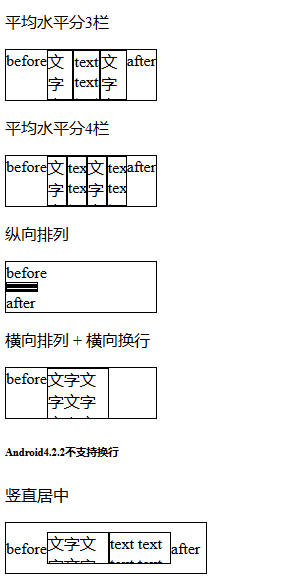
    <p>平均水平分3栏</p>

    <div class="flex-h w150 h50">

        <div class="flex1">文字文字文字文字文字文字文字</div>

        <div class="flex1">text text text text text text text text</div>

        <div class="flex1">文字文字文字文字文字文字文字</div>

    </div>

    <p>平均水平分4栏</p>

    <div class="flex-h w150 h50">

        <div class="flex1">文字文字文字文字文字文字文字</div>

        <div class="flex1">text text text text text text text text</div>

        <div class="flex1">文字文字文字文字文字文字文字</div>

        <div class="flex1">text text text text text text text text</div>

    </div>

    <p>纵向排列</p>

    <div class="flex-v w150 h50">

        <div class="flex1 w60 h50">文字文字文字文字文字文字文字</div>

        <div class="flex1 w60 h50">text text text text text text text text</div>

        <div class="flex1 w60 h50">文字文字文字文字文字文字文字</div>

        <div class="flex1 w60 h50">text text text text text text text text</div>

    </div>

    <p>横向排列 + 横向换行</p>

    <div class="flex-h w150 h50 flex-hw">

        <div class="w60 h50">文字文字文字文字文字文字文字</div>

        <div class="w60 h50">text text text text text text text text</div>

        <div class="w60 h50">文字文字文字文字文字文字文字</div>

        <div class="w60 h50">text text text text text text text text</div>

    </div>

    <h6>Android4.2.2不支持换行</h6>

    <p>竖直居中</p>

    <div class="flex-h flex-vc w200 h50">

        <div class="w60 h30">文字文字文字文字文字文字文字</div>

        <div class="w60 h30">text text text text text text text text</div>

    </div>

    <p>水平居中</p>

    <div class="flex-h flex-hc w200 h50">

        <div class="w60 h30">文字文字文字文字文字文字文字</div>

        <div class="w60 h30">text text text text text text text text</div>

    </div>

    <p>居中</p>

    <div class="flex-h flex-hc flex-vc w200 h50">

        <div class="w60 h30">文字文字文字文字文字文字文字</div>

        <div class="w60 h30">text text text text text text text text</div>

    </div>

    <p>改变顺序(栅格布局,最终效果英文应该在左边)</p>

    <div class="flex-h w200 h50">

        <div class="flex1 flex-2">文字文字文字文字文字文字文字</div>

        <div class="flex1 flex-1">text text text text text text text text</div>

    </div>

    <h6>Android4.2.2下伪元素位置表现不一致</h6>

</body>

</html>
display:flex不兼容Android、Safari低版本的解决方案 【flex布局】的更多相关文章
- 转:display:flex不兼容Android、Safari低版本的解决方案 【flex布局】
<!DOCTYPE html> <html lang="en"> <head> <meta charset="UTF-8&quo ...
- Android较低版本(<5.2) 页面默认Select选择框效果的BUG解决
Bug描述: 使用低版本安卓(<5.2),在微信上打开网页,点击下拉框,会出现如下图所示的用来展示select选项的弹出框: 在选项较少的时候,可以向下滑动,将选项滑到底部 滑动前: 滑动后: ...
- [iOS开发]Xcode8兼容iOS7以及低版本Xcode调试高版本iOS系统
现在的项目一般都要兼容iOS7系统,同时也要兼容iOS10,在Xcode8上面,默认情况下无法调试iOS7,因为缺乏调试iOS7需要的配置文件.同时在低版本的Xcode上面(8以下),也无法调试iOS ...
- Xcode8兼容iOS7以及低版本Xcode调试高版本iOS系统
我们使用Xcode8新建的工程,默认支持的最低系统是iOS8,我们可以手动更改版本到7.0,但是不支持真机调试. 现在的项目一般都要兼容iOS7系统,同时也要兼容iOS10,在Xcode8上面,默认情 ...
- Android 之低版本高版本实现沉浸式状态栏
沉浸式状态栏确切的说应该叫做透明状态栏.一般情况下,状态栏的底色都为黑色,而沉浸式状态栏则是把状态栏设置为透明或者半透明. 沉浸式状态栏是从android Kitkat(Android 4.4)开始出 ...
- IOS:兼容ios6和低版本
viewDidUnload在ios6开始被弃用了,所以我们在这里处理内存警告的这类问题,这个时候我们就要把相应的处理放在 didReceiveMemoryWarning中. - (void)didRe ...
- android popupwindow低版本报空指针
在项目中使用Popupwindow pop=new Popupwindow();在2.3版本报 异常信息: Exception: null 堆栈信息: android.widget.PopupWind ...
- Fundebug前端JavaScript插件更新至1.8.0,兼容低版本的Android浏览器
摘要: 兼容低版本Android浏览器,请大家及时更新. Fundebug前端BUG监控服务 Fundebug是专业的程序BUG监控平台,我们JavaScript插件可以提供全方位的BUG监控,可以帮 ...
- ie低版本内核事件兼容问题(事件绑定,绑定事件自动执行,文档模式问题)
问题情况 搜狗等,兼容模式下,以前前端写的点击事件的代码没有, 后来一看是因为兼容模式为9,导致点击事件失效 解决办法,步骤 1,处理绑定事件兼容问题 ie低版本绑定事件只支持attactevent, ...
随机推荐
- String的getBytes()方法
这是一篇转帖: 本文来自CSDN博客,转载请标明出处:http://blog.csdn.net/maxracer/archive/2010/12/14/6075057.aspx 在Java中,Stri ...
- luogu1578 奶牛浴场 枚举点最大子矩阵
建议看看王知昆dalao的论文,讲得很好 #include <algorithm> #include <iostream> #include <cstring> # ...
- Java中String类通过new创建和直接赋值字符串的区别
方式一:String a = “aaa” ; 方式二:String b = new String(“aaa”); 两种方式都能创建字符串对象,但方式一要比方式二更优. 因为字符串是保存在常量池中的,而 ...
- 用javascript写计算器
本人新手,如果有什么不足的地方,希望可以得到指点 今天尝试用javascript写一个计算器 首先把计算器的按钮做出来,用button做好了,这样可以不用设置太多的样式 <button valu ...
- iOS ifdef ifndef endif
#ifdef DEBUG //标识符//定义过执行#else//未定义过执行#endif #ifndef DEBUG//标识符//未定义过执行#else//定义过执行#endif #if (5> ...
- Selenium WebDriver-操作复选框
#encoding=utf-8 import unittest import time import chardet from selenium import webdriver class Visi ...
- Leetcode 456.132模式
132模式 给定一个整数序列:a1, a2, ..., an,一个132模式的子序列 ai, aj, ak 被定义为:当 i < j < k 时,ai < ak < aj.设计 ...
- 从几率到logisitic函数
odds 几率,又称事件的优势比.几率和概率的关系如下: o=p1−pp=o1+o Logistic 回归模型的因变量只有 1/0 两种取值.假设在 p 个独立自变量 x1,x2,…,xp 作用下,记 ...
- struts2和spring的两种整合方式
首先,来看看如何让Spring 来管理Action. 在struts.xml中加入 <constant name="struts.objectFactory" value=& ...
- sqlserver数据库的权限设置
1.先用Windows账户登陆,然后在安全性中添加用户--SQL server 身份验证,用户名,密码2.用户映射--勾选对应的数据库--数据库角色成员身份--db_owner public