
Java方式配置Spring
概述
本文主要讲的是如何使用Java Bean来配置Spring,而不是用xml来配置Spring。
本文主要是代码,需要注意的都在注释里面。
Java配置Spring
 package com.wisely.highlight_spring4.ch1.javaconfig;

 /**

  * 最终被调用的类

  */

 public class FunctionService {

     public String sayHello(String word){

         return "Hello " + word +" !";

     }

 }
 package com.wisely.highlight_spring4.ch1.javaconfig;

 /**

  * 调用类

  */

 public class UseFunctionService {

     //这里也可以使用@Autowired将FunctionService的实体bean注入到UseFunctionService中,

     //让UseFunctionService具备将FunctionService的实体bean注入到UseFunctionService中的功能

     //@Autowired

     FunctionService functionService;

     public void setFunctionService(FunctionService functionService) {

         this.functionService = functionService;

     }

     public String SayHello(String word){

         return functionService.sayHello(word);

     }

 }
 package com.wisely.highlight_spring4.ch1.javaconfig;

 import org.springframework.context.annotation.Bean;

 import org.springframework.context.annotation.Configuration;

 /**

  * 配置类,代替xml配置

  */

 //声明当前类是一个配置类

 @Configuration

 //自动扫描包名下所有使用@Service/@Component/@Repository和@Controller的类,并注册为Bean

 //@ComponentScan("com.wisely.highlight_spring4.ch1")

 public class JavaConfig {

     /**

      * 声明当前方法的返回值是一个bean,bean的名称是方法名

      * @return bean

      */

     @Bean

     public FunctionService functionService(){

         return new FunctionService();

     }

     @Bean

     public UseFunctionService useFunctionService(){

         UseFunctionService useFunctionService = new UseFunctionService();

         //注入FunctionService的时候直接调用functionService

         useFunctionService.setFunctionService(functionService()); //

         return useFunctionService;

     }

     /**

      * 也可以将bean作为方法参数传入,spring会自动注入

      */

 //    @Bean

 //    public UseFunctionService useFunctionService(FunctionService functionService){//4

 //        UseFunctionService useFunctionService = new UseFunctionService();

 //        useFunctionService.setFunctionService(functionService);

 //        return useFunctionService;

 //    }

 }
 package com.wisely.highlight_spring4.ch1.javaconfig;

 import org.springframework.context.annotation.AnnotationConfigApplicationContext;

 /**

  * 程序入口

  */

 public class Main {

     public static void main(String[] args) {

         //使用AnnotationConfigApplicationContext作为容器,

         //接受输入一个配置类作为参数

         AnnotationConfigApplicationContext context =

                 new AnnotationConfigApplicationContext(JavaConfig.class);

         //获得声明配置的UseFunctionService的Bean

         UseFunctionService useFunctionService = context.getBean(UseFunctionService.class);

         //调用输出方法

         System.out.println(useFunctionService.SayHello("java config"));

         context.close();

     }

 }
最终效果如下所示

Java配置AOP
 package com.wisely.highlight_spring4.ch1.aop;

 import java.lang.annotation.Documented;

 import java.lang.annotation.ElementType;

 import java.lang.annotation.Retention;

 import java.lang.annotation.RetentionPolicy;

 import java.lang.annotation.Target;

 /**

  * 拦截规则的注解

  */

 @Target(ElementType.METHOD)

 @Retention(RetentionPolicy.RUNTIME)

 @Documented

 public @interface Action {

     //注解参数

     String name();

 }
 package com.wisely.highlight_spring4.ch1.aop;

 import org.springframework.stereotype.Service;

 /**

  * 使用注解的被拦截类

  */

 @Service

 public class DemoAnnotationService {

     @Action(name="注解式拦截的add操作")

     public void add(){}

 }
 package com.wisely.highlight_spring4.ch1.aop;

 import org.springframework.stereotype.Service;

 /**

  * 使用方法规则被拦截类

  */

 @Service

 public class DemoMethodService {

     public void add(){}

 }
 package com.wisely.highlight_spring4.ch1.aop;

 import org.aspectj.lang.JoinPoint;

 import org.aspectj.lang.annotation.After;

 import org.aspectj.lang.annotation.Aspect;

 import org.aspectj.lang.annotation.Before;

 import org.aspectj.lang.annotation.Pointcut;

 import org.aspectj.lang.reflect.MethodSignature;

 import org.springframework.stereotype.Component;

 import java.lang.reflect.Method;

 /**

  * 配置切面

  */

 @Aspect //声明切面

 @Component //让切面成为spring容器管理的bean

 public class LogAspect {

     //声明切点,拦截Action

     @Pointcut("@annotation(com.wisely.highlight_spring4.ch1.aop.Action)")

     public void annotationPointCut() {

     }

     //声明建言,并使用@Pointcut定义的切点annotationPointCut()

     @After("annotationPointCut()")

     public void after(JoinPoint joinPoint) {

         MethodSignature signature = (MethodSignature) joinPoint.getSignature();

         Method method = signature.getMethod();

         Action action = method.getAnnotation(Action.class);

         //通过反射获可得注解上的name属性,然后做日志记录相关的操作

         System.out.println("注解式拦截 " + action.name());

     }

     //声明建言,直接使用拦截规则作为参数

     @Before("execution(* com.wisely.highlight_spring4.ch1.aop.DemoMethodService.*(..))")

     public void before(JoinPoint joinPoint) {

         MethodSignature signature = (MethodSignature) joinPoint.getSignature();

         Method method = signature.getMethod();

         System.out.println("方法规则式拦截," + method.getName());

     }

 }
 package com.wisely.highlight_spring4.ch1.aop;

 import org.springframework.context.annotation.ComponentScan;

 import org.springframework.context.annotation.Configuration;

 import org.springframework.context.annotation.EnableAspectJAutoProxy;

 /**

  * Spring配置类,因为程序中使用了诸如@Service之类的配置,所以这里不用写其他配置

  * 只需要使用@ComponentScan扫描一下就可以了

  */

 @Configuration

 //扫描注解,注册bean

 @ComponentScan("com.wisely.highlight_spring4.ch1.aop")

 //开启spring对AspectJ的支持

 @EnableAspectJAutoProxy //

 public class AopConfig {

 }
 package com.wisely.highlight_spring4.ch1.aop;

 import org.springframework.context.annotation.AnnotationConfigApplicationContext;

 /**

  * 程序入口

  */

 public class Main {

     public static void main(String[] args) {

          AnnotationConfigApplicationContext context =

                     new AnnotationConfigApplicationContext(AopConfig.class);

          DemoAnnotationService demoAnnotationService = context.getBean(DemoAnnotationService.class);

          DemoMethodService demoMethodService = context.getBean(DemoMethodService.class);

          demoAnnotationService.add();

          demoMethodService.add();

          context.close();

     }

 }
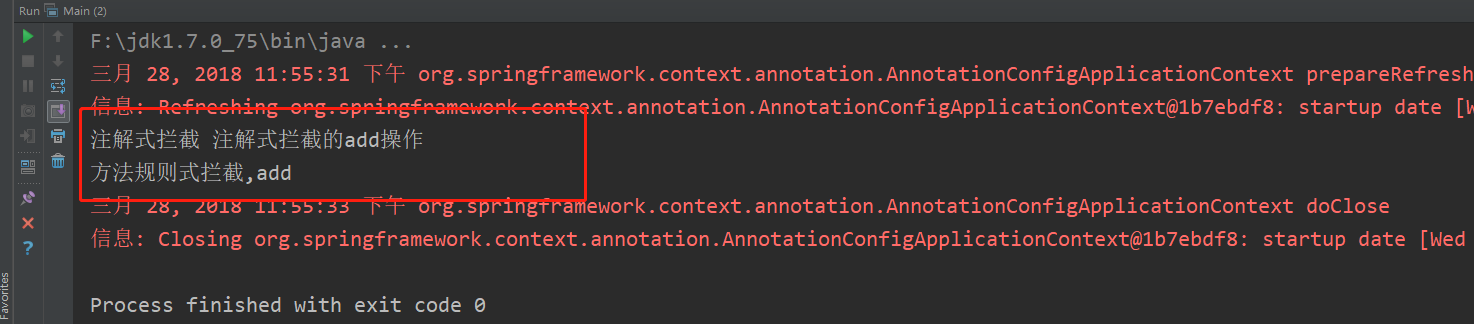
最终效果如下所示
Java方式配置Spring的更多相关文章
- Java方式配置Spring MVC
概述 使用Java方式配置Spring MVC,以及回顾一下Spring MVC的各种用法. Spring MVC简述 关于Spring MVC的介绍网上有很多,这里就不再赘述了,只是要说一下,Spr ...
- 如何用Java类配置Spring MVC(不通过web.xml和XML方式)
DispatcherServlet是Spring MVC的核心,按照传统方式, 需要把它配置到web.xml中. 我个人比较不喜欢XML配置方式, XML看起来太累, 冗长繁琐. 还好借助于Servl ...
- bean的自动装配,使用注解开发,使用java的方式配置Spring
bean的自动装配 自动装配是Spring满足bean依赖一种方式! Spring会在上下文中自动寻找,并自动给bean装配属性! 在Spring中有三种装配的方式 在xml中显示的配置 在java中 ...
- SSH深度历险(十) AOP原理及相关概念学习+AspectJ注解方式配置spring AOP
AOP(Aspect Oriented Programming),是面向切面编程的技术.AOP基于IoC基础,是对OOP的有益补充. AOP之所以能得到广泛应用,主要是因为它将应用系统拆分分了2个部分 ...
- 纯java config配置Spring MVC实例
1.首先创建一个Maven工程,项目结构如下: pom.xml添加Spring和servlet依赖,配置如下 <project xmlns="http://maven.apache.o ...
- 使用java类的方式配置spring 需要什么注解?
1.@Configuration 修饰类,声明当前类是一个配置类,相当于applicationContext.xml文件 2.@ComponentScan 用于指定spring在初始化容器时要扫描的包 ...
- spring java 方式配置JedisPool Bean
来自一个开源项目https://git.oschina.net/geek_qi/ace-cache package com.ace.cache.config; import com.ace.cache ...
- MyBatis 及 MyBatis Plus 纯注解方式配置(Spring Boot + Postgresql)
说明 当前的版本为 MyBatis 3.5.9 MyBatis Plus 3.5.1 Spring Boot 2.6.4 Postgresql 42.3.3 与 Spring Boot 结合使用 My ...
- 纯注解方式配置spring+springMVC
1.新建类initConfig,继承AbstractAnnotationConfigDispatcherServletInitializer,并重写getRootConfigClasses().get ...
随机推荐
- 在Eclipse配置自动提示
1.我们打开eclipse,选择菜单栏的window选项 2.点击Windows,选择下拉菜单里面的preferences选项,之后在打开的对话框的左侧找到Java选项 3.之后点击Java选项,选择 ...
- CodeForces - 840D:(主席树求出现区间出现次数大于某值的最小数)
Once, Leha found in the left pocket an array consisting of n integers, and in the right pocket q que ...
- [LeetCode] Shortest Distance from All Buildings Solution
之前听朋友说LeetCode出了一道新题,但是一直在TLE,我就找时间做了一下.这题是一个比较典型的BFS的题目,自己匆忙写了一个答案,没有考虑优化的问题,应该是有更好的解法的. 原题如下: You ...
- TX2上yolov3精度和速度优化方向
速度优化的方向: 1.减少输入图片的尺寸, 但是相应的准确率可能会有所下降2.优化darknet工程源代码(去掉一些不必要的运算量或者优化运算过程)3.剪枝和量化yolov3网络(压缩模型---> ...
- CSS:CSS 合法颜色值
ylbtech-CSS:CSS 合法颜色值 1.返回顶部 1. CSS 颜色 可以用以下方法来规定 CSS 中的颜色: 十六进制色 RGB 颜色 RGBA 颜色 HSL 颜色 HSLA 颜色 预定义/ ...
- [poj2186]Popular Cows(targin缩点)
题意:求其他所有牛都认为其牛的牛的个数. 解题关键:targin算法模板题,缩点形成一棵树,并不一定是棵树,可能含有多个入度为0的点,寻找出度为0的点(缩点之后的点)的个数,如果个数大于0,则无解,否 ...
- Yet Another Number Sequence
题意: $F_0 = 0, F_1 = 1, F_n = F_{n-1} + F_{n-2}$ 求解$\sum_{i=1}^n{ F_i i^K } \ mod \ 10^9+7$. 解法: 记$ ...
- ubuntu删除g2o
解决方法为:(1)删除/usr/local/include/g2o,指令为sudo rm -rf /usr/local/include/g2o:(2)删除/usr/local/lib下有关libg2o ...
- Flutter实战视频-移动电商-09.首页_项目结构建立和获取数据
09.首页_项目结构建立和获取数据 在config下创建service_url.dart 用来配置我们后端接口的配置文件 一个变量存 接口地址,一个接口方法地址 所有后天请求数据的方法都放在这个文件夹 ...
- springboot2 -广播式WebSocket
1.WebSocket,STOMP,SockJS含义 WebSocket:WebSocket是HTML5开始提供的一种在单个 TCP 连接上进行全双工通讯的协议. SockJS:SockJS 是 We ...