
Flask源码阅读
上下文篇
整个Flask生命周期中都依赖LocalStack()栈?。而LocalStack()分为请求上下文_request_ctx_stack和应用上下文_app_ctx_stack.
_request_ctx_stack:包含request和session等请求信息_app_ctx_stack:包含应用信息
...

def _lookup_req_object(name):

    print("_lookup_req_object===", name)

    top = _request_ctx_stack.top

    print("top===", top)

    if top is None:

        raise RuntimeError(_request_ctx_err_msg)

    print("getattr(top, name)", getattr(top, name))

    return getattr(top, name)

def _lookup_app_object(name):

    print("_lookup_app_object===", name)

    top = _app_ctx_stack.top

    print("top===", top)

    if top is None:

        raise RuntimeError(_app_ctx_err_msg)

    print("getattr(top, name)", getattr(top, name))

    return getattr(top, name)

def _find_app():

    top = _app_ctx_stack.top

    print("find_app", top)

    if top is None:

        raise RuntimeError(_app_ctx_err_msg)

    print("top.app", top.app)

    return top.app

# context locals

# 请求上下文

_request_ctx_stack = LocalStack()

# 应用上下文

_app_ctx_stack = LocalStack()

current_app = LocalProxy(_find_app)

request = LocalProxy(partial(_lookup_req_object, 'request'))

session = LocalProxy(partial(_lookup_req_object, 'session'))

g = LocalProxy(partial(_lookup_app_object, 'g'))
接下来我们看看LocalStack()的内容,有一个Local()类 、push()方法、pop()方法、top()方法,还有一个通过列表维护成栈的stack
Local():LocalStack()的核心push(): 往stack中推送数据pop():弹出stack中数据top():返回stack顶元素stack:一个列表 []
class LocalStack:

    def __init__(self) -> None:

        self._local = Local()

    def __release_local__(self) -> None:

        self._local.__release_local__()

    @property

    def __ident_func__(self) -> t.Callable[[], int]:

        return self._local.__ident_func__

    @__ident_func__.setter

    def __ident_func__(self, value: t.Callable[[], int]) -> None:

        object.__setattr__(self._local, "__ident_func__", value)

    def __call__(self) -> "LocalProxy":

        def _lookup() -> t.Any:

            rv = self.top

            if rv is None:

                raise RuntimeError("object unbound")

            return rv

        return LocalProxy(_lookup)

    def push(self, obj: t.Any) -> t.List[t.Any]:

        """Pushes a new item to the stack"""

        rv = getattr(self._local, "stack", []).copy()

        rv.append(obj)

        print("stack0000000000000", rv)

        self._local.stack = rv

        print("self.local00000000", self._local._storage)

        print("self.__ident_func__00000000", self._local.__ident_func__)

        return rv  # type: ignore

    def pop(self) -> t.Any:

        """Removes the topmost item from the stack, will return the

        old value or `None` if the stack was already empty.

        """

        stack = getattr(self._local, "stack", None)

        print("stack111111111", stack)

        print("self.local111111111", self._local._storage)

        print("self.__ident_func__11111111", self._local.__ident_func__)

        if stack is None:

            return None

        elif len(stack) == 1:

            release_local(self._local)

            return stack[-1]

        else:

            return stack.pop()

    @property

    def top(self) -> t.Any:

        """The topmost item on the stack.  If the stack is empty,

        `None` is returned.

        """

        try:

            return self._local.stack[-1]

        except (AttributeError, IndexError):

            return None
来到Local()我们看到有一个_storage,_storage而核心是 ContextVar("local_storage")
class Local:

    __slots__ = ("_storage",)

    def __init__(self) -> None:

        object.__setattr__(self, "_storage", ContextVar("local_storage"))

    @property

    def __storage__(self) -> t.Dict[str, t.Any]:

        warnings.warn(

            "'__storage__' is deprecated and will be removed in Werkzeug 2.1.",

            DeprecationWarning,

            stacklevel=2,

        )

        return self._storage.get({})  # type: ignore

    @property

    def __ident_func__(self) -> t.Callable[[], int]:

        warnings.warn(

            "'__ident_func__' is deprecated and will be removed in"

            " Werkzeug 2.1. It should not be used in Python 3.7+.",

            DeprecationWarning,

            stacklevel=2,

        )

        return _get_ident  # type: ignore

    @__ident_func__.setter

    def __ident_func__(self, func: t.Callable[[], int]) -> None:

        warnings.warn(

            "'__ident_func__' is deprecated and will be removed in"

            " Werkzeug 2.1. Setting it no longer has any effect.",

            DeprecationWarning,

            stacklevel=2,

        )

    def __iter__(self) -> t.Iterator[t.Tuple[int, t.Any]]:

        return iter(self._storage.get({}).items())

    def __call__(self, proxy: str) -> "LocalProxy":

        """Create a proxy for a name."""

        return LocalProxy(self, proxy)

    def __release_local__(self) -> None:

        __release_local__(self._storage)

    def __getattr__(self, name: str) -> t.Any:

        values = self._storage.get({})

        print(values, name, "xxxxxxxxxxxxx")

        try:

            return values[name]

        except KeyError:

            raise AttributeError(name) from None

    def __setattr__(self, name: str, value: t.Any) -> None:

        values = self._storage.get({}).copy()

        values[name] = value

        print(name, values, "xxxxxxxxxx222xxxxxx")

        self._storage.set(values)

    def __delattr__(self, name: str) -> None:

        values = self._storage.get({}).copy()

        try:

            del values[name]

            self._storage.set(values)

        except KeyError:

            raise AttributeError(name) from None
进入ContextVar我们会发现ContextVar有两个,一个是系统的ContextVar另一个是本地维护ContextVar类。第一选择使用的是系统的ContextVar和greenlet协程,我们主动报错,使其使用本地维护的ContextVar类。这个ContextVar类就是维护一个全局字典,这个字典是线程安全的关键,每个请求对应一个线程ID,通过这个全局字典来维护。
{9064: {'stack': [<flask.ctx.AppContext object at 0x0000016B7E27B748>]}} # 应用上下文
{9064: {'stack': [<RequestContext 'http://127.0.0.1:5000/22' [GET] of test_testing>]}} # 请求上下文
try:

    from contextvars import ContextVar

    # 主动报错,自己维护ContextVar

    raise ImportError("xxxx")

    if "gevent" in sys.modules or "eventlet" in sys.modules:

        # Both use greenlet, so first check it has patched

        # ContextVars, Greenlet <0.4.17 does not.

        import greenlet

        greenlet_patched = getattr(greenlet, "GREENLET_USE_CONTEXT_VARS", False)

        if not greenlet_patched:

            # If Gevent is used, check it has patched ContextVars,

            # <20.5 does not.

            try:

                from gevent.monkey import is_object_patched

            except ImportError:

                # Gevent isn't used, but Greenlet is and hasn't patched

                raise _CannotUseContextVar() from None

            else:

                if is_object_patched("threading", "local") and not is_object_patched(

                    "contextvars", "ContextVar"

                ):

                    raise _CannotUseContextVar()

    def __release_local__(storage: t.Any) -> None:

        # Can remove when support for non-stdlib ContextVars is

        # removed, see "Fake" version below.

        storage.set({})

except (ImportError, _CannotUseContextVar):

    class ContextVar:  # type: ignore

        """A fake ContextVar based on the previous greenlet/threading

        ident function. Used on Python 3.6, eventlet, and old versions

        of gevent.

        """

        def __init__(self, _name: str) -> None:

            self.storage: t.Dict[int, t.Dict[str, t.Any]] = {}

        def get(self, default: t.Dict[str, t.Any]) -> t.Dict[str, t.Any]:

            print(self.storage, _get_ident(), default, "1111111")

            return self.storage.get(_get_ident(), default)

        def set(self, value: t.Dict[str, t.Any]) -> None:

            self.storage[_get_ident()] = value

            print(self.storage, "000000")

    def __release_local__(storage: t.Any) -> None:

        # Special version to ensure that the storage is cleaned up on

        # release.

        # 释放栈

        print("storage.storage", _get_ident(), storage.storage)

        storage.storage.pop(_get_ident(), None)

...

try:

    from greenlet import getcurrent as _get_ident

    raise ImportError("xxxx")

except ImportError:

    from threading import get_ident as _get_ident

def get_ident() -> int:

    warnings.warn(

        "'get_ident' is deprecated and will be removed in Werkzeug"

        " 2.1. Use 'greenlet.getcurrent' or 'threading.get_ident' for"

        " previous behavior.",

        DeprecationWarning,

        stacklevel=2,

    )

    return _get_ident()  # type: ignore
流程篇
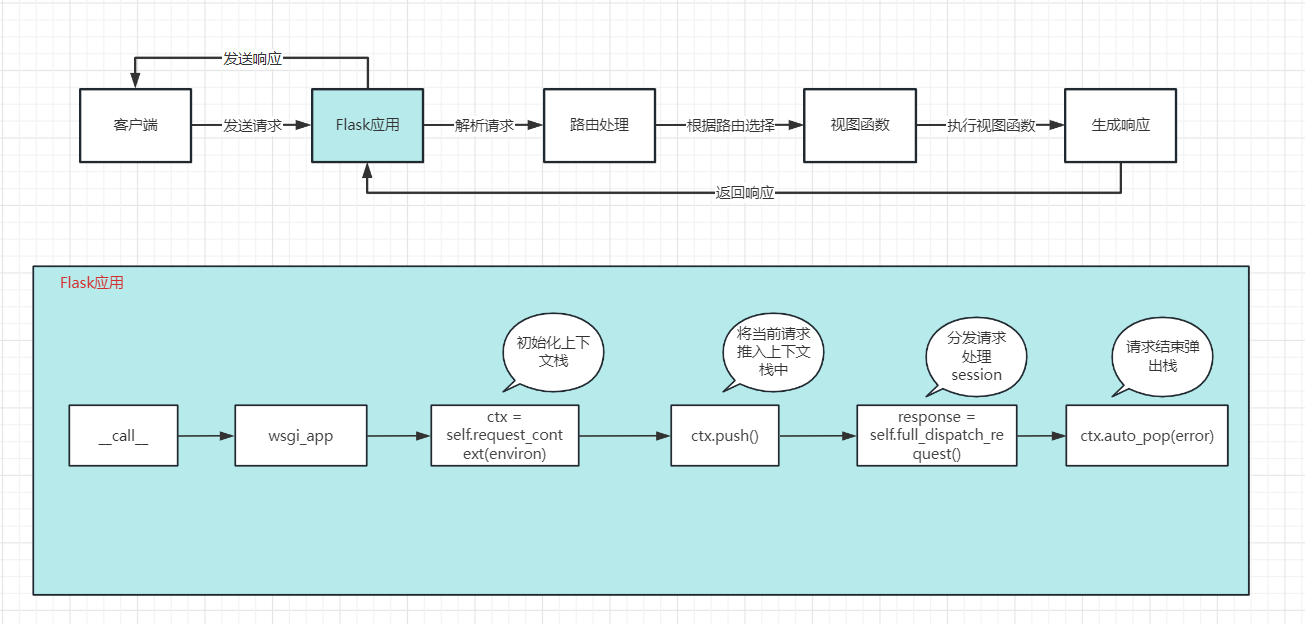
- 启动时调用
run方法
class Flask(_PackageBoundObject):

    ...

    # step 0

    def run(self, host=None, port=None, debug=None, load_dotenv=True, **options):

        """Runs the application on a local development server.

        Do not use ``run()`` in a production setting. It is not intended to

        meet security and performance requirements for a production server.

        Instead, see :ref:`deployment` for WSGI server recommendations.

        If the :attr:`debug` flag is set the server will automatically reload

        for code changes and show a debugger in case an exception happened.

        If you want to run the application in debug mode, but disable the

        code execution on the interactive debugger, you can pass

        ``use_evalex=False`` as parameter.  This will keep the debugger's

        traceback screen active, but disable code execution.

        It is not recommended to use this function for development with

        automatic reloading as this is badly supported.  Instead you should

        be using the :command:`flask` command line script's ``run`` support.

        .. admonition:: Keep in Mind

           Flask will suppress any server error with a generic error page

           unless it is in debug mode.  As such to enable just the

           interactive debugger without the code reloading, you have to

           invoke :meth:`run` with ``debug=True`` and ``use_reloader=False``.

           Setting ``use_debugger`` to ``True`` without being in debug mode

           won't catch any exceptions because there won't be any to

           catch.

        :param host: the hostname to listen on. Set this to ``'0.0.0.0'`` to

            have the server available externally as well. Defaults to

            ``'127.0.0.1'`` or the host in the ``SERVER_NAME`` config variable

            if present.

        :param port: the port of the webserver. Defaults to ``5000`` or the

            port defined in the ``SERVER_NAME`` config variable if present.

        :param debug: if given, enable or disable debug mode. See

            :attr:`debug`.

        :param load_dotenv: Load the nearest :file:`.env` and :file:`.flaskenv`

            files to set environment variables. Will also change the working

            directory to the directory containing the first file found.

        :param options: the options to be forwarded to the underlying Werkzeug

            server. See :func:`werkzeug.serving.run_simple` for more

            information.

        .. versionchanged:: 1.0

            If installed, python-dotenv will be used to load environment

            variables from :file:`.env` and :file:`.flaskenv` files.

            If set, the :envvar:`FLASK_ENV` and :envvar:`FLASK_DEBUG`

            environment variables will override :attr:`env` and

            :attr:`debug`.

            Threaded mode is enabled by default.

        .. versionchanged:: 0.10

            The default port is now picked from the ``SERVER_NAME``

            variable.

        """

        # Change this into a no-op if the server is invoked from the

        # command line. Have a look at cli.py for more information.

        ...

        from werkzeug.serving import run_simple

        try:

            run_simple(host, port, self, **options)

        finally:

            # reset the first request information if the development server

            # reset normally.  This makes it possible to restart the server

            # without reloader and that stuff from an interactive shell.

            self._got_first_request = False
- 请求进来时调用
__call__方法
class Flask(_PackageBoundObject):

    ...

    # step 1

    def __call__(self, environ, start_response):

        """Shortcut for :attr:`wsgi_app`."""

        return self.wsgi_app(environ, start_response)
- 初始化请求上下文
class Flask(_PackageBoundObject):

    ...

    def wsgi_app(self, environ, start_response):

        # 初始化请求上下文

        # step 2

        ctx = self.request_context(environ)

        # 将请求上下文 推进_request_ctx_stack栈中

        # step 3

        ctx.push()

        error = None

        try:

            try:

                # 分发请求 获取结果

                # step 4

                response = self.full_dispatch_request()

            except Exception as e:

                error = e

                response = self.handle_exception(e)

         	except:

             	error = sys.exc_info()[1]

             	raise

            # 返回结果

            # step 5

          	return response(environ, start_response)

        finally:

            if self.should_ignore_error(error):

                error = None

             # 弹出_request_ctx_stack、_app_ctx_stack栈数据

             # step 6

             ctx.auto_pop(error)
- 将请求推入
_request_ctx_stack栈中和应用推入_app_ctx_stack栈中
class RequestContext(object):

    ...

    def push(self):

        """Binds the request context to the current context."""

        # If an exception occurs in debug mode or if context preservation is

        # activated under exception situations exactly one context stays

        # on the stack.  The rationale is that you want to access that

        # information under debug situations.  However if someone forgets to

        # pop that context again we want to make sure that on the next push

        # it's invalidated, otherwise we run at risk that something leaks

        # memory.  This is usually only a problem in test suite since this

        # functionality is not active in production environments.

        top = _request_ctx_stack.top

        print("_request_ctx_stack.top", top)

        if top is not None and top.preserved:

            top.pop(top._preserved_exc)

        # Before we push the request context we have to ensure that there

        # is an application context.

        # 初始化应用上下文

        # step 3.1

        print("_app_ctx_stack", _app_ctx_stack)

        app_ctx = _app_ctx_stack.top

        print("_app_ctx_stack.top", app_ctx)

        if app_ctx is None or app_ctx.app != self.app:

            # 初始化应用上下文

            app_ctx = self.app.app_context()

            print("app_ctx", app_ctx)

            # 将应用上下文推入应用上下文栈中

            app_ctx.push()

            self._implicit_app_ctx_stack.append(app_ctx)

        else:

            self._implicit_app_ctx_stack.append(None)

        print("self._implicit_app_ctx_stack", self._implicit_app_ctx_stack)

        if hasattr(sys, 'exc_clear'):

            sys.exc_clear()

		# step 3.2

        _request_ctx_stack.push(self)

        print("_request_ctx_stack", _request_ctx_stack, self)

        # Open the session at the moment that the request context is

        # available. This allows a custom open_session method to use the

        # request context (e.g. code that access database information

        # stored on `g` instead of the appcontext).

        # 处理session

        # step 3.3

        self.session = self.app.open_session(self.request)

        print("self.session", self.session)

        if self.session is None:

            self.session = self.app.make_null_session()

            print("self.session", self.session)

class AppContext(object):

    ...

    def push(self):

        """Binds the app context to the current context."""

        self._refcnt += 1

        if hasattr(sys, 'exc_clear'):

            sys.exc_clear()

        # 将当前应用推进应用上下文栈

        _app_ctx_stack.push(self)

        appcontext_pushed.send(self.app)
- 派发、处理请求
class Flask(_PackageBoundObject):

    ...

    # step 4.1

    def full_dispatch_request(self):

        """Dispatches the request and on top of that performs request

        pre and postprocessing as well as HTTP exception catching and

        error handling.

        .. versionadded:: 0.7

        """

        self.try_trigger_before_first_request_functions()

        try:

            request_started.send(self)

            #

            rv = self.preprocess_request()

            if rv is None:

                # 派发请求

                rv = self.dispatch_request()

        except Exception as e:

            rv = self.handle_user_exception(e)

        return self.finalize_request(rv)

    # step 4.2

    def dispatch_request(self):

        """Does the request dispatching.  Matches the URL and returns the

        return value of the view or error handler.  This does not have to

        be a response object.  In order to convert the return value to a

        proper response object, call :func:`make_response`.

        .. versionchanged:: 0.7

           This no longer does the exception handling, this code was

           moved to the new :meth:`full_dispatch_request`.

        """

        req = _request_ctx_stack.top.request

        if req.routing_exception is not None:

            self.raise_routing_exception(req)

        rule = req.url_rule

        # if we provide automatic options for this URL and the

        # request came with the OPTIONS method, reply automatically

        if getattr(rule, 'provide_automatic_options', False) \

           and req.method == 'OPTIONS':

            return self.make_default_options_response()

        # otherwise dispatch to the handler for that endpoint

        print("rule.endpoint", rule.endpoint)

        print("self.view_functions", self.view_functions, "req.view_args", req.view_args)

        # 执行views

        return self.view_functions[rule.endpoint](**req.view_args)

    # step 4.3

	def finalize_request(self, rv, from_error_handler=False):

        """Given the return value from a view function this finalizes

        the request by converting it into a response and invoking the

        postprocessing functions.  This is invoked for both normal

        request dispatching as well as error handlers.

        Because this means that it might be called as a result of a

        failure a special safe mode is available which can be enabled

        with the `from_error_handler` flag.  If enabled, failures in

        response processing will be logged and otherwise ignored.

        :internal:

        """

        response = self.make_response(rv)

        try:

            # 处理响应

            response = self.process_response(response)

            request_finished.send(self, response=response)

        except Exception:

            if not from_error_handler:

                raise

            self.logger.exception('Request finalizing failed with an '

                                  'error while handling an error')

        return response

    # step 4.4

	def process_response(self, response):

        """Can be overridden in order to modify the response object

        before it's sent to the WSGI server.  By default this will

        call all the :meth:`after_request` decorated functions.

        .. versionchanged:: 0.5

           As of Flask 0.5 the functions registered for after request

           execution are called in reverse order of registration.

        :param response: a :attr:`response_class` object.

        :return: a new response object or the same, has to be an

                 instance of :attr:`response_class`.

        """

        ctx = _request_ctx_stack.top

        bp = ctx.request.blueprint

        funcs = ctx._after_request_functions

        if bp is not None and bp in self.after_request_funcs:

            funcs = chain(funcs, reversed(self.after_request_funcs[bp]))

        if None in self.after_request_funcs:

            funcs = chain(funcs, reversed(self.after_request_funcs[None]))

        for handler in funcs:

            response = handler(response)

        # step 4.4.1

        if not self.session_interface.is_null_session(ctx.session):

            # 增加session

            self.save_session(ctx.session, response)

        return response
- 从
_request_ctx_stack、_app_ctx_stack栈中弹出当前请求上下文、应用上下文
class RequestContext(object):

    ...

    # step 6.2

    def pop(self, exc=_sentinel):

        """Pops the request context and unbinds it by doing that.  This will

        also trigger the execution of functions registered by the

        :meth:`~flask.Flask.teardown_request` decorator.

        .. versionchanged:: 0.9

           Added the `exc` argument.

        """

        app_ctx = self._implicit_app_ctx_stack.pop()

        try:

            clear_request = False

            if not self._implicit_app_ctx_stack:

                self.preserved = False

                self._preserved_exc = None

                if exc is _sentinel:

                    exc = sys.exc_info()[1]

                self.app.do_teardown_request(exc)

                # If this interpreter supports clearing the exception information

                # we do that now.  This will only go into effect on Python 2.x,

                # on 3.x it disappears automatically at the end of the exception

                # stack.

                if hasattr(sys, 'exc_clear'):

                    sys.exc_clear()

                request_close = getattr(self.request, 'close', None)

                if request_close is not None:

                    request_close()

                clear_request = True

        finally:

            rv = _request_ctx_stack.pop()

            # get rid of circular dependencies at the end of the request

            # so that we don't require the GC to be active.

            if clear_request:

                rv.request.environ['werkzeug.request'] = None

            # Get rid of the app as well if necessary.

            if app_ctx is not None:

                app_ctx.pop(exc)

            assert rv is self, 'Popped wrong request context.  ' \

                '(%r instead of %r)' % (rv, self)

	# step 6.1

    def auto_pop(self, exc):

        print("auto_pop", exc)

        if self.request.environ.get('flask._preserve_context') or \

           (exc is not None and self.app.preserve_context_on_exception):

            self.preserved = True

            self._preserved_exc = exc

        else:

            self.pop(exc)
Flask源码阅读的更多相关文章
- Flask源码阅读-第一篇(flask包下的__main__.py)
源码: # -*- coding: utf-8 -*-""" flask.__main__ ~~~~~~~~~~~~~~ Alias for flask.run for ...
- Flask源码阅读-第四篇(flask\app.py)
flask.app该模块2000多行代码,主要完成应用的配置.初始化.蓝图注册.请求装饰器定义.应用的启动和监听,其中以下方法可以重点品读和关注 def setupmethod(f): @setupm ...
- Flask源码阅读-第三篇(flask\_compat.py)
源码 # -*- coding: utf-8 -*-""" flask._compat ~~~~~~~~~~~~~ Some py2/py3 compatibility ...
- Flask源码阅读-第二篇(flask\__init__.py)
源码: # -*- coding: utf-8 -*-""" flask ~~~~~ A microframework based on Werkzeug. It's e ...
- Flask源码阅读笔记(一)
作者:acezio链接:https://zhuanlan.zhihu.com/p/21358368来源:知乎著作权归作者所有.商业转载请联系作者获得授权,非商业转载请注明出处. flask的url r ...
- 用尽洪荒之力学习Flask源码
WSGIapp.run()werkzeug@app.route('/')ContextLocalLocalStackLocalProxyContext CreateStack pushStack po ...
- flask源码走读
Flask-Origin 源码版本 一直想好好理一下flask的实现,这个项目有Flask 0.1版本源码并加了注解,挺清晰明了的,我在其基础上完成了对Werkzeug的理解部分,大家如果想深入学习的 ...
- Flask源码分析二:路由内部实现原理
前言 Flask是目前为止我最喜欢的一个Python Web框架了,为了更好的掌握其内部实现机制,这两天准备学习下Flask的源码,将由浅入深跟大家分享下,其中Flask版本为1.1.1. 上次了解了 ...
- 【原】FMDB源码阅读(三)
[原]FMDB源码阅读(三) 本文转载请注明出处 —— polobymulberry-博客园 1. 前言 FMDB比较优秀的地方就在于对多线程的处理.所以这一篇主要是研究FMDB的多线程处理的实现.而 ...
- 【原】FMDB源码阅读(二)
[原]FMDB源码阅读(二) 本文转载请注明出处 -- polobymulberry-博客园 1. 前言 上一篇只是简单地过了一下FMDB一个简单例子的基本流程,并没有涉及到FMDB的所有方方面面,比 ...
随机推荐
- 动态库 DLL 封装一:dll分类
动态库分为三种: Non-MFC-DLL(非MFC动态库): 非MFC动态库不采用MFC类库结构,其带出函数为标准C接口,能被非MFC或MFC编写的应用程序所调用 MFC Regular DLL( ...
- windows server 出现.net 3.5安装不上去
前言 有人说为什么到了现在还有人用.net 3.5呢?其实我也不用,主要是mmsql安装的时候要用到. 正文 一般我们不同电脑在程序和功能中添加,如果添加不上会弹出一个自动获取的一个过程,这时我们点击 ...
- leetcode:3. 无重复字符的最长子串
3. 无重复字符的最长子串 给定一个字符串,请你找出其中不含有重复字符的 最长子串 的长度. 示例 1: 输入: "abcabcbb" 输出: 3 解释: 因为无重复字符的最长子 ...
- 利用navicat实现excel转json
1.需要工具,Navicat Premium,网上有破解及安装教程 2.新建sqlite连接,选择新建sqlite3,如下图 3.接着点确定,如图 4. 5.
- C内存操作API的实现原理
我们在编写C代码时,会使用两种类型的内存,一种是栈内存,另外一种是堆内存,其中栈内存的申请和释放是由编译器来隐式管理的,我们也称为自动内存,这种变量是最简单而且最常用的,然后就是堆内存,堆的申请和释放 ...
- MyBatis 核心配置讲解(上)
大家好,我是王有志,一个分享硬核 Java 技术的互金摸鱼侠. 前两篇的文章中我们分别介绍了 MyBatis 和 MyBaits 的应用组成,到这里基础篇的内容就结束了. 从今天开始,我们正式进入 M ...
- D365虚拟机安装
原本有本地VM是2023.3.31安装的,奈何微软不断升级,导致程序一些新特性用不到,例如: 1,Master Planning ---> Planning Optimization, 2,mi ...
- 力扣224(java)-基本计算器(困难)
题目: 给你一个字符串表达式 s ,请你实现一个基本计算器来计算并返回它的值. 注意:不允许使用任何将字符串作为数学表达式计算的内置函数,比如 eval() . 示例 1: 输入:s = " ...
- SysOM 案例解析:消失的内存都去哪了 !| 龙蜥技术
简介: 这儿有一份"关于内存不足"排查实例,请查收. 文/系统运维 SIG 在<AK47 所向披靡,内存泄漏一网打尽>一文中,我们分享了slab 内存泄漏的排查方式和工 ...
- KubeVela:标准化的云原生平台构建引擎
简介: 本文由"GO 开源说"第三期 KubeVela 直播内容修改整理而成,视频内容较长,本文内容有所删减和重构. KubeVela 的背景 KubeVela 是一个基于 Go ...