
lvs之DR模式的实操演练
理论

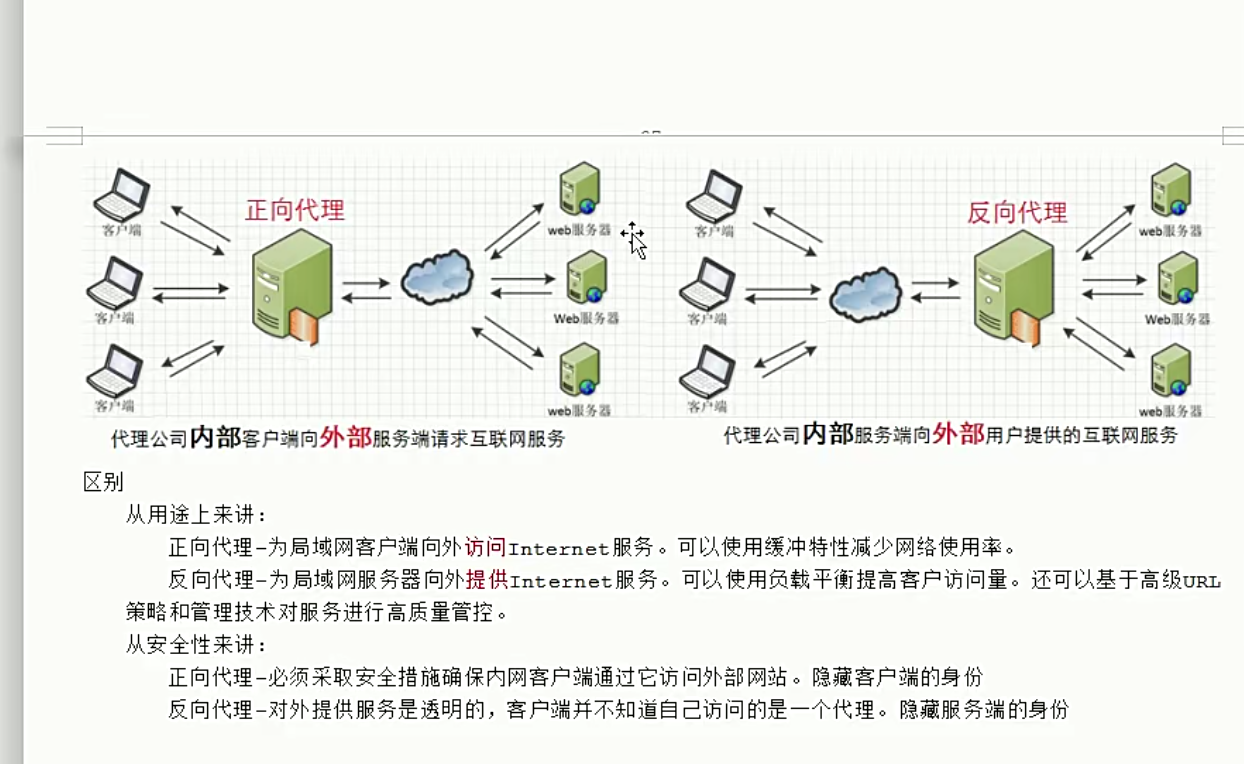
我是内部服务,代替我访问外部网络,这是正向代理;代替外部网络访问我,这是反向代理
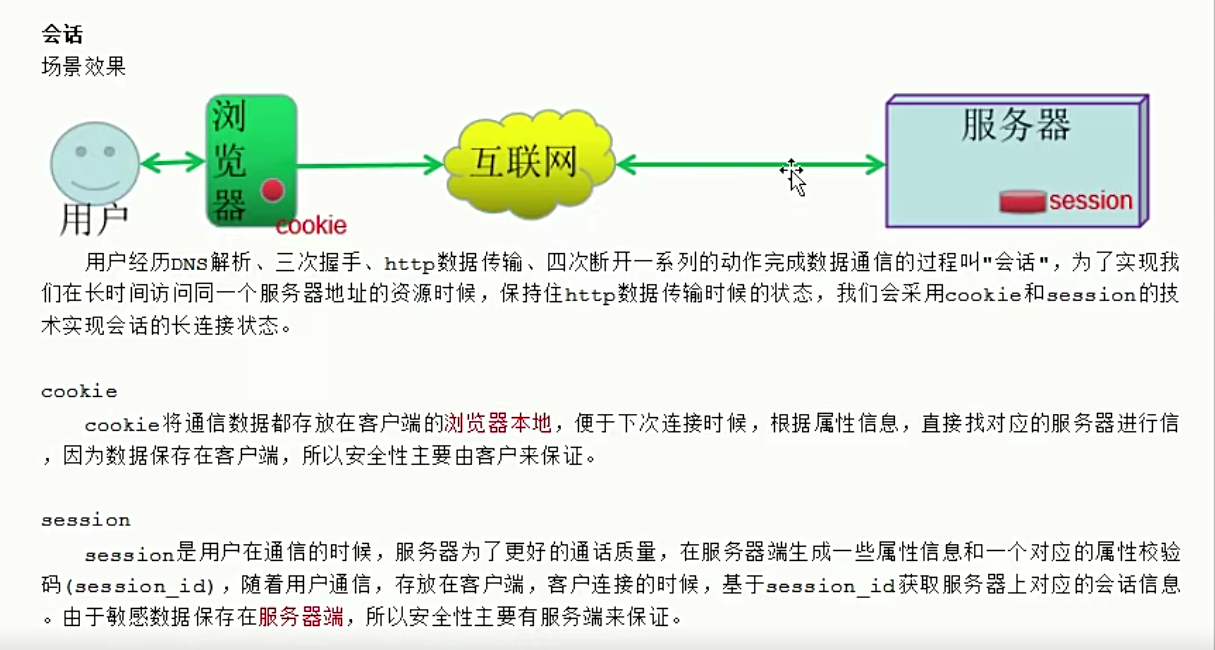
槽位

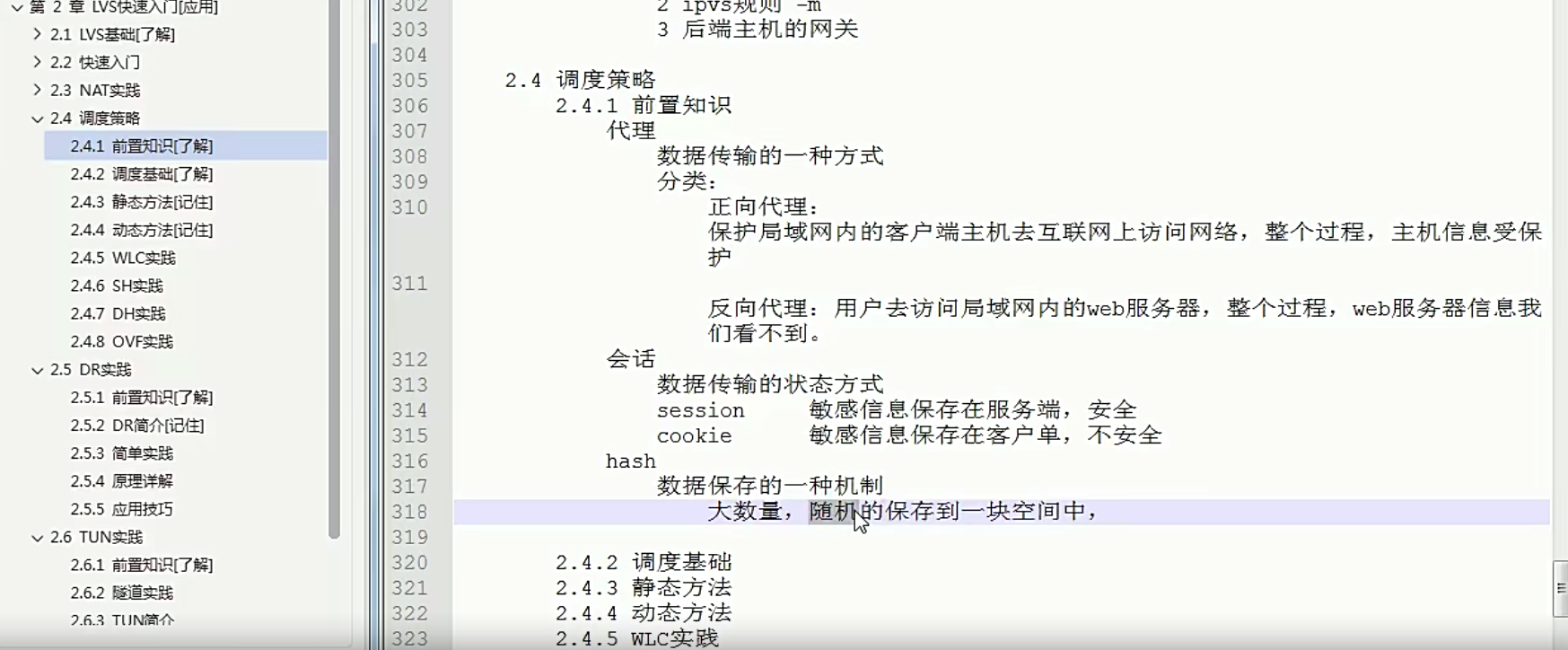

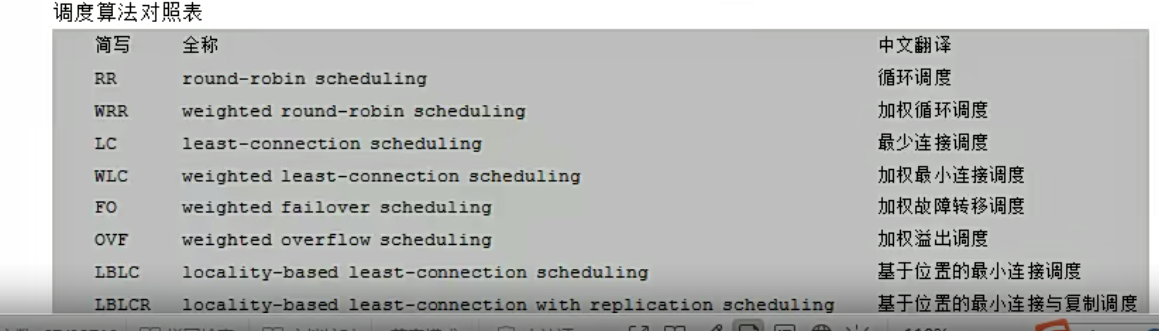
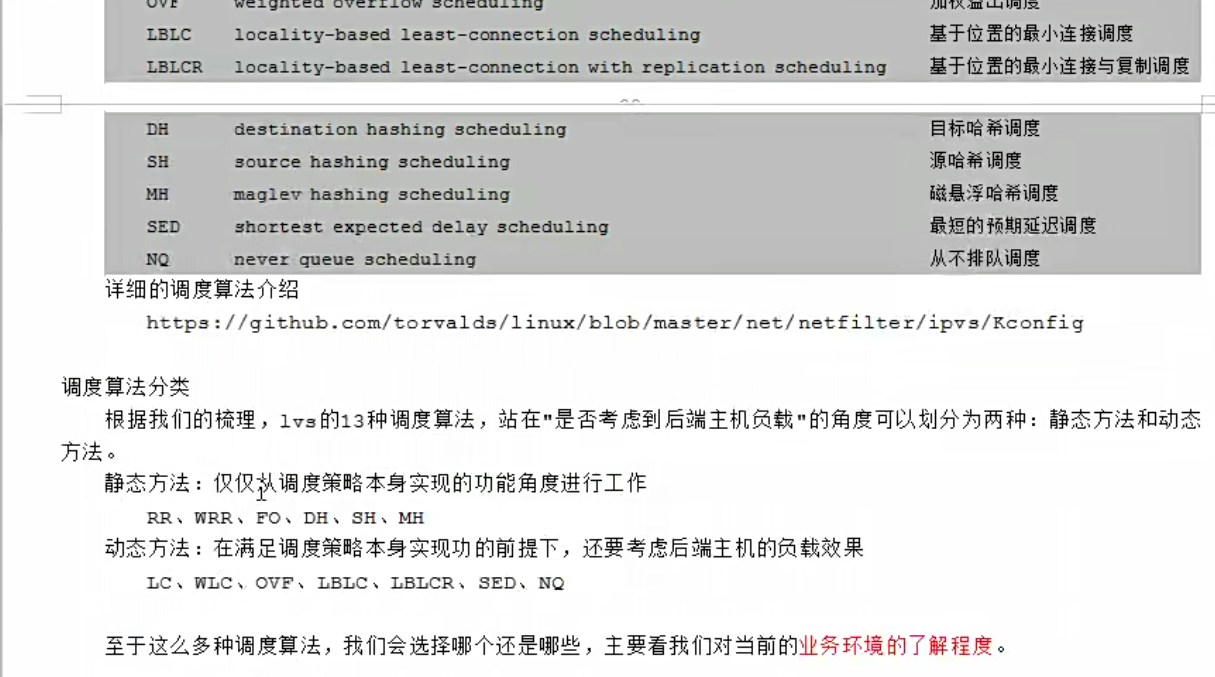
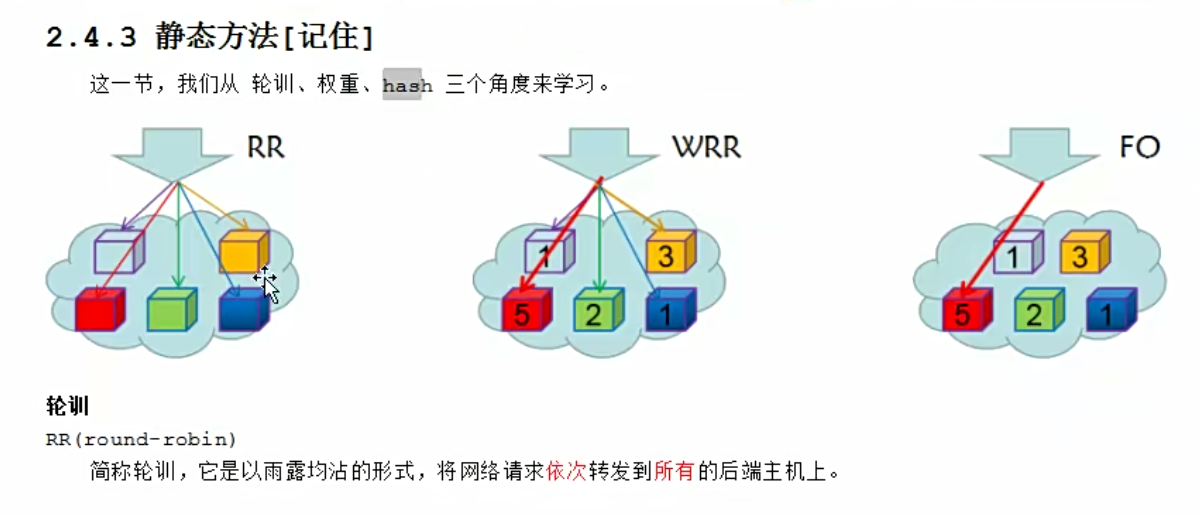
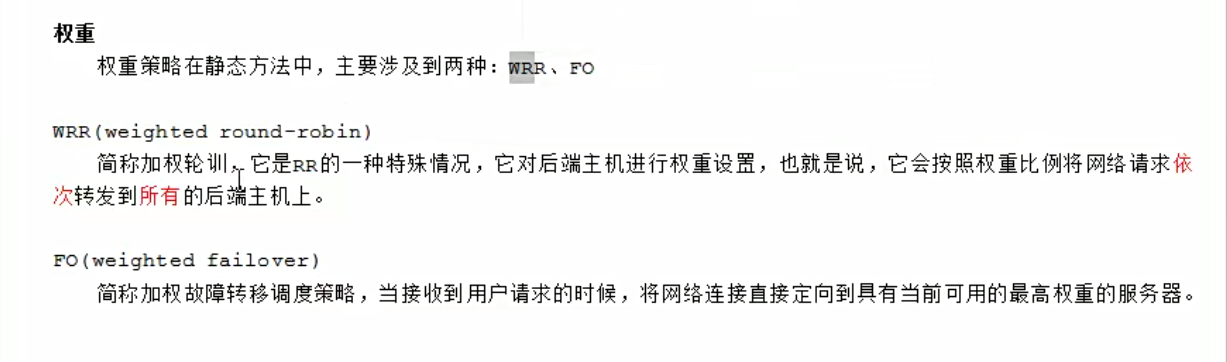
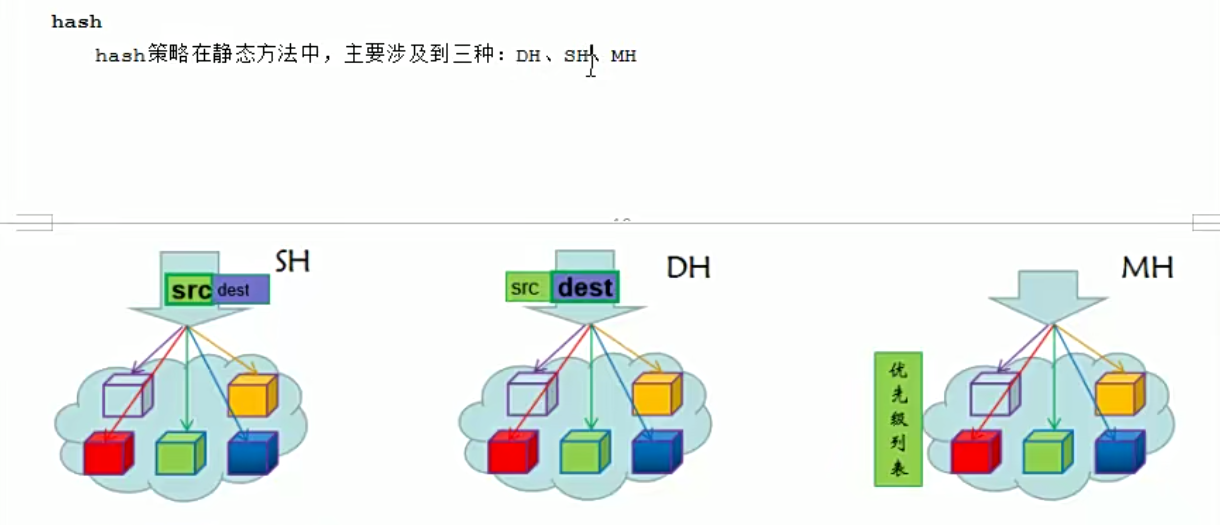
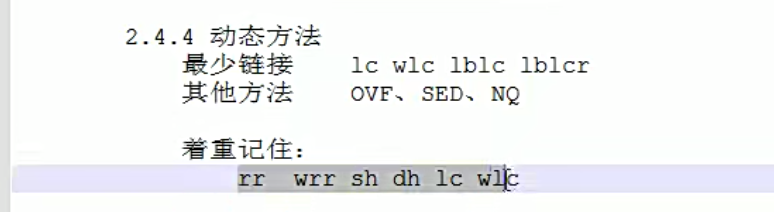
sh根据源地址。调度到某个节点,dh,根据目标地址,调度到某个节点,
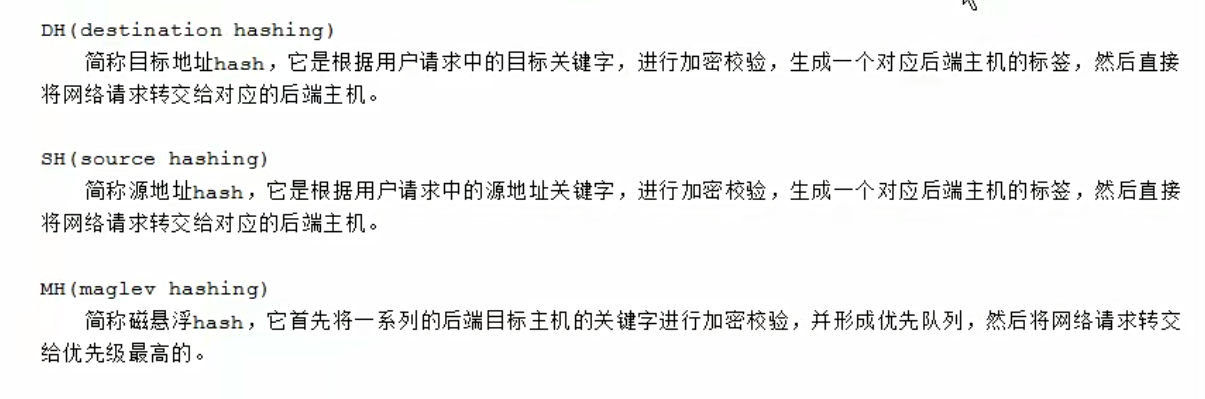
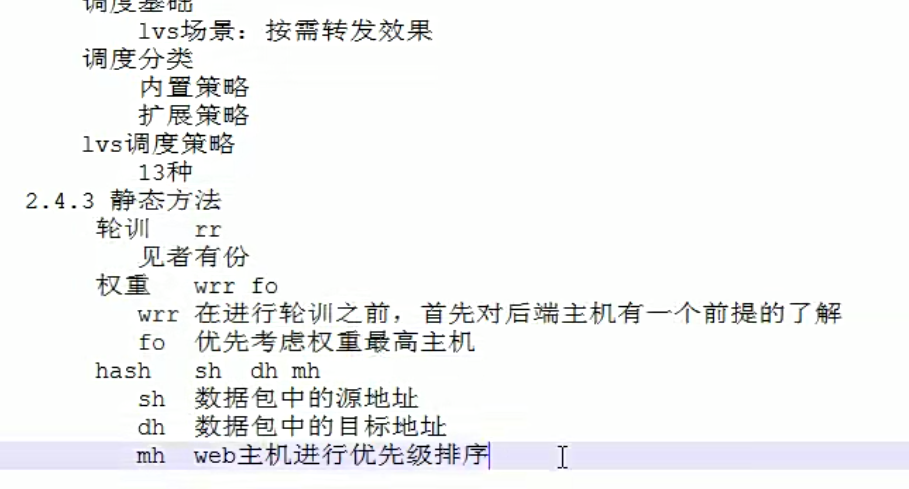


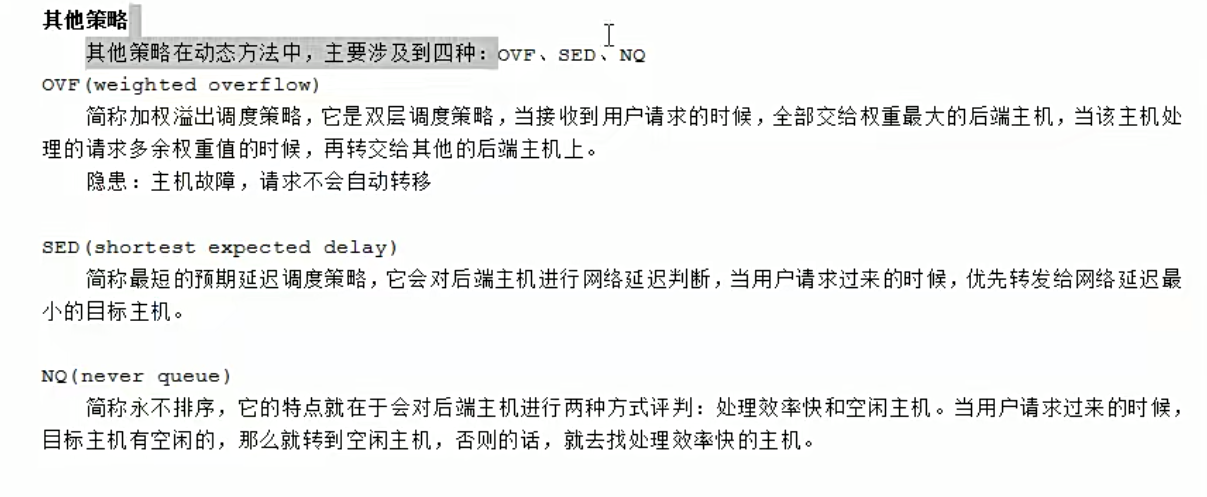
实战演练
默认策略以及修改策略
查看
[root@mcw04 ~]# ipvsadm -Ln

IP Virtual Server version 1.2.1 (size=4096)

Prot LocalAddress:Port Scheduler Flags

  -> RemoteAddress:Port           Forward Weight ActiveConn InActConn

TCP  10.0.0.14:80 wlc

  -> 172.168.1.15:80              Masq    1      0          0

  -> 172.168.1.16:80              Masq    1      0          0

TCP  10.0.0.14:443 wlc

  -> 172.168.1.16:443             Masq    1      0          0

  -> 172.168.1.25:443             Masq    1      0          0

[root@mcw04 ~]#
清除后添加,默认是wlc
[root@mcw04 ~]# ipvsadm -C

[root@mcw04 ~]# ipvsadm -Ln

IP Virtual Server version 1.2.1 (size=4096)

Prot LocalAddress:Port Scheduler Flags

  -> RemoteAddress:Port           Forward Weight ActiveConn InActConn

[root@mcw04 ~]# ipvsadm -A -t 10.0.0.14:80

[root@mcw04 ~]# ipvsadm -Ln

IP Virtual Server version 1.2.1 (size=4096)

Prot LocalAddress:Port Scheduler Flags

  -> RemoteAddress:Port           Forward Weight ActiveConn InActConn

TCP  10.0.0.14:80 wlc

[root@mcw04 ~]#
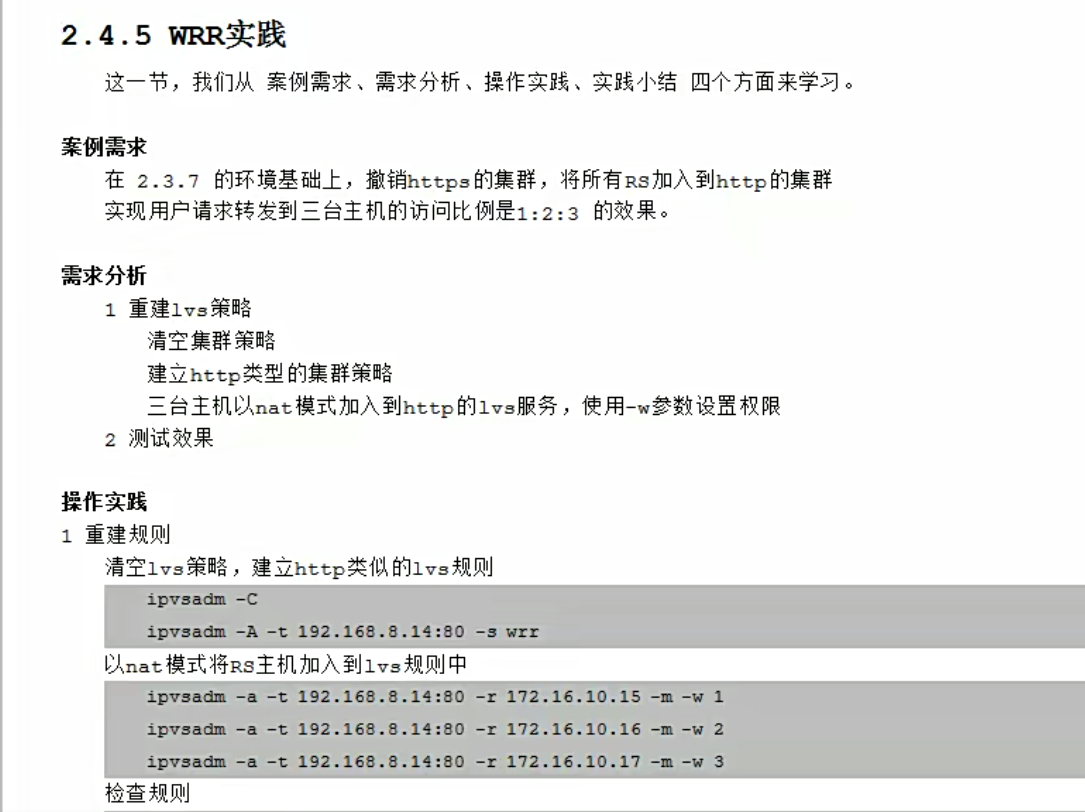
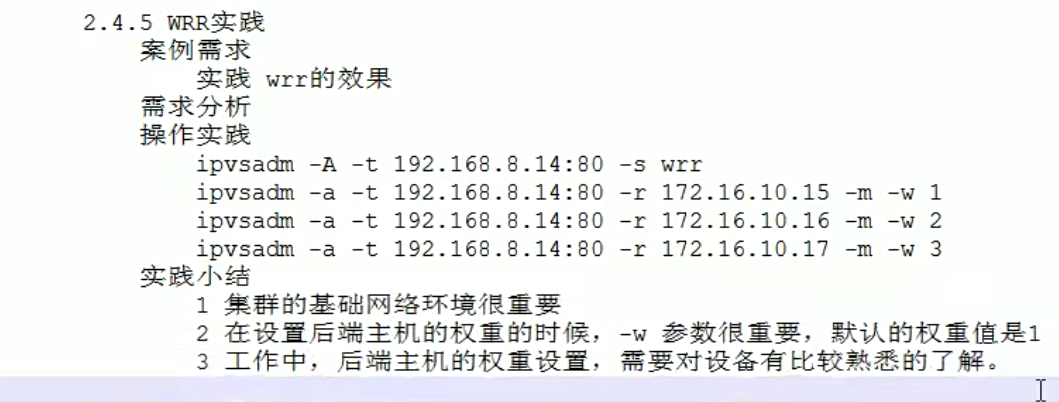
wrr理论
wrr实践演练
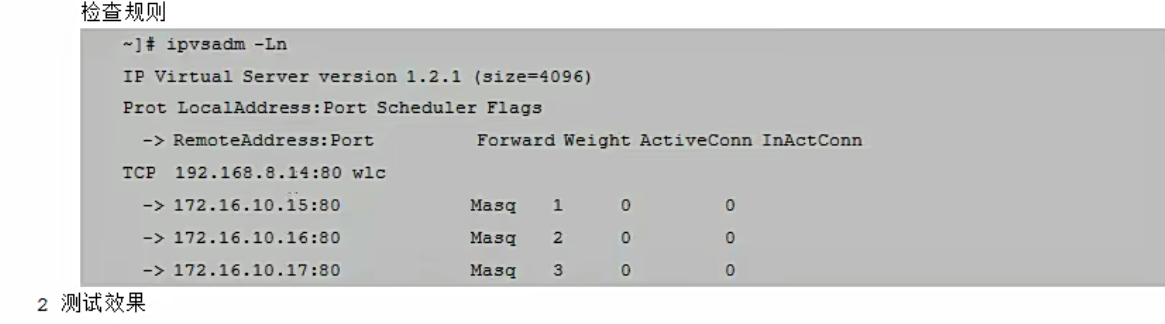
清空以前的,然后添加wrr的lvs集群
[root@mcw04 ~]# ipvsadm -Ln

IP Virtual Server version 1.2.1 (size=4096)

Prot LocalAddress:Port Scheduler Flags

  -> RemoteAddress:Port           Forward Weight ActiveConn InActConn

TCP  10.0.0.14:80 wlc

[root@mcw04 ~]# ipvsadm -C

[root@mcw04 ~]# ipvsadm -Ln

IP Virtual Server version 1.2.1 (size=4096)

Prot LocalAddress:Port Scheduler Flags

  -> RemoteAddress:Port           Forward Weight ActiveConn InActConn

[root@mcw04 ~]# ipvsadm -A -t 10.0.0.14:80 -s wrr

[root@mcw04 ~]# ipvsadm -Ln

IP Virtual Server version 1.2.1 (size=4096)

Prot LocalAddress:Port Scheduler Flags

  -> RemoteAddress:Port           Forward Weight ActiveConn InActConn

TCP  10.0.0.14:80 wrr

[root@mcw04 ~]#
添加rs 1 2 3 ,权重分别是1 2 3 。并且是nat模式,我们也能查看到权重信息
[root@mcw04 ~]# ipvsadm -Ln

IP Virtual Server version 1.2.1 (size=4096)

Prot LocalAddress:Port Scheduler Flags

  -> RemoteAddress:Port           Forward Weight ActiveConn InActConn

TCP  10.0.0.14:80 wrr

[root@mcw04 ~]# ipvsadm -a -t 10.0.0.14:80 -r 172.168.1.15 -m -w 1

[root@mcw04 ~]# ipvsadm -a -t 10.0.0.14:80 -r 172.168.1.16 -m -w 2

[root@mcw04 ~]# ipvsadm -a -t 10.0.0.14:80 -r 172.168.1.25 -m -w 3

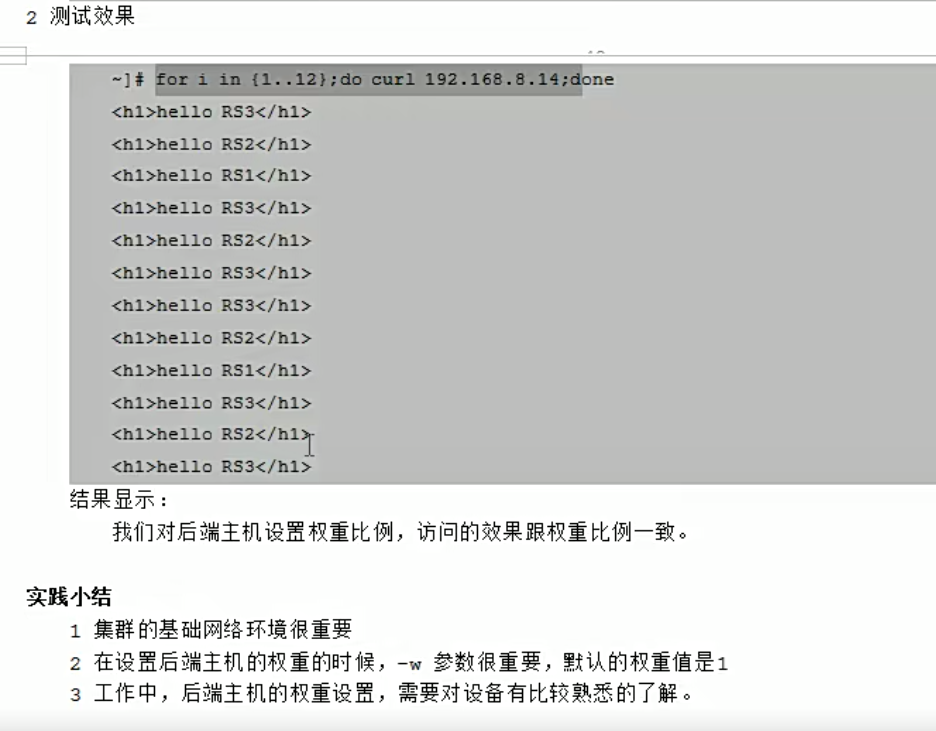
[root@mcw04 ~]# ipvsadm -Ln

IP Virtual Server version 1.2.1 (size=4096)

Prot LocalAddress:Port Scheduler Flags

  -> RemoteAddress:Port           Forward Weight ActiveConn InActConn

TCP  10.0.0.14:80 wrr

  -> 172.168.1.15:80              Masq    1      0          0

  -> 172.168.1.16:80              Masq    2      0          0

  -> 172.168.1.25:80              Masq    3      0          0

[root@mcw04 ~]#
我们在客户端mcw03上访问,可以看到,的确是 1 2 3 的比例,被调度到
[root@mcw03 ~]#

[root@mcw03 ~]# for i in {1..6}

> do

> curl 10.0.0.14

> done

hello rs3

machangwei06 rs2

machangwei05 rs1

hello rs3

hello rs3

machangwei06 rs2

[root@mcw03 ~]#
如果是访问12次呢,我们可以看到,的确还是1:2:3的概率
[root@mcw03 ~]# for i in {1..12}; do curl 10.0.0.14; done

hello rs3

machangwei06 rs2

machangwei05 rs1

hello rs3

hello rs3

machangwei06 rs2

hello rs3

machangwei06 rs2

machangwei05 rs1

hello rs3

hello rs3

machangwei06 rs2

[root@mcw03 ~]#
SH实践
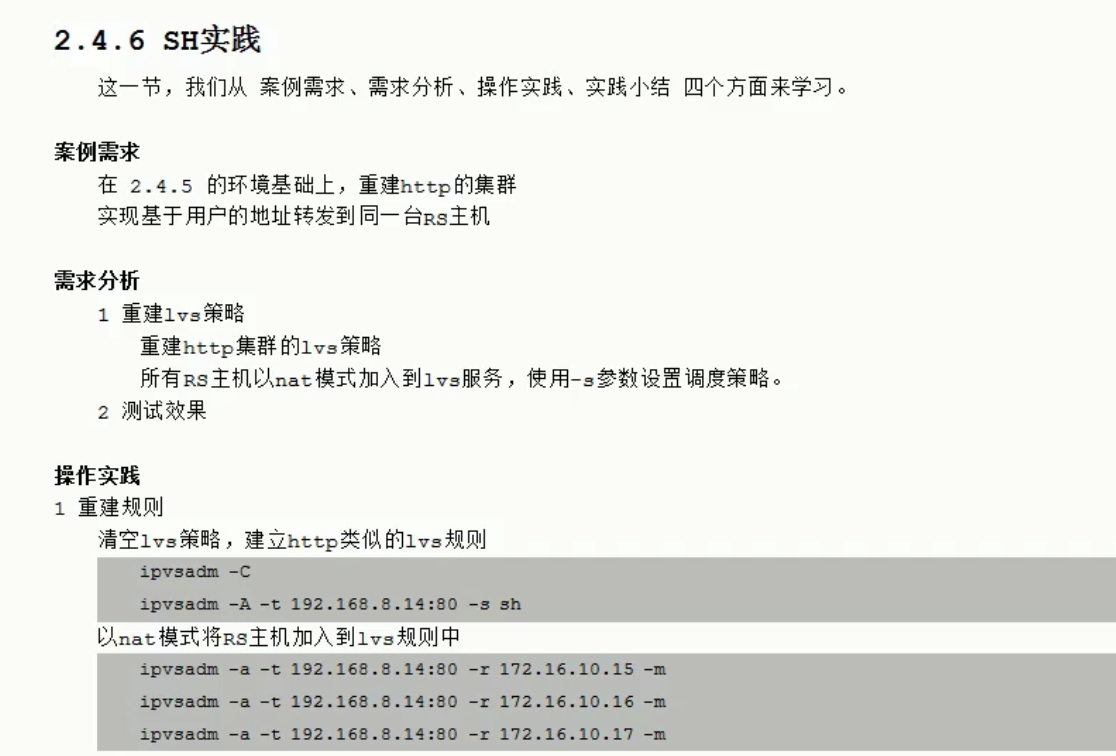
测试效果,某个主机访问第一次调度到哪里,那么后面一直会调度到哪里

我们创建集群,添加rs。指定调度算法sh
[root@mcw04 ~]# ipvsadm -C

[root@mcw04 ~]# ipvsadm -Ln

IP Virtual Server version 1.2.1 (size=4096)

Prot LocalAddress:Port Scheduler Flags

  -> RemoteAddress:Port           Forward Weight ActiveConn InActConn

[root@mcw04 ~]# ipvsadm -A -t 10.0.0.14:80 -s sh

[root@mcw04 ~]# ipvsadm -Ln

IP Virtual Server version 1.2.1 (size=4096)

Prot LocalAddress:Port Scheduler Flags

  -> RemoteAddress:Port           Forward Weight ActiveConn InActConn

TCP  10.0.0.14:80 sh

[root@mcw04 ~]# ipvsadm -a -t 10.0.0.14:80 -r 172.168.1.15 -m

[root@mcw04 ~]# ipvsadm -a -t 10.0.0.14:80 -r 172.168.1.16 -m

[root@mcw04 ~]# ipvsadm -a -t 10.0.0.14:80 -r 172.168.1.25 -m

[root@mcw04 ~]# ipvsadm -Ln

IP Virtual Server version 1.2.1 (size=4096)

Prot LocalAddress:Port Scheduler Flags

  -> RemoteAddress:Port           Forward Weight ActiveConn InActConn

TCP  10.0.0.14:80 sh

  -> 172.168.1.15:80              Masq    1      0          0

  -> 172.168.1.16:80              Masq    1      0          0

  -> 172.168.1.25:80              Masq    1      0          0

[root@mcw04 ~]#
客户端请求,可以看到,客户端一直被调度到rs2上,符合预期
[root@mcw03 ~]# for i in {1..12}; do curl 10.0.0.14; done

machangwei06 rs2

machangwei06 rs2

machangwei06 rs2

machangwei06 rs2

machangwei06 rs2

machangwei06 rs2

machangwei06 rs2

machangwei06 rs2

machangwei06 rs2

machangwei06 rs2

machangwei06 rs2

machangwei06 rs2

[root@mcw03 ~]# for i in {1..12}; do curl 10.0.0.14; done

machangwei06 rs2

machangwei06 rs2

machangwei06 rs2

machangwei06 rs2

machangwei06 rs2

machangwei06 rs2

machangwei06 rs2

machangwei06 rs2

machangwei06 rs2

machangwei06 rs2

machangwei06 rs2

machangwei06 rs2

[root@mcw03 ~]#
再换一台机器访问,还是总是调度到后面同一台机器处理
[root@mcw04 ~]# for i in {1..12}; do curl 10.0.0.14; done

hello rs3

hello rs3

hello rs3

hello rs3

hello rs3

hello rs3

hello rs3

hello rs3

hello rs3

hello rs3

hello rs3

hello rs3

[root@mcw04 ~]# for i in {1..12}; do curl 10.0.0.14; done

hello rs3

hello rs3

hello rs3

hello rs3

hello rs3

hello rs3

hello rs3

hello rs3

hello rs3

hello rs3

hello rs3

hello rs3

[root@mcw04 ~]#
[root@mcw04 ~]# for i in {1..12}; do curl 10.0.0.14; done

hello rs3

hello rs3

hello rs3

hello rs3

hello rs3

hello rs3

hello rs3

hello rs3

hello rs3

hello rs3

hello rs3

hello rs3

[root@mcw04 ~]# for i in {1..12}; do curl 10.0.0.14; done

hello rs3

hello rs3

hello rs3

hello rs3

hello rs3

hello rs3

hello rs3

hello rs3

hello rs3

hello rs3

hello rs3

hello rs3

[root@mcw04 ~]#
不过我在把rs2防火墙开起来后
[root@mcw06 ~]# systemctl start firewalld.service

[root@mcw06 ~]# curl localhost

machangwei06 rs2

[root@mcw06 ~]#
这时它还是去请求rs2,此时有问题,但是它还是调度这个绑定的节点,而不是其它节点
[root@mcw03 ~]# for i in {1..12}; do curl 10.0.0.14; done

curl: (7) Failed connect to 10.0.0.14:80; No route to host

curl: (7) Failed connect to 10.0.0.14:80; No route to host

curl: (7) Failed connect to 10.0.0.14:80; No route to host

curl: (7) Failed connect to 10.0.0.14:80; No route to host

curl: (7) Failed connect to 10.0.0.14:80; No route to host

curl: (7) Failed connect to 10.0.0.14:80; No route to host

curl: (7) Failed connect to 10.0.0.14:80; No route to host

curl: (7) Failed connect to 10.0.0.14:80; No route to host

^C

[root@mcw03 ~]# for i in {1..12}; do curl 10.0.0.14; done

curl: (7) Failed connect to 10.0.0.14:80; No route to host

curl: (7) Failed connect to 10.0.0.14:80; No route to host

curl: (7) Failed connect to 10.0.0.14:80; No route to host

curl: (7) Failed connect to 10.0.0.14:80; No route to host

curl: (7) Failed connect to 10.0.0.14:80; No route to host

curl: (7) Failed connect to 10.0.0.14:80; No route to host

curl: (7) Failed connect to 10.0.0.14:80; No route to host

curl: (7) Failed connect to 10.0.0.14:80; No route to host

curl: (7) Failed connect to 10.0.0.14:80; No route to host

curl: (7) Failed connect to 10.0.0.14:80; No route to host

curl: (7) Failed connect to 10.0.0.14:80; No route to host

curl: (7) Failed connect to 10.0.0.14:80; No route to host

[root@mcw03 ~]#

DR模式前置知识理论

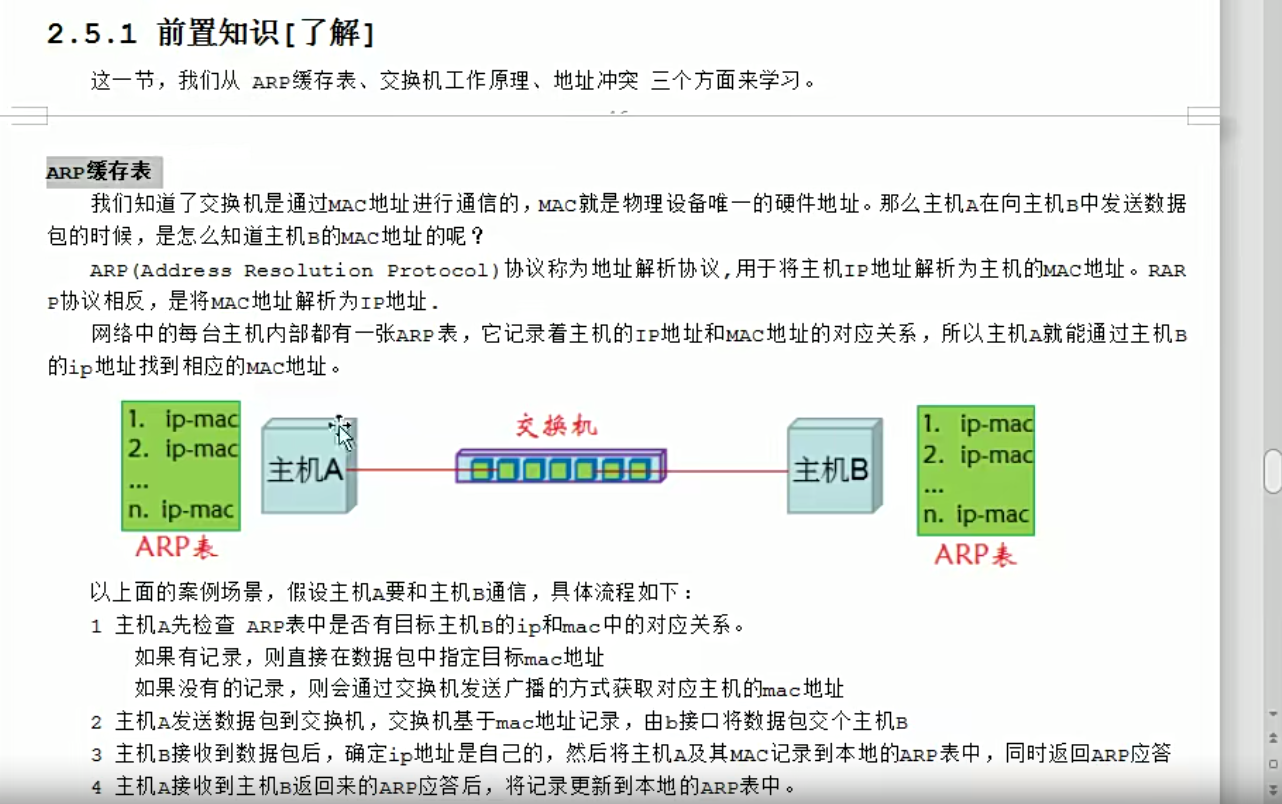
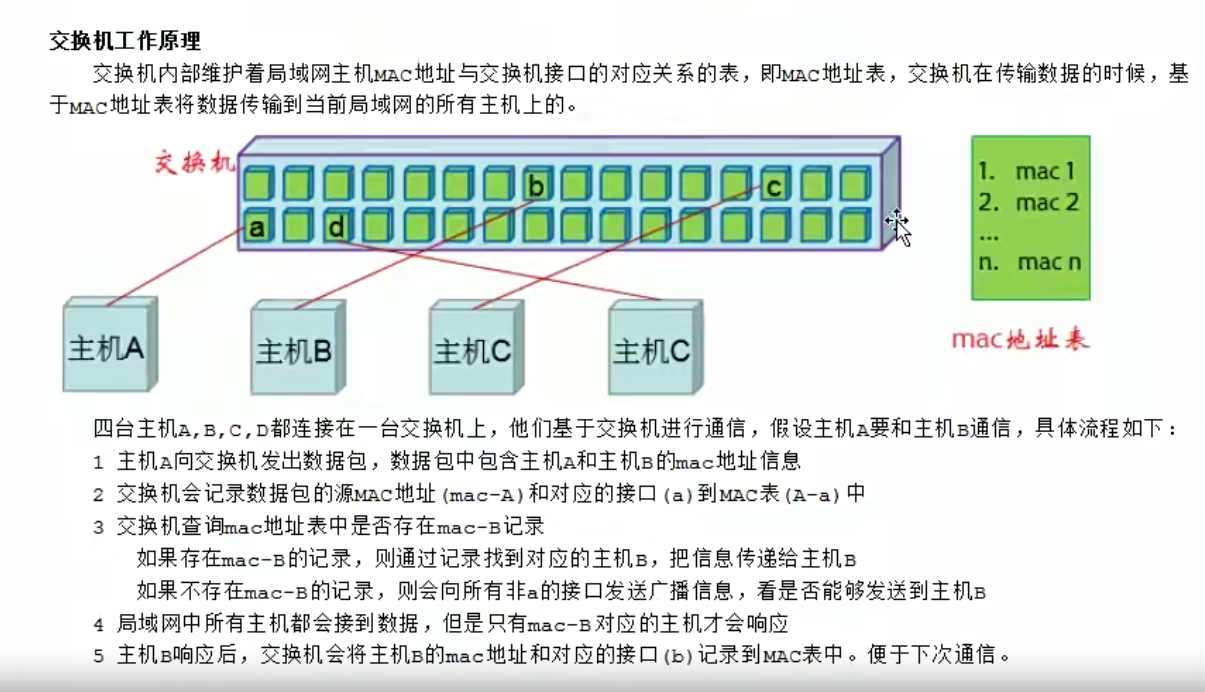

DR模式理论
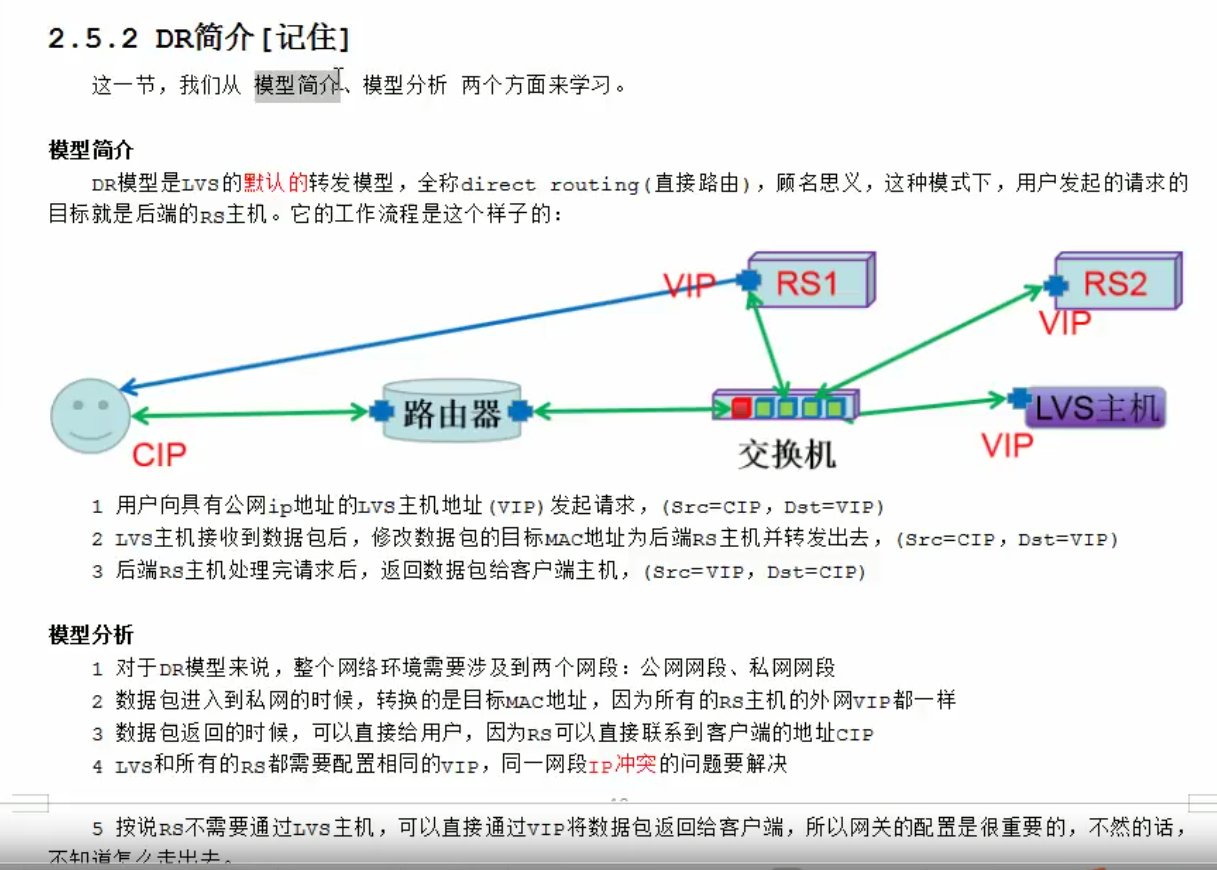
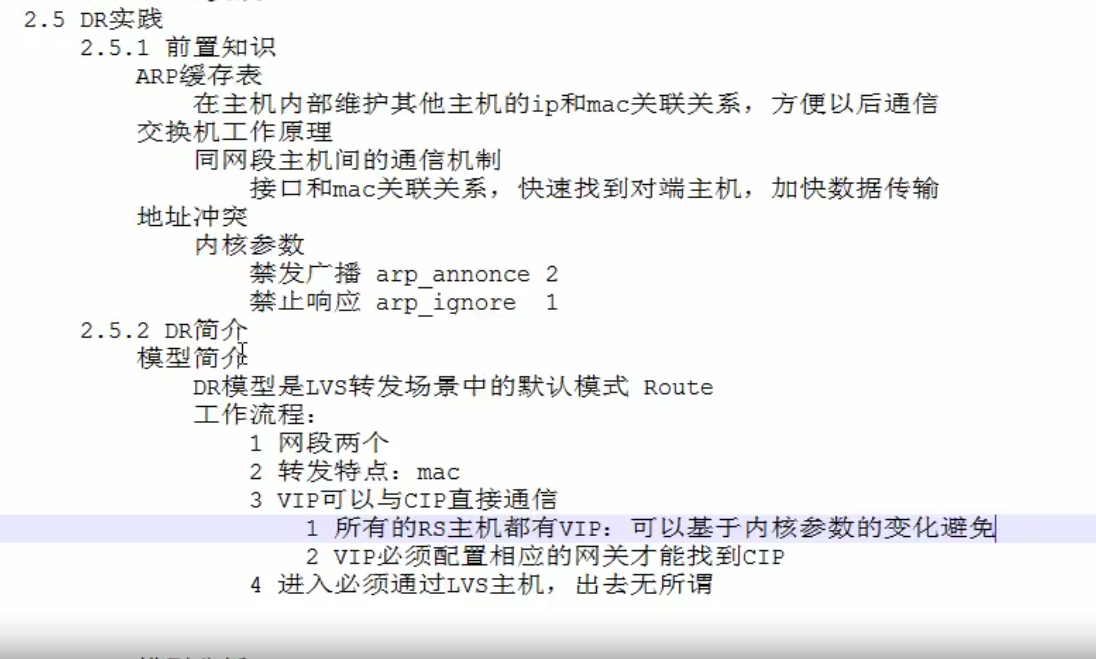
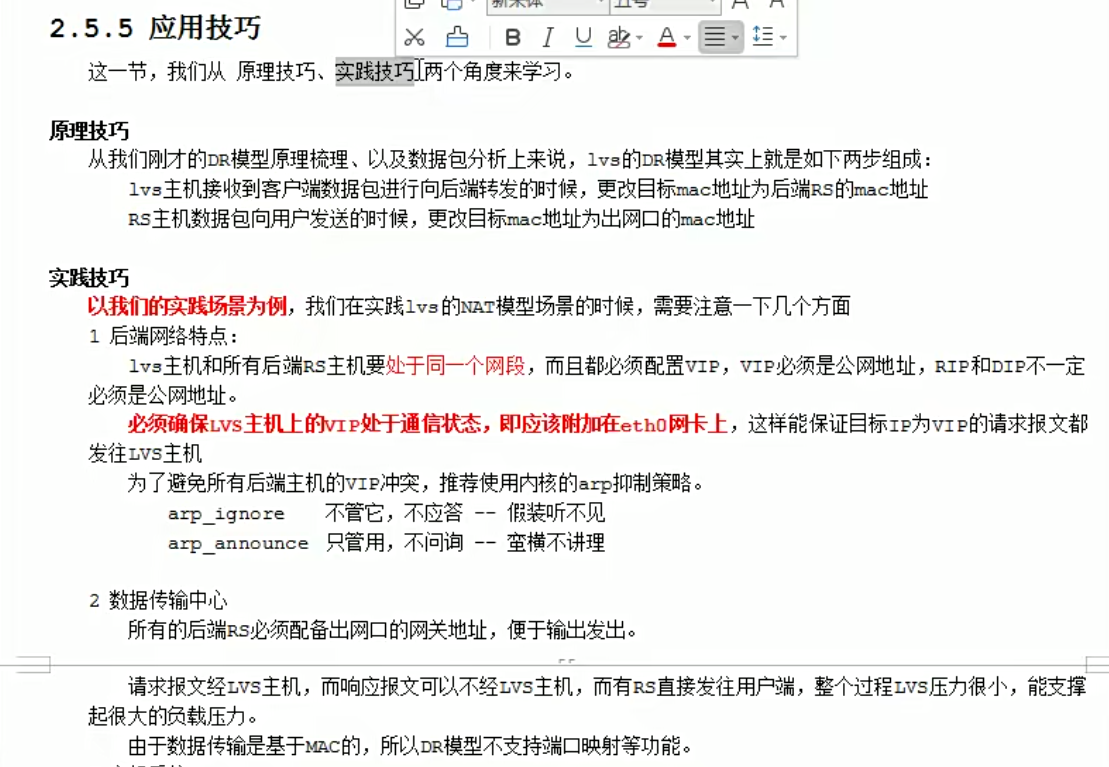
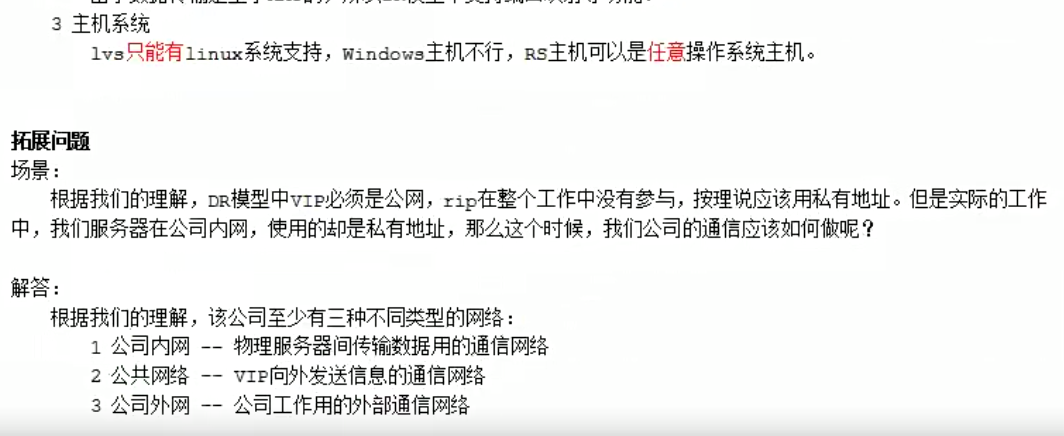
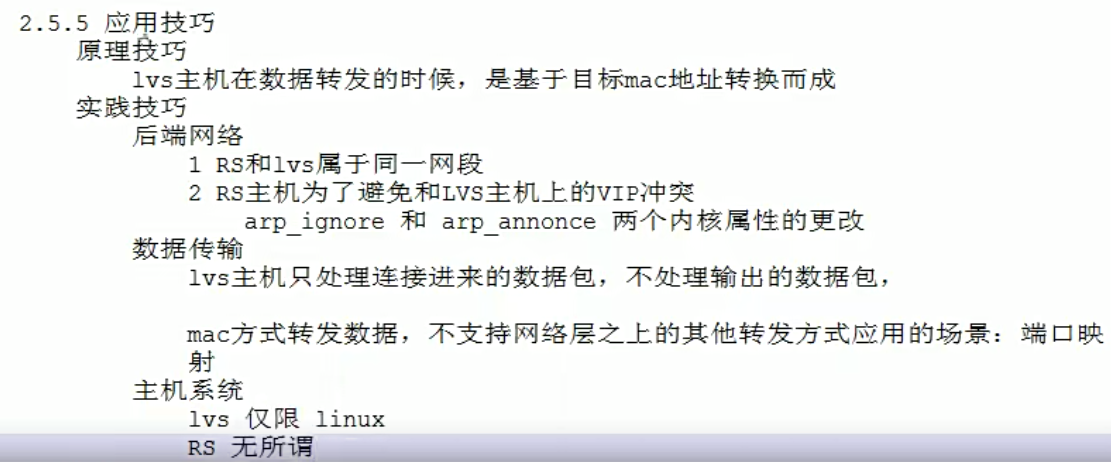
直接路由的意思,就是后端rs真实主机能直接和客户端进行通信。lvs主机和rs在同一个交换机上面,可以基于mac地址进行通信。rs要和客户端通信,需要有外网ip。客户端需要访问公司服务的时候,只会访问一个ip地址。因此我们想要请求随机跳到任何一个主机上面,那么这些所有的后端主机上面必须都有一个相同的对外的ip,也就是vip。
数据请求是这样的:数据从客户端经过路由器,转交到lvs主机,lvs主机把请求分发给后端的真实主机,后端的真实主机的响应报文会通过vip接口直接返回给客户端,这就是一个完整的数据流程。
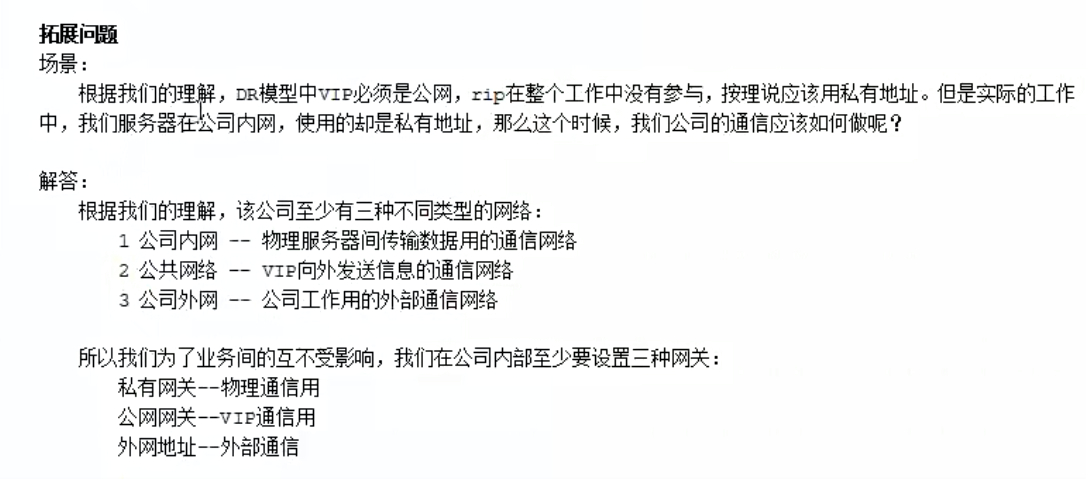
公网网段:cip,vip,;私网网段,lvs和rs都是通过交换机,在内网网段。lvs主机在整个当中属于一个分发的效果。而且是基于交换机分发,基于mac地址进行分发。
数据来的时候需要经过lvs主机,走的时候不需要经过lvs主机,直接通过rs主机返回给客户端。这种情况下lvs主机的压力会少一些。
下面最重要的一个就是配置我们的网关,让vip能找到客户端ip。
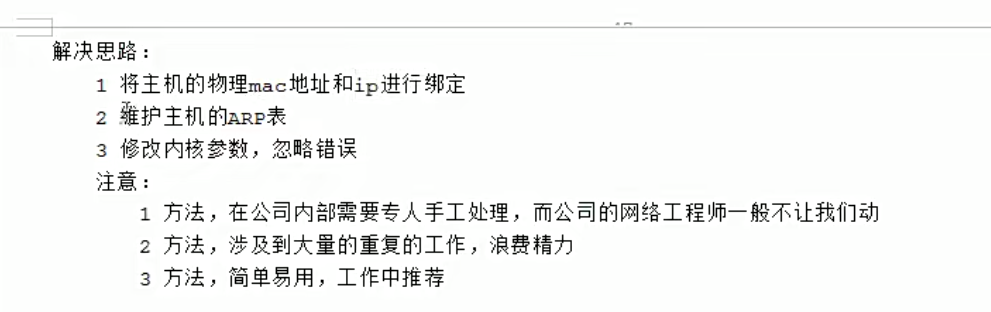
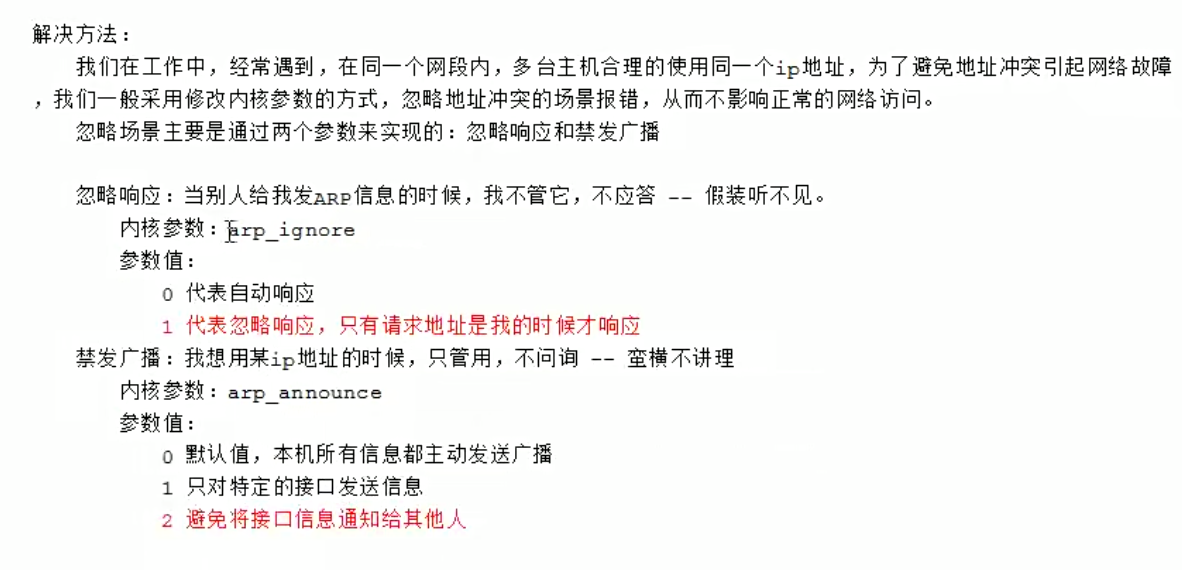
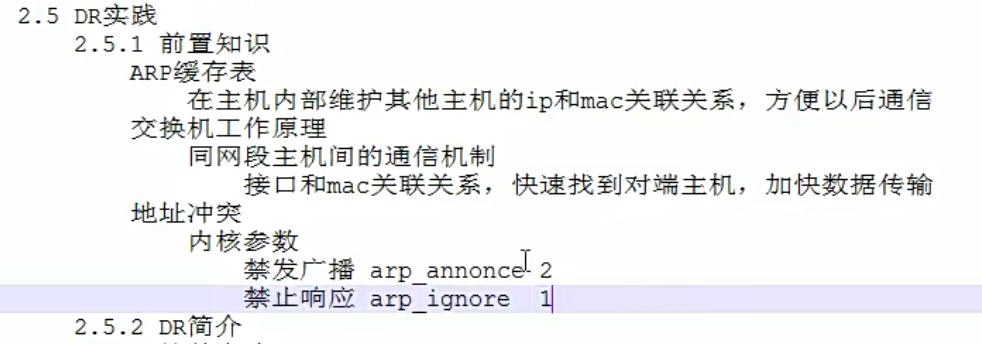
因为下面的主机都用了同一个vip,那么地址冲突的问题需要解决了。这里我们通过内核方式的修改,达到所有的内网主机上面,都可以使用相同的vip效果。
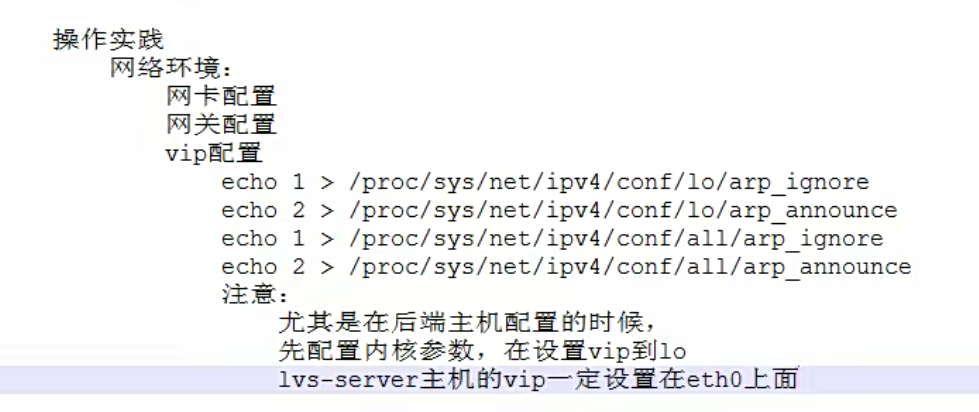
DR模式简单实践
理论
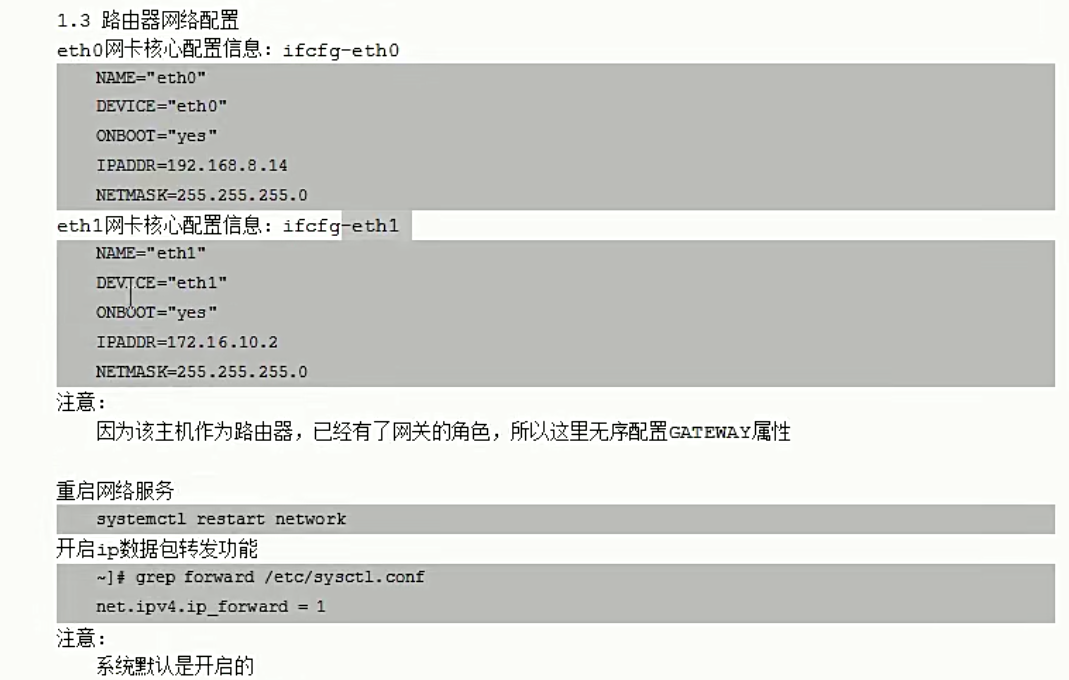
路由器,一个外网一个内网
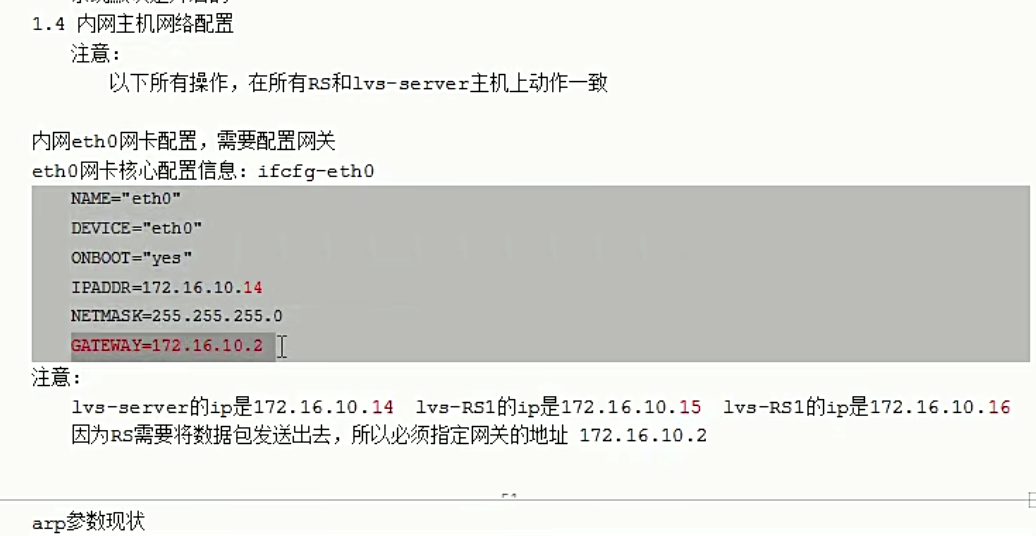
因为是直接路由,所以我的rs想要和外网直接通信的话,需要配置一个vip,vip和外网直接通信,还需要设置我们的网络网关。
因为lvs机器上面,作为流量的入口,所以vip最好是配置在真实网卡上面,而rs上的vip,仅供响应数据报文的出口,所以没必要放在eth0网卡上面,可以放在lo上面。而lvs主机,必须得绑定到真实网卡上面,不然没办法接收数据了,

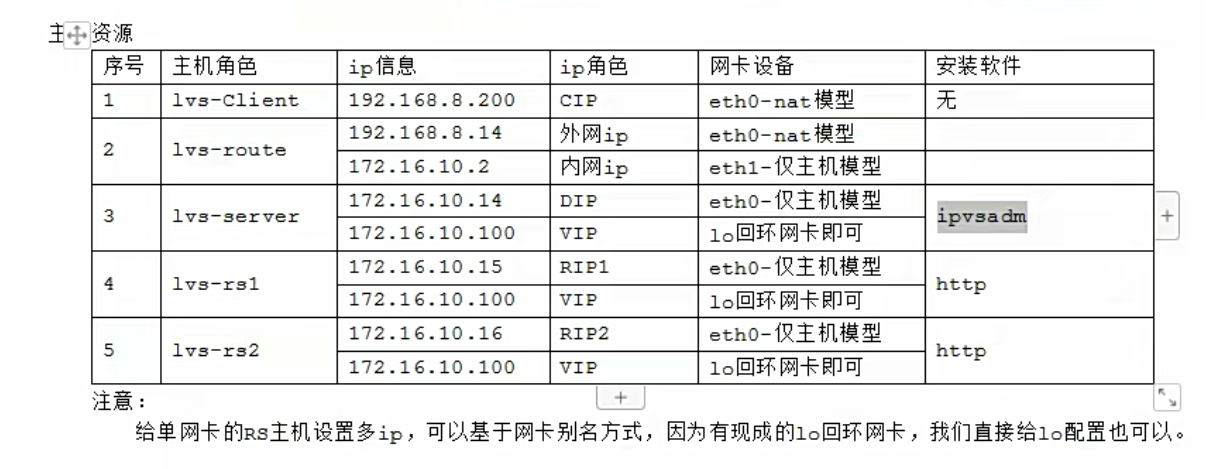
效果,注意这里访问,客户端是访问路由器对外的ip 192.168.8.14,不是访问我们的vip。

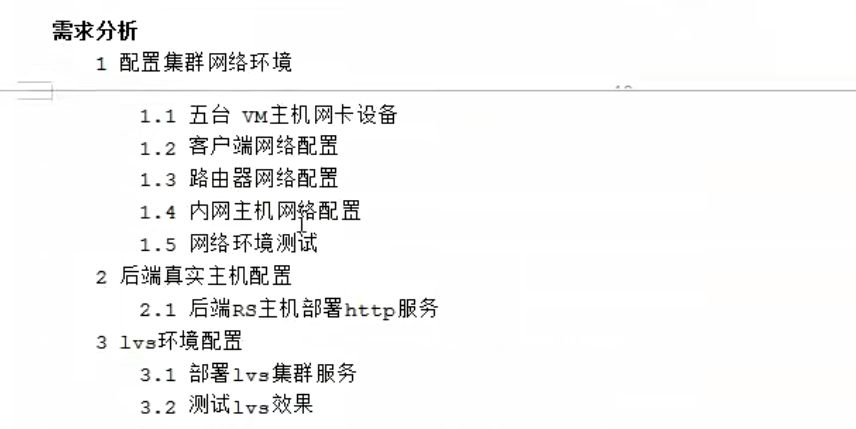

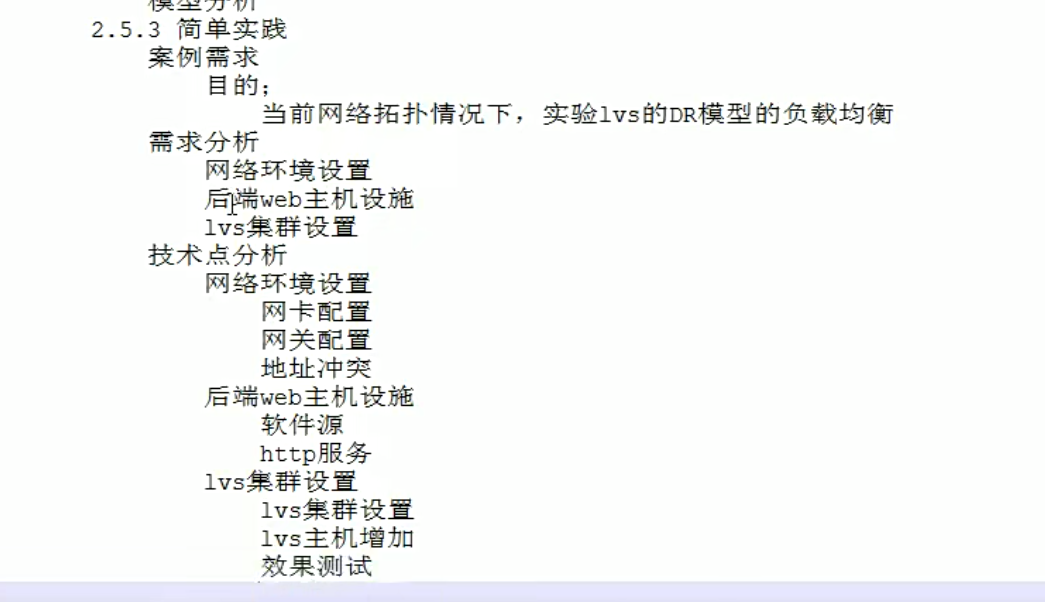





实践
mcw03 客户端 10.0.0.13(ens33)
mcw15 路由器 10.0.0.25(ens33 进网网关) 172.168.1.25(ens34 出网网关)
mcw04 lvs 172.168.1.14(ens33) 172.168.1.100(ens34) 关闭外网网卡
mcw05 rs1 172.168.1.15(ens34) 172.168.1.100(ens34) 关闭外网网卡
mcw06 rs2 172.168.1.16(ens34) 172.168.1.100(ens34) 关闭外网网卡
因为路由器有ens34网卡IP。所以三个内网机器,都可可以用内网IP从路由器上去登录
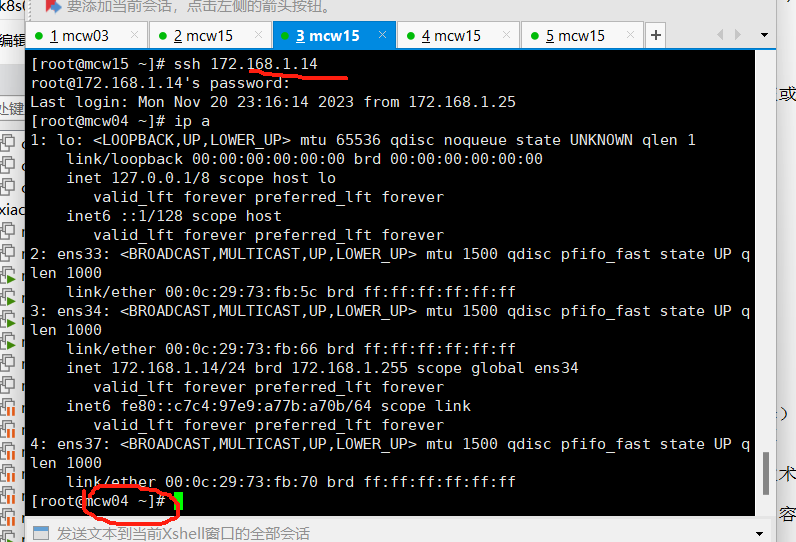
mcw04 5 6上增加出网网关,指向路由器内网网卡IP。此时,内网机器,可以ping通路由器外网网卡的IP。虽然mcw05没有外网IP,但是因为添加了路由器的内网网卡IP作为默认路由,当ping路由器的外网网卡IP的时候,因为出流量会走到mcw05的默认网关也就是路由器的内网网卡IP上面去,然后访问到
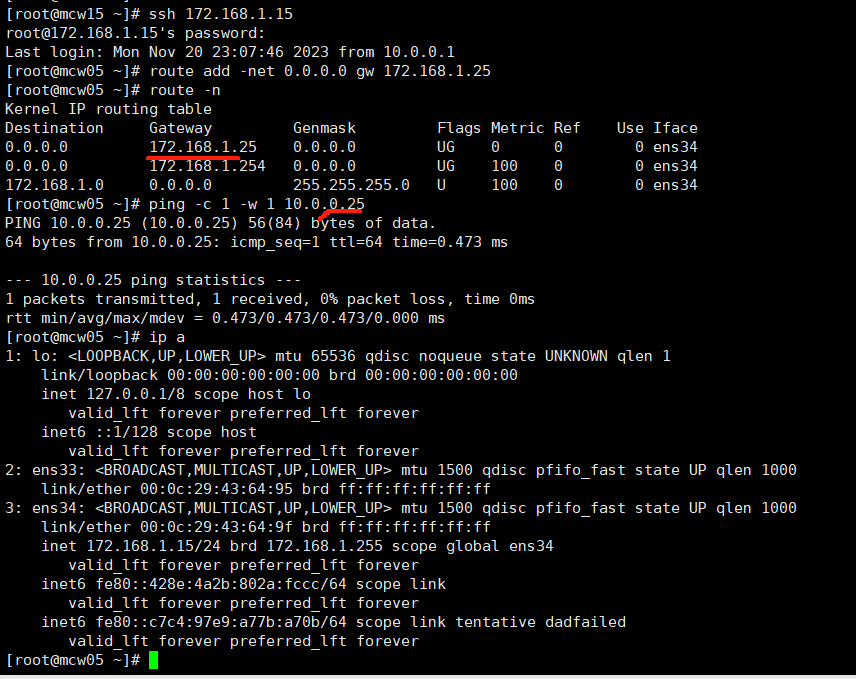
给三个内网机器添加VIP
mcw04 LVS机器加到ens34上面
ifconfig ens34:0 172.168.1.100/32 up
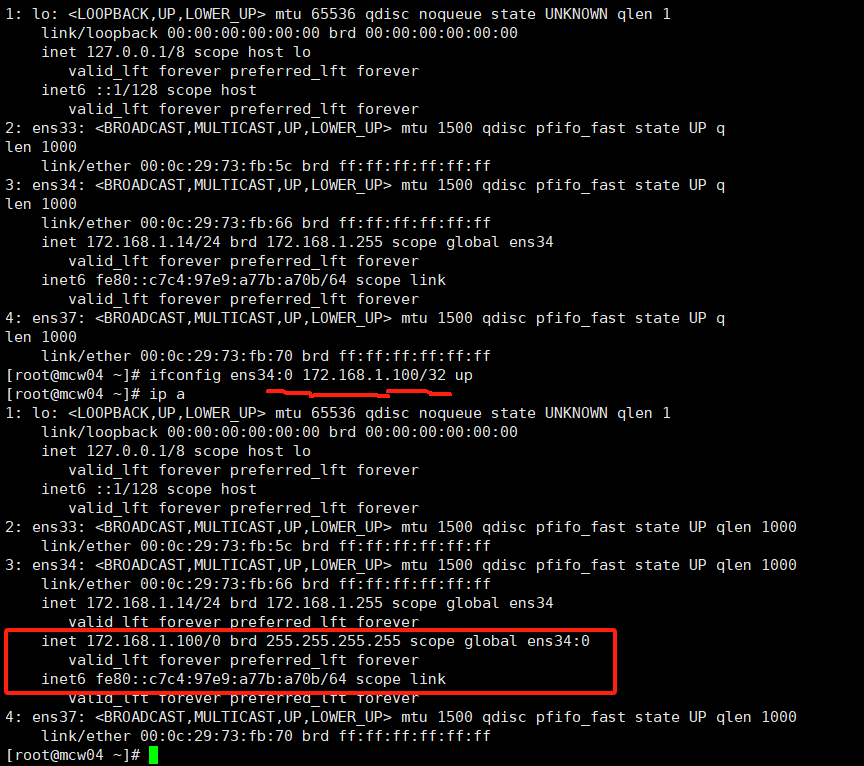
rs添加VIP,添加到lo上面
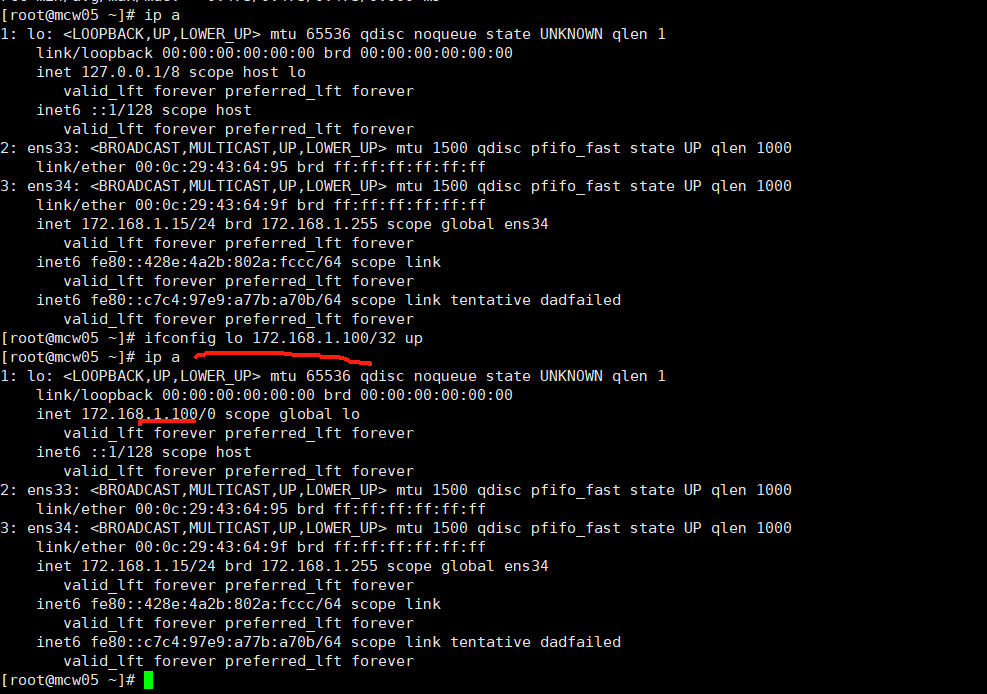
重新来,添加网卡
[root@mcw05 ~]# ifconfig

ens33: flags=4163<UP,BROADCAST,RUNNING,MULTICAST>  mtu 1500

        ether 00:0c:29:43:64:95  txqueuelen 1000  (Ethernet)

        RX packets 500038  bytes 33458865 (31.9 MiB)

        RX errors 0  dropped 0  overruns 0  frame 0

        TX packets 15512  bytes 1443348 (1.3 MiB)

        TX errors 0  dropped 0 overruns 0  carrier 0  collisions 0

ens34: flags=4163<UP,BROADCAST,RUNNING,MULTICAST>  mtu 1500

        inet 172.168.1.15  netmask 255.255.255.0  broadcast 172.168.1.255

        inet6 fe80::c7c4:97e9:a77b:a70b  prefixlen 64  scopeid 0x20<link>

        inet6 fe80::428e:4a2b:802a:fccc  prefixlen 64  scopeid 0x20<link>

        ether 00:0c:29:43:64:9f  txqueuelen 1000  (Ethernet)

        RX packets 1843  bytes 122461 (119.5 KiB)

        RX errors 0  dropped 0  overruns 0  frame 0

        TX packets 281  bytes 33083 (32.3 KiB)

        TX errors 0  dropped 0 overruns 0  carrier 0  collisions 0

[root@mcw05 ~]# ifconfig lo 172.168.1.100/32 up

[root@mcw05 ~]# ifconfig

ens33: flags=4163<UP,BROADCAST,RUNNING,MULTICAST>  mtu 1500

        ether 00:0c:29:43:64:95  txqueuelen 1000  (Ethernet)

        RX packets 500038  bytes 33458865 (31.9 MiB)

        RX errors 0  dropped 0  overruns 0  frame 0

        TX packets 15512  bytes 1443348 (1.3 MiB)

        TX errors 0  dropped 0 overruns 0  carrier 0  collisions 0

ens34: flags=4163<UP,BROADCAST,RUNNING,MULTICAST>  mtu 1500

        inet 172.168.1.15  netmask 255.255.255.0  broadcast 172.168.1.255

        inet6 fe80::c7c4:97e9:a77b:a70b  prefixlen 64  scopeid 0x20<link>

        inet6 fe80::428e:4a2b:802a:fccc  prefixlen 64  scopeid 0x20<link>

        ether 00:0c:29:43:64:9f  txqueuelen 1000  (Ethernet)

        RX packets 1871  bytes 124817 (121.8 KiB)

        RX errors 0  dropped 0  overruns 0  frame 0

        TX packets 296  bytes 35749 (34.9 KiB)

        TX errors 0  dropped 0 overruns 0  carrier 0  collisions 0

lo: flags=73<UP,LOOPBACK,RUNNING>  mtu 65536

        inet 172.168.1.100  netmask 0.0.0.0

        inet6 ::1  prefixlen 128  scopeid 0x10<host>

        loop  txqueuelen 1  (Local Loopback)

        RX packets 175  bytes 14640 (14.2 KiB)

        RX errors 0  dropped 0  overruns 0  frame 0

        TX packets 175  bytes 14640 (14.2 KiB)

        TX errors 0  dropped 0 overruns 0  carrier 0  collisions 0

[root@mcw05 ~]#
宕掉网卡
[root@mcw05 ~]# ifconfig lo 172.168.1.100/32 down

[root@mcw05 ~]# ifconfig

ens33: flags=4163<UP,BROADCAST,RUNNING,MULTICAST>  mtu 1500

        ether 00:0c:29:43:64:95  txqueuelen 1000  (Ethernet)

        RX packets 500038  bytes 33458865 (31.9 MiB)

        RX errors 0  dropped 0  overruns 0  frame 0

        TX packets 15512  bytes 1443348 (1.3 MiB)

        TX errors 0  dropped 0 overruns 0  carrier 0  collisions 0

ens34: flags=4163<UP,BROADCAST,RUNNING,MULTICAST>  mtu 1500

        inet 172.168.1.15  netmask 255.255.255.0  broadcast 172.168.1.255

        inet6 fe80::c7c4:97e9:a77b:a70b  prefixlen 64  scopeid 0x20<link>

        inet6 fe80::428e:4a2b:802a:fccc  prefixlen 64  scopeid 0x20<link>

        ether 00:0c:29:43:64:9f  txqueuelen 1000  (Ethernet)

        RX packets 1901  bytes 127333 (124.3 KiB)

        RX errors 0  dropped 0  overruns 0  frame 0

        TX packets 312  bytes 38973 (38.0 KiB)

        TX errors 0  dropped 0 overruns 0  carrier 0  collisions 0

[root@mcw05 ~]# ip a

1: lo: <LOOPBACK> mtu 65536 qdisc noqueue state DOWN qlen 1

    link/loopback 00:00:00:00:00:00 brd 00:00:00:00:00:00

    inet 172.168.1.100/0 scope global lo

       valid_lft forever preferred_lft forever

2: ens33: <BROADCAST,MULTICAST,UP,LOWER_UP> mtu 1500 qdisc pfifo_fast state UP qlen 1000

    link/ether 00:0c:29:43:64:95 brd ff:ff:ff:ff:ff:ff

3: ens34: <BROADCAST,MULTICAST,UP,LOWER_UP> mtu 1500 qdisc pfifo_fast state UP qlen 1000

    link/ether 00:0c:29:43:64:9f brd ff:ff:ff:ff:ff:ff

    inet 172.168.1.15/24 brd 172.168.1.255 scope global ens34

       valid_lft forever preferred_lft forever

    inet6 fe80::428e:4a2b:802a:fccc/64 scope link

       valid_lft forever preferred_lft forever

    inet6 fe80::c7c4:97e9:a77b:a70b/64 scope link tentative dadfailed

       valid_lft forever preferred_lft forever

[root@mcw05 ~]#
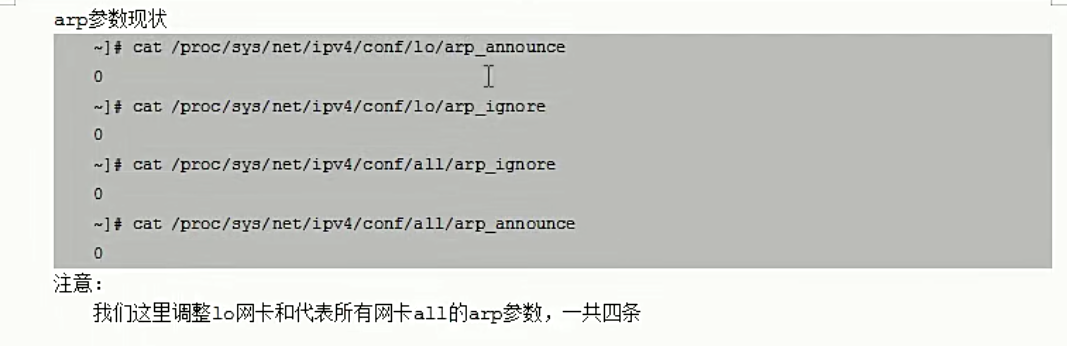
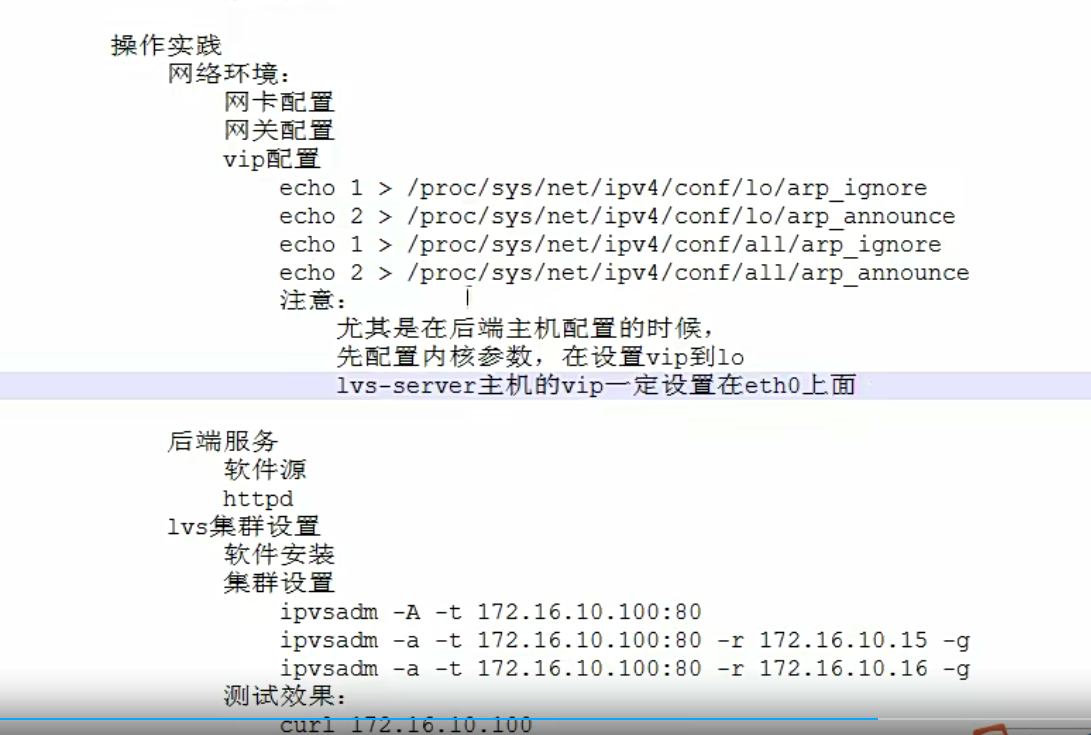
在添加VIP之前,我们应该先修改rs内核参数。查看参数
[root@mcw05 ~]# cat /proc/sys/net/ipv4/conf/all/arp_ignore

0

[root@mcw05 ~]# cat /proc/sys/net/ipv4/conf/all/arp_announce

0

[root@mcw05 ~]# cat /proc/sys/net/ipv4/conf/lo/arp_ignore

0

[root@mcw05 ~]# cat /proc/sys/net/ipv4/conf/lo/arp_announce

0

[root@mcw05 ~]#
修改参数
[root@mcw05 ~]# echo 1 > /proc/sys/net/ipv4/conf/all/arp_ignore

[root@mcw05 ~]# echo 1 > /proc/sys/net/ipv4/conf/all/arp_announce

[root@mcw05 ~]# echo 2 > /proc/sys/net/ipv4/conf/lo/arp_ignore

[root@mcw05 ~]# echo 2 >  /proc/sys/net/ipv4/conf/lo/arp_announce

[root@mcw05 ~]#
然后添加VIP
root@mcw05 ~]# ifconfig lo 172.168.1.100/32 up

[root@mcw05 ~]# ifconfig

ens33: flags=4163<UP,BROADCAST,RUNNING,MULTICAST>  mtu 1500

        ether 00:0c:29:43:64:95  txqueuelen 1000  (Ethernet)

        RX packets 500136  bytes 33465129 (31.9 MiB)

        RX errors 0  dropped 0  overruns 0  frame 0

        TX packets 15512  bytes 1443348 (1.3 MiB)

        TX errors 0  dropped 0 overruns 0  carrier 0  collisions 0

ens34: flags=4163<UP,BROADCAST,RUNNING,MULTICAST>  mtu 1500

        inet 172.168.1.15  netmask 255.255.255.0  broadcast 172.168.1.255

        inet6 fe80::c7c4:97e9:a77b:a70b  prefixlen 64  scopeid 0x20<link>

        inet6 fe80::428e:4a2b:802a:fccc  prefixlen 64  scopeid 0x20<link>

        ether 00:0c:29:43:64:9f  txqueuelen 1000  (Ethernet)

        RX packets 2511  bytes 179461 (175.2 KiB)

        RX errors 0  dropped 0  overruns 0  frame 0

        TX packets 638  bytes 76453 (74.6 KiB)

        TX errors 0  dropped 0 overruns 0  carrier 0  collisions 0

lo: flags=73<UP,LOOPBACK,RUNNING>  mtu 65536

        inet 172.168.1.100  netmask 0.0.0.0

        inet6 ::1  prefixlen 128  scopeid 0x10<host>

        loop  txqueuelen 1  (Local Loopback)

        RX packets 175  bytes 14640 (14.2 KiB)

        RX errors 0  dropped 0  overruns 0  frame 0

        TX packets 175  bytes 14640 (14.2 KiB)

        TX errors 0  dropped 0 overruns 0  carrier 0  collisions 0

[root@mcw05 ~]#
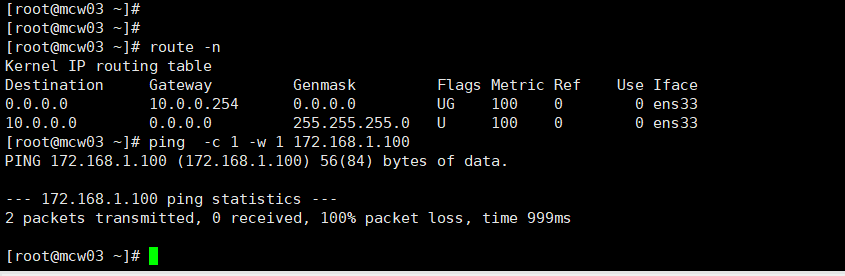
此时客户端上访问VIP,试试,没有通,这是因为没有添加网关
添加网关,是路由器外网网卡,还是不通。
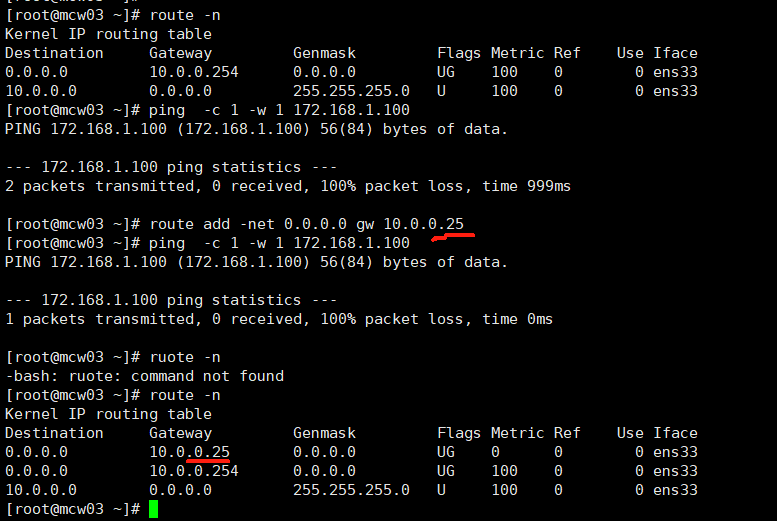
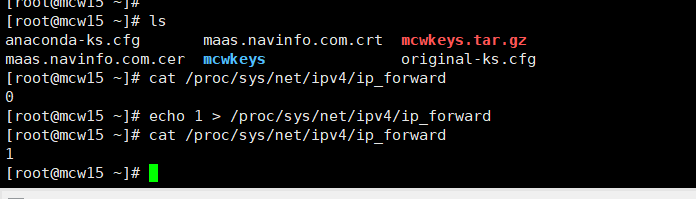
路由器开启ipv4转发
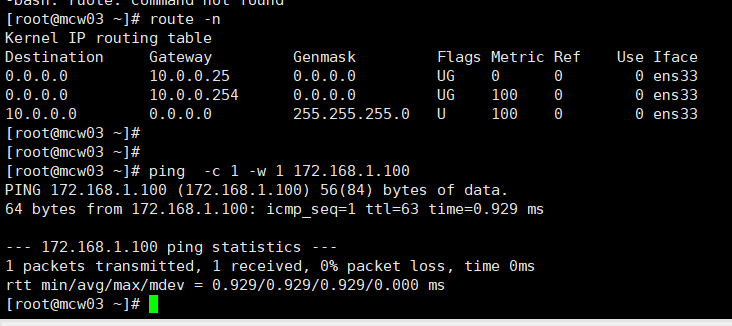
然后就可以ping通VIP了
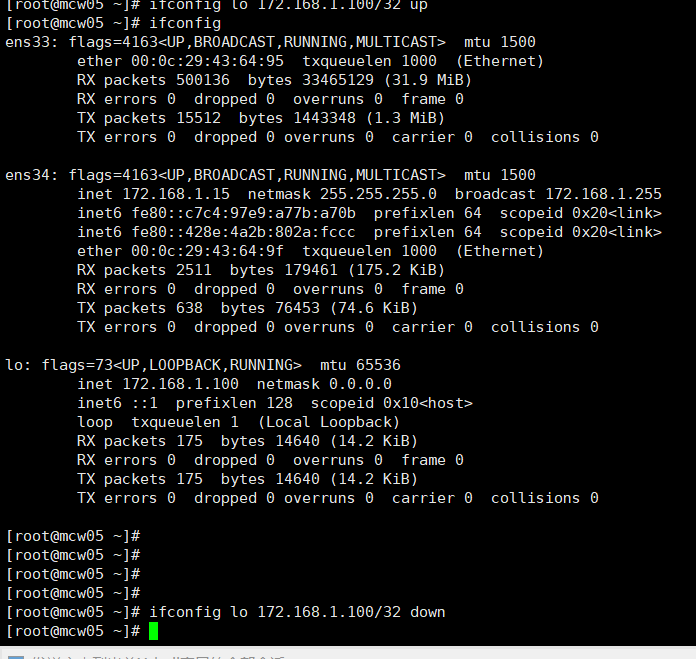
宕掉rs1 mcw05的VIP,此时只有lvs服务器有这个VIP,然后从外网客户端继续ping,可以ping通VIP。因为ping VIP的时候,客户端默认网关是到路由器外网网卡,通过ipvs4内核转发到路由器内网网卡,内网网卡能通lvs内网服务器,到达VIP,返回数据包的时候,因为lvs服务器的默认网关是路由器的内网网卡,路由器又通过内核转发到外网网卡,然后到达外部网络客户端。
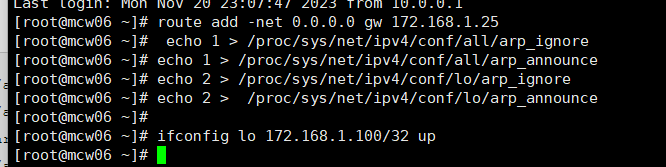
rs2也配置一下VIP
echo 1 > /proc/sys/net/ipv4/conf/all/arp_ignore

echo 1 > /proc/sys/net/ipv4/conf/all/arp_announce

echo 2 > /proc/sys/net/ipv4/conf/lo/arp_ignore

echo 2 >  /proc/sys/net/ipv4/conf/lo/arp_announce

ifconfig lo 172.168.1.100/32 up
ssl报错了

后端服务开启,因为rs2用了https了,所以启停特别慢
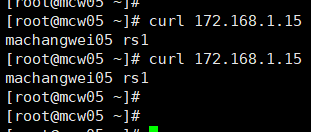
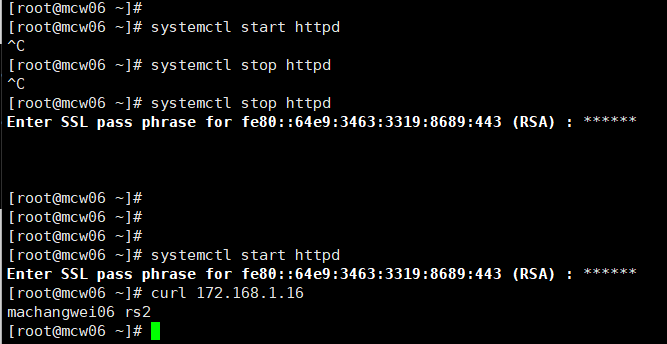
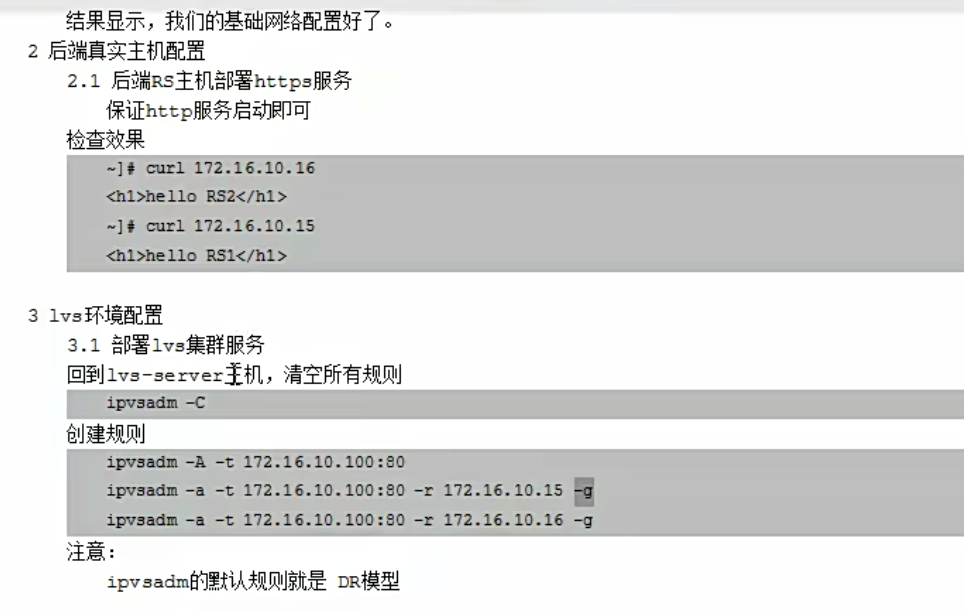
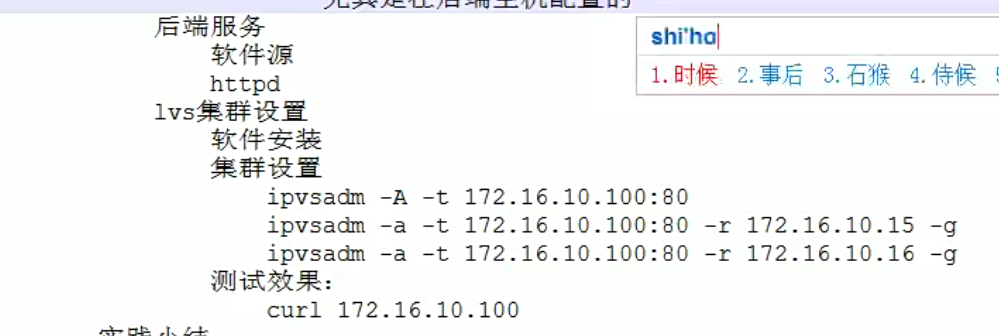
添加lvs集群以及添加后端服务器。使用直接路由的模式
[root@mcw04 ~]# ipvsadm -C

[root@mcw04 ~]# ipvsadm -Ln

IP Virtual Server version 1.2.1 (size=4096)

Prot LocalAddress:Port Scheduler Flags

  -> RemoteAddress:Port           Forward Weight ActiveConn InActConn

[root@mcw04 ~]# ipvsadm -A -t 172.168.1.100:80

[root@mcw04 ~]# ipvsadm -a -t 172.168.1.100:80 -r 172.168.1.15

[root@mcw04 ~]# ipvsadm -a -t 172.168.1.100:80 -r 172.168.1.16

[root@mcw04 ~]# ipvsadm -Ln

IP Virtual Server version 1.2.1 (size=4096)

Prot LocalAddress:Port Scheduler Flags

  -> RemoteAddress:Port           Forward Weight ActiveConn InActConn

TCP  172.168.1.100:80 wlc

  -> 172.168.1.15:80              Route   1      0          0

  -> 172.168.1.16:80              Route   1      0          0

[root@mcw04 ~]#
在客户端访问,可以成功访问到。
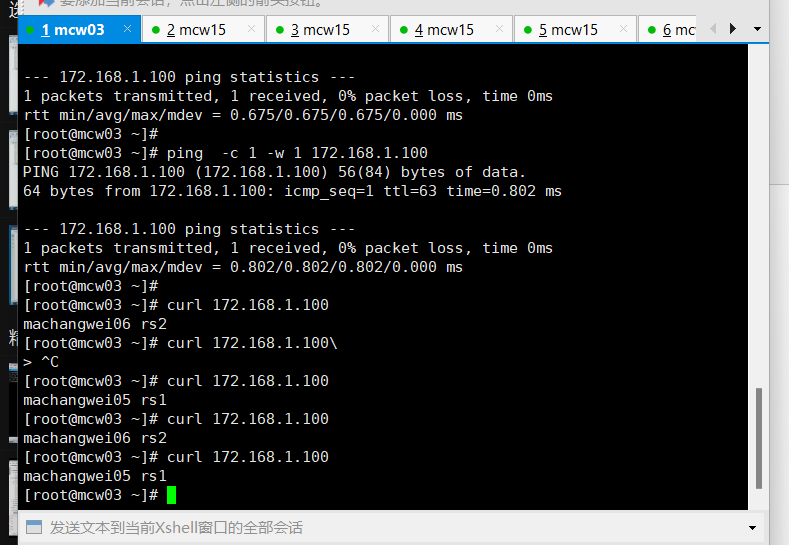
回头测试,把内核配置取消掉,是什么结果,测试了,貌似没有影响,四个内核配置都设置为0.结果还能被调度访问到服务
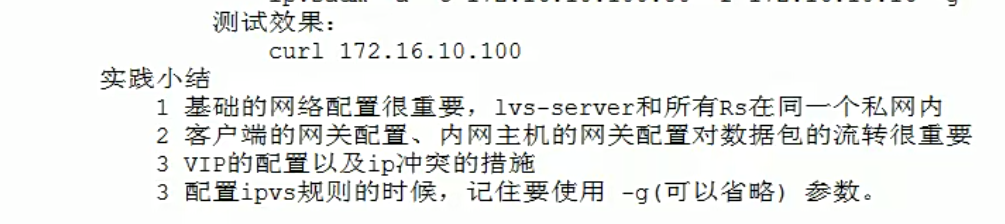
DR模型原理详解

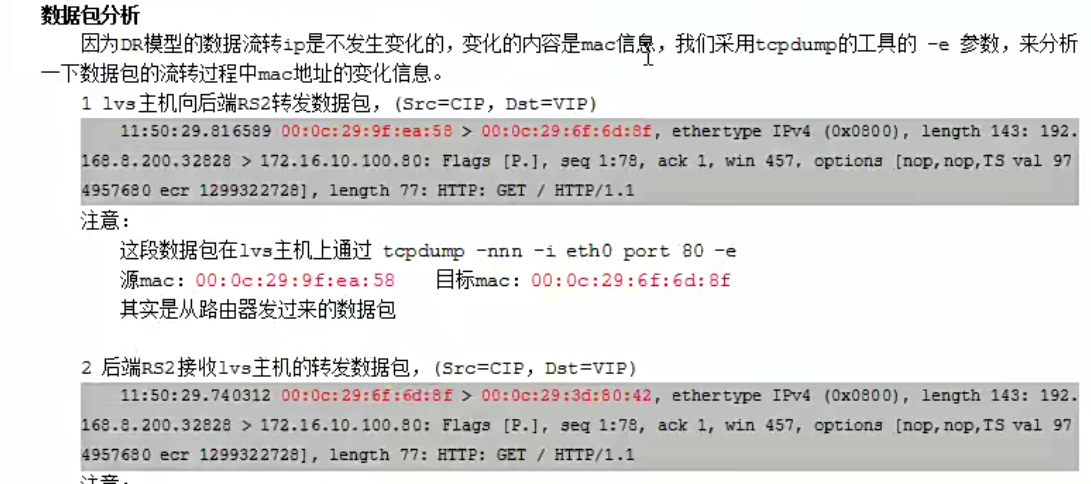

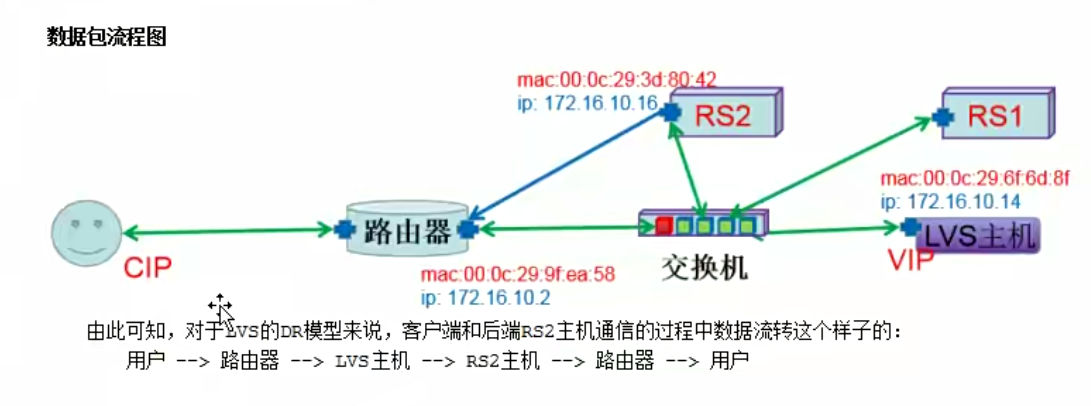
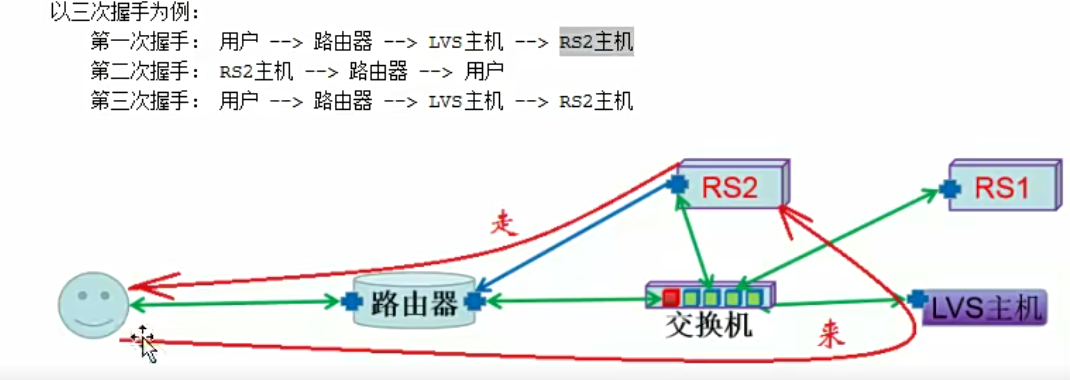
DR模型应用技巧

上面的案例原理解析抓包分析
客户端请求访问到rs1
[root@mcw03 ~]# curl 172.168.1.100
machangwei05 rs1
[root@mcw03 ~]#
路由器外网网卡ens33
[root@mcw15 ~]#

[root@mcw15 ~]# tcpdump -nn -i ens33 port 80 -e

tcpdump: verbose output suppressed, use -v or -vv for full protocol decode

listening on ens33, link-type EN10MB (Ethernet), capture size 262144 bytes

00:06:12.468817 00:0c:29:ae:54:49 > 00:0c:29:aa:cb:e8, ethertype IPv4 (0x0800), length 74: 10.0.0.13.21076 > 172.168.1.100.80: Flags [S], seq 1733961331, win 29200, options [mss 1460,sackOK,TS val 279975180 ecr 0,nop,wscale 9], length 0

00:06:12.469374 00:0c:29:aa:cb:e8 > 00:0c:29:ae:54:49, ethertype IPv4 (0x0800), length 74: 172.168.1.100.80 > 10.0.0.13.21076: Flags [S.], seq 3273677818, ack 1733961332, win 28960, options [mss 1460,sackOK,TS val 279961132 ecr 279975180,nop,wscale 9], length 0

00:06:12.469696 00:0c:29:ae:54:49 > 00:0c:29:aa:cb:e8, ethertype IPv4 (0x0800), length 66: 10.0.0.13.21076 > 172.168.1.100.80: Flags [.], ack 1, win 58, options [nop,nop,TS val 279975181 ecr 279961132], length 0

00:06:12.469727 00:0c:29:ae:54:49 > 00:0c:29:aa:cb:e8, ethertype IPv4 (0x0800), length 143: 10.0.0.13.21076 > 172.168.1.100.80: Flags [P.], seq 1:78, ack 1, win 58, options [nop,nop,TS val 279975181 ecr 279961132], length 77: HTTP: GET / HTTP/1.1

00:06:12.470284 00:0c:29:aa:cb:e8 > 00:0c:29:ae:54:49, ethertype IPv4 (0x0800), length 66: 172.168.1.100.80 > 10.0.0.13.21076: Flags [.], ack 78, win 57, options [nop,nop,TS val 279961132 ecr 279975181], length 0

00:06:12.470891 00:0c:29:aa:cb:e8 > 00:0c:29:ae:54:49, ethertype IPv4 (0x0800), length 325: 172.168.1.100.80 > 10.0.0.13.21076: Flags [P.], seq 1:260, ack 78, win 57, options [nop,nop,TS val 279961133 ecr 279975181], length 259: HTTP: HTTP/1.1 200 OK

00:06:12.471041 00:0c:29:ae:54:49 > 00:0c:29:aa:cb:e8, ethertype IPv4 (0x0800), length 66: 10.0.0.13.21076 > 172.168.1.100.80: Flags [.], ack 260, win 60, options [nop,nop,TS val 279975183 ecr 279961133], length 0

00:06:12.471122 00:0c:29:ae:54:49 > 00:0c:29:aa:cb:e8, ethertype IPv4 (0x0800), length 66: 10.0.0.13.21076 > 172.168.1.100.80: Flags [F.], seq 78, ack 260, win 60, options [nop,nop,TS val 279975183 ecr 279961133], length 0

00:06:12.471587 00:0c:29:aa:cb:e8 > 00:0c:29:ae:54:49, ethertype IPv4 (0x0800), length 66: 172.168.1.100.80 > 10.0.0.13.21076: Flags [F.], seq 260, ack 79, win 57, options [nop,nop,TS val 279961134 ecr 279975183], length 0

00:06:12.471712 00:0c:29:ae:54:49 > 00:0c:29:aa:cb:e8, ethertype IPv4 (0x0800), length 66: 10.0.0.13.21076 > 172.168.1.100.80: Flags [.], ack 261, win 60, options [nop,nop,TS val 279975183 ecr 279961134], length 0
路由器内网网卡ens34
[root@mcw15 ~]# tcpdump -nn -i ens34 port 80 -e

tcpdump: verbose output suppressed, use -v or -vv for full protocol decode

listening on ens34, link-type EN10MB (Ethernet), capture size 262144 bytes

00:06:12.468838 00:0c:29:aa:cb:f2 > 00:0c:29:73:fb:66, ethertype IPv4 (0x0800), length 74: 10.0.0.13.21076 > 172.168.1.100.80: Flags [S], seq 1733961331, win 29200, options [mss 1460,sackOK,TS val 279975180 ecr 0,nop,wscale 9], length 0

00:06:12.469244 00:0c:29:73:fb:66 > 00:0c:29:43:64:9f, ethertype IPv4 (0x0800), length 74: 10.0.0.13.21076 > 172.168.1.100.80: Flags [S], seq 1733961331, win 29200, options [mss 1460,sackOK,TS val 279975180 ecr 0,nop,wscale 9], length 0

00:06:12.469366 00:0c:29:43:64:9f > 00:0c:29:aa:cb:f2, ethertype IPv4 (0x0800), length 74: 172.168.1.100.80 > 10.0.0.13.21076: Flags [S.], seq 3273677818, ack 1733961332, win 28960, options [mss 1460,sackOK,TS val 279961132 ecr 279975180,nop,wscale 9], length 0

00:06:12.469702 00:0c:29:aa:cb:f2 > 00:0c:29:73:fb:66, ethertype IPv4 (0x0800), length 66: 10.0.0.13.21076 > 172.168.1.100.80: Flags [.], ack 1, win 58, options [nop,nop,TS val 279975181 ecr 279961132], length 0

00:06:12.469729 00:0c:29:aa:cb:f2 > 00:0c:29:73:fb:66, ethertype IPv4 (0x0800), length 143: 10.0.0.13.21076 > 172.168.1.100.80: Flags [P.], seq 1:78, ack 1, win 58, options [nop,nop,TS val 279975181 ecr 279961132], length 77: HTTP: GET / HTTP/1.1

00:06:12.469837 00:0c:29:73:fb:66 > 00:0c:29:43:64:9f, ethertype IPv4 (0x0800), length 66: 10.0.0.13.21076 > 172.168.1.100.80: Flags [.], ack 1, win 58, options [nop,nop,TS val 279975181 ecr 279961132], length 0

00:06:12.469839 00:0c:29:73:fb:66 > 00:0c:29:43:64:9f, ethertype IPv4 (0x0800), length 143: 10.0.0.13.21076 > 172.168.1.100.80: Flags [P.], seq 1:78, ack 1, win 58, options [nop,nop,TS val 279975181 ecr 279961132], length 77: HTTP: GET / HTTP/1.1

00:06:12.470275 00:0c:29:43:64:9f > 00:0c:29:aa:cb:f2, ethertype IPv4 (0x0800), length 66: 172.168.1.100.80 > 10.0.0.13.21076: Flags [.], ack 78, win 57, options [nop,nop,TS val 279961132 ecr 279975181], length 0

00:06:12.470883 00:0c:29:43:64:9f > 00:0c:29:aa:cb:f2, ethertype IPv4 (0x0800), length 325: 172.168.1.100.80 > 10.0.0.13.21076: Flags [P.], seq 1:260, ack 78, win 57, options [nop,nop,TS val 279961133 ecr 279975181], length 259: HTTP: HTTP/1.1 200 OK

00:06:12.471046 00:0c:29:aa:cb:f2 > 00:0c:29:73:fb:66, ethertype IPv4 (0x0800), length 66: 10.0.0.13.21076 > 172.168.1.100.80: Flags [.], ack 260, win 60, options [nop,nop,TS val 279975183 ecr 279961133], length 0

00:06:12.471126 00:0c:29:aa:cb:f2 > 00:0c:29:73:fb:66, ethertype IPv4 (0x0800), length 66: 10.0.0.13.21076 > 172.168.1.100.80: Flags [F.], seq 78, ack 260, win 60, options [nop,nop,TS val 279975183 ecr 279961133], length 0

00:06:12.471518 00:0c:29:73:fb:66 > 00:0c:29:43:64:9f, ethertype IPv4 (0x0800), length 66: 10.0.0.13.21076 > 172.168.1.100.80: Flags [.], ack 260, win 60, options [nop,nop,TS val 279975183 ecr 279961133], length 0

00:06:12.471521 00:0c:29:73:fb:66 > 00:0c:29:43:64:9f, ethertype IPv4 (0x0800), length 66: 10.0.0.13.21076 > 172.168.1.100.80: Flags [F.], seq 78, ack 260, win 60, options [nop,nop,TS val 279975183 ecr 279961133], length 0

00:06:12.471582 00:0c:29:43:64:9f > 00:0c:29:aa:cb:f2, ethertype IPv4 (0x0800), length 66: 172.168.1.100.80 > 10.0.0.13.21076: Flags [F.], seq 260, ack 79, win 57, options [nop,nop,TS val 279961134 ecr 279975183], length 0

00:06:12.471716 00:0c:29:aa:cb:f2 > 00:0c:29:73:fb:66, ethertype IPv4 (0x0800), length 66: 10.0.0.13.21076 > 172.168.1.100.80: Flags [.], ack 261, win 60, options [nop,nop,TS val 279975183 ecr 279961134], length 0

00:06:12.471884 00:0c:29:73:fb:66 > 00:0c:29:43:64:9f, ethertype IPv4 (0x0800), length 66: 10.0.0.13.21076 > 172.168.1.100.80: Flags [.], ack 261, win 60, options [nop,nop,TS val 279975183 ecr 279961134], length 0
lvs网卡ens34
[root@mcw04 ~]# tcpdump -nn -i ens34 port 80 -e

tcpdump: verbose output suppressed, use -v or -vv for full protocol decode

listening on ens34, link-type EN10MB (Ethernet), capture size 262144 bytes

00:06:13.879854 00:0c:29:aa:cb:f2 > 00:0c:29:73:fb:66, ethertype IPv4 (0x0800), length 74: 10.0.0.13.21076 > 172.168.1.100.80: Flags [S], seq 1733961331, win 29200, options [mss 1460,sackOK,TS val 279975180 ecr 0,nop,wscale 9], length 0

00:06:13.879890 00:0c:29:73:fb:66 > 00:0c:29:43:64:9f, ethertype IPv4 (0x0800), length 74: 10.0.0.13.21076 > 172.168.1.100.80: Flags [S], seq 1733961331, win 29200, options [mss 1460,sackOK,TS val 279975180 ecr 0,nop,wscale 9], length 0

00:06:13.880193 00:0c:29:43:64:9f > 00:0c:29:aa:cb:f2, ethertype IPv4 (0x0800), length 74: 172.168.1.100.80 > 10.0.0.13.21076: Flags [S.], seq 3273677818, ack 1733961332, win 28960, options [mss 1460,sackOK,TS val 279961132 ecr 279975180,nop,wscale 9], length 0

00:06:13.880541 00:0c:29:aa:cb:f2 > 00:0c:29:73:fb:66, ethertype IPv4 (0x0800), length 66: 10.0.0.13.21076 > 172.168.1.100.80: Flags [.], ack 1, win 58, options [nop,nop,TS val 279975181 ecr 279961132], length 0

00:06:13.880554 00:0c:29:73:fb:66 > 00:0c:29:43:64:9f, ethertype IPv4 (0x0800), length 66: 10.0.0.13.21076 > 172.168.1.100.80: Flags [.], ack 1, win 58, options [nop,nop,TS val 279975181 ecr 279961132], length 0

00:06:13.880587 00:0c:29:aa:cb:f2 > 00:0c:29:73:fb:66, ethertype IPv4 (0x0800), length 143: 10.0.0.13.21076 > 172.168.1.100.80: Flags [P.], seq 1:78, ack 1, win 58, options [nop,nop,TS val 279975181 ecr 279961132], length 77: HTTP: GET / HTTP/1.1

00:06:13.880591 00:0c:29:73:fb:66 > 00:0c:29:43:64:9f, ethertype IPv4 (0x0800), length 143: 10.0.0.13.21076 > 172.168.1.100.80: Flags [P.], seq 1:78, ack 1, win 58, options [nop,nop,TS val 279975181 ecr 279961132], length 77: HTTP: GET / HTTP/1.1

00:06:13.880856 00:0c:29:43:64:9f > 00:0c:29:aa:cb:f2, ethertype IPv4 (0x0800), length 66: 172.168.1.100.80 > 10.0.0.13.21076: Flags [.], ack 78, win 57, options [nop,nop,TS val 279961132 ecr 279975181], length 0

00:06:13.881687 00:0c:29:43:64:9f > 00:0c:29:aa:cb:f2, ethertype IPv4 (0x0800), length 325: 172.168.1.100.80 > 10.0.0.13.21076: Flags [P.], seq 1:260, ack 78, win 57, options [nop,nop,TS val 279961133 ecr 279975181], length 259: HTTP: HTTP/1.1 200 OK

00:06:13.881976 00:0c:29:aa:cb:f2 > 00:0c:29:73:fb:66, ethertype IPv4 (0x0800), length 66: 10.0.0.13.21076 > 172.168.1.100.80: Flags [.], ack 260, win 60, options [nop,nop,TS val 279975183 ecr 279961133], length 0

00:06:13.881989 00:0c:29:73:fb:66 > 00:0c:29:43:64:9f, ethertype IPv4 (0x0800), length 66: 10.0.0.13.21076 > 172.168.1.100.80: Flags [.], ack 260, win 60, options [nop,nop,TS val 279975183 ecr 279961133], length 0

00:06:13.882037 00:0c:29:aa:cb:f2 > 00:0c:29:73:fb:66, ethertype IPv4 (0x0800), length 66: 10.0.0.13.21076 > 172.168.1.100.80: Flags [F.], seq 78, ack 260, win 60, options [nop,nop,TS val 279975183 ecr 279961133], length 0

00:06:13.882042 00:0c:29:73:fb:66 > 00:0c:29:43:64:9f, ethertype IPv4 (0x0800), length 66: 10.0.0.13.21076 > 172.168.1.100.80: Flags [F.], seq 78, ack 260, win 60, options [nop,nop,TS val 279975183 ecr 279961133], length 0

00:06:13.882187 00:0c:29:43:64:9f > 00:0c:29:aa:cb:f2, ethertype IPv4 (0x0800), length 66: 172.168.1.100.80 > 10.0.0.13.21076: Flags [F.], seq 260, ack 79, win 57, options [nop,nop,TS val 279961134 ecr 279975183], length 0

00:06:13.882573 00:0c:29:aa:cb:f2 > 00:0c:29:73:fb:66, ethertype IPv4 (0x0800), length 66: 10.0.0.13.21076 > 172.168.1.100.80: Flags [.], ack 261, win 60, options [nop,nop,TS val 279975183 ecr 279961134], length 0

00:06:13.882582 00:0c:29:73:fb:66 > 00:0c:29:43:64:9f, ethertype IPv4 (0x0800), length 66: 10.0.0.13.21076 > 172.168.1.100.80: Flags [.], ack 261, win 60, options [nop,nop,TS val 279975183 ecr 279961134], length 0
rs1网卡ens34
[root@mcw05 ~]# tcpdump -nnn -i ens34 port 80 -e

tcpdump: verbose output suppressed, use -v or -vv for full protocol decode

listening on ens34, link-type EN10MB (Ethernet), capture size 262144 bytes

00:06:13.875934 00:0c:29:aa:cb:f2 > 00:0c:29:73:fb:66, ethertype IPv4 (0x0800), length 74: 10.0.0.13.21076 > 172.168.1.100.80: Flags [S], seq 1733961331, win 29200, options [mss 1460,sackOK,TS val 279975180 ecr 0,nop,wscale 9], length 0

00:06:13.876087 00:0c:29:73:fb:66 > 00:0c:29:43:64:9f, ethertype IPv4 (0x0800), length 74: 10.0.0.13.21076 > 172.168.1.100.80: Flags [S], seq 1733961331, win 29200, options [mss 1460,sackOK,TS val 279975180 ecr 0,nop,wscale 9], length 0

00:06:13.876112 00:0c:29:43:64:9f > 00:0c:29:aa:cb:f2, ethertype IPv4 (0x0800), length 74: 172.168.1.100.80 > 10.0.0.13.21076: Flags [S.], seq 3273677818, ack 1733961332, win 28960, options [mss 1460,sackOK,TS val 279961132 ecr 279975180,nop,wscale 9], length 0

00:06:13.876684 00:0c:29:aa:cb:f2 > 00:0c:29:73:fb:66, ethertype IPv4 (0x0800), length 66: 10.0.0.13.21076 > 172.168.1.100.80: Flags [.], ack 1, win 58, options [nop,nop,TS val 279975181 ecr 279961132], length 0

00:06:13.876689 00:0c:29:aa:cb:f2 > 00:0c:29:73:fb:66, ethertype IPv4 (0x0800), length 143: 10.0.0.13.21076 > 172.168.1.100.80: Flags [P.], seq 1:78, ack 1, win 58, options [nop,nop,TS val 279975181 ecr 279961132], length 77: HTTP: GET / HTTP/1.1

00:06:13.876797 00:0c:29:73:fb:66 > 00:0c:29:43:64:9f, ethertype IPv4 (0x0800), length 66: 10.0.0.13.21076 > 172.168.1.100.80: Flags [.], ack 1, win 58, options [nop,nop,TS val 279975181 ecr 279961132], length 0

00:06:13.876806 00:0c:29:73:fb:66 > 00:0c:29:43:64:9f, ethertype IPv4 (0x0800), length 143: 10.0.0.13.21076 > 172.168.1.100.80: Flags [P.], seq 1:78, ack 1, win 58, options [nop,nop,TS val 279975181 ecr 279961132], length 77: HTTP: GET / HTTP/1.1

00:06:13.876835 00:0c:29:43:64:9f > 00:0c:29:aa:cb:f2, ethertype IPv4 (0x0800), length 66: 172.168.1.100.80 > 10.0.0.13.21076: Flags [.], ack 78, win 57, options [nop,nop,TS val 279961132 ecr 279975181], length 0

00:06:13.877662 00:0c:29:43:64:9f > 00:0c:29:aa:cb:f2, ethertype IPv4 (0x0800), length 325: 172.168.1.100.80 > 10.0.0.13.21076: Flags [P.], seq 1:260, ack 78, win 57, options [nop,nop,TS val 279961133 ecr 279975181], length 259: HTTP: HTTP/1.1 200 OK

00:06:13.877983 00:0c:29:aa:cb:f2 > 00:0c:29:73:fb:66, ethertype IPv4 (0x0800), length 66: 10.0.0.13.21076 > 172.168.1.100.80: Flags [.], ack 260, win 60, options [nop,nop,TS val 279975183 ecr 279961133], length 0

00:06:13.878043 00:0c:29:aa:cb:f2 > 00:0c:29:73:fb:66, ethertype IPv4 (0x0800), length 66: 10.0.0.13.21076 > 172.168.1.100.80: Flags [F.], seq 78, ack 260, win 60, options [nop,nop,TS val 279975183 ecr 279961133], length 0

00:06:13.878135 00:0c:29:73:fb:66 > 00:0c:29:43:64:9f, ethertype IPv4 (0x0800), length 66: 10.0.0.13.21076 > 172.168.1.100.80: Flags [.], ack 260, win 60, options [nop,nop,TS val 279975183 ecr 279961133], length 0

00:06:13.878213 00:0c:29:73:fb:66 > 00:0c:29:43:64:9f, ethertype IPv4 (0x0800), length 66: 10.0.0.13.21076 > 172.168.1.100.80: Flags [F.], seq 78, ack 260, win 60, options [nop,nop,TS val 279975183 ecr 279961133], length 0

00:06:13.878241 00:0c:29:43:64:9f > 00:0c:29:aa:cb:f2, ethertype IPv4 (0x0800), length 66: 172.168.1.100.80 > 10.0.0.13.21076: Flags [F.], seq 260, ack 79, win 57, options [nop,nop,TS val 279961134 ecr 279975183], length 0

00:06:13.878647 00:0c:29:aa:cb:f2 > 00:0c:29:73:fb:66, ethertype IPv4 (0x0800), length 66: 10.0.0.13.21076 > 172.168.1.100.80: Flags [.], ack 261, win 60, options [nop,nop,TS val 279975183 ecr 279961134], length 0

00:06:13.878750 00:0c:29:73:fb:66 > 00:0c:29:43:64:9f, ethertype IPv4 (0x0800), length 66: 10.0.0.13.21076 > 172.168.1.100.80: Flags [.], ack 261, win 60, options [nop,nop,TS val 279975183 ecr 279961134], length 0
如下,命令行添加的VIP,当重启网络之后,就会消失,会失效,


lvs之DR模式的实操演练的更多相关文章
- 第十章 Fisco Bcos 权限控制下的数据上链实操演练
一.目的 前面已经完成fisco bcos 相关底层搭建.sdk使用.控制台.webase中间件平台等系列实战开发, 本次进行最后一个部分,体系化管理区块链底层,建立有序的底层控管制度,实现权限化管理 ...
- ABP入门系列(1)——学习Abp框架之实操演练
作为.Net工地搬砖长工一名,一直致力于挖坑(Bug)填坑(Debug),但技术却不见长进.也曾热情于新技术的学习,憧憬过成为技术大拿.从前端到后端,从bootstrap到javascript,从py ...
- LVS:DR模式(Direct Routing)部署实验
本文介绍怎样在kvm的虚拟环境下,部署实验LVS的DR模式.包含网络结构图,怎样配置.以及使用tcpdump分析ip包. 网络结构图 kvm ...
- ASP.NET Core托管和部署Linux实操演练手册
一.课程介绍 ASP.NET Core 是一种全新的跨平台开源 .NET 框架,能够在 IIS.Nginx.Apache.Docker 上进行托管或在自己的进程中进行自托管. 作为一个.NET Web ...
- LVS的DR模式
DR模式: 请求由LVS接受,由真实提供服务的服务器(RealServer, RS)直接返回给用户,返回的时候不经过LVS. DR模式下需要LVS和绑定同一个VIP(RS通过将VIP绑定在loopba ...
- LVS的DR模式负载均衡
参考项目:http://www.cnblogs.com/along21/p/7833261.html#auto_id_3 LVS的DR模式实现负载均衡 1.环境 lvs-server :192.168 ...
- Lvs Keepalive DR模式高可用配置
Lvs Keepalive DR模式配置 一.环境 #DIP# eth0:192.168.233.145#VIP# eth0:0 192.168.233.250/32 #RIP1:192.168.23 ...
- lvs中dr模式配置脚本
1 dr模式介绍 1.1 lvs的安装 安装具体解释:http://blog.csdn.net/CleverCode/article/details/50586957. 1.2 lvs模式 lvs有三 ...
- lvs部署-DR模式
DR模式 角色 IP地址 备注 LVS负载均衡器 192.168.119.132 VIP:192.168.119.150 ipvsadm http_Real server 192.168.119 ...
- CentOS6.4 配置LVS(DR模式)
DR模式中LVS主机与实际服务器都有一块网卡连在同一物理网段上. IP分配 VIP:10.10.3.170 RIP1:10.10.3.140 RIP2:10.10.3.141 1.安装所需的依赖包 y ...
随机推荐
- 体验Semantic Kernel图片内容识别
前言 前几日在浏览devblogs.microsoft.com的时候,看到了一篇名为Image to Text with Semantic Kernel and HuggingFace的文章.这篇文章 ...
- 内容分发策略与 SEO 优化指南
内容分发 内容分发是指通过各种媒介分享.发布或传播内容给受众的过程.这些媒介可以包括不同的渠道,例如社交媒体平台(Facebook.Twitter.LinkedIn.朋友圈.微博.小红书.B 站.抖音 ...
- Git安装和配置教程:Windows/Mac/Linux三平台详细图文教程,带你一次性搞定Git环境
Git是一款免费.开源的分布式版本控制系统,广泛应用于软件开发领域.随着开源和云计算的发展,Git已经成为了开发者必备的工具之一.本文将为大家介绍Git在Windows.Mac和Linux三个平台上的 ...
- C# 面试问答
引用:https://www.cnblogs.com/zh7791/p/13705434.html 1.什么是 COM? COM 代表组件对象模型.COM 是微软技术之一.使用这项技术,我们可以开 ...
- Response下载文件
Response下载文件的主要步骤有七个: 1.要获取下载文件的路径 String realPath = "F:\\JavaWeb\\WorkSpace\\JavaWeb-Servlet\\ ...
- 抓包整理————tcp 三次握手[九]
前言 简单抓包一下3次握手. 正文 握手的目标: 同步sequence 序列化 初始化序列化ISN(Initial Sequence Number) 交换tcp 通信参数 如MSS.窗口比例因子.选择 ...
- 深入分析C++对象模型之移动构造函数
接下来我将持续更新"深度解读<深度探索C++对象模型>"系列,敬请期待,欢迎关注!也可以关注公众号:iShare爱分享,自动获得推文和全部的文章列表. C++11新标准 ...
- 力扣619(MySQL)-只出现一次的最大数字(简单)
题目: MyNumbers 表: 单一数字 是在 MyNumbers 表中只出现一次的数字. 请你编写一个 SQL 查询来报告最大的 单一数字 .如果不存在 单一数字 ,查询需报告 null . 查询 ...
- CSS选择器练习--餐厅选择
1.题目:Select the plates 答案:plate 1 <div class="table"> 2 <plate></plate> ...
- POJ4151:电影节
4151:电影节 总时间限制: 1000ms 内存限制: 65536kB 描述 大学生电影节在北大举办! 这天,在北大各地放了多部电影,给定每部电影的放映时间区间,区间重叠的电影不可能同时看(端点 ...