
富文本编辑器-Ueditor传值
前两天研究了一下富文本编辑器Ueditor的使用和配置,并且我们已经可以正常的在页面上编辑内容到富文本编辑器中,那么我们如何将输入的内容传到数据库中呢 ? Listen carefully.
首先介绍一下环境配置:
JDK-9.0.1
MySql的数据库
Tomcat 8.0
Eclipse
包结构
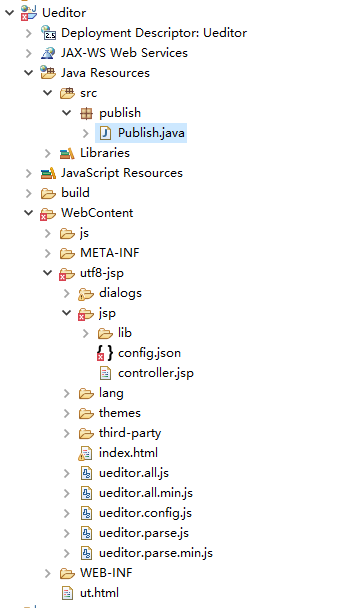
在前几天的基础上,我们要对Ueditor的配置按照如下修改
UEditor的配置:

    在Eclipse中新建一个Web项目,将utf8-jsp复制到项目的WebContent(或WebRoot)下面;

    将utf8-jsp/jsp/lib下的所有jar包复制到WebContent/WEB-INF/lib中

    修改utf8-jsp/jsp/config.json文件,配置如下:

        "imageUrlPrefix": "/Ueditor", /* 图片访问路径前缀  一般使用:/项目名称 */

        "imagePathFormat": "/image/{yyyy}{mm}{dd}/{time}{rand:6}", /* 上传保存路径,可以自定义保存路径和文件名格式 */

    修改utf8-jsp/ueditor.config.js文件,配置如下:

        最开始添加一行命令:window.UEDITOR_HOME_URL = "/Ueditor/utf8-jsp/";

        通过配置toolbars属性来设置用户可以使用的功能。

BUG修改:(1)修改utf8-jsp/ueditor.config.js中第285行左右(scaleEnabled的默认值无效):

	,scaleEnabled:true//开启scaleEnabled,自动长高失效以固定编辑器的高度,当编辑内容超过时,会自动出现滚动条。
接着我们在数据库中创建一个news的表
CREATE TABLE `news` (

  `id` INT(11) NOT NULL AUTO_INCREMENT,

  `title` VARCHAR(255) DEFAULT NULL,

  `content` TEXT,

  `publishtime` DATETIME DEFAULT NULL,

  PRIMARY KEY  (`id`)

) ENGINE=INNODB DEFAULT CHARSET=utf8;
然后我们在WebContent下创建ut.html
<!DOCTYPE html>

<html>

<head>

<meta charset="UTF-8">

<title>新闻发布</title>

<style type="text/css">

.left {

	float: left;

}

.wd10 {

	width: 10%;

}

.wd90 {

	width: 90%;

}

.he40 {

	height: 40px;

	line-height: 40px;

}

.he500 {

	height: 500px;

}

</style>

<script type="text/javascript" charset="utf-8"

	src="utf8-jsp/ueditor.config.js"></script>

<script type="text/javascript" charset="utf-8"

	src="utf8-jsp/ueditor.all.min.js">

</script>

<script type="text/javascript" charset="utf-8"

	src="utf8-jsp/lang/zh-cn/zh-cn.js"></script>

<script type="text/javascript" charset="utf-8" src="js/jquery-2.0.2.js"></script>

</head>

<body>

	<div class="he40"

		style="background: blue; color: white; margin-bottom: 20px;">发布新闻</div>

	<div>

		<div class="left wd10 he40">新闻标题:</div>

		<div class="left wd90 he40">

			<input type="text" id="title" value=""

				style="width: 800px; height: 35px;" />

		</div>

	</div>

	<div>

		<div class="left wd10 he500">新闻内容:</div>

		<div class="left wd90 he500">

			<script type="text/plain" id="content"

				style="width: 800px; height: 350px;"></script>

		</div>

	</div>

	<br>

	<br>

	<br>

	<br>

	<div style="margin-top: 100px;">

		<div class="left he40" style="width: 100%; text-align: center;">

			<input type="button" id="tjbtn" value="提交"

				style="width: 80px; height: 35px;" />

		</div>

	</div>

</body>

<script type="text/javascript">

	var ue = UE.getEditor('content');

	$('#tjbtn').click(

			function() {

				$.ajax({

					url : "Publish",

					type : 'post',

					data : "title=" + $('#title').val() + "&content="

							+ encodeURIComponent(ue.getContent()),

					dataType : "html",

					success : function(re) {

						$('#title').val('');

						ue.execCommand('cleardoc');

						alert(re);

					}

				});

			});

</script>

</html>
上述代码中,我们在html页面上引入了Ueditor,我们在js代码块中,对提交(tjbtn)按钮进行了ajax异步请求处理。
其次我们在src目录中创建一个Servlet文件,名为:Publish 基于publish包下
Publish.java
package publish;

import java.io.IOException;

import java.io.PrintWriter;

import java.sql.Connection;

import java.sql.DriverManager;

import java.sql.Statement;

import javax.servlet.ServletException;

import javax.servlet.annotation.WebServlet;

import javax.servlet.http.HttpServlet;

import javax.servlet.http.HttpServletRequest;

import javax.servlet.http.HttpServletResponse;

@WebServlet("/Publish")

public class Publish extends HttpServlet {

	private static final long serialVersionUID = 1L;

	private static final String driver="com.mysql.jdbc.Driver";

	private static final String url="jdbc:mysql://localhost:3306/mybatis";

	private static final String user="root";

	private static final String password="root";

    /**

     * @see HttpServlet#HttpServlet()

     */

    public Publish() {

        super();

        // TODO Auto-generated constructor stub

    }

	/**

	 * @see HttpServlet#doGet(HttpServletRequest request, HttpServletResponse response)

	 */

	protected void doGet(HttpServletRequest request, HttpServletResponse response) throws ServletException, IOException {

		request.setCharacterEncoding("utf-8");

		String title=request.getParameter("title").trim();

		String content=request.getParameter("content").trim();

		System.out.println("title:"+title+"\ncontent:"+content);

		String restr="";

		Connection con;

		try{

			Class.forName(driver);

			con=DriverManager.getConnection(url,user,password);

			Statement st=con.createStatement();

			String sql="INSERT INTO news SET title='"+title+"',content='"+content+"',publishtime=NOW();";

			System.out.println(sql);

			st.executeUpdate(sql);

			restr="上传成功";

			st.close();

			con.close();

		}catch(Exception e){

			e.printStackTrace();

			restr="上传失败";

		}

		response.setContentType("text/html;charset=UTF-8;");

		PrintWriter out=response.getWriter();

		out.print(restr);

		out.flush();

		out.close();

	}

	/**

	 * @see HttpServlet#doPost(HttpServletRequest request, HttpServletResponse response)

	 */

	protected void doPost(HttpServletRequest request, HttpServletResponse response) throws ServletException, IOException {

		doGet(request, response);

	}

}
在上述代码中,我们先连接了数据库,然后在Get请求中,我们用request.getParameter方法获取了从页面传过来的Title和Content的值。然后用sql的插入语句将这两个值传入到数据库中,最后关闭数据库连接。
运行效果:
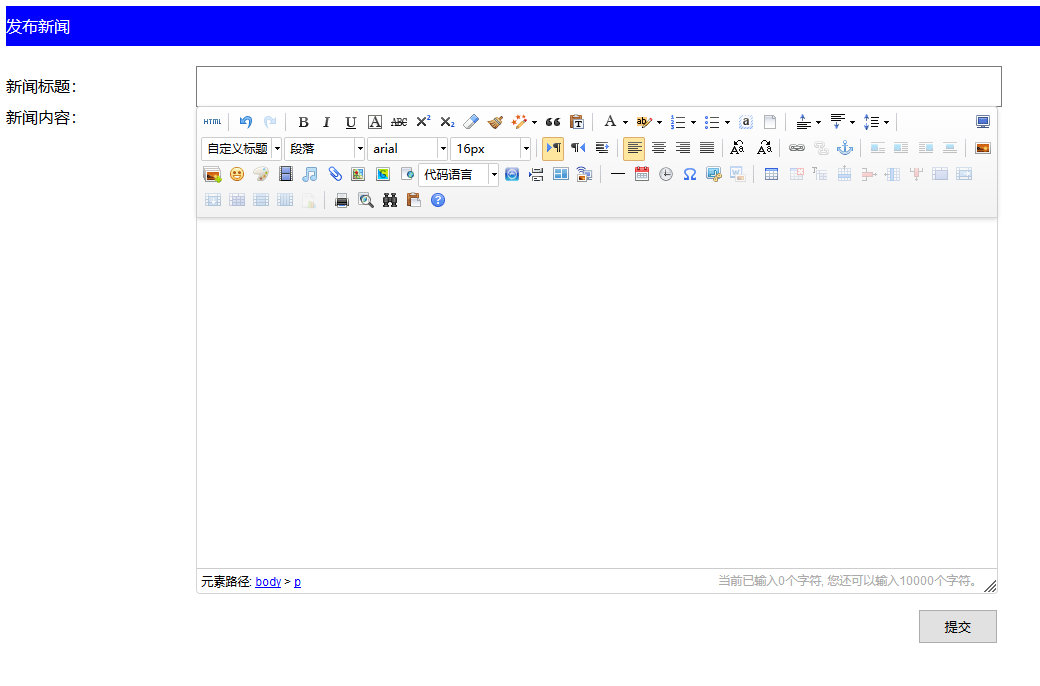
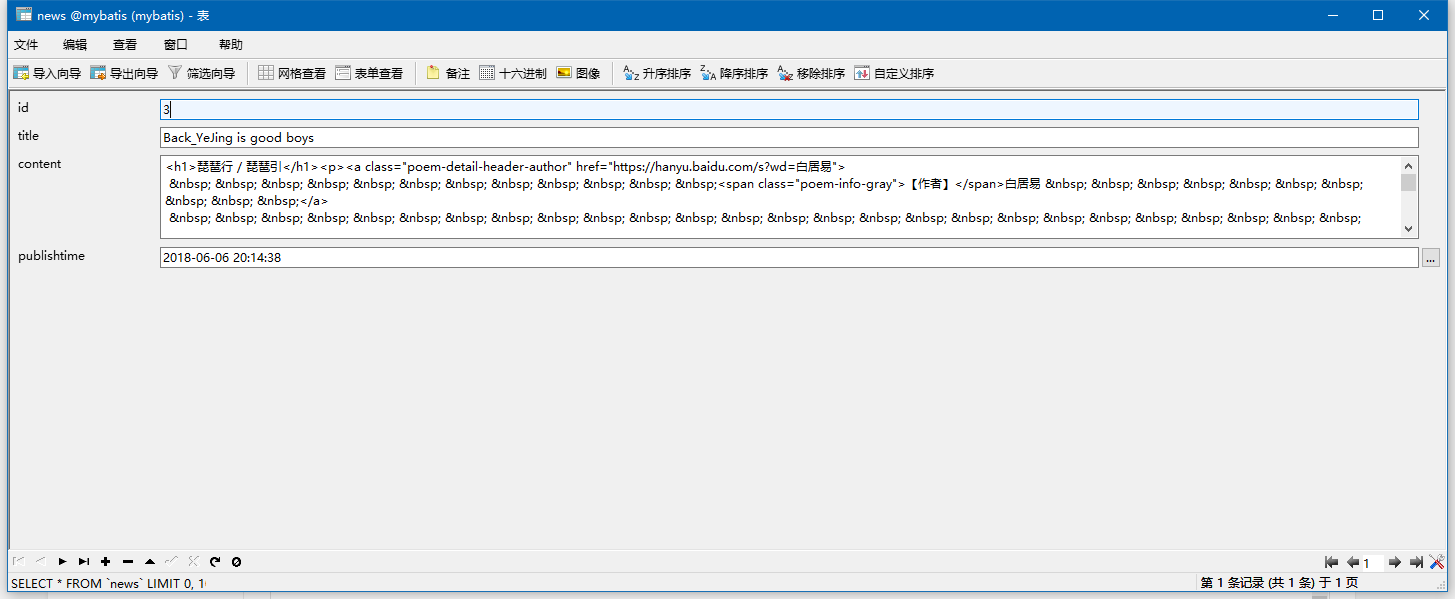
我们在新闻标题里写上:Back_YeJing is good boys,在新闻内容里面写上"琵琶行",然后点击提交。这时候会弹出提交成功的警告框。然后我们去数据库中查看
总结
从数据库中的只来看,我们在Ueditor中传值这个功能是成功的,但是在Content中的内容会加入一些html的tag。这是因为Ueditor可以自动将你插入的文字转换成html代码,所以当content里面的内容传入到数据库中时,这些tag也会随之传入数据库中。
富文本编辑器-Ueditor传值的更多相关文章
- 百度Web富文本编辑器ueditor在ASP.NET MVC3项目中的使用说明
====================================================================== [百度Web富文本编辑器ueditor在ASP.NET M ...
- 百度富文本编辑器UEditor安装配置全过程
网站开发时富文本编辑器是必不可少的,他可以让用户自行编辑内容的样式然后上传到后台!下面我们来介绍如何安装使用百度富文本编辑器 一.下载并且设置百度富文本编辑器的样式 你可以去百度UEditor ...
- 百度富文本编辑器ueditor使用总结
最近做的项目用到了ueditor这个东东,但是他的一些配置文档对初次使用者来说很难以理解,故作此总结 相关详细操作链接地址: http://blog.csdn.net/wusuopubupt/arti ...
- 富文本编辑器UEditor自定义工具栏(二、插入图片、音频、视频个性化功能按钮和弹层及自定义分页符)
导读:本篇将简单探讨插入图片.音频.视频的功能按钮实现方式 传送门:富文本编辑器UEditor自定义工具栏(一.基础配置与字体.背景色.行间距.超链接实现) 一.效果图 1.UEditor自定义工具栏 ...
- 富文本编辑器UEditor自定义工具栏(三、自定义工具栏功能按钮图标及工具栏样式简单修改)
导读 富文本编辑器UEditor提供丰富了定制配置项,如果想设置个性化的工具栏按钮图标有无办法呢?答案是肯定的!前两篇博文简要介绍了通过将原工具栏隐藏,在自定义的外部按钮上,调用UEditor各命令实 ...
- vue+富文本编辑器UEditor
vue+富文本编辑器UEditor 昨天的需求是把textarea换成富文本编辑器的形式, 网上找了几种富文本编辑器ueditor.tinymce等, 觉得ueditor实现双向绑定还挺有意思, 分享 ...
- 关于富文本编辑器ueditor(jsp版)上传文件到阿里云OSS的简单实例,适合新手
关于富文本编辑器ueditor(jsp版)上传文件到阿里云OSS的简单实例,适合新手 本人菜鸟一枚,最近公司有需求要用到富文本编辑器,我选择的是百度的ueditor富文本编辑器,闲话不多说,进入正 ...
- 富文本编辑器Ueditor 及 hibernate 逆向工程
1.1 富文本编辑器Ueditor ueditor下载地址: http://ueditor.baidu.com/ 下载1.4.3 –utf8-Jsp版本.完整demo可参考下载文件 ...
- 百度富文本编辑器ueditor使用启示
百度富文本编辑器ueditor使用启示 一.总结 一句话总结:使用工具,多去看官方demo,非常详细. 二.百度富文本编辑器ueditor使用启示 官方完整demo 官方完整demo对应的源代码 &l ...
随机推荐
- 同样的WiFi,手机能连上网,电脑不能。错误代码DNS_PROBE_POSSIBLE
今天电脑不知打为撒,出了这样个毛病,原因不明.先试着用电脑管家修复,无效.找了网上的很多办法,排除了dns.ip之类的问题.最后在贴吧里看到大神的解决办法,实测简单有效.链接http://tieba. ...
- stingstream 类
使用完后在使用必须要clear():
- 安装了Node.js 从VScode 使用node -v 和 npm -v等命令却无效
前言 最近写TypeScript需要安装.配置Node.js环境,楼主是使用的安装包所以环境变量都是自动就配好了(如果是下载的zip压缩包解压后要自己配置到系统环境变量中).打开系统终端敲入命令 no ...
- Ubuntu下qt5使用vlc
一:Ubuntu下在线安装qt5,同时安装了qt creator 二:打开终端执行sudo apt-get install libvlc5 libvlc-dev libvlccore-dev 安装 ...
- CentOS7 yum install elasticsearch
首先安装 JDK 环境 # 本机是否已经安装,ElasticSearch 最低支持 jdk 1.7 yum list installed | grep java # 查看 yum 库中的 java 安 ...
- linux目录简介说明
- css常见小问题(自己遇到的)
禁止div点击 //css属性: pointer-events: none; //或者定义属性,在js中添加: $(".原类名").addClass("新类名" ...
- Mac下WebStorm直接运行ReactNative项目
1.首先点击WebStorm右上方的下拉箭头弹出的Edit Configurations…. 2.然后会进入一个配置页面.点击左上方的+.在弹出的列表中选中npm. 3.在右边的配置框中,先选择Com ...
- 代码实现:键盘录入一个int类型的整数,对其求二进制表现形式
package com.loaderman.test; import java.math.BigDecimal; import java.math.BigInteger; import java.ut ...
- ConstraintLayout的简单介绍和使用
ConstraintLayout是Android Studio 2.2中主要的新增功能之一,也是Google在去年的I/O大会上重点宣传的一个功能.我们都知道,在传统的Android开发当中,界面基本 ...