
SpringCloud介绍及入门(二)
接口的实现
在user_service_interface中添加一个User的类。 增加私有属性 id,name , 并利用快捷键Alt+Insert 实现get,set的快速生成。
实体类User
要注意要有一个无参的构造函数,否则消费者调用的时候会报错
package com.project.microservice.domain;

public class User {

    private Long Id;

    private String Name;

    public Long getId() {

        return Id;

    }

    public void setId(Long id) {

        Id = id;

    }

    public String getName() {

        return Name;

    }

    public void setName(String name) {

        Name = name;

    }

    public User(Long id, String name) {

        Id = id;

        Name = name;

    }

    public User(){

    }

    @Override

    public String toString() {

        return "User{" +

                "Id=" + Id +

                ", Name='" + Name + '\'' +

                '}';

    }

}
接口定义
package com.project.microservice.service;

import com.project.microservice.domain.User;

public interface IUserService {

    User getUserInfo(Long id,String name);

}
SANPSHOP是什么
一个快照版本。这样可以不用频繁更新。
在Maven依赖管理中,唯一标识一个依赖项是由该依赖项的三个属性构成的,分别是groupId、artifactId以及version。这三个属性可以唯一确定一个组件(Jar包或者War包)
一个仓库一般分为public(Release)仓和SNAPSHOT仓,前者存放正式版本,后者存放快照版本。如果在项目配置文件中(无论是build.gradle还是pom.xml)指定的版本号带有’-SNAPSHOT’后缀,比如版本号为’Junit-4.10-SNAPSHOT’,那么打出的包就是一个快照版本。
参考:https://www.cnblogs.com/huang0925/p/5169624.html
User_service_provider_8001生产者的实现。
思路:该项目主要是提供服务,然后在Eureka注册中心中去注册,业务逻辑主要是主要是实现接口层的方法 。做为eureserver的客户端,导入client的包,导入接口的包。
provider中pom.xml的主要配置
<dependency>

            <groupId>org.springframework.boot</groupId>

            <artifactId>spring-boot-starter-web</artifactId>

        </dependency>

        <dependency>

            <groupId>org.springframework.boot</groupId>

            <artifactId>spring-boot-starter-test</artifactId>

            <scope>test</scope>

        </dependency>

        <dependency>

            <groupId>org.springframework.cloud</groupId>

            <artifactId>spring-cloud-starter-netflix-eureka-client</artifactId>

</dependency>
provider中的启动类
import org.springframework.boot.SpringApplication;

import org.springframework.boot.autoconfigure.SpringBootApplication;

import org.springframework.cloud.netflix.eureka.EnableEurekaClient;

@SpringBootApplication

@EnableEurekaClient

public class UserProviderApplication {

    public static void main(String[] args) {

        SpringApplication.run(UserProviderApplication.class,args);

    }

}
yml的配置
server:

  port: 8001

spring:

  application:

    name: microservice-provider-user

eureka:

  register-with-eureka: true #

  fetch-registry: true #

  client:

    service-url:

      defaultZone: http://127.0.0.1:7001/eureka/

  instance:

    prefer-ip-address: true
实现接口
import com.project.microservice.domain.User;

import org.springframework.web.bind.annotation.PathVariable;

import org.springframework.web.bind.annotation.RequestMapping;

import org.springframework.web.bind.annotation.RestController;

@RestController

@RequestMapping("/provider")

public class UserController {

    @RequestMapping("/user/{id}")

    public User getUserInfo(@PathVariable(value = "id")Long id, String name) {

        return new User(id,name);

    }

}
注意
register-with-eureka: true #

  fetch-registry: true #
这两项配置在服务中心中要设置为false,表示不发现自身服务,但是在客户端,一定要设置为true,否则发现不了。
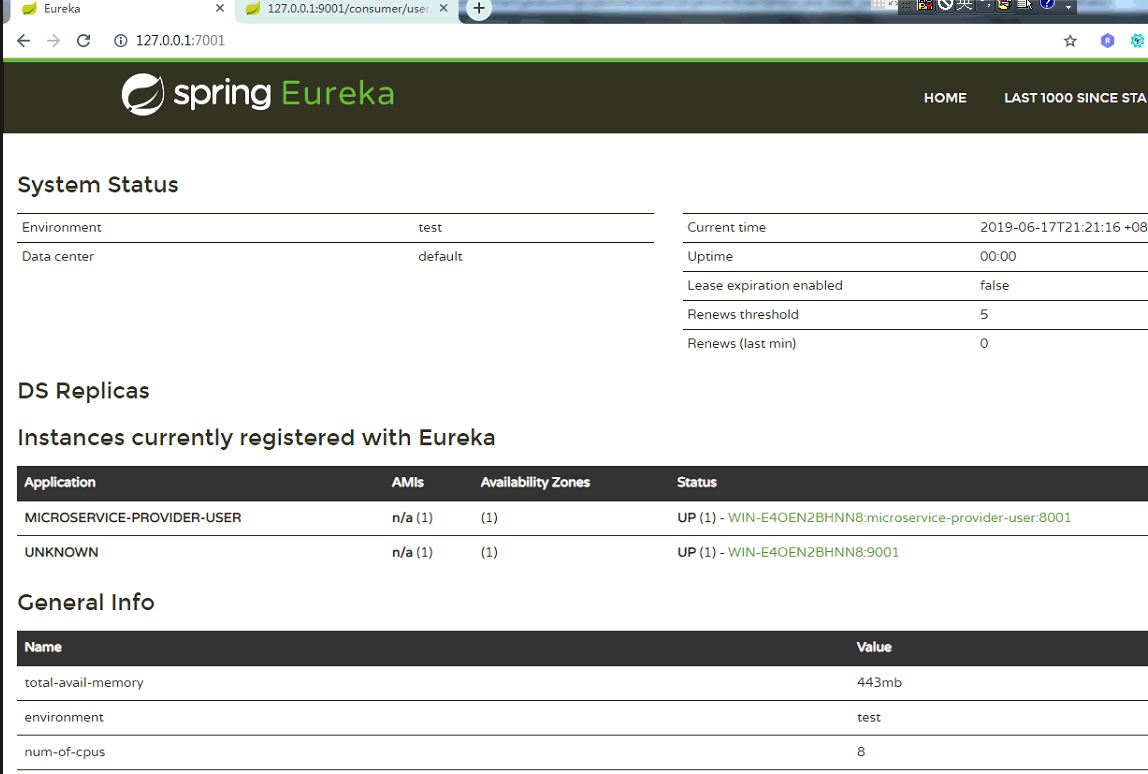
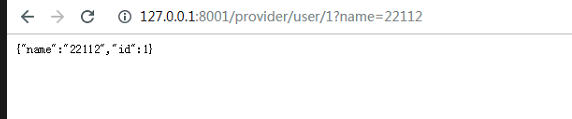
测试生产者调用结果:
注册中心会自动显示出生产者
生产者直接调用结果
消费者代码的实现
消费者项目pom.xml中引用接口和相应的依赖,web,test,cloud
<?xml version="1.0" encoding="UTF-8"?>

<project xmlns="http://maven.apache.org/POM/4.0.0"

         xmlns:xsi="http://www.w3.org/2001/XMLSchema-instance"

         xsi:schemaLocation="http://maven.apache.org/POM/4.0.0 http://maven.apache.org/xsd/maven-4.0.0.xsd">

    <parent>

        <artifactId>microservice_paent</artifactId>

        <groupId>com.project</groupId>

        <version>1.0-SNAPSHOT</version>

    </parent>

    <modelVersion>4.0.0</modelVersion>

    <artifactId>User_service_consume_9001</artifactId>

    <dependencies>

        <dependency>

            <groupId>com.project</groupId>

            <artifactId>User_service_interface</artifactId>

            <version>1.0-SNAPSHOT</version>

        </dependency>

        <dependency>

            <groupId>org.springframework.boot</groupId>

            <artifactId>spring-boot-starter-web</artifactId>

        </dependency>

        <dependency>

            <groupId>org.springframework.boot</groupId>

            <artifactId>spring-boot-starter-test</artifactId>

            <scope>test</scope>

        </dependency>

        <dependency>

            <groupId>org.springframework.cloud</groupId>

            <artifactId>spring-cloud-starter-netflix-eureka-client</artifactId>

        </dependency>

    </dependencies>

</project>
Resource的yml中进行相应的配置
server:

  port: 9001

eureka:

  register-with-eureka: false #

  fetch-registry: false #

  client:

    service-url:

      defaultZone: http://127.0.0.1:7001/eureka/

  instance:

    prefer-ip-address: true
消费者启动类的配置
引用SpringBootApplication和EnableEurekaClient两个注解。
package com.project;

import org.springframework.boot.SpringApplication;

import org.springframework.boot.autoconfigure.SpringBootApplication;

import org.springframework.cloud.netflix.eureka.EnableEurekaClient;

@SpringBootApplication

@EnableEurekaClient

public class UserConsumeApplication {

    public static void main(String[] args) {

        SpringApplication.run(UserConsumeApplication.class,args);

    }

}
创建webcontroller实现调用生产者的代码
要注意不能直接用生产者的ip地址,因为生产才在注册中心注册以后,会变,用ip找不到。
package com.project.web.controller;

import com.project.microservice.domain.User;

import org.springframework.beans.factory.annotation.Autowired;

import org.springframework.cloud.client.loadbalancer.LoadBalancerClient;

import org.springframework.web.bind.annotation.PathVariable;

import org.springframework.web.bind.annotation.RequestMapping;

import org.springframework.web.bind.annotation.RestController;

import org.springframework.web.client.RestTemplate;

@RestController

@RequestMapping("/consumer/user")

public class UserController {

    private static final String URL_PREFIX="http://MICROSERVICE-PROVIDER-USER";

    @Autowired

    private LoadBalancerClient loadBalancerClient;

    @Autowired

    private RestTemplate restTemplate;

    @RequestMapping("/{id}")

    public User get(@PathVariable("id") Long id, String name) {

        return restTemplate.getForObject(URL_PREFIX+"/provider/user/"+id+"?name="+name,User.class);

    }

}
关于RestTemplate的配置
package com.project.config;

import org.springframework.cloud.client.loadbalancer.LoadBalanced;

import org.springframework.context.annotation.Bean;

import org.springframework.context.annotation.Configuration;

import org.springframework.web.client.RestTemplate;

@Configuration

public class ConfigBean {

    @Bean

    @LoadBalanced

    public RestTemplate getRestTemplate(){

        return new RestTemplate();

    }

}
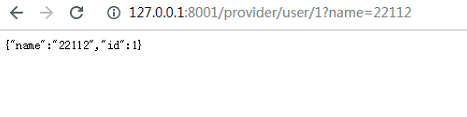
启动消费者进行测试
SpringCloud介绍及入门(二)的更多相关文章
- SpringCloud介绍及入门一
springcloud是什么 基于spring boot实现的服务治理工具包,管理和协微服务 把别人的东西拿来组合在一起,形成各种组件 微服务协调者[service registtry注册中心 Eur ...
- java框架之SpringCloud(1)-微服务及SpringCloud介绍
微服务概述 是什么 业界大牛 Martin Fowler 这样描述微服务: 参考[微服务(Microservices)-微服务原作者Martin Flower博客翻译]. 下面是关于上述博客中的部分重 ...
- 脑残式网络编程入门(二):我们在读写Socket时,究竟在读写什么?
1.引言 本文接上篇<脑残式网络编程入门(一):跟着动画来学TCP三次握手和四次挥手>,继续脑残式的网络编程知识学习 ^_^. 套接字socket是大多数程序员都非常熟悉的概念,它是计算机 ...
- freemarker语法介绍及其入门教程实例
# freemarker语法介绍及其入门教程实例 # ## FreeMarker标签使用 #####一.FreeMarker模板文件主要有4个部分组成</br>#### 1.文本,直接输 ...
- [转帖]脑残式网络编程入门(二):我们在读写Socket时,究竟在读写什么?
脑残式网络编程入门(二):我们在读写Socket时,究竟在读写什么? http://www.52im.net/thread-1732-1-1.html 1.引言 本文接上篇<脑残式网 ...
- springcloud+eureka简单入门案例
springcloud+eureka简单入门案例 一.服务提供者 直接提供服务,入门案例没有特别要设置的地方,注意下端口,由于要启动多个服务,可能会冲突 配置文件(src/main/resources ...
- redis入门(二)
目录 redis入门(二) 前言 持久化 RDB AOF 持久化文件加载 高可用 哨兵 流程 安装部署 配置技巧 集群 原理 集群搭建 参考文档 redis入门(二) 前言 在redis入门(一)简单 ...
- C#线程学习笔记九:async & await入门二
一.异步方法返回类型 只能返回3种类型(void.Task和Task<T>). 1.1.void返回类型:调用方法执行异步方法,但又不需要做进一步的交互. class Program { ...
- Mysql数据库的简单介绍与入门
Mysql数据库的简单介绍与入门 前言 一.下载与安装 1.下载 官网下载MYSQL5.7.21版本,链接地址https://www.mysql.com/downloads/.下载流程图如下: 找到M ...
随机推荐
- flask/app.py-add_url_rule源码分析
之前分析route方法的时候,可以看到中间会调用add_url_rule方法,add_url_rule方法和route方法一样属于Flask这个类的. add_url_rule方法主要用来连接url规 ...
- Linux建立虚拟ip的方法
文章来源 运维公会:Linux建立虚拟ip的方法 1.虚拟ip的介绍 虚拟IP地址(VIP) 是一个不与特定计算机或一个计算机中的网络接口卡(NIC)相连的IP地址.数据包被发送到这个VIP地址, ...
- centos 7.6 配置VNC
一.安装 1. 以root用户运行以下命令来安装vncserver; yum install tigervnc-server 2. 同样运行以下命令来安装vncviewer; yum instal ...
- -bash: 无法为立即文档创建临时文件: 设备上没有空间---记一次报错
故障发生原因 测试环境,之前用该机器做过docker-compose,后来有需要用到该机器上的docker环境,需要将旧的docker容器全部删除,由于之前启动是使用docker-compose启动的 ...
- 软硬RAID 和 不常见的RAID
若转载请于明显处标明出处:http://www.cnblogs.com/kelamoyujuzhen/p/5561809.html 为啥子引入RAID? 存储最现实的两个问题:速度.容量 001——计 ...
- Zookeeper配置安装
单机模式: 1:修改hosts文件 2:下载解压zookeeper.tar文件 3:创建data目录和logs目录 进入zookeeper目录下创建 4:复制一份zoo_sample.cfg配 ...
- vscode java是否合适??
https://blog.csdn.net/luoaki/article/details/79138028 Language support for Java ™ for Visual Studio ...
- nextjs —— jsx style 学习记录
作用域 全局 <style global jsx>{` .hero { width: 100%; color: #333; } .title { margin: 0; width: 100 ...
- Linux下干净卸载mysql
1.首先查看mysql的安装情况 rpm -qa|grep -i mysql 显示之前安装了: MySQL-client-5.5.25a-1.rhel5 MySQL-server-5.5.25a-1. ...
- super关键字小结(构造方法的执行是不是一定会创建对象?)
1.父类 public class Person { private String name = "李四"; private int age; public Person() { ...