
C#使用Castle实现AOP面向切面编程
Castle.Core 本质是创建继承原来类的代理类,重写虚方法实现AOP功能。个人觉得比Autofac用着爽
使用方式比较简单,先新建一个控制台项目,然后在Nuget上搜索Castle.Core并安装,如下顺序:
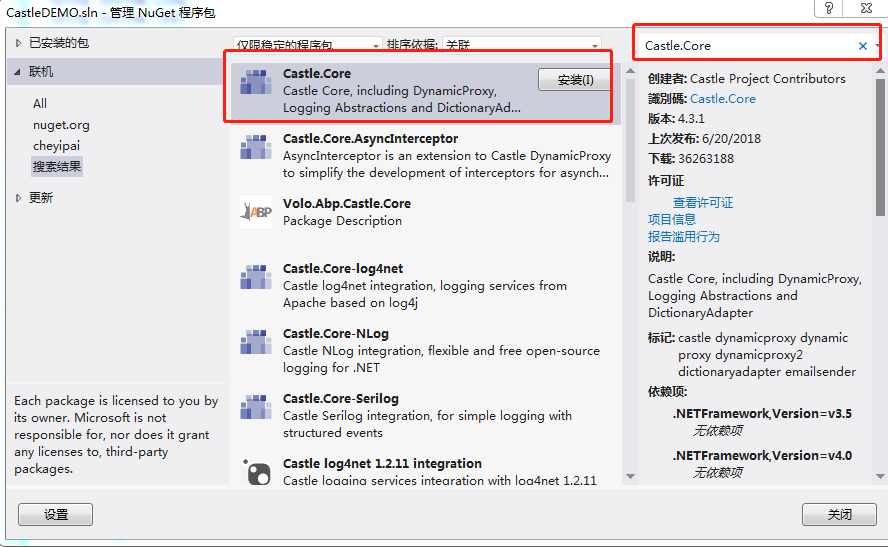
或者通过命令安装:
Install-Package Castle.Core -Version 3.3.
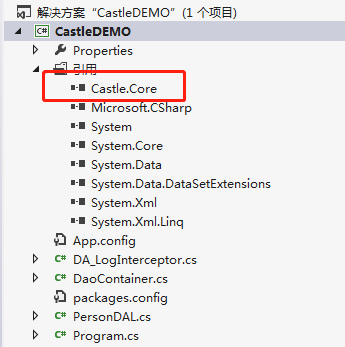
安装成功之后,如下图:
1. 创建拦截器
using System;

using System.Collections.Generic;

using System.Linq;

using System.Text;

using System.Threading.Tasks;

//先在Nuget上搜索Castle安装

using Castle.DynamicProxy;

namespace CastleDEMO

{

    /// <summary>

    /// 拦截器 需要实现 IInterceptor接口 Intercept方法

    /// </summary>

    public class DA_LogInterceptor : IInterceptor

    {

        public void Intercept(IInvocation invocation)

        {

            try

            {

                DateTime begin = DateTime.Now;

                Console.WriteLine("开始DAL {0}调用!", invocation.Method.Name);

                //在被拦截的方法执行完毕后 继续执行

                invocation.Proceed();

                DateTime end = DateTime.Now;

                Console.WriteLine("结束DAL {0}调用!耗时:{1}ms", invocation.Method.Name, (end - begin).TotalMilliseconds);

            }

            catch (Exception ex)

            {

                string methodName = "DA_" + invocation.TargetType.ToString() + "." + invocation.Method.Name;

                Console.WriteLine("{0}方法错误:{1}", methodName, ex.Message);

                //如果没有定义异常处理返回值,就直接抛异常

                if (!invocation.Method.IsDefined(typeof(ExceptionReturnAttribute), false))

                    throw;

                var ls = invocation.Method.GetCustomAttributes(typeof(ExceptionReturnAttribute), false);

                if (null == ls || ls.Length <= )

                    throw;

                ExceptionReturnAttribute v = (ExceptionReturnAttribute)ls[];

                if (null == v.Value && null == v.Type)

                {

                    invocation.ReturnValue = null;

                    return;

                }

                if (null != v.Value)

                {

                    invocation.ReturnValue = v.Value;

                    return;

                }

                if (null != v.Type)

                {

                    invocation.ReturnValue = Activator.CreateInstance(v.Type);

                    return;

                }

            }

        }

        /// <summary>

        /// <para>DAO层异常时,不throw,返回设定的值.</para>

        /// <para>1. 返回复杂类型,使用Type,复杂类型需要有无参的构造函数</para>

        /// <para>2. 返回简单类型,使用value</para>

        /// </summary>

        [AttributeUsage(AttributeTargets.Method)]

        public class ExceptionReturnAttribute : System.Attribute

        {

            /// <summary>

            /// 返回复杂类型,使用Type,复杂类型需要有无参的构造函数

            /// </summary>

            public Type Type { get; set; }

            /// <summary>

            /// 返回简单类型,使用value

            /// </summary>

            public object Value { get; set; }

        }

    }

}
2. 创建拦截容器
using System;

using System.Collections.Generic;

using System.Linq;

using System.Text;

using System.Threading.Tasks;

using Castle.DynamicProxy;

namespace CastleDEMO

{

    /// <summary>

    /// Dao 类的接口

    /// 继承实现BaseDao的类,其相关接口访问的公共方法必须要声明 virtual 方法才能被拦截器拦截。

    /// </summary>

    public abstract class BaseDao

    {

    }

    /// <summary>

    /// Dao容器,必须依赖于此类来创建Dao对象,使Dao受控,可进行检查等

    /// </summary>

    public class DaoContainer

    {

        //ProxyGenerator上自身有缓存

        //实例化【代理类生成器】

        public static ProxyGenerator generator = new ProxyGenerator();

        public static T GetDao<T>() where T : BaseDao

        {

            //实例化【拦截器】

            DA_LogInterceptor interceptor = new DA_LogInterceptor();

            //使用【代理类生成器】创建T对象,而不是使用new关键字来实例化

            return generator.CreateClassProxy<T>(interceptor);

        }

    }

}
3. 新建实例类
using System;

using System.Collections.Generic;

using System.Linq;

using System.Text;

using System.Threading.Tasks;

namespace CastleDEMO

{

    public abstract class PersonDAL : BaseDao

    {

        /// <summary>

        /// 必须是虚方法才能被拦截器拦截

        /// </summary>

        public virtual void SayHello()

        {

            Console.WriteLine("我是虚方法{0}方法", "SayHello");

        }

        public virtual void SayName(string name)

        {

            Console.WriteLine("我是虚方法{0}方法,参数值:{1}", "SayName", name);

        }

        public abstract void AbstactSayOther();

        public void SayOther()

        {

            Console.WriteLine("我是普通方法{0}方法", "SayOther");

        }

    }

}
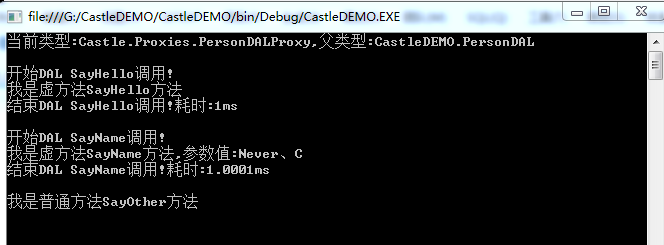
4. 测试
using System;

using System.Collections.Generic;

using System.Linq;

using System.Text;

using System.Threading.Tasks;

namespace CastleDEMO

{

    public class Program

    {

        public static void Main(string[] args)

        {

            PersonDAL person = DaoContainer.GetDao<PersonDAL>();

            Console.WriteLine("当前类型:{0},父类型:{1}", person.GetType(), person.GetType().BaseType);

            Console.WriteLine();

            person.SayHello();//拦截

            Console.WriteLine();

            person.SayName("Never、C");//拦截

            Console.WriteLine();

            person.SayOther();//普通方法,无法拦截

            //person.AbstactSayOther();//抽象方法,可以拦截(但是如果方法没实现拦截时会报错)

            Console.ReadLine();

        }

    }

}
C#使用Castle实现AOP面向切面编程的更多相关文章
- 从壹开始前后端分离【 .NET Core2.0 +Vue2.0 】框架之十 || AOP面向切面编程浅解析:简单日志记录 + 服务切面缓存
代码已上传Github+Gitee,文末有地址 上回<从壹开始前后端分离[ .NET Core2.0 Api + Vue 2.0 + AOP + 分布式]框架之九 || 依赖注入IoC学习 + ...
- Z从壹开始前后端分离【 .NET Core2.0/3.0 +Vue2.0 】框架之十 || AOP面向切面编程浅解析:简单日志记录 + 服务切面缓存
本文梯子 本文3.0版本文章 代码已上传Github+Gitee,文末有地址 大神反馈: 零.今天完成的深红色部分 一.AOP 之 实现日志记录(服务层) 1.定义服务接口与实现类 2.在API层中添 ...
- AOP(面向切面编程)大概了解一下
前言 上一篇在聊MemoryCache的时候,用到了Autofac提供的拦截器进行面向切面编程,很明显能体会到其优势,既然涉及到了,那就趁热打铁,一起来探探面向切面编程. 正文 1. 概述 在软件业, ...
- AOP 面向切面编程, Attribute在项目中的应用
一.AOP(面向切面编程)简介 在我们平时的开发中,我们一般都是面对对象编程,面向对象的特点是继承.多态和封装,我们的业务逻辑代码主要是写在这一个个的类中,但我们在实现业务的同时,难免也到多个重复的操 ...
- AOP面向切面编程的四种实现
一.AOP(面向切面编程)的四种实现分别为最原始的经典AOP.代理工厂bean(ProxyFacteryBean)和默认自动代理DefaultAdvisorAutoProxyCreator以及Bea ...
- Javascript aop(面向切面编程)之around(环绕)
Aop又叫面向切面编程,其中“通知”是切面的具体实现,分为before(前置通知).after(后置通知).around(环绕通知),用过spring的同学肯定对它非常熟悉,而在js中,AOP是一个被 ...
- Method Swizzling和AOP(面向切面编程)实践
Method Swizzling和AOP(面向切面编程)实践 参考: http://www.cocoachina.com/ios/20150120/10959.html 上一篇介绍了 Objectiv ...
- [转] AOP面向切面编程
AOP面向切面编程 AOP(Aspect-Oriented Programming,面向切面的编程),它是可以通过预编译方式和运行期动态代理实现在不修改源代码的情况下给程序动态统一添加功能的一种技术. ...
- C# AOP 面向切面编程之 调用拦截
有时候我们需要在代码中对方法调用进行拦截,并修改参数和返回值,这种操作叫做AOP(面向切面编程) 不过需要注意的是,AOP的效率很慢,在需要高效率场合慎用. 以下是C#的AOP方法: 首先建立一个控制 ...
随机推荐
- sphinx和coreseek
sphinx是国外的一款搜索软件. coreseek是在sphinx的基础上,增加了中文分词功能,换句话说,就是支持了中文. Coreseek发布了3.2.14版本和4.1版本,其中的3.2.14版本 ...
- 3、spark Wordcount
一.用Java开发wordcount程序 1.开发环境JDK1.6 1.1 配置maven环境 1.2 如何进行本地测试 1.3 如何使用spark-submit提交到spark集群进行执行(spar ...
- mac 登陆phpmyadmin 提示 mysqli_real_connect(): (HY000/2002): No such file or directory
我们将下载的phpmyadmin 放在apache目录中,进入phpmyadmin目录, 首先将这个目录中的配置文件改名 sudo mv config.sample.inc.php config.in ...
- win10下子系统的倒腾记录
本文是对于win10下安装ubuntu 18.04的安装.配置c语言开发环境的记录: 一.win10下面的设置,从win10的1709开始,可以完整的搞定linux子系统,如果win10版本不够的同学 ...
- 在 Arch 上Yaourt 使用这些替代品
1. aurman aurman 是最好的 AUR 助手之一,也能胜任 Yaourt 替代品的地位.它有非常类似于 pacman 的语法,可以支持所有的 pacman 操作.你可以搜索 AUR.解决包 ...
- Jenkins 获取 Git 的提交记录(Change Log)
工作中用 Jenkins 做 iOS 和 Android 的持续集成,之前实现的是当 git 有新代码提交的时候,就会自动编译并上传安装包到蒲公英,然后自动发送QQ群通知或者讨论组通知给相关小伙伴,方 ...
- 系统调优:如何解决系统报错too many open files
一.检查系统版本是否手工升级 关于lsb_release -a和/etc/issue显示的发行版本号不同,原因只有一个:系统内核手动升级了 对于高并发高http连接的应用程序例如www或Java,会遇 ...
- JavaScript DOM的一些扩展
对DOM的扩展主要是:Selectors API和HTML5. Selectors API Selectors API是由W3C发起指定的一个标准,致力于让浏览器原生支持CSS查询.Selectors ...
- 一键分享QQ、微信、微博等
github上找到的,合并了一个二维码在线支持API,直接修改样式可用. 二维码API说明网址:http://www.liantu.com/pingtai/ <html> <head ...
- unittest 的用法
一.discover方法 discover方法可以根据标准加载用例,并将结果返回给测试套件(suite),start_dir:待测试的目录,pattern:测试用例文件名的匹配规. 如: start_ ...