
HTML练习一
效果图
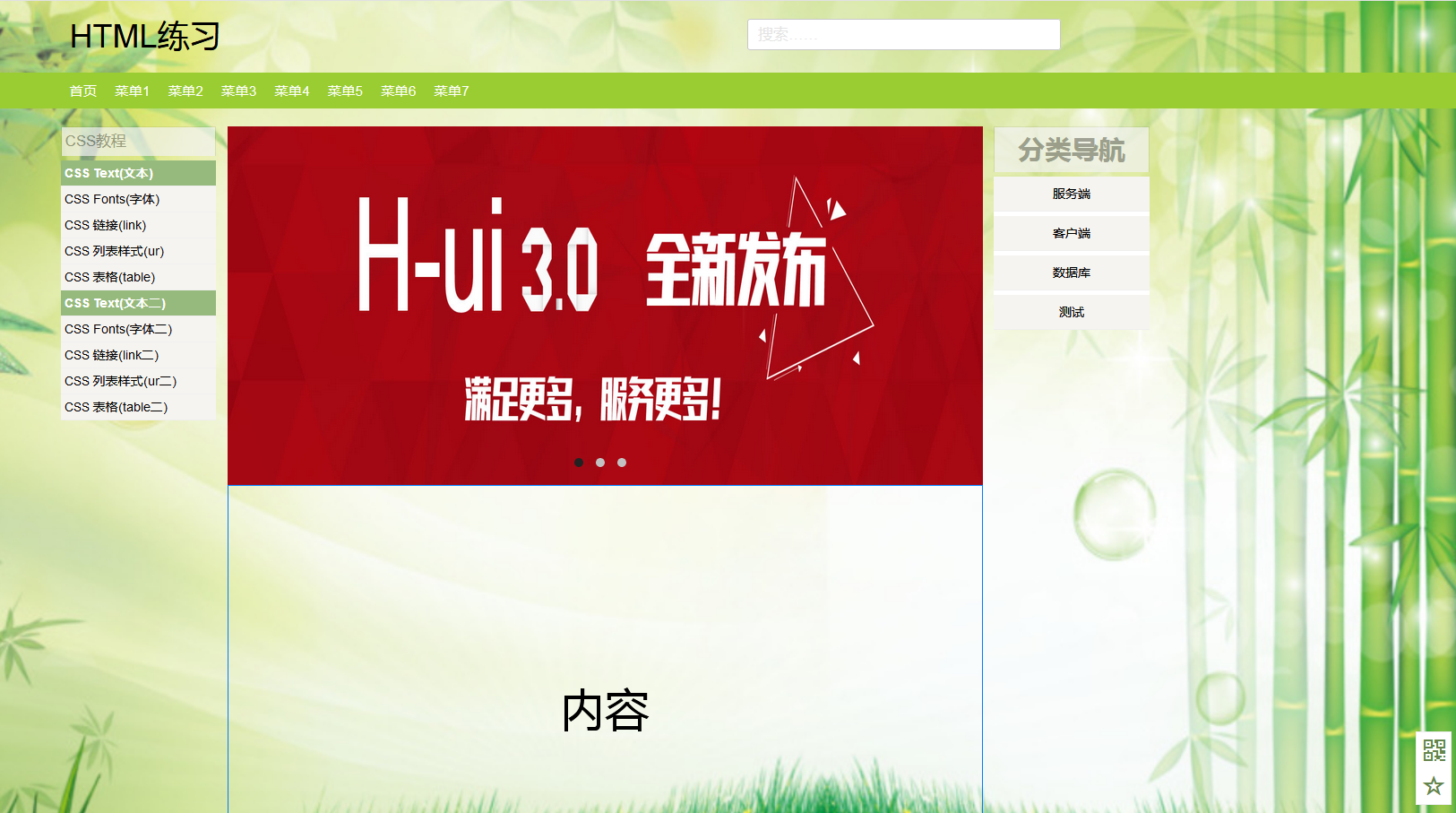
动态图

html代码
<!DOCTYPE html>
<html> <head>
<meta charset="UTF-8">
<title>主页</title>
<link rel="stylesheet" type="text/css" href="static/content/bootstrap.min.css" />
<link rel="stylesheet" type="text/css" href="static/content/index.css" />
</head> <body>
<!--背景-->
<div class="bg">
<img src="static/image/bg-timg2.jpg" width="100%" height="100%" />
</div>
<!--头部-->
<div class="container logo-search">
<div class="row">
<div class="logo">
<h1 style="margin-top: 10px;">HTML练习</h1>
</div>
<div class="search">
<input type="text" class="placeholder" id="s" name="s" placeholder="搜索……" autocomplete="off">
</div>
</div>
</div>
<!--导航栏-->
<div class="container navigation">
<div class="row">
<ul>
<li>
<a>首页</a>
</li>
<li>
<a>菜单1</a>
</li>
<li>
<a>菜单2</a>
</li>
<li>
<a>菜单3</a>
</li>
<li>
<a>菜单4</a>
</li>
<li>
<a>菜单5</a>
</li>
<li>
<a>菜单6</a>
</li>
<li>
<a>菜单7</a>
</li>
</ul>
</div>
</div>
<!--内容-->
<div class="container main">
<div class="row">
<!--左边-->
<div class="all-column left-column">
<div class="tab">
CSS教程
</div>
<div class="sidebar-box">
<a class="top_tit" target="_top" title="CSS Text(文本)" style="font-weight: bold; color: rgb(255,255,255); background-color: rgb(150,185,125);" href="javascript:void(0)">CSS Text(文本)</a>
<a target="top_tit" title="CSS Fonts(字体)" href="javascript:void(0)">CSS Fonts(字体)</a>
<a target="top_tit" title="CSS Fonts(字体)" href="javascript:void(0)">CSS 链接(link)</a>
<a target="top_tit" title="CSS Fonts(字体)" href="javascript:void(0)">CSS 列表样式(ur)</a>
<a target="top_tit" title="CSS Fonts(字体)" href="javascript:void(0)">CSS 表格(table)</a> <a class="top_tit" target="_top" title="CSS Text(文本)" style="font-weight: bold; color: rgb(255,255,255); background-color: rgb(150,185,125);" href="javascript:void(0)">CSS Text(文本二)</a>
<a target="top_tit" title="CSS Fonts(字体)" href="javascript:void(0)">CSS Fonts(字体二)</a>
<a target="top_tit" title="CSS Fonts(字体)" href="javascript:void(0)">CSS 链接(link二)</a>
<a target="top_tit" title="CSS Fonts(字体)" href="javascript:void(0)">CSS 列表样式(ur二)</a>
<a target="top_tit" title="CSS Fonts(字体)" href="javascript:void(0)">CSS 表格(table二)</a>
</div>
</div>
<!--中间-->
<div class="all-column main-column">
<!--轮播图片-->
<div class="tempWrap">
<ul>
<li>
<a href="">
<img src="static/image/banner1.jpg" />
</a>
</li>
<li>
<a href="">
<img src="static/image/banner2.jpg" />
</a>
</li>
<li>
<a href="">
<img src="static/image/banner3.jpg" />
</a>
</li>
</ul>
<ol class="tempWrap-ol">
<li style="background-color: #222222;">1</li>
<li>2</li>
<li>3</li>
</ol>
</div> <!--内容-->
<div class="main-content">
内容
</div>
</div>
<!--右边-->
<div class="all-column right-column">
<div class="tab right-box right-tab">
分类导航
</div>
<div class="sidebar-box right-box">
<ul>
<li>
<a target="top_tit" title="CSS Fonts(字体)" href="javascript:void(0)">服务端</a>
<ul class="right-tree">
<li>
<a>首页</a>
</li>
<li>
<a>菜单1</a>
</li>
<li>
<a>菜单2</a>
</li>
<li>
<a>菜单3</a>
</li>
<li>
<a>菜单4</a>
</li>
<li>
<a>菜单5</a>
</li>
<li>
<a>菜单6</a>
</li>
<li>
<a>菜单7</a>
</li>
<li>
<a>菜单87</a>
</li>
</ul>
</li>
<li>
<a target="top_tit" title="CSS Fonts(字体)" href="javascript:void(0)">客户端</a>
<ul class="right-tree">
<li>
<a>首页</a>
</li>
</ul>
</li>
<li>
<a target="top_tit" title="CSS Fonts(字体)" href="javascript:void(0)">数据库</a>
<ul class="right-tree">
<li>
<a>首页</a>
</li>
</ul>
</li>
<li>
<a target="top_tit" title="CSS Fonts(字体)" href="javascript:void(0)">测试</a>
<ul class="right-tree">
<li>
<a>首页</a>
</li>
</ul>
</li>
</ul>
</div>
</div>
</div>
</div>
<!--底部-->
<div class="footer">
<div class="row footer-data">
Copyright © 2013-2019
<strong>
<a href="//www.runoob.com/" target="_blank">菜鸟教程</a>
</strong>
<strong>
<a href="//www.runoob.com/" target="_blank">runoob.com</a>
</strong> All Rights Reserved. 备案号:闽ICP备15012807号-1
</div>
</div>
<!--返回顶部标签-->
<div class="fixed-btn">
<a class="go-top" href="javascript:void(0)" title="返回顶部" style="display: inline-block;"><i class="glyphicon glyphicon-chevron-up"></i></a>
<a class="qrcode" href="javascript:void(0)" title="关注我们"><i class="glyphicon glyphicon-qrcode"></i></a>
<a class="writer" style="" href="javascript:void(0)" title="标记/收藏"><i class="glyphicon glyphicon-star-empty" aria-hidden="true"></i></a>
<!-- qrcode modal -->
<div id="bottom-qrcode" class="modal-fade" style="display: none;">
<h4>微信关注</h4>
<div class="panel-body"><img alt="微信关注" src="static/image/1.png"></div>
</div>
</div> <script src="static/scripts/jQuery-2.2.0.min.js"></script>
<script src="static/scripts/bootstrap.min.js"></script>
<script src="static/scripts/index.js"></script>
</body> </html>
css代码:
.::after,.::before{

    content: "";

    display: table;

}

.::after,.::before{

    clear: both;

}

body,ul,li{

    margin:;

    padding:;

    color: #000000;

    list-style: none;

}

div,li{

    display: block;

}

.bg {

    width: 100%;

    min-width: 1000px;

    height: 100%;

    min-height: 1000px;

    position: fixed;

    z-index: -1;

}

.container {

    margin: 0 auto;

    padding: 0 10px;

}

/*头部*/

.logo-search{

    width: 100%;

    height: 80px;

    padding: 10px 0 10px 20px;

    overflow: hidden;

    /*border: solid 1px yellow;*/

}

.logo{

    width: 60%;

    margin-right: 1%;

    float: left;

}

.search{

    width: 30%;

    float: left;

}

.placeholder{

    line-height: 34px;

    left: 9px;

    margin-top: 10px;

    text-align: initial;

    white-space: nowrap;

    right: 9px;

    height: 35px;

    width: 94%;

    padding: 0 3% 0 3%;

    background-color: #fff;

    border: 1px solid #c8c8c8;

    border-radius: 3px;

    color: #ccc;

    font-weight:;

    font-size: 1.2em;

}

/*导航栏*/

.navigation {

    width: 100%;

    height: 40px;

    background-color: yellowgreen;

    font-size: 1.1em;

    font-family: proxima-nova,'Helvetica Neue',Helvetica,Arial,sans-serif;

    overflow: hidden;

}

.row{

    max-width: 1260px;

    min-width: 755px;

    margin: 0 auto;

    padding:0 10px;

}

.navigation .row ul{

    height: 40px;

    padding: 10px 0 10px 10px;

    list-style: nnone;

    white-space: nowrap;

}

.navigation .row ul li{

    float: left;

    margin: 0 20px 0 0;

    display: inline;

    line-height: 20px;

    text-align: center;

    white-space: nowrap;

}

.navigation .row ul li a{

    color: #FFFFFF;

    padding: 10px 0 10px 0;

    margin: 10px 0 0 0;

    text-decoration: none;

}

.navigation .row ul li a:hover{

    color: #CFCFCF;

}

/*内容*/

.main {

    margin-top: 20px;

    width: 100%;

}

.all-column{

    margin-right: 1%;

    float: left;

}

.left-column{

    width: 14%;

    /*height: 1000px;*/

    /*border: solid 1px red;*/

}

.tab{

    opacity: .7;

    padding-left: 4px;

    font-size: 1.2em;

    line-height: 1.9em;

    font-family: proxima-nova,'Helvetica Neue',Helvetica,Arial,sans-serif;

    color: grey;

    text-shadow: 0 1px 0 rgba(255,255,255,.15);

    border: solid 1px rgba(0,0,0,.1);

    border-bottom:;

    background-clip: padding-box;

    background-color: #f2f2f2;

}

.sidebar-box{

    background: #fff;

    margin: 5px 0 20px 0;

}

.sidebar-box a{

    line-height: 20px;

    text-decoration: none;

    color: #000000;

    background-color: #f6f4f0;

    padding: 4px;

    border-bottom: 1px solid #efefef;

    display: block;

}

.sidebar-box a:hover{

    font-weight: bold;

    color: #2AABD2;

    background-color: #CFCFCF;

}

.main-column{

    width: 68%;

    /*height: 1500px;*/

    /*border: solid 1px #007BFF;*/

}

.tempWrap{

    width: 100%;

    height: 400px;

    /*border: solid 1px #007BFF;*/

    position: relative;

    overflow: hidden;

}

.tempWrap ul li a img{

    width: 100%;

    height: 100%;

}

.tempWrap ul{

    width: 300%;

    position: relative;

    overflow: hidden;

    padding: 0px;

    margin: 0px;

    left: 0%;

}

.tempWrap ul li{

    width: 33.33%;

    height: 400px;

    float: left;

    overflow: hidden;

    background-position: center;

    background-repeat: no-repeat;

}

.tempWrap-ol {

    position: absolute;

    z-index:;

    left:;

    right:;

    bottom: 10px;

    padding: 0 10px;

    text-align: center;

    display: inline-block;

}

.tempWrap-ol li{

    width: 10px;

    height: 10px;

    font-size:;

    line-height:;

    border-radius: 50%;

    display: inline-block;

    text-align: center;

    margin-right: 10px;

    background-color: #c2c2c2;

    cursor: pointer;

}

.main-content {

    width: 100%;

    height: 1000px;

    border: solid 1px #007BFF;

    font-size: 50px;

    line-height: 500px;

    text-align: center;

}

.right-column{

    width: 14%;

    /*height: 1000px;

    border: solid 1px #101010;*/

}

.right-tab{

    font-size: 30px;

    font-weight: bold;

    line-height: 50px;

}

.right-box{

    margin:;

    padding:;

    text-align: center;

}

.right-box > ul > li{

    margin: 5px 0 0 0;

    position: relative;

    vertical-align: middle;

    cursor: pointer;

}

.right-box ul li a{

    line-height: 30px;

}

.right-box > ul > li:hover > a{

    font-weight: bold;

    text-decoration: underline;

    color: #3E8F3E;

    background-color: #CFCFCF;

}

.right-box ul li:hover > ul{

    display: block;

}

.right-tree {

    position: absolute;

    width: 300px;

    /*height: 200px;*/

    background: #f6f4f0;

    right: 100%;

    top:;

    display: none;

    float: left;

    text-align: center;

    overflow: hidden;

    text-overflow: ellipsis;

    white-space: nowrap;

    box-shadow: 0px 8px 16px 0px rgba(0,0,0,0.2);

}

.right-tree li{

    width: 140px;

    margin: 5px;

    float: left;

    display: inline;

    line-height: 20px;

    text-align: center;

    white-space: nowrap;

}

.right-tree li a{

    color: #000000;

    text-decoration: none;

}

.right-tree li a:hover{

    color: #007BFF;

    text-decoration: underline;

}

/*底部*/

.footer{

    width: 100%;

    height: 60px;

    margin-top: 20px;

    /*background-color: #fff;*/

}

.footer-data{

    line-height: 60px;

    text-align: center;

    color: #000000;

    font-size: 14px;

}

/*返回顶部标签*/

.fixed-btn{

    position: fixed;

    right: 1%;

    bottom: 5%;

    width: 40px;

    border: 1px solid #eee;

    background-color: white;

    font-size: 24px;

    z-index:;

}

.fixed-btn .go-top {

    border-bottom: 1px solid #eee;

}

.fixed-btn a {

    display: inline-block;

    width: 40px;

    height: 40px;

    text-align: center;

    color: #64854c;

    text-decoration: none;

}

.fixed-btn a:hover {

    background-color: #CFCFCF;

}

.fixed-btn a:after {

    content: ".";

    font-size:;

    height: 100%;

    display: inline-block;

    vertical-align: middle;

}

.fixed-btn a i {

    vertical-align: middle;

}

.fa {

    display: inline-block;

    font-family: normal normal normal 14px/1 FontAwesome;

    font-size: inherit;

    text-rendering: auto;

}

.fixed-btn .modal-fade {

    top: auto;

    bottom:;

    height: 188px;

    width: 128px;

    padding: 10px;

    margin:;

    right: 65px;

    left: auto;

    text-align: center;

    position: absolute;

}

.fixed-btn .modal-fade:after,

.fixed-btn .modal-fade:before{

    position: absolute;

    top: 109px;

    right: -100px;

    content: '';

    display: inline-block;

    border-top: 9px solid transparent;

    border-bottom: 9px solid transparent;

    border-left: 9px solid white;

}

.panel-modal .panel-body {

    overflow-y: auto;

}

.panel-body .panel-body img{

    width: 128px;

    height: 128px;

}
js代码:
$(function() {

    //返回顶部标签

    $(window).scroll(function() {

        if($(window).scrollTop() > 100) {

            $(".go-top").fadeIn(150);

        } else {

            $(".go-top").fadeOut(150);

        }

    });

    $(".go-top").click(function() {

        if($('html').scrollTop()) {

            $('html').animate({

                scrollTop: 0

            }, 100);

            return false;

        }

        $('body').animate({

            scrollTop: 0

        }, 100);

        return false;

    });

    //微信二维码显示

    $('.qrcode').hover(function() {

        $('#bottom-qrcode').css({"display": "block"})

    },function() {

        $('#bottom-qrcode').css({"display": "none"})

    }

    );

    //右侧菜单显示

//    $('.right-box ul li a').hover(function() {

//        $(".right-box ul li a + ul").addClass("blue");

//        $('.blue').css({"display": "block"})

//    },function() {

//        $('.blue').css({"display": "none"})

//        $(".right-box ul li a + ul").removeClass("blue");

//    }

//    );

    //轮播图片

    var index = 0;

    function selectImage(liindex){

        index = liindex;

        var perleft = -index * 100;

        $(".tempWrap ul").animate({"left": perleft + "%"});

//      $('.tempWrap ul').css({"left": perleft + "%"});

        $('.tempWrap-ol li').css({"background-color": "#c2c2c2"});

        $('.tempWrap-ol li').eq(liindex).css({"background-color": "#222222"});

    };

    $('.tempWrap-ol li').click(function(e){

        var i = parseInt(e.target.textContent);

        selectImage(i-1);

    });

    function startImage(){

        if(index == 2){

            index = 0;

        }else{

            index++;

        }

        selectImage(index);

        setTimeout(function(){ startImage(); } , 3000);

    };

    $('.tempWrap').onLoad(startImage());

})
图片的话自己找吧
随机推荐
- docker 容器连接 host的sql server失败
报错内容::“A network-related or instance-specific error occurred while establishing a connection to SQL ...
- mongoose 建立schema 和model
在node中使用MongoDB很多情况下,都是使用mongoose的,所以这集来介绍一下 安装 yarn add mongoose 连接 const mongoose = require(" ...
- 朴素贝叶斯算法python实现
朴素贝叶斯是一种十分简单的分类算法,称其朴素是因为其思想基础的简单性,就文本分类而言,他认为词袋中的两两词之间的关系是相互独立的,即一个对象的特征向量中的每个维度都是互相独立的.这是朴素贝叶斯理论的思 ...
- ASP.NET MVC 3 Razor 多国语言参考解决方案
http://www.cnblogs.com/think8848/archive/2011/03/20/1989376.html
- win2008 r2下配置IIS7(ASP.net运行环境)
一.常规配置: 1.先要设置应用程序池(ApplicationPool)为Classic.NETAppPool. 2.选中左侧的“应用程序池”,选中“Classic.NETAppPool”,单击右侧的 ...
- win10 Java JDK环境变量配置
注意下载JDK 版本不需太高(百度一下jdk下载就好了) 第一步 我们首先打开win10电脑的资源管理器,快捷键win+E 然后选中此电脑,鼠标右键在弹出的菜单中选中属性的按钮 第二步 看到窗口的 ...
- java调用js脚本
有些情况下,需要java去调用js,groovy等脚本语言,传入参数获取脚本运行的结果. js脚本例子: function add(a,b){ return a + b + number; } jav ...
- golang web框架设计4:日志设计
beego的日志设计思路来自于seelog,根据不同的level来记录日志,beego设计的日志是一个轻量级的,采用系统log.Logger接口,默认输出到os.Stdout,用户可以实现这个接口然后 ...
- Apache Jmeter教程(一) - 入门
一.下载Jmeter 登录官网Jmeter下载,得到压缩包jmeter-5.0.tgz,下载地址:http://jmeter.apache.org/download_jmeter.cgi. 二.安装 ...
- 【并行计算与CUDA开发】英伟达硬件加速解码器在 FFMPEG 中的使用
目录(?)[-] 私有驱动 编译 FFMPEG 使用 nvenc 这篇文档介绍如何在 ffmpeg 中使用 nvenc 硬件编码器. 私有驱动 nvenc 本身是依赖于 nvidia 底层的私有驱动的 ...