
struts2之多文件上传与拦截器(8)
前台jsp
<s:form action="uploadAction" enctype="multipart/form-data" method="post">
<label>上传文件:</label><br/>
<s:file name="myfiles"></s:file> <br/>
<s:file name="myfiles"></s:file> <br/>
<s:file name="myfiles"></s:file> <br/>
<s:file name="myfiles"></s:file> <br/>
<s:submit value="提交"></s:submit>
</s:form>
action
public class UploadAction extends ActionSupport {
//三个全局属性注意命名规则,属性名的前半部分保持一致,不然报空值
//上传的文件(旧文件)
private File[] myfiles;
//上传的文件名(旧文件)
private String[] myfilesFileName;
//上传文件类型(旧文件)
private String[] myfilesContentType;
//封装上传方法
public void copy(File myfile,String myfileFileName,String path){
//生成新的文件名(使用uuid)
String newmyfilename = UUIDUtil.getUUID()+myfileFileName.substring(myfileFileName.lastIndexOf("."));
//上传文件的位置
String filepath = path+File.pathSeparator+newmyfilename;
System.out.println("filepath = "+filepath);
//构建新文件
File newfile = new File(filepath);
//读入写出 从旧文件读内容到新文件
FileInputStream fis = null;
FileOutputStream fos = null;
try {
//将旧文件封装到输入流
fis = new FileInputStream(myfile);
//将新文件封装到输出流
fos = new FileOutputStream(newfile);
//设置一个字节数组缓冲内容
byte [] bt = new byte[1024];
int len = 0;
/**
* 循环读取缓冲区的内容
* 输入流不断的将字节读入到缓冲区(旧文件到缓冲区)
* 输出流不断的将字节写出到新文件(缓冲区到新文件)
*/
while((len = fis.read(bt))!=-1){
fos.write(bt, 0, len);
}
fos.close();
fis.close();
} catch (FileNotFoundException e) {
// TODO Auto-generated catch block
e.printStackTrace();
} catch (IOException e) {
// TODO Auto-generated catch block
e.printStackTrace();
}
}
//处理上传请求
public String upload(){
//指定上传的位置(因为只有一个,所以不用再循环)
String path = ServletActionContext.getServletContext().getRealPath("upload");
for (int i = 0; i < myfiles.length; i++) {
copy(myfiles[i], myfilesFileName[i], path);
}
return SUCCESS;
}
public File[] getMyfiles() {
return myfiles;
}
public void setMyfiles(File[] myfiles) {
this.myfiles = myfiles;
}
public String[] getMyfilesFileName() {
return myfilesFileName;
}
public void setMyfilesFileName(String[] myfilesFileName) {
this.myfilesFileName = myfilesFileName;
}
public String[] getMyfilesContentType() {
return myfilesContentType;
}
public void setMyfilesContentType(String[] myfilesContentType) {
this.myfilesContentType = myfilesContentType;
}
}
struts.xml
<!-- struts2中文件上传拦截
struts2 的核心包下的default.properties文件里有默认的大小为struts.multipart.maxSize=2097152,也就是2M. 这是struts2默认拦截,
解决方法:在struts.xml配置文件中,添加
<constant name="struts.multipart.maxSize" value="10485760"/>
这里的value单位为B,即10485760B = 100MB。
-->
<constant name="struts.multipart.maxSize" value="104857600"/>
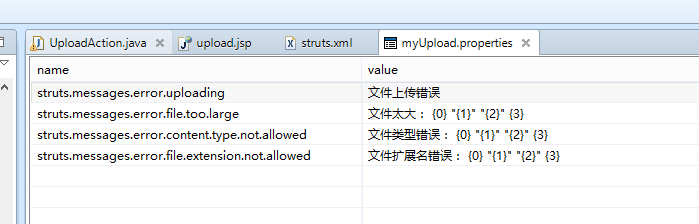
<!-- 该常量用于读取国际化文件
name表示国际化资源
value表示国际化文件所在位置,
注意:国际化文件不要写后缀 -->
<constant name="struts.custom.i18n.resources" value="com.oak.action.myUpload"></constant>
<package name="upload" namespace="/" extends="struts-default">
<action name="uploadAction" class="com.oak.action.UploadAction" method="upload">
<!-- fileUpload拦截器是系统拦截器,只需要引用,单词是固定的 -->
<interceptor-ref name="fileUpload">
<!-- 允许用户上传文件的大小,单位是字节 10M -->
<param name="maximumSize">10485760</param>
<!-- 允许用户上传文件的扩展名,如果不设置,则不受限,多个可以以逗号分隔 -->
<param name="allowedExtensions">.jpg,.txt,.jsp</param>
</interceptor-ref>
<!--还需要引用系统默认的拦截器-->
<interceptor-ref name="validationWorkflowStack"></interceptor-ref>
<interceptor-ref name="basicStack"></interceptor-ref>
<result>
/welcome.jsp
</result>
<!-- 用于输出错误信息到页面 -->
<result name="input">
/upload.jsp
</result>
</action>
</package>
struts2之多文件上传与拦截器(8)的更多相关文章
- struts2 基础3 文件上传、拦截器
文件上传: 1.将头设置为enctype=”multipart/form-data” <form action="${pageContext.request.contextPath } ...
- 04springMVC结构,mvc模式,spring-mvc流程,spring-mvc的第一个例子,三种handlerMapping,几种控制器,springmvc基于注解的开发,文件上传,拦截器,s
1. Spring-mvc介绍 1.1市面上流行的框架 Struts2(比较多) Springmvc(比较多而且属于上升的趋势) Struts1(即将被淘汰) 其他 1.2 spring-mv ...
- springmvc文件上传和拦截器
文件上传 用到这两个包 配置视图解析器:springmvc配置文件配置 <!-- id必须要是"multipartResolver" --> <bean id=& ...
- 2017/2/12:springMVC的简单文件上传跟拦截器
1.写文件上传的界面jsp代码如下重点为文件上传标签的类型 2.写登录成功跟失败的界面:成功自己写 3.写springMVC的文件上传的controller的方法 4.最后一步配置spring-ser ...
- struts2 笔记02 文件上传、文件下载、类型转换器、国际化的支持
Struts2的上传 1. Struts2默认采用了apache commons-fileupload 2. Struts2支持三种类型的上传组件 3. 需要引入commons-fileupload ...
- [转]Struts2多个文件上传
转载至:http://blog.csdn.net/hanxiaoshuang123/article/details/7342091 Struts2多个文件上传多个文件上传分为List集合和数组,下面我 ...
- Struts2学习总结——文件上传与下载
Struts2文件上传与下载 1.1.1新建一个Maven项目(demo02) 在此添加Web构面以及 struts2 构面 1.2.1配置Maven依赖(pom.xml 文件) <?xml v ...
- Struts2 之 实现文件上传和下载
Struts2 之 实现文件上传和下载 必须要引入的jar commons-fileupload-1.3.1.jar commons-io-2.2.jar 01.文件上传需要分别在struts.xm ...
- 笨鸟先飞之Java(一)--使用struts2框架实现文件上传
无论是.net还是Java,我们最常接触到的就是文件的上传和下载功能,在Java里要实现这两个经常使用功能会有非常多种解决方案,可是struts2的框架却能给我们一个比較简单的方式,以下就一起来看吧: ...
随机推荐
- [转帖]你不曾见过的国产CPU:可能是最全的龙芯系列芯片家谱(下)
你不曾见过的国产CPU:可能是最全的龙芯系列芯片家谱(下) https://www.ijiwei.com/html/news/newsdetail?source=pc&news_id=7177 ...
- 1.3.4 并发工具类CountDownLatch/Semaphore/CyclicBarrier/FutureTask
CountDownLatch的2个用途: 1. 所有线程都到达相同的起跑线后,再一起开始跑(并非同时开始,而是队列中一个唤醒另一个)[此情况需到达起跑线后再调用await()等待其他线程] 2. 所有 ...
- Java各版本新特性总结
Java或者说JDK的更新一般分为两部分内容:Java语言.JVM(C.C++编写),但通常情况下都不会单独发布,因为新的语言特性需要特定的JVM支持才行.下面我总结了从古至今Java各版本的新 ...
- golang之工厂模式
说明: golang的结构体没有构造函数,通常可以使用工厂模式来解决这个问题 如果包里面的结构体变量首字母小写,引入后,不能直接使用,可以工厂模式解决: ch1.go package ch1 type ...
- linux系统安全设置加固
描述 设置SSH空闲超时退出时间,可降低未授权用户访问其他用户ssh会话的风险 检查提示 -- 加固建议 编辑/etc/ssh/sshd_config,将ClientAliveInterval ...
- Linux:删除一个目录下的所有文件,但保留一个指定文件
面试题:删除一个目录下的所有文件,但保留一个指定文件 解答: 假设这个目录是/xx/,里面有file1,file2,file3..file10 十个文件 [root@oldboy xx]# touc ...
- MQTT协议探究(三)
1 回顾与本次目标 1.1 回顾 主题通配符 主题语义和用法 WireShark进行抓包分析了报文 报文分析: SUBSCRIBE--订阅主题 SUBACK--订阅确认 UNNSUBSCRIBE--取 ...
- 我是如何将一个加载90s的接口优化到不足2s的
一.提出问题 由于公司是做医疗级智能可穿戴设备的,所以数据(二进制数据)的存储方面有点特殊,数据没有存储于数据库里面,而是存储于磁盘上.可能有同学质疑,mysql的Blob类型也可以存储二进制数据啊, ...
- 使用lodop.js打印控件打印table并分页等
import {getLodop} from '@/utils/LodopFuncs.js' //打印表格 export default{ // num 打印还是打印预览 conData 对象形式 传 ...
- SpringCloud 随笔
目录 服务间通讯 统一配置中心 RabbitMQ Spring Cloud Stream 服务网关 Spring Cloud Zuul ++==(纯手打,代码可能有错!)==++ 服务间通讯 Rest ...