
python常用模块二正则表达式
正则表达式
常用的正则元字符
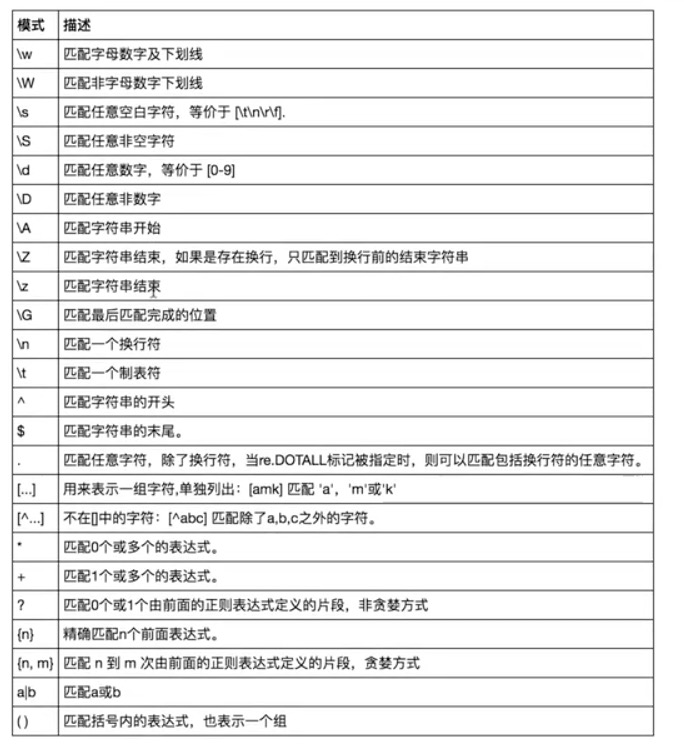
# =================================匹配模式=================================

#一对一的匹配

# 'hello'.replace(old,new)

# 'hello'.find('pattern')

#正则匹配

import re

#\w与\W

print(re.findall('\w','hello egon 123')) #['h', 'e', 'l', 'l', 'o', 'e', 'g', 'o', 'n', '1', '2', '3']

print(re.findall('\W','hello egon 123')) #[' ', ' ']

#\s与\S

print(re.findall('\s','hello  egon  123')) #[' ', ' ', ' ', ' ']

print(re.findall('\S','hello  egon  123')) #['h', 'e', 'l', 'l', 'o', 'e', 'g', 'o', 'n', '1', '2', '3']

#\n \t都是空,都可以被\s匹配

print(re.findall('\s','hello \n egon \t 123')) #[' ', '\n', ' ', ' ', '\t', ' ']

#\n与\t

print(re.findall(r'\n','hello egon \n123')) #['\n']

print(re.findall(r'\t','hello egon\t123')) #['\n']

#\d与\D

print(re.findall('\d','hello egon 123')) #['1', '2', '3']

print(re.findall('\D','hello egon 123')) #['h', 'e', 'l', 'l', 'o', ' ', 'e', 'g', 'o', 'n', ' ']

#\A与\Z

print(re.findall('\Ahe','hello egon 123')) #['he'],\A==>^

print(re.findall('123\Z','hello egon 123')) #['he'],\Z==>$

#^与$

print(re.findall('^h','hello egon 123')) #['h']

print(re.findall('3$','hello egon 123')) #['3']

# 重复匹配:| . | * | ? | .* | .*? | + | {n,m} |

#.

print(re.findall('a.b','a1b')) #['a1b']

print(re.findall('a.b','a1b a*b a b aaab')) #['a1b', 'a*b', 'a b', 'aab']

print(re.findall('a.b','a\nb')) #[]

print(re.findall('a.b','a\nb',re.S)) #['a\nb']

print(re.findall('a.b','a\nb',re.DOTALL)) #['a\nb']同上一条意思一样

#*

print(re.findall('ab*','bbbbbbb')) #[]

print(re.findall('ab*','a')) #['a']

print(re.findall('ab*','abbbb')) #['abbbb']

#?

print(re.findall('ab?','a')) #['a']

print(re.findall('ab?','abbb')) #['ab']

#匹配所有包含小数在内的数字

print(re.findall('\d+\.?\d*',"asdfasdf123as1.13dfa12adsf1asdf3")) #['123', '1.13', '12', '1', '3']

#.*默认为贪婪匹配

print(re.findall('a.*b','a1b22222222b')) #['a1b22222222b']

#.*?为非贪婪匹配:推荐使用

print(re.findall('a.*?b','a1b22222222b')) #['a1b']

#+

print(re.findall('ab+','a')) #[]

print(re.findall('ab+','abbb')) #['abbb']

#{n,m}

print(re.findall('ab{2}','abbb')) #['abb']

print(re.findall('ab{2,4}','abbb')) #['abb']

print(re.findall('ab{1,}','abbb')) #'ab{1,}' ===> 'ab+'

print(re.findall('ab{0,}','abbb')) #'ab{0,}' ===> 'ab*'

#[]

print(re.findall('a[1*-]b','a1b a*b a-b')) #[]内的都为普通字符了,且如果-没有被转意的话,应该放到[]的开头或结尾

print(re.findall('a[^1*-]b','a1b a*b a-b a=b')) #[]内的^代表的意思是取反,所以结果为['a=b']

print(re.findall('a[0-9]b','a1b a*b a-b a=b')) #[]内的^代表的意思是取反,所以结果为['a=b']

print(re.findall('a[a-z]b','a1b a*b a-b a=b aeb')) #[]内的^代表的意思是取反,所以结果为['a=b']

print(re.findall('a[a-zA-Z]b','a1b a*b a-b a=b aeb aEb')) #[]内的^代表的意思是取反,所以结果为['a=b']

#\# print(re.findall('a\\c','a\c')) #对于正则来说a\\c确实可以匹配到a\c,但是在python解释器读取a\\c时,会发生转义,然后交给re去执行,所以抛出异常

print(re.findall(r'a\\c','a\c')) #r代表告诉解释器使用rawstring,即原生字符串,把我们正则内的所有符号都当普通字符处理,不要转义

print(re.findall('a\\\\c','a\c')) #同上面的意思一样,和上面的结果一样都是['a\\c']

#():分组

print(re.findall('ab+','ababab123')) #['ab', 'ab', 'ab']

print(re.findall('(ab)+123','ababab123')) #['ab'],匹配到末尾的ab123中的ab

print(re.findall('(?:ab)+123','ababab123')) #findall的结果不是匹配的全部内容,而是组内的内容,?:可以让结果为匹配的全部内容

print(re.findall('href="(.*?)"','<a href="http://www.baidu.com">点击</a>'))#['http://www.baidu.com']

print(re.findall('href="(?:.*?)"','<a href="http://www.baidu.com">点击</a>'))#['href="http://www.baidu.com"']

#|

print(re.findall('compan(?:y|ies)','Too many companies have gone bankrupt, and the next one is my company'))
基本用法
python提供的re中的方法
import re

#

print(re.findall('e','alex make love') )   #['e', 'e', 'e'],返回所有满足匹配条件的结果,放在列表里

#

print(re.search('e','alex make love').group()) #e,只到找到第一个匹配然后返回一个包含匹配信息的对象,该对象可以通过调用group()方法得到匹配的字符串,如果字符串没有匹配,则返回None。

#

print(re.match('e','alex make love'))    #None,同search,不过在字符串开始处进行匹配,完全可以用search+^代替match

#

print(re.split('[ab]','abcd'))     #['', '', 'cd'],先按'a'分割得到''和'bcd',再对''和'bcd'分别按'b'分割

#

print('===>',re.sub('a','A','alex make love')) #===> Alex mAke love,不指定n,默认替换所有

print('===>',re.sub('a','A','alex make love',1)) #===> Alex make love

print('===>',re.sub('a','A','alex make love',2)) #===> Alex mAke love

print('===>',re.sub('^(\w+)(.*?\s)(\w+)(.*?\s)(\w+)(.*?)$',r'\5\2\3\4\1','alex make love')) #===> love make alex

print('===>',re.subn('a','A','alex make love')) #===> ('Alex mAke love', 2),结果带有总共替换的个数

#

obj=re.compile('\d{2}')

print(obj.search('abc123eeee').group()) #

print(obj.findall('abc123eeee')) #['12'],重用了obj
补充
import re

print(re.findall("<(?P<tag_name>\w+)>\w+</(?P=tag_name)>","<h1>hello</h1>")) #['h1']

print(re.search("<(?P<tag_name>\w+)>\w+</(?P=tag_name)>","<h1>hello</h1>").group()) #<h1>hello</h1>

print(re.search("<(?P<tag_name>\w+)>\w+</(?P=tag_name)>","<h1>hello</h1>").groupdict()) #<h1>hello</h1>

print(re.search(r"<(\w+)>\w+</(\w+)>","<h1>hello</h1>").group())

print(re.search(r"<(\w+)>\w+</\1>","<h1>hello</h1>").group())
import re

print(re.findall(r'-?\d+\.?\d*',"1-12*(60+(-40.35/5)-(-4*3))")) #找出所有数字['1', '-12', '60', '-40.35', '5', '-4', '3']

#使用|,先匹配的先生效,|左边是匹配小数,而findall最终结果是查看分组,所有即使匹配成功小数也不会存入结果

#而不是小数时,就去匹配(-?\d+),匹配到的自然就是,非小数的数,在此处即整数

print(re.findall(r"-?\d+\.\d*|(-?\d+)","1-2*(60+(-40.35/5)-(-4*3))")) #找出所有整数['1', '-2', '60', '', '5', '-4', '3']
#_*_coding:utf-8_*_
__author__ = 'Linhaifeng'
#在线调试工具:tool.oschina.net/regex/#
import re s='''
http://www.baidu.com
egon@oldboyedu.com
你好
010-3141
''' #最常规匹配
# content='Hello 123 456 World_This is a Regex Demo'
# res=re.match('Hello\s\d\d\d\s\d{3}\s\w{10}.*Demo',content)
# print(res)
# print(res.group())
# print(res.span()) #泛匹配
# content='Hello 123 456 World_This is a Regex Demo'
# res=re.match('^Hello.*Demo',content)
# print(res.group()) #匹配目标,获得指定数据 # content='Hello 123 456 World_This is a Regex Demo'
# res=re.match('^Hello\s(\d+)\s(\d+)\s.*Demo',content)
# print(res.group()) #取所有匹配的内容
# print(res.group(1)) #取匹配的第一个括号内的内容
# print(res.group(2)) #去陪陪的第二个括号内的内容 #贪婪匹配:.*代表匹配尽可能多的字符
# import re
# content='Hello 123 456 World_This is a Regex Demo'
#
# res=re.match('^He.*(\d+).*Demo$',content)
# print(res.group(1)) #只打印6,因为.*会尽可能多的匹配,然后后面跟至少一个数字 #非贪婪匹配:?匹配尽可能少的字符
# import re
# content='Hello 123 456 World_This is a Regex Demo'
#
# res=re.match('^He.*?(\d+).*Demo$',content)
# print(res.group(1)) #只打印6,因为.*会尽可能多的匹配,然后后面跟至少一个数字 #匹配模式:.不能匹配换行符
content='''Hello 123456 World_This
is a Regex Demo
'''
# res=re.match('He.*?(\d+).*?Demo$',content)
# print(res) #输出None # res=re.match('He.*?(\d+).*?Demo$',content,re.S) #re.S让.可以匹配换行符
# print(res)
# print(res.group(1)) #转义:\ # content='price is $5.00'
# res=re.match('price is $5.00',content)
# print(res)
#
# res=re.match('price is \$5\.00',content)
# print(res) #总结:尽量精简,详细的如下
# 尽量使用泛匹配模式.*
# 尽量使用非贪婪模式:.*?
# 使用括号得到匹配目标:用group(n)去取得结果
# 有换行符就用re.S:修改模式 #re.search:会扫描整个字符串,不会从头开始,找到第一个匹配的结果就会返回 # import re
# content='Extra strings Hello 123 456 World_This is a Regex Demo Extra strings'
#
# res=re.match('Hello.*?(\d+).*?Demo',content)
# print(res) #输出结果为None #
# import re
# content='Extra strings Hello 123 456 World_This is a Regex Demo Extra strings'
#
# res=re.search('Hello.*?(\d+).*?Demo',content) #
# print(res.group(1)) #输出结果为 #re.search:只要一个结果,匹配演练,
import re
content='''
<tbody>
<tr id="4766303201494371851675" class="even "><td><div class="hd"><span class="num">1</span><div class="rk "><span class="u-icn u-icn-75"></span></div></div></td><td class="rank"><div class="f-cb"><div class="tt"><a href="/song?id=476630320"><img class="rpic" src="http://p1.music.126.net/Wl7T1LBRhZFg0O26nnR2iQ==/19217264230385030.jpg?param=50y50&quality=100"></a><span data-res-id="476630320" "
# res=re.search('<a\shref=.*?<b\stitle="(.*?)".*?b>',content)
# print(res.group(1)) #re.findall:找到符合条件的所有结果
# res=re.findall('<a\shref=.*?<b\stitle="(.*?)".*?b>',content)
# for i in res:
# print(i) #re.sub:字符串替换
import re
content='Extra strings Hello 123 456 World_This is a Regex Demo Extra strings' # content=re.sub('\d+','',content)
# print(content) #用\1取得第一个括号的内容
#用法:将123与456换位置
# import re
# content='Extra strings Hello 123 456 World_This is a Regex Demo Extra strings'
#
# # content=re.sub('(Extra.*?)(\d+)(\s)(\d+)(.*?strings)',r'\1\4\3\2\5',content)
# content=re.sub('(\d+)(\s)(\d+)',r'\3\2\1',content)
# print(content) # import re
# content='Extra strings Hello 123 456 World_This is a Regex Demo Extra strings'
#
# res=re.search('Extra.*?(\d+).*strings',content)
# print(res.group(1)) # import requests,re
# respone=requests.get('https://book.douban.com/').text # print(respone)
# print('======'*1000)
# print('======'*1000)
# print('======'*1000)
# print('======'*1000)
# res=re.findall('<li.*?cover.*?href="(.*?)".*?title="(.*?)">.*?more-meta.*?author">(.*?)</span.*?year">(.*?)</span.*?publisher">(.*?)</span.*?</li>',respone,re.S)
# # res=re.findall('<li.*?cover.*?href="(.*?)".*?more-meta.*?author">(.*?)</span.*?year">(.*?)</span.*?publisher">(.*?)</span>.*?</li>',respone,re.S)
#
#
# for i in res:
# print('%s %s %s %s' %(i[0].strip(),i[1].strip(),i[2].strip(),i[3].strip()))
例子
测试例子:
http://tool.chinaz.com/regex/
参考
https://blog.csdn.net/yufenghyc/article/details/51078107
https://www.cnblogs.com/fozero/p/7868687.html
原文来自:http://www.cnblogs.com/linhaifeng/articles/6384466.html#_label13
python常用模块二正则表达式的更多相关文章
- Python常用模块二
一.time & datetime #_*_coding:utf-8_*_ import time # print(time.clock()) #返回处理器时间,3.3开始已废弃 , 改成了t ...
- Python常用模块(二)
一.json与pickle json与pickle模块是为了完成数据的序列化. 序列化是指把对象(变量)从内存中变成可存储或传输的过程,在Python中叫picking,在其他语言中也由其他的叫法,但 ...
- python:常用模块二
1,hashlib模块---摘要算法 import hashlib md5 = hashlib.md5() md5.update('how to use md5 in python hashlib?' ...
- python 常用模块 time random os模块 sys模块 json & pickle shelve模块 xml模块 configparser hashlib subprocess logging re正则
python 常用模块 time random os模块 sys模块 json & pickle shelve模块 xml模块 configparser hashlib subprocess ...
- python常用模块-1
一.认识模块 1.什么是模块:一个模块就是一个包含了python定义和声明的文件,文件名就是加上.py的后缀,但其实import加载的模块分为四个通用类别 : 1.使用python编写的代码(.py文 ...
- Python常用模块大全
Python常用模块大全 os模块: os.remove() 删除文件 os.unlink() 删除文件 os.rename() 重命名文件 os.listdir() 列出指定目录下所有文件 os.c ...
- python——常用模块
python--常用模块 1 什么是模块: 模块就是py文件 2 import time #导入时间模块 在Python中,通常有这三种方式来表示时间:时间戳.元组(struct_time).格式化的 ...
- python常用模块之subprocess
python常用模块之subprocess python2有个模块commands,执行命令的模块,在python3中已经废弃,使用subprocess模块来替代commands. 介绍一下:comm ...
- python常用模块-调用系统命令模块(subprocess)
python常用模块-调用系统命令模块(subprocess) 作者:尹正杰 版权声明:原创作品,谢绝转载!否则将追究法律责任. subproces基本上就是为了取代os.system和os.spaw ...
随机推荐
- csp考前
T1不会太麻烦,不行心里多说几遍"沙比提,沙比提".就做出来了. 后天就要出发了,可是我感觉不到长进---- 可能又学一年是个不明智的想法,退役预定.
- [LeetCode] 881. Boats to Save People 渡人的船
The i-th person has weight people[i], and each boat can carry a maximum weight of limit. Each boat c ...
- Java Scala获取所有注解的类信息
要想获取使用指定注解的类信息,可借助工具: org.reflections.Reflections 此工具将Java反射进行了高级封装,Reflections 通过扫描 classpath,索引元数据 ...
- Intellij插件之Alibaba Java Coding Guidelines
作用: 阿里巴巴出品的java代码规范插件,可以扫描整个项目找到不规范的地方 并且大部分可以自动修复 .虽说检测功能没有findbugs强大,但是可以自 动修复,阿里巴巴Java编码指南插件支持. 插 ...
- Qt Quick 常用元素:ComboBox(下拉列表) 与 ProgressBar(进度条)
一.ComboBox ComboBox,即下拉列表框,由一个列表框和一个标签控件(或编辑控件)组成.ComboBox 的下拉列表是使用 Menu 实现的,列表内的每个条目对应一个 Menultem. ...
- Qt 绘制图表 - Qt Charts版
一.前言 自从 Qt 发布以来,给广大跨平台界面研发人员带来了无数的福利.但是Qt自己却一直没有提供自带的图表库,这就使得 QWT.QCustomPlot 等第三方图表库有了巨大的生存空间,为了降低开 ...
- 一张图入门Python【中文版】
好久没写了,就拿这张图作为开篇吧,重新梳理自己学习的东西,最近两年人工智能炒红了python,devops的提出也把开发.运维整合到了一起,作为一个运维工程师,随着企业自动化运维的提出,光会shell ...
- JavaScript 正则表达式匹配成功后的返回结果
原文地址:https://blog.csdn.net/liupeifeng3514/article/details/79005604 使用正则表达式EDIT 正则表达式可以被用于RegExp的exec ...
- ScheduledThreadPoolExecutor源码
添加元素,先添加到数组末尾,然后上调整堆. 取对首元素,把最后一个元素放到0位置,然后下调整堆. 移除中间元素,把最后一个元素放到中间位置,然后下调整堆,下调整堆没动(已经是最大的),就在上调整堆.下 ...
- git rebase的使用: 合并多次commit记录; rebase一个分支的起点
合并多次commit记录: good:https://blog.csdn.net/csdlwzy/article/details/83379546 使用 git log 命令查看提交历史: 想要合并前 ...