
039 Android SQLite数据库(了解)
1.介绍
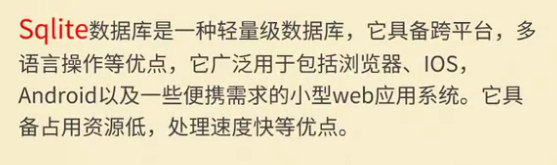
注意:当有大量相似结构的数据需要存储的时候,需要使用数据库。
2.SQLiteOpenHelper简介
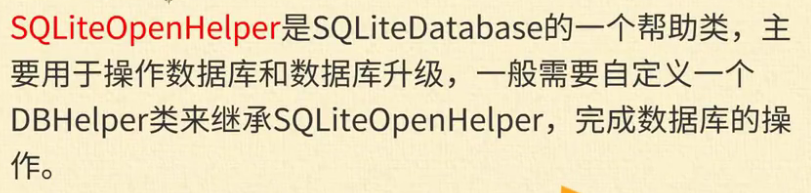
注意:数据库的创建方法总结:
(1)定义一个类继承SQLiteOpenHelper
onCreate()方法:当数据库第一次创建时调用,特别适合做表结构的初始化。
onUpdate()方法:当数据库版本进行更新时调用。
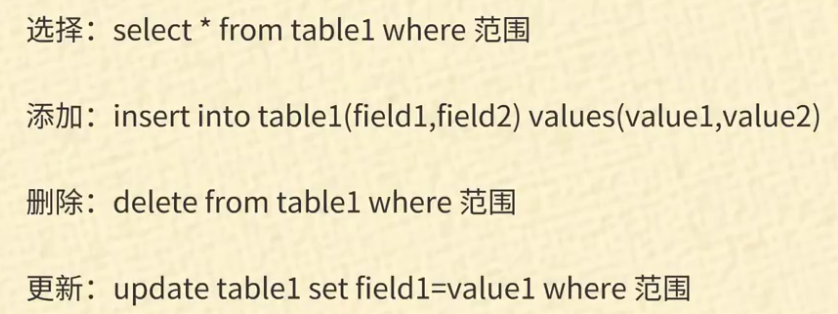
3.简单SQL语句
4.xml文件页面布局
<?xml version="1.0" encoding="utf-8"?>

<LinearLayout xmlns:android="http://schemas.android.com/apk/res/android"

    xmlns:app="http://schemas.android.com/apk/res-auto"

    xmlns:tools="http://schemas.android.com/tools"

    android:layout_width="match_parent"

    android:layout_height="match_parent"

    android:orientation="vertical"

    tools:context=".MainActivity"

    >

    <LinearLayout

        android:layout_width="match_parent"

        android:layout_height="wrap_content"

        android:orientation="horizontal"

        android:layout_marginLeft="20dp">

        <TextView

            android:id="@+id/textView"

            android:layout_width="wrap_content"

            android:layout_height="wrap_content"

            android:text="编号:" />

        <EditText

            android:id="@+id/editText_id"

            android:layout_width="wrap_content"

            android:layout_height="wrap_content"

            android:ems="10"

            android:inputType="textPersonName"

            android:text="" />

    </LinearLayout>

    <LinearLayout

        android:layout_width="match_parent"

        android:layout_height="wrap_content"

        android:orientation="horizontal"

        android:layout_marginLeft="20dp">

        <TextView

            android:id="@+id/textView2"

            android:layout_width="wrap_content"

            android:layout_height="wrap_content"

            android:text="姓名:" />

        <EditText

            android:id="@+id/editText_name"

            android:layout_width="wrap_content"

            android:layout_height="wrap_content"

            android:ems="10"

            android:inputType="textPersonName"

            android:text="" />

    </LinearLayout>

    <LinearLayout

        android:layout_width="match_parent"

        android:layout_height="wrap_content"

        android:orientation="horizontal"

        android:layout_marginLeft="20dp">

        <TextView

            android:id="@+id/textView3"

            android:layout_width="wrap_content"

            android:layout_height="wrap_content"

            android:text="年龄:" />

        <EditText

            android:id="@+id/editText_age"

            android:layout_width="wrap_content"

            android:layout_height="wrap_content"

            android:ems="10"

            android:inputType="textPersonName"

            android:text="" />

    </LinearLayout>

    <LinearLayout

        android:layout_width="match_parent"

        android:layout_height="wrap_content"

        android:orientation="horizontal"

        android:layout_marginLeft="20dp">

        <TextView

            android:id="@+id/textView4"

            android:layout_width="wrap_content"

            android:layout_height="wrap_content"

            android:text="请输入你要查找的编号:" />

        <EditText

            android:id="@+id/editText_qurryid"

            android:layout_width="70dp"

            android:layout_height="wrap_content"

            android:ems="10"

            android:inputType="textPersonName"

            android:text="" />

        <Button

            android:id="@+id/button_qurryById"

            android:layout_width="wrap_content"

            android:layout_height="wrap_content"

            android:text="查找" />

    </LinearLayout>

    <LinearLayout

        android:layout_width="match_parent"

        android:layout_height="wrap_content"

        android:orientation="horizontal"

        android:layout_marginLeft="20dp">

        <Button

            android:id="@+id/button_add"

            android:layout_width="wrap_content"

            android:layout_height="wrap_content"

            android:text="添加"

            android:layout_marginRight="10dp"/>

        <Button

            android:id="@+id/button_delete"

            android:layout_width="wrap_content"

            android:layout_height="wrap_content"

            android:text="删除"

            android:layout_marginRight="10dp"/>

        <Button

            android:id="@+id/button_modify"

            android:layout_width="wrap_content"

            android:layout_height="wrap_content"

            android:text="修改" />

    </LinearLayout>

    <TextView

        android:id="@+id/textView5"

        android:layout_width="match_parent"

        android:layout_height="wrap_content"

        android:text="TextView" />

</LinearLayout>
5.java后台
主界面
package com.lucky.test48sqlite;

import android.database.Cursor;

import android.database.sqlite.SQLiteDatabase;

import android.support.v7.app.AppCompatActivity;

import android.os.Bundle;

import android.view.View;

import android.widget.Button;

import android.widget.EditText;

import android.widget.TextView;

public class MainActivity extends AppCompatActivity {

        Button button_queryByid;

        Button button_add;

        Button button_delete;

        Button button_modify;

        EditText editText_id;

        EditText editText_name;

        EditText editText_age;

        EditText editText_inputid;

        TextView textView_findresult;

        SQLiteDatabase sqLiteDatabase;

    @Override

    protected void onCreate(Bundle savedInstanceState) {

        super.onCreate(savedInstanceState);

        setContentView(R.layout.activity_main);

        init();

        MyDataBase myDataBase=new MyDataBase(MainActivity.this); //实例化数据库

        sqLiteDatabase=myDataBase.getWritableDatabase();       //创建数据库

        //绑定按钮点击事件

        button_queryByid.setOnClickListener(new View.OnClickListener() {

            @Override

            public void onClick(View v) {

                //根据id进行查询

                textView_findresult.setText("");

                String sql="select *from user where 编号=?";

                Cursor cursor=sqLiteDatabase.rawQuery(sql,new String[]{editText_inputid.getText().toString()});

                //判断游标是否可以移到下一行,若可以,则有数据

                while (cursor.moveToNext()){

                    String name=cursor.getString(cursor.getColumnIndex("姓名"));

                    int id=cursor.getInt(cursor.getColumnIndex("编号"));

                    textView_findresult.append("\n编号:"+id+"\t姓名:"+name);

                }

            }

        });

        button_add.setOnClickListener(new View.OnClickListener() {

            @Override

            public void onClick(View v) {

                //向数据库中添加数据

                String sql="insert into user(编号,姓名,年龄) values(?,?,?)";

                sqLiteDatabase.execSQL(sql,new Object[]{Integer.parseInt(editText_id.getText().toString()),

                editText_name.getText().toString(),

                Integer.parseInt(editText_age.getText().toString())});

            }

        });

        button_delete.setOnClickListener(new View.OnClickListener() {

            @Override

            public void onClick(View v) {

                //删除数据库中的数据

                String sql="delete from user where 编号=?";

                sqLiteDatabase.execSQL(sql,new Object[]{Integer.parseInt(editText_id.getText().toString())});

            }

        });

        button_modify.setOnClickListener(new View.OnClickListener() {

            @Override

            public void onClick(View v) {

                //修改数据库内容

                String sql="update user set 编号=?,姓名=?,年龄=?";

                sqLiteDatabase.execSQL(sql,new Object[]{Integer.parseInt(editText_id.getText().toString()),

                        editText_name.getText().toString(),

                        Integer.parseInt(editText_age.getText().toString())});

            }

        });

    }

    private void init() {

        button_add=findViewById(R.id.button_add);

        button_delete=findViewById(R.id.button_delete);

        button_modify=findViewById(R.id.button_modify);

        button_queryByid=findViewById(R.id.button_qurryById);

        editText_age=findViewById(R.id.editText_age);

        editText_id=findViewById(R.id.editText_id);

        editText_name=findViewById(R.id.editText_name);

        editText_inputid=findViewById(R.id.editText_qurryid);

        textView_findresult=findViewById(R.id.textView5);

    }

}
Mydatabase工具类
package com.lucky.test48sqlite;

import android.content.Context;

import android.database.sqlite.SQLiteDatabase;

import android.database.sqlite.SQLiteOpenHelper;

public class MyDataBase extends SQLiteOpenHelper {

    static int version=1;

    static String name="lucky.db";

    public MyDataBase( Context context) {

        //参数1:context为上下文,参数2:name为数据库名称,参数3可默认为null,参数4:为数据库版本

        super(context, name, null, version);

    }

    //当数据库第一次被创建的时候,调用该方法,适合进行数据库表的初始化,创建数据库(注意:数据库创建在安卓app文件包内)

    @Override

    public void onCreate(SQLiteDatabase db) {

        String sql="create table user(编号 Integer,姓名 varchar(10),年龄 Integer)";

        db.execSQL(sql);

    }

    @Override

    public void onUpgrade(SQLiteDatabase db, int oldVersion, int newVersion) {

    }

}
039 Android SQLite数据库(了解)的更多相关文章
- Android Sqlite 数据库版本更新
Android Sqlite 数据库版本更新 http://87426628.blog.163.com/blog/static/6069361820131069485844/ 1.自己写一个类继承 ...
- Android SQLite 数据库详细介绍
Android SQLite 数据库详细介绍 我们在编写数据库应用软件时,需要考虑这样的问题:因为我们开发的软件可能会安装在很多用户的手机上,如果应用使用到了SQLite数据库,我们必须在用户初次使用 ...
- Android sqlite数据库存取图片信息
Android sqlite数据库存取图片信息 存储图片:bitmap private byte[] getIconData(Bitmap bitmap){ int size = bitmap.get ...
- Android SQLite 数据库 增删改查操作
Android SQLite 数据库 增删改查操作 转载▼ 一.使用嵌入式关系型SQLite数据库存储数据 在Android平台上,集成了一个嵌入式关系型数据库--SQLite,SQLite3支持NU ...
- 图解IntelliJ IDEA 13版本对Android SQLite数据库的支持
IntelliJ IDEA 13版本的重要构建之一是支持Android程序开发.当然对Android SQLite数据库的支持也就成为了Android开发者对IntelliJ IDEA 13版本的绝对 ...
- Android——SQLite/数据库 相关知识总结贴
android SQLite简介 http://www.apkbus.com/android-1780-1-1.html Android SQLite基础 http://www.apkbus.com/ ...
- Android Sqlite数据库加密
Android使用的是开源的SQLite数据库,数据库本身没有加密,加密思路通常有两个: 1. 对几个关键的字段使用加密算法,再存入数据库 2. 对整个数据库进行加密 SQLite数据库加密工具: 收 ...
- Android SQLite数据库使用
在Android开发中SQLite起着很重要的作用,网上SQLite的教程有很多很多,不过那些教程大多数都讲得不是很全面.本人总结了一些SQLite的常用的方法,借着论坛的大赛,跟大家分享分享的.一. ...
- android: SQLite 数据库的最佳实践
6.5.1 使用事务 前面我们已经知道,SQLite 数据库是支持事务的,事务的特性可以保证让某一系列的操 作要么全部完成,要么一个都不会完成.那么在什么情况下才需要使用事务呢?想象以下场 景, ...
随机推荐
- Maven项目启动失败:class path resource [spring/] cannot be resolved to URL because it does not exist
目录 Maven项目启动失败:class path resource [spring/] cannot be resolved to URL because it does not exist 解决方 ...
- C# 使用大漠插件, 源码在Github和码云 ..希望对大家有所帮助
c# 使用大漠插件. 完成 类似 按键精灵的 功能. 方法 注释 正在慢慢的 完善中 目录 仓库 github 码云 准备 效果图 如何运行 1. 注册 大漠dll 到com (资源在 源码 DLL ...
- shell文本处理工具
本文将介绍Linux下使用Shell处理文本时最常用的工具: find.grep.xargs.sort.uniq.tr.cut.paste.wc.sed.awk: 提供的例子和参数都是最常用和最为实用 ...
- fluent-动网格-动态层
模型算例来源:http://blog.sina.com.cn/s/blog_599d8faa0100w4uj.html 原视频下载地址:http://yunpan.cn/cujM2FxLuGdLK ...
- redis渐进式 rehash
转载(http://redisbook.com/preview/dict/incremental_rehashing.html) 上一节说过, 扩展或收缩哈希表需要将 ht[0] 里面的所有键值对 r ...
- 查看 ssh 攻击 和 攻击成功者
查看攻击失败记录: grep "Failed password for invalid user admin" /var/log/auth.log 查看攻击成功的记录: grep ...
- Spring AOP设计
Spring IOC设计到的设计模式: 工厂模式,模板方法模式,单例模式 Spring AOP涉及到的设计模式: 工厂模式,代理模式 1.Spring AOP目标 将分散在程序各处的横切关注点剥离出来 ...
- 【Java.Regex】用正则表达式查找Java文件里的字符串
代码: import java.io.FileNotFoundException; import java.io.FileReader; import java.io.IOException; imp ...
- 办公室上网慢原因排查 有人下载东西 设置行为管理 宽带分配设置独立下行宽带 TL-WVR1200L
办公室上网慢原因排查 有人下载东西 设置行为管理 宽带分配设置独立下行宽带
- vue模块化以及封装Storage组件实现保存搜索的历史记录
<template> <div id="app"> <input type="text" v-model='todo' @keyd ...