
4.matplotlib绘制直方图
 

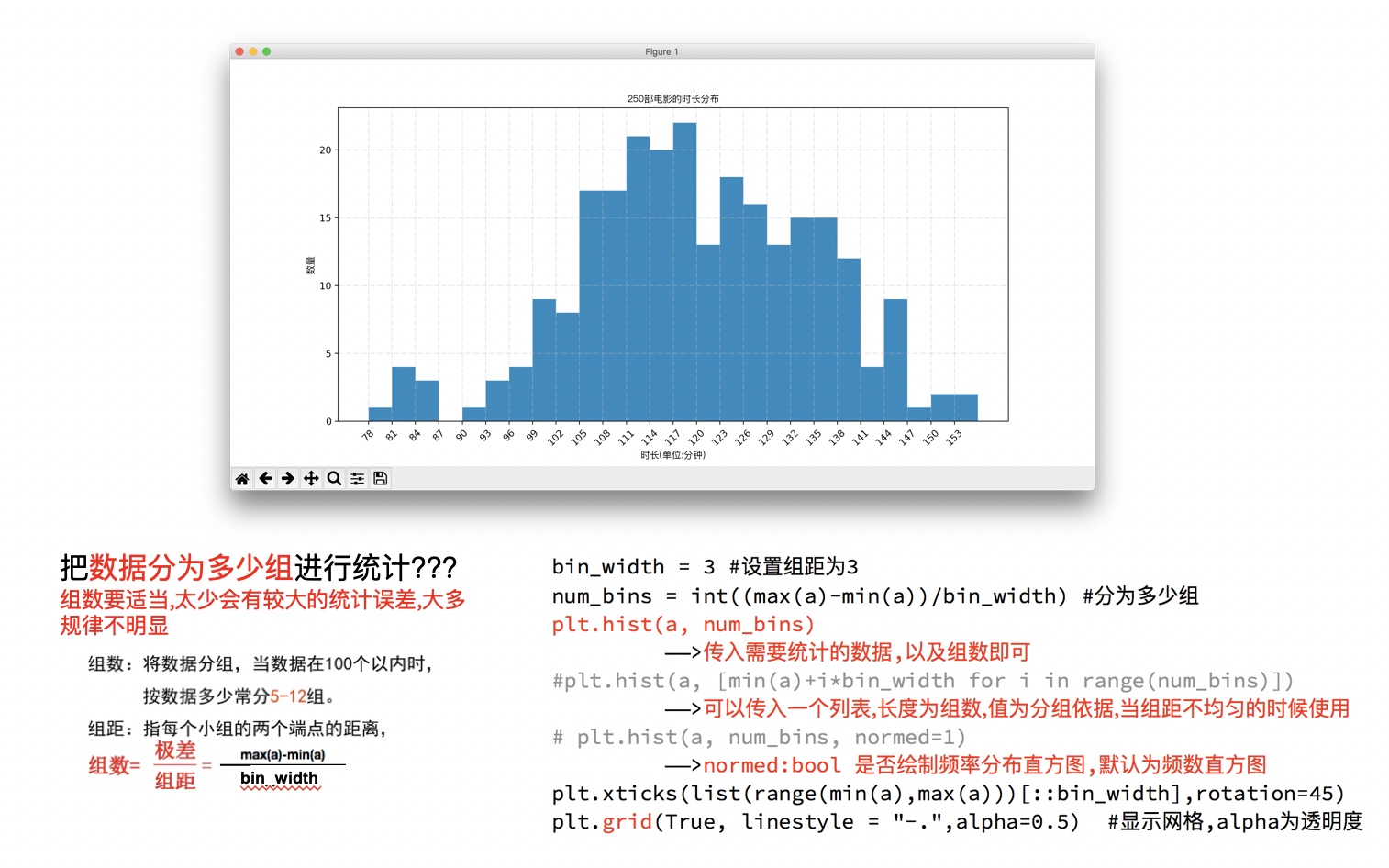 

# coding=utf-8

from matplotlib import pyplot as plt

from matplotlib import font_manager

a=[131,  98, 125, 131, 124, 139, 131, 117, 128, 108, 135, 138, 131, 102, 107, 114, 119, 128, 121, 142, 127, 130, 124, 101, 110, 116, 117, 110, 128, 128, 115,  99, 136, 126, 134,  95, 138, 117, 111,78, 132, 124, 113, 150, 110, 117,  86,  95, 144, 105, 126, 130,126, 130, 126, 116, 123, 106, 112, 138, 123,  86, 101,  99, 136,123, 117, 119, 105, 137, 123, 128, 125, 104, 109, 134, 125, 127,105, 120, 107, 129, 116, 108, 132, 103, 136, 118, 102, 120, 114,105, 115, 132, 145, 119, 121, 112, 139, 125, 138, 109, 132, 134,156, 106, 117, 127, 144, 139, 139, 119, 140,  83, 110, 102,123,107, 143, 115, 136, 118, 139, 123, 112, 118, 125, 109, 119, 133,112, 114, 122, 109, 106, 123, 116, 131, 127, 115, 118, 112, 135,115, 146, 137, 116, 103, 144,  83, 123, 111, 110, 111, 100, 154,136, 100, 118, 119, 133, 134, 106, 129, 126, 110, 111, 109, 141,120, 117, 106, 149, 122, 122, 110, 118, 127, 121, 114, 125, 126,114, 140, 103, 130, 141, 117, 106, 114, 121, 114, 133, 137,  92,121, 112, 146,  97, 137, 105,  98, 117, 112,  81,  97, 139, 113,134, 106, 144, 110, 137, 137, 111, 104, 117, 100, 111, 101, 110,105, 129, 137, 112, 120, 113, 133, 112,  83,  94, 146, 133, 101,131, 116, 111,  84, 137, 115, 122, 106, 144, 109, 123, 116, 111,111, 133, 150]

#计算组数

d = 3  #组距

num_bins = (max(a)-min(a))//d

print(max(a),min(a),max(a)-min(a))

print(num_bins)

#设置图形的大小

plt.figure(figsize=(20,8),dpi=80)

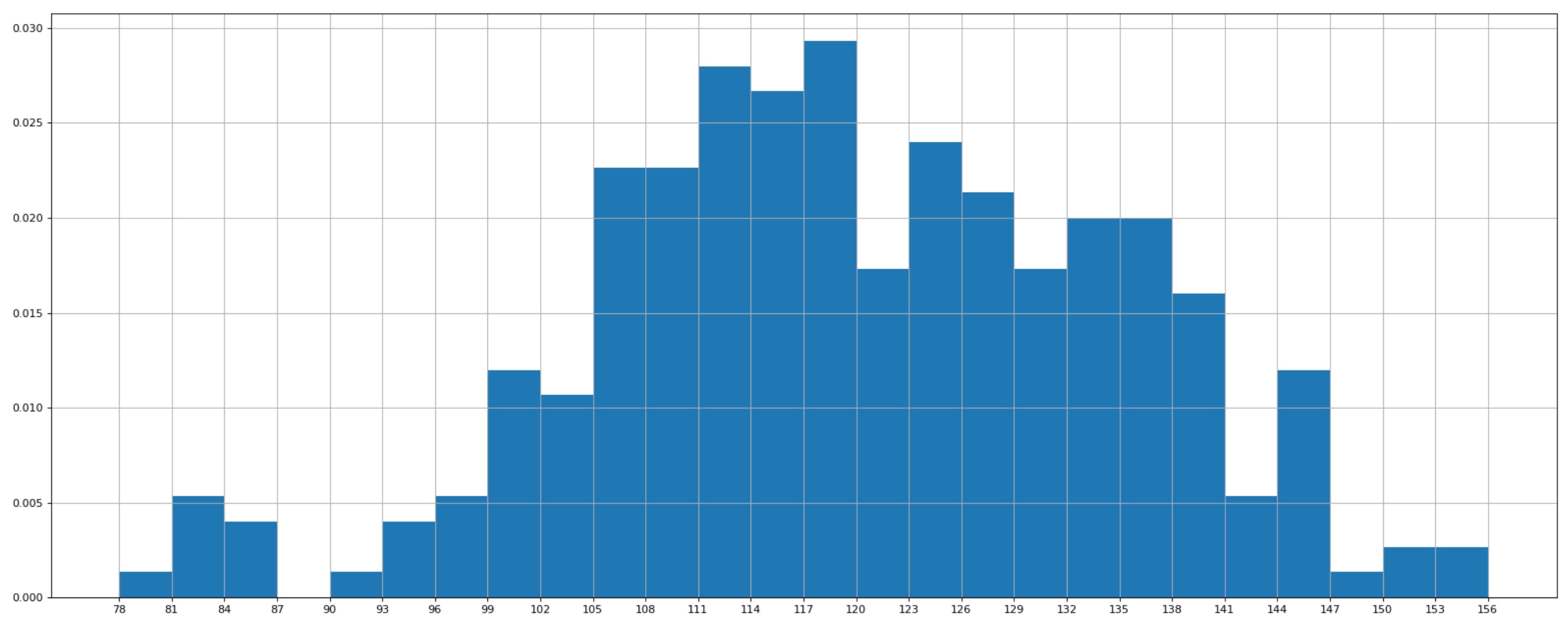
plt.hist(a,num_bins,normed=True)

#设置x轴的刻度

plt.xticks(range(min(a),max(a)+d,d))

plt.grid()

plt.show()
显示效果

4.matplotlib绘制直方图的更多相关文章
- NumPy使用 Matplotlib 绘制直方图
NumPy - 使用 Matplotlib 绘制直方图 NumPy 有一个numpy.histogram()函数,它是数据的频率分布的图形表示. 水平尺寸相等的矩形对应于类间隔,称为bin,变量hei ...
- matplotlib绘制直方图【柱状图】
代码: def drawBar(): xticks = ['A', 'B', 'C', 'D', 'E']#每个柱的下标说明 gradeGroup = {'A':200,'B':250,'C':330 ...
- 关于matplotlib绘制直方图偏移的问题
在使用pyplot绘制直方图的时候我发现了一个问题,在给函数.hist()传参的时候,如果传入的组数不是刚刚好(就是说这个组数如果是使用(最大值-最小值)/组距计算出来,而这个数字不是整除得来而是取整 ...
- Python:matplotlib绘制直方图
使用hist方法来绘制直方图: 绘制直方图,最主要的是一个数据集data和需要划分的区间数量bins,另外你也可以设置一些颜色.类型参数: plt.hist(np.random.randn(1 ...
- numpy和matplotlib绘制直方图
使用 Matplotlib Matplotlib 中有直方图绘制函数:matplotlib.pyplot.hist()它可以直接统计并绘制直方图.你应该使用函数 calcHist() 或 np.his ...
- 利用pandas读取Excel表格,用matplotlib.pyplot绘制直方图、折线图、饼图
利用pandas读取Excel表格,用matplotlib.pyplot绘制直方图.折线图.饼图 数据: 折线图代码: import pandas as pdimport matplotlib. ...
- matplotlib如何绘制直方图、条形图和饼图
1 绘制直方图: import matplotlib.pyplot as plt import numpy as np import matplotlib def hist1(): # 设置matpl ...
- python包matplotlib绘制图像
使用matplotlib绘制图像 import matplotlib.pyplot as plt from matplotlib.pyplot import MultipleLocator impor ...
- matplotlib绘制动画
matplotlib从1.1.0版本以后就开始支持绘制动画,具体使用可以参考官方帮助文档.下面是一个很基本的例子: """ A simple example of an ...
随机推荐
- Writeup:第五届上海市大学生网络安全大赛-Web
目录 Writeup:第五届上海市大学生网络安全大赛-Web 一.Decade 无参数函数RCE(./..) 二.Easysql 三.Babyt5 二次编码绕过strpos Description: ...
- [技术博客] rails控制台调试路由
目录 rails console 获得路由 app.xxx_path 发送请求 获得响应 作者:庄廓然 rails console 在项目目录下执行rails console test 可以进入测试模 ...
- DICOM中的UID
UID形式上是一个字符串,用于唯一标识DICOM标准中各种不同信息对象,如数据元素的值表示类型.DICOM抽象语法名.传输语法.应用程序上下文名字等,以保证在各个不同的国家.地区.生产商.设备使用时的 ...
- encode_chunked=req.has_header('Transfer-encoding'))问题解决方法
Traceback (most recent call last): File "/Library/Frameworks/Python.framework/Versions/3.6/lib/ ...
- 深度解析 ASP.NET MVC 5
ASP.NET MVC基础 IoC容器 ASP.NET MVC可扩展性 ASP.NET MVC Filters & Cache ASP.NET MVC AJAX ASP.NET MVC Cli ...
- maven本地仓库已经有了所需的jar包,为什么还要去请求远程仓库
问题 IDEA 中的maven 项目,一个jar包一直导入不进来,reimport 无效.从另一仓库把这个jar包拷贝到当前仓库,还是无效.mvn clean install -e U 发现加载这个j ...
- mybatis三个执行器的差别
myBatis官方对参数"defaultExecutorType"是这样说明的: 有这样三种执行器, SIMPLE是普通的执行器:REUSE执行器会重用预处理语句(prepared ...
- sparkStreaming读取kafka写入hive表
sparkStreaming: package hive import java.io.File import org.apache.kafka.clients.consumer.ConsumerRe ...
- 解决support包引起的AndroidStudio编译报错
{"kind":"error","text":"error: resource android:attr/colorError n ...
- Egret HTML5游戏开发指南
Egret HTML5游戏开发指南 下载地址:https://pan.baidu.com/s/1fuxllvmRhWXoWDwH4gxN9g 关注微信公众号获取提取码: 输入:egrt 获取提取码