
【jmeter】使用jmeter进行测试-示例
介绍
jmeter主要用于负载测试,详细信息可以参见Google。
这里使用一个简单的示例,来介绍jmeter的使用。
涉及的功能点包括:
- HTTP HEADER配置
- HTTP Request配置
- JSON提取器的使用
- OAUTH认证的token获取
jmeter的标准模式
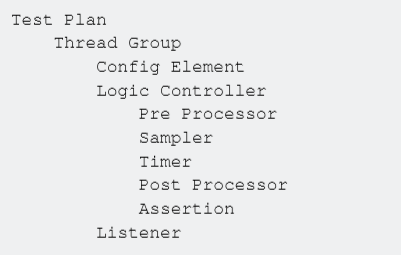
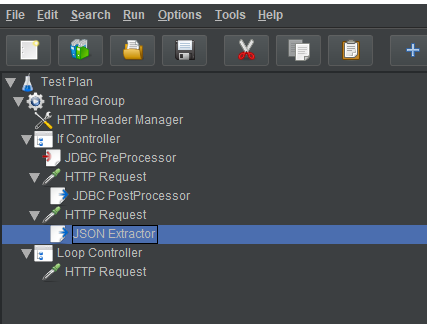
配置HTTP基本参数
本次测试使用的http请求的协议、ip和端口都相同,因此可以进行通用配置,相关参数如下:
- 协议:HTTP
- IP地址:10.144.91.163
- 端口号:30301
配置如下


获取token
所有的服务都需要认证,目前使用OAUTH认证,浏览器获取token的截图如下:
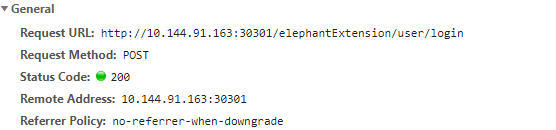
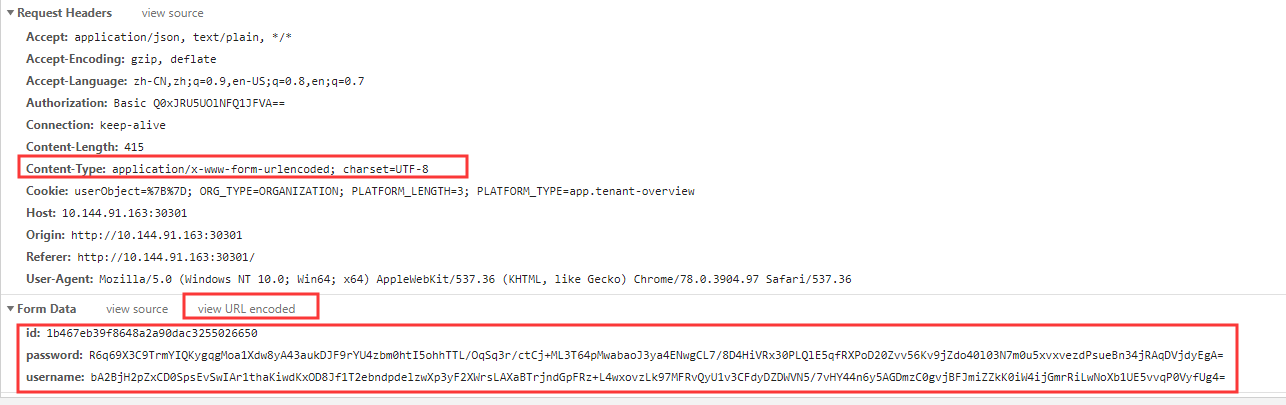
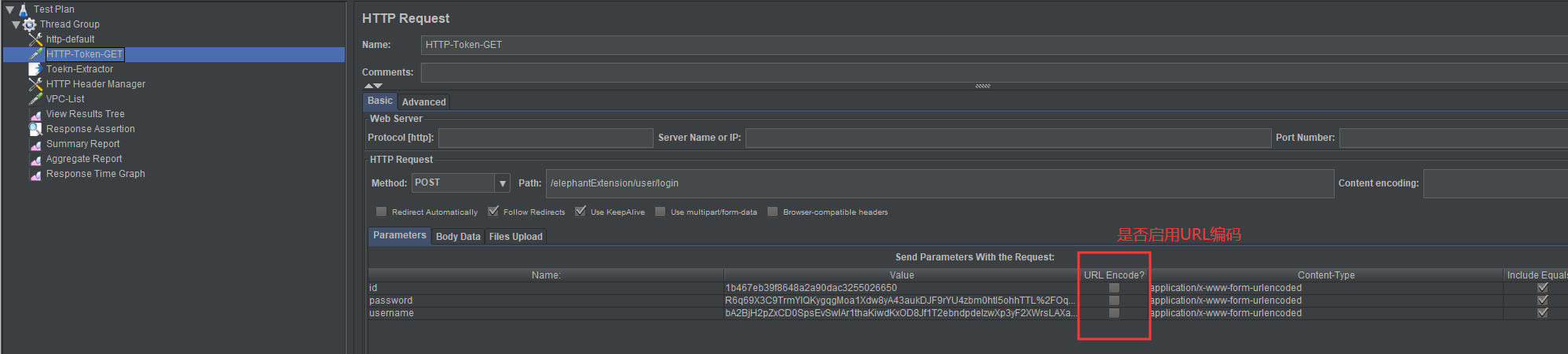
需要注意上图中的请求参数、content-type以及是否启用URL编码
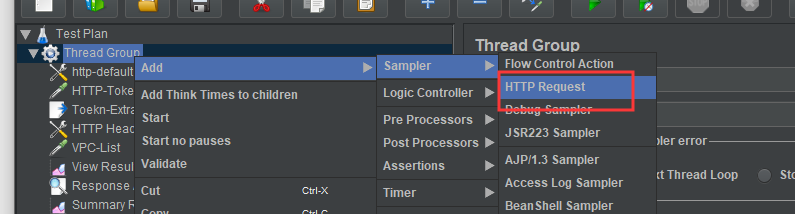
配置获取token的http请求 ,截图如下:
使用浏览器的参数配置如下属性
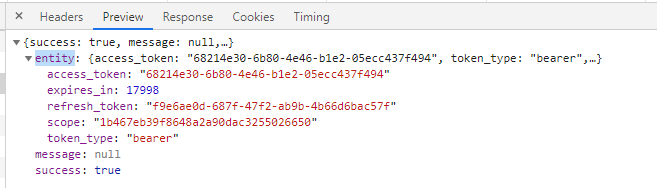
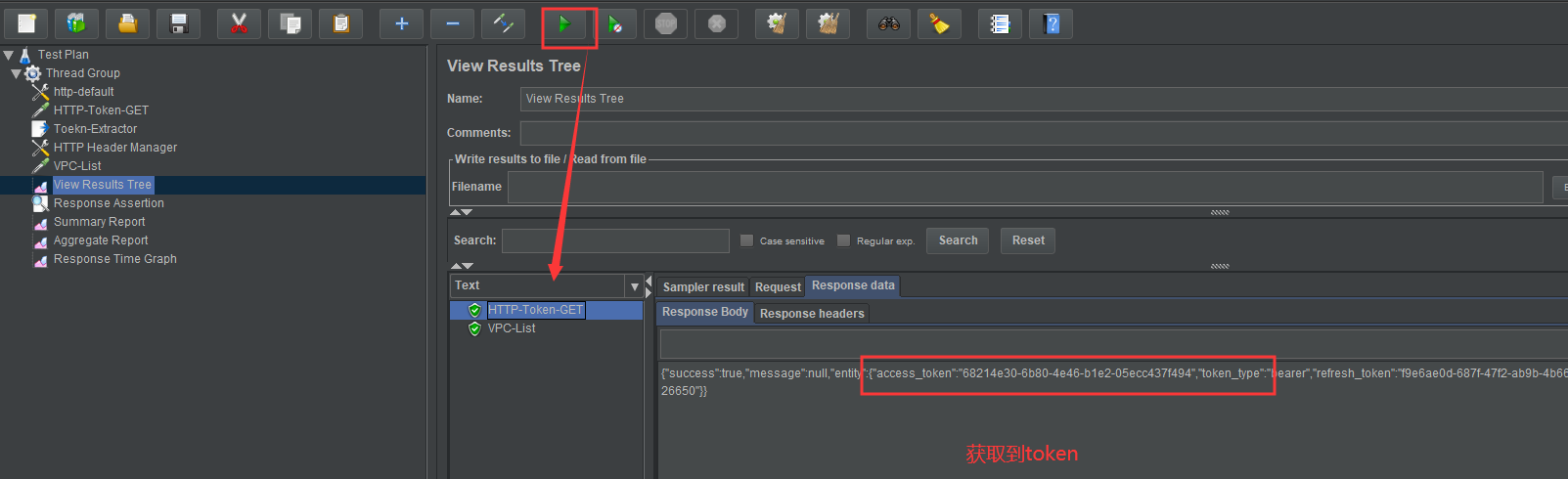
token的响应结果如下:
{

  "success": true,

  "message": null,

  "entity": {

    "access_token": "68214e30-6b80-4e46-b1e2-05ecc437f494",

    "token_type": "bearer",

    "refresh_token": "f9e6ae0d-687f-47f2-ab9b-4b66d6bac57f",

    "expires_in": 16036,

    "scope": "1b467eb39f8648a2a90dac3255026650"

  }

}
需要获取返回结果中的 access_token属性
使用JSON提取器提取token


Json的提取表达式需要参照返回结果来设置
在HTTP Header中配置token
token提前完成后,所有的测试请求都需要,可以设置为通用的http header


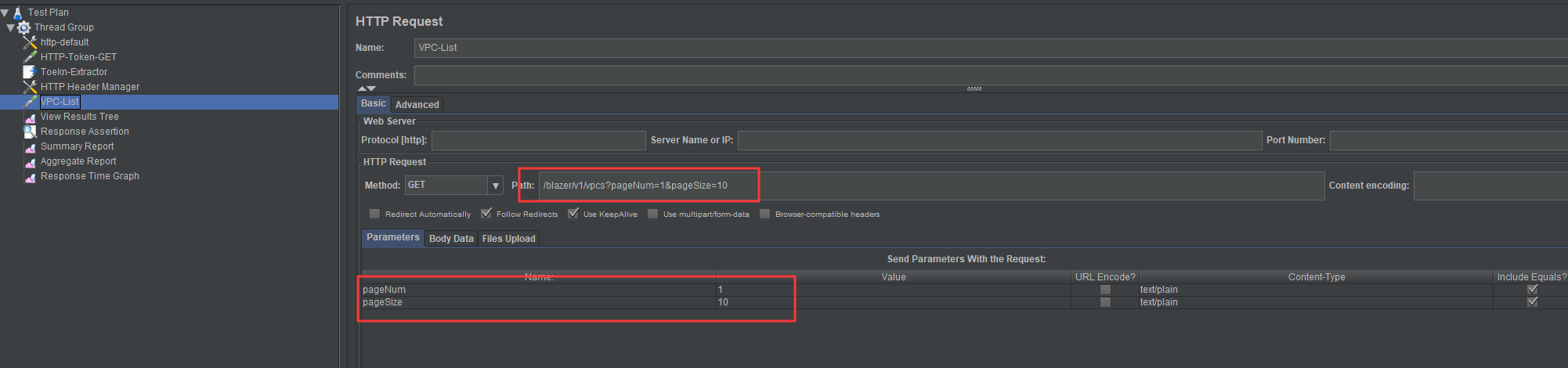
请求VPC列表进行测试
浏览器请求参数:

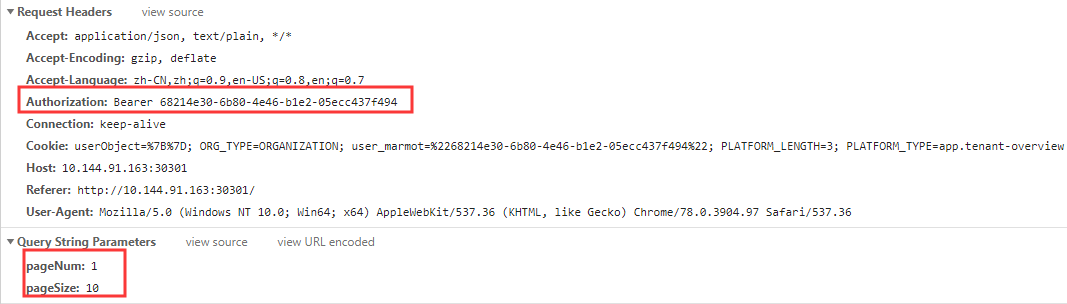
创建HTTP的请求

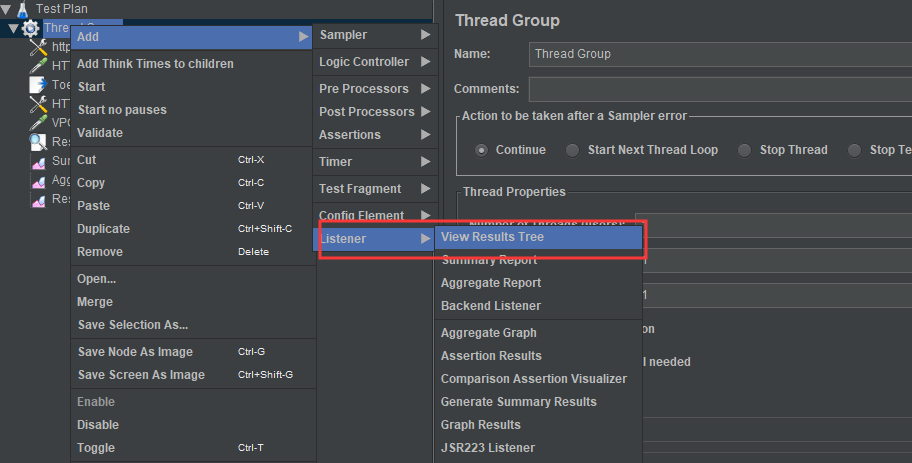
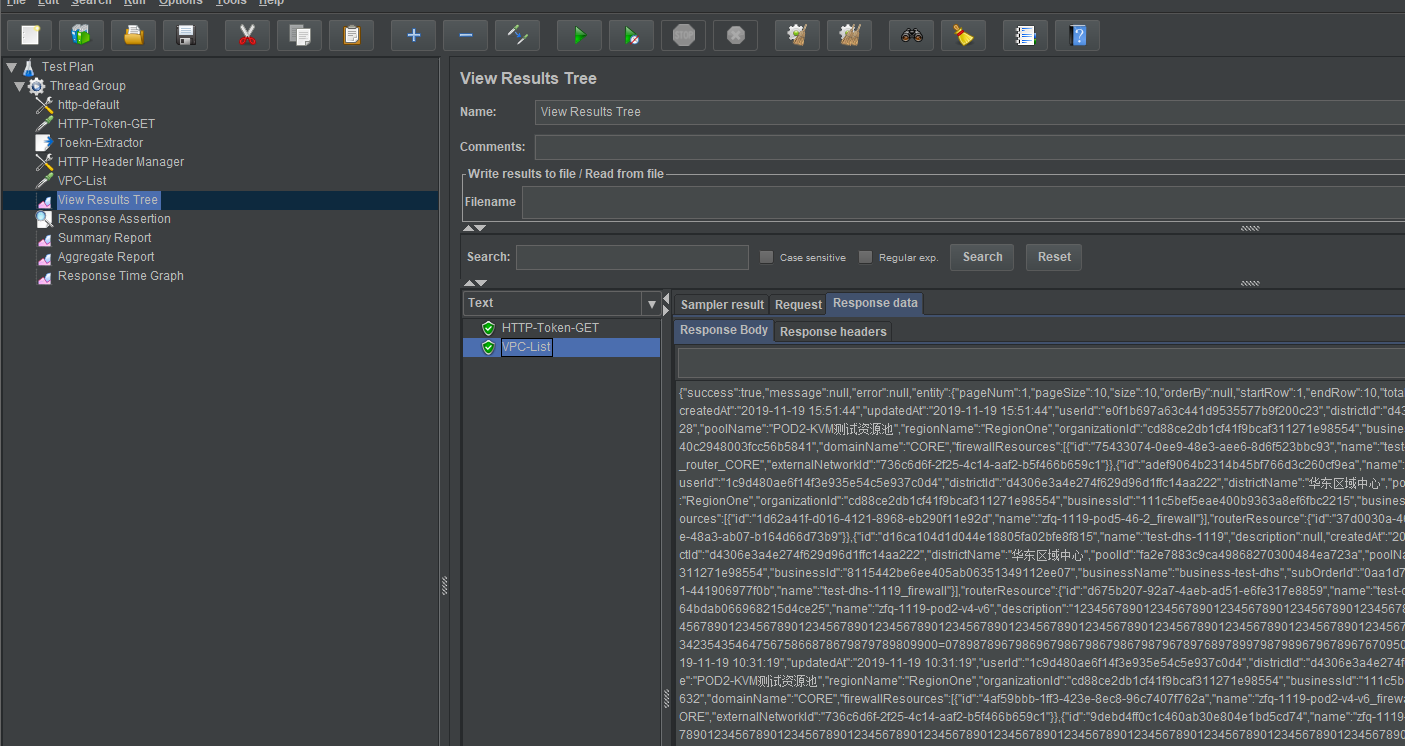
查看测试结果:
自动化录制工具
BlazeMeter
一个Chrome插件,需要翻墙
自动录制配置

录制结果

badboy: 明确已经停止维护
链接
Apache JMeter Correlations
JSON提取器示例
Automated Correlation by Using BlazeMeter’s ‘SmartJMX’
附件
完整的jmx文件
<?xml version="1.0" encoding="UTF-8"?>
<jmeterTestPlan version="1.2" properties="5.0" jmeter="5.2">
<hashTree>
<TestPlan guiclass="TestPlanGui" testclass="TestPlan" testname="Test Plan" enabled="true">
<stringProp name="TestPlan.comments"></stringProp>
<boolProp name="TestPlan.functional_mode">false</boolProp>
<boolProp name="TestPlan.tearDown_on_shutdown">true</boolProp>
<boolProp name="TestPlan.serialize_threadgroups">false</boolProp>
<elementProp name="TestPlan.user_defined_variables" elementType="Arguments" guiclass="ArgumentsPanel" testclass="Arguments" testname="User Defined Variables" enabled="true">
<collectionProp name="Arguments.arguments"/>
</elementProp>
<stringProp name="TestPlan.user_define_classpath"></stringProp>
</TestPlan>
<hashTree>
<ThreadGroup guiclass="ThreadGroupGui" testclass="ThreadGroup" testname="Thread Group" enabled="true">
<stringProp name="ThreadGroup.on_sample_error">continue</stringProp>
<elementProp name="ThreadGroup.main_controller" elementType="LoopController" guiclass="LoopControlPanel" testclass="LoopController" testname="Loop Controller" enabled="true">
<boolProp name="LoopController.continue_forever">false</boolProp>
<stringProp name="LoopController.loops">1</stringProp>
</elementProp>
<stringProp name="ThreadGroup.num_threads">1</stringProp>
<stringProp name="ThreadGroup.ramp_time">1</stringProp>
<boolProp name="ThreadGroup.scheduler">false</boolProp>
<stringProp name="ThreadGroup.duration"></stringProp>
<stringProp name="ThreadGroup.delay"></stringProp>
<boolProp name="ThreadGroup.same_user_on_next_iteration">true</boolProp>
</ThreadGroup>
<hashTree>
<ConfigTestElement guiclass="HttpDefaultsGui" testclass="ConfigTestElement" testname="http-default" enabled="true">
<elementProp name="HTTPsampler.Arguments" elementType="Arguments" guiclass="HTTPArgumentsPanel" testclass="Arguments" testname="User Defined Variables" enabled="true">
<collectionProp name="Arguments.arguments"/>
</elementProp>
<stringProp name="HTTPSampler.domain">10.144.91.163</stringProp>
<stringProp name="HTTPSampler.port">30301</stringProp>
<stringProp name="HTTPSampler.protocol">http</stringProp>
<stringProp name="HTTPSampler.contentEncoding"></stringProp>
<stringProp name="HTTPSampler.path"></stringProp>
<stringProp name="HTTPSampler.concurrentPool">6</stringProp>
<stringProp name="HTTPSampler.connect_timeout"></stringProp>
<stringProp name="HTTPSampler.response_timeout"></stringProp>
</ConfigTestElement>
<hashTree/>
<HTTPSamplerProxy guiclass="HttpTestSampleGui" testclass="HTTPSamplerProxy" testname="HTTP-Token-GET" enabled="true">
<elementProp name="HTTPsampler.Arguments" elementType="Arguments" guiclass="HTTPArgumentsPanel" testclass="Arguments" testname="User Defined Variables" enabled="true">
<collectionProp name="Arguments.arguments">
<elementProp name="id" elementType="HTTPArgument">
<boolProp name="HTTPArgument.always_encode">false</boolProp>
<stringProp name="Argument.value">1b467eb39f8648a2a90dac3255026650</stringProp>
<stringProp name="Argument.metadata">=</stringProp>
<boolProp name="HTTPArgument.use_equals">true</boolProp>
<stringProp name="Argument.name">id</stringProp>
<stringProp name="HTTPArgument.content_type">application/x-www-form-urlencoded</stringProp>
</elementProp>
<elementProp name="password" elementType="HTTPArgument">
<boolProp name="HTTPArgument.always_encode">false</boolProp>
<stringProp name="Argument.value">R6q69X3C9TrmYIQKygqgMoa1Xdw8yA43aukDJF9rYU4zbm0htI5ohhTTL%2FOqSq3r%2FctCj%2BML3T64pMwabaoJ3ya4ENwgCL7%2F8D4HiVRx30PLQlE5qfRXPoD20Zvv56Kv9jZdo40l03N7m0u5xvxvezdPsueBn34jRAqDVjdyEgA%3D</stringProp>
<stringProp name="Argument.metadata">=</stringProp>
<boolProp name="HTTPArgument.use_equals">true</boolProp>
<stringProp name="Argument.name">password</stringProp>
<stringProp name="HTTPArgument.content_type">application/x-www-form-urlencoded</stringProp>
</elementProp>
<elementProp name="username" elementType="HTTPArgument">
<boolProp name="HTTPArgument.always_encode">false</boolProp>
<stringProp name="Argument.value">bA2BjH2pZxCD0SpsEvSwIAr1thaKiwdKxOD8Jf1T2ebndpdelzwXp3yF2XWrsLAXaBTrjndGpFRz%2BL4wxovzLk97MFRvQyU1v3CFdyDZDWVN5%2F7vHY44n6y5AGDmzC0gvjBFJmiZZkK0iW4ijGmrRiLwNoXb1UE5vvqP0VyfUg4%3D</stringProp>
<stringProp name="Argument.metadata">=</stringProp>
<boolProp name="HTTPArgument.use_equals">true</boolProp>
<stringProp name="Argument.name">username</stringProp>
<stringProp name="HTTPArgument.content_type">application/x-www-form-urlencoded</stringProp>
</elementProp>
</collectionProp>
</elementProp>
<stringProp name="HTTPSampler.domain"></stringProp>
<stringProp name="HTTPSampler.port"></stringProp>
<stringProp name="HTTPSampler.protocol"></stringProp>
<stringProp name="HTTPSampler.contentEncoding"></stringProp>
<stringProp name="HTTPSampler.path">/elephantExtension/user/login</stringProp>
<stringProp name="HTTPSampler.method">POST</stringProp>
<boolProp name="HTTPSampler.follow_redirects">true</boolProp>
<boolProp name="HTTPSampler.auto_redirects">false</boolProp>
<boolProp name="HTTPSampler.use_keepalive">true</boolProp>
<boolProp name="HTTPSampler.DO_MULTIPART_POST">false</boolProp>
<stringProp name="HTTPSampler.embedded_url_re"></stringProp>
<stringProp name="HTTPSampler.connect_timeout"></stringProp>
<stringProp name="HTTPSampler.response_timeout"></stringProp>
</HTTPSamplerProxy>
<hashTree/>
<JSONPostProcessor guiclass="JSONPostProcessorGui" testclass="JSONPostProcessor" testname="Toekn-Extractor" enabled="true">
<stringProp name="JSONPostProcessor.referenceNames">token</stringProp>
<stringProp name="JSONPostProcessor.jsonPathExprs">$.entity.access_token</stringProp>
<stringProp name="JSONPostProcessor.match_numbers"></stringProp>
</JSONPostProcessor>
<hashTree/>
<HeaderManager guiclass="HeaderPanel" testclass="HeaderManager" testname="HTTP Header Manager" enabled="true">
<collectionProp name="HeaderManager.headers">
<elementProp name="" elementType="Header">
<stringProp name="Header.name">Authorization</stringProp>
<stringProp name="Header.value">Bearer ${token}</stringProp>
</elementProp>
</collectionProp>
</HeaderManager>
<hashTree/>
<HTTPSamplerProxy guiclass="HttpTestSampleGui" testclass="HTTPSamplerProxy" testname="VPC-List" enabled="true">
<elementProp name="HTTPsampler.Arguments" elementType="Arguments" guiclass="HTTPArgumentsPanel" testclass="Arguments" testname="User Defined Variables" enabled="true">
<collectionProp name="Arguments.arguments">
<elementProp name="pageNum" elementType="HTTPArgument">
<boolProp name="HTTPArgument.always_encode">false</boolProp>
<stringProp name="Argument.value">1</stringProp>
<stringProp name="Argument.metadata">=</stringProp>
<boolProp name="HTTPArgument.use_equals">true</boolProp>
<stringProp name="Argument.name">pageNum</stringProp>
</elementProp>
<elementProp name="pageSize" elementType="HTTPArgument">
<boolProp name="HTTPArgument.always_encode">false</boolProp>
<stringProp name="Argument.value">10</stringProp>
<stringProp name="Argument.metadata">=</stringProp>
<boolProp name="HTTPArgument.use_equals">true</boolProp>
<stringProp name="Argument.name">pageSize</stringProp>
</elementProp>
</collectionProp>
</elementProp>
<stringProp name="HTTPSampler.domain"></stringProp>
<stringProp name="HTTPSampler.port"></stringProp>
<stringProp name="HTTPSampler.protocol"></stringProp>
<stringProp name="HTTPSampler.contentEncoding"></stringProp>
<stringProp name="HTTPSampler.path">/blazer/v1/vpcs?pageNum=1&pageSize=10</stringProp>
<stringProp name="HTTPSampler.method">GET</stringProp>
<boolProp name="HTTPSampler.follow_redirects">true</boolProp>
<boolProp name="HTTPSampler.auto_redirects">false</boolProp>
<boolProp name="HTTPSampler.use_keepalive">true</boolProp>
<boolProp name="HTTPSampler.DO_MULTIPART_POST">false</boolProp>
<stringProp name="HTTPSampler.embedded_url_re"></stringProp>
<stringProp name="HTTPSampler.connect_timeout"></stringProp>
<stringProp name="HTTPSampler.response_timeout"></stringProp>
</HTTPSamplerProxy>
<hashTree/>
<ResultCollector guiclass="ViewResultsFullVisualizer" testclass="ResultCollector" testname="View Results Tree" enabled="true">
<boolProp name="ResultCollector.error_logging">false</boolProp>
<objProp>
<name>saveConfig</name>
<value class="SampleSaveConfiguration">
<time>true</time>
<latency>true</latency>
<timestamp>true</timestamp>
<success>true</success>
<label>true</label>
<code>true</code>
<message>true</message>
<threadName>true</threadName>
<dataType>true</dataType>
<encoding>false</encoding>
<assertions>true</assertions>
<subresults>true</subresults>
<responseData>false</responseData>
<samplerData>false</samplerData>
<xml>false</xml>
<fieldNames>true</fieldNames>
<responseHeaders>false</responseHeaders>
<requestHeaders>false</requestHeaders>
<responseDataOnError>false</responseDataOnError>
<saveAssertionResultsFailureMessage>true</saveAssertionResultsFailureMessage>
<assertionsResultsToSave>0</assertionsResultsToSave>
<bytes>true</bytes>
<sentBytes>true</sentBytes>
<url>true</url>
<threadCounts>true</threadCounts>
<idleTime>true</idleTime>
<connectTime>true</connectTime>
</value>
</objProp>
<stringProp name="filename"></stringProp>
</ResultCollector>
<hashTree/>
<ResponseAssertion guiclass="AssertionGui" testclass="ResponseAssertion" testname="Response Assertion" enabled="true">
<collectionProp name="Asserion.test_strings">
<stringProp name="49586">200</stringProp>
</collectionProp>
<stringProp name="Assertion.custom_message">测试失败</stringProp>
<stringProp name="Assertion.test_field">Assertion.response_code</stringProp>
<boolProp name="Assertion.assume_success">false</boolProp>
<intProp name="Assertion.test_type">8</intProp>
</ResponseAssertion>
<hashTree/>
<ResultCollector guiclass="SummaryReport" testclass="ResultCollector" testname="Summary Report" enabled="true">
<boolProp name="ResultCollector.error_logging">false</boolProp>
<objProp>
<name>saveConfig</name>
<value class="SampleSaveConfiguration">
<time>true</time>
<latency>true</latency>
<timestamp>true</timestamp>
<success>true</success>
<label>true</label>
<code>true</code>
<message>true</message>
<threadName>true</threadName>
<dataType>true</dataType>
<encoding>false</encoding>
<assertions>true</assertions>
<subresults>true</subresults>
<responseData>false</responseData>
<samplerData>false</samplerData>
<xml>false</xml>
<fieldNames>true</fieldNames>
<responseHeaders>false</responseHeaders>
<requestHeaders>false</requestHeaders>
<responseDataOnError>false</responseDataOnError>
<saveAssertionResultsFailureMessage>true</saveAssertionResultsFailureMessage>
<assertionsResultsToSave>0</assertionsResultsToSave>
<bytes>true</bytes>
<sentBytes>true</sentBytes>
<url>true</url>
<threadCounts>true</threadCounts>
<idleTime>true</idleTime>
<connectTime>true</connectTime>
</value>
</objProp>
<stringProp name="filename"></stringProp>
</ResultCollector>
<hashTree/>
<ResultCollector guiclass="StatVisualizer" testclass="ResultCollector" testname="Aggregate Report" enabled="true">
<boolProp name="ResultCollector.error_logging">false</boolProp>
<objProp>
<name>saveConfig</name>
<value class="SampleSaveConfiguration">
<time>true</time>
<latency>true</latency>
<timestamp>true</timestamp>
<success>true</success>
<label>true</label>
<code>true</code>
<message>true</message>
<threadName>true</threadName>
<dataType>true</dataType>
<encoding>false</encoding>
<assertions>true</assertions>
<subresults>true</subresults>
<responseData>false</responseData>
<samplerData>false</samplerData>
<xml>false</xml>
<fieldNames>true</fieldNames>
<responseHeaders>false</responseHeaders>
<requestHeaders>false</requestHeaders>
<responseDataOnError>false</responseDataOnError>
<saveAssertionResultsFailureMessage>true</saveAssertionResultsFailureMessage>
<assertionsResultsToSave>0</assertionsResultsToSave>
<bytes>true</bytes>
<sentBytes>true</sentBytes>
<url>true</url>
<threadCounts>true</threadCounts>
<idleTime>true</idleTime>
<connectTime>true</connectTime>
</value>
</objProp>
<stringProp name="filename"></stringProp>
</ResultCollector>
<hashTree/>
<ResultCollector guiclass="RespTimeGraphVisualizer" testclass="ResultCollector" testname="Response Time Graph" enabled="true">
<boolProp name="ResultCollector.error_logging">false</boolProp>
<objProp>
<name>saveConfig</name>
<value class="SampleSaveConfiguration">
<time>true</time>
<latency>true</latency>
<timestamp>true</timestamp>
<success>true</success>
<label>true</label>
<code>true</code>
<message>true</message>
<threadName>true</threadName>
<dataType>true</dataType>
<encoding>false</encoding>
<assertions>true</assertions>
<subresults>true</subresults>
<responseData>false</responseData>
<samplerData>false</samplerData>
<xml>false</xml>
<fieldNames>true</fieldNames>
<responseHeaders>false</responseHeaders>
<requestHeaders>false</requestHeaders>
<responseDataOnError>false</responseDataOnError>
<saveAssertionResultsFailureMessage>true</saveAssertionResultsFailureMessage>
<assertionsResultsToSave>0</assertionsResultsToSave>
<bytes>true</bytes>
<sentBytes>true</sentBytes>
<url>true</url>
<threadCounts>true</threadCounts>
<idleTime>true</idleTime>
<connectTime>true</connectTime>
</value>
</objProp>
<stringProp name="filename"></stringProp>
</ResultCollector>
<hashTree/>
</hashTree>
</hashTree>
</hashTree>
</jmeterTestPlan>
【jmeter】使用jmeter进行测试-示例的更多相关文章
- JMeter学习-022-JMeter 分布式测试(性能测试大并发、远程启动解决方案)
在使用 JMeter 进行性能测试时,难免遇到要求并发请求数比较的场景,此时单台测试机的配置(CPU.内存.带宽等)可能无法支持此性能测试场景.因而,此时 JMeter 提供的分布式测试功能就有了用武 ...
- 使用JMeter进行RESTful API测试
使用JMeter进行RESTful API测试 在哪里设置实现最优脚本重用的属性 由于支持云的应用程序通常可以轻松.快速地进行复制和部署,所以可以在多种环境中对其进行测试.如果您需要在多个环境中测试和 ...
- JMeter (1) —— JMeter与WebDriver安装与测试(101 Tutorial)
JMeter (1) -- JMeter与WebDriver安装与测试(101 Tutorial) 主要内容 JMeter安装 WebDriver安装 一个简单的JMeter+WebDriver示例 ...
- JMeter安装及简单应用示例
一.Jmeter下载 官网地址:http://jmeter.apache.org/ 1.进入官网 2.选中一个版本下载 3.解压安装即可 二.Jmeter环境变量配置 1. 电脑桌面----> ...
- AWS EC2+Docker+JMeter构建分布式负载测试基础架构
目录 概述及范围 前提条件 Part 1: Local setup-本地配置 Part 2: Cloud端基础架构--Infrastructure 总结: 原文链接 @ 概述及范围 本文介绍有关如何使 ...
- JMeter接口自动化发包与示例
JMeter接口自动化发包与示例 近期需要完成对于接口的测试,于是了解并简单做了个测试示例,看了看这款江湖上声名远播的强大的软件-Jmeter靠不靠谱. 官网:https://jmeter.apach ...
- 使用Jmeter至WebService压力测试
使用Jmeter至WebService压力测试 目中我们使用了Jmeter对webservice进行了压力測试,Apache JMeter是Apache组织开发的基于Java的压力測试工具.用于对 ...
- jmeter的使用---web测试
jmeter的使用---web测试 url:http://127.0.0.1:1080/WebTours/ 1.通过badboy录制脚本 1.1输入url点击右侧的跳转按钮,随后右侧显示url界面 1 ...
- (转)使用JMeter进行Web压力测试
使用JMeter进行压力测试 说到压力测试,一般第一反应都是LoadRunner.这个软件也确实是自动化测试的一个事实标准.无奈这个软件太过庞大,以及不能在MacOS上使用.我由于项目的需要,需要对一 ...
随机推荐
- Odoo Qweb语法
转载请注明原文地址:https://www.cnblogs.com/ygj0930/p/10826202.html 一:简介 QWeb是一个基于xml的模板引擎,用于生成HTML片段和页面. 模板指令 ...
- linux设备驱动程序-i2c(0)-i2c设备驱动源码实现
(基于4.14内核版本) 为了梳理清楚linux内核中的i2c实现框架,从本文开始,博主将分几个章节分别解析i2c总线在linux内核中的形成过程.匹配过程.以及设备驱动程序源码实现. 在介绍linu ...
- sudo apt update报错
在Ubuntu系统下,使用sudo apt-get update有时会出现“W: 无法下载 http://cn.archive.ubuntu.com/ubuntu/.... 校验和不符”, xj@xj ...
- phpstorm通过FileWatchers配置自动格式化代码插件
在自动格式代码的插件中, prettier一直是挺不错的, 这个插件在不同的IDE里有不同的配置地方, 但是配置参数基本上是差不多的. 下面就说明下在phpstorm(版本2019.2)中如何配置的吧 ...
- 25、typing导入Python的数据类型模块、collections集合模块
一.typing模块 1.typing模块的作用 类型检查,防止运行时出现参数和返回值类型不符合. 作为开发文档附加说明,方便使用者调用时传入和返回参数类型. 该模块加入后并不会影响程序的运行,不会报 ...
- selenium 2 设置浏览器安装路径
selenium 2由于调用的是真实的浏览器,所以当你的浏览器不是安装在默认路径下,你就需要设定浏览器启动路径:若是默认路径,则程序中不需设定浏览器启动路径. 比如说用firefox进行测试 1. f ...
- BZOJ 2600: [Ioi2011]ricehub 双指针+贪心
不难发现,当我们要选的区间确定后,一定会把仓库安排到中间的稻草上(如果是偶数个的话中间两个都行). 然后按照坐标从小到大枚举右指针,左指针一定不递减,双指针扫一下就行了. code: #include ...
- 文件搜索命令locate
与find命令不同,locate命令不会去搜索某一个分区或硬盘,而是直接在资料库中搜索,因此,搜索的速度要比find命令快得多,linux系统会定期更新资料库. 利用locate locate命令可以 ...
- 使用packer 打包nodegui 应用
packer 是nodegui 团队提供的专门用来打包noodegui 应用程序的工具 安装packer yarn 方式安装 yarn add @nodegui/packer 效果 [fsevents ...
- Python 装饰器(Decorators) 超详细分类实例
Python装饰器分类 Python 装饰器函数: 是指装饰器本身是函数风格的实现; 函数装饰器: 是指被装饰的目标对象是函数;(目标对象); 装饰器类 : 是指装饰器本身是类风格的实现; 类 ...