
rest framework 之解析器
一、示例
1、api/urls.py
from django.urls import path, re_path

from api.views import UserView, ParserView

urlpatterns = [

    # path('users/', UserView.as_view()),

    re_path('(?P<version>[v1|v2]+)/users/', UserView.as_view(), name='api_user'),

    path('parser/', ParserView.as_view(), name='api_parer'),		# 添加这句

]
2、api/views.py
JSONParser:只能解析content-type:application/json的头FormParser:只能解析content-type:application/x-www-form-urlencoded的头
from rest_framework.parsers import JSONParser, FormParser

class ParserView(APIView):

    parser_classes = [JSONParser, FormParser]

    def post(self, request, *args, **kwargs):

        print(request.data)

        return HttpResponse('解析')
3、使用 postman 发送 json 数据测试后台是否能解析:
(1)、设置为 post 方式,headers 中添加数据类型为 json

(2)、body 中选择 raw,然后选择 json 类型,最后就是在空白处构建要发送的 json 数据(记得是双引号):

后台结果:

如果是 content-type:application/x-www-form-urlencoded 类型数据,不需要设置请求头,默认就是。但是 body 中需要设置为 x-www-form-urlencoded 。
二、源码分析
1、dispatch()
def dispatch(self, request, *args, **kwargs):

    """

    `.dispatch()` is pretty much the same as Django's regular dispatch,

    but with extra hooks for startup, finalize, and exception handling.

    """

    self.args = args

    self.kwargs = kwargs

    # 对原生的 request 对象进行加工,丰富了

    # request= Request(request,parsers=self.get_parsers(),authenticators=self.get_authenticators(),negotiator=self.get_content_negotiator(),parser_context=parser_context)

    # 第一个参数为原生的 request 对象,封装原生 request

    request = self.initialize_request(request, *args, **kwargs)

    self.request = request

    self.headers = self.default_response_headers  # deprecate?

    try:

        self.initial(request, *args, **kwargs)

        # Get the appropriate handler method

        if request.method.lower() in self.http_method_names:

            handler = getattr(self, request.method.lower(),

                              self.http_method_not_allowed)

        else:

            handler = self.http_method_not_allowed

            response = handler(request, *args, **kwargs)

    except Exception as exc:

        response = self.handle_exception(exc)

        self.response = self.finalize_response(request, response, *args, **kwargs)

        return self.response
2、initialize_request()
def initialize_request(self, request, *args, **kwargs):

    """

    Returns the initial request object. 封装原生 request 对象

    """

    parser_context = self.get_parser_context(request)

    return Request(

        request,

        # 获取所有解析器

        parsers=self.get_parsers(),

        authenticators=self.get_authenticators(),

        negotiator=self.get_content_negotiator(),

        parser_context=parser_context

    )
3、get_parsers()
def get_parsers(self):

    """

    Instantiates and returns the list of parsers that this view can use.

    返回次视图可以使用的解析器列表

    """

    return [parser() for parser in self.parser_classes]
4、parser_classes
class APIView(View):

    # The following policies may be set at either globally, or per-view.

    renderer_classes = api_settings.DEFAULT_RENDERER_CLASSES

    # 从 settings 中获取解析器

    parser_classes = api_settings.DEFAULT_PARSER_CLASSES

    # Allow dependency injection of other settings to make testing easier.

    settings = api_settings
5、全局配置解析器 settings:
REST_FRAMEWORK = {

    # 解析器

    "DEFAULT_PARSER_CLASSES":["rest_framework.parsers.JSONParser","rest_framework.parsers.FormParser"]

}
源码流程图

根据请求头 content-type 选择对应的解析器就请求体内容进行处理。
三、仅处理请求头 content-type 为 application/json 的请求体
1、urls.py
from django.urls import path, re_path, include

from api.views import TestView2

urlpatterns = [

    re_path(r'(?P<version>[v1|v2]+)/test2', TestView2.as_view()),

]
2、views.py
rom rest_framework.views import APIView

from rest_framework.parsers import JSONParser, FormParser

from rest_framework.response import Response

class TestView2(APIView):

    parser_classes = [JSONParser]

    def post(self, request, *args, **kwargs):

        print(request.content_type)    # application/json

        # 获取请求值,并发 JSONParser  处理

        print(request.data)     # {'name': 'rose', 'age': 18}

        # application/x-www-form-urlencoded 或 multipart/form-data时,request.POST中才有值

        print(request.POST)         # <QueryDict: {}>

        print(request.FILES)        # <MultiValueDict: {}>

        return Response('响应内容')
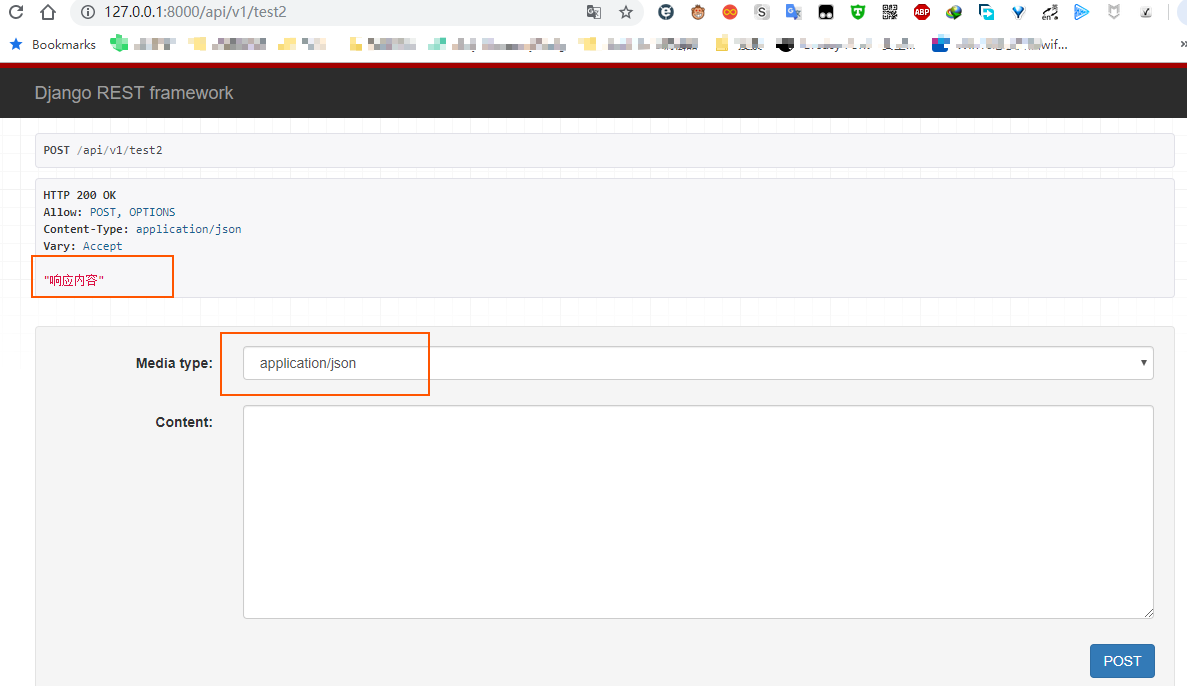
四、仅处理请求头 content-type 为 application/x-www-form-urlencoded 的请求体
1、urls.py
from django.urls import path, re_path, include

from api.views import TestView2

urlpatterns = [

    re_path(r'(?P<version>[v1|v2]+)/test2', TestView2.as_view()),

]
2、views.py
rom rest_framework.views import APIView

from rest_framework.parsers import JSONParser, FormParser

from rest_framework.response import Response

class TestView2(APIView):

    parser_classes = [FormParser]

    def post(self, request, *args, **kwargs):

        print(request.content_type)    # application/x-www-form-urlencoded

        # 获取请求值,并发 JSONParser  处理

        print(request.data)     # <QueryDict: {'123': ['']}>

        # application/x-www-form-urlencoded 或 multipart/form-data时,request.POST中才有值

        print(request.POST)         # <QueryDict: {'123': ['']}>

        print(request.FILES)        # <MultiValueDict: {}>

        return Response('响应内容')
五、仅处理请求头content-type为multipart/form-data的请求体
1、urls.py
from django.urls import path, re_path, include

from api.views import TestView2

urlpatterns = [

    re_path(r'(?P<version>[v1|v2]+)/test2', TestView2.as_view()),

]
2、views.py
rom rest_framework.views import APIView

from rest_framework.parsers import JSONParser, FormParser, MultiPartParser

from rest_framework.response import Response

class TestView2(APIView):

    parser_classes = [MultiPartParser]

    def post(self, request, *args, **kwargs):

        print(request.content_type)    # multipart/form-data

        # 获取请求值,并发 JSONParser  处理

        print(request.data)

        # application/x-www-form-urlencoded 或 multipart/form-data时,request.POST中才有值

        print(request.POST)

        print(request.FILES)

        return Response('响应内容')
3、upload.html
<!DOCTYPE html>

<html lang="en">

<head>

    <meta charset="UTF-8">

    <title>Title</title>

</head>

<body>

<form action="http://127.0.0.1:8000/test/" method="post" enctype="multipart/form-data">

    <input type="text" name="user" />

    <input type="file" name="img">

    <input type="submit" value="提交">

</form>

</body>

</html>
六、仅上传文件
1、urls.py
from django.urls import path, re_path, include

from api.views import TestView2

urlpatterns = [

    re_path(r'(?P<version>[v1|v2]+)/test2', TestView2.as_view()),

]
2、views.py
rom rest_framework.views import APIView

from rest_framework.parsers import JSONParser, FormParser, MultiPartParser, FileUploadParser

from rest_framework.response import Response

class TestView2(APIView):

    parser_classes = [FileUploadParser]

    def post(self, request, *args, **kwargs):

        print(request.content_type)

        # 获取请求值,并发 JSONParser  处理

        print(request.data)

        # application/x-www-form-urlencoded 或 multipart/form-data时,request.POST中才有值

        print(request.POST)

        print(request.FILES)

        return Response('响应内容')
3、upload.html
<!DOCTYPE html>

<html lang="en">

<head>

    <meta charset="UTF-8">

    <title>Title</title>

</head>

<body>

<form action="http://127.0.0.1:8000/test/" method="post" enctype="multipart/form-data">

    <input type="text" name="user" />

    <input type="file" name="img">

    <input type="submit" value="提交">

</form>

</body>

</html>
七、其他
多个 parser
当同时使用多个 parser 时,rest framework 会根据请求头 content-type 自动进行比对,并使用对应 parser
#!/usr/bin/env python

# -*- coding:utf-8 -*-

from rest_framework.views import APIView

from rest_framework.response import Response

from rest_framework.request import Request

from rest_framework.parsers import JSONParser, FormParser, MultiPartParser

class TestView(APIView):

    parser_classes = [JSONParser, FormParser, MultiPartParser, ]

    def post(self, request, *args, **kwargs):

        print(request.content_type)

        # 获取请求的值,并使用对应的JSONParser进行处理

        print(request.data)

        # application/x-www-form-urlencoded 或 multipart/form-data时,request.POST中才有值

        print(request.POST)

        print(request.FILES)

        return Response('POST请求,响应内容')
全局使用
settings.py
REST_FRAMEWORK = {

    'DEFAULT_PARSER_CLASSES':[

        'rest_framework.parsers.JSONParser'

        'rest_framework.parsers.FormParser'

        'rest_framework.parsers.MultiPartParser'

    ]

}
Tips: 个别特殊的值可以通过Django的request对象 request._request 来进行获取
总结
JSONParser,解析数据类型:content-type:application/jsonFormParser,解析数据类型:content-type:application/x-www-form-urlencoded- 支持全局配置解析器类型
rest framework 之解析器的更多相关文章
- Django Rest framework 之 解析器
RESTful 规范 django rest framework 之 认证(一) django rest framework 之 权限(二) django rest framework 之 节流(三) ...
- DRF Django REST framework 之 解析器(二)
引入 Django Rest framework帮助我们实现了处理application/json协议请求的数据,如果不使用DRF,直接从 request.body 里面拿到原始的客户端请求的字节数据 ...
- Django Rest Framework之解析器
基本代码结构 urls.py: from django.conf.urls import url, include from web.views.s5_parser import TestView u ...
- Django REST framework的解析器与渲染器
解析器 解析器的作用 解析器的作用就是服务端接收客户端传过来的数据,把数据解析成自己可以处理的数据.本质就是对请求体中的数据进行解析. 在了解解析器之前,我们要先知道Accept以及ContentTy ...
- django的rest framework框架——版本、解析器、序列化
一.rest framework的版本使用 1.版本可以写在URL中,通过GET传参,如 http://127.0.0.1:8082/api/users/?version=v1 (1)自定义类获取版本 ...
- Django高级篇三。restful的解析器,认证组件,权限组件
一.rest=framework之解析器 1)解析器作用. 根据提交的数据.只解析某些特定的数据.非法数据不接收,为了系统安全问题 比如解析的数据格式有 有application/json,x-www ...
- Django rest framework(5)----解析器
目录 Django rest framework(1)----认证 Django rest framework(2)----权限 Django rest framework(3)----节流 Djan ...
- Restful framework【第五篇】解析器
基本使用 -解析器 -源码从request.data -全局配置 -'DEFAULT_PARSER_CLASSES':['rest_framework.parsers.JSONParser'], -局 ...
- python-django rest framework框架之解析器
1.解析器 : 对请求的数据进行解析 - 请求体进行解析. 解析器在你不拿请求体数据时 不会调用. class UsersView(APIView): def get(self,request,*ar ...
随机推荐
- Hotspot的Metaspace
Meta Space是JDK1.8引入的,在JDK1.8使用的是方法区,永久代(Permnament Generation).元空间存储的是元信息,使用的是操作系统的本地内存(Metaspace与Pe ...
- 【Kubernetes学习之三】Kubernetes分布式集群架构
环境 centos 7 一.Kubernetes分布式集群架构1.Kubernetes服务注册和服务发现问题怎么解决的?每个服务分配一个不变的虚拟IP+端口, 系统env环境变量里有每个服务的服务名称 ...
- WebBrowser内存泄露
使用WebBrowser控件开发的程序,占用内存会随着时间不停增长,最终内存溢出导致崩溃.究其原因是由于其自身的缺陷造成的.每一次加载新页面,WebBrowser就会多占用10-20M内存,有资料说是 ...
- python 字典转成对象
database = { "key1": { 'period':999, "data": { 'a':1, 'b':2, } }, "key2&quo ...
- 你不知道的js——数组 join
你可能对使用数组的 join 方法已经轻车熟路,但你也许不知道: 10.If element0 is undefined or null, let R be the empty String; oth ...
- Oracle账号,用于下载jdk
账号:liwei@xiaostudy.com 密码:OracleTest1234
- 开源分布式数据库中间件 DBLE
DBLE 是企业级开源分布式中间件,江湖人送外号 “MyCat Plus”:以其简单稳定,持续维护,良好的社区环境和广大的群众基础得到了社区的大力支持: DBLE官方网站:https://openso ...
- 记一个Redis分布式事务锁
package com.mall.common; import lombok.extern.slf4j.Slf4j; import org.springframework.beans.factory. ...
- SQL系列(一)—— SQL简介
在说到SQL之前需要了解一些关于数据库的概念: 数据库(database):是一个以某种有组织的方式存储的数据集合.存储数据的仓库,不过是以一定的组织方式进行存储. DBMS:数据库管理系统.经常遇到 ...
- sqlserver获得数据库非聚集索引的代码
创建Index DECLARE @zindex_sql NVARCHAR(max); SET @zindex_sql = N''; SELECT @zindex_sql = @zindex_sql + ...