
jQuery 简单过滤选择器
<!DOCTYPE HTML>

<html>

<head>

    <title> 使用jQuery基本过滤选择器 </title>

    <script src="http://libs.baidu.com/jquery/1.9.0/jquery.js"></script>

</head>

<body>

    <div>

          <h1>基本过滤选择器</h1>

          <ul>

            <li class="DefClass">Item 0</li>

            <li class="DefClass">Item 1</li>

            <li class="NotClass">Item 2</li>

            <li class="DefClass">Item 3</li>

          </ul>

          <span id="spanMove">Span Move</span>

    </div>

</body>

</html>
body{

    font-size:12px;

    text-align:center

}

div{

    width:241px;

    height:83px;

    border:solid 1px #ccc

}

h1 {

    font-size:13px

}

ul {

    list-style-type:none;padding:0px

}

.DefClass,.NotClass{

    width:60px;

    height:23px;

    line-height:23px;

    float:left;

    border-top:solid 1px #eee;

    border-bottom:solid 1px #eee

}

.GetFocus{

    width:58px;

    border-bottom:solid 1px #666;

    background-color:#eee

}

#spanMove{

    width:238px;

    height:23px;

    line-height:23px

}
$(function (){//jQuery代码

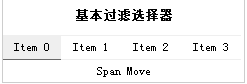
1.  ul中的第一个li元素添加样式;

  $("ul li:first").addClass("GetFocus");

  $("ul li").first().addClass("GetFocus");

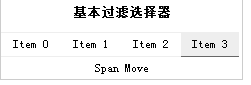
2.  ul中的最后一个li元素添加样式;

  $("ul li:last").addClass("GetFocus");

  $("ul li").last().addClass("GetFocus");

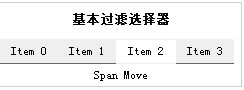
3.   ul中的非class=“NotClass” li元素添加样式;

  $("ul li:not(.NotClass)").addClass("GetFocus");

4.  ul中的 li索引值为偶数的元素添加样式;从0开始计数

  $("ul li:even").addClass("GetFocus");

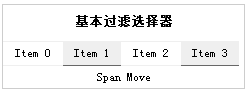
5.  ul中的 li索引值为奇数的元素添加样式;从0开始计数

  $("ul li:odd").addClass("GetFocus");

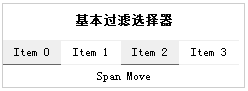
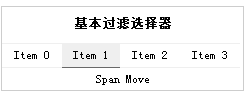
6.增加一个给定索引值的元素类别,从0开始计数

  $("li:eq(1)").addClass("GetFocus");

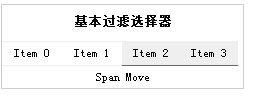
7.增加所有大于给定索引值的元素类别,从0开始计数

  $("li:gt(1)").addClass("GetFocus");

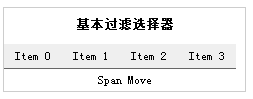
8.增加所有小于给定索引值的元素类别,从0开始计数

   $("li:lt(4)").addClass("GetFocus");

9.//增加标题类元素类别

   $("div h1").css("width","238");

    $(":header").addClass("GetFocus");

})
1. 
2.
3.
4.
5.
6.
7.
8.
9.
jQuery 简单过滤选择器的更多相关文章
- jQuery简单过滤选择器
<html xmlns="http://www.w3.org/1999/xhtml"> <head> <!--jQuery选择器详解 根据所获 ...
- jQuery基本过滤选择器
jQuery基本过滤选择器: <h1>this is h1</h1> <div id="p1"> <h2>this is h2< ...
- Jquery的过滤选择器分为哪几种?
Jquery的过滤选择器分为哪几种? 转载▼ 标签: jquery 过滤选择器 分类 分类: JQuery 所有的过滤选择器分为哪几种: 一.基本过滤选择器(重点掌握下列八个) :first 选取第一 ...
- 第一百六十五节,jQuery,过滤选择器
jQuery,过滤选择器 学习要点: 1.基本过滤器 2.内容过滤器 3.可见性过滤器 4.子元素过滤器 5.其他方法 过滤选择器简称:过滤器.它其实也是一种选择器,而这种选择器类似与 CSS3 (h ...
- jquery :checked(过滤选择器) 和 空格:checked(后代选择器)
jquery 过滤选择器 和 后代选择器 <%@ page language="java" contentType="text/html; charset=UTF- ...
- JQuery 可见性过滤选择器
<!DOCTYPE html> <html xmlns="http://www.w3.org/1999/xhtml"> <head> <m ...
- JQuery 内容过滤选择器
<!DOCTYPE html> <html xmlns="http://www.w3.org/1999/xhtml"> <head> <m ...
- jQuery内容过滤选择器与子元素过滤选择器用法实例分析
jQuery选择器内容过滤 一.:contains(text) 选择器::contains(text)描述:匹配包含给定文本的元素返回值:元素集合 示例: ? 1 2 $("div.mini ...
- jquery :checked(过滤选择器) 和 空格:checked(后代选择器)【转】
jquery 过滤选择器 和 后代选择器 <%@ page language="java" contentType="text/html; charset=UTF- ...
随机推荐
- android几个实用的判定代码
之前项目有几个判定代码很实用,特此做一个整理. 一.验证手机格式是否正确 //判断手机号码是否合理 private boolean judgePhoneNums(String phoneNums) { ...
- javascript平时小例子③(setInterval使用1)
<!DOCTYPE html><html> <head> <meta charset="UTF-8"> <title>& ...
- FineUi导出时禁用ajax即EnableAjax="false"出现问题的解决方法
fineui导出时会出现乱码, 在按钮上添加EnableAjax="false"属性禁用ajax就可以正常导出.但如果我在后台代码中直接return 而不进行导出流操作,则前台脚本 ...
- 运行在VMware上的Linux虚拟机如何使用NAT模式连接物理机的外部网络
在VMware Workstation中,默认有3个虚拟交换机,分别是VMnet0(使用桥接网络).VMnet1(仅主机网络)和VMnet8(NAT网络). 首先说一下为什么要用NAT模式,如果你的物 ...
- Oracle数据库更新时间的SQL语句
---Oracle数据库更新时间字段数据时的sql语句---格式化时间插入update t_user u set u.name='pipi',u.modifytime=to_date('2015-10 ...
- DateUtils
package com.vcredit.ddcash.batch.util; import java.text.SimpleDateFormat;import java.util.Calendar;i ...
- Hibernate简单实例
1.配置hibernate.cfg.xml文件(名字必须这么写): <?xml version='1.0' encoding='utf-8'?> <!DOCTYPE hibernat ...
- 重新启动 Apache 以加载上面安装的模块
尽管Ubuntu 是一种新兴的Linux分支,但Ubuntu 组织却为Apache提供了丰富的支持软件,这些软件都可以从发行版的光盘获取,也可以从官方站点轻松下载.所以,Ubuntu非常适合作为Web ...
- 数据库---T-SQL语句提纲
T-SQL语句: 创建表:create table Name(Code varchar(50)) 主键:primary key自增长列:auto_increment外键关系:references非空: ...
- venus java高并发框架
http://www.iteye.com/topic/1118484 因为有 netty.mima等远程框架.包括spring jboss等remoting框架 和阿里的dubbo相比, 没有亮点.. ...