
Notification
一:普通Notification
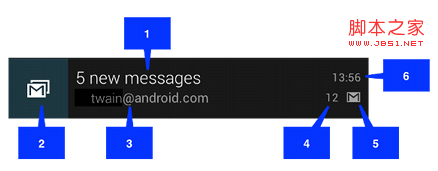
1.内容标题setContentTitle(...)
2.大图标setLargeIcon(Bitmap)
3.内容setContentText(...)
4.内容附加信息setContentInfo(...)
5.小图标setSmallIcon(...)
6.时间(自动生成)
二:Notification的创建
1>实例化一个NotificationCompat.Builder对象
2>调用builder的相关方法对notification设置标题,图标,内容等;
3>调用builder.build()方法,此方法返回一个Notification类的对象;
4>实例化一个NotificationManager对象
5>调用manager的notify(...)方法 来发送通知。
三:普通的Notification(点击之后跳到打电话界面,不需要可以不写setContentIntent这个方法)
private NotificationManager notificationManager;
// 获取通知管理器的系统组件实例
notificationManager = (NotificationManager) getSystemService(NOTIFICATION_SERVICE);
private void showNormal() {
    //建造者模式----利用静态内部类来构建宿主类的对象,链式编程
    Notification notification = new NotificationCompat.Builder(this)
            .setSmallIcon(R.mipmap.ic_launcher)
            .setContentTitle("ContentTitle")//设置通知标题
            .setContentText("ContentText")//设置通知内容
            .setTicker("showNormal")//设置滚动字幕
            .setContentInfo("contentInfo")//设置附加信息
            .setDefaults(Notification.DEFAULT_SOUND|Notification.DEFAULT_VIBRATE)//声音|震动通知,设置震动的时候需要设置权限: <uses-permission android:name="android.permission.VIBRATE" />
            //DEFAULT_ALL:声音,震动,呼吸灯都有
            .setContentIntent(PendingIntent.getActivity(this, 100,//100是requestCode
                    new Intent(Intent.ACTION_CALL,
                            Uri.parse("tel:10086")),
                    PendingIntent.FLAG_ONE_SHOT))//需要添加打电话权限,否则不会报错但无效果(延时意图不能在logCat中查看),如果没设置延时意图, 则点击通知无法自动消除.
            .build();     //构建Notification 类对象
    //注意:是notification对象的flags,不是Builder对象的
    notification.flags |= Notification.FLAG_AUTO_CANCEL;   //设置为点击后可清除,否则点击无法清除[必须同时设置了延时意图PendingIntent]
    notification.flags |= Notification.FLAG_NO_CLEAR; //设置为不能横向滑动清除,否则横向拖动可清除,等价于builder对象调用.setOngoing(true)
    notificationManager.notify(1, notification);     //指定id,发送通知
}
四:带进度条的Notification
 private void showProgressBar() {
        //final:因为要在内部类里面使用builder .
        final NotificationCompat.Builder builder = new NotificationCompat.Builder(this);
        builder.setSmallIcon(R.mipmap.ic_launcher)
                .setTicker("showProgressBar").setContentInfo("contentInfo")
                .setOngoing(true)    //不可拖动清除
                .setContentTitle("ContentTitle")
                .setContentText("ContentText");
        //启动一个线程来更新进度,因为不能阻塞UI线程
        new Thread(new Runnable() {//Thread构造方法的实参是一个匿名内部类(实现了Runnable接口)
            @Override
            public void run() {
                for (int progress = 0; progress < 100; progress += 10) {
                    //第一个参数 最大进度,        第二个参数 当前进度
                    //第三个参数 无明确进度的进度条样式; true:不确定;false:确定
                    builder.setProgress(100, progress, false);
                    notificationManager.notify(2, builder.build());//发送通知
                    try {
                        Thread.sleep(1000);
                    } catch (InterruptedException e) {
                        System.out.println("sleep failure");
                    }
                }
                builder.setContentTitle("下载完成")
                        .setProgress(0, 0, false).setOngoing(true);//设置为下载完成后可清除
                notificationManager.notify(2, builder.build());
            }
        }).start();
    }
五:返回应用的某个界面[了解]
有时候我们可能需要实现这样的功能:当新notification出现时,我们希望点击它后可直接进入应用相应的界面中去完整查看或处理此消息的功能。 然后,当我们点击back按钮时返回到应用主界面而不是桌面。比如:当我们有新的短信来时,我们在任务栏中点击它后进入读信息页面,当我们读完短信后,按“返回”键回到短信的主界面,而不是手机桌面。要实现这样的功能要我们做相应的处理:
private void backToApp() {
TaskStackBuilder stackBuilder = TaskStackBuilder.create(this);
// Adds the back stack
stackBuilder.addParentStack(OtherActivity.class);
// Adds the Intent to the top of the stack
Intent resultIntent = new Intent(this, OtherActivity.class);//点击通知后会打开OtherActivity,回退后显示MainActivity,再回退后退出app
//并在清单文件中配置OtherActivity依赖的父窗体为MainActivity(详见下面xml配置)
stackBuilder.addNextIntent(resultIntent);
// Gets a PendingIntent containing the entire back stack
PendingIntent resultPendingIntent = stackBuilder.getPendingIntent(0,//int requestCode
PendingIntent.FLAG_UPDATE_CURRENT);//如果系统中有一个和你描述的PendingIntent对等的PendingInent,那么系统将使用该PendingIntent对象,但是会使用新 的Intent来更新之前PendingIntent中的Intent对象数据,例如更新Intent中的Extras。
Notification notification = new NotificationCompat.Builder(this)
.setLargeIcon(icon).setSmallIcon(R.drawable.ic_launcher)
.setTicker("backApp").setContentInfo("contentInfo")
.setContentTitle("ContentTitle").setContentText("ContentText")
.setContentIntent(resultPendingIntent).setAutoCancel(true)
.setDefaults(Notification.DEFAULT_ALL).build();
manager.notify(5, notification);
this.finish();//关闭当前Activity
}
并需要我们在配置文件中对我们用来显示详细信息的OtherActivity进行相应的配置如下:
<activity
android:name=".OtherActivity"
android:label="第二个页面"
android:parentActivityName=".MainActivity" >
<meta-data
android:name="android.support.PARENT_ACTIVITY"
android:value=".MainActivity" />
</activity>
Notification的更多相关文章
- Android Notification 详解(一)——基本操作
Android Notification 详解(一)--基本操作 版权声明:本文为博主原创文章,未经博主允许不得转载. 微博:厉圣杰 源码:AndroidDemo/Notification 文中如有纰 ...
- Android Notification 详解——基本操作
Android Notification 详解 版权声明:本文为博主原创文章,未经博主允许不得转载. 前几天项目中有用到 Android 通知相关的内容,索性把 Android Notificatio ...
- android Notification介绍
如果要添加一个Notification,可以按照以下几个步骤 1:获取NotificationManager: NotificationManager m_NotificationManager=(N ...
- Android种使用Notification实现通知管理以及自定义通知栏(Notification示例四)
示例一:实现通知栏管理 当针对相同类型的事件多次发出通知,作为开发者,应该避免使用全新的通知,这时就应该考虑更新之前通知栏的一些值来达到提醒用户的目的.例如我们手机的短信系统,当不断有新消息传来时,我 ...
- Missing Push Notification Entitlement 问题
最近打包上传是遇到一个问题: 描述: Missing Push Notification Entitlement - Your app includes an API for Apple's Push ...
- 笔记:Memory Notification: Library Cache Object loaded into SGA
笔记:Memory Notification: Library Cache Object loaded into SGA在警告日志中发现一些这样的警告信息:Mon Nov 21 14:24:22 20 ...
- ABP源码分析二十四:Notification
NotificationDefinition: 用于封装Notification Definnition 的信息.注意和Notification 的区别,如果把Notification看成是具体的消息 ...
- Android中使用Notification实现进度通知栏(Notification示例三)
我们在使用APP的过程中,软件会偶尔提示我们进行版本更新,我们点击确认更新后,会在通知栏显示下载更新进度(已知长度的进度条)以及安装情况(不确定进度条),这就是我们今天要实现的功能.实现效果如下: 在 ...
- Android中使用Notification实现宽视图通知栏(Notification示例二)
Notification是在你的应用常规界面之外展示的消息.当app让系统发送一个消息的时候,消息首先以图表的形式显示在通知栏.要查看消息的详情需要进入通知抽屉(notificationdrawer) ...
- Android中使用Notification实现普通通知栏(Notification示例一)
Notification是在你的应用常规界面之外展示的消息.当app让系统发送一个消息的时候,消息首先以图表的形式显示在通知栏.要查看消息的详情需要进入通知抽屉(notificationdrawer) ...
随机推荐
- Django~Excel,PDF
# Text file #response = HttpResponse(mimetype='text/plain') #response['Content-Disposition'] = 'att ...
- BestCoder19 1001.Alexandra and Prime Numbers(hdu 5108) 解题报告
题目链接:http://acm.hdu.edu.cn/showproblem.php?pid=5108 题目意思:给出一个数正整数 N,N <= 1e9,现在需要找出一个最少的正整数 M,使得 ...
- 创建odoo数据库时出现错误原因
安装完odoo 8.0后创建数据库时出现如下错误信息: Odoo Odoo Server Error Traceback (most recent call last): File "D:\ ...
- selinux
root@lujie ~]# vim /etc/sysconfig/selinux # This file controls the state of SELinux on the system. # ...
- .net如何实现时间相减得到天数
第一种方法: 为了得到时间的天数,代码如下:(计算整天,不含半天) DateTime start = DateTime.Parse(txt_start.Value.Trim());//开始时间 Dat ...
- August 25th 2016 Week 35th Thursday
Every man dies, but not every man really lives. 每个人都会死,但不是每个人都曾经真真活过. As I become older and older, I ...
- 解决客户端访问https报错
现象: javax.net.ssl.SSLHandshakeException: Received fatal alert: handshake_failure at com.sun.net.ssl. ...
- 从键盘输入成绩,找出最高分,并输出学生成绩等级。成绩>=最高分-10,为A,成绩>=最高分-20,为B,成绩>=最高分-30,为C,其余等级为D
import java.util.Scanner;public class TestStudent { public static void main(String[] args) { //从键盘获得 ...
- iOS开发-正则表达式的使用方法
前言:在表单验证中,我们经常会使用到正则,因为我们需要用它来判断用户输入的字符是否为合法的,如果是不合法的,那么应该提示用户输入错误,并不让提交至服务器.我们也可以通过正则表达式,从用户输入的字符串中 ...
- Spring+Maven+Dubbo+MyBatis+Linner+Handlebars—Web开发环境搭建
本文主要分三部分,分别是:后台核心业务逻辑.桥梁辅助控制和前台显示页面. 本Web开发环境综合了多种工具,包括Maven包管理与编译工具.Dubbo分布式服务框架.MyBatis数据持久化工具.Lin ...