
ubuntu 14.04 安装mysql server的分支MariaDB Server初级教程
序,MariaDB Server是Mysql的fork版本,与Mysql完美兼容,mysql在10年被sun收购,后sun被oracle收购,后mysql的创建者及项目长期技术带头人之一的Michael ‘Monty’ Widenius。Monty和他的团队创建了Mysql的一个fork版本并命名为MariaDB。
MariaDB是一个开源数据库且100%与MySQL兼容,目标是替代MySQL数据库
默认上MariaDB的包并没有在Ubuntu仓库中。要安装MariaDB,我们首先要设置MariaDB仓库。
设置 MariaDB 仓库
- $ sudo apt-get install software-properties-common
- $ sudo apt-key adv --recv-keys --keyserver hkp://keyserver.ubuntu.com:80 0xcbcb082a1bb943db
- $ sudo add-apt-repository 'deb http://sfo1.mirrors.digitalocean.com/mariadb/repo/10.0/ubuntu trusty main'
安装 MariaDB :
- $ sudo apt-get update
- $ sudo apt-get install mariadb-server
在安装中,你会被要求设置MariaDB的root密码。
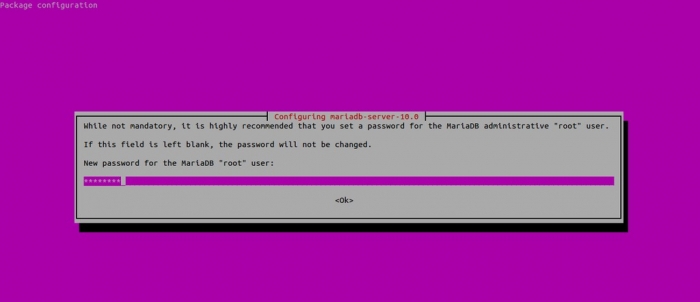
从命令行连接到MariaDB :
- linuxtechi@mail:~$ mysql -uroot -p
- Enter password:
- Welcome to the MariaDB monitor. Commands end with ; or \g.
- Your MariaDB connection id is 40
- Server version: 10.0.14-MariaDB-1~trusty-log mariadb.org binary distribution
- Copyright (c) 2000, 2014, Oracle, SkySQL Ab and others.
- Type 'help;' or '\h' for help. Type '\c' to clear the current input statement.
- MariaDB [(none)]>
MariaDB 服务
- $ sudo /etc/init.d/mysql stop
- $ sudo /etc/init.d/mysql start
以上只是在Ubuntu上装完MariaDB,下面要设置MariaDB允许远程访问
1. 如果Ubuntu有设置防火墙或者iptables规则的话,请自行打开
2. 3306端口是不是没有打开?
使用nestat命令查看3306端口状态:
~# netstat -an | grep 3306
tcp 0 0 127.0.0.1:3306 0.0.0.0:* LISTEN
从结果可以看出3306端口只是在IP 127.0.0.1上监听,所以拒绝了其他IP的访问。
解决方法:修改/etc/mysql/my.cnf文件。打开文件,找到下面内容:
# Instead of skip-networking the default is now to listen only on
# localhost which is more compatible and is not less secure.
bind-address = 127.0.0.1
把上面这一行注释掉或者把127.0.0.1换成合适的IP,建议注释掉。
重新启动后,重新使用netstat检测:
~# netstat -an | grep 3306
tcp 0 0 0.0.0.0:3306 0.0.0.0:* LISTEN
3. 现在使用下面命令测试:
~# mysql -h 192.168.0.101 -u root -p
Enter password:
ERROR 1130 (00000): Host 'Ubuntu-Fvlo.Server' is not allowed to connect to this MySQL server
结果出乎意料,还是不行。
解决方法:原来还需要把用户权限分配各远程用户。
登录到mysql服务器,使用grant命令分配权限
mysql> grant all on *.* to 你的用户名如root@'%' identified by '你的密码';
完成后使用mysql命令连接,提示成功,为了确保正确可以再远程登陆测试一下。
ubuntu 14.04 安装mysql server的分支MariaDB Server初级教程的更多相关文章
- Ubuntu 14.04 安装mysql
Ubuntu 14.04 没有mysql5.7的源,需要连接外部资源下载安装. wget http://dev.mysql.com/get/mysql-apt-config_0.8.1-1_all.d ...
- ubuntu 14.04 安装mysql server初级教程
序,mysql数据库是开源的,被大多数企业所使用 目录 一.apt-get install 软件安装原理剖析二.安装mysql server三.配置和管理msyql 一.apt-get install ...
- ubuntu 14.04 安装mysql,并配置远程连接和中文乱码
1. 安装MySQL的jar root@computer-PowerEdge-T30:~# sudo apt-get install mysql-server mysql-client在本次安装中,根 ...
- Ubuntu 14.04安装mysql
在ubuntu kylin上面安装mysq的过程中遇到一些问题,记录如下, wget http://cdn.mysql.com//Downloads/MySQL-5.7/mysql-server_5. ...
- ubuntu 14.04安装mysql server & mysql client
$ sudo apt-get install mysql-server
- 阿里云 Ubuntu 14.04 安装mysql 5.6
1. 升级apt-get apt-get update 如果出现 : 说明没有你不是root用户,则需要用sudo命令 sudo apt-get update 下面出现权限问题都可以参照这个方法. 2 ...
- ubuntu 14.04安装mysql数据库
1. apt-get install mysql-server mysql-client 输入root的密码: 确认root的密码: 2. 连接测试是否成功:mysql –hlocalhost –ur ...
- ubuntu 14.04 安装svn server (subversionedge )
ubuntu 14.04 安装subversionedge 请仔细阅读安装包自带的readme文件! 1.先去官网,找安装包: http://subversion.apache.org/ http:/ ...
- Ubuntu 16.04 安装Mysql 5.7 踩坑小记
title:Ubuntu 16.04 安装Mysql 5.7 踩坑小记 date: 2018.02.03 安装mysql sudo apt-get install mysql-server mysql ...
随机推荐
- UOJ149 【NOIP2015】子串
本文作者:ljh2000作者博客:http://www.cnblogs.com/ljh2000-jump/转载请注明出处,侵权必究,保留最终解释权! [问题描述]有两个仅包含小写英文字母的字符串 A ...
- Codeforces Round #389 Div.2 C. Santa Claus and Robot
time limit per test 2 seconds memory limit per test 256 megabytes input standard input output standa ...
- GridView控件RowDataBound事件中获取列字段值的几种途径 !!!
protected void GridView1_RowDataBound(object sender, GridViewRowEventArgs e) { if (e.Row.RowType == ...
- Linux下安装webstorm
Linux下安装webstorm 1--在webstorm官网里面下载最新的版本 WebStorm-11.0.3.tar.gz 2--创建webstorm的安装目录 #mkdir /usr/webst ...
- 安装PhantomJS
安装步骤 # 安装依赖软件 yum -y install wget fontconfig # 下载PhantomJS wget -P /tmp/ https://bitbucket.org/ariya ...
- JSP+Servlet+javabean+mysql实现页面多条件模糊查询
需求: 一般列表页上面会有一个查询框,有各种的查询条件组合,一般都采用模糊查询方式 ,以下以自己做的实例来说明一下实现方法: 需要实现的界面原型:要满足条件: 1.单选分类,点GO按扭 2.单独输入标 ...
- linux 下各文件夹的功能性介绍。(转载)
原文来自:http://www.cnblogs.com/wen858636827/archive/2012/12/26/2834373.html /opt 放置用户自己下载的软件 英文全称是op ...
- POJ 1947Rebuilding Roads(树形DP + 01背包)
题目链接 题意:给出一个树形结构,求P个节点的子树最少要去掉几条边 分析:DP[root][j] 表示 以第 root 个为根节点, 包含j 个节点需要去掉几条边.那么对于 root 这个根节点来说, ...
- api get
http://ibi.imim.es/befree/ http://disgenet.org/ http://rest.ensembl.org/ { "variantSetId": ...
- spring+hibernate ---laobai
biz包: package com.etc.biz; import java.util.List; import org.springframework.orm.hibernate3.support. ...