
linux 分区 物理卷 逻辑卷
今天我们主要说说分区、格式化、SWAP、LVM、软件RAID的创建哈~
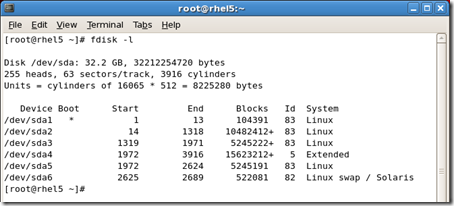
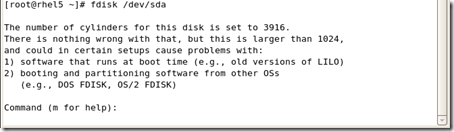
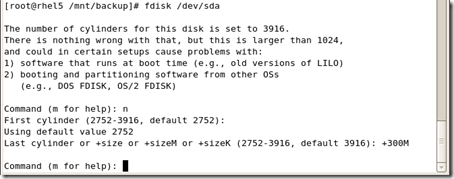
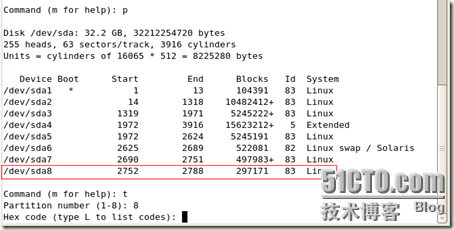
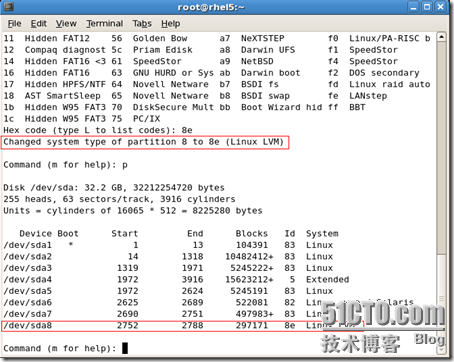
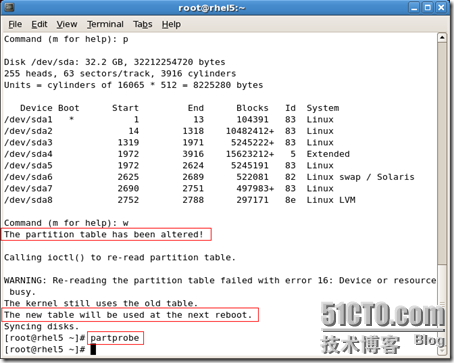
#fdisk /dev/sda
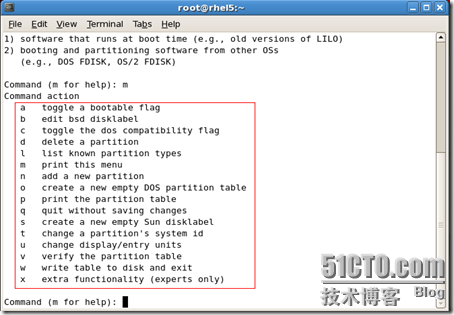
D删除一个分区





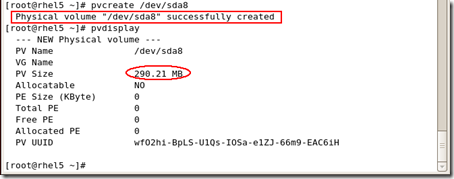
#pvcreate /dev/sdax
sdax就是你刚才创建的分区
从硬盘驱动器中创建物理卷(physical volumes-PV)。
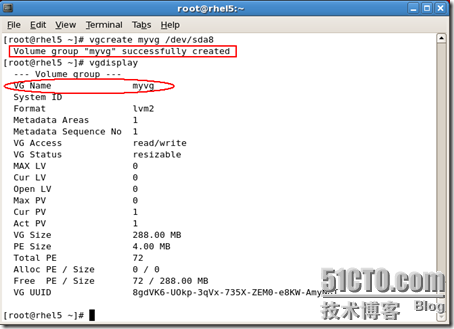
从物理卷中创建卷组(volume groups-VG)。
从卷组中创建逻辑卷(logical volumes-LV),并分派逻辑卷挂载点
其中只有逻辑卷才可以写数据
#vgcreate myvg /dev/sda8
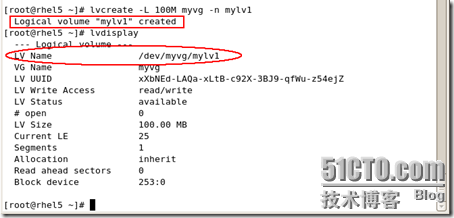
我就从卷组里面分100M出来创建一个逻辑卷
#lvcreate -L 100M myvg -n mylv1
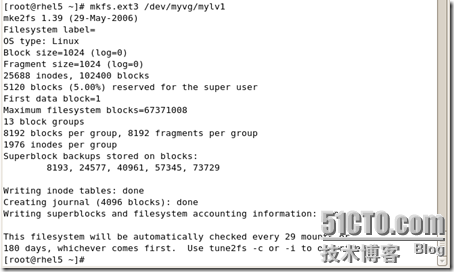

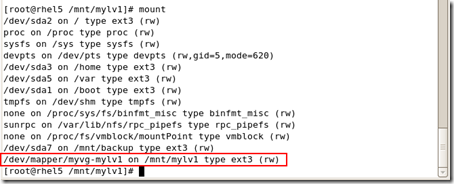
|
[root@rhel5 /mnt/mylv1]# fdisk -l
Disk /dev/sda: 32.2 GB, 32212254720 bytes
255 heads, 63 sectors/track, 3916 cylinders Units = cylinders of 16065 * 512 = 8225280 bytes Device Boot Start End Blocks Id System
/dev/sda1 * 1 13 104391 83 Linux /dev/sda2 14 1318 10482412+ 83 Linux /dev/sda3 1319 1971 5245222+ 83 Linux /dev/sda4 1972 3916 15623212+ 5 Extended /dev/sda5 1972 2624 5245191 83 Linux /dev/sda6 2625 2689 522081 82 Linux swap / Solaris /dev/sda7 2690 2751 497983+ 83 Linux /dev/sda8 2752 2788 297171 8e Linux LVM [root@rhel5 /mnt/mylv1]# lvdisplay --- Logical volume --- LV Name /dev/myvg/mylv1 VG Name myvg LV UUID xXbNEd-LAQa-xLtB-c92X-3BJ9-qfWu-z54ejZ LV Write Access read/write LV Status available # open 1 LV Size 100.00 MB Current LE 25 Segments 1 Allocation inherit Read ahead sectors 0 Block device 253:0 [root@rhel5 /mnt/mylv1]# |
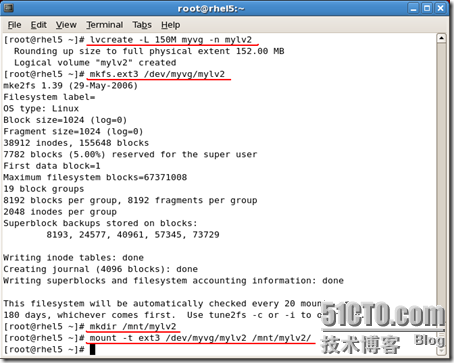
#lvresize -L 绝对大小 对象
#lvresize -L 100M /dev/myvg/mylv2

resize2fs /dev/myvg/mylv2
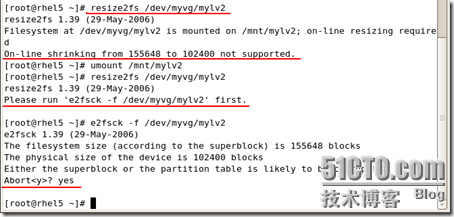
1:不要进行对该分区的任何写入操作,最好是也不read
2:用lvresize2fs重新扩大该分区,且扩大的容量是刚刚缩小的容量(数字一定要和刚刚的一致哈~)。
3:缩小文件系统
4:最后缩小逻辑卷哈。
5:确认文件系统和逻辑卷大小一致。
|
[root@rhel5 ~]# umount /mnt/mylv2
[root@rhel5 ~]# lvresize -L 150M /dev/myvg/mylv2 Rounding up size to full physical extent 152.00 MB Extending logical volume mylv2 to 152.00 MB Logical volume mylv2 successfully resized [root@rhel5 ~]# e2fsck -f /dev/myvg/mylv2 e2fsck 1.39 (29-May-2006) Pass 1: Checking inodes, blocks, and sizes Pass 2: Checking directory structure Pass 3: Checking directory connectivity Pass 4: Checking reference counts Pass 5: Checking group summary information /dev/myvg/mylv2: 12/38912 files (8.3% non-contiguous), 10580/155648 blocks [root@rhel5 ~]# resize2fs /dev/myvg/mylv2 100M resize2fs 1.39 (29-May-2006) Resizing the filesystem on /dev/myvg/mylv2 to 102400 (1k) blocks. The filesystem on /dev/myvg/mylv2 is now 102400 blocks long. [root@rhel5 ~]# lvresize -L 100M /dev/myvg/mylv2
WARNING: Reducing active logical volume to 100.00 MB THIS MAY DESTROY YOUR DATA (filesystem etc.) Do you really want to reduce mylv2? [y/n]: y Reducing logical volume mylv2 to 100.00 MB Logical volume mylv2 successfully resized [root@rhel5 ~]# e2fsck -f /dev/myvg/mylv2 e2fsck 1.39 (29-May-2006) Pass 1: Checking inodes, blocks, and sizes Pass 2: Checking directory structure Pass 3: Checking directory connectivity Pass 4: Checking reference counts Pass 5: Checking group summary information /dev/myvg/mylv2: 12/26624 files (8.3% non-contiguous), 9032/102400 blocks [root@rhel5 ~]# mount -t ext3 /dev/myvg/mylv2 /mnt/mylv2 [root@rhel5 ~]# |

#resize2fs /dev/myvg/mylv1
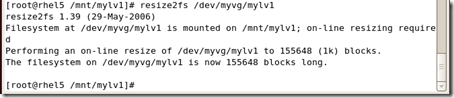
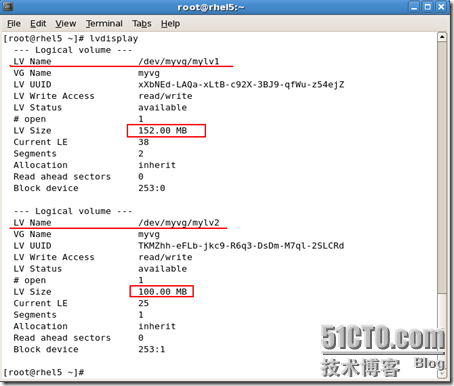
|
[root@rhel5 /mnt/mylv1]# fdisk /dev/sda
The number of cylinders for this disk is set to 3916.
There is nothing wrong with that, but this is larger than 1024, and could in certain setups cause problems with: 1) software that runs at boot time (e.g., old versions of LILO) 2) booting and partitioning software from other OSs (e.g., DOS FDISK, OS/2 FDISK) Command (m for help): n
First cylinder (2789-3916, default 2789): Using default value 2789 Last cylinder or +size or +sizeM or +sizeK (2789-3916, default 3916): +500M Command (m for help): p
Disk /dev/sda: 32.2 GB, 32212254720 bytes
255 heads, 63 sectors/track, 3916 cylinders Units = cylinders of 16065 * 512 = 8225280 bytes Device Boot Start End Blocks Id System
/dev/sda1 * 1 13 104391 83 Linux /dev/sda2 14 1318 10482412+ 83 Linux /dev/sda3 1319 1971 5245222+ 83 Linux /dev/sda4 1972 3916 15623212+ 5 Extended /dev/sda5 1972 2624 5245191 83 Linux /dev/sda6 2625 2689 522081 82 Linux swap / Solaris /dev/sda7 2690 2751 497983+ 83 Linux /dev/sda8 2752 2788 297171 8e Linux LVM /dev/sda9 2789 2850 497983+ 83 Linux Command (m for help): t
Partition number (1-9): 9 Hex code (type L to list codes): 8e Changed system type of partition 9 to 8e (Linux LVM) Command (m for help): p
Disk /dev/sda: 32.2 GB, 32212254720 bytes
255 heads, 63 sectors/track, 3916 cylinders Units = cylinders of 16065 * 512 = 8225280 bytes Device Boot Start End Blocks Id System
/dev/sda1 * 1 13 104391 83 Linux /dev/sda2 14 1318 10482412+ 83 Linux /dev/sda3 1319 1971 5245222+ 83 Linux /dev/sda4 1972 3916 15623212+ 5 Extended /dev/sda5 1972 2624 5245191 83 Linux /dev/sda6 2625 2689 522081 82 Linux swap / Solaris /dev/sda7 2690 2751 497983+ 83 Linux /dev/sda8 2752 2788 297171 8e Linux LVM /dev/sda9 2789 2850 497983+ 8e Linux LVM Command (m for help): w
The partition table has been altered! Calling ioctl() to re-read partition table.
WARNING: Re-reading the partition table failed with error 16: Device or resource busy.
The kernel still uses the old table. The new table will be used at the next reboot. Syncing disks. [root@rhel5 /mnt/mylv1]# |


#vgedtend myvg /dev/sda9

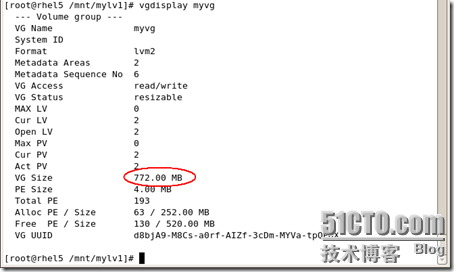
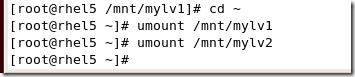
#umount /mnt/mylv1
#umount /mnt/mylv2



|
[root@rhel5 ~]# fdisk /dev/sda
The number of cylinders for this disk is set to 3916.
There is nothing wrong with that, but this is larger than 1024, and could in certain setups cause problems with: 1) software that runs at boot time (e.g., old versions of LILO) 2) booting and partitioning software from other OSs (e.g., DOS FDISK, OS/2 FDISK) Command (m for help): p
Disk /dev/sda: 32.2 GB, 32212254720 bytes
255 heads, 63 sectors/track, 3916 cylinders Units = cylinders of 16065 * 512 = 8225280 bytes Device Boot Start End Blocks Id System
/dev/sda1 * 1 13 104391 83 Linux /dev/sda2 14 1318 10482412+ 83 Linux /dev/sda3 1319 1971 5245222+ 83 Linux /dev/sda4 1972 3916 15623212+ 5 Extended /dev/sda5 1972 2624 5245191 83 Linux /dev/sda6 2625 2689 522081 82 Linux swap / Solaris /dev/sda7 2690 2751 497983+ 83 Linux /dev/sda8 2752 2788 297171 8e Linux LVM /dev/sda9 2789 2850 497983+ 8e Linux LVM Command (m for help): d
Partition number (1-9): 9 Command (m for help): p
Disk /dev/sda: 32.2 GB, 32212254720 bytes
255 heads, 63 sectors/track, 3916 cylinders Units = cylinders of 16065 * 512 = 8225280 bytes Device Boot Start End Blocks Id System
/dev/sda1 * 1 13 104391 83 Linux /dev/sda2 14 1318 10482412+ 83 Linux /dev/sda3 1319 1971 5245222+ 83 Linux /dev/sda4 1972 3916 15623212+ 5 Extended /dev/sda5 1972 2624 5245191 83 Linux /dev/sda6 2625 2689 522081 82 Linux swap / Solaris /dev/sda7 2690 2751 497983+ 83 Linux /dev/sda8 2752 2788 297171 8e Linux LVM Command (m for help): d
Partition number (1-8): 8 Command (m for help): p
Disk /dev/sda: 32.2 GB, 32212254720 bytes
255 heads, 63 sectors/track, 3916 cylinders Units = cylinders of 16065 * 512 = 8225280 bytes Device Boot Start End Blocks Id System
/dev/sda1 * 1 13 104391 83 Linux /dev/sda2 14 1318 10482412+ 83 Linux /dev/sda3 1319 1971 5245222+ 83 Linux /dev/sda4 1972 3916 15623212+ 5 Extended /dev/sda5 1972 2624 5245191 83 Linux /dev/sda6 2625 2689 522081 82 Linux swap / Solaris /dev/sda7 2690 2751 497983+ 83 Linux Command (m for help): w
The partition table has been altered! Calling ioctl() to re-read partition table.
WARNING: Re-reading the partition table failed with error 16: Device or resource busy.
The kernel still uses the old table. The new table will be used at the next reboot. Syncing disks. [root@rhel5 ~]# partprobe [root@rhel5 ~]# |
RAID0
RAID1
RAID5
优点:廉价
缺点:不稳定,如果系统坏了,RAID整列也就损坏,容易造成数据丢失
相对于软件RAID
优点:可靠性高,易管理。稳定
缺点:成本过高
因为RAID5至少需要3个或者更多的硬盘,我们就要分3个分区,然后再加一个热备份的分区,就是4个分区
the new table will be used at the next reboot
warning: unable to open /dev/h dc read-wirte ( read-only file system)
|
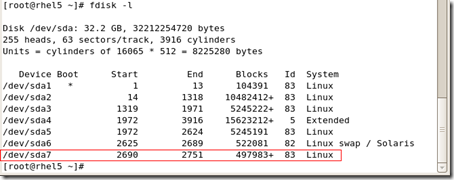
[root@rhel5 ~]# fdisk -l
Disk /dev/sda: 32.2 GB, 32212254720 bytes
255 heads, 63 sectors/track, 3916 cylinders Units = cylinders of 16065 * 512 = 8225280 bytes Device Boot Start End Blocks Id System
/dev/sda1 * 1 13 104391 83 Linux /dev/sda2 14 1318 10482412+ 83 Linux /dev/sda3 1319 1971 5245222+ 83 Linux /dev/sda4 1972 3916 15623212+ 5 Extended /dev/sda5 1972 2624 5245191 83 Linux /dev/sda6 2625 2689 522081 82 Linux swap / Solaris [root@rhel5 ~]# fdisk /dev/sda The number of cylinders for this disk is set to 3916.
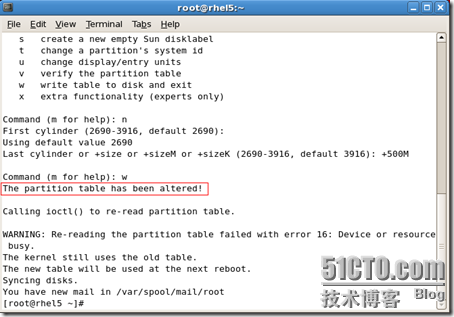
There is nothing wrong with that, but this is larger than 1024, and could in certain setups cause problems with: 1) software that runs at boot time (e.g., old versions of LILO) 2) booting and partitioning software from other OSs (e.g., DOS FDISK, OS/2 FDISK) Command (m for help): n
First cylinder (2690-3916, default 2690): Using default value 2690 Last cylinder or +size or +sizeM or +sizeK (2690-3916, default 3916): +100M Command (m for help): n
First cylinder (2703-3916, default 2703): Using default value 2703 Last cylinder or +size or +sizeM or +sizeK (2703-3916, default 3916): +100M Command (m for help): n
First cylinder (2716-3916, default 2716): Using default value 2716 Last cylinder or +size or +sizeM or +sizeK (2716-3916, default 3916): +100M Command (m for help): n
First cylinder (2729-3916, default 2729): Using default value 2729 Last cylinder or +size or +sizeM or +sizeK (2729-3916, default 3916): +100M Command (m for help): p
Disk /dev/sda: 32.2 GB, 32212254720 bytes
255 heads, 63 sectors/track, 3916 cylinders Units = cylinders of 16065 * 512 = 8225280 bytes Device Boot Start End Blocks Id System
/dev/sda1 * 1 13 104391 83 Linux /dev/sda2 14 1318 10482412+ 83 Linux /dev/sda3 1319 1971 5245222+ 83 Linux /dev/sda4 1972 3916 15623212+ 5 Extended /dev/sda5 1972 2624 5245191 83 Linux /dev/sda6 2625 2689 522081 82 Linux swap / Solaris /dev/sda7 2690 2702 104391 83 Linux /dev/sda8 2703 2715 104391 83 Linux /dev/sda9 2716 2728 104391 83 Linux /dev/sda10 2729 2741 104391 83 Linux Command (m for help): t
Partition number (1-10): 7 Hex code (type L to list codes): fd Changed system type of partition 7 to fd (Linux raid autodetect) Command (m for help): t
Partition number (1-10): 8 Hex code (type L to list codes): fd Changed system type of partition 8 to fd (Linux raid autodetect) Command (m for help): t
Partition number (1-10): 9 Hex code (type L to list codes): fd Changed system type of partition 9 to fd (Linux raid autodetect) Command (m for help): t
Partition number (1-10): 10 Hex code (type L to list codes): fd Changed system type of partition 10 to fd (Linux raid autodetect) Command (m for help): p
Disk /dev/sda: 32.2 GB, 32212254720 bytes
255 heads, 63 sectors/track, 3916 cylinders Units = cylinders of 16065 * 512 = 8225280 bytes Device Boot Start End Blocks Id System
/dev/sda1 * 1 13 104391 83 Linux /dev/sda2 14 1318 10482412+ 83 Linux /dev/sda3 1319 1971 5245222+ 83 Linux /dev/sda4 1972 3916 15623212+ 5 Extended /dev/sda5 1972 2624 5245191 83 Linux /dev/sda6 2625 2689 522081 82 Linux swap / Solaris /dev/sda7 2690 2702 104391 fd Linux raid autodetect /dev/sda8 2703 2715 104391 fd Linux raid autodetect /dev/sda9 2716 2728 104391 fd Linux raid autodetect /dev/sda10 2729 2741 104391 fd Linux raid autodetect Command (m for help): w
The partition table has been altered! Calling ioctl() to re-read partition table.
WARNING: Re-reading the partition table failed with error 16: Device or resource busy.
The kernel still uses the old table. The new table will be used at the next reboot. Syncing disks. [root@rhel5 ~]# partprobe Warning: Unable to open /dev/hdc read-write (Read-only file system). /dev/hdc has been opened read-only. [root@rhel5 ~]# partprobe [root@rhel5 ~]# |
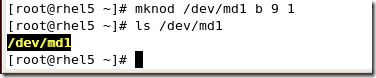
#mdadm --detail /dev/md1
查看RAID状态
|
[root@rhel5 ~]# mdadm -C /dev/md1 -l 5 -n 3 -x 1 /dev/sda7 /dev/sda8 /dev/sda9 /dev/sda10
mdadm: array /dev/md1 started. [root@rhel5 ~]# mdadm --detail /dev/md1 /dev/md1: Version : 00.90.03 Creation Time : Mon Dec 29 17:25:41 2008 Raid Level : raid5 Array Size : 208640 (203.78 MiB 213.65 MB) Device Size : 104320 (101.89 MiB 106.82 MB) Raid Devices : 3 Total Devices : 4 Preferred Minor : 1 Persistence : Superblock is persistent Update Time : Mon Dec 29 17:25:44 2008
State : clean Active Devices : 3 Working Devices : 4 Failed Devices : 0 Spare Devices : 1 Layout : left-symmetric
Chunk Size : 64K UUID : 2f7e30d2:f3f54047:e22d6b9f:16f2b256
Events : 0.2 Number Major Minor RaidDevice State
0 8 7 0 active sync /dev/sda7 1 8 8 1 active sync /dev/sda8 2 8 9 2 active sync /dev/sda9 3 8 10 - spare /dev/sda10
[root@rhel5 ~]# |
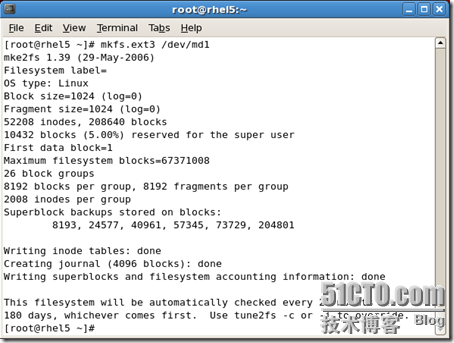
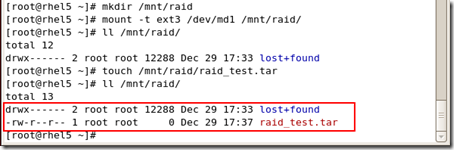
#mount -t ext3 /dev/md1 /mnt/raid
- 顶
- 0
- 踩
linux 分区 物理卷 逻辑卷的更多相关文章
- linux运维基础知识-系统分区及LVM逻辑卷的创建
系统分区及LVM逻辑卷的创建 分区 创建逻辑卷 LVM简介:逻辑卷管理器(LogicalVolumeManager)本质上是一个虚拟设备驱动,是在内核中块设备和物理设备之间添加的一个新的抽象层次,如图 ...
- Linux下对lvm逻辑卷分区大小的调整(针对xfs和ext4不同文件系统)
当我们在安装系统的时候,由于没有合理分配分区空间,在后续维护过程中,发现有些分区空间不够使用,而有的分区空间却有很多剩余空间.如果这些分区在装系统的时候使用了lvm(前提是这些分区要是lvm逻辑卷分区 ...
- 1.4 Linux下对lvm逻辑卷分区大小的调整(针对xfs和ext4不同文件系统)
当我们在安装系统的时候,由于没有合理分配分区空间,在后续维护过程中,发现有些分区空间不够使用,而有的分区空间却有很多剩余空间.如果这些分区在装系统的时候使用了lvm(前提是这些分区要是lvm逻辑卷 ...
- Linux增加LV(逻辑卷)容量
Linux增加LV(逻辑卷)容量 2017-09-29-17:34:13 个人原创博客,转载请注明出处. 查看逻辑卷的相关命令: lvs vgs 命令: [root@arch ~]# vgs VG # ...
- aliyun添加数据盘后的物理分区和lvm逻辑卷两种挂载方式
一.普通磁盘分区管理方式 1.对磁盘进行分区 列出磁盘 # fdisk -l # fdisk /dev/vdb Welcome to fdisk (util-linux 2.23.2). Change ...
- linux LVM:物理卷逻辑卷
逻辑卷管理器,当分区不够用的时候,可以新建一个更大的分区再复制进去,但是浪费时间.Lvm可以弹性调整分区大小,可以动态组合分区.分区大小固定了就无法调整, apt-get update & a ...
- Linux磁盘分区与lvm逻辑卷
硬盘接口的种类分四类:(价格由低到高) IDE SATA硬盘:别名串口硬盘,具有较强的纠错能力. SCSI硬盘:即采用SCSI接口的硬盘,SCSI接口具有应用范围广,多任务,带宽大,CPU占用率低. ...
- 管理员技术(六): 硬盘分区及格式化、 新建一个逻辑卷、调整现有磁盘的分区、扩展逻辑卷的大小、添加一个swap分区
一.硬盘分区及格式化 问题: 本例要求熟悉硬盘分区结构,使用fdisk分区工具在磁盘 /dev/vdb 上按以下要求建立分区: 1> 采用默认的 msdos 分区模式 2> ...
- Linux基础学习-LVM逻辑卷管理遇到的问题
LVM学习逻辑卷管理创建逻辑卷遇到的问题 1 实验环境 系统 内核 发行版本 CentOS 2.6.32-754.2.1.el6.x86_64 CentOS release 6.10 (Final) ...
随机推荐
- mysql数据过滤
WHERE子句 在我们使用数据库时,通常只会根据特定条件提取表数据的子集.只检索所需数据需要指定搜索条件(search criteria),搜索条件也称为过滤条件(filtercondition). ...
- Visual C++中的一些编程小技巧
在应用程序的任意地方实现窗体的最大化.最小化.正常窗口等功能 // 设置Windows窗体的状态void CMinWindowsDlg::SetWindowState(int nWindowSize) ...
- 初识windows程序需要了解的知识点
初识一件事物我们会有陌生,我们慢慢地去了解它就会懂,让我带你们一起了解吧. 一.Form是.Net Framework 定义好的一个最基本的窗体类,具有窗体基本属性和方法 属性 ...
- Webform(Linq高级查、分页、组合查询)
一.linq高级查 1.模糊查(包含) 1 public List<User> Select(string name) 2 { 3 return con.User.Where(r => ...
- ENVI数据显示操作【Tools菜单操作1】
---恢复内容开始--- 一.Tools菜单命令及其功能 主图像窗口中Tool菜单多对应的下拉菜单共17项命令. 二.窗口链接/覆盖显示 窗口链接和叠加显示(Link和Overlay)是对多幅图像某一 ...
- SQL Server代码如何快速格式化
在SQL Server中我们经常需要编写各种SQL脚本,例如存储过程和函数等,由于在编写过程中,经常会进行调整,有些关键字我们用的大写,有的我们用的小写,有的后面结束用:分割有的又没有.对于有强迫症的 ...
- 使用 SVG 动画实现弹性的页面元素效果
Codrops 分享了一些给SVG元素加上弹性动画的灵感.实现的思路是把一个SVG元素整合成一个组件,然后从一个路径弹性动画到另一个.这种效果可以应用到像菜单,按钮或其它元素,使得交互更有趣,看起更原 ...
- 知道吗?9个搜索引擎优化(SEO)最佳实践
作为网页设计师,搜索引擎优化重要吗?我们知道,网站设计是把屏幕上平淡无奇变成令人愉快的美感,更直观地辨认信息.这也是人与人之间在沟通想法,这样的方式一直在演变.穴居人拥有洞穴壁画,古埃及人有象形文字, ...
- HTML动画分类 HTML5动画 SVG库 SVG工具 Canvas动画工具
1.js配合传统css属性控制,可以使用setTimeout或者高级的requestAnimationFrame 2.css3 3.svg 4.canvas(当然,这个还是要配合js) 也许这么 ...
- 使用Python对文档单词进行计数
做hacker.org上面的题目时,遇到了一个题目需要对RFC3280种长度为9的单词进行计数,并找出这些单词中出现次数最多的那个:Didactic Byte RFC3280文档有7000多行,靠人工 ...