
Java文件选择对话框(文件选择器JFileChooser)的使用:以一个文件加密器为例
文件加密器,操作过程肯定涉及到文件选择器的使用,所以这里以文件加密器为例。下例为我自己写的一个文件加密器,没什么特别的加密算法,只为演示文件选择器JFileChooser的使用。
加密器界面如图:
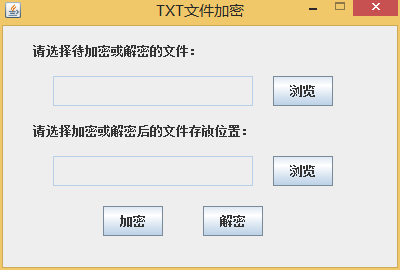

项目目录结构如图:

下面贴出各个文件的源代码:
MainForm.java
package com.lidi;

import javax.swing.*;

import java.awt.*;

public class MainForm extends JFrame {

    /**

     * 构造界面

     *

     * @author 1109030125

     */

    private static final long serialVersionUID = 1L;

    /* 主窗体里面的若干元素 */

    private JFrame mainForm = new JFrame("TXT文件加密"); // 主窗体,标题为“TXT文件加密”

    private JLabel label1 = new JLabel("请选择待加密或解密的文件:");

    private JLabel label2 = new JLabel("请选择加密或解密后的文件存放位置:");

    public static JTextField sourcefile = new JTextField(); // 选择待加密或解密文件路径的文本域

    public static JTextField targetfile = new JTextField(); // 选择加密或解密后文件路径的文本域

    public static JButton buttonBrowseSource = new JButton("浏览"); // 浏览按钮

    public static JButton buttonBrowseTarget = new JButton("浏览"); // 浏览按钮

    public static JButton buttonEncrypt = new JButton("加密"); // 加密按钮

    public static JButton buttonDecrypt = new JButton("解密"); // 解密按钮

    public MainForm() {

        Container container = mainForm.getContentPane();

        /* 设置主窗体属性 */

        mainForm.setSize(400, 270);// 设置主窗体大小

        mainForm.setDefaultCloseOperation(WindowConstants.EXIT_ON_CLOSE);// 设置主窗体关闭按钮样式

        mainForm.setLocationRelativeTo(null);// 设置居于屏幕中央

        mainForm.setResizable(false);// 设置窗口不可缩放

        mainForm.setLayout(null);

        mainForm.setVisible(true);// 显示窗口

        /* 设置各元素位置布局 */

        label1.setBounds(30, 10, 300, 30);

        sourcefile.setBounds(50, 50, 200, 30);

        buttonBrowseSource.setBounds(270, 50, 60, 30);

        label2.setBounds(30, 90, 300, 30);

        targetfile.setBounds(50, 130, 200, 30);

        buttonBrowseTarget.setBounds(270, 130, 60, 30);

        buttonEncrypt.setBounds(100, 180, 60, 30);

        buttonDecrypt.setBounds(200, 180, 60, 30);

        /* 为各元素绑定事件监听器 */

        buttonBrowseSource.addActionListener(new BrowseAction()); // 为源文件浏览按钮绑定监听器,点击该按钮调用文件选择窗口

        buttonBrowseTarget.addActionListener(new BrowseAction()); // 为目标位置浏览按钮绑定监听器,点击该按钮调用文件选择窗口

        buttonEncrypt.addActionListener(new EncryptAction()); // 为加密按钮绑定监听器,单击加密按钮会对源文件进行加密并输出到目标位置

        buttonDecrypt.addActionListener(new DecryptAction()); // 为解密按钮绑定监听器,单击解密按钮会对源文件进行解密并输出到目标位置

        sourcefile.getDocument().addDocumentListener(new TextFieldAction());// 为源文件文本域绑定事件,如果文件是.txt类型,则禁用解密按钮;如果是.kcd文件,则禁用加密按钮。

        sourcefile.setEditable(false);// 设置源文件文本域不可手动修改

        targetfile.setEditable(false);// 设置目标位置文本域不可手动修改

        container.add(label1);

        container.add(label2);

        container.add(sourcefile);

        container.add(targetfile);

        container.add(buttonBrowseSource);

        container.add(buttonBrowseTarget);

        container.add(buttonEncrypt);

        container.add(buttonDecrypt);

    }

    public static void main(String args[]) {

        new MainForm();

    }

}
BrowseAction.java
package com.lidi;

import java.awt.event.ActionEvent;

import java.awt.event.ActionListener;

import javax.swing.JFileChooser;

import javax.swing.filechooser.FileNameExtensionFilter;

public class BrowseAction implements ActionListener {

    @Override

    public void actionPerformed(ActionEvent e) {

        if (e.getSource().equals(MainForm.buttonBrowseSource)) {

            JFileChooser fcDlg = new JFileChooser();

            fcDlg.setDialogTitle("请选择待加密或解密的文件...");

            FileNameExtensionFilter filter = new FileNameExtensionFilter(

                    "文本文件(*.txt;*.kcd)", "txt", "kcd");

            fcDlg.setFileFilter(filter);

            int returnVal = fcDlg.showOpenDialog(null);

            if (returnVal == JFileChooser.APPROVE_OPTION) {

                String filepath = fcDlg.getSelectedFile().getPath();

                MainForm.sourcefile.setText(filepath);

            }

        } else if (e.getSource().equals(MainForm.buttonBrowseTarget)) {

            JFileChooser fcDlg = new JFileChooser();

            fcDlg.setDialogTitle("请选择加密或解密后的文件存放目录");

            fcDlg.setFileSelectionMode(JFileChooser.DIRECTORIES_ONLY);

            int returnVal = fcDlg.showOpenDialog(null);

            if (returnVal == JFileChooser.APPROVE_OPTION) {

                String filepath = fcDlg.getSelectedFile().getPath();

                MainForm.targetfile.setText(filepath);

            }

        }

    }

}
查看代码
EncryptAction.java
package com.lidi;

import java.awt.event.ActionEvent;

import java.awt.event.ActionListener;

import java.io.File;

import java.io.FileReader;

import java.io.FileWriter;

import java.io.IOException;

import javax.swing.JOptionPane;

public class EncryptAction implements ActionListener {

    @Override

    public void actionPerformed(ActionEvent e) {

        // TODO Auto-generated method stub

        if (MainForm.sourcefile.getText().isEmpty()) {

            JOptionPane.showMessageDialog(null, "请选择待加密文件!");

        }

        else if (MainForm.targetfile.getText().isEmpty()) {

            JOptionPane.showMessageDialog(null, "请选择加密后文件存放目录!");

        }

        else {

            String sourcepath = MainForm.sourcefile.getText();

            String targetpath = MainForm.targetfile.getText();

            File file = new File(sourcepath);

            String filename = file.getName();

            File dir = new File(targetpath);

            if (file.exists() && dir.isDirectory()) {

                File result = new File(getFinalFile(targetpath, filename));

                if (!result.exists()) {

                    try {

                        result.createNewFile();

                    } catch (IOException e1) {

                        JOptionPane.showMessageDialog(null,

                                "目标文件创建失败,请检查目录是否为只读!");

                    }

                }

                try {

                    FileReader fr = new FileReader(file);

                    FileWriter fw = new FileWriter(result);

                    int ch = 0;

                    while ((ch = fr.read()) != -1) {

                        // System.out.print(Encrypt(ch));

                        fw.write(Encrypt(ch));

                    }

                    fw.close();

                    fr.close();

                    JOptionPane.showMessageDialog(null, "加密成功!");

                } catch (Exception e1) {

                    JOptionPane.showMessageDialog(null, "未知错误!");

                }

            }

            else if (!file.exists()) {

                JOptionPane.showMessageDialog(null, "待加密文件不存在!");

            } else {

                JOptionPane.showMessageDialog(null, "加密后文件存放目录不存在!");

            }

        }

    }

    public char Encrypt(int ch) {

        int x = ch + 1;

        return (char) (x);

    }

    public String getFinalFile(String targetpath, String filename) {

        int length = filename.length();

        String finalFileName = filename.substring(0, length - 4);

        String finalFile = targetpath + "\\" + finalFileName + ".kcd";

        return finalFile;

    }

}
查看代码
DecryptAction.java
package com.lidi;

import java.awt.event.ActionEvent;

import java.awt.event.ActionListener;

import java.io.File;

import java.io.FileReader;

import java.io.FileWriter;

import java.io.IOException;

import javax.swing.JOptionPane;

public class DecryptAction implements ActionListener {

    @Override

    public void actionPerformed(ActionEvent e) {

        // TODO Auto-generated method stub

        if (MainForm.sourcefile.getText().isEmpty()) {

            JOptionPane.showMessageDialog(null, "请选择待解密文件!");

        }

        else if (MainForm.targetfile.getText().isEmpty()) {

            JOptionPane.showMessageDialog(null, "请选择解密后文件存放目录!");

        }

        else {

            String sourcepath = MainForm.sourcefile.getText();

            String targetpath = MainForm.targetfile.getText();

            File file = new File(sourcepath);

            String filename = file.getName();

            File dir = new File(targetpath);

            if (file.exists() && dir.isDirectory()) {

                File result = new File(getFinalFile(targetpath, filename));

                if (!result.exists()) {

                    try {

                        result.createNewFile();

                    } catch (IOException e1) {

                        JOptionPane.showMessageDialog(null,

                                "目标文件创建失败,请检查目录是否为只读!");

                    }

                }

                try {

                    FileReader fr = new FileReader(file);

                    FileWriter fw = new FileWriter(result);

                    int ch = 0;

                    while ((ch = fr.read()) != -1) {

                        // System.out.print(Encrypt(ch));

                        fw.write(Decrypt(ch));

                    }

                    fw.close();

                    fr.close();

                    JOptionPane.showMessageDialog(null, "解密成功!");

                } catch (Exception e1) {

                    JOptionPane.showMessageDialog(null, "未知错误!");

                }

            }

            else if (!file.exists()) {

                JOptionPane.showMessageDialog(null, "待解密文件不存在!");

            } else {

                JOptionPane.showMessageDialog(null, "解密后文件存放目录不存在!");

            }

        }

    }

    public char Decrypt(int ch) {

        // double x = 0 - Math.pow(ch, 2);

        int x = ch - 1;

        return (char) (x);

    }

    public String getFinalFile(String targetpath, String filename) {

        int length = filename.length();

        String finalFileName = filename.substring(0, length - 4);

        String finalFile = targetpath + "\\" + finalFileName + ".txt";

        return finalFile;

    }

}
查看代码
TextFieldAction.java
package com.lidi;

import javax.swing.event.DocumentEvent;

import javax.swing.event.DocumentListener;

public class TextFieldAction implements DocumentListener {

    @Override

    public void insertUpdate(DocumentEvent e) {

        // TODO Auto-generated method stub

        ButtonAjust();

    }

    @Override

    public void removeUpdate(DocumentEvent e) {

        // TODO Auto-generated method stub

        ButtonAjust();

    }

    @Override

    public void changedUpdate(DocumentEvent e) {

        // TODO Auto-generated method stub

        ButtonAjust();

    }

    public void ButtonAjust() {

        String file = MainForm.sourcefile.getText();

        if (file.endsWith("txt")) {

            MainForm.buttonDecrypt.setEnabled(false);

            MainForm.buttonEncrypt.setEnabled(true);

        }

        if (file.endsWith("kcd")) {

            MainForm.buttonEncrypt.setEnabled(false);

            MainForm.buttonDecrypt.setEnabled(true);

        }

    }

}
查看代码
Java文件选择对话框(文件选择器JFileChooser)的使用:以一个文件加密器为例的更多相关文章
- 利用JFileChooser实现文件选择对话框
简单的文件选择对话框: package mypackage;/** * 打开文件和存储文件 */import java.awt.BorderLayout;import java.awt.Contain ...
- 文件选择对话框:CFileDialog
程序如下: CString FilePathName; //文件名参数定义 CFileDialog Dlg(TRUE,NULL,NULL, ...
- NX二次开发-UFUN文件选择对话框UF_UI_create_filebox
NX11+VS2013 #include <uf.h> #include <uf_ui.h> UF_initialize(); //文件选择对话框 char sPromptSt ...
- VBScript - 弹出“文件选择对话框”方法大全!
本文记录,VBScript 中,各种打开 "文件选择对话框" 的方法. 实现方法-1 (mshta.exe): 首先,我们要实现的就是,弹出上面的这个"文件选择对话框&q ...
- Java基础知识强化之IO流笔记52:IO流练习之 把一个文件中的字符串排序后再写入另一个文件案例
1. 把一个文件中的字符串排序后再写入另一个文件 已知s.txt文件中有这样的一个字符串:"hcexfgijkamdnoqrzstuvwybpl" 请编写程序读取数据内容,把数据排 ...
- Shell 从日志文件中选择时间段内的日志输出到另一个文件
Shell 从日志文件中选择时间段内的日志输出到另一个文件 情况是这样的,某系统的日志全部写在一个日志文件内,所以这个文件非常大,非常长,每次查阅的时候非常的不方便.所以,相关人员希望能够查询某个时间 ...
- Linux将一个文件夹或文件夹下的所有内容复制到另一个文件夹
Linux将一个文件夹或文件夹下的所有内容复制到另一个文件夹 1.将一个文件夹下的所有内容复制到另一个文件夹下 cp -r /home/packageA/* /home/cp/packageB ...
- Java Swing提供的文件选择对话框 - JFileChooser
JFileChooser() 构造一个指向用户默认目录的 JFileChooser. JFileChooser(File currentDirectory) 使 ...
- SWT的文件选择对话框I的使用
swt文件选择框 FileDialog fileselect=new FileDialog(shell,SWT.SINGLE); fileselect ...
随机推荐
- Jconsole远程监控tomcat 的JVM内存(linux、windows)
Jconsole是JDK自带的监控工具,在JDK/bin目录下可以找到.它用于连接正在运行的本地或者远程的JVM,对运行在java应用程序的资源消耗和性能进行监控,并画出大量的图表,提供强大的可视化界 ...
- 高性能 Windows Socket 组件 HP-Socket v3.0.1 正式发布
HP-Socket 是一套通用的高性能 Windows Socket 组件包,包含服务端组件(IOCP 模型)和客户端组件(Event Select 模型),广泛适用于 Windows 平台的 TCP ...
- java多线程之hashmap concurrenthashmap的状态同步
最近在高并发的系统中发现,concurrenthashmap除了大家熟知的避免循环期间发生ConcurrentModificationException异常外,还有重要的一点是Retrievals r ...
- 设计3D标签
java自带的Label太枯燥了,真是拿不出手啊. 所以,我们要设计3D标签!! 看看下面这张图 原理 看看这图,可以看到哈哈有三种颜色:白色.黑色和灰色 实现的时候并不像PS那样,按几个按钮就O了 ...
- Vis.js – 基于浏览器的动态 JavaScript 可视化库
Vis.js 是一个动态的,基于浏览器的可视化库.该库被设计为易于使用,能处理大量的动态数据.该库由以下几部分组成:一是数据集和数据视图,基于灵活的键/值数据集,可以添加,更新和删除项目,订阅数据集变 ...
- 《javascript权威指南》读书笔记(连载)
这是一篇很长的博客 终于把权威指南给买回来了,之前一直犹豫,第一:书太厚,怕买了不能坚持看完.第二:觉得太贵,最少100¥.现在实习也能发点工资了,给自己定了一个志愿:把一个月的工资用于买书.这么一想 ...
- hibernate 入门([数据访问中间件] 开源框架)
1.内容: hibernate 也是一个经典的[数据访问中间件] 开源框架. 2.hibernate核心组件 SessionFactory[整个数据的操作]重量级组件 ...
- 一次简单的分析手机APK病毒木马
写个笔记记录一下,起因是朋友在QQ上发了个连接叫我看看 安不安全,叫我帮他看看,反正在店里待着也没生意,那就顺便看看咯. 打开这个网址 会自动弹出下载一个名为OOXX的APK安装包. 起先我的思路是 ...
- HTML5攻防向量
From:HTML 5 Morden Day Attack And Defense Vectors Autor:Rafay Baloch 摘要 根据Powermapper出版的统计,他们分析的Web页 ...
- mysql 时间函数转换
1 NOW() //当前时间 2 SYSDATE() //当前时间 3 CURRENT_TIMESTAMP 4 以'YYYY-MM-DD HH:MM:SS'或YYYYMMDDHHMMSS格式返回当前的 ...