
SpringMVC_第一个程序
一、基本代码的完成
补充
1、在myeclipse中 WEB-INF下放的资源和WebRoot下的资源区别:
WEB-INF下放到资源是不能通过浏览器直接访问的,是比较安全的,只能是后台服务端程序进行跳转的时候跳转过去,所以不能重定向到WEB-INF.
2、在使用EL表达式的jsp页面
<%@page isELIgnored="false" %>
3、SpringMVC最全约束
<?xml version="1.0" encoding="UTF-8"?>

<beans xmlns="http://www.springframework.org/schema/beans"

        xmlns:xsi="http://www.w3.org/2001/XMLSchema-instance"

        xmlns:context="http://www.springframework.org/schema/context"

        xmlns:aop="http://www.springframework.org/schema/aop"

        xmlns:tx="http://www.springframework.org/schema/tx"

        xmlns:mvc="http://www.springframework.org/schema/mvc"

        xsi:schemaLocation="http://www.springframework.org/schema/beans

        http://www.springframework.org/schema/beans/spring-beans.xsd

        http://www.springframework.org/schema/context

        http://www.springframework.org/schema/context/spring-context.xsd

        http://www.springframework.org/schema/aop

        http://www.springframework.org/schema/aop/spring-aop.xsd

        http://www.springframework.org/schema/tx

        http://www.springframework.org/schema/tx/spring-tx.xsd

        http://www.springframework.org/schema/mvc

        http://www.springframework.org/schema/mvc/spring-mvc.xsd">

</beans>
public class MyController implements Controller {

    public ModelAndView handleRequest(HttpServletRequest request,

            HttpServletResponse response) throws Exception {

        // TODO Auto-generated method stub

        ModelAndView mv= new ModelAndView();

        mv.addObject("message","hello SpringMVC World!");

        mv.setViewName("/WEB-INF/welcome.jsp");

        return mv;

    }

}
MyController
注册处理器
 <?xml version="1.0" encoding="UTF-8"?>

 <beans xmlns="http://www.springframework.org/schema/beans"

         xmlns:xsi="http://www.w3.org/2001/XMLSchema-instance"

         xmlns:context="http://www.springframework.org/schema/context"

         xmlns:aop="http://www.springframework.org/schema/aop"

         xmlns:tx="http://www.springframework.org/schema/tx"

         xmlns:mvc="http://www.springframework.org/schema/mvc"

         xsi:schemaLocation="http://www.springframework.org/schema/beans

         http://www.springframework.org/schema/beans/spring-beans.xsd

         http://www.springframework.org/schema/context

         http://www.springframework.org/schema/context/spring-context.xsd

         http://www.springframework.org/schema/aop

         http://www.springframework.org/schema/aop/spring-aop.xsd

         http://www.springframework.org/schema/tx

         http://www.springframework.org/schema/tx/spring-tx.xsd

         http://www.springframework.org/schema/mvc

         http://www.springframework.org/schema/mvc/spring-mvc.xsd">

 <!-- 注册处理器 -->

 <bean id="/my.do" class="com.jmu.handlers.MyController"></bean>

 </beans>
springmvc.xml

二、注册中央调度器
在web.xml中
<!--  注册中央调度器 -->

 <servlet>

   <servlet-name>reyco</servlet-name>

   <servlet-class>org.springframework.web.servlet.DispatcherServlet</servlet-class>

 </servlet>

<servlet-mapping>

  <servlet-name>reyco</servlet-name>

  <url-pattern>*.do</url-pattern>

</servlet-mapping>
三、指定SpringMVC配置文件
添加修改
 <servlet>

   <servlet-name>reyco</servlet-name>

   <servlet-class>org.springframework.web.servlet.DispatcherServlet</servlet-class>


     <init-param>

     <param-name>contextConfigLocation</param-name>

     <param-value>classpath:springMVC.xml</param-value>

   </init-param>

 </servlet>
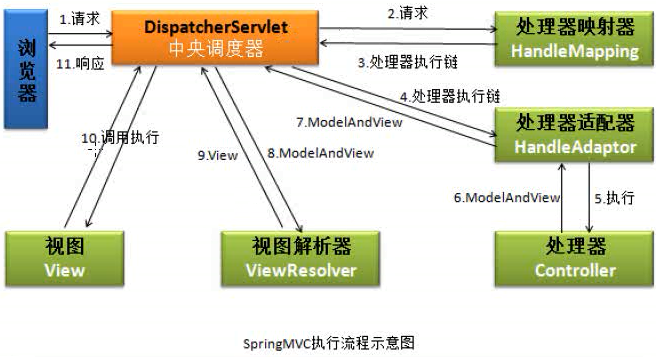
四、springMVC执行流程
五、使用servletloadOnStartup
目的:在Tomcat启动时直接创建当前Servlet
在web.xml中添加
<load-on-startup>1</load-on-startup>
即添加修改
!--  注册中央调度器 -->

 <servlet>

   <servlet-name>springMVC</servlet-name>

   <servlet-class>org.springframework.web.servlet.DispatcherServlet</servlet-class>

   <!-- 指定springMVC配置文件的位置及文件名 -->

   <init-param>

     <param-name>contextConfigLocation</param-name>

     <param-value>classpath:springMVC.xml</param-value>

   </init-param>

   <load-on-startup>1</load-on-startup>

 </servlet>

<servlet-mapping>

  <servlet-name>springMVC</servlet-name>

  <url-pattern>*.do</url-pattern>

</servlet-mapping>
五、使用视图解析器
修改MyController
mv.setViewName("welcome");//welcome为逻辑视图
welcome逻辑视图名通过内部资源适配器InternalResourceViewResolver转换成物理视图
修改springmvc.xml
<!-- 注册视图解析器 -->

<bean class="org.springframework.web.servlet.view.InternalResourceViewResolver">

 <property name="prefix" value="/WEB-INF/jsp/"></property>

  <property name="suffix" value=".jsp"></property>

</bean>
六、整理
 public class MyController implements Controller {

     public ModelAndView handleRequest(HttpServletRequest request,

             HttpServletResponse response) throws Exception {

         // TODO Auto-generated method stub

         ModelAndView mv= new ModelAndView();

         mv.addObject("message","hello SpringMVC World!");

         mv.setViewName("welcome");//welcome为逻辑视图

         return mv;

     }

 }
MyController
 <?xml version="1.0" encoding="UTF-8"?>

 <beans xmlns="http://www.springframework.org/schema/beans"

         xmlns:xsi="http://www.w3.org/2001/XMLSchema-instance"

         xmlns:context="http://www.springframework.org/schema/context"

         xmlns:aop="http://www.springframework.org/schema/aop"

         xmlns:tx="http://www.springframework.org/schema/tx"

         xmlns:mvc="http://www.springframework.org/schema/mvc"

         xsi:schemaLocation="http://www.springframework.org/schema/beans

         http://www.springframework.org/schema/beans/spring-beans.xsd

         http://www.springframework.org/schema/context

         http://www.springframework.org/schema/context/spring-context.xsd

         http://www.springframework.org/schema/aop

         http://www.springframework.org/schema/aop/spring-aop.xsd

         http://www.springframework.org/schema/tx

         http://www.springframework.org/schema/tx/spring-tx.xsd

         http://www.springframework.org/schema/mvc

         http://www.springframework.org/schema/mvc/spring-mvc.xsd">

 <!-- 注册视图解析器 -->

 <bean class="org.springframework.web.servlet.view.InternalResourceViewResolver">

  <property name="prefix" value="/WEB-INF/jsp/"></property>

   <property name="suffix" value=".jsp"></property>

 </bean>

 <!-- 注册处理器 -->

 <bean id="/my.do" class="com.jmu.handlers.MyController"></bean>

 </beans>
springmvc.xml
 <?xml version="1.0" encoding="UTF-8"?>

 <web-app xmlns:xsi="http://www.w3.org/2001/XMLSchema-instance"

     xmlns="http://java.sun.com/xml/ns/javaee"

     xsi:schemaLocation="http://java.sun.com/xml/ns/javaee http://java.sun.com/xml/ns/javaee/web-app_2_5.xsd"

     id="WebApp_ID" version="2.5">

     <display-name>01-springmvc-primary</display-name>

     <!-- 注册中央调度器 -->

     <servlet>

         <servlet-name>springMVC</servlet-name>

         <servlet-class>org.springframework.web.servlet.DispatcherServlet</servlet-class>

         <!-- 指定springMVC配置文件的位置及文件名 -->

         <init-param>

             <param-name>contextConfigLocation</param-name>

             <param-value>classpath:springmvc.xml</param-value>

         </init-param>

         <load-on-startup>1</load-on-startup>

     </servlet>

     <servlet-mapping>

         <servlet-name>springMVC</servlet-name>

         <url-pattern>*.do</url-pattern>

     </servlet-mapping>

     <welcome-file-list>

         <welcome-file>index.jsp</welcome-file>

     </welcome-file-list>

 </web-app>
web.xml
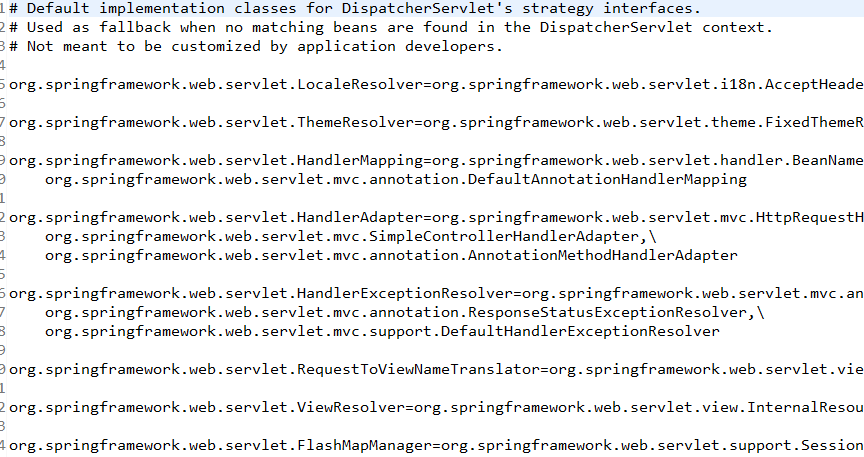
七、DispatcherServlet默认配置

SpringMVC_第一个程序的更多相关文章
- Android开发-之第一个程序:HelloWorld!
小编觉得不管学习什么编程的时候,第一个程序都是要求打印输出一个"HelloWorld!",那就从最简单的HelloWorld开始吧!哈哈~~~~ 一.创建一个Android工程 1 ...
- [Fluent NHibernate]第一个程序
目录 写在前面 Fluent Nhibernate简介 基本配置 总结 写在前面 在耗时两月,NHibernate系列出炉这篇文章中,很多园友说了Fluent Nhibernate的东东,也激起我的兴 ...
- rails再体验(第一个程序)
掌握redmine plugin开发的目标在2016年未实现,2017年继续. 选择<Ruby on Rails Tutorial>教程,windows安装railsinstaller,该 ...
- OpenGL学习笔记1——第一个程序
学习的参考书基本是按照GL编程指南,如果有消息机制概念,对于GLUT的理解是很自然的.下面就按照自己写的第一个程序详细解释一下GL,还是比较容易上手的. 程序实现的功能是,根据当前随即种子摇出来的结果 ...
- Android 第一个程序 及 环境搭配
一. JDK配置 1.找到jdk安装路径 2.配置环境变量(建议配置在系统变量里面) 1).配置JAVA_HOME变量 2).配置 CLASSPATH 环境变量 CLASSPATH=.;%JAVA_H ...
- unix 网路编程(卷一)第一个程序编译过程
unix卷一去年暑假买的到现在才开始看无比惭愧,而且惭愧第一个程序就断断续续弄了几天,要好好写程序了,马上要找工作了,下面介绍下把本书第一个程序跑起来的过程: 搜各种博客 我用系统的是ubuntu 1 ...
- Hadoop学习历程(三、第一个程序)
根据之前的操作,我们已经可以正常的启动Hadoop了,关于真正的集群我会在之后进行说明.现在我们来看一下第一个程序吧 1. 在eclipse上建立一个java项目 2. 将 /usr/hadoop/s ...
- Python2.7.3 学习——第一个程序 Hello Python World
Hello World 每学一门语言开始的第一程序都是Hello World ,当然了Python也不例外,下面开始我们的Python第一个程序编写: 1,命令行: (1)打开终端,输入python, ...
- 【 D3.js 入门系列 — 1 】 第一个程序 HelloWorld
记得以前刚上大一学 C 语言的时候,写的第一个程序就是在控制台上输出 HelloWorld .当时很纳闷,为什么要输出这个.老师解释说所有学编程入门的第一个程序都是在屏幕上输出 HelloWorld, ...
随机推荐
- NOIP 2017 Day 0. 游记
刚从曲师大试机回来... 不巧,我抽到了和去年一样的考场,还是那么难用的XP,还是那么难用的键盘. 似乎在考场上有一股奇怪的力量,我本来在自己电脑上打板子打的没那么快,但是试机的那段时间..说出来你们 ...
- HashSet和CopyOnWriteArraySet
前言 这篇文章的目的如下: HashSet是如何保证元素的不重复和无序 HashSet的增删(改查?)原理 CopyOnWriteArraySet支持并发的原理 CopyOnWriteArraySet ...
- javamail+ical4j发送会议提醒
本篇讲述小编在使用ical4j时对其的理解与使用,留作笔记的同时希望能帮助到大家! 初学者可以先了解下ical4j的基本信息: iCalender编程基础,了解与使用ical4j:https://ww ...
- Chrome浏览器的自动安装下载工具
链接 https://www.google.com/chrome/browser/desktop/index.html?brand=CHWL&utm_campaign=en&utm_s ...
- golang使用http client发起get和post请求示例
[转自 http://www.01happy.com/golang-http-client-get-and-post/ ] get请求 get请求可以直接http.Get方法,非常简单. 1 2 3 ...
- 开启Nginx的目录文件列表功能
ngx_http_autoindex_module 此模块用于自动生成目录列表,ngx_http_autoindex_module只在 ngx_http_index_module模块未找到索引文件时 ...
- nginx的负载均衡集群测试
分别在3台机子安装nginx和启动nginx服务. dir: 192.168.0.7 另外2台服务器为 192.168.0.5 ,192.168.0.6 在dir 192.168.0.7 上增加配置 ...
- [APIO2015]雅加达的摩天楼
Description 印尼首都雅加达市有 N 座摩天楼,它们排列成一条直线,我们从左到右依次将它们编号为 0 到 N−1.除了这 N 座摩天楼外,雅加达市没有其他摩天楼. 有 M 只叫做 " ...
- 通过读取配置文件,启动mongodb
在实际的项目中,经常利用mongodb数据库做缓存,mongodb的并发性比较高,所以对于快速存储.读取信息有很多优点.在项目中对于第一次的数据请求会直接访问数据库,而对于获得的信息通常都会在此时刻存 ...
- Python自动化--语言基础3--字典、函数、全局/局部变量
字典 dict1 = {'name':'han','age':18,'class':'first'} print(dict1.keys()) #打印所有的key值 print(dict1.values ...