
1. 初识 Lucene
在学习Lucene之前呢,我们当然首先要了解下什么是Lucene.
0x01 什么是Lucene ?
Lucene是一套用于全文检索和搜索的开放源代码程序库,由Apache软件基金会支持和提供。
Lucene提供了一个简单却强大的应用程序接口,能够做全文索引和搜索,在Java开发环境里Lucene是一个成熟的免费开放源代码工具;
就其本身而论,Lucene是现在并且是这几年,最受欢迎的免费Java信息检索程序库。
Lucene最初是由Doug Cutting所撰写的,他贡献出Lucene的目标是为各种中小型应用程序加入全文检索功能。
Tips: 摘要来自维基百科 https://zh.wikipedia.org/wiki/Lucene
这里我们只需要知道Lucene是目前最为流行的基于 Java 开源全文检索工具包。
0x02 Lucene 是用来做什么的?
基于Lucene的著名项目
| 项目名称 | 项目描述 |
| Apache Nutch | 提供成熟可用的网络爬虫 |
| Apache Solr | 基于Lucenne核心的高性能搜索服务器,提供JSON/Python/Ruby API |
| Elasticsearch | 企业搜索平台,目的是组织数据并使其易于获取 |
| DocFetcher | 跨平台的本机文件搜索桌面程序 |
| Lucene.NET | 提供给.Net平台用户的Lucene类库的封装 |
| Swiftype | 基于Lucene的企业级搜索 |
| Apache Lucy | 为动态语言提供全文搜索的能力,是Lucene Java 库的C接口 |
其实我们不难发现主要用途
- 可以用来编写网络爬虫
- 也可以用来实现网站后台的全文检索。
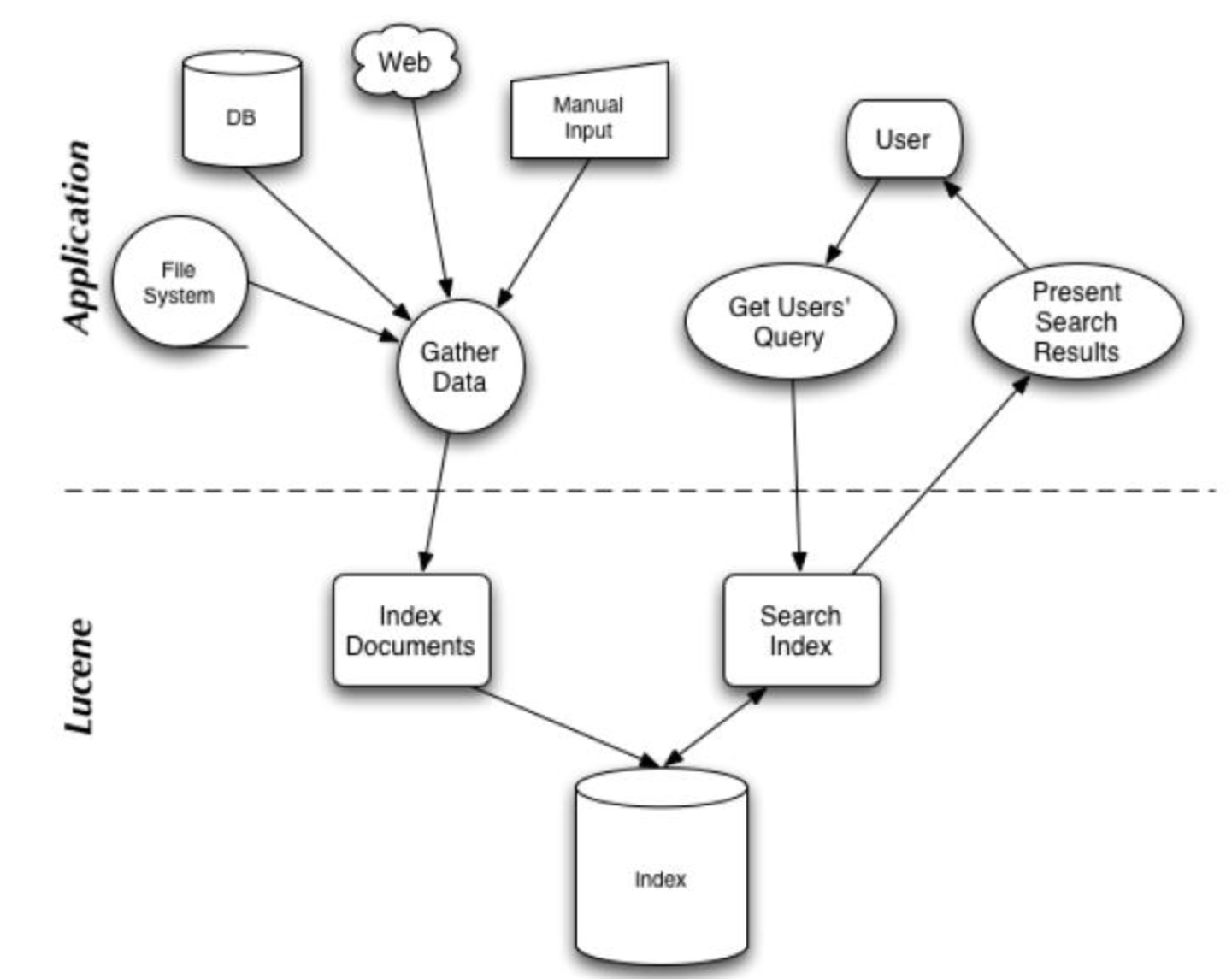
偶然发现这张图感觉挺不错的,在这里分享下:
搜索应用程序和 Lucene 之间的关系
Lucene 能够为文本类型的数据建立索引,所以你只要能把你要索引的数据格式转化的文本的,Lucene 就能对你的文档进行索引和搜索。
0x03 Lucene 软件包分析
Lucene 软件包的发布形式是一个 JAR 文件,下面我们分析一下这个 JAR 文件里面的主要的 JAVA 包,使读者对之有个初步的了解。
Package: org.apache.lucene.document
这个包提供了一些为封装要索引的文档所需要的类,比如 Document, Field。这样,每一个文档最终被封装成了一个 Document 对象。
Package: org.apache.lucene.analysis
这个包主要功能是对文档进行分词,因为文档在建立索引之前必须要进行分词,所以这个包的作用可以看成是为建立索引做准备工作。
Package: org.apache.lucene.index
这个包提供了一些类来协助创建索引以及对创建好的索引进行更新。这里面有两个基础的类:IndexWriter 和 IndexReader,
其中 IndexWriter 是用来创建索引并添加文档到索引中的,IndexReader 是用来删除索引中的文档的。
Package: org.apache.lucene.search
这个包提供了对在建立好的索引上进行搜索所需要的类。比如 IndexSearcher 和 Hits, IndexSearcher 定义了在指定的索引上进行搜索的方法,Hits 用来保存搜索得到的结果。
0x04 搭建Lucene 开发环境?
相信你和我一样已经控制不住自己的洪荒之力想要写个demo来跑跑了,但是在此之前我们还是要先搭建好开发环境。
1. 首先我们需要找到Lucene的官网
Lucene官网:https://lucene.apache.org/

翻译内容如下:
Apache LuceneTM项目开发开源搜索软件,其中包括:
我们的旗舰子项目Lucene Core提供了基于Java的索引和搜索技术,以及拼写检查,高亮显示和高级分析/标记化功能。
SolrTM是一款使用Lucene Core构建的高性能搜索服务器,具有XML / HTTP和JSON / Python / Ruby API,高亮显示,多面搜索,缓存,复制和Web管理界面。
PyLucene是Core项目的Python端口。
2.点击上图中的Download 按钮,会跳转到这个下载页面

Tips: 这里存在很多镜像下载链接,我们选择推荐的下载链接下载即可。
0x05 Lucene Hello World Sample
文档资料相信你在其他网站已经看了不少,但是不写一个能跑起来的Hello World 对于初学者来说是非常痛苦的。
对于这个简单的例子,我们将从一些字符串中创建一个内存索引
1.创建Maven 项目
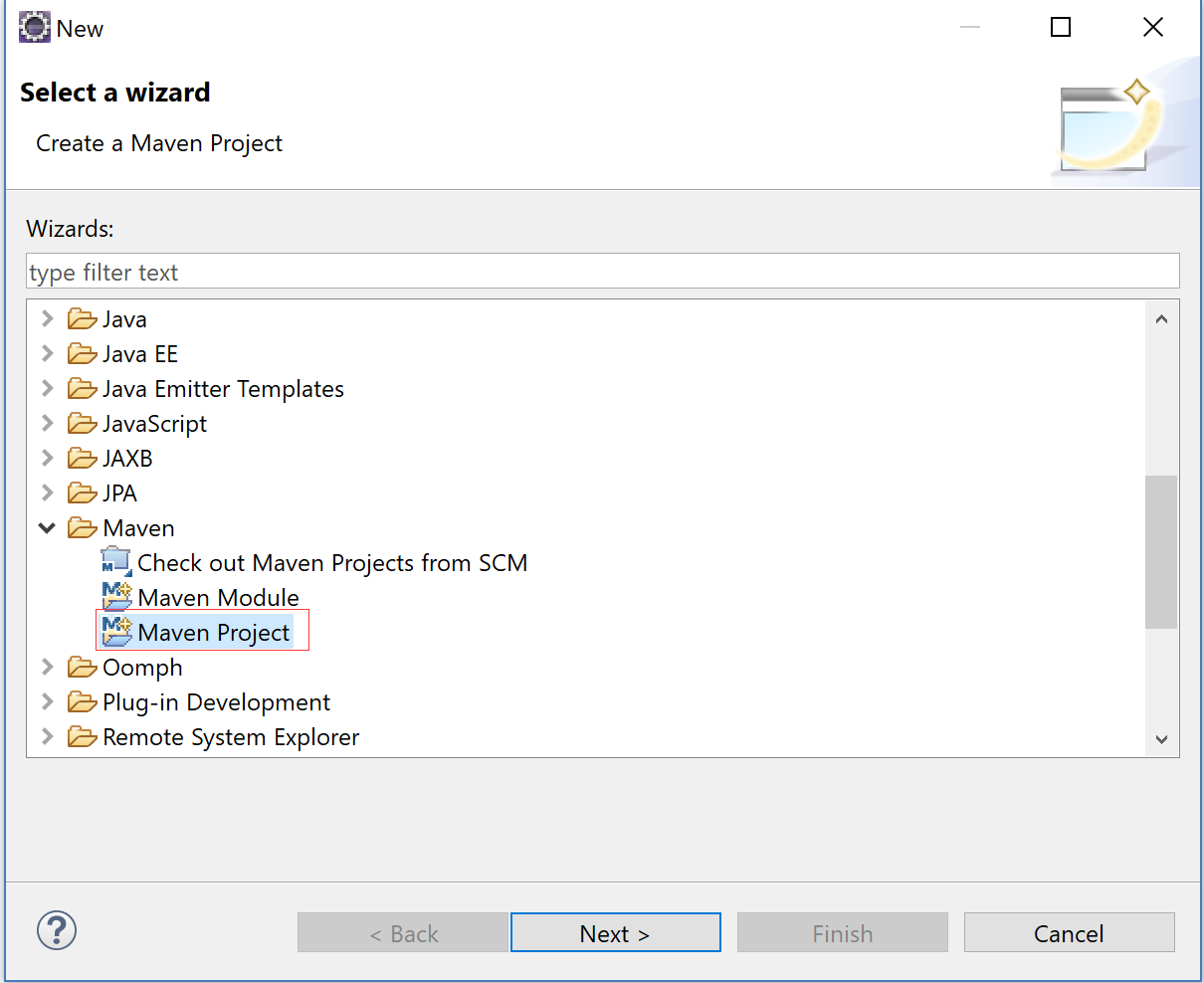
2.选择创建一个简单的Maven Project

3. 配置工程信息

4. 点击完成

5. 配置POM.xml
<project xmlns="http://maven.apache.org/POM/4.0.0" xmlns:xsi="http://www.w3.org/2001/XMLSchema-instance" xsi:schemaLocation="http://maven.apache.org/POM/4.0.0 http://maven.apache.org/xsd/maven-4.0.0.xsd">

  <modelVersion>4.0.0</modelVersion>

  <groupId>com.xingyun</groupId>

  <artifactId>lucene-sample</artifactId>

  <version>0.0.1-SNAPSHOT</version>

  <packaging>jar</packaging>

  <name>lucene-sample</name>

    <properties>

        <project.build.sourceEncoding>UTF-8</project.build.sourceEncoding>

    </properties>

    <build>

      <plugins>

          <plugin>

              <groupId>org.codehaus.mojo</groupId>

              <artifactId>exec-maven-plugin</artifactId>

              <version>1.3.2</version>

              <executions>

                  <execution>

                      <id>ex</id>

                      <phase>package</phase>

                      <goals>

                          <goal>exec</goal>

                      </goals>

                      <configuration>

                          <executable>java</executable>

                          <arguments>

                              <argument>-classpath</argument>

                              <classpath />

                              <argument>HelloLucene.HelloLucene</argument>

                          </arguments>

                      </configuration>

                  </execution>

              </executions>

          </plugin>

      </plugins>

    </build>

    <dependencies>

        <dependency>

            <groupId>org.apache.lucene</groupId>

            <artifactId>lucene-core</artifactId>

            <version>4.0.0</version>

        </dependency>

        <dependency>

            <groupId>org.apache.lucene</groupId>

            <artifactId>lucene-queries</artifactId>

            <version>4.0.0</version>

        </dependency>

        <dependency>

            <groupId>org.apache.lucene</groupId>

            <artifactId>lucene-test-framework</artifactId>

            <version>4.0.0</version>

        </dependency>

        <dependency>

            <groupId>org.apache.lucene</groupId>

            <artifactId>lucene-analyzers-common</artifactId>

            <version>4.0.0</version>

        </dependency>

        <dependency>

            <groupId>org.apache.lucene</groupId>

            <artifactId>lucene-queryparser</artifactId>

            <version>4.0.0</version>

        </dependency>

    </dependencies>

</project>
6. 创建HelloLucene.java
package com.xingyun;

import java.io.IOException;

import java.text.ParseException;

import org.apache.lucene.analysis.standard.StandardAnalyzer;

import org.apache.lucene.document.Document;

import org.apache.lucene.document.Field;

import org.apache.lucene.document.StringField;

import org.apache.lucene.document.TextField;

import org.apache.lucene.index.DirectoryReader;

import org.apache.lucene.index.IndexReader;

import org.apache.lucene.index.IndexWriter;

import org.apache.lucene.index.IndexWriterConfig;

import org.apache.lucene.queryparser.classic.QueryParser;

import org.apache.lucene.search.IndexSearcher;

import org.apache.lucene.search.Query;

import org.apache.lucene.search.ScoreDoc;

import org.apache.lucene.search.TopScoreDocCollector;

import org.apache.lucene.store.Directory;

import org.apache.lucene.store.RAMDirectory;

import org.apache.lucene.util.Version;

public class HelloLucene {

    public static void main(String[] args) throws IOException, ParseException {

        // 对于这个简单的例子,我们将从一些字符串中创建一个内存索引。

        // 0. Specify the analyzer for tokenizing text.

        // The same analyzer should be used for indexing and searching

        StandardAnalyzer analyzer = new StandardAnalyzer(Version.LUCENE_40);

        // 1. create the index

        Directory index = new RAMDirectory();

        IndexWriterConfig config = new IndexWriterConfig(Version.LUCENE_40, analyzer);

        IndexWriter w = new IndexWriter(index, config);

        addDoc(w, "Lucene in Action", "193398817");

        addDoc(w, "Lucene for Dummies", "55320055Z");

        addDoc(w, "Managing Gigabytes", "55063554A");

        addDoc(w, "The Art of Computer Science", "9900333X");

        w.close();

        // 2. query

        String querystr = args.length > 0 ? args[0] : "lucene";

        // the "title" arg specifies the default field to use

        // when no field is explicitly specified in the query.

        Query q = null;

        try {

            q = new QueryParser(Version.LUCENE_40, "title", analyzer).parse(querystr);

        } catch (org.apache.lucene.queryparser.classic.ParseException e) {

            e.printStackTrace();

        }

        // 3. search

        int hitsPerPage = 10;

        IndexReader reader = DirectoryReader.open(index);

        IndexSearcher searcher = new IndexSearcher(reader);

        TopScoreDocCollector collector = TopScoreDocCollector.create(hitsPerPage, true);

        searcher.search(q, collector);

        ScoreDoc[] hits = collector.topDocs().scoreDocs;

        // 4. display results

        System.out.println("Found " + hits.length + " hits.");

        for (int i = 0; i < hits.length; ++i) {

            int docId = hits[i].doc;

            Document d = searcher.doc(docId);

            System.out.println((i + 1) + ". " + d.get("isbn") + "\t" + d.get("title"));

        }

        // reader can only be closed when there

        // is no need to access the documents any more.

        reader.close();

    }

    private static void addDoc(IndexWriter w, String title, String isbn) throws IOException {

        Document doc = new Document();

        doc.add(new TextField("title", title, Field.Store.YES));

        // use a string field for isbn because we don't want it tokenized

        doc.add(new StringField("isbn", isbn, Field.Store.YES));

        w.addDocument(doc);

    }

}
7. 运行后,我们便可以得到索引集合中带有Lucene的所有内容
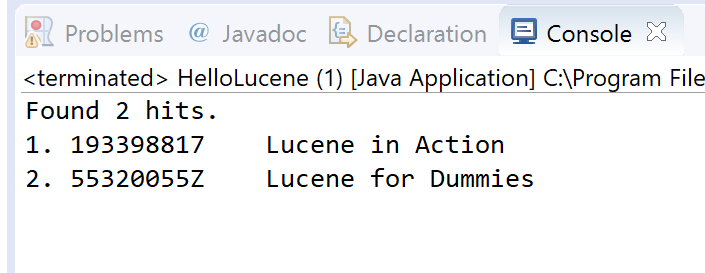
0x06 代码剖析
我们运行成功后,相信此时的你已经有心情和我一起来分析代码了吧。
1. 创建索引
StandardAnalyzer analyzer = new StandardAnalyzer();

Directory index = new RAMDirectory();

IndexWriterConfig config = new IndexWriterConfig(analyzer);

IndexWriter w = new IndexWriter(index, config);

addDoc(w, "Lucene in Action", "193398817");

addDoc(w, "Lucene for Dummies", "55320055Z");

addDoc(w, "Managing Gigabytes", "55063554A");

addDoc(w, "The Art of Computer Science", "9900333X");

w.close();
我们需要虚构一些假的数据,通过上面的方式来对一些字符串和数字创建索引
addDoc 方法定义如下所示:
private static void addDoc(IndexWriter w, String title, String isbn) throws IOException {

  Document doc = new Document();

  doc.add(new TextField("title", title, Field.Store.YES));

  doc.add(new StringField("isbn", isbn, Field.Store.YES));

  w.addDocument(doc);

}
2. 查询
String querystr = args.length > 0 ? args[0] : "lucene";

Query q = new QueryParser("title", analyzer).parse(querystr);
3.搜索
int hitsPerPage = 10;

IndexReader reader = DirectoryReader.open(index);

IndexSearcher searcher = new IndexSearcher(reader);

TopDocs docs = searcher.search(q, hitsPerPage);

ScoreDoc[] hits = docs.scoreDocs;
4.显示结果
System.out.println("Found " + hits.length + " hits.");

for(int i=0;i<hits.length;++i) {

    int docId = hits[i].doc;

    Document d = searcher.doc(docId);

    System.out.println((i + 1) + ". " + d.get("isbn") + "\t" + d.get("title"));

}
0x07 参考资料:
Lucene in 5 minutes:http://www.lucenetutorial.com/lucene-in-5-minutes.html
Lucene常识总结以及小demo总结 http://www.imooc.com/article/21946
Lucene 概述: https://www.ibm.com/developerworks/cn/java/j-lo-lucene1/
视频实战教程:
基于Lucene4.6+Solr4.6+Heritrix1.14+S2SH实战开发从无到有垂直搜索引擎
网盘地址:https://pan.baidu.com/s/1nwkAamt 密码: 9ang
备用地址(腾讯微云):http://url.cn/5CmEW7s 密码:p8TmhQ
1. 初识 Lucene的更多相关文章
- 初识Lucene.net
最近想提高下自己的能力,也是由于自己的项目中需要用到Lucene,所以开始接触这门富有挑战又充满新奇的技术.. 刚刚开始,只是写了个小小的demo,用了用lucene,确实很好 创建索引 Data ...
- 初识 Lucene
Lucene是一个信息检索工具库,而不是一个完整的搜索程序 搜索程序 Lucene索引核心类 Lucene索引核心类: Document: 文档对象代表一些域(field)的集合 Field: 每个文 ...
- 第一章 初识Lucene
多看几遍,慢就是快 1.1 应对信息爆炸 1.2 Lucene 是什么 1.2.1 Lucene 能做些什么 1.2.2 Lucene 的历史 1.3 Lucene 和搜索程序组件 基本概念 索引操作 ...
- 初识lucene
lucene的介绍网上有好多,再写一遍可能有点多余了. 使用lucene之前,有一系列的疑问 为什么lucene就比数据库快? 倒排索引是什么,他是怎么做到的 lucene的数据结构是什么样的,cpu ...
- 初识lucene(想看代码的跳过)
最早是在百度贴吧里看到的lucene这个名称,只知道跟搜索引擎有关,因为工作中一直以来没有类似的需求,所以没有花时间学习这方面的知识. 刚过完年,公司不忙,自己闲不住把<Netty权威指南> ...
- (转)初识 Lucene
Lucene 是一个基于 Java 的全文信息检索工具包,它不是一个完整的搜索应用程序,而是为你的应用程序提供索引和搜索功能.Lucene 目前是 Apache Jakarta 家族中的一个开源项目. ...
- 实战 Lucene,第 1 部分: 初识 Lucene (zhuan)
http://www.ibm.com/developerworks/cn/Java/j-lo-lucene1/ ******************************************** ...
- 搜索引擎学习(一)初识Lucene
一.Lucene相关基础概念 定义:一个简易的工具包,实现文件搜索的功能,支持中文,关键字,多条件查询,凡是文件名或文件内容包含的都查出来. 数据分类:结构化数据(固定格式或有限长度的数据)和非结构化 ...
- 【转载】Lucene.Net入门教程及示例
本人看到这篇非常不错的Lucene.Net入门基础教程,就转载分享一下给大家来学习,希望大家在工作实践中可以用到. 一.简单的例子 //索引Private void Index(){ Index ...
随机推荐
- dojo、iframe和FusionCharts兼容性
今天,我们项目组对项目收尾检查,却突然发现了一个问题,FusionCharts出现兼容性问题. 在火狐浏览器上,项目运行正常:在IE8(标准模式下)运行正常,但是在IE8杂项出现兼容性问题.经过检查, ...
- 【mongodb系统学习之八】mongodb shell常用操作
八.mongodb shell常用基础操作(每个语句后可以加分号,也可以不加,看情况定(有的工具中可以不加),最好是加): 1).进入shell操作界面:mongo,上边已有演示: 2).查看当前使 ...
- servlet上传文件报错(三)
1.具体报错如下 null null Exception in thread "http-apr-8686-exec-5" java.lang.OutOfMemoryError: ...
- Linux显示计算次数的结果
Linux显示计算次数的结果 youhaidong@youhaidong-ThinkPad-Edge-E545:~$ free -c free:选项需要一个参数 -- c Usage: free [o ...
- 芝麻HTTP: Scrapy小技巧-MySQL存储
这两天上班接手,别人留下来的爬虫发现一个很好玩的 SQL脚本拼接. 只要你的Scrapy Field字段名字和 数据库字段的名字 一样.那么恭喜你你就可以拷贝这段SQL拼接脚本.进行MySQL入库处理 ...
- 零基础6个月学好java月薪1w+看看他是怎么学好java的
21世纪进入信息时代,信息科技给人类的生产和生活方式带来了深刻的变革,信息产业已成为推动国家经济发展的主导产业之一,Java作为含金量极高的一门IT技术,很多人希望从事这个行业,那么想学好Java,要 ...
- A Dream (PKUWC 2018)
A Dream (PKUWC 2018) 这是一个梦. 从没有几分节日气氛的圣诞,做到了大雪纷飞的数九寒天. 忘了罢! 不记得时间,不记得地点.随着记忆的褪去,一切也只会不复存在. Day-34? D ...
- Poj2723:Get Luffy Out
题意 给出 n 对钥匙,每对只能挑一把使用,每把只能用一次,当一对钥匙中的一把被使用后,另一把也就不能再用了:然后给出 m 道门,每个门都有两把钥匙可以打开,问最多能开几道门(按给出的顺序开). So ...
- 第二章 js数据类型和变量
一.驼峰命名法 第一个单词首字母大写,如果有多个单词的话其他的单词首字母大写. eg:nickName 二.prototype现象 新的命名规范. 常用的:以下划线为首字母(变量为对象的私有成员变量) ...
- 利用TPC-H为MYSQL生成数据
## 利用TPC-H为MYSQL生成数据 导言 这篇文章是看了joyee写的TPC-H数据导入MySQL教程以及另一篇网上的MySQL TPCH测试工具简要手册 后写的,有些内容是完全转载自以上两篇文 ...