
『片段』ShellHelper 控制台程序 的 程序调用(支持输入命令得到返回字符串输出)
背景:
> 之前做 OGG 时,被 OGG的配置 恶心到了。(OGG是啥,这里就不解释了)
> 总之就是一个 控制台程序,总是得手动执行一堆命令,每次都得输入 —— 实在是打字打累了。
> 于是,搜索:Shell控制输入输出 的代码 —— 没有找到完美的。【部分网友给出的往往是:一堆命令,得到全部输出 —— 而我要的是:输入一行命令就得到对应的输出】
源码:
 using System;

 using System.Collections.Generic;

 using System.Diagnostics;

 using System.Threading;

 namespace Temp

 {

     /// <summary>

     /// 控制台程序Shell辅助类

     /// </summary>

     public class ShellHelper

     {

         private static List<ShellInfo> m_ListShell = null;

         private static Thread m_ManageShell = null;

         private static readonly object m_Locker = new object();

         public static bool IsManageShellThread

         {

             get { return Thread.CurrentThread == m_ManageShell; }

         }

         public static ShellInfo Start(string exePath, ShellInfoReadLine ReadLine)

         {

             ShellInfo shellInfo = new ShellInfo();

             Process process = shellInfo.Process = new Process();

             process.StartInfo.FileName = exePath;

             process.StartInfo.UseShellExecute = false;

             process.StartInfo.RedirectStandardInput = true;

             process.StartInfo.RedirectStandardOutput = true;

             process.StartInfo.RedirectStandardError = true;

             process.StartInfo.CreateNoWindow = true;

             //process.StartInfo.WindowStyle = ProcessWindowStyle.Hidden;

             process.OutputDataReceived += new DataReceivedEventHandler(Process_OutputDataReceived);

             process.ErrorDataReceived += new DataReceivedEventHandler(Process_ErrorDataReceived);

             process.EnableRaisingEvents = true;                      // 启用Exited事件

             process.Exited += new EventHandler(Process_Exited);   // 注册进程结束事件

             process.Start();

             process.BeginOutputReadLine();

             process.BeginErrorReadLine();

             process.StandardInput.WriteLine();

             shellInfo.ReadLine = ReadLine;

             if (m_ListShell == null) m_ListShell = new List<ShellInfo>();

             m_ListShell.Add(shellInfo);

             InitShellManageThread();

             return shellInfo;

         }

         private static void InitShellManageThread()

         {

             if (m_ManageShell == null)

             {

                 m_ManageShell = new Thread(ManageShell_ThreadWork);

                 m_ManageShell.IsBackground = true;

                 m_ManageShell.Start();

             }

         }

         private static void ManageShell_ThreadWork()

         {

             while (m_ListShell != null && m_ListShell.Count >= )

             {

                 try

                 {

                     lock (m_Locker)

                     {

                         foreach (ShellInfo shell in m_ListShell)

                             if (shell != null) shell.InvokeInputOutput();

                     }

                     //线程休眠 50毫秒

                     AutoResetEvent eventHandle = new AutoResetEvent(false);

                     eventHandle.WaitOne();

                     eventHandle.Dispose();

                 }

                 catch (Exception ex) { Console.WriteLine("ERR: " + ex.ToString()); }

             }

         }

         private static void Process_OutputDataReceived(object sender, DataReceivedEventArgs e)

         {

             try

             {

                 ShellInfo shell = FindShellInfo(sender as Process);

                 if (shell != null) shell.DataReceived(e.Data);

             }

             catch (Exception ex) { Console.WriteLine("ERR: " + ex.ToString()); }

         }

         private static void Process_ErrorDataReceived(object sender, DataReceivedEventArgs e)

         {

             try

             {

                 ShellInfo shell = FindShellInfo(sender as Process);

                 if (shell != null) shell.ErrorReceived(e.Data);

             }

             catch (Exception ex) { Console.WriteLine("ERR: " + ex.ToString()); }

         }

         private static void Process_Exited(object sender, EventArgs e)

         {

         }

         public static ShellInfo FindShellInfo(Process process)

         {

             if (process == null) return null;

             ShellInfo shell = m_ListShell.Find(x => x.Process == process);

             return shell;

         }

     }

     public class ShellInfo

     {

         private ShellState m_State = ShellState.Wait;

         private DateTime m_StateTime = DateTime.MinValue;

         private string m_LastOutLine;

         private List<ShellLine> m_ListWrite = new List<ShellLine>();

         private List<string> m_ListData = new List<string>();

         private List<string> m_ListError = new List<string>();

         public Process Process { get; set; }

         public ShellInfoReadLine ReadLine { get; set; }

         public ShellState State

         {

             get { return m_State; }

             private set

             {

                 m_State = value;

                 m_StateTime = DateTime.Now;

                 m_EventHandle.Set();

             }

         }

         public string PrevCmd { get { return string.Empty; } }

         public string NextCmd { get { return string.Empty; } }

         public void Close()

         {

             try { if (Process != null && !Process.HasExited) Process.Close(); }

             catch { }

         }

         #region  输 入 输 出 处 理

         private DateTime m_DataTime = DateTime.MinValue;

         private DateTime m_ErrorTime = DateTime.MinValue;

         private AutoResetEvent m_EventHandle = new AutoResetEvent(false);

         private ManualResetEvent m_EventWaitLogoOutputHandle = new ManualResetEvent(false);

         private AutoResetEvent m_EventAwaitWriteHandle = new AutoResetEvent(false);

         private const int MAX_UIWAIT_MILLSECOND =  * ;

         /// <summary>

         /// 等待 Shell 的 Logo输出结束 (也就是 刚启动Shell程序时, Shell程序最先输出文本, 然后才允许用户输入, 这里等待的就是 最先输出文本的过程)

         /// </summary>

         public void WaitLogoOuput()

         {

             if (ShellHelper.IsManageShellThread) return;

             m_EventWaitLogoOutputHandle.WaitOne(MAX_UIWAIT_MILLSECOND);

         }

         /// <summary>

         /// 阻塞当前线程, 直到当前 Shell 处于 指定的状态

         /// </summary>

         public void WaitState(ShellState state)

         {

             if (ShellHelper.IsManageShellThread || m_State == ShellState.Exited) return;

             const int JOIN_MILL_SECOND = ; //等待毫秒数

             while (m_State != ShellState.Exited && (m_State & state) != m_State)

                 m_EventHandle.WaitOne(JOIN_MILL_SECOND);

         }

         /// <summary>

         /// 向Shell中, 输入一段命令, 且等待命令返回 执行后的输出字符串.

         /// </summary>

         public string WriteLine(string cmd)

         {

             return WriteLine(cmd, MAX_UIWAIT_MILLSECOND);

         }

         /// <summary>

         /// 向Shell中, 输入一段命令, 且等待命令返回 执行后的输出字符串.

         /// </summary>

         public string WriteLine(string cmd, int ms)

         {

             if (ms < ) ms = MAX_UIWAIT_MILLSECOND;

             WaitLogoOuput();

             WaitState(ShellState.Input | ShellState.Wait);

             State = ShellState.Input;

             if (m_ListWrite == null) m_ListWrite = new List<ShellLine>();

             cmd = (cmd ?? string.Empty).Trim();

             ShellLine cmdLine = this.CurrLine = new ShellLine(m_LastOutLine, cmd);

             m_ListWrite.Add(cmdLine);

             m_EventAwaitWriteHandle.Reset();

             m_EventAwaitWriteHandle.WaitOne(ms);

             return cmdLine.Result;

         }

         /// <summary>

         /// 向Shell中, 以异步模式输入一段命令, 命令返回的输出字符串, 可以通过 ReadLine 回调捕获

         /// </summary>

         public void BeginWriteLine(string cmd)

         {

             WaitLogoOuput();

             WaitState(ShellState.Input | ShellState.Wait);

             State = ShellState.Input;

             if (m_ListWrite == null) m_ListWrite = new List<ShellLine>();

             cmd = (cmd ?? string.Empty).Trim();

             ShellLine cmdLine = this.CurrLine = new ShellLine(m_LastOutLine, cmd);

             m_ListWrite.Add(cmdLine);

             //m_EventAwaitWriteHandle.Reset();

             //m_EventAwaitWriteHandle.WaitOne(MAX_UIWAIT_MILLSECOND);

         }

         protected ShellLine CurrLine { get; set; }

         public void DataReceived(string str)

         {

             WaitState(ShellState.Output | ShellState.Wait);

             State = ShellState.Output;

             ShellLine cmdLine = this.CurrLine;

             if (cmdLine != null && !cmdLine.IsEmpty && !string.IsNullOrEmpty(str) && !cmdLine.Output)

             {

                 Process.StandardInput.WriteLine();

                 string diffStr = cmdLine.GetDiffString(str);

                 if (!string.IsNullOrEmpty(diffStr)) m_ListData.Add(diffStr);

                 cmdLine.Output = true;

                 return;

             }

             if (cmdLine != null) cmdLine.Output = true;

             m_ListData.Add(str);

             State = ShellState.Output;

         }

         public void ErrorReceived(string err)

         {

             WaitState(ShellState.OutputError | ShellState.Wait);

             State = ShellState.OutputError;

             m_ListError.Add(err);

             State = ShellState.OutputError;

         }

         public void InvokeInputOutput()

         {

             if (Process == null || Process.HasExited)

             {

                 m_EventHandle.Set();

                 m_EventWaitLogoOutputHandle.Set();

                 m_EventAwaitWriteHandle.Set();

                 return;

             }

             //100 ms 没有进行 输入、输出 操作, 则管理线程开始接收 Shell的处理

             const int DIFF_MILL_SECOND = ;

             if (/*m_State != ShellState.Wait && */(DateTime.Now - m_StateTime).TotalMilliseconds > DIFF_MILL_SECOND)

             {

                 ShellInfoReadLine handle = this.ReadLine;

                 ShellLine waitCmdLine = this.CurrLine;

                 string waitCmd = waitCmdLine == null ? string.Empty : waitCmdLine.Cmd;

                 if (waitCmdLine != null || (m_ListWrite == null || m_ListWrite.Count <= ))

                 {

                     #region  正常输出

                     if (m_ListData != null && m_ListData.Count >= )

                     {

                         string last = m_ListData[m_ListData.Count - ];

                         if (!string.IsNullOrEmpty(last) && !last.Trim().EndsWith(">")) m_ListData.Add(string.Empty);

                         string data = "\r\n" + string.Join("\r\n", m_ListData);

                         m_LastOutLine = last;

                         m_ListData.Clear();

                         handle(waitCmd, data);

                         if (waitCmdLine != null) waitCmdLine.Result = data;

                         this.CurrLine = null;

                         m_EventAwaitWriteHandle.Set();

                         m_EventWaitLogoOutputHandle.Set();

                     }

                     #endregion

                     #region  异常输出

                     if (m_ListError != null && m_ListError.Count >= )

                     {

                         string last = m_ListError[m_ListError.Count - ];

                         if (!string.IsNullOrEmpty(last) && !last.Trim().EndsWith(">")) m_ListError.Add(string.Empty);

                         string error = "\r\n" + string.Join("\r\n", m_ListError);

                         m_ListError.Clear();

                         handle(waitCmd, error);

                         if (waitCmdLine != null) waitCmdLine.Result = error;

                         this.CurrLine = null;

                         m_EventAwaitWriteHandle.Set();

                         m_EventWaitLogoOutputHandle.Set();

                     }

                     #endregion

                 }

                 #region  执行输入

                 if (m_ListWrite != null && m_ListWrite.Count >= )

                 {

                     ShellLine cmdLine = m_ListWrite[];

                     this.Process.StandardInput.WriteLine(cmdLine.Cmd);

                     m_ListWrite.RemoveAt();

                     //输入命令后, 优先接收 Shell 的 错误信息

                     State = ShellState.OutputError;

                 }

                 else

                     State = ShellState.Wait;

                 #endregion

             }

         }

         #endregion

     }

     public class ShellLine

     {

         public ShellLine(string cmd)

         {

             this.Cmd = cmd;

         }

         public ShellLine(string tip, string cmd)

         {

             this.Tip = tip;

             this.Cmd = cmd;

         }

         public string Tip { get; set; }

         public string Cmd { get; set; }

         public string Result { get; set; }

         public bool Output { get; set; }

         public bool IsEmpty

         {

             get { return string.IsNullOrEmpty(this.Cmd); }

         }

         public string Line

         {

             get { return Tip + Cmd; }

         }

         public string GetDiffString(string str)

         {

             if (string.IsNullOrEmpty(str)) return string.Empty;

             string tip = this.Tip;

             string line = this.Line;

             if (str.StartsWith(line)) return str.Substring(line.Length);

             if (str.StartsWith(tip)) return str.Substring(tip.Length);

             return str;

         }

     }

     [Flags]

     public enum ShellState

     {

         /// <summary>

         /// Shell 暂时没有任何输入输出, 可能是在等待用户输入, 也可能是Shell正在处理数据

         /// </summary>

         Wait = ,

         /// <summary>

         /// 正在向 Shell 中写入命令

         /// </summary>

         Input = ,

         /// <summary>

         /// Shell 正式输出 正常信息

         /// </summary>

         Output = ,

         /// <summary>

         /// Shell 正在输出 错误信息

         /// </summary>

         OutputError = ,

         /// <summary>

         /// Shell 已经退出

         /// </summary>

         Exited = ,

     }

     public delegate void ShellInfoReadLine(string cmd, string result);

 }
调用:
             ShellInfo shell = ShellHelper.Start("cmd.exe", (cmd, rst) => {  });

             shell.WaitLogoOuput(); //先等程序把 LOGO 输出完

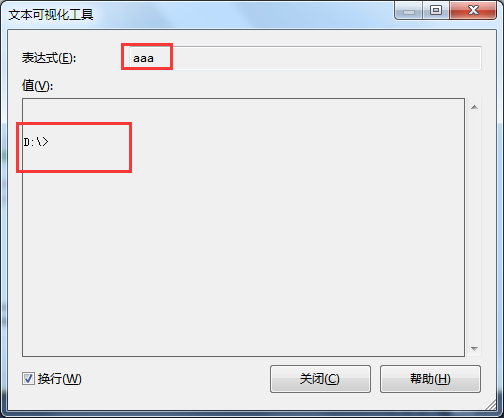
             string aaa = shell.WriteLine("D:");  //相当于在 cmd 中输入 D:

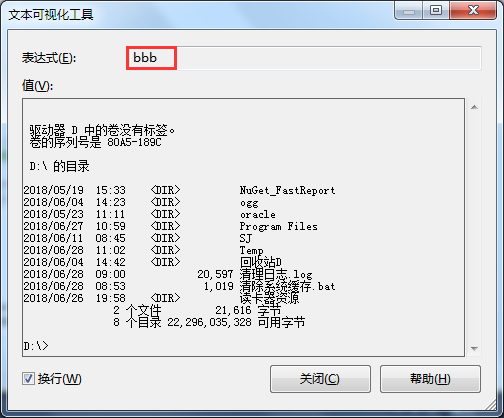
             string bbb = shell.WriteLine("dir"); //相当于在 cmd 中输入 dir
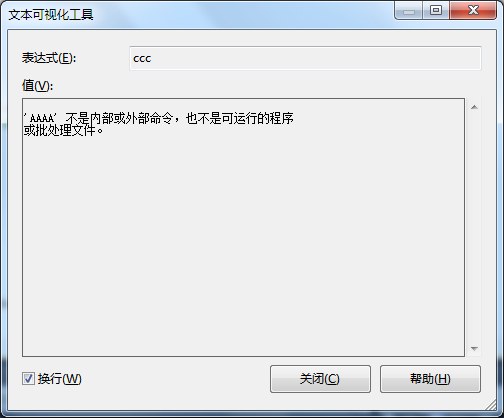
              string ccc = shell.WriteLine("AAAA");
截图:
『片段』ShellHelper 控制台程序 的 程序调用(支持输入命令得到返回字符串输出)的更多相关文章
- 『片段』OracleHelper (支持 多条SQL语句)
C# 调用 Oracle 是如此尴尬 >System.Data.OracleClient.dll —— .Net 自带的 已经 过时作废. >要链接 Oracle 服务器,必须在 本机安装 ...
- 『片段』Win32 模式窗体 消息路由
需求背景 近来,有个需求: 和一个外部程序对接. 具体是,我这边 主程序用 Process 启动外部程序.外部程序启动后,我这边调用的窗体不允许再进行任何操作. 当外部程序关闭时,外部程序会向我这边的 ...
- 『片段』C# DateTime 时间相减 和 时区的关系
本文只是基础代码片段,直接先写 结论: C# DateTime 时间相减 —— 和 时区无关,只和时间值有关. 运行结果: 测试代码: using System; using System.Colle ...
- 『OpenCV3』Harris角点特征_API调用及python手动实现
一.OpenCV接口调用示意 介绍了OpenCV3中提取图像角点特征的函数: # coding=utf- import cv2 import numpy as np '''Harris算法角点特征提取 ...
- 『TensorFlow』专题汇总
TensorFlow:官方文档 TensorFlow:项目地址 本篇列出文章对于全零新手不太合适,可以尝试TensorFlow入门系列博客,搭配其他资料进行学习. Keras使用tf.Session训 ...
- 用chrome的snippets片段功能创建页面js外挂程序,从控制台创建js小脚本
用chrome的snippets片段功能创建页面js外挂程序,从控制台创建js小脚本 Chrome的snippets是小脚本,还可以创作并在Chrome DevTools的来源面板中执行.可以访问和从 ...
- C#控制台或应用程序中两个多个Main()方法的可行性方案
大多数初级程序员或学生都认为在C#控制台或应用程序中只能有一个Main()方法.但是事实上是可以有多个Main()方法的. 在C#控制台或应用程序中,在多个类中,且每个类里最多只能存在一个Main() ...
- C#控制台或应用程序中两个多个Main()方法的设置
大多数初级程序员或学生都认为在C#控制台或应用程序中只能有一个Main()方法.但是事实上是可以有多个Main()方法的. 在C#控制台或应用程序中,在多个类中,且每个类里最多只能存在一个Main() ...
- 【实验 1-1】编写一个简单的 TCP 服务器和 TCP 客户端程序。程序均为控制台程序窗口。
在新建的 C++源文件中编写如下代码. 1.TCP 服务器端#include<winsock2.h> //包含头文件#include<stdio.h>#include<w ...
随机推荐
- 利用Hive分析nginx日志
这里用到的nginx日志是网站的访问日志,比如日志格式: 180.173.250.74 - - [08/Jan/2015:12:38:08 +0800] "GET /avatar/xxx.p ...
- session熟知
Session 服务器端保存会话信息的技术. //如何获得session HttpSession session = request.getSession(); //如何操作session sessi ...
- Nordic官网/Infocenter/Devzone/Github简介
1. Nordic官网及资料下载 Nordic官网主页:https://www.nordicsemi.com/,进入官网后,一般点击"Products"标签页,即进入Nordic产 ...
- define 的全部使用方法
typedef的总结,以下是引用的内容(红色部分是我自己写的内容). 用途一: 定义一种类型的别名,而不只是简单的宏替换.可以用作同时声明指针型的多个对象.比如: char* pa, pb; // 这 ...
- Centos7搭建hadoop完全分布式
虽然说是完全分布式,但三个节点也都是在一台机器上.拿来练手也只能这样咯,将就下.效果是一样滴.这个我自己都忘了步骤,一起来回顾下吧. 必备知识: Linux基本命令 vim基本命令 准备软件: VMw ...
- Get,Post请求方式经典详解
本文转自:http://blog.csdn.net/findsafety/article/details/47129021 前几天工作中,所有表单我都采用post方法,头儿说那样不好,大型网站上一般都 ...
- 解决CentOS 7中php-fpm进程数过多导致服务器内存资源消耗较大的问题
本文由荒原之梦原创,原文链接:http://zhaokaifeng.com/?p=653 什么是php-fpm: php-fpm即FastCGI进程管理器,用于控制php的内存和进程等. 操作环境: ...
- 如何在js或者jquery中操作EL表达式的一个List集合
------------吾亦无他,唯手熟尔,谦卑若愚,好学若饥------------- 先说明此篇博客看明白了可以干嘛: 就是在js或者jquery中操作一个EL表达式的一个list集合或者复杂类型 ...
- Node.js 专题
前提电脑中已经安装过NodeJS, npm.现在需要进行升级操作.1.查看当前的npm和NodeJs的版本: C:\Users\Administrator>node -v v4.4.3 C:\U ...
- 前端学习总结(一)——常见数据结构的javascript实现
1.列表类 // 列表类 function List() { this.listSize = 0; // 列表的元素个数 this.pos = 0; // 列表的当前位置 this.dataStore ...