
mapbox.gl文字标注算法基本介绍
Well-placed labels can be the difference between a sloppy map and a beautiful one. Labels need to clearly identify features without obscuring the map.
好的标注位置可以作为潦草的地图和漂亮的地图之间的区别。标签需要清晰地识别要素而不模糊地图。
The normal requirements for map labelling are to place labels as clearly as possible without any overlap. Regular maps just need to avoid label overlap for a single, fixed zoom level and rotation.
地图标注的正常要求是尽可能清晰地放置标签,而不需要重叠。正常地图只需要对一个单一的固定缩放级别和旋转来避免标签重叠。
Good label placement is a hard problem that we solve for Mapbox GL. We need our label placements to work at any zoom and any rotation. We need labels placements to be continuous, so that labels don’t jump around when zooming or rotating. We need labels to be seamless across tiles. We need to support changing font sizes as you zoom. And it all needs to be fast.
好的标注安置是我们解决的一个难题。我们需要我们的标签放置在任何缩放和任何旋转中都能正常展示。我们需要标注安置是渐进型的,这样标签不至于在旋转、缩放时跳来跳去。我们需要标注在瓦片上上无缝地连接。当你缩放时,我们需要支持更改字体大小。而且一切都需要快速。
Placement needs to support both horizontal labels, as well as curved labels which follow a line. Both types of labels need to behave smoothly when zooming and rotating. Labels can never overlap, even when rotating. Horizontal labels stay horizontal and curved labels rotate with the map. Labels are flipped to avoid being drawn upside down and curved labels smoothly slide along roads.
安置需要同时支持水平文字标注和沿着一条曲线弯曲的标注。两种类型的标签都需要在缩放和旋转时表现得很平滑。标签永远不能重叠,即使旋转时也不能重叠。水平标签保持水平且曲线标签随着地图旋转。文本标注会被翻转以避免被渲染成字头向下(文字倒置)的情况,弯曲的标签沿着道路平滑滑动。
There is plenty of academic research on label placement, but most of this applies to maps with fixed rotation and with separate zoom levels. Dynamic maps with continuous zooming, panning, and rotation need a completely different approach. Our implementation expands on a paper by Been and Yap that establishes four ideal requirements for continuous and interactive labelling:
标签安置方面的学术研究很多,但大部分都适用于固定旋转和分立的缩放级别的地图。具有连续缩放、平移和旋转的动态地图需要完全不同的安置方法。我们的实现扩展了由Been 和 Yap编写的论文,该论文为连续和交互式标签确立了四个理想要求:
- Labels should not disappear when zooming in or appear when zooming out.
- Labels should not disappear or appear when panning except when sliding out of view.
- Labels should not jump around, but instead should be anchored.
- Label placement should be deterministic, no matter how you got to the current view.
- 标签不应该在放大时消失,在缩小时出现。
- 标签不应该在平移时消失或出现,除非滑出视图。
- 标签不应该跳来跳去,而是应该被锚定。
- 标签的位置应该是确定的,无论你怎么到当前视图。
The paper provides guidance on implementing this for horizontal labels, but we go further by supporting rotation and curved labels.
该论文为水平标注的实现提供了指导,但是我们通过支持旋转和弯曲标签来更进一步完善文本安置。
- Our implementation has two steps:
- Preprocessing
- Rendering
- 我们的实现有两个步骤:
- 预处理
- 渲染
The rendering step needs to be fast so that Mapbox GL can rerender the entire map every frame for smooth interaction. Most of the placement work happens in the preprocessing step:
- Generate anchor points for each label.
- Calculate the positions of individual glyphs relative to the anchors.
- Calculate the zoom levels at which the labels and glyphs can be shown without overlap.
- Calculate the rotation range in which the label can be shown.
渲染步骤需要足够快以便为了mapbox gl 能够在每一帧中都能重新渲染整个地图以达到顺滑的交互效果。大多数的安置个工作发生在预处理的步骤中:
- 为每个标签生成锚点。
- 计算各个字形相对于锚点的位置。
- 计算该标签和符号可以没有重叠显示的缩放级别。
- 计算可以显示标签的旋转范围。
Generating anchor points
Each label has an anchor. An anchor is the point at which a label is positioned when zooming or rotating.
每一个标签都有一个锚点,锚点是指缩放活旋转时被定位位置的点。
Labels for point features have a single anchor, the point.
对于点要素的标签只有一个锚点,就是这个点本身。
For lines, we want to show multiple labels so we interpolate along the line adding an anchor every x pixels. Distance between labels changes when zooming, so we add a minimum zoom level for each anchor to maintain appropriate spacing. Fewer labels are shown at lower zoom levels and more appear as you zoom in.
对于线,我们想显示多个标签,所以我们沿着这条线对个x像素的都插入一个锚点。缩放时标签之间的距离发生变化,因此我们为每个锚添加最小缩放级别以保持适当的间距。较少的标签显示在较低缩放级别,并且随着您缩放的时候出现更多。

Generating positioned glyphs for each anchor
For each piece of text we already have a list of glyphs and their positions, but these positions need to be adjusted for curved labels.
对于每一段文本,我们已经有了一个字形和它们位置的列表,但是这些位置对于弯曲标签来说需要调整。
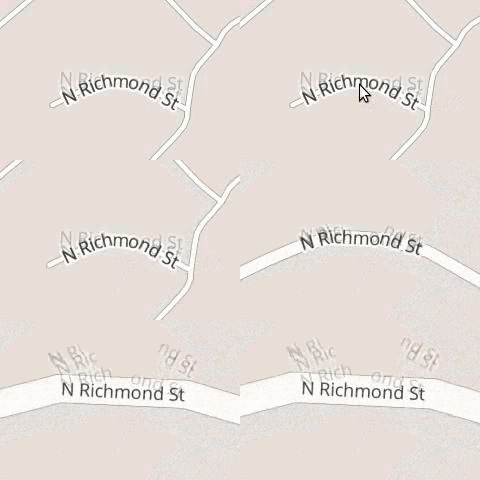
During the render step we can only shift glyphs along a straight line. To draw curved text we need to add multiple copies of glyphs — one for each line segment a glyph appears on. Each of these glyphs have minimum and maximum zoom levels that hide the glyph when it slides off the end of a segment so that only one instance of each original glyph is shown at the same time.
在渲染步骤中,我们只能沿着直线移动字形。要绘制曲面文本,我们需要添加多个字形副本每——一个线段上只出现一个字形。每个字形都有最小和最大缩放级别,当它滑动到段末端时隐藏字形符号,以便每一个原始字形的实例在同一时间只有一个能显示。
Usually these glyphs are completely hidden when out of range, but here they are shown with a reduced opacity:
通常这些符号在超出范围时完全隐藏起来,但是在这里它们显示出了一个减少的透明度:
Restricting the zoom range
To avoid label collisions, we need to restrict the zoom level at which a label is first shown. As you zoom in, labels get spaced further apart, opening room for new labels. Once a label is shown, it will not be hidden as you zoom in.
为了避免文本标注碰撞,我们需要在文本标注第一次显示时限制它的缩放级别。当你放大时,标签间距会进一步增大,为新的标签出现打开空间。一旦标签显示出来,它在放大时就不会被隐藏。
We use an R-tree that contains already-placed labels to narrow down which labels might collide. We then calculate the zoom level at which the two labels will fit side-by-side. It is safe to show the label for any zoom level higher than this one.
我们使用一个r树,它包含已经放置的标签来减少可能会碰撞的标签。然后计算两个标签将并排安装的缩放级别。对于任何缩放级别高于此的级别下显示这个标签是安全的。
Horizontal-horizontal collision
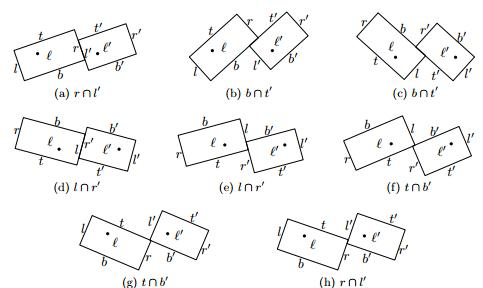
There are eight possible angles at which a pair of horizontal labels could collide. Each of these possible collisions is checked with some trigonometry.
有八个可能的角度会使得一对水平标签发生碰撞。这些可能碰撞的每一个都用一些三角学检验来检验。
弯曲-水平旋转碰撞
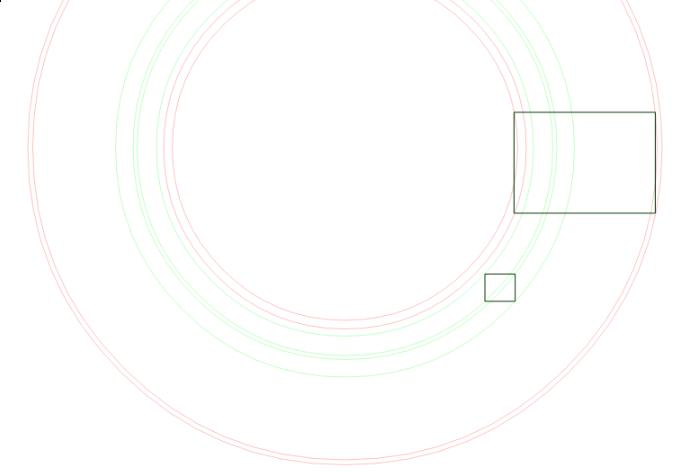
A curved-horizontal collision occurs when a corner of one label’s bounding box intersects an edge of the other label’s bounding box. For each of the eight bounding box corners, we calculate the angles at which a circle (formed by that point being rotated around the label’s anchor) intersects the edges of the other box. These are the angles at which a collision would begin and end.
当一个标签的边框的角与另一个标签的边框的边缘相交时,出现了弯曲水平碰撞。对于八个包围盒角的每个角落,我们计算了一个圆(由该点旋转围绕标签的锚)相交于另一个盒子的边缘的一些角度。这些就是碰撞开始和结束的角度。
Seamlessness
Mapbox GL downloads vector tiles with data for the area and zoom level it is currently displaying. When new tiles are downloaded and their labels have been placed, an old tile’s label may need to be hidden to make way for a more important label. This will be handled in a resolution step that has not yet been implemented.
Mapbox GL下载当前显示范围和缩放级别的矢量瓦片。当新的瓦片下载完成,且它们的标签位置已经计算完成,一个旧的瓦片的标注可能需要隐藏让位给一个更重要的标签。这将在尚未实现的步骤由解析处理。
mapbox.gl文字标注算法基本介绍的更多相关文章
- golang实现文字云算法
golang实现文字云算法 项目链接 https://github.com/bangbaoshi/wordcloud 效果图 测试步骤如下 git clone https://github.com/b ...
- mapbox.gl源码解析——基本架构与数据渲染流程
加载地图 Mapbox GL JS是一个JavaScript库,使用WebGL渲染交互式矢量瓦片地图和栅格瓦片地图.WebGL渲染意味着高性能,MapboxGL能够渲染大量的地图要素,拥有流畅的交互以 ...
- 3D GIS 应用开发 —— 基于 Mapbox GL 的实践总结
最近在折腾的 web 端的可视化项目,由于相关业务的需要,用到了 Mapbox 这一地图开发的神器.在此先奉上一个基于mapbox-gl实现的demo(来源:uber的deck.gl项目): 下面我们 ...
- openlayers学习笔记(十三)— 异步调用JSON数据画点、文字标注与连线
使用Openlayers 3实现调用本地json数据在地图上添加点.文字标注以及连线. 生成底图地图 首先得有一个地图作为底图,代码如下: let vectorSource = new ol.sour ...
- 【学】常用hash算法的介绍
基本知识 Hash,一般翻译做“散列”,也有直接音译为“哈希”的,就是把任意长度的输入(又叫做预映射, pre-image),通过散列算法,变换成固定长度的输出,该输出就是散列值.这种转换是一种压缩映 ...
- leaflet渲染mapbox gl的矢量数据
准备条件 1.mapbox-gl.js mapbox-gl.css 2.leaflet-mapbox-gl.js https://github.com/mapbox/mapbox-gl-leaflet ...
- DBoW2算法原理介绍
本篇介绍DBoW2算法原理介绍,下篇介绍DBoW2的应用. DBow2算法 DBow2是一种高效的回环检测算法,DBOW2算法的全称为Bags of binary words for fast pla ...
- 算法笔记_071:SPFA算法简单介绍(Java)
目录 1 问题描述 2 解决方案 2.1 具体编码 1 问题描述 何为spfa(Shortest Path Faster Algorithm)算法? spfa算法功能:给定一个加权连通图,选取一个 ...
- Zbar算法流程介绍
博客转载自:https://blog.csdn.net/sunflower_boy/article/details/50783179 zbar算法是现在网上开源的条形码,二维码检测算法,算法可识别大部 ...
随机推荐
- SSM-SpringMVC-29:SpringMVC中InitBinder的初步
------------吾亦无他,唯手熟尔,谦卑若愚,好学若饥------------- 之前博客的配置日期类型转换器,他是全局的,如果只是一个处理器中使用怎么办? 引出@InitBinder注解 ...
- ARM-Linux中断系统
1.前言 了解Linux中断子系统,同时也需要了解ARM体系结构中断处理流程:在熟悉整个软硬件架构和流程基础上,才能对流程进行细化,然后找出问题的瓶颈.<2. 梳理中断处理子系统> 但是所 ...
- Python并发编程之从生成器使用入门协程(七)
大家好,并发编程 进入第七篇. 从今天开始,我们将开始进入Python的难点,那就是协程. 为了写明白协程的知识点,我查阅了网上的很多相关资料.发现很难有一个讲得系统,讲得全面的文章,导致我们在学习的 ...
- linux下实时查看tomcat运行日志 2017.12.4
1.先切换到:cd usr/local/tomcat5/logs 2.tail -f catalina.out 3.这样运行时就可以实时查看运行日志了
- jmeter添加断言
先创建一个线程组,再创建一个http请求. 为了方便观察,我们添加两个监听器,察看结果树和断言结果. 添加断言:响应断言,响应断言也是比较常用的一个断言 设置响应断言:正常情况下响应代码是200.选择 ...
- 好代码是管出来的——浅谈.Net Core的代码管理方法与落地(更新中...)
软件开发的目的是在规定成本和时间前提下,开发出具有适用性.有效性.可修改性.可靠性.可理解性.可维护性.可重用性.可移植性.可追踪性.可互操作性和满足用户需求的软件产品. 而对于整个开发过程来说,开发 ...
- System.out.println()
System是java.lang中的类,out为System中的一个静态数据成员,out是java.io.PrintStream类的对象,而println()是java.io.PrintStream类 ...
- xsrftoken--源码笔记
}
- forwardport--源码笔记--注释
failed:", err.Error()) } }() } // log.Println("forwardPort ...
- B20J_1297_[SCOI2009]迷路_矩阵乘法
B20J_1297_[SCOI2009]迷路_矩阵乘法 题意:有向图 N 个节点,从节点 0 出发,必须恰好在 T 时刻到达节点 N-1.总共有多少种不同的路径? 2 <= N <= 10 ...