
Bootstrap3 datetimepicker控件的使用
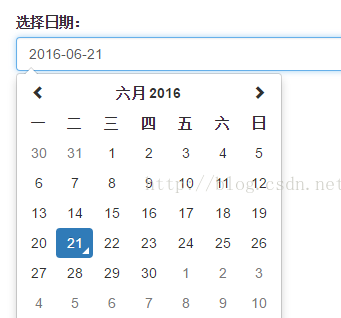
Bootstrap3 日期+时间选择控件
1.支持日期选择,格式设定
2.支持时间选择
3.支持时间段选择控制
4.支持中文
官网地址:http://eonasdan.github.io/bootstrap-datetimepicker/
moment语言包:https://github.com/moment/moment
moment时间格式化使用说明:http://momentjs.com/docs/
使用方法,引用的文件:
- <script src="Js/jquery-1.11.3.min.js"></script>
- <link href="Js/bootstrap-3.3.5-dist/css/bootstrap.css" rel="stylesheet" />
- <script src="Js/bootstrap-3.3.5-dist/js/bootstrap.min.js"></script>
- <link href="Js/bootstrap-datetimepicker/css/bootstrap-datetimepicker.min.css" rel="stylesheet" />
- <script src="Js/bootstrap-datetimepicker/js/moment-with-locales.min.js"></script>
- <script src="Js/bootstrap-datetimepicker/js/bootstrap-datetimepicker.min.js"></script>
实例1:
<div class="row">

    <div class='col-sm-6'>

        <div class="form-group">

            <label>选择日期:</label>

            <!--date标记-->

            <div class='input-group date' id='datetimepicker1'>

                <input type='text' class="form-control" />

                <span class="input-group-addon">

                    <span class="glyphicon glyphicon-calendar"></span>

                </span>

            </div>

        </div>

    </div>

    <div class='col-sm-6'>

        <div class="form-group">

            <label>选择日期+时间:</label>

            <!--date标记-->

            <div class='input-group date' id='datetimepicker2'>

                <input type='text' class="form-control" />

                <span class="input-group-addon">

                    <span class="glyphicon glyphicon-calendar"></span>

                </span>

            </div>

        </div>

    </div>

</div>
$(function () {

    $('#datetimepicker1').datetimepicker({

        format: 'YYYY-MM-DD',

        locale: moment.locale('zh-cn')

    });

    $('#datetimepicker2').datetimepicker({

        format: 'YYYY-MM-DD hh:mm',

        locale: moment.locale('zh-cn')

    });

});

Bootstrap3 datetimepicker控件的使用的更多相关文章
- 在asp.net mvc4项目里bootstrap datetimepicker控件的使用
前段时间写了一篇关于调用阿里大于的短信接口来开发例会短信群发通知功能的文章http://www.cnblogs.com/zhouyuangan/p/apicall_1.html,其中的例会时间是需求中 ...
- DateTimePicker 控件的格式设置
DateTimePicker 控件的格式设置 CustomFormat属性设置 : yyyy-MM-dd HH:mm:ss 月大写M,分钟小写m,小时H代表24小时计算,h代表12小时计算yyyy- ...
- winform中的dateTimePicker控件设置默认值为空
winform中的dateTimePicker控件设置默认值为空 第一步:设置Format的属性值为“Custom” 第二步:设置CustomFormat的属性值为空,需要按一个空格键
- 【分享】自己写的一个可空的DateTimePicker控件-附源码
最近这段时间在重构以前的一个项目,其中有一项就是要把DateTimePicker控件值可空.大家都知道的DateTimePicker值为DateTime类型,DateTime类型值不能等于Null.但 ...
- Delphi - DateTimePicker控件日期格式
设置成显示年.月.日.时.分.秒 1:将DateTimePicker的Format属性中加入日期格式设成 'yyyy-MM-dd HH:mm:ss',注意日期里月份对应的MM是大写,时间里的分钟对应的 ...
- delphi中DateTimePicker控件同时输入日期和时间
将DateTimePicker的Format属性中加入日期格式设成 'yyyy-MM-dd HH:mm',注意大小写 , 将kind设置为dtkTime即可,可以在每次Form onShow时将Dat ...
- C# DateTimePicker控件如何精确设置显示时分秒
项目中需要使用DateTimePicker空间选定当前的时间,但是这个空间默认显示到天,如何能让它显示具体的小时和分钟呢? 我们看到有一个Format属性,Format令我们想到格式化,有这几种格式 ...
- DateTimePicker 控件置空
dtOrderDateFrom.Format = DateTimePickerFormat.Custom; dtOrderDateFrom.CustomFormat = " "; ...
- C#DateTimePicker控件问题
DateTimPicker控件在遇到29这样特殊的日期,选择时可能会出现 解决方案:在属性中把Value值设置为除29日外的其他日期或者在代码中直接设置Value值:DateTimePicker1 = ...
随机推荐
- VS2005 添加lib 的方法
应用程序使用外部库时需要进行加载,两种库的加载本质上都是一样:提供功能和功能的定义.vs2005 c++ 项目设置外部库方法如下:1. 添加编译所需要(依赖)的 lib 文件 在"项 ...
- 问题解决了,可是为什么呢?could not find the main class.program will exitmain
今天重新学习socket编写简单的在线聊天,简单功能实现的情况下,一时心血来潮便想要把这程序打成可执行的jar包,以便于在桌面直接双击运行. 参照自己之前写的那篇<>打好两个jar包以后却 ...
- java注解之二
从JDK5开始,Java增加了Annotation(注解),Annotation是代码里的特殊标记,这些标记可以在编译.类加载.运行时被读取,并执行相应的处理.通过使用Annotation,开发人员可 ...
- [RPC Fault faultString="Cannot invoke method 'saveOrUpdate'." faultCode="Server.ResourceUnavailable"
1.错误描述 [RPC Fault faultString="Cannot invoke method 'saveOrUpdate'." faultCode="Serve ...
- Carries SCU - 4437
Carries frog has nn integers a1,a2,-,ana1,a2,-,an, and she wants to add them pairwise. Unfortunately ...
- C#图解教程 第二十五章 其他主题
其他主题 概述字符串使用 StringBuilder类把字符串解析为数据值关于可空类型的更多内容 为可空类型赋值使用空接合运算符使用可空用户自定义类型 Main 方法文档注释 插入文档注释使用其他XM ...
- WPF自学入门(四)WPF路由事件之自定义路由事件
在上一遍博文中写到了内置路由事件,其实除了内置的路由事件,我们也可以进行自定义路由事件.接下来我们一起来看一下WPF中的自定义路由事件怎么进行创建吧. 创建自定义路由事件分为3个步骤: 1.声明并注册 ...
- Codeforces Round #446 (Div. 2)
Codeforces Round #446 (Div. 2) 总体:rating涨了好多,虽然有部分是靠和一些大佬(例如redbag和ShichengXiao)交流的--希望下次能自己做出来2333 ...
- hibernate 反向生成 实体类
1,配置数据库连接 步骤. 点击 windows -> open perspective - > myeclipse datebase Exprorer 打开了dateb ...
- Windows下Python环境的搭建
我刚开始接触Python没多久,当然这也是为初学者来更好的去入门Python,我电脑上既跑着Windows也跑着Red Hat的Linux,相比较而言,开发我还是更青睐于Linux系统,很多开发工具红 ...