
RadioButton的图标改变大小(TextView也适用)
RadioButton的图标大小并没有相应的布局参数,本文通过自定义属性的方式自定义RadioButton,实现控制图片大小。
- 本文要点:
- 自定义属性的使用。
- 解决RadioButton文字上、下、左、右的图标大小自定义问题。
- 此方法对TextView内的图标也适用。
- 问题如下:
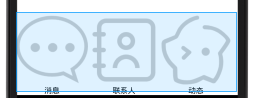
- 解决方法:
1.values/attrs.xml 文件中:自定义rb_width 和 rb_height 两个属性
<?xml version="1.0" encoding="utf-8"?>

<resources>

    <declare-styleable name="MyRadioButton">

        <attr name="rb_width" format="dimension"/>

        <attr name="rb_height" format="dimension"/>

    </declare-styleable>

</resources>
2.自定义RadioButton
 package top.toly.www.myqq.view;

 import android.content.Context;

 import android.content.res.TypedArray;

 import android.graphics.drawable.Drawable;

 import android.util.AttributeSet;

 import android.widget.RadioButton;

 import top.toly.www.myqq.R;

 import utils.shortUtils.Change;

 /**

  * 作者:张风捷特烈

  * 时间:2018/3/28:6:30

  * 邮箱:1981462002@qq.com

  * 说明:自定义RadioButton 属性:rb_width  rb_height

  */

 public class MyRadioButton extends RadioButton {

     private float mImg_width;

     private float mImg_height;

     public MyRadioButton(Context context) {

         super(context);

     }

     public MyRadioButton(Context context, AttributeSet attrs) {

         super(context, attrs);

         TypedArray t = context.obtainStyledAttributes(attrs, R.styleable.MyRadioButton);

         mImg_width = t.getDimension(R.styleable.MyRadioButton_rb_width, Change.dp2px());

         mImg_height = t.getDimension(R.styleable.MyRadioButton_rb_height, Change.dp2px());

         t.recycle();

     }

     @Override

     protected void onMeasure(int widthMeasureSpec, int heightMeasureSpec) {

         super.onMeasure(widthMeasureSpec, heightMeasureSpec);

         //让RadioButton的图标可调大小 属性:

         Drawable drawableLeft = this.getCompoundDrawables()[];//获得文字左侧图片

         Drawable drawableTop = this.getCompoundDrawables()[];//获得文字顶部图片

         Drawable drawableRight = this.getCompoundDrawables()[];//获得文字右侧图片

         Drawable drawableBottom = this.getCompoundDrawables()[];//获得文字底部图片

         if (drawableLeft != null) {

             drawableLeft.setBounds(, , (int) mImg_width, (int) mImg_height);

             this.setCompoundDrawables(drawableLeft, null, null, null);

         }

         if (drawableRight != null) {

             drawableRight.setBounds(, , (int) mImg_width, (int) mImg_height);

             this.setCompoundDrawables(null, null, drawableRight, null);

         }

         if (drawableTop != null) {

             drawableTop.setBounds(, , (int) mImg_width, (int) mImg_height);

             this.setCompoundDrawables(null, drawableTop, null, null);

         }

         if (drawableBottom != null) {

             drawableBottom.setBounds(, , (int) mImg_width, (int) mImg_height);

             this.setCompoundDrawables(null, null, null, drawableBottom);

         }

     }

 }
3.使用属性控制RadioButton 中的图片大小
- 注意:
- <top.toly.www.myqq.view.MyRadioButton 为自定义控件类的全路径名
xmlns:toly="http://schemas.android.com/apk/res-auto" 声明命名空间,其中toly为自定义名称,可替换(需与第3点冒号前名称一致)
toly:rb_width="30dp" toly:rb_height="30dp" 为自定义属性的使用
android:drawableTop="@drawable/tab_msg_selector" 为指定的图片资源
<?xml version="1.0" encoding="utf-8"?>

<RelativeLayout

    xmlns:android="http://schemas.android.com/apk/res/android"

    xmlns:toly="http://schemas.android.com/apk/res-auto"

    android:id="@+id/my_layout"

    android:layout_width="match_parent"

    android:layout_height="match_parent"

    android:background="@color/qq_title_text">

    <RadioGroup

        android:id="@+id/rg_btns"

        android:layout_width="match_parent"

        android:layout_height="wrap_content"

        android:layout_alignParentBottom="true"

        android:orientation="horizontal">

        <top.toly.www.myqq.view.MyRadioButton

            android:layout_width="wrap_content"

            android:layout_height="wrap_content"

            android:layout_weight=""

            android:id="@+id/rb_msg"

            android:checked="false"

            toly:rb_width="30dp"

            toly:rb_height="30dp"

            android:button="@null"

            android:gravity="center"

            android:drawableTop="@drawable/tab_msg_selector"

            android:text="消息"/>

        <top.toly.www.myqq.view.MyRadioButton

            android:layout_width="wrap_content"

            android:layout_height="wrap_content"

            android:layout_weight=""

            android:id="@+id/rb_contact"

            android:background="@android:color/transparent"

            android:checked="false"

            android:button="@null"

            toly:rb_width="30dp"

            toly:rb_height="30dp"

            android:gravity="center"

            android:drawableTop="@drawable/tab_contact_selector"

            android:text="联系人"/>

        <top.toly.www.myqq.view.MyRadioButton

            android:layout_width="wrap_content"

            android:layout_height="wrap_content"

            android:layout_weight=""

            android:id="@+id/rb_act"

            android:button="@null"

            toly:rb_width="30dp"

            toly:rb_height="30dp"

            android:gravity="center"

            android:background="@android:color/transparent"

            android:drawableTop="@drawable/tab_act_selector"

            android:text="动态"

           />

    </RadioGroup>

</RelativeLayout>
4.结果图:

RadioButton的图标改变大小(TextView也适用)的更多相关文章
- 2018.10.10 MAC 的Launchpad图标改变大小的设置
mac更改launchpad图标大小 设置每列显示的图标数目为8 defaults write com.apple.dock springboard-columns -int 8 设置每行显示的图标数 ...
- QTableView的表格项中加入图标的方法(重载View::mouseMoveEvent,并使用View::setIconSize函数设置图标的大小)
当在使用表格视图的时候,需要在表格每一行前面加入图标,应该怎么做呢?Qt中通过使用MVC的处理方式,很容易做到这一点,具体实现如下: 先贴出图,让大家一睹为快 下面我就来介绍一下,上图的灯泡是怎么实现 ...
- node-webkit学习之【无边框窗口用JS实现拖动改变大小等】
效果如下图 原生的如下图(原生的用在自己的app上面太丑了,并且还带边框,所以重写了左上角的三个功能键) 1.首先了解一下nw底下的package.json 文件 { "name" ...
- 【转】C# 控件的自定义拖动、改变大小方法
在用VS的窗体设计器时,我们可以发现控件都是可以拖动的,并且还可以调整大小.怎么在自己的程序中可以使用上述功能呢? 下面的方法值得借鉴! using System; using System.Wind ...
- Qt 无边框窗体改变大小 完美实现(全部自己实现)
近期,做项目用到无边框窗体,令人蛋疼的是无边框窗体大小的改变要像右边框那样,上下左右四周,而且要流畅. 网上也找了些代码,发现居然还要连接到windows事件,这显然不合常理,后来自己新建了demo, ...
- JS实现漂亮的窗口拖拽效果(可改变大小、最大化、最小化、关闭)
转自<JS实现漂亮的窗口拖拽效果(可改变大小.最大化.最小化.关闭)>:http://www.jb51.net/article/73157.htm 这篇文章主要介绍了JS实现漂亮的窗口 ...
- 黄聪:C#图像处理(各种旋转、改变大小、柔化、锐化、雾化、底片、浮雕、黑白、滤镜效果) (转)
一.各种旋转.改变大小 注意:先要添加画图相关的using引用. //向右旋转图像90°代码如下:private void Form1_Paint(object sender, System.Wind ...
- C# (GDI+相关) 图像处理(各种旋转、改变大小、柔化、锐化、雾化、底片、浮雕、黑白、滤镜效果) (转)
C#图像处理 (各种旋转.改变大小.柔化.锐化.雾化.底片.浮雕.黑白.滤镜效果) 一.各种旋转.改变大小 注意:先要添加画图相关的using引用. //向右旋转图像90°代码如下 ...
- Qt:无标题栏无边框程序的拖动和改变大小
From: http://blog.csdn.net/kfbyj/article/details/9284923 最近做项目遇到的问题,总结下. 有时候我们觉得系统的标题栏和按钮太丑太呆板,想做自己的 ...
随机推荐
- webpack开发环境配置和生产环境配置
开发环境配置 在开发环境下,我们首先考虑的是方便开发,方便代码调试,不需要考虑代码合并和css样式分离这些. 这里主要说三个 :1.css模块化:2.模块热替换功能:3.source-map(代码映射 ...
- 关于设计SQL表的一些问题
1.设计问题: 当sql语句输入时,需要输入表名,表名内需要输入日期,而且譬如"第二天安装"这种,sql语句中有两个地方需要输入日期,一个是昨天,一个是今天,这种情况将输入日期的部 ...
- Linux初学者的总结
总算在年前把Linux的一些基本命令学完了,总结一下学到的(比较实用的)东西 我这里用的是Red Hat Enterprise Linux7的社区版本centos7 首先最重要的文件查看命令:ls.d ...
- elfinder源码浏览-Volume文件系统操作类(1)
今天看了一个文件管理的java后台源码,elfinder 发现这个东东比我写的代码效率告到不知道哪去了,苦思冥想后还是抽点时间看看吧.. 它实现了我们电脑上的所以关于文件操作的动作,并生成了api开放 ...
- Jersey+mybatis实现web项目第一篇
---恢复内容开始--- Jesery第一篇:实现Jesery前后台页面交互,Form表单提交,后台控制页面跳转 该项目中有实现的功能: Mybatis实现后台数据持久化 Jersey页面数据提交 后 ...
- C和C#的区别
c:面向过程,语法太麻烦,但对硬件的底层编程和对内存的管理的灵活性方面c是其他高级语言所不可及的. c#:纯面向对象的(跟java很像如果你对java了解估计你就会明白c&c#之间的区别了), ...
- VM及centOS系统安装
虚拟机安装linux及配置
- VISUALSVN: UNABLE TO CONNECT TO A REPOSITORY AT URL 无法连接主机的解决办法
场景:我的系统是win7,安装的 VisualSVN Server 作为svn 服务器,昨天是好的,我手渐,使用鲁大师优化了系统,今天提交,更新的时候,直接提示:Unable to connect t ...
- 如何写对kubernetes的模板文件
kubernetes的模板配置文件随着版本更迭也会有相应的调整,正确配置模板关键字的方式是参考版本发布的doc,如下图 在docs\api-reference下面有不同功能的API目录,如下图 各个A ...
- 常用的Maven依赖
一.数据库类型 1.mysql驱动 <!-- mysql驱动支持 --> <dependency> <groupId>mysql</groupId> & ...