
struts2增删改查---layer---iframe层---通配符---国际化
在前一篇文章的基础上,修改一部分即可(在此只是简单介绍)
struts.xml页面
在原来的基础之上
action的name="*_*" class="包名.{1}" method="{2}"
 <?xml version="1.0" encoding="UTF-8" ?>

 <!DOCTYPE struts PUBLIC

     "-//Apache Software Foundation//DTD Struts Configuration 2.0//EN"

     "http://struts.apache.org/dtds/struts-2.0.dtd">

 <struts>

  <!-- 国际化 -->

  <constant name="struts.custom.i18n.resources" value="zr"></constant>

 <!-- user表的通配符增删改查 -->

  <package name="aa" namespace="/user"  extends="struts-default">

   <action name="*_*"   class="com.zr.{1}"  method="{2}">

     <result name="show">/show.jsp</result>

     <result name="add" type="redirectAction">Struts2Text_showstuent?ye=1</result>

     <result name="deletee" type="redirectAction">Struts2Text_showstuent?ye=1</result>

     <result name="toupdate">/update.jsp</result>

     <result name="update"  type="redirectAction">Struts2Text_showstuent?ye=1</result>

   </action>

  </package>

  <!-- class10表的通配符增删改查 -->

   <package name="bb" namespace="/class"  extends="struts-default">

   <action name="*_*"   class="com.zr.{1}"  method="{2}">

     <result name="show">/Classshow.jsp</result>

     <result name="add" type="redirectAction">ClassStruts2Text_showstuent?ye=1</result>

     <result name="deletee" type="redirectAction">ClassStruts2Text_showstuent?ye=1</result>

     <result name="toupdate">/Classupdate.jsp</result>

     <result name="update"  type="redirectAction">ClassStruts2Text_showstuent?ye=1</result>

   </action>

  </package>

 </struts>
add.jsp页面
将原来的
<form action="user/add.action" > 改为
<form action="user/Struts2Text_add" >
 <%@ page language="java" import="java.util.*" pageEncoding="utf-8"%>

 <%

 String path = request.getContextPath();

 String basePath = request.getScheme()+"://"+request.getServerName()+":"+request.getServerPort()+path+"/";

 %>


 <!DOCTYPE HTML PUBLIC "-//W3C//DTD HTML 4.01 Transitional//EN">

 <html>

   <head>

     <base href="<%=basePath%>">

     <title>My JSP 'add.jsp' starting page</title>

     <meta http-equiv="pragma" content="no-cache">

     <meta http-equiv="cache-control" content="no-cache">

     <meta http-equiv="expires" content="0">

     <meta http-equiv="keywords" content="keyword1,keyword2,keyword3">

     <meta http-equiv="description" content="This is my page">

     <!--

     <link rel="stylesheet" type="text/css" href="styles.css">

     -->

     <script type="text/javascript" src="layer/layer.js"></script>

     <script type="text/javascript">

     function add(a){

         a.submit();

         var index = parent.layer.getFrameIndex(window.name); //获取窗口索引

         parent.ReloadData();

         parent.layer.close(index);

         }

     </script>

   </head>

   <body>

  <form action="user/Struts2Text_add" >

  <input type="hidden" name="id">

  <input type="hidden" name="method" value="add">

 <input type="text" name="username" placeholder=" 请输入姓名"><br/>

 <input type="text" name="password" placeholder=" 请输入密码"><br/>

  <input type="button" onclick="javascript:add(this.form)" value="确定添加"><br/>

  </form>

   </body>

 </html>
index.jsp页面
对38以及39行代码进行修改
第二行为引入struts标签库 <s: > </s: >
30-39行代码均有国际化的体现 也是与之前代码相比较修改的地方
 <%@ page language="java" import="java.util.*" pageEncoding="utf-8"%>

 <%@ taglib uri="/struts-tags" prefix="s" %>

 <%

 String path = request.getContextPath();

 String basePath = request.getScheme()+"://"+request.getServerName()+":"+request.getServerPort()+path+"/";

 %>

 <!DOCTYPE HTML PUBLIC "-//W3C//DTD HTML 4.01 Transitional//EN">

 <html>

   <head>

     <base href="<%=basePath%>">

     <title>My JSP 'index.jsp' starting page</title>

     <meta http-equiv="pragma" content="no-cache">

     <meta http-equiv="cache-control" content="no-cache">

     <meta http-equiv="expires" content="0">

     <meta http-equiv="keywords" content="keyword1,keyword2,keyword3">

     <meta http-equiv="description" content="This is my page">

     <!--

     <link rel="stylesheet" type="text/css" href="styles.css">

     -->

     <STYLE type="text/css">

     a{

     text-decoration: none;

     color: black;

     }

     </STYLE>

   </head>

   <body>

   <s:text name="userName"></s:text> <input type="text" placeholder="请输入用户名"><br/>

   <s:text name="password"></s:text> <input type="text" placeholder="请输入密码"><br/>

   <s:text name="welcomeInfo">

   <s:param>郭艺华</s:param>

   <s:param>大哥</s:param>

   </s:text>

   <button> <s:text name="login"></s:text></button><br/>

   ………………………………………………………………………………………………………………………………………………………………………………………………………<br/>

   <a  href="user/Struts2Text_showstuent?ye=1"><s:text name="user"></s:text></a><br/>

   <a  href="class/ClassStruts2Text_showstuent?ye=1"><s:text name="class"></s:text></a>

   </body>

 </html>
show.jsp页面
主要修改90-104行的分页代码 因为每一次翻页都需要用到show方法
也就是通配符的修改
 <%@ page language="java" import="java.util.*" pageEncoding="utf-8"%>

 <%@ taglib  uri="http://java.sun.com/jsp/jstl/core"   prefix="c"%>

 <%

 String path = request.getContextPath();

 String basePath = request.getScheme()+"://"+request.getServerName()+":"+request.getServerPort()+path+"/";

 %>

 <!DOCTYPE HTML PUBLIC "-//W3C//DTD HTML 4.01 Transitional//EN">

 <html>

   <head>

     <base href="<%=basePath%>">

     <title>My JSP 'show.jsp' starting page</title>

     <meta http-equiv="pragma" content="no-cache">

     <meta http-equiv="cache-control" content="no-cache">

     <meta http-equiv="expires" content="0">

     <meta http-equiv="keywords" content="keyword1,keyword2,keyword3">

     <meta http-equiv="description" content="This is my page">

     <!--

     <link rel="stylesheet" type="text/css" href="styles.css">

     -->

     <script type="text/javascript" src="layer/jquery-1.8.2.min.js"></script>

     <script type="text/javascript" src="layer/layer.js"></script>

     <script type="text/javascript">

      function func10() {

             //iframe层

             layer.open({

                 type: 2,

                 title: 'layer mobile页',

                 closeBtn: 1, //不显示关闭按钮

                 shadeClose: true,

                 shade: 0.8,

                 area: ['380px', '90%'],

                 content: 'add.jsp' //iframe的url

             });

         }

      function func11(id) {

             //iframe层

             layer.open({

                 type: 2,

                 title: 'layer mobile页',

                 closeBtn: 1, //不显示关闭按钮

                 shadeClose: true,

                 shade: 0.8,

                 area: ['380px', '90%'],

                 content: 'user/Struts2Text_toupdate?id='+id //iframe的url

             });

         }

     function ReloadData(){

            window.location.reload();

          }

     </script>

     <style type="text/css">

         a{

         text-decoration: none;

         color: black;

         }

     </style>

   </head>

   <body>

              <table border="1" bordercolor="gray" >

              <tr>

               <th>编号</th>

                <th>姓名</th>

                <th>密码</th>

                  <th>删除</th>

                  <th>修改</th>

              </tr>

              <c:forEach items="${list}"  var="a">

              <tr>

               <td>${a.id}</td>

                <td>${a.username}</td>

                <td>${a.password}</td>

                <td> <a  href="user/Struts2Text_deletee?id=${a.id}">删除</a></td>

                <td> <a  href="javascript:func11(${a.id})">修改</a></td>

              </tr>

              </c:forEach>

              </table>

              <c:if test="${param.ye>1}">

              <a href="user/Struts2Text_showstuent?ye=1">首页</a>

              </c:if>

              <c:if test="${param.ye>1}">

              <a href="user/Struts2Text_showstuent?ye=${param.ye-1}">上一页</a>

              </c:if>

              <c:forEach begin="1" end="${count}" varStatus="a">

              <a href="user/Struts2Text_showstuent?ye=${a.index }">${a.index }</a>

              </c:forEach>

               <c:if test="${param.ye<count}">

              <a href="user/Struts2Text_showstuent?ye=${param.ye+1}">下一页</a>

              </c:if>

              <c:if test="${param.ye<count}">

              <a href="user/Struts2Text_showstuent?ye=${count}">尾页</a>

              </c:if>

            <a  href="javascript:func10()"> 添加 </a><br/>

   </body>

 </html>
然后是代码笔记,在这里就不放源代码了
关于通配符的(未国际化之前)


 、
、
(通配符加国际化)
index.jsp页面

struts.xml文件配置 国际化 只需要加一句话

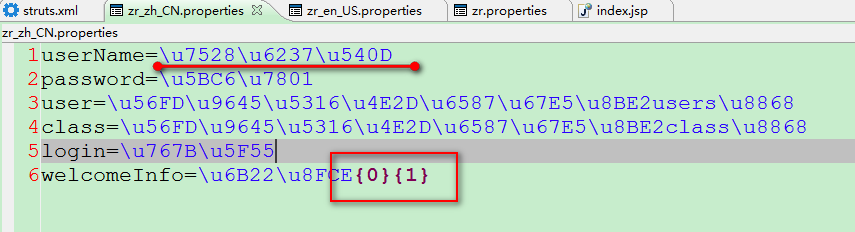
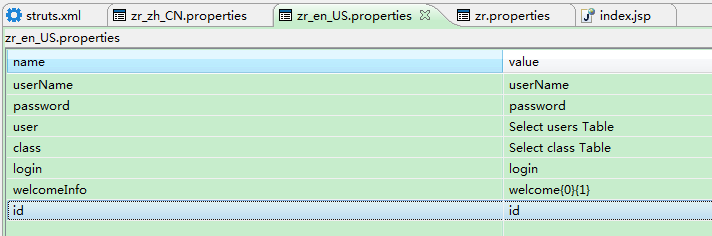
以下为properties文件 命名规范根据语言缩写来
具体可以在Internet选项进行查看
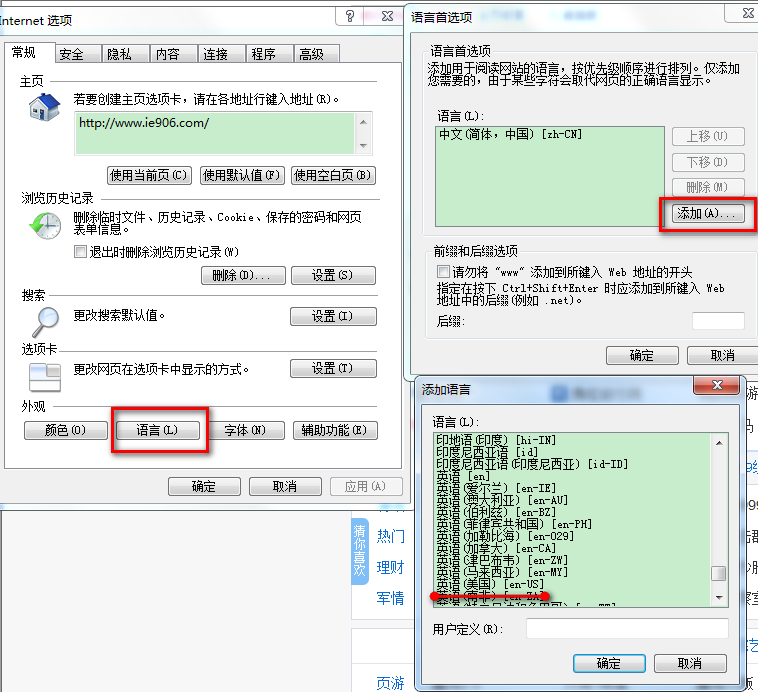
properties文件打开样式
以上就是简单的通配符以及国际化的简单介绍
仅供参考
仅供记录
2017-08-1020:23:24
struts2增删改查---layer---iframe层---通配符---国际化的更多相关文章
- struts2增删改查---layer---iframe层
在这里写一下struts2中的简单的增删改查 struts.xml中的配置 <?xml version="1.0" encoding="UTF-8" ?& ...
- struts2增删改查
1.导入相关的依赖:struts.自定义标签库 配置pom.xml <project xmlns="http://maven.apache.org/POM/4.0.0" xm ...
- Struts2增删改查(自己思路理解)
1:查询所有: DAO层:把所有的信息都放到list集合中.然后返回. public List<Employee> getEmployees(){ return new ArrayList ...
- 反射实现增删改查(DAO层)——查询数据
先贴出代码,后续补充自己的思路.配置文件.使用方式: /** * * 数据查询 * */ @Override public List<?> queryObject(List<Map& ...
- 反射实现增删改查(DAO层)——修改数据
先贴出代码,后续补充自己的思路.配置文件.使用方式: /** * * 修改数据 * */ @Override public void updateObject(Object object, Strin ...
- 反射实现增删改查(DAO层)——删除数据
先贴出代码,后续补充自己的思路.配置文件.使用方式: /** * * 删除数据 */ @Override public void deleteObject(List<Map<String, ...
- 反射实现增删改查(DAO层)——插入数据
先贴出代码,后续补充自己的思路.配置文件.使用方式: /** * 插入数据 */ @Override public void addObject(Object object, String table ...
- 权限管理系统之LayUI实现页面增删改查和弹出层交互
由于对LayUI框架不太熟悉,昨天抽空看了下LayUI的文档,今天在网上找了使用LayUI进行增删改查相关内容,自己照葫芦画了个瓢,画瓢部分不是很难,主要是下午遇到了一个弹出层的问题耗时比较久. 同一 ...
- Struts2+Spring+Hibernate实现员工管理增删改查功能(一)之ssh框架整合
前言 转载请标明出处:http://www.cnblogs.com/smfx1314/p/7795837.html 本项目是我写的一个练习,目的是回顾ssh框架的整合以及使用.项目介绍: ...
随机推荐
- qmake 提示 Failure to open file:****
执行qmake时报错,如下图所示: 解决方法: 将***.pro文件夹的属主改为当前用户,具体操作为: 1.切换登录用户为:root 2.#chown -R ies:ies /usr/appsoft ...
- 关于php的一些安全知识
绝不要以明文形式显示或发送密码.即使是对密码的所有者也应该这样.如果你需要 "忘记密码" 的功能,可以随机生成一个新的 一次性的(这点很重要)密码,然后把这个密码发送给用户 你希望 ...
- 用mybatis实现dao的编写或者实现mapper代理
一.mybatis和hibernate的区别和应用场景hibernate:是一个标准的ORM框架(对象关系映射).入门门槛较高的,不需要写sql,sql语句自动生成了.对sql语句进行优化.修改比较困 ...
- MySQL数据库Raid存储方案
作为一名DBA,选择自己的数据存储在什么上面,应该是最基本的事情了.但是很多DBA却容易忽略了这一点,我就是其中一个.之前对raid了解的并不多,本文就记录下学习的raid相关知识. 一.RAID的基 ...
- 暂停和播放CSS3动画的两种实现方法
1,直接修改animationPlayState <!DOCTYPE html> <html> <head lang="en"> <met ...
- (转载)iptables 转发oracle端口
本文出自 “乡丅亻” 博客,请务必保留此出处http://shaowu.blog.51cto.com/627407/514909 项目组同事需要将SQL请求转发到另一台服务器上,于是通过iptable ...
- 学习笔记TF024:TensorFlow实现Softmax Regression(回归)识别手写数字
TensorFlow实现Softmax Regression(回归)识别手写数字.MNIST(Mixed National Institute of Standards and Technology ...
- 阿里巴巴2018届应届生在线编程测验-研发工程师C/C++
刚才去做了阿里巴巴的编程测验,好消息是抽到的题相对别的题简单一些,坏消息是编的太慢了,没有做完. 现在把题目和自己后来编出来的代码贴在这里,供大家参考. 题目: 1. 从命令行输入若干个正整数(大于等 ...
- MongoDB数据库文档操作
前面的话 本文将详细介绍MongoDB数据库关于文档的增删改查 数据类型 在介绍文档操作之前,首先要了解MongoDB的数据类型 MongoDB支持许多数据类型,包括 1.字符串 - 这是用于存储数据 ...
- zip & tar 压缩文件时排除某个文件夹
确实是用参数 -x aaa bbb 两个文件夹要写全路径. 如 zip -r test.zip test -x /test/aaa/* -x /test/bbb/* 既包含了文件夹,也可以 zip - ...