
webAPI+angularJS文件上传和下载
开发框架
前端
angularJS1.6
下载和保存文件FileSaver:https://github.com/eligrey/FileSaver.js/
后端
.net WebAPI
1 导入Excel文件关键代码
1.1 导入Excel弹出框
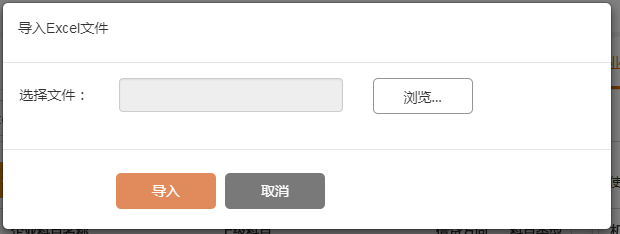
1.2 模态框html代码
   <div class="modal fade" id="importExcelPop" tabindex="-1" role="dialog" aria-labelledby="myModalLabel">

        <div class="modal-dialog" style="width:610px;height:100px;" role="document">

            <div class="modal-content">

                <div class="modal-header">

                    <div class="modal-title">导入Excel文件</div>

                </div>

                <div class="modal-body">

                    <form class="form-horizontal" id="importExcelForm">

                        <div class="form-group">

                            <label for="import" class="col-sm-2 control-label">选择文件:</label>

                            <div class="col-sm-5">

                                <div class="form-control" type="text" name="fileName" readonly placeholder="" ng-required="isAdd" title="{{file ? file.name : ''}}">

                                    {{file ? file.name : '' | limitString :20}}

                                </div>

                            </div>

                            <div class="col-sm-5">

                                <button type="button" type="file" ngf-select ng-model="file" accept=".xls,.xlsx" class="btn btn-not-important browse inline-div">{{'Browse' | translate }}</button>

                            </div>

                        </div>

                    </form>

                </div>

                <div class="modal-footer" style="padding-left:113px;">

                    <button type="button" class="btn btn-primary" ng-disabled="!file" ng-click=”upload()">导入</button>

                    <button type="button" class="btn btn-third" data-dismiss="modal">取消</button>

                </div>

            </div>

        </div>

    </div>
1.3 导入js代码
// 上传文件地址

var uploadUrl = apiInterceptor.webApiHostUrl + '/test/Upload';

// angularjs上传方法

$scope.upload = function() {if ($scope.file) {

        // 选中文件

        importData();

    }

};

// 导入数据

var importData = function() {

    if (!$scope.file || !$scope.file.name) {

        SweetAlert.info('请选择文件');

        return;

    }

    // $q需要注入

    var deferred = $q.defer();

    var tempFileName = PWC.newGuid() + '.dat';

    var token = $('input[name="__RequestVerificationToken"]').val();

    Upload.upload({

        url: uploadUrl,

        data: {

            cancel: false,

            filename: $scope.file.name,

        },

        file: $scope.file,

        resumeChunkSize: resumable ? $scope.chunkSize : null,

        headers: {

            'Access-Control-Allow-Origin': '*',

            Authorization: apiInterceptor.tokenType + ' ' + apiInterceptor.apiToken,

            __RequestVerificationToken: token,

            withCredentials: true

        },

        __RequestVerificationToken: token,

        withCredentials: true

    }).then(function(resp) {

        var ret = resp.data;

        deferred.resolve();

    }, function(resp) {

        deferred.resolve();

        console.log('Error status: ' + resp.statusText);

    }, function(evt) {

        deferred.resolve();

        var progressPercentage = parseInt(100.0 * evt.loaded / evt.total);

        $log.debug('progress: ' + progressPercentage + '% ' + evt.config.data.file.name);

    });

};
1.4 webAPI的TestController方法
/// <summary>

 /// Uploads this instance.

 /// </summary>

 /// <returns></returns>

 [Route("Upload")]

 [HttpPost]

 public IHttpActionResult Upload() {

     if (HttpContext.Current.Request.Files.Count == ) {

         return this.Ok(new OperationResultDto() { Result = false, ResultMsg = Message.Error.NoFile });

     }

     var file = HttpContext.Current.Request.Files[];

     var mappedPath = HostingEnvironment.MapPath("~/Upload");

     var fileFullPath = Path.Combine(mappedPath, Guid.NewGuid().ToString().ToUpper() + Path.GetFileName(file.FileName));

     var saveFileResult = this.SaveFile(file, mappedPath, fileFullPath);

     if (!saveFileResult.Result) {

         return this.Ok(saveFileResult);

     }

     OperationResultDto ret = new OperationResultDto();

     string errorMsg = string.Empty;

     Dictionary < System.Guid, string > error = new Dictionary < Guid, string > ();

     try {

         // 读取Excel文件,自己实现

         // var getImportDataResult = this.GetImportFileData(mappedPath, fileFullPath);

         // if (!getImportDataResult.Result) {

         //     return this.Ok(getImportDataResult);

         // }

         // 业务处理

     } catch (Exception ex) {

         errorMsg = ex.Message.ToString();

         error.Add(System.Guid.NewGuid(), ex.StackTrace.ToString());

     } finally {

         File.Delete(fileFullPath);

     }

     if (!string.IsNullOrEmpty(errorMsg)) {

         ret.ResultMsg = errorMsg;

         ret.Errors = error;

     }

     return this.Ok(ret);

 }

 /// <summary>

 /// Saves the file.

 /// </summary>

 /// <param name="file">The file.</param>

 /// <param name="mappedPath">The mapped path.</param>

 /// <param name="fileFullPath">The file full path.</param>

 /// <returns></returns>

 private OperationResultDto SaveFile(HttpPostedFile file, string mappedPath, string fileFullPath) {

     string errorMsg = string.Empty;

     Dictionary < System.Guid, string > error = new Dictionary < Guid, string > ();

     try {

         if (Directory.Exists(mappedPath) == false) {

             Directory.CreateDirectory(mappedPath);

         }

         file.SaveAs(fileFullPath);

     } catch (Exception ex) {

         errorMsg = Message.Error.SaveFileError;

         error.Add(System.Guid.NewGuid(), ex.StackTrace.ToString());

     }

     return new OperationResultDto() { ResultMsg = errorMsg, Result = string.IsNullOrEmpty(errorMsg), Errors = error };

 }
2 下载Excel关键代码
2.1 UI

2.2 html代码
<button type="button" class="btn" ng-click="down ()"> <i class="fa fa-download" aria-hidden="true"></i>下载模板</button>
2.3 js代码
Js Controller代码
$scope.down = function() {

    testService. download ();

};
Js webservice方法
download: function() {

     var thisConfig = apiConfig.create();

     thisConfig.responseType = "arraybuffer";

     return $http.post('/test/download', {}, thisConfig).then(function(response) {

         var data = new Blob([response.data], { type: response.headers('Content-Type') });

         // var filename1 = response.headers('Content-Disposition').split(';')[1].trim().substr('filename='.length);

         var filename = 'Excel.xlsx';

        // FileSaver 是一个插件

         FileSaver.saveAs(data, filename);

     });

 }
2.4 webAPI方法
[HttpPost]

[Route("download")]

public HttpResponseMessage Download (object o) {

    var filePath = HostingEnvironment.MapPath("~/downLoad/Excel.xlsx");

    string customFileName = Constant.FileName + DateTime.Now.ToString("yyyyMMddHHmmss") + ".xlsx"; //客户端保存的文件名

    FileStream fileStream = new FileStream(filePath, FileMode.Open, FileAccess.Read, FileShare.Read);

    System.IO.MemoryStream ms = new System.IO.MemoryStream();

    fileStream.CopyTo(ms);

    var response = this.Request.CreateResponse(HttpStatusCode.OK);

    response.Content = new ByteArrayContent(ms.ToArray());

    response.Content.Headers.ContentDisposition = new ContentDispositionHeaderValue("attachment");

    response.Content.Headers.ContentDisposition.FileName = customFileName;

    response.Content.Headers.ContentType = new System.Net.Http.Headers.MediaTypeHeaderValue("application/vnd.openxmlformats-officedocument.spreadsheetml.sheet"); // 这句话要告诉浏览器要下载文件

    return response;

}
webAPI+angularJS文件上传和下载的更多相关文章
- java web学习总结(二十四) -------------------Servlet文件上传和下载的实现
在Web应用系统开发中,文件上传和下载功能是非常常用的功能,今天来讲一下JavaWeb中的文件上传和下载功能的实现. 对于文件上传,浏览器在上传的过程中是将文件以流的形式提交到服务器端的,如果直接使用 ...
- (转载)JavaWeb学习总结(五十)——文件上传和下载
源地址:http://www.cnblogs.com/xdp-gacl/p/4200090.html 在Web应用系统开发中,文件上传和下载功能是非常常用的功能,今天来讲一下JavaWeb中的文件上传 ...
- JavaWeb学习总结,文件上传和下载
在Web应用系统开发中,文件上传和下载功能是非常常用的功能,今天来讲一下JavaWeb中的文件上传和下载功能的实现. 对于文件上传,浏览器在上传的过程中是将文件以流的形式提交到服务器端的,如果直接使用 ...
- java文件上传和下载
简介 文件上传和下载是java web中常见的操作,文件上传主要是将文件通过IO流传放到服务器的某一个特定的文件夹下,而文件下载则是与文件上传相反,将文件从服务器的特定的文件夹下的文件通过IO流下载到 ...
- 使用jsp/servlet简单实现文件上传与下载
使用JSP/Servlet简单实现文件上传与下载 通过学习黑马jsp教学视频,我学会了使用jsp与servlet简单地实现web的文件的上传与下载,首先感谢黑马.好了,下面来简单了解如何通过使用 ...
- JavaWeb学习总结(五十)——文件上传和下载
在Web应用系统开发中,文件上传和下载功能是非常常用的功能,今天来讲一下JavaWeb中的文件上传和下载功能的实现. 对于文件上传,浏览器在上传的过程中是将文件以流的形式提交到服务器端的,如果直接使用 ...
- 文件上传和下载(可批量上传)——Spring(三)
在文件上传和下载(可批量上传)——Spring(二)的基础上,发现了文件下载时,只有在Chrome浏览器下文件名正常显示,还有发布到服务器后,不能上传到指定的文件夹目录,如上传20160310.txt ...
- 文件上传和下载(可批量上传)——Spring(二)
针对SpringMVC的文件上传和下载.下载用之前“文件上传和下载——基础(一)”的依然可以,但是上传功能要修改,这是因为springMVC 都为我们封装好成自己的文件对象了,转换的过程就在我们所配置 ...
- Struts2 之 实现文件上传和下载
Struts2 之 实现文件上传和下载 必须要引入的jar commons-fileupload-1.3.1.jar commons-io-2.2.jar 01.文件上传需要分别在struts.xm ...
随机推荐
- Javascript中的Microtask和Macrotask——从一道很少有人能答对的题目说起
首先我们来看一道题目,如下javascript代码,执行后会在控制台打印出什么内容? async function async1() { console.log('async1 start'); aw ...
- 将php项目打包docker镜像
简介:有时候我们需要将php的项目打包成docker镜像,这里介绍下 思路:我们php和apache结合一个镜像实现php项目的访问,mysql是一个单独的镜像 步骤: 1.首先我们在本地测试好自己的 ...
- sqlserver 存储过程 游标实例
if exists(select * from sysobjects where id = object_id(N'dbo.test_cursor') and type = 'P') drop PRO ...
- ES6异步操作Thunk、co和async
使用Thunk函数对Generator函数进行流程管理,首先什么是Thunk函数?我们应该先说下参数的求值策略,编译器的求值策略一个是"传值调用"另一个是"传名调用&qu ...
- 最长回文子序列(LPS)
问题描述: 回文是正序与逆序相同的非空字符串,例如"civic"."racecar"都是回文串.任意单个字符的回文是其本身. 求最长回文子序列要求在给定的字符串 ...
- 在Ubuntu14.04下安装 ffmpeg-2.4.13(处理视频用,将视频保存为图片序列)
首先在 http://www.ffmpeg.org/olddownload.html 下载 ffmpeg-2.4.13.tar.bz2 : 然后安装 yasm 和 libx264: apt-get i ...
- HDU4992 求所有原根
Primitive Roots Time Limit: 4000/2000 MS (Java/Others) Memory Limit: 32768/32768 K (Java/Others)T ...
- bzoj 2752: [HAOI2012]高速公路(road)
Description Y901高速公路是一条重要的交通纽带,政府部门建设初期的投入以及使用期间的养护费用都不低,因此政府在这条高速公路上设立了许多收费站.Y901高速公路是一条由N-1段路以及N个收 ...
- Linq To EF
l简单查询:var result = from c in Entities.Customer select c; l条件查询: 普通linq写法: var result = from c in Ent ...
- IT服务(运维)管理实施的几个要点--第二章 人员和组织架构
子曰"没有合适的人" 在流程化的管理模式下,最容易步入的一个误区是按流程设计一个"理想的"组织架构,然后对应于这个架构对人员进行评估.培养,甚至是更换.我见过很 ...