
GitLab搭建详细过程
一、前提
- 系统:Centos 6.5
- 软件版本:gitlab-7.8.4
- Selinux:关闭
- 防火墙规则:先清空(搭建好了后续自己添加相关放行规则)
二、yum源配置和相关依赖包
1.添加epel源和PUIAS_6_computational源
# yum -y install epel-release
创建该文件并添加以下内容:
# vim /etc/yum.repos.d/PUIAS_6_computational.repo

[PUIAS_6_computational]

name=PUIAS computational Base $releasever - $basearch

mirrorlist=http://puias.math.ias.edu/data/puias/computational/$releasever/$basearch/mirrorlist

#baseurl=http://puias.math.ias.edu/data/puias/computational/$releasever/$basearch

gpgcheck=1

gpgkey=file:///etc/pki/rpm-gpg/RPM-GPG-KEY-puias
获取和导入相关验证文件
# wget -O /etc/pki/rpm-gpg/RPM-GPG-KEY-puias http://springdale.math.ias.edu/data/puias/6/x86_64/os/RPM-GPG-KEY-puias

# rpm --import /etc/pki/rpm-gpg/RPM-GPG-KEY-puias

# yum repolist
2.安装依赖包
# yum install -y vim lrzsz wget gcc gcc-c++ make makeconf cmake

# yum -y update

# yum -y groupinstall 'Development Tools'

# yum -y install readline readline-devel ncurses-devel gdbm-devel glibc-devel tcl-devel openssl-devel curl-devel expat-devel db4-devel byacc sqlite-devel libyaml libyaml-devel libffi libffi-devel libxml2 libxml2-devel libxslt libxslt-devel libicu libicu-devel system-config-firewall-tui redis sudo wget crontabs logwatch logrotate perl-Time-HiRes git cmake libcom_err-devel.i686 libcom_err-devel.x86_64 nodejs cmake libicu-devel libicu openssl openssl-devel

查看安装的git版本,需要1.7.12以上,有PUIAS源会装1.8

# git --version
三、安装Ruby
1.查看是否安装有Ruby
# rpm -qa | grep ruby
2.安装Ruby
# mkdir /tmp/ruby && cd /tmp/ruby

# curl --progress ftp://ftp.ruby-lang.org/pub/ruby/2.1/ruby-2.1.2.tar.gz | tar xz

# cd ruby-2.1.2

# ./configure --disable-install-rdoc

# make

# make prefix=/usr/local install
3.安装Bundler Gem
# gem install bundler --no-doc
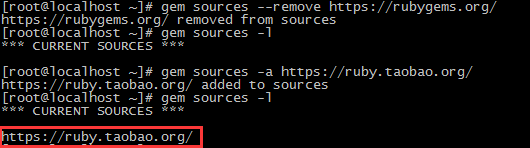
可能会报以下错误,这是因为国内网络导致rubygems.org存放在Amazon S3上面的资源文件间接性链接失败,用国内的RubyGems镜像(参见http://ruby.taobao.org/)替换官方镜像

更换镜像地址:
# gem sources --remove https://rubygems.org/		# 删除原镜像地址

# gem sources -a https://ruby.taobao.org/			# 添加新镜像地址
查看是否更换成功:
再次安装:

四、创建系统用户git
# adduser --system --shell /bin/bash --comment 'GitLab' --create-home --home-dir /home/git/ git

让git用户可以找到/usr/local/bin命令,并可以使用sudo

# visudo

找到这一行:

Defaults    secure_path = /sbin:/bin:/usr/sbin:/usr/bin

在后面添加 /usr/local/bin :

Defaults    secure_path = /sbin:/bin:/usr/sbin:/usr/bin:/usr/local/bin

再找到这一行:

root    ALL=(ALL)       ALL

在下一行添加:

git    ALL=(ALL)       ALL
五、安装MySQL
1.前提
这里的数据库需要安装Mysql 5.5以上的版本,而epel源默认只有5.1,所以需要添加有Mysql 5.5的源
# rpm -qa | grep mysql   # 查看是否安装比较低版本的mysql,然后卸载

# yum remove -y mysql*

# yum install -y mysql55-server mysql55-devel mysql55 postfix # 安装5.5版本

# chkconfig mysqld on   # 设置开机启动

# service mysqld start
要求是InnoDB引擎,登陆查看是否为InnoDB引擎
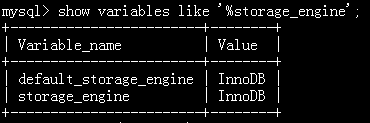
如果不是可以用SET storage_engine=INNODB设置,或者修改my.cnf文件后重启mysql
2.配置GitLab使用的数据库
> CREATE DATABASE IF NOT EXISTS `gitlabhq_production` DEFAULT CHARACTER SET `utf8` COLLATE `utf8_unicode_ci`;

> GRANT SELECT, LOCK TABLES, INSERT, UPDATE, DELETE, CREATE, DROP, INDEX, ALTER ON `gitlabhq_production`.* TO 'git'@'localhost' identified by 'git';

> GRANT SELECT, LOCK TABLES, INSERT, UPDATE, DELETE, CREATE, DROP, INDEX, ALTER ON `gitlabhq_production`.* TO 'git'@'127.0.0.1' identified by 'git';

> flush privileges;

> exit;
六、安装Redis
安装Reids
# yum -y install redis

# chkconfig redis on

# cp /etc/redis.conf /etc/redis.conf.orig
下面这条命令会把redis.conf的端口设置为0,而redis.conf.orig不变
# sed 's/^port .*/port 0/' /etc/redis.conf.orig | sudo tee /etc/redis.conf

# echo 'unixsocket /var/run/redis/redis.sock' | sudo tee -a /etc/redis.conf

# echo -e 'unixsocketperm 0770' | sudo tee -a /etc/redis.conf
授权/var/run/redis给redis权限
# mkdir -p /var/run/redis/

# chown redis:redis /var/run/redis

# chmod 755 /var/run/redis
将git加入redis组,并启动Redis
# usermod -aG redis git

# service redis start
七、安装GitLab
1.克隆GitLab
# su - git

# cd /home/git

# git clone https://gitlab.com/larryli/gitlab.git -b 7-8-zh gitlab
2.配置
切换至GitLab目录下面,复制一份配置文件
# cd gitlab

# cp config/gitlab.yml.example config/gitlab.yml
确保GitLab可以对 log 和 tmp 目录有写入权限
# chown -R git log/

# chown -R git tmp/

# chmod -R u+rwX log/

# chmod -R u+rwX tmp/
为satelites创建目录
# mkdir /home/git/gitlab-satellites

# chmod u+rwx,g=rx,o-rwx /home/git/gitlab-satellites
确保GitLab可以对 tmp/pids、tmp/sockets、public/uploads目录有写入权限
# chmod -R u+rwX tmp/pids/

# chmod -R u+rwX tmp/sockets/

# chmod -R u+rwX  public/uploads
从配置案例复制一份unicorn配置文件,并修改配置文件中的timeout选项的值为600(防止仓库文件太大,拉取时间过长出现超时)
# su -

# cd /home/git/gitlab

# sudo -u git -H cp config/unicorn.rb.example config/unicorn.rb

# vim gitlab/config/unicorn.rb

修改timeout 600
从配置案例复制一份rack attack配置文件
# sudo -u git -H cp config/initializers/rack_attack.rb.example config/initializers/rack_attack.rb
为git用户配置git全局配置
# sudo -u git -H git config --global user.name "GitLab"

# sudo -u git -H git config --global user.email "xxxxxx@qq.com"

# sudo -u git -H git config --global core.autocrlf input
配置redis连接
# sudo -u git -H cp config/resque.yml.example config/resque.yml
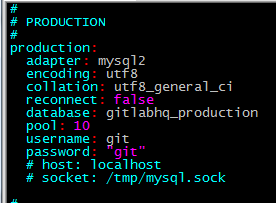
配置GitLab数据库设置
# sudo -u git cp config/database.yml.mysql config/database.yml

# vim config/database.yml
只需配置生产的部分(第一部分),用户名和密码
配置好以后运行该命令
# sudo -u git -H chmod o-rwx config/database.yml
配置GitLab绑定的域名或者IP
# vim config/gitlab.yml

修改host为gitlab的域名为你主机的IP地址(有两项,test一项应该没有影响,不过也修改吧)

host:主机IP
安装Gems
# sudo -u git -H bundle install --deployment --without development test postgres aws
可能会报错,还是大陆访问官网的问题,替换成https://ruby.taobao.org,然后再安装

替换命令:
# sed -i '/^source/s/https\:\/\/rubygems\.org/https\:\/\/ruby\.taobao\.org/' Gemfile
安装GitLab shell
# sudo -u git -H bundle exec rake gitlab:shell:install[v2.5.4] REDIS_URL=unix:/var/run/redis/redis.sock RAILS_ENV=production
初始化数据库
# sudo -u git -H bundle exec rake gitlab:setup RAILS_ENV=production
如果想要自己设置GitLab的root默认登陆密码则运行以下命令:
# sudo -u git -H bundle exec rake gitlab:setup RAILS_ENV=production GITLAB_ROOT_PASSWORD=yourpassword
默认登陆账号密码
login.........root

password......5iveL!fe
配置启动脚本
# cp lib/support/init.d/gitlab /etc/init.d/
配置日志切割
# cp lib/support/logrotate/gitlab /etc/logrotate.d/gitlab
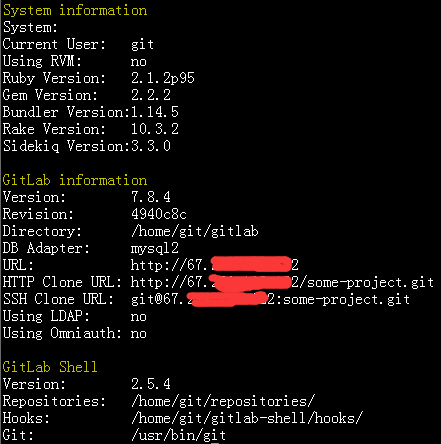
运行命令检测GitLab和它的环境是否正确
# sudo -u git -H bundle exec rake gitlab:env:info RAILS_ENV=production
运行命令结果截图如下:
拉取GitLab静态资源文件
# sudo -u git -H bundle exec rake assets:precompile RAILS_ENV=production
修改配置文件的gitlab_url为主机IP或者域名
# vim /home/git/gitlab-shell/config.yml
启动GitLab实例
# service gitlab start
八、配置Nginx
安装和配置开机启动(这里用yum安装,也可以自己编译安装)
# yum install -y nginx

# chkconfig nginx on
下载Nginx配置文件,并命名为gitlab.conf
# wget -O /etc/nginx/conf.d/gitlab.conf https://gitlab.com/gitlab-org/gitlab-ce/raw/master/lib/support/nginx/gitlab
把nginx加入到git组
# usermod -a -G git nginx

# chmod g+rx /home/git/
修改gitlab.conf文件
# vim /etc/nginx/conf.d/gitlab.conf

server unix:/home/git/gitlab/tmp/sockets/gitlab-workhorse.socket fail_timeout=0; 修改为 server unix:/home/git/gitlab/tmp/sockets/gitlab.socket fail_timeout=0;

listen 0.0.0.0:80 default_server;   修改为 listen 80;

listen [::]:80 default_server;       该行删除

server_name YOUR_SERVER_FQDN;  修改为 server_name 主机IP
启动Nginx
# service nginx start
九、访问
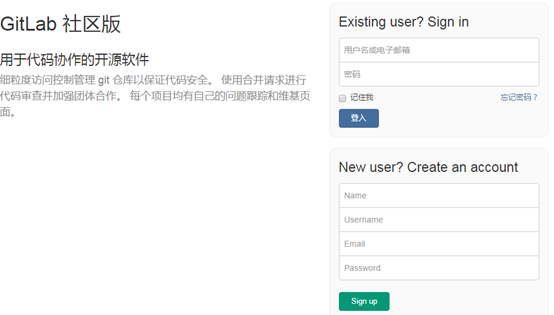
访问地址,http://主机IP或者域名,第一次登陆后就需要修改root用户的密码,然后再去掉GitLab的用户注册功能。到此GitLab搭建完毕!
GitLab搭建详细过程的更多相关文章
- Centos 6.5 GitLab安装配置搭建详细过程
GitLab搭建详细过程 一.前提 系统:Centos 6.5 软件版本:gitlab-7.8.4 Selinux:关闭 防火墙规则:先清空(搭建好了后续自己添加相关放行规则) 二.yum源配置和 ...
- IDEA SpringBoot多模块项目搭建详细过程(转)
文章转自https://blog.csdn.net/zcf980/article/details/83040029 项目源码: 链接: https://pan.baidu.com/s/1Gp9cY1Q ...
- centos下hadoop2.6.0集群搭建详细过程
一 .centos集群环境配置 1.创建一个namenode节点,5个datanode节点 主机名 IP namenodezsw 192.168.129.158 datanode1zsw 192.16 ...
- Solr搜索引擎搭建详细过程
1 什么是solr Solr 是Apache下的一个顶级开源项目,采用Java开发,它是基于Lucene的全文搜索服务器.Solr可以独立运行在Jetty.Tomcat等这些Servlet容器中 ...
- windows 2008r2+php5.6.28环境搭建详细过程
安装IIS7 安装php 网站验证 安装IIS7 1.打开服务器管理器(开始-计算机-右键-管理-也可以打开),添加角色 直接下一步 勾选Web服务器(IIS),下一步,有个注意事项继续下一步(这里我 ...
- Learning Discriminative and Transformation Covariant Local Feature Detectors实验环境搭建详细过程
依赖项: Python 3.4.3 tensorflow>1.0.0, tqdm, cv2, exifread, skimage, glob 1.安装tensorflow:https://www ...
- Redis集群搭建详细过程整理备忘
三.安装配置 1.环境 使用2台centos服务器,每台机器上部署3个实例,集群为三个主节点与三个从节点: 192.168.5.144:6380 192.168.5.144:6381 192.168. ...
- windows 2008r2+php5.6.28搭建详细过程
安装IIS7 1.打开服务器管理器(开始-计算机-右键-管理-也可以打开),添加角色 直接下一步 勾选Web服务器(IIS),下一步,有个注意事项继续下一步(这里我就不截图了) 勾选ASP.NET会弹 ...
- SilverLight搭建WCF聊天室详细过程[转]
http://www.silverlightchina.net/html/zhuantixilie/getstart/2011/0424/7148.html 默认节点 SilverLight搭建WCF ...
随机推荐
- IntelliJ IDEA 14.1.4设置关闭自动保存和标志改动文件为星号?
一.设置取消默认的自动保存: 二.设置文件内容改动后为文件标题头部添加*号:
- elasticsearch的映射(mapping)和分析(analysis)
转发自:http://blog.csdn.net/hzrandd/article/details/47128895 分析和分析器 分析(analysis)是这样一个过程: 首先,表征化一个文本块为适用 ...
- WPF 如何画出1像素的线
如何有人告诉你,请你画出1像素的线,是不是觉得很简单,实际上在 WPF 上还是比较难的. 本文告诉大家,如何让画出的线不模糊 画出线的第一个方法,创建一个 Canvas ,添加一个线 界面代码 < ...
- 模块:time,random,os,sys
时间模块 import time # print(time.time()) #时间戳 # print(time.strftime('%Y-%m-%d %X')) #格式化字符 # print(time ...
- UVa11882,Biggest Number
搜索+剪枝 如此水的一个题,居然搞了一上午 出错在bfs与dfs时共用了一个vis数组,导致bfs完后返回dfs应该能访问到的点访问不到 自己想怎么剪枝,想了几个剪枝方法,又证明,又推翻,再想,再证明 ...
- UVa10129,Play On Words
给出n个单词,如果一个单词的尾和另一个单词的头字符相等,那么可以相连,问这n个单词是否可以排成一列.欧拉路应用,构图:一个单词的头尾字母分别作为顶点,每输入一个word,该word的头指向word的尾 ...
- RabbitMQ 笔记-工作队列
工作队列的主要思想是不用等待资源密集型的任务处理完成, 为了确保消息或者任务不会丢失,rabbitmq 支持消息确信 ACK.ACK机制是消费者端从rabbitmq收到消息并处理完成后,反馈给rabb ...
- 25.Linux-Nor Flash驱动(详解)
1.nor硬件介绍: 从原理图中我们能看到NOR FLASH有地址线,有数据线,它和我们的SDRAM接口相似,能直接读取数据,但是不能像SDRAM直接写入数据,需要有命令才行 1.1其中我们2440的 ...
- CoreCLR源码探索(八) JIT的工作原理(详解篇)
在上一篇我们对CoreCLR中的JIT有了一个基础的了解, 这一篇我们将更详细分析JIT的实现. JIT的实现代码主要在https://github.com/dotnet/coreclr/tree/m ...
- python函数说明内容格式错误
def levlTwo(levloneList,levlOneNum): """ 入参levloneList 一级城市列表 入参levlOneNum 用户选择的城市序号 ...