
angular-bootstrap ui-date组件问题总结

使用angular框架的时候,之前用的时间控件是引入My97DatePicker组件实现的,但是因为
1.My97DatePicker样式不太好看以及偶尔会出现底部被遮盖的情况、点击不可编辑input框使用backspace按钮会出现格式不符合问题
2.angular-bootstrap 自带兼容第三方ui-date,并且是基于bootstrap改造的
所以决定调研ui-date是否符合产品需求:
条件1.开始时间和结束时间之间有某种关系:开始时间可范围最大值不超过结束时间值,结束时间可选最小值不小于开始时间值
条件2.有选择今天日期按钮
条件3.不能有清除日期按钮
条件4.必须汉化
在引入该文件的时候,angular版本是1.5.0,angular-ui-bootstrap版本是1.1.2,修改代码后为
 <p class="input-group">

    <input type="text" class="form-control" uib-datepicker-popup readonly ng-model="dicQueryObj.startTime" is-open="startPopupOpened" min-date="minStartDate" max-date="maxStartDate" datepicker-options="dateOptions" ng-required="true" close-text="关闭" current-text="今天"/>

    <span class="input-group-btn">

      <button type="button" class="btn btn-default" ng-click="startOpen()"><i class="glyphicon glyphicon-calendar"></i></button>

    </span>

</p>
 <p class="input-group">

    <input type="text" class="form-control" uib-datepicker-popup readonly ng-model="dicQueryObj.endTime" is-open="endPopupOpened" min-date="minEndDate" max-date="maxEndDate" datepicker-options="dateOptions" ng-required="true" close-text="关闭" current-text="今天" />

    <span class="input-group-btn">

        <button type="button" class="btn btn-default" ng-click="endOpen()"><i class="glyphicon glyphicon-calendar"></i></button>

    </span>

</p>
//初始化查询条件
$scope.dicQueryObj = {
    fileName: '',
    startTime:new Date(CommonServ.getLastMonthDate()),
    endTime: new Date(CommonServ.getCurDate()),
    order: '0'
};
//时间选择器配置
$scope.minStartDate = 0; //开始时间的最小时间
$scope.maxStartDate = $scope.dicQueryObj.endTime; //开始时间的最大可选时间
$scope.minEndDate = $scope.dicQueryObj.startTime; //结束时间的最小可选时间要大于开始时间的设定值
$scope.maxEndDate = $scope.dicQueryObj.endTime; //结束时间的最大可选择时间不超过结束时间的设定值

$scope.$watch('dicQueryObj.startTime', function(v){
    $scope.minEndDate = v;
});
$scope.$watch('dicQueryObj.endTime', function(v){
    $scope.maxStartDate = v;
});
$scope.dateOptions = {
    formatYear: 'yy',
    maxDate: new Date(),
    startingDay: 1
};
$scope.startOpen = function() {
    $timeout(function() {
        $scope.startPopupOpened = true;
    });
};
$scope.endOpen = function() {
    $timeout(function() {
        $scope.endPopupOpened = true;
    });
};
$scope.startPopupOpened = false;
$scope.endPopupOpened = false;
然后隐藏清除按钮:
 /*ui-date样式*/

 .uib-button-bar .btn-group button[ng-click^="select(null)"] {

     display: none;

 }
效果界面显示如下:
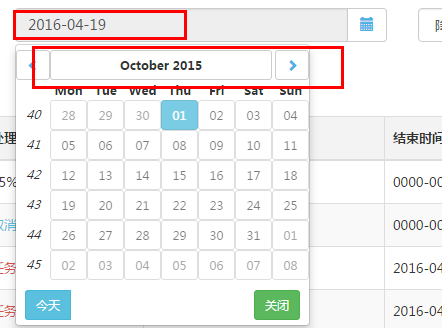
条件1、条件2、条件3都符合,然后被组内小伙伴测出来bug!!!
bug描述:因为设置了日期可选范围,界面确实对范围外的日期呈不可选状态,不可点击,然后顶部前后年份以及月份都可滑动,关键是每次切换月份,月份的1号都会被莫名的自动选中,导致我ng-model绑定的数据变化!!然而居然$watch不出来!!!我就纳闷了?
然后尝试看源码,然而各种看不懂啊。只有类似一句self.activeDate(year,mouth,1),然而各种注释都木有用,各种按照issue上面改代码,然而作者说版本更新已经不适用了。。。我就放弃了,再说改源码毕竟不好啊!
中途各种看issues(https://github.com/angular-ui/bootstrap/issues?utf8=%E2%9C%93)发现人家标为这是bug!!!

http://angular-ui.github.io/bootstrap/#/datepicker无奈研究了一下官网,他并没有出现我遇到的问题,查看他用的版本,发现人用的版本不一样啊!!!

然后重新下载版本bower install angular-bootstrap#1.3.2,引入解决了bug!

到目前为止就剩下条件4汉化了,查了一下issue,结果...
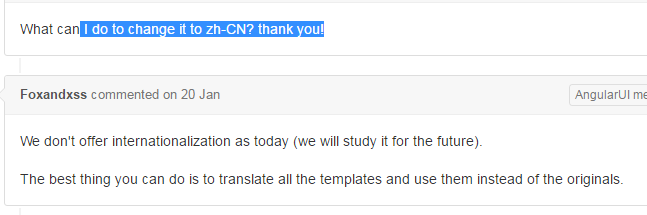
就在快要放弃的时候,大牛说是引入中文文件就OK,毕竟它改造之前是可以支持中文版本的,然后开始各种找,找到了i18n,bower install angular-i18n,下下来发现各种文件
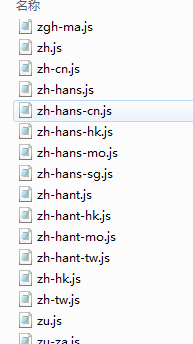
然而查看发现
require('./angular-locale_zh-cn');

module.exports = 'ngLocale';
。。好吧 这个angular2.0的代码
但是ngLocale这个模块貌似就是汉化的重要线索,然后就找到这个了http://stackoverflow.com/questions/19671887/angularjs-angular-ui-bootstrap-changing-language-used-by-the-datepicker
里面提到解决方法,扒下来汉化文件https://github.com/angular/angular.js/blob/master/src/ngLocale/angular-locale_zh.js
然后引进项目中,完全汉化了!效果如下:
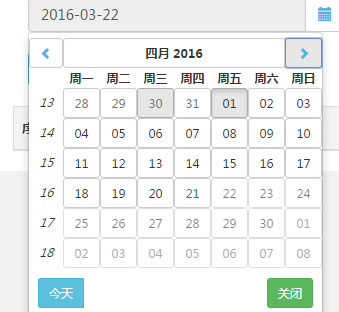
注意1:min-date以及max-date设置从html中转义至controller中的options设置
                <p class="input-group">

                    <input type="text" class="form-control" uib-datepicker-popup readonly ng-model="newWordQueryObj.startTime" is-open="startPopupOpened" datepicker-options="startDateOptions" ng-required="true" close-text="关闭" current-text="今天" />

                  <span class="input-group-btn">

                    <button type="button" class="btn btn-default" ng-click="startOpen()"><i class="glyphicon glyphicon-calendar"></i></button>

                  </span>

                </p>

                <p class="input-group">

                    <input type="text" class="form-control" uib-datepicker-popup readonly ng-model="newWordQueryObj.endTime" is-open="endPopupOpened" datepicker-options="endDateOptions" ng-required="true" close-text="关闭" current-text="今天" />

                  <span class="input-group-btn">

                    <button type="button" class="btn btn-default" ng-click="endOpen()"><i class="glyphicon glyphicon-calendar"></i></button>

                  </span>

                </p>
JS代码修改:
         //初始化查询条件

         $scope.newWordQueryObj = {

             fileName: '',

             startTime: new Date(CommonServ.getLastMonthDate()),

             endTime: new Date(CommonServ.getCurDate()),

             order: '0'

         };

         //时间选择器配置

         //$scope.minStartDate = 0; //开始时间的最小时间

         //$scope.maxStartDate = $scope.newWordQueryObj.endTime; //开始时间的最大可选时间

         //$scope.minEndDate = $scope.newWordQueryObj.startTime; //结束时间的最小可选时间要大于开始时间的设定值

         //$scope.maxEndDate = $scope.newWordQueryObj.endTime; //结束时间的最大可选择时间不超过结束时间的设定值

         $scope.startDateOptions = {

             formatYear: 'yy',

             maxDate: $scope.newWordQueryObj.endTime,

             startingDay: 1

         };

         $scope.endDateOptions = {

             formatYear: 'yy',

             minDate: $scope.newWordQueryObj.startTime,

             maxDate: new Date(),

             startingDay: 1

         };

         $scope.$watch('newWordQueryObj.startTime', function(newValue,oldValue){

             //$scope.minEndDate = newValue;

             $scope.endDateOptions.minDate = newValue;

         });

         $scope.$watch('newWordQueryObj.endTime', function(newValue,oldValue){

             //$scope.maxStartDate = newValue;

             $scope.startDateOptions.maxDate = newValue;

         });

         $scope.startOpen = function() {

             $timeout(function() {

                 $scope.startPopupOpened = true;

             });

         };

         $scope.endOpen = function() {

             $timeout(function() {

                 $scope.endPopupOpened = true;

             });

         };

         $scope.startPopupOpened = false;

         $scope.endPopupOpened = false;
注意2:这时如果要隐藏clear清除按钮,css代码得改变
 /*ui-date样式*/

 .uib-button-bar .btn-group button[ng-click^="select(null, $event)"] {

     display: none;

 }
完成~
接下来就可以重新测试一下了~
备注:
此时对accordion来说,如果自定义了templateUrl,此时templateUrl内需要添加一个属性uib-accordion-header
<span data-toggle="collapse" aria-expanded="{{isOpen}}" aria-controls="{{::panelId}}" tabindex="0" class="accordion-toggle" uib-accordion-transclude="heading"><span ng-class="{'text-muted': isDisabled}" uib-accordion-header>{{heading}}</span></span>
angular-bootstrap ui-date组件问题总结的更多相关文章
- Angular第三方UI组件库------ionic
一.Angular UI组件库 ------------ionic 1. 官网:https://ionicframework.com 文档:https://ionicframework.com/d ...
- 开始学习Angular Mobile UI
介绍 Mobile AngularUI 可以让你使用Twitter Booostrap和Angular JS来开发混合移动App和桌面应用程序. 下面是是一些贯穿整个项目的步骤,我强烈的建议你去继续阅 ...
- 超棒的 15 款 Bootstrap UI 编辑器
自从 2011 年 Mark Otto 和 Jacob Thornton 开发了 Bootstrap,我们第一次接触并熟知了 Bootstrap .这些都归功于 Twitter!从那以后,它就非常 ...
- Angular 2 to Angular 4 with Angular Material UI Components
Download Source - 955.2 KB Content Part 1: Angular2 Setup in Visual Studio 2017, Basic CRUD applicat ...
- springMVC+angular+bootstrap+mysql的简易购物网站搭建
springMVC+angular+bootstrap+mysql的简易购物网站搭建 介绍 前端的css框架用了bootstrap, 以及bootstrap的JS组件, 以及很好用的angular(a ...
- 阿里云 Angular 2 UI框架 NG-ZORRO介绍
说明: Angular2出来后,一直想找个基于Angular2的前端后台管理框架,但一直没有找到比较适合的.前段时间在Angular官网资源无意之间看到NG-ZORRO,NG-ZORRO由阿里计算平台 ...
- Phonegap集成angular/bootstrap/animate.css教程
1,phonegap集成angular 按照这篇文档的步骤:http://projectpoppycock.com/angularjs-phonegap-and-angular-seed-lets-g ...
- 《疯狂前端开发讲义jQuery+Angular+Bootstrap前端开发实践》学习笔记
<疯狂前端开发讲义jQuery+Angular+Bootstrap前端开发实践>学习笔记 二〇一九年二月十三日星期三2时28分54秒 前提:本书适合有初步HTML.CSS.JavaScri ...
- Bootstrap:UI开发平台 sdk
Bootstrap:UI开发平台 Bootstrap是一个易用.优雅.灵活.可扩展的前端工具包,里面包含了丰富的Web组件,包括布局.栅格.表格.表单.导航.按钮.进度条.媒体对象等,基于这些组件,可 ...
- 四款免费好用的Bootstrap ui编辑器
Bootstrap带来了设计革命,本文介绍的四种免费Bootstrap在线设计工具,可视化所见所得设计网页,然后输出Html/CSS代码,其中有些甚至可以实现拖曳,也有可以设定自己的主题模板Theme ...
随机推荐
- Swift语言中与C/C++和Java不同的语法(五)
这一节将会提到Swift中其他的关于函数的应用,这些内容包括有: 默认参数值和可变参数值.常量参数.返回函数类型和函数嵌套: 一.默认参数值和可变参数值 对默认参数值是指在函数的声明中就已经定义了参数 ...
- Win7常用快捷键整理
Win7常用快捷键整理.. -------------------- Win + Pause:显示系统属性对话框 ------------------------------------ Win7系统 ...
- Windows7 中常用的一些DOS命令总结
Windows7 中常用的一些DOS命令总结... ----------------------- -------------------------------------------- dos,是 ...
- struts2--Action
HTTP请求 提交 Struts2 StrutsPrepareAndExecuteFilter 核心控制器 -- 请求分发给不同Action Action书写的的三种格式 第一种 Action可以是 ...
- 新手之VM下安装centos版本Linux系统完整版!
一.安装必备软件 1:下载好VM workstations虚拟机 2:下载好你要安装的centos版本. 如果没有,请自己先百度下载好~或者找我要. 二.开始安装 VM workstation部分 1 ...
- Servlet的执行流程、生命周期
下面这幅图的Request和Response的箭头方向反了,应该是客户端发出请求,然后web服务器返回响应. servlet生命周期阶段包括初始化.加载.实例化.服务和销毁. 编写Servlet的d ...
- 在shell脚本中使用alias
Linux shell有交互式与非交互式两种工作模式.我们日常使用shell输入命令得到结果的方式是交互式的方式,而shell脚本使用的是非交互式方式. shell提供了alias功能来简化我们的 ...
- 简述C/C++调用lua中实现的自定义函数
1.首先说下目的,为什么要这么做 ? 正式项目中,希望主程序尽量不做修改,于是使用C/C++完成功能的主干(即不需要经常变动的部分)用lua这类轻量级的解释性语言实现一些存在不确定性的功能逻辑:所以, ...
- WCF(一)基础整理
学习WCF之前,了解下WCF和WebService的区别. WCF和WebService区别 Web Service严格来说是行业标准,也就是Web Service 规范,它使用XML扩展标记语言来表 ...
- §--------算法分界线--------§
如题 As said in the title~ 计算机的cpu计算从根源上由最基本的逻辑电路(晶体管)组成,由此衍生出最基本的数值运算:四则运算.而此后所有的高级算法都是建立在这个基本计算原理(逻辑 ...