
winform socket编程之TCPListener
运行结果:
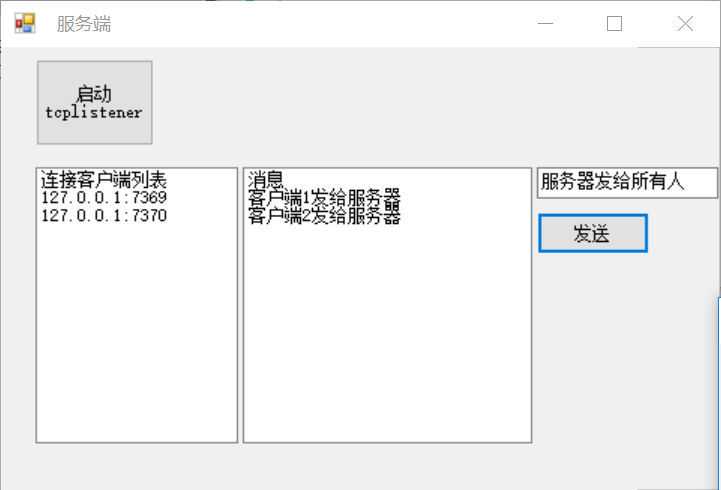


服务端代码
 using System;

 using System.Collections.Generic;

 using System.ComponentModel;

 using System.Data;

 using System.Drawing;

 using System.Linq;

 using System.Net;

 using System.Net.Sockets;

 using System.Text;

 using System.Threading;

 using System.Threading.Tasks;

 using System.Windows.Forms;

 namespace SocketServer

 {

     public partial class Form1 : Form

     {

         private List<TcpClient> clientList=new List<TcpClient>();///保存客户连接socket

         private TcpListener tcpListener;///监听类

         public Form1()

         {

             InitializeComponent();

         }

         private void button3_Click(object sender, EventArgs e)

         {

             tcpListener = new TcpListener(IPAddress.Any, );//监听3000端口

             tcpListener.Start();//开始监听

             Thread listenThread = new Thread(new ThreadStart(ListenForClients));///新建线程来处理新的客户端连接

             listenThread.Start();

         }

         /// <summary>

         /// 处理客户端连接线程

         /// </summary>

         private void ListenForClients()

         {

             while (true)

             {

                 //blocks until a client has connected to the server

                 TcpClient client = this.tcpListener.AcceptTcpClient();

                 clientList.Add(client);

                 listBox2.BeginInvoke(new Action(()=>{listBox2.Items.Add(client.Client.RemoteEndPoint.ToString());}));

                 //create a thread to handle communication

                 //with connected client

                 Thread clientThread = new Thread(new ParameterizedThreadStart(HandleClientComm));

                 clientThread.Start(client);

             }

         }

         /// <summary>

         /// 读客户端数据

         /// </summary>

         /// <param name="client"></param>

         private void HandleClientComm(object client)

         {

             TcpClient tcpClient = (TcpClient)client;

             NetworkStream clientStream = tcpClient.GetStream();

             byte[] message = new byte[];

             int bytesRead;

             while (true)

             {

                 bytesRead = ;

                 try

                 {

                     //blocks until a client sends a message,每个线程在这一句时会中断一下,等待客户端有数据传进来后再往下执行

                     bytesRead = clientStream.Read(message, , );

                 }

                 catch

                 {

                     //a socket error has occured

                     break;

                 }

                 if (bytesRead == )

                 {

                     //the client has disconnected from the server

                     break;

                 }

                 //message has successfully been received

                 UTF8Encoding utf8 = new UTF8Encoding();

                 System.Diagnostics.Debug.WriteLine(utf8.GetString(message, , bytesRead));

                 ///线程里修改UI界面的内容要用invoke方法和委托

                 listBox1.Invoke(new Action(() => { listBox1.Items.Add(utf8.GetString(message, , bytesRead)); }));

             }

             //tcpClient.Close();//不要关闭

         }

         /// <summary>

         /// 向所有客户端发送

         /// </summary>

         /// <param name="sender"></param>

         /// <param name="e"></param>

         private void button4_Click(object sender, EventArgs e)

         {

             foreach (var item in clientList)

             {

                 NetworkStream stream=item.GetStream();

                 stream.Write(UTF8Encoding.UTF8.GetBytes(this.textBox1.Text), , UTF8Encoding.UTF8.GetBytes(this.textBox1.Text).Length);

             }

         }

     }

 }
客户端代码
 using System;

 using System.Collections.Generic;

 using System.ComponentModel;

 using System.Data;

 using System.Drawing;

 using System.Linq;

 using System.Net;

 using System.Net.Sockets;

 using System.Text;

 using System.Threading;

 using System.Threading.Tasks;

 using System.Windows.Forms;

 namespace EdoecSpeaker

 {

     public partial class Form1 : Form

     {

         TcpClient client;

         public Form1()

         {

             InitializeComponent();

         }

       /// <summary>

       /// 连接服务器

       /// </summary>

       /// <param name="sender"></param>

       /// <param name="e"></param>

         private void button3_Click(object sender, EventArgs e)

         {

             if (client==null)

             {

                 client = new TcpClient();

                 IPEndPoint serverEndPoint = new IPEndPoint(IPAddress.Parse("127.0.0.1"), );

                 client.Connect(serverEndPoint);

                 Thread clientThread = new Thread(new ParameterizedThreadStart(HandleClientComm));

                 clientThread.Start(client);

             }

             //clientStream.Flush();

         }

         /// <summary>

         /// 接收消息

         /// </summary>

         /// <param name="client"></param>

         private void HandleClientComm(object client)

         {

             TcpClient tcpClient = (TcpClient)client;

             NetworkStream clientStream = tcpClient.GetStream();

             byte[] message = new byte[];

             int bytesRead;

             while (true)

             {

                 bytesRead = ;

                 try

                 {

                     //blocks until a client sends a message

                     bytesRead = clientStream.Read(message, , );

                 }

                 catch

                 {

                     //a socket error has occured

                     break;

                 }

                 if (bytesRead == )

                 {

                     //the client has disconnected from the server

                     break;

                 }

                 //message has successfully been received

                 UTF8Encoding utf8 = new UTF8Encoding();

                 System.Diagnostics.Debug.WriteLine(utf8.GetString(message, , bytesRead));

                 listBox1.Invoke(new Action(() => { listBox1.Items.Add(utf8.GetString(message, , bytesRead)); }));

             }

             //tcpClient.Close();

         }

         /// <summary>

         /// 发送消息

         /// </summary>

         /// <param name="sender"></param>

         /// <param name="e"></param>

         private void button4_Click(object sender, EventArgs e)

         {

             NetworkStream clientStream = client.GetStream();

             clientStream.Write(UTF8Encoding.UTF8.GetBytes(this.textBox1.Text), , UTF8Encoding.UTF8.GetBytes(this.textBox1.Text).Length);

         }

     }

 }
winform socket编程之TCPListener的更多相关文章
- [深入浅出WP8.1(Runtime)]Socket编程之UDP协议
13.3 Socket编程之UDP协议 UDP协议和TCP协议都是Socket编程的协议,但是与TCP协议不同,UDP协议并不提供超时重传,出错重传等功能,也就是说其是不可靠的协议.UDP适用于一次只 ...
- iPhone socket 编程之BSD Socket篇
iPhone socket 编程之BSD Socket篇 收藏在进行iPhone网络通讯程序的开发中,不可避免的要利用Socket套接字.iPhone提供了Socket网络编程的接口CFSocket, ...
- 老雷socket编程之websocket实现
老雷socket编程之websocket实现 我们主要实现私聊和群聊两个功能,要在web端实现想微信QQ那样的即时通讯的功能,我们需要了解一下websocket.websocket是一种可以双向通讯的 ...
- 老雷socket编程之PHP利用socket扩展实现聊天服务
老雷socket编程之PHP利用socket扩展实现聊天服务 socket聊天服务原理 PHP有两个socket的扩展 sockets和streamssockets socket_create(AF_ ...
- PHP Socket 编程之9个主要函数的使用之测试案例
php的socket编程算是比较难以理解的东西吧,不过,我们只要理解socket几个函数之间的关系,以及它们所扮演的角色,那么理解起来应该不是很难了,在笔者看来,socket编程,其实就是建立一个网络 ...
- C#编程 socket编程之TcpClient,TcpListener,UdpClient
应用程序可以通过 TCPClient.TCPListener 和 UDPClient 类使用传输控制协议 (TCP) 和用户数据文报协议 (UDP) 服务.这些协议类建立在 System.Net.So ...
- winform网络编程之TcpClient类,TcpListener类和UdpClient类
TcpClient类和TcpListener类 (1)TcpClient的用途: 用于在同步阻止模式下通过网络来链接.发送和接受流数据,在此情况下,必须有侦听此连接的请求,而侦听的任务就交给TcpLi ...
- Python socket编程之二:【struct.pack】&【struct.unpack】
import struct """通过 socket 的 send 和 recv 只能传输 str 格式的数据""" "" ...
- Linux系统编程(37)—— socket编程之UDP服务器与客户端
典型的UDP客户端/服务器通讯过程: 编写UDP Client程序的步骤 1.初始化sockaddr_in结构的变量,并赋值.这里使用"8888"作为连接的服务程序的端口,从命令行 ...
随机推荐
- TCP的十一种状态与三次握手分析(有图)
我们知道TCP是面向连接的,我们只知道有连接断开,其实内部还有一些比较复杂的状态.去了解各个状态之间的切换有助于我们更加深入的了解TCP.下面我们就来分析各个状态. 1.如下图示(图源百度)图中显示出 ...
- nat的翻译类型(3)--端口地址转换
目的:在1.1 1.2 1.3 三台内网的服务器访问外网的服务器(202.1.1.2)时,将内网ip转换为外网ip. 1.设置内网三台服务器的Ip ,网关,以及外网服务器的ip网关 分别为:192.1 ...
- idea svn 的使用----转载,挺好的
Intellij IDEA svn的使用记录 这里的忽略一直灰色的,可以进入 这里的版本控制里进行忽略选择 或者 这里进行添加 这里有三个选择 按照顺序 1.忽略指定的文件 2.忽略文件夹下所有文件 ...
- solr集群的理解和配置(待更新)
solr部署在tomcat下,solr集群依赖tomcat集群和zookeeper集群: zookeeper:1.对象注册和发放中心,实现异步调用. 2.配置中心.(solrConfig.xml,sc ...
- 中国IT职业培训市场经历的几波浪潮,未来的浪潮又是那一波?
第一波 电脑普及性培训时代 2000年至2003年左右,中国正处于PC计算机普及阶段,而IT职业教育也刚开始兴起,这一波浪潮主要以计算机办公自动化.平面设计.计算机硬件维修.为主:几家大的IT培训机构 ...
- 对Java中多态,封装,继承的认识(重要)
一.Java面向对象编程有三大特性:封装,继承,多态 在了解多态之前我觉得应该先了解一下 ...
- go编程之常见工具函数
1.时间格式化 基于模式的布局进行时间格式化和解析 package main import "fmt" import "time" func main() { ...
- 606. Construct String from Binary Tree
You need to construct a string consists of parenthesis and integers from a binary tree with the preo ...
- iView的使用【CDN向】
直接粗暴地上html代码 <!DOCTYPE html> <html> <head> <meta charset="utf-8"> ...
- bzoj 4719: [Noip2016]天天爱跑步
Description 小c同学认为跑步非常有趣,于是决定制作一款叫做<天天爱跑步>的游戏.?天天爱跑步?是一个养成类游戏,需要 玩家每天按时上线,完成打卡任务.这个游戏的地图可以看作一一 ...