
Nginx+nagios安装配置
Nginx+nagios安装配置
[root@Nagios ~]# vi /etc/nginx/nginx.conf

    server {

        listen  ;

        server_name     localhost;

        auth_basic "Nagios Access";

        auth_basic_user_file /usr/local/nagios/passwd;

        location / {

            root   /usr/local/nagios/share;

            index  index.html index.htm index.php;

        }

        location ~ .*\.(php|php5)?$ {

            root /usr/local/nagios/share;

            fastcgi_pass  127.0.0.1:;

            fastcgi_index index.php;

            include fastcgi.conf;

        }

        location /nagios {

            alias /usr/local/nagios/share;

        }

        location /cgi-bin/images {

            alias /usr/local/nagios/share/images;

        }

        location /cgi-bin/stylesheets {

            alias /usr/local/nagios/share/stylesheets;

         }

        location /cgi-bin {

            alias /usr/local/nagios/sbin;

        }

        location ~ .*\.(cgi|pl)?$ {

            gzip off;

            root   /usr/local/nagios/sbin;

            rewrite ^/nagios/cgi-bin/(.*)\.cgi /$.cgi break;

            fastcgi_pass  unix:/var/run/perl-fastcgi.sock;

            fastcgi_param SCRIPT_FILENAME /usr/local/nagios/sbin$fastcgi_script_name;

            fastcgi_index index.cgi;

            fastcgi_param  REMOTE_USER        $remote_user;

            fastcgi_param HTTP_ACCEPT_LANGUAGE en_US;

            include fastcgi_params;

            fastcgi_read_timeout   ;

         }

         location /nagiosql/ {

            alias /usr/local/nagios/nagiosql;

         }

    }

[root@Nagios ~]# echo -en 'nagios:'>/usr/local/nagios/share/passwd

[root@Nagios ~]# perl -e 'print crypt($ARGV[0], "nagios")' passwd >>/usr/local/nagios/share/passwd
# 安装 PHP php-fpm

[root@Nagios ~]# yum install -y php php-fpm

[root@Nagios ~]# /etc/init.d/php-fpm start
# 安装perl FCGI

[root@Nagios ~]# yum install -y perl-devel

[root@Nagios src]# wget http://www.cpan.org/modules/by-module/FCGI/FCGI-0.74.tar.gz

[root@Nagios src]# tar zxf FCGI-0.74.tar.gz

[root@Nagios src]# cd FCGI-0.74

[root@Nagios FCGI-0.74]# perl Makefile.PL

[root@Nagios FCGI-0.74]# make && make install

[root@Nagios ~]# touch /usr/bin/fastcgi-wrapper.pl

[root@Nagios ~]# chmod  /usr/bin/fastcgi-wrapper.pl

[root@Nagios ~]# vi /usr/bin/fastcgi-wrapper.pl

#!/usr/bin/perl

use FCGI;

use Socket;

use POSIX qw(setsid);

require 'syscall.ph';

&daemonize;

#this keeps the program alive or something after exec'ing perl scripts

END() { } BEGIN() { }

*CORE::GLOBAL::exit = sub { die "fakeexit\nrc=".shift()."\n"; };

eval q{exit};

if ($@) {

    exit unless $@ =~ /^fakeexit/;

};

&main;

sub daemonize() {

    chdir '/'                 or die "Can't chdir to /: $!";

    defined(my $pid = fork)   or die "Can't fork: $!";

    exit if $pid;

    setsid                    or die "Can't start a new session: $!";

    umask ;

}

sub main {

        #$socket = FCGI::OpenSocket( "127.0.0.1:8999",  ); #use IP sockets

        $socket = FCGI::OpenSocket( "/var/run/perl-fastcgi.sock",  );

        $request = FCGI::Request( \*STDIN, \*STDOUT, \*STDERR, \%req_params, $socket );

        if ($request) { request_loop()};

            FCGI::CloseSocket( $socket );

}

sub request_loop {

        while( $request->Accept() >=  ) {

           #processing any STDIN input from WebServer (for CGI-POST actions)

           $stdin_passthrough ='';

           $req_len =  + $req_params{'CONTENT_LENGTH'};

           if (($req_params{'REQUEST_METHOD'} eq 'POST') && ($req_len != ) ){

                my $bytes_read = ;

                while ($bytes_read < $req_len) {

                        my $data = '';

                        my $bytes = read(STDIN, $data, ($req_len - $bytes_read));

                        last if ($bytes ==  || !defined($bytes));

                        $stdin_passthrough .= $data;

                        $bytes_read += $bytes;

                }

            }

            #running the cgi app

            if ( (-x $req_params{SCRIPT_FILENAME}) &&  #can I execute this?

                 (-s $req_params{SCRIPT_FILENAME}) &&  #Is this file empty?

                 (-r $req_params{SCRIPT_FILENAME})     #can I read this file?

            ){

        pipe(CHILD_RD, PARENT_WR);

        my $pid = open(KID_TO_READ, "-|");

        unless(defined($pid)) {

            print("Content-type: text/plain\r\n\r\n");

                        print "Error: CGI app returned no output - ";

                        print "Executing $req_params{SCRIPT_FILENAME} failed !\n";

            next;

        }

        if ($pid > ) {

            close(CHILD_RD);

            print PARENT_WR $stdin_passthrough;

            close(PARENT_WR);

            while(my $s = <KID_TO_READ>) { print $s; }

            close KID_TO_READ;

            waitpid($pid, );

        } else {

                    foreach $key ( keys %req_params){

                       $ENV{$key} = $req_params{$key};

                    }

                    # cd to the script's local directory

                    if ($req_params{SCRIPT_FILENAME} =~ /^(.*)\/[^\/]+$/) {

                            chdir $;

                    }

            close(PARENT_WR);

            close(STDIN);

            #fcntl(CHILD_RD, F_DUPFD, );

            syscall(&SYS_dup2, fileno(CHILD_RD), );

            #open(STDIN, "<&CHILD_RD");

            exec($req_params{SCRIPT_FILENAME});

            die("exec failed");

        }

            }

            else {

                print("Content-type: text/plain\r\n\r\n");

                print "Error: No such CGI app - $req_params{SCRIPT_FILENAME} may not ";

                print "exist or is not executable by this process.\n";

            }

        }

}

[root@Nagios ~]# touch /etc/init.d/perl-fastcgi

[root@Nagios ~]# chmod  /etc/init.d/perl-fastcgi

[root@Nagios ~]# vi /etc/init.d/perl-fastcgi

#!/bin/sh

#

# nginx – this script starts and stops the nginx daemon

#

# chkconfig: -

# description: Nginx is an HTTP(S) server, HTTP(S) reverse \

# proxy and IMAP/POP3 proxy server

# processname: nginx

# config: /opt/nginx/conf/nginx.conf

# pidfile: /opt/nginx/logs/nginx.pid

# Source function library.

. /etc/rc.d/init.d/functions

# Source networking configuration.

. /etc/sysconfig/network

# Check that networking is up.

[ "$NETWORKING" = "no" ] && exit

perlfastcgi="/usr/bin/fastcgi-wrapper.pl"

prog=$(basename perl)

lockfile=/var/lock/subsys/perl-fastcgi

start() {

    [ -x $perlfastcgi ] || exit

    echo -n $"Starting $prog: "

    daemon $perlfastcgi

    retval=$?

    echo

    [ $retval -eq  ] && touch $lockfile

    return $retval

}

stop() {

    echo -n $"Stopping $prog: "

    killproc $prog -QUIT

    retval=$?

    echo

    [ $retval -eq  ] && rm -f $lockfile

    return $retval

}

restart() {

    stop

    start

}

reload() {

    echo -n $”Reloading $prog: ”

    killproc $nginx -HUP

    RETVAL=$?

    echo

}

force_reload() {

    restart

}

rh_status() {

    status $prog

}

rh_status_q() {

    rh_status >/dev/null >&

}

case "$1" in

    start)

        rh_status_q && exit

        $

        ;;

    stop)

        rh_status_q || exit

        $

        ;;

    restart)

        $

        ;;

    reload)

        rh_status_q || exit

        $

        ;;

    force-reload)

        force_reload

        ;;

    status)

        rh_status

        ;;

    condrestart|try-restart)

        rh_status_q || exit

        ;;

    *)

        echo $"Usage: $0 {start|stop|status|restart|condrestart|try-restart|reload|force-reload}"

        exit

    esac
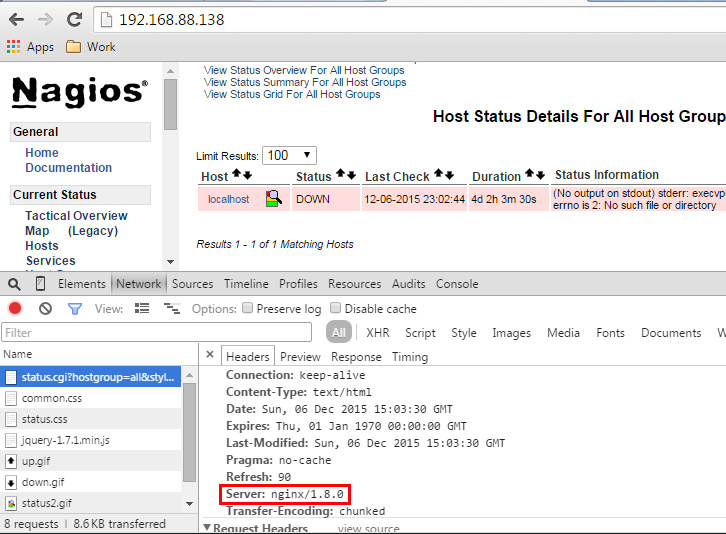
nagios安装请参考该篇:http://www.cnblogs.com/caoguo/p/4981903.html
Nginx+nagios安装配置的更多相关文章
- nginx初级安装配置
nginx初级安装配置 转自:(lykyl原创)http://www.cnblogs.com/lykyl/archive/2012/11/21/2781077.html 实验环境:系统 CENTOS5 ...
- nginx+tomcat安装配置
nginx+tomcat安装配置 # nginx+tomcat安装配置 #创建网站目录 mkdir -p /www/wwwroot cd /www #安装配置 wget http://mirrors. ...
- gerrit+nginx+centos安装配置
安装环境 centos 6.8 gerrit-full-2.5.2.war 下载地址:https://gerrit-releases.storage.googleapis.com/gerrit-ful ...
- Nginx的安装配置和tomcat负载均衡
Nginx简介 什么是nginx? Nginx是一款高性能的http 服务器/反向代理服务器及电子邮件(IMAP/POP3)代理服务器.由俄罗斯的程序设计师Igor Sysoev所开发,官方测试ngi ...
- nginx php-fpm安装配置 CentOS编译安装php7.2
CentOS编译安装php7.2 介绍: 久闻php7的速度以及性能那可是比php5系列的任何一版本都要快,具体性能有多好,建议还是先尝试下再说.如果你是升级或新安装,那你首先需要考虑php7和程序是 ...
- 吴裕雄--天生自然Django框架开发笔记:Django Nginx+uwsgi 安装配置
Django Nginx+uwsgi 安装配置 使用 python manage.py runserver 来运行服务器.这只适用测试环境中使用. 正式发布的服务,需要一个可以稳定而持续的服务器,比如 ...
- centos 系统下安装FastDFS+nginx+fastdfs-nginx-module安装配置
前言: 以前的项目上传的文件都是保存到本地或者是局域网内的共享文件夹下,由于数据量,服务器的负载均衡(分机的某些图片无法访问的问题处理)等因素的情况下,就想到用fastdfs来文件管理,花了几天时间硬 ...
- Nginx服务安装配置
1.Nginx介绍 Nginx是一个高性能的HTTP和反向代理服务器,由俄罗斯人开发的,第一个版本发布于2004年10月4日.Nginx由于出色的性能,在世界范围内受到了越来越多人的关注,其特点是占有 ...
- Django Nginx+uwsgi 安装配置
使用 python manage.py runserver 来运行服务器.这只适用测试环境中使用. 正式发布的服务,我们需要一个可以稳定而持续的服务器,比如apache, Nginx, lighttp ...
随机推荐
- JavaMail发送邮件后再通过JavaMail接收格式问题
复杂邮件发送问题 转载请标明出处!https://www.cnblogs.com/dream-saddle/p/10978113.html 关于 JavaMail 如何发送邮件这里就不赘述了,网上有很 ...
- 美河LINUX 内核学习视频
Linux内核从原理到代码详解 培训视频 Linux内核源码研读与实战演练 [7.10][美河资料发布小组@aipepsi][linux内核分析视频教程] 炼数成金Linux内核探秘 [11.23][ ...
- js部分基础
1.js的基本类型有哪些?引用类型有哪些?null和undefined的区别. 基础类型:number,null,regex,string,boolean 引用类型 : object,function ...
- Android GIS开发系列-- 入门季(1) 起点
前言 这个系列,待最终完成更新,大家体谅点,第一版本全部是参考的网络教程,最近会逐步的细化更新为可以直接使用的情况. 本系列的开发基于AS ( Android Studio ), 和ArcGIS 的 ...
- 最短的计算大数乘法的c程序
#include <stdio.h> char s[99],t[99]; int m,n; void r(int i,int c) { int j=0,k=i; while(k)c+=s[ ...
- Flex 绘制圆形并填充图片
注意:Ellipse 绘制椭圆,当width = height 时 则绘制圆形. BitmapFill:填充图片 <s:Group id="gpimgUser" width= ...
- 用BOOST_FOREACH简化遍历操作
BOOST_FOREACH能够方便的遍历STL容器. 仅仅须要头文件: #include <boost/foreach.hpp> 然后遍历容器vector/list/set/deque/s ...
- jQuery 中ready与load事件
jquey有3种针对文档加载的方法: //document ready $(document).ready(function(){ //...代码... }) //document ready 简写 ...
- 可编程数据平面将OpenFlow扩展至电信级应用(一)
可编程数据平面将OpenFlow扩展至电信级应用(一) 案例:基于WinPath网络处理器的电信极OpenFlow (CG-OF)client实现 作者:Liviu Pinchas, Tao Lang ...
- HDU 1814 Peaceful Commission(2-sat 模板题输出最小字典序解决方式)
题目链接:http://acm.hdu.edu.cn/showproblem.php?pid=1814 Problem Description The Public Peace Commission ...