
【转】获取Android控件的宽和高
我们都知道在onCreate()里面获取控件的高度是0,这是为什么呢?我们来看一下示例:
首先我们自己写一个控件,这个控件非常简单:
public class MyImageView extends ImageView {

    public MyImageView(Context context, AttributeSet attrs) {

        super(context, attrs);

    }

    public MyImageView(Context context) {

        super(context);

    }

    @Override

    protected void onMeasure(int widthMeasureSpec, int heightMeasureSpec) {

        super.onMeasure(widthMeasureSpec, heightMeasureSpec);

        System.out.println("onMeasure 我被调用了"+System.currentTimeMillis());

    }

    @Override

    protected void onDraw(Canvas canvas) {

        super.onDraw(canvas);

        System.out.println("onDraw 我被调用了"+System.currentTimeMillis());

    }

}
布局文件:
    <com.test.MyImageView

        android:id="@+id/imageview"

        android:layout_width="wrap_content"

        android:layout_height="wrap_content"

        android:src="@drawable/test" />
测试的Activity的onCreate():
    @Override

    public void onCreate(Bundle savedInstanceState) {

        super.onCreate(savedInstanceState);

        setContentView(R.layout.main);

        System.out.println("执行完毕.."+System.currentTimeMillis());

    }
现在我们现在来看一下结果:

说明等onCreate方法执行完了,我们定义的控件才会被度量(measure),所以我们在onCreate方法里面通过view.getHeight()获取控件的高度或者宽度肯定是0,因为它自己还没有被度量,也就是说他自己都不知道自己有多高,而你这时候去获取它的尺寸,肯定是不行的.
现在碰到这个问题我们不能不解决,在网上找到了如下办法:
        //------------------------------------------------方法一

        int w = View.MeasureSpec.makeMeasureSpec(0,View.MeasureSpec.UNSPECIFIED);

        int h = View.MeasureSpec.makeMeasureSpec(0,View.MeasureSpec.UNSPECIFIED);

        imageView.measure(w, h);

        int height =imageView.getMeasuredHeight();

        int width =imageView.getMeasuredWidth();

        textView.append("\n"+height+","+width);

        //-----------------------------------------------方法二

        ViewTreeObserver vto = imageView.getViewTreeObserver();

        vto.addOnPreDrawListener(new ViewTreeObserver.OnPreDrawListener() {

            public boolean onPreDraw() {

                int height = imageView.getMeasuredHeight();

                int width = imageView.getMeasuredWidth();

                textView.append("\n"+height+","+width);

                return true;

            }

        });

        //-----------------------------------------------方法三

        ViewTreeObserver vto2 = imageView.getViewTreeObserver();

        vto2.addOnGlobalLayoutListener(new OnGlobalLayoutListener() {

            @Override

            public void onGlobalLayout() {

                imageView.getViewTreeObserver().removeGlobalOnLayoutListener(this);

                textView.append("\n\n"+imageView.getHeight()+","+imageView.getWidth());

            }

        });
现在要讨论的是当我们需要时候使用哪个方法呢?
现在把测试的Activity改成如下:
  @Override

    public void onCreate(Bundle savedInstanceState) {

        super.onCreate(savedInstanceState);

        setContentView(R.layout.main);

        final ImageView imageView = (ImageView) findViewById(R.id.imageview);

        //------------------------------------------------方法一

        int w = View.MeasureSpec.makeMeasureSpec(0,View.MeasureSpec.UNSPECIFIED);

        int h = View.MeasureSpec.makeMeasureSpec(0,View.MeasureSpec.UNSPECIFIED);

        imageView.measure(w, h);

        int height =imageView.getMeasuredHeight();

        int width =imageView.getMeasuredWidth();

        textView.append("\n"+height+","+width);

        System.out.println("执行完毕.."+System.currentTimeMillis());

    }
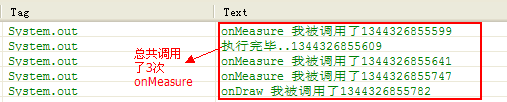
接着来看下面几种方式输出结果:
把测试Activity改成如下:
    @Override

    public void onCreate(Bundle savedInstanceState) {

        super.onCreate(savedInstanceState);

        setContentView(R.layout.main);

        final ImageView imageView = (ImageView) findViewById(R.id.imageview);

        //-----------------------------------------------方法二

        ViewTreeObserver vto = imageView.getViewTreeObserver();

        vto.addOnPreDrawListener(new ViewTreeObserver.OnPreDrawListener() {

            public boolean onPreDraw() {

                int height = imageView.getMeasuredHeight();

                int width = imageView.getMeasuredWidth();

                textView.append("\n"+height+","+width);

                return true;

            }

        });

    }
结果如下:

方法三就不再测试了同方法二!!!
那么方法二和方法三在执行上有什么区别呢?
我们在布局文件中加入一个TextView来记录这个控件的宽高.
    <ScrollView

        android:layout_width="wrap_content"

        android:layout_height="wrap_content" >

        <TextView

            android:id="@+id/text"

            android:layout_width="wrap_content"

            android:layout_height="wrap_content" />

    </ScrollView>
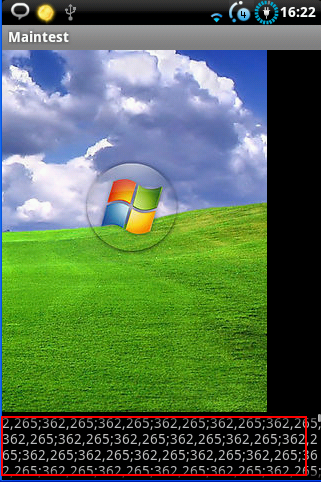
先来测试方法二:
    @Override

    public void onCreate(Bundle savedInstanceState) {

        super.onCreate(savedInstanceState);

        setContentView(R.layout.main);

        final ImageView imageView = (ImageView) findViewById(R.id.imageview);

        //-----------------------------------------------方法二

        ViewTreeObserver vto = imageView.getViewTreeObserver();

        vto.addOnPreDrawListener(new ViewTreeObserver.OnPreDrawListener() {

            public boolean onPreDraw() {

                int height = imageView.getMeasuredHeight();

                int width = imageView.getMeasuredWidth();

                textView.append("\n"+height+","+width);

                return true;

            }

        });

    }
结果如下:
我们再来测试方法三:
    @Override

    public void onCreate(Bundle savedInstanceState) {

        super.onCreate(savedInstanceState);

        setContentView(R.layout.main);

        final ImageView imageView = (ImageView) findViewById(R.id.imageview);

        //-----------------------------------------------方法三

        ViewTreeObserver vto2 = imageView.getViewTreeObserver();

        vto2.addOnGlobalLayoutListener(new OnGlobalLayoutListener() {

            @Override

            public void onGlobalLayout() {

                imageView.getViewTreeObserver().removeGlobalOnLayoutListener(this);

                textView.append("\n\n"+imageView.getHeight()+","+imageView.getWidth());

            }

        });

    }
输出结果如下:
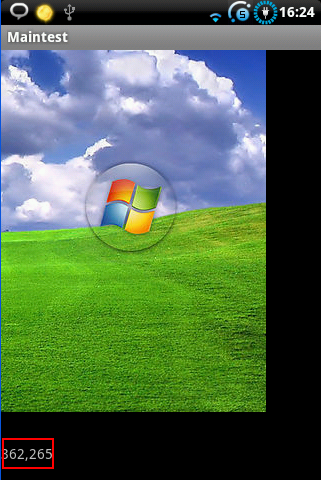
我想这方法二和方法三之间的区别就不用说了吧.
总结:那么需要获取控件的宽高该用那个方法呢?
方法一: 比其他的两个方法多了一次计算,也就是多调用了一次onMeasure()方法,该方法虽然看上去简单,但是如果要目标控件计算耗时比较大的话(如listView等),不建议使用.
方法二,它的回调方法会调用很多次,并且滑动TextView的时候任然会调用,所以不建议使用.
方法三,比较合适.
当然,实际应用的时候需要根据实际情况而定.
【转】获取Android控件的宽和高的更多相关文章
- Android初级教程_获取Android控件的宽和高
转载:http://blog.csdn.net/johnny901114/article/details/7839512 我们都知道在onCreate()里面获取控件的高度是0,这是为什么呢?我们来看 ...
- 我的Android进阶之旅------>如何获取Android控件的宽和高
本文转载于:http://blog.csdn.net/johnny901114/article/details/7839512 我们都知道在onCreate()里面获取控件的高度是0,这是为什么呢?我 ...
- 【Android】获取控件的宽和高
有时候我们须要在Activity的时候获取控件的宽和高来做一些操作,以下介绍三种获取宽和高的方式: 1. onWindowFocusChanged @Override public void onWi ...
- 获取android控件的高度
问题 如何获取一个控件的长和高,相信很多朋友第一眼看见这个问题都会觉得很简单,直接在onCreate里面调用getWidth.getMeasuredWidth不就可以获得了吗,但是,事实上是并没有简单 ...
- [BS-01] 根据字符串对象的参数自动计算用来显示该字符串的UI控件的宽和高
根据字符串对象的参数自动计算用来显示该字符串的UI控件的宽和高 1. 影响昵称Label的高和宽的因素: 字体和字号大小.文字多少.高度取决于是否固定了宽度(是否限制了最大的宽度和高度) 2. 使用 ...
- Android在onCreate中获取控件的宽高
在某些需求下,我们需要在onCreate的时候就获取到控件的宽高,但是如果直接用view.getWidth()或view.getHeight()会得到0.这是因为在onCreate执行的时候,控件还没 ...
- 获取到Android控件的高度
问题 如何获取一个控件的长和高,相信很多朋友第一眼看见这个问题都会觉得很简单,直接在onCreate里面调用getWidth.getMeasuredWidth不就可以获得了吗,但是,事实上是并没有简单 ...
- 如何获取到Android控件的高度
问题 如何获取一个控件的长和高,相信很多朋友第一眼看见这个问题都会觉得很简单,直接在onCreate里面调用getWidth.getMeasuredWidth不就可以获得了吗,但是,事实上是并没有简单 ...
- 最简单也最难——怎样获取到Android控件的高度
问题 怎样获取一个控件的长和高.相信非常多朋友第一眼看见这个问题都会认为非常easy,直接在onCreate里面调用getWidth.getMeasuredWidth不就能够获得了吗,可是.事实上是并 ...
随机推荐
- parsley之验证属性设置
parsley.js添加表单验证功能,直接在html元素中添加对应属性: Name API Description Required #2.0必填 required HTML5 data-parsle ...
- HDU_1175_连连看
题目:http://acm.hdu.edu.cn/showproblem.php?pid=1175 大意:连连看规则,只能转两次弯,先输入矩阵0表示没有棋子,正整数表示不同的棋子,然后询问,输入两点坐 ...
- docker 1-->docker swarm 转载
实践中会发现,生产环境中使用单个 Docker 节点是远远不够的,搭建 Docker 集群势在必行.然而,面对 Kubernetes, Mesos 以及 Swarm 等众多容器集群系统,我们该如何选择 ...
- 微信小程序 setData动态修改数据数组的值
1.问题说明 有一组数据,用来存储图片路径,动态修改图片的路径来上传图片,而小程序JS只能通过事件获取时机和setData方法修改数据来改变view. 而用这样写的方式明显是错误的 2.解决办法 字符 ...
- http怎么做自动跳转https
Nginx版本 server { listen 80; server_name localhost; rewrite ^(.*)$ https://$host$1 permanent; ...
- buf.writeFloatBE()函数详解
buf.writeFloatBE(value, offset[, noAssert]) buf.writeFloatLE(value, offset[, noAssert]) value {Numbe ...
- Tampermonkey脚本安装问题及自用脚本推荐
对于高手来说,chrome浏览器中即使没有其他任何chrome插件,可能都无关紧要.但是有一个插件必不可少, 那就是Tampermonkey油猴插件.Tampermonkey是Chrome上最流行的用 ...
- 长久不用的mysql报错ERROR 2002 (HY000): Can't connect to local MySQL server through socket '/tmp/mysql.sock' (2)
mac上安装过mysql: 然而,尝试连接时报错: $ mysql -u root -p Enter password: ERROR 2002 (HY000): Can't connect to lo ...
- circumferential averge streamwise velocity using Tecplot and Matlab
Input: results from solver output: circumferential averge physical quantities( such as streamwise ve ...
- PAT 1085 PAT单位排行
每次 PAT 考试结束后,考试中心都会发布一个考生单位排行榜.本题就请你实现这个功能. 输入格式: 输入第一行给出一个正整数 N(≤10^5),即考生人数.随后 N 行,每行按下列格式给出一个考生的信 ...