
Code:NLog
| ylbtech-Code:NLog |
| 1. NLog介绍使用返回顶部 |
NLog是什么
NLog是一个基于.NET平台编写的类库,我们可以使用NLog在应用程序中添加极为完善的跟踪调试代码。
NLog是一个简单灵活的.NET日志记录类库。通过使用NLog,我们可以在任何一种.NET语言中输出带有上下文的(contextual information)调试诊断信息,根据喜好配置其表现样式之后发送到一个或多个输出目标(target)中。
NLog的API非常类似于log4net,且配置方式非常简单。NLog使用路由表(routing table)进行配置,这样就让NLog的配置文件非常容易阅读,并便于今后维护。
NLog遵从BSD license,即允许商业应用且完全开放源代码。任何人都可以免费使用并对其进行测试,然后通过邮件列表反馈问题以及建议。
NLog支持.NET、C/C++以及COM interop API,因此我们的程序、组件、包括用C++/COM 编写的遗留模块都可以通过同一个路由引擎将信息发送至NLog中。
简单来说Nlog就是用来记录项目日志的组件
NLog日志输出目标
文件 比如TXT、Excel
文本控制台
Email
数据库
网络中的其它计算机(通过TCP或UDP)
基于MSMQ的消息队列
Windows系统日志
NLog使用
直接用NuGet安装就行了
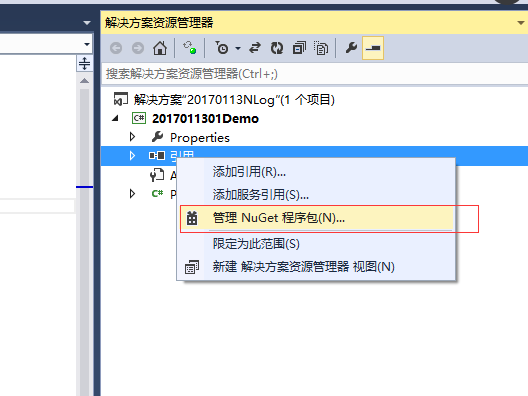
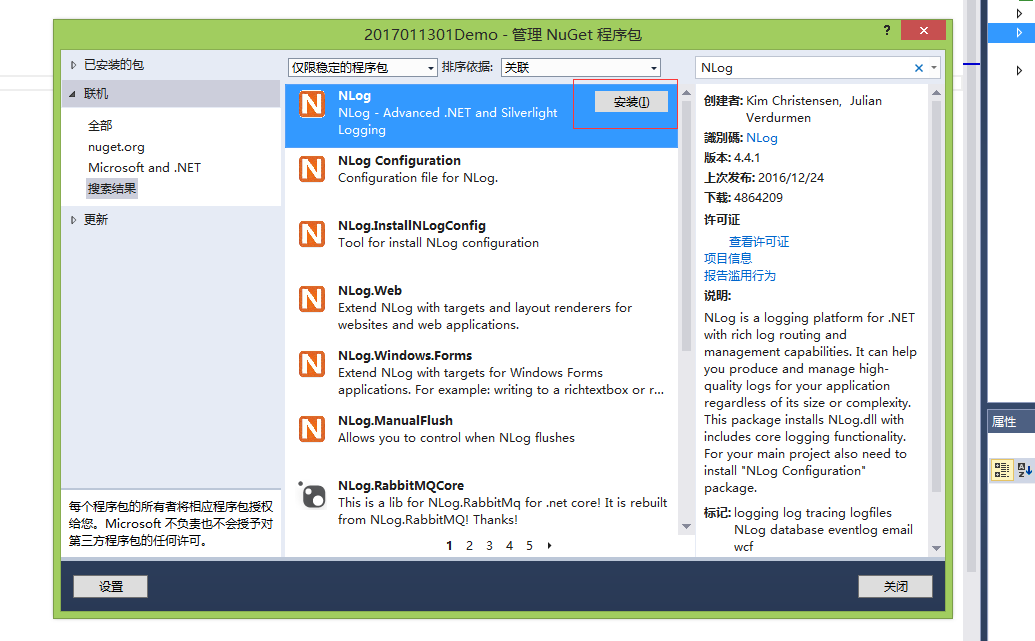
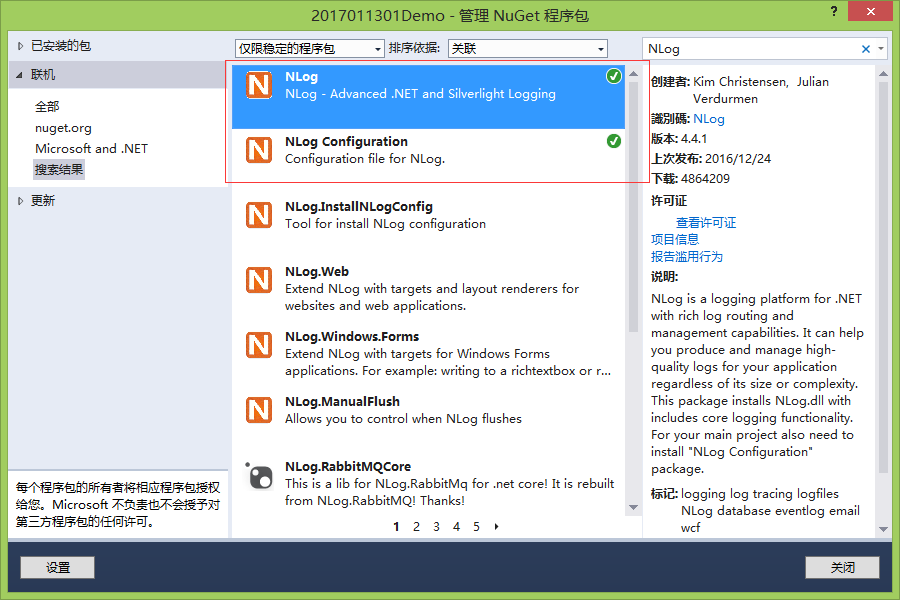
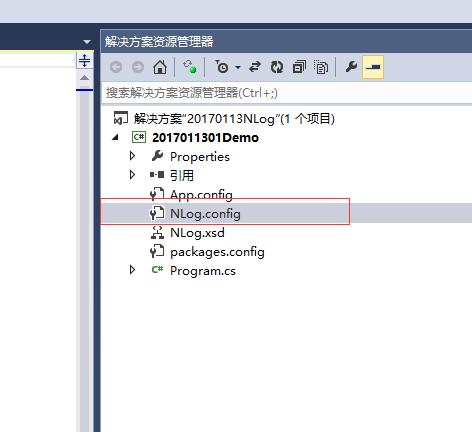
简单的Demo

<?xml version="1.0" encoding="utf-8" ?>

<nlog xmlns="http://www.nlog-project.org/schemas/NLog.xsd"

      xmlns:xsi="http://www.w3.org/2001/XMLSchema-instance"

      xsi:schemaLocation="http://www.nlog-project.org/schemas/NLog.xsd NLog.xsd"

      autoReload="true"

      throwExceptions="false"

      internalLogLevel="Off"

      internalLogFile="c:\temp\nlog-internal.log">

  <variable name="myvar" value="myvalue"/>

  <targets>

    <target xsi:type="File" name="SimpleDemoFile" fileName="../../../Logs/SimpleDemo.txt" layout="${message}" encoding="UTF-8"/>

  </targets>

  <rules>

    <logger name="SimpleDemo" level="Error" writeTo="SimpleDemoFile"/>

  </rules>

</nlog>
using NLog;

using System;

using System.Collections.Generic;

using System.Linq;

using System.Text;

using System.Threading.Tasks;

namespace _2017011301SimpleDemo

{

    class Program

    {

      public static Logger logger = LogManager.GetLogger("SimpleDemo");

        static void Main(string[] args)

        {

            Console.WriteLine("执行开始");

            logger.Error("Hello World");

            Console.WriteLine("执行结束");

            Console.ReadKey();

        }

    }

}
输出到 ../../../Logs/SimpleDemo.txt 内容为 Hello World
NLog配置
<?xml version="1.0" encoding="utf-8" ?>
<nlog xmlns="http://www.nlog-project.org/schemas/NLog.xsd"
xmlns:xsi="http://www.w3.org/2001/XMLSchema-instance"
xsi:schemaLocation="http://www.nlog-project.org/schemas/NLog.xsd NLog.xsd"
autoReload="true"
throwExceptions="false"
internalLogLevel="Off“
internalLogFile="c:\temp\nlog-internal.log">
<variable name="myvar" value="myvalue"/>
<targets> </targets>
<rules> </rules>
</nlog>
xmlns=“http://www.nlog-project.org/schemas/NLog.xsd” 这表示默认命名空间
xmlns:xsi="http://www.w3.org/2001/XMLSchema-instance" 这个命名空间里面的元素或者属性就必须要以xsi:这种方式来写
比如schemaLocation就是他的一个属性,所以写成xsi:schemaLocation
而默认命名空间不带类似xsi这种,其实xml标签名称有个专业叫法叫做QName,而如果没有前面的xsi:这种一般叫做NCName
xsi:schemaLocation="http://www.nlog-project.org/schemas/NLog.xsd NLog.xsd"
表示把定义这个命名空间的schema文件给引用进来,好让开发类型工具能够解析和验证你的xml文件是否符合语法规范
等同于
简单来说 上面是用来验证你XML格式是否正确的。
InternalLogFile="c:\log\nlog.txt" //NLog内部日志文件位置
internalLogLevel="Debug" //日志级别
autoReload:一旦启动程序,这时候NLog.config文件被读取后,知道程序再启动都不会再读取配置文件了。假如我们不想停掉程序,比如说服务器哪能说停就停哈。这就用上这个配置了,这个配置功能是,一旦你对配置文件修改,程序将会重新读取配置文件,也就是自动再配置。
throwExceptions//NLog日志系统抛出异常
internalLogFile="c:\log\nlog.txt" //NLog内部日志文件位置
internalLogLevel="Debug" //日志级别
<variable /> - 定义配置文件中用到的变量
<targets /> - 定义日志的目标/输出
<rules /> - 定义日志的路由规则
Layout布局
几种常见的
${var:basePath} basePath是前面自定义的变量
${longdate} 日期格式 2017-01-17 16:58:03.8667
${shortdate}日期格式 2017-01-17
${date:yyyyMMddHHmmssFFF} 日期 20170117165803866
${message} 输出内容
${guid} guid
${level}日志记录的等级
${logger} 配置的logger
NLog记录等级
Trace - 最常见的记录信息,一般用于普通输出
Debug - 同样是记录信息,不过出现的频率要比Trace少一些,一般用来调试程序
Info - 信息类型的消息
Warn - 警告信息,一般用于比较重要的场合
Error - 错误信息
Fatal - 致命异常信息。一般来讲,发生致命异常之后程序将无法继续执行。
自上而下,等级递增。
NLog等级使用
指定特定等级 如:level="Warn"
指定多个等级 如:levels=“Warn,Debug“ 以逗号隔开
指定等级范围 如:minlevel="Warn" maxlevel="Error"
Logger使用
从配置文件读取信息并初始化 两种常用的方式
根据配置的路由名获生成特定的logger Logger logger = LogManager.GetLogger("LoggerDemo");
初始化为当前命名空间下当前类的logger Logger logger = LogManager.GetCurrentClassLogger();
区别是logger的name不一样 前者是LoggerDemo,后者是当前命名空间+点+当前类名 如类比较多,并且往同一个日志文件记录,建议用GetCurrentClassLogger
Logger有以下三种常用的写入方式
logger.Error("这是DatabaseDemo的错误信息");
logger.Error(“ContentDemo {0}:{1}”,“时间”,DateTime.Now.ToString());需要拼接字符串的话推荐这种,NLog做了延迟处理,用的时候才拼接。
logger.Log(LogLevel.Error, "这是ContentDemo");
Logger发邮件参数
smtpServer=“*****” 邮件服务器 例如126邮箱是smtp.126.com
smtpPort=“25“端口
smtpAuthentication=“Basic“ 身份验证方式 基本
smtpUserName=“*****“ 邮件服务器用户名
smtpPassword=“******”邮件服务器密码
enableSsl=“false”是否使用安全连接 需要服务器支持
addNewLines=“true” 开头与结尾是否换行
from=“****” 发件邮箱
to=“XXXX@XX.com,XXXXX@XX.com”收件邮箱 多个以逗号分隔
subject=“subject:${machinename}报错“ 邮件主题
header=“---------------------开头-------------------------“ 邮件开头
body=“${newline}${message}${newline}“ 邮件内容
footer=“---------------------结尾-------------------------“ 邮件结尾
<?xml version="1.0" encoding="utf-8" ?>

<nlog xmlns="http://www.nlog-project.org/schemas/NLog.xsd"

      xmlns:xsi="http://www.w3.org/2001/XMLSchema-instance"

      xsi:schemaLocation="http://www.nlog-project.org/schemas/NLog.xsd NLog.xsd"

      autoReload="true"

      throwExceptions="true"

      internalLogLevel="Off"

      internalLogFile="c:\temp\nlog-internal.log">

  <!-- optional, add some variables

  https://github.com/nlog/NLog/wiki/Configuration-file#variables

  -->

  <variable name="basePath" value="C:\Users\Zachary\Desktop\练习\20170113NLog\Logs\"/>

  <targets>

    <target xsi:type="Mail"

            name="SendMail"

            smtpServer="你的邮件服务器"

            smtpPort="你的邮件服务器端口"

            smtpAuthentication="Basic"

            smtpUserName="你的邮件服务器名"

            smtpPassword="你的邮件服务器密码"

            enableSsl="false"

            addNewLines="false"

            from="你的发件邮箱"

            to="你的收件邮箱"

            subject="subject:${machinename}报错"

            header="---------------------开头-------------------------"

            body="${newline}${message}${newline}"

            footer="---------------------结尾-------------------------"

            encoding="UTF-8"/>

  </targets>

  <rules>

    <logger name="*" level="Error"  writeTo="SendMail"></logger>

  </rules>

</nlog>
Logger写入数据库参数
<target xsi:type="Database"
name="DatabaseFile"
dbProvider=“System.Data.SqlClient”数据库类型
commandText=“Insert into ErrorLog(ID, Content, CreateTime) Values(@id, @content, @createTime);”插入操作
connectionString=“data source=.;initial catalog=NLog;user id=sa;password=******;”> 数据库连接字符串 跟我们webcofig中的一样
<parameter name=“@id” layout=“${guid}” /> 参数
<parameter name="@content" layout="${message}" />
<parameter name="@createTime" layout="${date:format=yyyy\-MM\-dd HH\:mm\:ss.fff} " />
</target>
需在数据库里提前建好表
<?xml version="1.0" encoding="utf-8" ?>

<nlog xmlns="http://www.nlog-project.org/schemas/NLog.xsd"

      xmlns:xsi="http://www.w3.org/2001/XMLSchema-instance"

      xsi:schemaLocation="http://www.nlog-project.org/schemas/NLog.xsd NLog.xsd"

      autoReload="true"

      throwExceptions="true"

      internalLogLevel="Off"

      internalLogFile="../../../Logs/nlog-internal.log">

  <targets>

    <target xsi:type="Database"

            name="DatabaseFile"

            dbProvider="System.Data.SqlClient"

            commandText="Insert into ErrorLog(ID, Content, CreateTime) Values(@id, @content, @createTime);"

            connectionString="data source=.;initial catalog=NLog;user id=sa;password=你的数据库密码;">

    <parameter name="@id" layout="${guid}" />

    <parameter name="@content" layout="${message}" />

    <parameter name="@createTime" layout="${date:format=yyyy\-MM\-dd HH\:mm\:ss.fff} " />

    </target>

  </targets>

  <rules>

    <logger name="Database" level="Error" writeTo="DatabaseFile"/>

  </rules>

</nlog>
NLog.config可以单独放,也可以放在WebConfig里。
在configuration配置
<configSections>

    <section name="nlog" type="NLog.Config.ConfigSectionHandler, NLog"/>

  </configSections>
然后把NLog.config里面放在后面就行了。
<configuration>

  <configSections>

    <section name="nlog" type="NLog.Config.ConfigSectionHandler, NLog"/>

  </configSections>

  <nlog xmlns="http://www.nlog-project.org/schemas/NLog.xsd"

      xmlns:xsi="http://www.w3.org/2001/XMLSchema-instance"

      xsi:schemaLocation="http://www.nlog-project.org/schemas/NLog.xsd NLog.xsd"

      autoReload="true"

      throwExceptions="true"

      internalLogLevel="Off"

      internalLogFile="c:\temp\nlog-internal.log">

    <variable name="myvar" value="myvalue"/>

    <targets async="false">

      <target xsi:type="File" name="WebDemoFile" fileName="C:\Users\Zachary\Desktop\练习\20170113NLog\Logs\${date:yyyyMMddHHmm}WebDemo.txt" layout="${longdate} ${message}" encoding="UTF-8"/>

    </targets>

    <rules>

      <logger name="WebDemo" level="Error" writeTo="WebDemoFile"/>

    </rules>

  </nlog>

</configuration>
| 2. 常用配置返回顶部 |
<?xml version="1.0" encoding="utf-8" ?>

<nlog xmlns="http://www.nlog-project.org/schemas/NLog.xsd"

      xmlns:xsi="http://www.w3.org/2001/XMLSchema-instance">

  <!--

  See https://github.com/nlog/nlog/wiki/Configuration-file

  for information on customizing logging rules and outputs.

   -->

  <targets>

    <default-wrapper xsi:type="AsyncWrapper">

      <wrapper-target xsi:type="RetryingWrapper"/>

    </default-wrapper>

    <!-- add your targets here -->

    <target xsi:type="File" name="AllLog" fileName="${basedir}/App_Data/logs/${shortdate}/all.log" layout="${longdate} ${uppercase:${level}} [${threadid}] ${logger} - ${message} ${exception:format=tostring}" />

    <target xsi:type="File" name="DebugLog" fileName="${basedir}/App_Data/logs/${shortdate}/debug.log" layout="${longdate} [${threadid}] ${logger} - ${message} ${exception:format=tostring}" />

    <target xsi:type="File" name="DelayDebug" fileName="${basedir}/App_Data/logs/${shortdate}/debug.log" layout="${longdate}-${message} ${exception:format=tostring}" />

    <target xsi:type="File" name="ErrorLog" fileName="${basedir}/App_Data/logs/${shortdate}/error.log" layout="${longdate} [${threadid}] ${logger} - ${message} ${exception:format=tostring}" />

    <target xsi:type="File" name="FatalLog" fileName="${basedir}/App_Data/logs/${shortdate}/fatal.log" layout="${longdate} [${threadid}] ${logger} - ${message} ${exception:format=tostring}" />

    <target xsi:type="File" name="InfoLog" fileName="${basedir}/App_Data/logs/${shortdate}/info.log" layout="${longdate} [${threadid}] ${logger} - ${message} ${exception:format=tostring}" />

    <target xsi:type="File" name="TraceLog" fileName="${basedir}/App_Data/logs/${shortdate}/trace.log" layout="${longdate} [${threadid}] ${logger} - ${message} ${exception:format=tostring}" />

    <target xsi:type="File" name="WarnLog" fileName="${basedir}/App_Data/logs/${shortdate}/warn.log" layout="${longdate} [${threadid}] ${logger} - ${message} ${exception:format=tostring}" />

    <target xsi:type="NLogViewer"

            name="viewer"

            address="udp://127.0.0.1:9999"/>

  </targets>

  <rules>

    <!-- add your logging rules here -->

    <logger name="*" minlevel="Trace" writeTo="AllLog" />

    <logger name="*" level="Debug" writeTo="DelayDebug" />

    <logger name="*" level="Error" writeTo="ErrorLog" />

    <logger name="*" level="Fatal" writeTo="FatalLog" />

    <logger name="*" level="Info" writeTo="InfoLog" />

    <logger name="*" level="Trace" writeTo="TraceLog" />

    <logger name="*" level="Warn" writeTo="WarnLog" />

    <logger name="*"

                minlevel="Trace"

                writeTo="viewer" />

  </rules>

</nlog>
| 3.返回顶部 |
| 4.返回顶部 |
| 5.返回顶部 |
| 6.返回顶部 |
 |
作者:ylbtech 出处:http://ylbtech.cnblogs.com/ 本文版权归作者和博客园共有,欢迎转载,但未经作者同意必须保留此段声明,且在文章页面明显位置给出原文连接,否则保留追究法律责任的权利。 |
Code:NLog的更多相关文章
- 转:NLog之:文件类型目标(File target)
转:http://www.cnblogs.com/RitchieChen/archive/2012/07/16/2594308.html 英文原文[http://nlog-project.org/wi ...
- 转:NLog 自定义日志内容,写日志到数据库;修改Nlog.config不起作用的原因
转:http://www.cnblogs.com/tider1999/p/4308440.html NLog的安装请百度,我安装的是3.2.NLog可以向文件,数据库,邮件等写日志,想了解请百度,这里 ...
- VS Code:让你工作效率翻倍的23个插件和23个编辑技巧
VS Code:让你工作效率翻倍的23个插件和23个编辑技巧 总结了一些平时常用且好用的 VS Code 的插件和编辑技巧分享出来. 文章详情可查阅我的博客:lishaoy.net ,欢迎大家访问. ...
- Windows could not set the offline local information.Error code:0X80000001解决方法
我的笔记本是联想Y460(白色) 昨天在重装系统的时候遇到如下错误:Windows could not set the offline local information.Error code:0X8 ...
- 杂项-Log:NLog
ylbtech-杂项-Log:NLog NLog是一个基于.NET平台编写的类库,我们可以使用NLog在应用程序中添加极为完善的跟踪调试代码. NLog是一个简单灵活的.NET日志记录类库.通过使用N ...
- Code:Blocks 中文乱码问题原因分析和解决方法
下面说说修改的地方. 1.修改源文件保存编码在:settings->Editor->gernal settings 看到右边的Encoding group Box了吗?如下图所示: Use ...
- VS Code:快捷方式
转于:vscode: Visual Studio Code 常用快捷键 博主:魚魚 更多操作参见官网:https://code.visualstudio.com/docs/getstarted/key ...
- Code:获取指定汉字的首字母
ylbtech-Code:获取指定汉字的首字母 1.获取指定汉字的首字母返回顶部 1. /// <summary> /// 获取指定汉字的首字母 /// </summary> ...
- VS Code:设置多行注释快捷键
多行注释,也叫块注释. 如何查看,并修改VS Code中的多行注释快捷键呢? 1). 点击 首选项 - 键盘快捷方式 2). 在搜索框中输入 comment 3). 这个时候可以看到“切换块注释”的信 ...
随机推荐
- ios 处理内存警告
iPhone下每个app可用的内存是被限制的,如果一个app使用的内存超过20M,则系统会向该app发送Memory Warning消息.收到此消息后,app必须正确处理,否则可能出错或者出现内存泄露 ...
- webuploader设置timeout
参考:http://www.codingwhy.com/view/841.html 备注下!
- spring mvc拦截器原理分析
我的springMVC+mybatis中的interceptor使用@autowired注入DAO失败,导致报空指针错误,这个是为什么呢? :空指针说明没有注入进来,你可以检查一下你的这个拦截器int ...
- BroadcastReceiver详解(二)
BroadCastReceiver 简介 (末尾有源码) BroadCastReceiver 源码位于: framework/base/core/java/android.content.Broadc ...
- Python机器学习-分类
监督学习下的分类模型,主要运用sklearn实践 kNN分类器 决策树 朴素贝叶斯 实战一:预测股市涨跌 # -*- coding: utf-8 -*- """ Crea ...
- POJ训练计划1035_Spell checker(串处理/暴力)
Spell checker Time Limit: 2000MS Memory Limit: 65536K Total Submissions: 18418 Accepted: 6759 De ...
- eclipse使用正则表达式查找文件内容
今天有个需求,查找工程中包含汉字的所有文件,随即想到利用eclipse的search功能配合正则表达式. 在eclipse中Ctrl+H,然后在Containing text中输入[\u4e00-\u ...
- Linux fcntl函数详解
功能描述:根据文件描述词来操作文件的特性. 文件控制函数 fcntl -- file control 头文件: #include <unistd.h> #include ...
- RC4算法的Python实现详注
刚对RC4算法进行了学习,网上发现https://ju.outofmemory.cn/entry/46753 中作者展示了RC4的python实现,但代码缺乏注释,较为晦涩,因此本文对部分代码进行了注 ...
- openwrt mt7620 内存大小检测
单独编译内核: make V=s target/linux/install 相调函数调用流程: init/main.c : start_kernel() -> setup_arch(&c ...