
struts2拦截器加自定义注解实现权限控制
https://blog.csdn.net/paul342/article/details/51436565
今天结合Java的Annotation和Struts2进行注解拦截器权限控制。
功能需求:添加、查找、删除三个功能,添加、查找功能需进行权限拦截判断,删除功能则不需进行权限拦截判断。
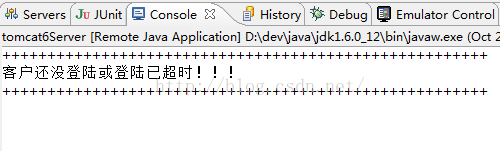
操作流程如下:客户未登录或登录已超时,提示“客户还没登陆或登陆已超时!!!”,终止执行,然后跳转到某页面;否则继续往下执行。
以下模拟案例大概实现如上需求,接下来废话少说,直接copy代码
1、项目目录结构
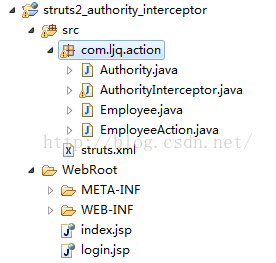
2、权限控制注解类Authority.java
package com.ljq.action;

import java.lang.annotation.ElementType;

import java.lang.annotation.Retention;

import java.lang.annotation.RetentionPolicy;

import java.lang.annotation.Target;

/**

 * 用于识别在进行action调用的时候,标注该方法调用是否需要权限控制,需要什么样的权限的注解类。

 *

 * 该注解类一般会包括两个属性,一个是需要的权限,一个是对应的action。

 *

 * @author Administrator

 *

 */

//表示在什么级别保存该注解信息

@Retention(RetentionPolicy.RUNTIME)

//表示该注解用于什么地方

@Target(ElementType.METHOD)

public @interface Authority {

    String actionName();

    String privilege();

}
3、权限拦截器类AuthorityInterceptor.java
package com.ljq.action;

import java.lang.reflect.Method;

import java.util.Date;

import org.apache.struts2.ServletActionContext;

import com.opensymphony.xwork2.ActionInvocation;

import com.opensymphony.xwork2.interceptor.Interceptor;

/**

 * 用于拦截请求判断是否拥有权限的拦截器

 *

 * @author Administrator

 *

 */

@SuppressWarnings("serial")

public class AuthorityInterceptor implements Interceptor{

    public void destroy() {

    }

    public void init() {

    }

    public String intercept(ActionInvocation actionInvocation) throws Exception {

        String methodName=actionInvocation.getProxy().getMethod();

        Method currentMethod=actionInvocation.getAction()

                   .getClass().getMethod(methodName, null);

        //1、判断客户是否登陆

        //从session获取当前客户信息

        Employee employee=(Employee)ServletActionContext

                    .getRequest().getSession().getAttribute("employee");

        if(employee==null){

            System.out.println("++++++++++++++++++++++++++++++++++++++++++++++++++++++");

            System.out.println("客户还没登陆或登陆已超时!!!");

            System.out.println("++++++++++++++++++++++++++++++++++++++++++++++++++++++");

            System.out.println();

            return "index";

        }

        //2、进行权限控制判断

        //如果该请求方法是需要进行验证的则需执行以下逻辑

        if(currentMethod.isAnnotationPresent(Authority.class)){

            //获取权限校验的注解

            Authority authority=currentMethod.getAnnotation(Authority.class);

            //获取当前请求的注解的actionName

            String actionName=authority.actionName();

            //获取当前请求需要的权限

            String privilege=authority.privilege();

            //可以在此判断当前客户是否拥有对应的权限,如果没有可以跳到指定的无权限提示页面,如果拥有则可以继续往下执行。

            //if(拥有对应的权限){

            //    return actionInvocation.invoke();

            //}else{

            //    return "无权限";

            //}

            System.out.println("++++++++++++++++++++++++++++++++++++++++++++++++++++++");

            System.out.println("客户" + employee.getUserName() + "在" + new Date() + "执行了" + actionName+"方法,拥有"+privilege+"权限!!");

            System.out.println("++++++++++++++++++++++++++++++++++++++++++++++++++++++");

            System.out.println();

            return actionInvocation.invoke();

        }

        //3、进行非权限控制判断

        System.out.println("++++++++++++++++++++++++++++++++++++++++++++++++++++++");

        System.out.println("我执行了没有??");

        System.out.println("++++++++++++++++++++++++++++++++++++++++++++++++++++++");

        return "index";

    }

}
4、客户信息类Employee.java
package com.ljq.action;

import java.io.Serializable;

@SuppressWarnings("serial")

public class Employee implements Serializable {

    private Integer id;

    private String userName;

    private String pwd;

    public Employee() {

    }

    public Integer getId() {

        return id;

    }

    public void setId(Integer id) {

        this.id = id;

    }

    public String getUserName() {

        return userName;

    }

    public void setUserName(String userName) {

        this.userName = userName;

    }

    public String getPwd() {

        return pwd;

    }

    public void setPwd(String pwd) {

        this.pwd = pwd;

    }

}
5、action类EmployeeAction
package com.ljq.action;

import com.opensymphony.xwork2.ActionSupport;

@SuppressWarnings("serial")

public class EmployeeAction extends ActionSupport{

    /**

     * 添加

     *

     * 请求该方法需要拥有对test的add权限,会通过拦截器拦截

     *

     * @return

     */

    @Authority(actionName="test", privilege="add")

    public String add(){

        System.out.println("执行了add方法!!!");

        return SUCCESS;

    }

    /**

     * 查找

     *

     * 请求该方法的时候需要拥有对test的find权限,会通过拦截器拦截

     *

     * @return

     * @throws Exception

     */

    @Authority(actionName="test", privilege="find")

    public String find() throws Exception {

        System.out.println("执行了find方法!!!");

        return SUCCESS;

    }

    /**

     * 删除

     *

     * 不会通过拦截器拦截,因为没对actionName进行权限配置

     *

     * @return

     * @throws Exception

     */

    public String delete() throws Exception {

        System.out.println("执行了delete方法!!!");

        return SUCCESS;

    }

}
6、首页index.jsp
<%@ page language="java" import="java.util.*" pageEncoding="UTF-8"%>

<%@taglib uri="/struts-tags" prefix="s"%>

<%

String path = request.getContextPath();

String basePath = request.getScheme()+"://"+request.getServerName()+":"+request.getServerPort()+path+"/";

%>

<!DOCTYPE HTML PUBLIC "-//W3C//DTD HTML 4.01 Transitional//EN">

<html>

  <head>

    <base href="<%=basePath%>">

    <title>My JSP 'index.jsp' starting page</title>

    <meta http-equiv="pragma" content="no-cache">

    <meta http-equiv="cache-control" content="no-cache">

    <meta http-equiv="expires" content="0">

    <meta http-equiv="keywords" content="keyword1,keyword2,keyword3">

    <meta http-equiv="description" content="This is my page">

    <!--

    <link rel="stylesheet" type="text/css" href="styles.css">

    -->

  </head>

  <body>

     欢迎您的到来....

  </body>

</html>
7、登录页login.jsp
<%@ page language="java" import="java.util.*" pageEncoding="UTF-8"%>

<%@page import="com.ljq.action.Employee"%>

<%

    Employee employee=new Employee();

    employee.setId(1);

    employee.setUserName("jiqinlin");

    employee.setPwd("123456");

    request.getSession().setAttribute("employee", employee);

%>
8、struts2配置文件
<?xml version="1.0" encoding="UTF-8" ?>

<!DOCTYPE struts PUBLIC

    "-//Apache Software Foundation//DTD Struts Configuration 2.0//EN"

    "http://struts.apache.org/dtds/struts-2.0.dtd">

<struts>

    <constant name="struts.serve.static.browserCache" value="false"/>

    <constant name="struts.action.extension" value="do"/>

    <constant name="struts.i18n.encoding" value="UTF-8"/>

    <package name="base" extends="struts-default">

        <global-results>

            <result name="index">/index.jsp</result>

            <result name="success">/login.jsp</result>

        </global-results>

    </package>

    <!-- 自定义拦截器 -->

    <package name="permissionInterceptor"

        namespace="/permissionInterceptor" extends="base">

        <interceptors>

            <!-- 注册自定义的权限控制拦截器 -->

            <interceptor name="authorityInterceptor" class="com.ljq.action.AuthorityInterceptor"/>

            <!-- 把自定义的权限控制拦截器和默认的拦截器栈加到新的自定义的拦截器栈 -->

            <interceptor-stack name="myInterceptors">

                <interceptor-ref name="defaultStack"/>

                <interceptor-ref name="authorityInterceptor"/>

            </interceptor-stack>

        </interceptors>

        <!-- 指定新的自定义的拦截器栈为默认的拦截器栈,这样自定义的权限控制拦截器就可以发挥作用了 -->

        <default-interceptor-ref name="myInterceptors"/>

    </package>

    <package name="employee" extends="permissionInterceptor">

        <action name="*Employee" class="com.ljq.action.EmployeeAction" method="{1}">

        </action>

    </package>

</struts>
web.xml配置文件
<?xml version="1.0" encoding="UTF-8"?>

<web-app version="2.4" xmlns="http://java.sun.com/xml/ns/j2ee"

    xmlns:xsi="http://www.w3.org/2001/XMLSchema-instance"

    xsi:schemaLocation="http://java.sun.com/xml/ns/j2ee

    http://java.sun.com/xml/ns/j2ee/web-app_2_4.xsd">

    <filter>

        <filter-name>struts2</filter-name>

        <filter-class>

            org.apache.struts2.dispatcher.ng.filter.StrutsPrepareAndExecuteFilter

        </filter-class>

    </filter>

    <filter-mapping>

        <filter-name>struts2</filter-name>

        <url-pattern>/*</url-pattern>

    </filter-mapping>

</web-app>
跟踪控制台打印的信息
1、未登录,访问查找功能:http://localhost:8083/struts2_authority_interceptor/addEmployee.do
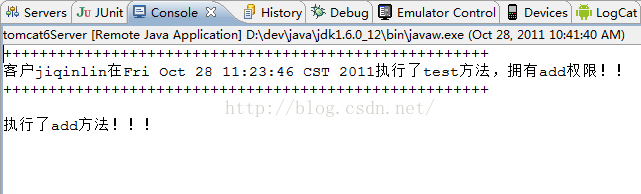
2、已登录,访问添加功能:http://localhost:8083/struts2_authority_interceptor/login.jsp
http://localhost:8083/struts2_authority_interceptor/addEmployee.do
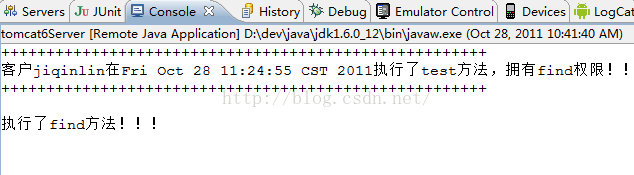
已登录,访问查找功能:http://localhost:8083/struts2_authority_interceptor/login.jsp
http://localhost:8083/struts2_authority_interceptor/findEmployee.do
3、已登录,访问删除功能
已登录,访问查找功能:http://localhost:8083/struts2_authority_interceptor/login.jsp
http://localhost:8083/struts2_authority_interceptor/deleteEmployee.do
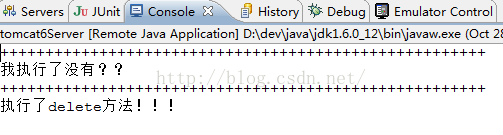
完毕!!
struts2拦截器加自定义注解实现权限控制的更多相关文章
- SpringMVC拦截器+Spring自定义注解实现权限验证
特别提示:本人博客部分有参考网络其他博客,但均是本人亲手编写过并验证通过.如发现博客有错误,请及时提出以免误导其他人,谢谢!欢迎转载,但记得标明文章出处:http://www.cnblogs.com/ ...
- 从struts2拦截器到自定义拦截器
拦截器可谓struts2的核心了,最基本的bean的注入就是通过默认的拦截器实现的,一般在struts2.xml的配置中,package内直接或间接继承了struts-default.xml,这样st ...
- struts2(五)之struts2拦截器与自定义拦截器
前言 前面介绍了struts2的输入验证,如果让我自己选的话,肯定是选择xml配置校验的方法,因为,能使用struts2中的一些校验规则,就无需自己编写了, 不过到后面应该都有其他更方便的校验方法,而 ...
- 在struts2.3.4.1中使用注解、反射、拦截器实现基于方法的权限控制
权限控制是每一个系统都应该有的一个功能,有些只需要简单控制一下就可以了,然而有些却需要进行更加深入和细致的权限控制,尤其是对于一些MIS类系统,基于方法的权限控制就更加重要了. 用反射和自定义注解来实 ...
- [Java]利用拦截器和自定义注解做登录以及权限验证
1.自定义注解 需要验证登录的注解 package com.etaofinance.wap.common; import java.lang.annotation.Documented; import ...
- 拦截器和自定义注解@interface
1 .拦截器(Interceptor): 用于在某个方法被访问之前进行拦截,然后在Handler执行之前或之后加入某些操作,其实就是AOP的一种实现策略. 拦截用户的请求并进行相应的处理,比如:判断用 ...
- Spring MVC基础知识整理➣拦截器和自定义注解
概述 Spring MVC中通过注解来对方法或者类进行动态的说明或者标注,类似于配置标识文件的属性信息.当标注的类或者方式被使用时候,通过提取注解信息来达到对类的动态处理.在 MVC中,我们常用的注解 ...
- SpringBoot 拦截器和自定义注解判断请求是否合法
应用场景举例: 当不同身份的用户请求一个接口时,用来校验用户某些身份,这样可以对单个字段数据进行精确权限控制,具体看代码注释 自定义注解 /** * 对比请求的用户身份是否符合 * @author l ...
- 6、Struts2拦截器实现权限控制
1.创建如下项目结果 2.在com.entity包下创建 package com.entity; public class User { private String name; private St ...
随机推荐
- Codeforces Round #402 (Div. 2) B
Description Polycarp is crazy about round numbers. He especially likes the numbers divisible by 10k. ...
- 水题 Codeforces Round #304 (Div. 2) A. Soldier and Bananas
题目传送门 /* 水题:ans = (1+2+3+...+n) * k - n,开long long */ #include <cstdio> #include <algorithm ...
- saltstack学习笔记--grains基本操作
查看当前已经定义的监控项: [root@master ~]# salt "192.168.75.135" grains.items 192.168.75.135: ---- ...
- RabbitMQ十:重要方法简述(参数)
主要方法 前言 经过前面的学习,RabbitMQ 已经拙见有一定认识和了解,今天主要针对我们在前面学习方法进行一次小总结,本篇文章也想在开头写的,但是后来考虑,如果我都把方法都一一列举,我想大家都没很 ...
- unity内存管理
最近一直在研究unity的内存加载,因为它是游戏运行的重中之重,如果不深入理解和合理运用,很可能导致项目因内存太大而崩溃. 详细说一下细节概念:AssetBundle运行时加载:来自文件就用Creat ...
- html语法第 -2
1 <html> 2 <head> 3 <title>这是第一节课网页标题</title> 4 <meta charset="UTF-8 ...
- 在Java8的foreach()中使用break、continue
java8的lambda中,foreach()处理集合时不能使用break和continue这两个方法,可以使用return实现 参考:https://blog.csdn.net/lmy86263/a ...
- IOS数组
/*******************************************************************************************NSArray ...
- HttpClient 接口调用
String url = "http://127.0.0.1:8080/api"; //然后根据表名获取公司信息 HttpPost httppost = new HttpPost( ...
- 1.1 NLP基础技能,字符串的处理
#!/usr/bin/env python # coding: utf-8 # # 字符串操作 # ### 去空格和特殊字符 # In[8]: s = " hello world! &quo ...