
iOS UILabel换行同时修改字体大小颜色
UIButton *onlyPriceBtn = [UIButton buttonWithType:UIButtonTypeCustom];
onlyPriceBtn.layer.borderColor = [HuConfigration uiColorFromString:@"#F0493D"].CGColor;;
onlyPriceBtn.layer.borderWidth = 0.5f;
onlyPriceBtn.layer.cornerRadius = 4;
onlyPriceBtn.layer.masksToBounds = YES;
onlyPriceBtn.frame = CGRectMake(15, CGRectGetMaxY(titleLabel.frame)+15, HHBWIDTH - 30, 60);
[self.bgView addSubview:onlyPriceBtn];
UILabel *btnTitleLabel = [[UILabel alloc]initWithFrame:CGRectMake(0, 0, 200, 60)];
btnTitleLabel.center = onlyPriceBtn.center;
btnTitleLabel.textColor = kHuColor(#A5A5A5);
btnTitleLabel.font = [UIFont customFontSize:12];
btnTitleLabel.numberOfLines = 0;
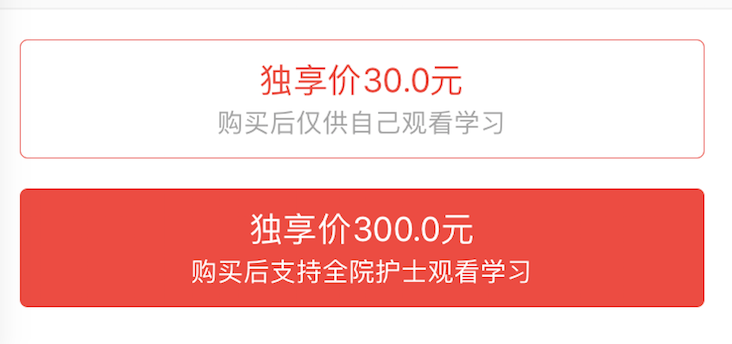
btnTitleLabel.text = @"独享价30.0元\n购买后仅供自己观看学习";//使用斜杠一定不要忘记写numberOfLines 否则无效
btnTitleLabel.textAlignment = NSTextAlignmentCenter;
NSMutableAttributedString *attributer = [[NSMutableAttributedString alloc]initWithString:btnTitleLabel.text];
[attributer addAttribute:NSForegroundColorAttributeName
value:kHuColor(#F0493D)
range:NSMakeRange(0, 8)];
[attributer addAttribute:NSFontAttributeName
value:[UIFont customFontSize:16]
range:NSMakeRange(0, 8)];
NSMutableParagraphStyle *paragraphStyle = [[NSMutableParagraphStyle alloc]init];//调整行间距
[paragraphStyle setLineSpacing:4];
[attributer addAttribute:NSParagraphStyleAttributeName
value:paragraphStyle
range:NSMakeRange(0, btnTitleLabel.text.length)];
[paragraphStyle setAlignment:NSTextAlignmentCenter];//为了美观调整行间距,但是当调整行间距时上面设置的居中不能用看 所以要加这一句 [paragraphStyle setAlignment:NSTextAlignmentCenter] 不然没有居中效果
btnTitleLabel.attributedText = attributer;
[self.bgView addSubview:btnTitleLabel];
效果图
iOS UILabel换行同时修改字体大小颜色的更多相关文章
- 利用NSMutableAttributedString实现label上字体大小颜色行间距的改变
UILabel *label = [[UILabel alloc]initWithFrame:CGRectMake(0, 0, self.frame.size.width, self.frame.si ...
- 【纯代码】Swift-自定义PickerView单选(可修改分割线颜色、修改字体大小、修改字体颜色。)(可根据需要自己扩展)
typealias PopPickerViewCallBackClosure = (_ resultStr:NSString?) -> () class PopPickerView : UIVi ...
- UISegmentedControl 修改字体大小 和 颜色
UISegmentedControl 修改字体大小 和 颜色 大小: UIFont *font = [UIFont boldSystemFontOfSize:14.0f]; NSDictionary ...
- 第一章:eclipse 中修改字体大小和编码格式
eclipse 中修改字体大小的步骤: 1. 在 eclipse 的工具栏中,找到 weindows 下面的 preferences 2. 在 preferences 的 输出 font ,在 Bas ...
- centos7 终端修改字体大小
如果你觉得你的终端字体太小了,停下来看一看这里可以帮你快捷修改字体大小 修改字体大小(这个是最坑爹的) 其实关键的命令就一个:setfont 但是setfont后面要跟的字体到底要写什么就的具体去查了 ...
- Eclipse 在线汉化的和修改字体大小、颜色的方法
一.在线汉化 先进入 http://www.eclipse.org/babel/downloads.php 找到自己对应版本的网址,然后复制下来. 然后,进入eclipse.点工具栏上的Help - ...
- eclipse-ee修改字体大小和配置Tomcat服务器
参考博客:http://blog.csdn.net/lpftobetheone/article/details/17783791 一.EclipseEE背景色和字体的修改 1.Eclipse背景颜色修 ...
- Android spinner默认样式不支持换行和修改字体样式的解决方法
在spinner中显示的数据过多,需要换行,而Android自身提供的android.R.layout.simple_spinner_dropdown_item样式不支持换行,因此参考android提 ...
- Android Studio修改字体大小
android studio提供的主题是不能修改字体和字体大小的,如果要修改大小就的另存一份自定义的主题了. 1.启动Android Studio,菜单"File"-"S ...
随机推荐
- 【C#】C#数据类型和VB的区别
导读:看完了C#,需要总结的有很多东西.开始没有怎么在意,根本没有意识到,那些视频是教给了我一种新的编程语言,我就真的是像看电视剧一样的看完了.猛然想起了学过的VB,这是目前为止,我接触到的仅有的语言 ...
- 新一代 javascript 模板引擎
artTemplate-3.0 新一代 javascript 模板引擎 <!DOCTYPE html> <html lang="en"> <head& ...
- 关于JS正则表达式
去除所有P标签 content=content.replace(/<([\/]?)(p)((:?\s*)(:?[^>]*)(:?\s*))>/g, ''); 将所有的 1. ...
- bzoj3874&2832 [Ahoi2014]宅男计划 模拟退火,三分
[Ahoi2014&Jsoi2014]宅男计划 Time Limit: 1 Sec Memory Limit: 256 MBSubmit: 962 Solved: 371[Submit][ ...
- linux命令dhclient
linux命令 dhclient 背景 多台服务器(CentOS7 系统)设置静态IP,其中有台服务器设置了静态IP后,只要重启就变更为其他的,但是配置文件并无改动. 使用命令 #自动获取IP dhc ...
- Nk 1430 Fibonacci(二分矩阵乘幂)
AC代码: #include<iostream> using namespace std; ][]; ][]; ][]; ][]; void binary(int n) { int i,j ...
- COdevs 1074 食物链
1074 食物链 2001年NOI全国竞赛 时间限制: 3 s 空间限制: 64000 KB 题目等级 : 钻石 Diamond 题目描述 Description 动物王国中有三类动物 A,B,C, ...
- CodeForces 438D 线段树 剪枝
D. The Child and Sequence time limit per test 4 seconds memory limit per test 256 megabytes input st ...
- laravel 的模型
建立model文件,再项目的app目录下建立Member.php namespace App; use Illuminate\Database\Eloquent\Model; class Member ...
- scott登陆PLSQL时候出现insufficient privileges的解决方法
先用SYS登陆SQLPLUS,即: 再给scott授权: