
The Runtime Interaction Model for Views-UI布局事件处理流程
The Runtime Interaction Model for Views
Any time a user interacts with your user interface, or any time your own code programmatically changes something, a complex sequence of events takes place inside of UIKit to handle that interaction. At specific points during that sequence, UIKit calls out to your view classes and gives them a chance to respond on behalf of your application. Understanding these callout points is important to understanding where your views fit into the system. Figure 1-7shows the basic sequence of events that starts with the user touching the screen and ends with the graphics system updating the screen content in response. The same sequence of events would also occur for any programmatically initiated actions.
Figure 1-7 UIKit interactions with your view objects 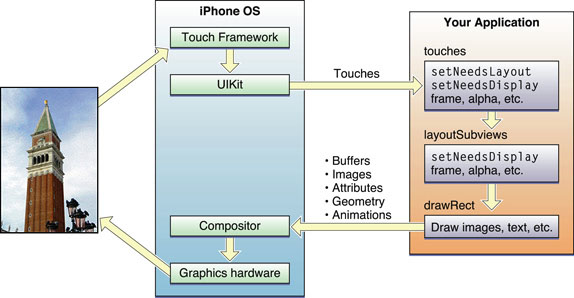
The following steps break the event sequence in Figure 1-7 down even further and explain what happens at each stage and how you might want your application to react in response.
The user touches the screen.
The hardware reports the touch event to the UIKit framework.
The UIKit framework packages the touch into a
UIEventobject and dispatches it to the appropriate view. (For a detailed explanation of how UIKit delivers events to your views, see Event Handling Guide for iOS.)The event-handling code of your view responds to the event. For example, your code might:
Change the properties (frame, bounds, alpha, and so on) of the view or its subviews.
Call the
setNeedsLayoutmethod to mark the view (or its subviews) as needing a layout update.Call the
setNeedsDisplayorsetNeedsDisplayInRect:method to mark the view (or its subviews) as needing to be redrawn.Notify a controller about changes to some piece of data.
Of course, it is up to you to decide which of these things the view should do and which methods it should call.
If the geometry of a view changed for any reason, UIKit updates its subviews according to the following rules:
If you have configured autoresizing rules for your views, UIKit adjusts each view according to those rules. For more information about how autoresizing rules work, see Handling Layout Changes Automatically Using Autoresizing Rules.
If the view implements the
layoutSubviewsmethod, UIKit calls it.You can override this method in your custom views and use it to adjust the position and size of any subviews. For example, a view that provides a large scrollable area would need to use several subviews as “tiles” rather than create one large view, which is not likely to fit in memory anyway. In its implementation of this method, the view would hide any subviews that are now offscreen or reposition them and use them to draw newly exposed content. As part of this process, the view’s layout code can also invalidate any views that need to be redrawn.
If any part of any view was marked as needing to be redrawn, UIKit asks the view to redraw itself.
For custom views that explicitly define a
drawRect:method, UIKit calls that method. Your implementation of this method should redraw the specified area of the view as quickly as possible and nothing else. Do not make additional layout changes at this point and do not make other changes to your application’s data model. The purpose of this method is to update the visual content of your view.Standard system views typically do not implement a
drawRect:method but instead manage their drawing at this time.Any updated views are composited with the rest of the application’s visible content and sent to the graphics hardware for display.
The graphics hardware transfers the rendered content to the screen.
https://developer.apple.com/library/content/documentation/WindowsViews/Conceptual/ViewPG_iPhoneOS/WindowsandViews/WindowsandViews.html#//apple_ref/doc/uid/TP40009503-CH2-SW5
The Runtime Interaction Model for Views-UI布局事件处理流程的更多相关文章
- iOS-屏幕适配-UI布局
iOS 屏幕适配:autoResizing autoLayout和sizeClass 一.图片解说 -------------------------------------------------- ...
- iOS开发~UI布局(三)深入理解autolayout
一.概要 通过对iOS8界面布局的学习和总结,发现autolayout才是主角,autolayout是iOS6引入的新特性,当时还粗浅的学习了下,可是没有真正应用到项目中.随着iOS设备尺寸逐渐碎片化 ...
- 移动UI布局设计原则(一)
学习笔记1 Learning notes one 移动UI布局设计的布局原则 Layout Principles of Mobile UI Layout Design 移动UI视觉交互设计法则 Des ...
- Duilib源码分析(五)UI布局—Layout与各子控件
接下来,继续分析duilib之UI布局Layout,目前提供的布局有:VerticalLayout.HorizontalLayout.TileLayout.TabLayout.ChildLayout分 ...
- iOS开发之遍历Model类的属性并完善使用Runtime给Model类赋值
在上篇博客<iOS开发之使用Runtime给Model类赋值>中介绍了如何使用运行时在实体类的基类中添加给实体类的属性赋值的方法,这个方法的前提是字典的Key必须和实体类的Property ...
- AppleWatch___学习笔记(二)UI布局和UI控件
1.UI布局 直接开发,你会发现Apple Watch并不支持AutoLayout,WatchKit里有个类叫做WKInterfaceGroup,乍一看像是UIView,但是这货其实是用来布局的.从 ...
- iOS开发~UI布局(二)storyboard中autolayout和size class的使用详解
一.概要:前一篇初步的描述了size class的概念,那么实际中如何使用呢,下面两个问题是我们一定会遇到的: 1.Xcode6中增加了size class,在storyboard中如何使用? 2.a ...
- iOS开发~UI布局(一)初探Size Class
随着iOS8系统的发布,一个全新的页面UI布局概念出现,这个新特性将颠覆包括iOS7及之前版本的UI布局方式,这个新特性就是Size Class.Size Class配合Auto Layout可以解决 ...
- WPF UI布局之概述
在线演示:http://v.youku.com/v_show/id_XNzA5NDk2Mjcy.html 清晰版视频+代码下载:http://115.com/lb/5lbeer0m9lad 一.简单介 ...
随机推荐
- Cocos2D-X2.2.3学习笔记12(瞬时动作)
watermark/2/text/aHR0cDovL2Jsb2cuY3Nkbi5uZXQvaHVjYmxvZw==/font/5a6L5L2T/fontsize/400/fill/I0JBQkFCMA ...
- opencl+opencv实现sobel算法
这几天在看opencl编程指南.照着书中的样例实现了sobel算法: 1.结合opencv读取图像,保存到缓冲区中. 2.编写和编译内核.并保存显示处理后的结果. 内核: const sampler_ ...
- 科普:google的数字图书馆
https://books.google.com/ngrams Google Ngram Viewer,她利用google所拥有的所有图书作为资源,为你提供单词和短语历年使用次数的展示图标.数据化了数 ...
- IE6\7\8 :last-child 和 :first-chlid 兼容
IE9以下不支持last-child ,只支持first-child,边框尽量用上边框.
- 控件CListCtr详解
1.CListCtrl控件 CListCtrl控件在数据库编程中是用得比较多的控件之一,也是Window控件中较难掌握的一个控件.他可以有四显示方式,Report.List.Icon.SmallIco ...
- 【Poj1090】Chain
Chain Time Limit: 1000MS Memory Limit: 10000K Total Submissions: 3414 Accepted: 1126 Description ...
- 【js】为什么要使用react+redux
前端的浪潮一叠叠袭来,带走了jQuery,带走了backbone,带来了react,带来了redux,但是面对层出不穷的前端技术,我们应该何去何从呢?近一年来笔者的也发生了同样的变化,技术栈从.net ...
- 2017杭电多校第五场Rikka with Subset
Rikka with Subset Time Limit: 2000/1000 MS (Java/Others) Memory Limit: 65536/65536 K (Java/Others ...
- 二分+RMQ/双端队列/尺取法 HDOJ 5289 Assignment
题目传送门 /* 题意:问有几个区间最大值-最小值 < k 解法1:枚举左端点,二分右端点,用RMQ(或树状数组)求区间最值,O(nlog(n))复杂度 解法2:用单调队列维护最值,O(n)复杂 ...
- Oracle取查询结果数据的第一条记录SQL
Oracle取查询结果数据的第一条记录SQL: ; ;