
IIS ARR设置HTTP跳转到HTTPS
GUI Version
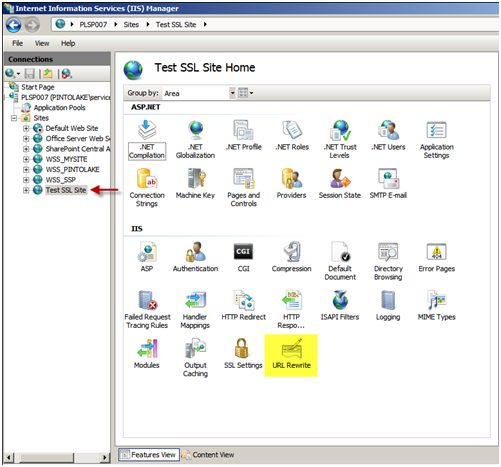
- Select the website you wish to configure
- In the “Features View” panel, double click URL Rewrite
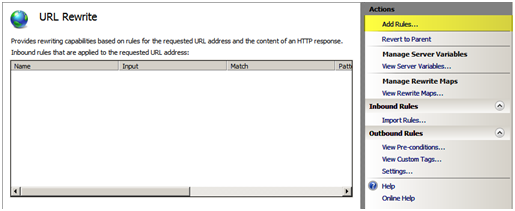
You will notice there are currently no rules configured for this site. Click “Add Rules…” in the Actions menu to the right of the “Features View” panel
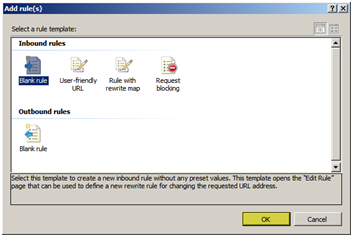
Use the default “Blank rule” and press “OK”.
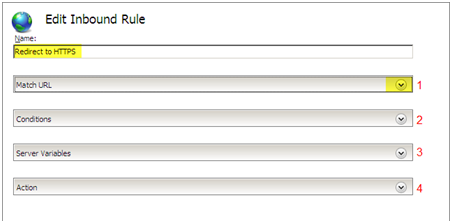
When editing a rule there are the “Name” field and 4 configuration pull down boxes.
- Enter “Redirect to HTTPS” in the name field.
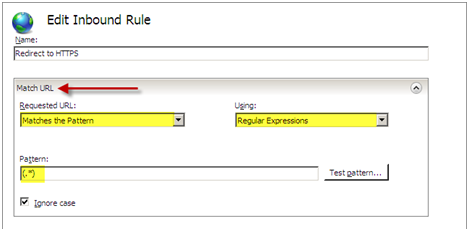
- Next we will configure the first configuration pull down box called “Match URL”, on the right side of “Match URL” press the down arrow to expand the box.
Within the “Match URL” configuration box we will set the following settings:
Requested URL: Matches the Pattern
Using: Regular Expressions
Pattern: (.*)
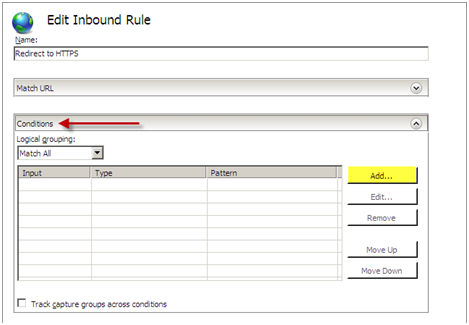
We can now edit the next configuration pull down box which is “Conditions”, Press “Add…” to add a new condition to the configuration.
We will configure the condition with the following settings:
Condition Input: {HTTPS}
Check if input string: Matches the Pattern
Pattern: ^OFF$
Press “OK”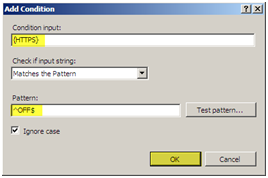
You should see your condition in the list of conditions.
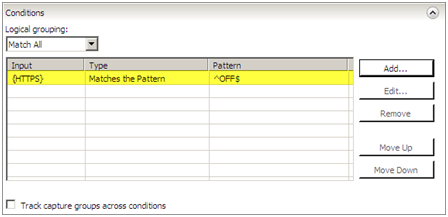
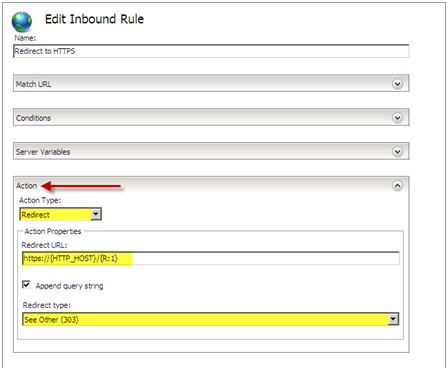
For this setting we do not need to configure the “Server Variables” pull down box. Continue onto the “Action” configuration box and pull down the box by selecting the arrow on the right. We will configure the following settings for the “Action” configuration:
Action Type: Redirect
Redirect URL: https://{HTTP_HOST}/{R:1}
Redirect Type: See Other (303)
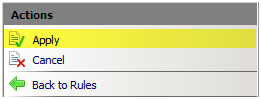
Press “Apply” then press “Back to Rules”
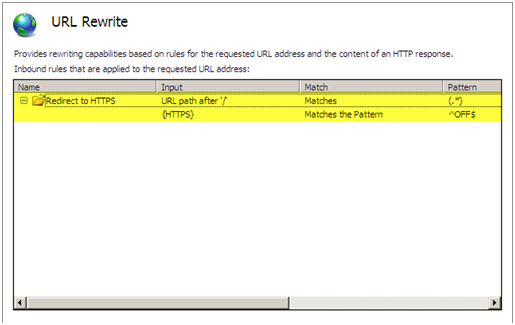
You should now see the rule configured on the main screen of the URL Rewrite module.
Test your site, it should now redirect from HTTP to HTTPS.
If we exam the web.config file we can see where the rule was entered. If we entered the rule directly into the web.config file it would show up in the GUI.
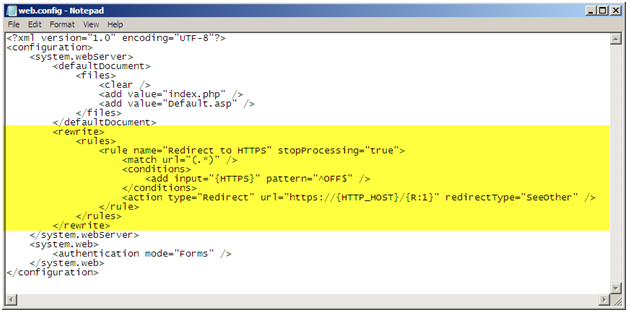
Web.Config Rule
You can also edit the web.config file of the site directly and you will be able to see the rule in the GUI. You will need to enter the following within the <system.webServer> </system.webServer> elements.
<rule name="Redirect to HTTPS" stopProcessing="true">

<match url="(.*)" />

<conditions><add input="{HTTPS}" pattern="^OFF$" />

</conditions>

<action type="Redirect" url="https://{HTTP_HOST}/{R:1}" redirectType="SeeOther" />

</rule>
When implementing this solution you need to make sure to use relative paths for all references on your page because there is a possibility you will get a warning asking you if you want to display secure and insecure items. For example, if you have a logo on your page and the URL to this logo is http://domain/images/logo.jpg, do not use the whole path because including the http:// will hard code this image to use http and not https. Instead use /images/logo.jpg.
IIS ARR设置HTTP跳转到HTTPS的更多相关文章
- IIS服务器设置http自动跳转https方法
很多站长在部署SSL证书后,网站实现https加密访问,但考虑到用户习惯了http访问,很多外链也是http访问形式,所以需要在IIS服务器配置http自动跳转https,避免用户通过http访问不到 ...
- 【转载】网站配置Https证书系列(三):IIS网站设置Http链接直接跳转Https安全连接
Http链接请求是以明文的方式传输,在传输的过程中很容易被篡改数据,一个典型的例子就是运营商的网络劫持注入广告信息等,而Https请求则是安全加密的请求,报文数据以密文的形式进行传输.当IIS网站配置 ...
- MVC图片上传详解 IIS (安装SSL证书后) 实现 HTTP 自动跳转到 HTTPS C#中Enum用法小结 表达式目录树 “村长”教你测试用例 引用provinces.js的三级联动
MVC图片上传详解 MVC图片上传--控制器方法 新建一个控制器命名为File,定义一个Img方法 [HttpPost]public ActionResult Img(HttpPostedFile ...
- iis7设置http跳转https实测可用
前面ytkah和大家聊了Apache设置http如何301到https,现在我们说说iis7设置http跳转https,因为还是有很多人在用iis服务器.首先要先安装url rewrite modul ...
- apache如何设置http自动跳转到https
如何设置http自动跳转到https?apache环境下,配置好https后,需要设置url重定向规则,使网站页面的http访问都自动转到https访问. 1.先打开url重定向支持1)打开Apach ...
- Nginx环境中如何将HTTP跳转至HTTPS设置
如果我们VPS服务器的WEB环境采用的是NGINX架构,那如果我们将安装SSL证书的网站希望强制跳转至HTTPS网站URL的时候那需要如何设置呢?这里个人建议是这样的,我们必须要强制一个地址,这样网站 ...
- IIS 7.5 使用URL Rewrite模块简单设置网页跳转
原文 IIS 7.5 使用URL Rewrite模块简单设置网页跳转 我们都知道Apache可以在配置文件里方便的设置针对网页或网站的rewrite,但是最近接手了一组IIS服务器,发现这货简单的没有 ...
- IIS (安装SSL证书后) 实现 HTTP 自动跳转到 HTTPS
IIS 里 安装好 SSL 证书后,如何实现 在浏览器里录入 http://www.xxx.com,会自动跳转到 https://www.xxx.com 呢. 首先,下载并安装 IIS 扩展: URL ...
- 如何在IIS中设置HTTPS服务
文章:https://support.microsoft.com/en-us/help/324069/how-to-set-up-an-https-service-in-iis 在这个任务中 摘要 为 ...
随机推荐
- WAMP的端口修改
wamp集成了开源的利器mysql+apache+php,真的是有越来越火的趋势了,可是有些人,安装php的集成开发环境WAMP的时候,出现端口被占用了,无法连接服务器的时候, 这时,如果要修改WAM ...
- 【leetcode】Word Break(python)
思路是这种.我们从第一个字符開始向后依次找,直到找到一个断句的地方,使得当前获得的子串在dict中,若找到最后都没找到.那么就是False了. 在找到第一个后,接下来找下一个断句处,当然是从第一个断句 ...
- [办公应用]如何在WORD中让英文网址可以在字符中间换行
有时候我们写文章,存在中英文混合录入的情况.一般情况下,office 2003的word软件中,会自作聪明的避免单词断行显示,也就是说它会默认尽量把一个单词显示在某一行内,从而避免单词被分开.但有时候 ...
- URL传参中文乱码的一种解决方法
中文乱码是由于,发送和接收方使用的编码解码格式不一致导致,以下是关于url传参解决中文乱码的一种方法,最后根据各种编码格式尝试解码,发现正确的解码格式 string strQueryString = ...
- 反爬统计 数据库 sql CASE
-- 经排查日志,发现ordertest.com下的url检测,频繁<Response [403]>,Forbidden;再进一步查询数据库数据:逐日统计错误临时表test_error_t ...
- Semantic Parsing(语义分析) Knowledge base(知识图谱) 对用户的问题进行语义理解 信息检索方法
简单说一下所谓Knowledge base(知识图谱)有两条路走,一条是对用户的问题进行语义理解,一般用Semantic Parsing(语义分析),语义分析有很多种,比如有用CCG.DCS,也有用机 ...
- ZFIND_EXIT_BADI
*&---------------------------------------------------------------------* *& Report ZFIND_EX ...
- 设计模式-(9)中介者模式(swift)
在对象去耦合的模式中,有两种模式:中介者模式,观察者模式 一,概念 用一个中介对象来封装一系列的对象交互.中介者使各对象不需要显式地相互引用,从而使其耦合松散,而且可以独立地改变它们之间的交互. 这个 ...
- jsp useBean
<jsp:uesBean id="test" scope="page" class="test.useBeanTest"> 用于 ...
- 并不对劲的fhq treap
听说很对劲的太刀流不止会splay一种平衡树,并不对劲的片手流为了反驳他,并与之针锋相对,决定学学高端操作. 很对劲的太刀流-> 据说splay常数极大,但是由于只知道splay一种平衡树能对序 ...