
Shell脚本初学习
第一个shell程序运行,教程来自:http://jingyan.baidu.com/article/8cdccae947f83e315413cd05.html
代码如下:
 #!/bin/sh

 touch a.txt

 sleep

 echo "testtesttesttest">>a.txt
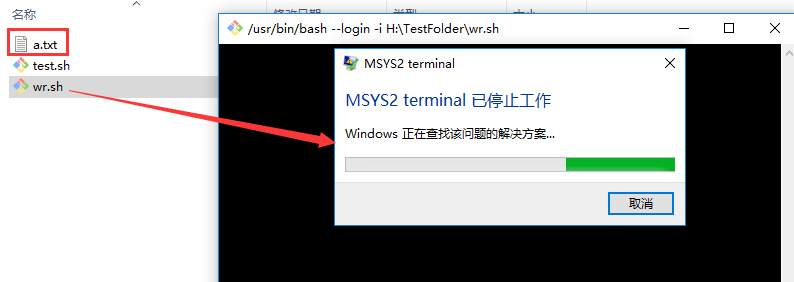
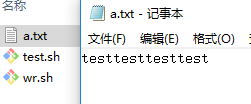
不知道为什么提示:MSYS2 terminal已停止工作。尚未解决。
然后用git pull的代码
 #!/bin/bash

 #mkdir  翟宇豪

 #cd     翟宇豪

 #git init

 #git pull https://git.coding.net/Rio56/wf.git master

 declare -A map=(["冉华"]="https://git.coding.net/Dawnfox/wf.git"

         ["刘淑霞"]="https://git.coding.net/liusx0303/CountWords.git"

         ["胡佑蓉"]="https://coding.net/u/huyr000/p/countWord/git"

         ["王超"]="https://git.coding.net/SuperCodingChao/wfProject.git"

         ["高远博"]="https://coding.net/u/Rainbows/p/wc/git"

         ["陈建宇"]=" https://coding.net/u/MR__Chen/p/Demo/git"

         ["代秋彤"]="https://git.coding.net/a284617374/soft.git"

         ["方铭"]="https://coding.net/u/MingZi-/p/cipingtongji/git"

         ["葛美义"]=" https://git.coding.net/gmyznb/wordcount1.git"

         ["黄泽宇"]="https://coding.net/u/huangzy_95/p/wf/git"

         ["贾男男"]="https://git.coding.net/lynlynyess/Wordcount.git"

         ["贾雅杰"]="https://git.coding.net/jyj5951/wf.git"

         ["姜珊"]="https://coding.net/u/js2017102865/p/StreamReader/git"

         ["阚博文"]="https://git.coding.net/zbwd666/zbwd.git"

         ["李传康"]="https://git.coding.net/lick468/wf.git"

         ["李圆圆"]="https://git.coding.net/lyy181/count.git"

         ["蔺依铭"]="https://git.coding.net/Hitagi123/word-count.git"

         ["刘成志"]=" https://git.coding.net/liuchengzhi0944/word_dirt.git"

         ["刘耀泽"]="https://coding.net/u/liuyz349/p/word_count/git"

         ["米赫"]="https://git.coding.net/immixiaomi/wf.git"

         ["苗威"]="https://git.coding.net/Vrocker/wf.git"

         ["任思佳"]="https://coding.net/u/rensijia/p/count-words/git"

         ["邵朔"]="https://coding.net/u/ss505072461/p/wf/git"

         ["宋雨"]="https://coding.net/u/songyuu/p/python_wf/git"

         ["田继平"]="https://git.coding.net/tianjiping/11111.git"

         ["王航"]="https://git.coding.net/wangh013/wordNumber.git"

         ["王磊"]="https://git.coding.net/137911934/SE20170914.git"

         ["王伟东"]="https://git.coding.net/wangwd/SecondAssignment.git"

         ["王玉玲"]="https://coding.net/u/tutu123/p/tutu1234/git"

         ["吴雨丹"]="https://git.coding.net/clairewyd/wf.git"

         ["徐劭斌"]="https://git.coding.net/xushaobin/ConsoleApplication3.git"

         ["杨梓瑞"]="https://git.coding.net/Vector121/homework.git"

         ["袁玥"]="https://git.coding.net/yuanyue2017102885/wordcount_1and2.git"

         ["翟宇豪"]="https://git.coding.net/Rio56/wf.git"

         ["张恩聚"]="https://git.coding.net/ZhangEJ/wf.git"

         ["邹双黛"]="https://git.coding.net/szjzsd/123.git"

         )

 for key in ${!map[@]} ; do

     mkdir $key

     cd  $key

     git init

     git pull ${map[$key]} master

     cd  ..

 done

 #echo ${!map[@]}

 #

 #echo ${map[@]}

 #

 # for key in ${!map[@]} ; do

 #     #    echo ${map[$key]}

 #     echo $key;

 # done
生成的文件夹乱码:
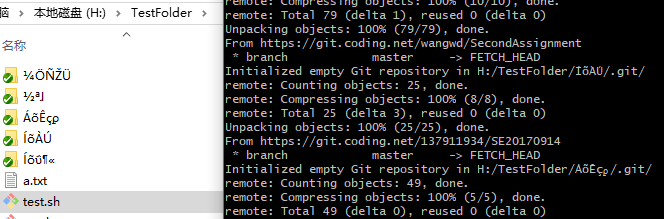
对shell脚本有了一点点认识,但看它也有变量定义等等,暂时还未学习。
留一个教程之后学习 http://www.runoob.com/linux/linux-shell.html
希望有遇到过此类问题的前辈帮忙解答~
Shell脚本初学习的更多相关文章
- 详细介绍Linux shell脚本基础学习
Linux shell脚本基础学习这里我们先来第一讲,介绍shell的语法基础,开头.注释.变量和 环境变量,向大家做一个基础的介绍,虽然不涉及具体东西,但是打好基础是以后学习轻松地前提.1. Lin ...
- Shell脚本编程学习入门 02
Shell脚本编程学习入门是本文要介绍的内容,我们可以使用任意一种文字编辑器,比如gedit.kedit.emacs.vi等来编写shell脚本,它必须以如下行开始(必须放在文件的第一行): #! ...
- Shell脚本的学习(二)
Shell脚本的学习(二) 方法: 1) 一个计算器: 2)递归实现打印目录 3)方法调用
- Shell脚本的学习(一)
Shell脚本的学习(一) 一)代码式shell脚本简介 1.下载 Xshell 5 建一个文件夹 mkdri home/data ; 1)查看一个在data里建一个1.sh 查看是否建立成功. 2) ...
- Linux shell脚本全面学习
Linux shell脚本全面学习 1. Linux 脚本编写基础 1.1 语法基本介绍 1.1.1 开头 程序必须以下面的行开始(必须方在文件的第一行): #!/bin/sh 符号#!用来告诉系统它 ...
- Linux shell脚本基础学习详细介绍(完整版)二
详细介绍Linux shell脚本基础学习(五) Linux shell脚本基础前面我们在介绍Linux shell脚本的控制流程时,还有一部分内容没讲就是有关here document的内容这里继续 ...
- Linux shell脚本基础学习详细介绍(完整版)一
Linux shell脚本基础学习这里我们先来第一讲,介绍shell的语法基础,开头.注释.变量和 环境变量,向大家做一个基础的介绍,虽然不涉及具体东西,但是打好基础是以后学习轻松地前提.1. Lin ...
- Shell脚本基础学习
Shell脚本基础学习 当你在类Unix机器上编程时, 或者参与大型项目如k8s等, 某些框架和软件的安装都是使用shell脚本写的. 学会基本的shell脚本使用, 让你走上人生巅峰, 才怪. 学会 ...
- Shell脚本编程学习入门 01
从程序员的角度来看, Shell本身是一种用C语言编写的程序,从用户的角度来看,Shell是用户与Linux操作系统沟通的桥梁.用户既可以输入命令执行,又可以利用 Shell脚本编程,完成更加复杂的操 ...
随机推荐
- python制作验证码
from PIL import Image, ImageFont, ImageDraw, ImageFilterfrom random import choice, randint # 随即配置颜色d ...
- GoogleTest初探(2)
前面的随笔介绍了Google Test中的基本测试单元TEST和测试夹具TEST_F,此篇介绍区别于这两种测试的参数化测试TEST_P 当待测试方法的行为取决于传入的参数时,而且这些参数的不同组合有多 ...
- MySQL高级函数case的使用技巧----与sum结合实现分段统计
case 函数 CASE WHEN condition1 THEN result1 WHEN condition2 THEN result2 ... WHEN conditionN THEN resu ...
- Linux启动流程(CentOS6)
内核级别: (POST)BIOS加电自检-->(Boot Sequence)从BIOS中读取启动顺序-->读取MBR中的bootloader-->加载内核-->读取伪根--&g ...
- Python-条件语句和循环语句
·条件语句 笔记: If 布尔值: print(‘hello,world!’) 当表达式为布尔表达式时,Flase None 0 ”” () [] {} 都视为假! @ ...
- C语言下的错误处理问题
今天来分享我认为比较好的几种在C语言下的错误处理方式 方式一: int example(int num) { ) { ; } ; } 在不符合条件的情况下使用return终止程序 方式二: void ...
- SQL 查询某时间段的数据 datadiff 计算时间差
datediff语法格式:datediff(day,开始时间,结束时间) 一.应用举例: 上面的代码,将查询 'created_time' > '2016-09-20' 的所有记录. 如果要查 ...
- 第一节 如何用Go实现单链表
一.概念介绍 下面这副图是我们单链表运煤车队. 每节运煤车就是单链表里的元素,每节车厢里的煤炭就是元素中保存的数据.前后车通过锁链相连,作为单链表运煤车,从1号车厢开始,每节车厢都知道后面拉着哪一节车 ...
- Verilog的一些系统任务(二)
$monitor 任务$monitor提供了监控和输出参数列表中的表达式或变量值的功能. 格式: $monitor(p1,p2,...,pn); $monitor; $monitor ...
- vs2013发布网站合并程序是出错(ILmerge.merge:error)
Vs2013发布网站时,生成错误提示: 合并程序集时出错: ILMerge.Merge: ERROR!!: Duplicate type 'manage_ForcePasswrod' found in ...