
Spring(十三)之SQL存储过程
SimpleJdbcCall 类可以被用于调用一个包含 IN 和 OUT 参数的存储过程。你可以在处理任何一个 RDBMS 时使用这个方法,就像 Apache Derby, DB2, MySQL, Microsoft SQL Server, Oracle,和 Sybase。
还是基于Spring之JDBC框架这个例子继续
(1)基于Test库创建对应的存储过程
DELIMITER $$

DROP PROCEDURE IF EXISTS `test`.`getRecord` $$

CREATE PROCEDURE `test`.`getRecord` (

IN in_id INTEGER,

OUT out_name VARCHAR(20),

OUT out_age  INTEGER)

BEGIN

   SELECT NAME, age

   INTO out_name, out_age

   FROM Student WHERE id = in_id;

END $$

DELIMITER ;
(2)创建实体
package com.tutorialspoint;

public class Student {

   private Integer age;

   private String name;

   private Integer id;

   public void setAge(Integer age) {

      this.age = age;

   }

   public Integer getAge() {

      return age;

   }

   public void setName(String name) {

      this.name = name;

   }

   public String getName() {

      return name;

   }

   public void setId(Integer id) {

      this.id = id;

   }

   public Integer getId() {

      return id;

   }

}
(3)编写StudentDAO
package com.tutorialspoint;

import java.util.List;

import javax.sql.DataSource;

public interface StudentDAO {

   /**

    * This is the method to be used to initialize

    * database resources ie. connection.

    */

   public void setDataSource(DataSource ds);

   /**

    * This is the method to be used to create

    * a record in the Student table.

    */

   public void create(String name, Integer age);

   /**

    * This is the method to be used to list down

    * a record from the Student table corresponding

    * to a passed student id.

    */

   public Student getStudent(Integer id);

   /**

    * This is the method to be used to list down

    * all the records from the Student table.

    */

   public List<Student> listStudents();

}
(4)编写StudentMapper.java
package com.tutorialspoint;

import java.sql.ResultSet;

import java.sql.SQLException;

import org.springframework.jdbc.core.RowMapper;

public class StudentMapper implements RowMapper<Student> {

   public Student mapRow(ResultSet rs, int rowNum) throws SQLException {

      Student student = new Student();

      student.setId(rs.getInt("id"));

      student.setName(rs.getString("name"));

      student.setAge(rs.getInt("age"));

      return student;

   }

}
(5)编写StudentJDBCTemplate .java
package com.tutorialspoint;

import java.util.List;

import java.util.Map;

import javax.sql.DataSource;

import org.springframework.jdbc.core.JdbcTemplate;

import org.springframework.jdbc.core.namedparam.MapSqlParameterSource;

import org.springframework.jdbc.core.namedparam.SqlParameterSource;

import org.springframework.jdbc.core.simple.SimpleJdbcCall;

public class StudentJDBCTemplate implements StudentDAO {

   private DataSource dataSource;

   private SimpleJdbcCall jdbcCall;

   public void setDataSource(DataSource dataSource) {

      this.dataSource = dataSource;

      this.jdbcCall =  new SimpleJdbcCall(dataSource).

                       withProcedureName("getRecord");

   }

   public void create(String name, Integer age) {

      JdbcTemplate jdbcTemplateObject = new JdbcTemplate(dataSource);

      String SQL = "insert into Student (name, age) values (?, ?)";

      jdbcTemplateObject.update( SQL, name, age);

      System.out.println("Created Record Name = " + name + " Age = " + age);

      return;

   }

   public Student getStudent(Integer id) {

      SqlParameterSource in = new MapSqlParameterSource().

                              addValue("in_id", id);

      Map<String, Object> out = jdbcCall.execute(in);

      Student student = new Student();

      student.setId(id);

      student.setName((String) out.get("out_name"));

      student.setAge((Integer) out.get("out_age"));

      return student;

   }

   public List<Student> listStudents() {

       JdbcTemplate jdbcTemplateObject = new JdbcTemplate(dataSource);

      String SQL = "select * from Student";

    List <Student> students = jdbcTemplateObject.query(SQL,

                                      new StudentMapper());

      return students;

   }

}
(6)编写对应的MainApp.java
package com.tutorialspoint;

import java.util.List;

import org.springframework.context.ApplicationContext;

import org.springframework.context.support.ClassPathXmlApplicationContext;

import com.tutorialspoint.StudentJDBCTemplate;

public class MainApp {

   public static void main(String[] args) {

      ApplicationContext context =

             new ClassPathXmlApplicationContext("Beans.xml");

      StudentJDBCTemplate studentJDBCTemplate =

      (StudentJDBCTemplate)context.getBean("studentJDBCTemplate");

      System.out.println("------Records Creation--------" );

      studentJDBCTemplate.create("Zara", 11);

      studentJDBCTemplate.create("Nuha", 2);

      studentJDBCTemplate.create("Ayan", 15);

      System.out.println("------Listing Multiple Records--------" );

      List<Student> students = studentJDBCTemplate.listStudents();

      for (Student record : students) {

         System.out.print("ID : " + record.getId() );

         System.out.print(", Name : " + record.getName() );

         System.out.println(", Age : " + record.getAge());

      }

      System.out.println("----Listing Record with ID = 2 -----" );

      Student student = studentJDBCTemplate.getStudent(2);

      System.out.print("ID : " + student.getId() );

      System.out.print(", Name : " + student.getName() );

      System.out.println(", Age : " + student.getAge());

   }

}
(7)编写Beans.xml
<?xml version="1.0" encoding="UTF-8"?>

<beans xmlns="http://www.springframework.org/schema/beans"

    xmlns:xsi="http://www.w3.org/2001/XMLSchema-instance"

    xsi:schemaLocation="http://www.springframework.org/schema/beans

    http://www.springframework.org/schema/beans/spring-beans-3.0.xsd ">

   <!-- Initialization for data source -->

   <bean id="dataSource"

      class="org.springframework.jdbc.datasource.DriverManagerDataSource">

      <property name="driverClassName" value="com.mysql.jdbc.Driver"/>

      <property name="url" value="jdbc:mysql://localhost:3306/TEST"/>

      <property name="username" value="root"/>

      <property name="password" value="1234"/>

   </bean>

   <!-- Definition for studentJDBCTemplate bean -->

   <bean id="studentJDBCTemplate"

      class="com.tutorialspoint.StudentJDBCTemplate">

      <property name="dataSource"  ref="dataSource" />

   </bean>

</beans>
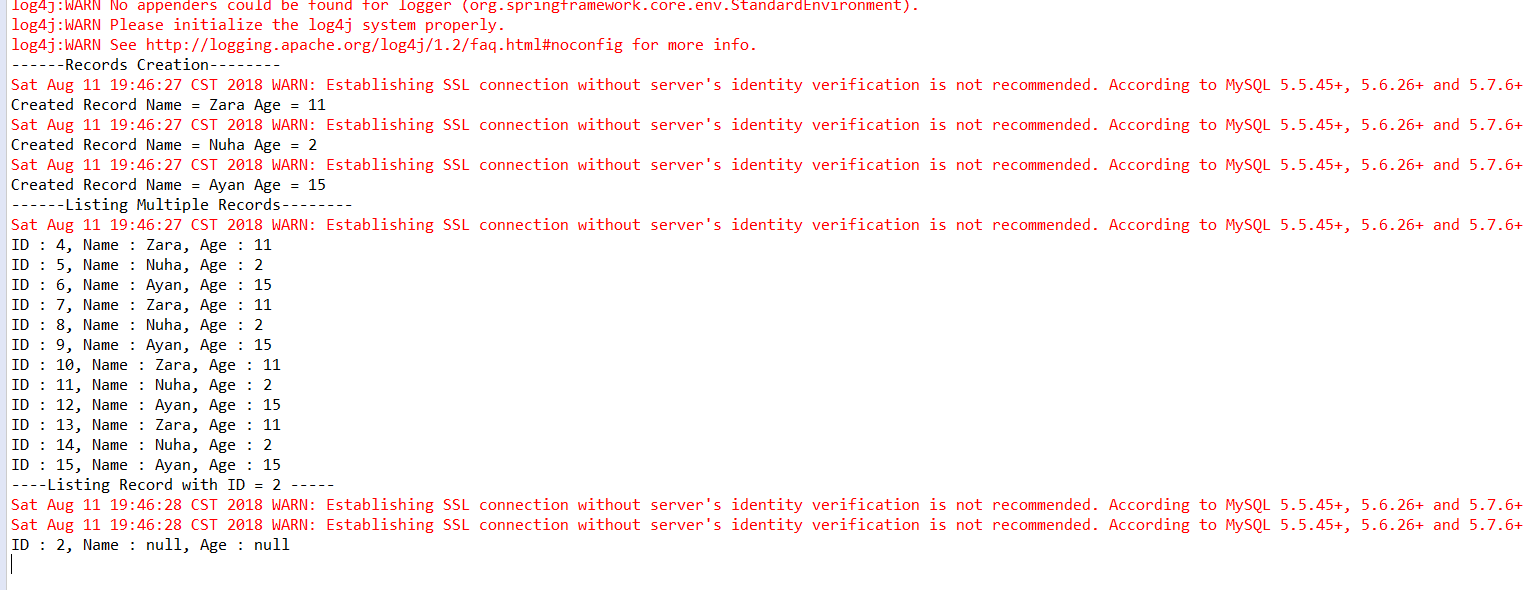
(8)运行MainApp.java中的main方法
结果如图:
Spring(十三)之SQL存储过程的更多相关文章
- spring data jpa 调用存储过程
网上这方面的例子不是很多,研究了一下,列出几个调用的方法. 假如我们有一个mysql的存储过程 CREATE DEFINER=`root`@`localhost` PROCEDURE `plus1in ...
- PL/SQL存储过程编程
PL/SQL存储过程编程 /**author huangchaobiao *Email:huangchaobiao111@163.com */ PL/SQL存储过程编程(上) 1. Oracle应用编 ...
- SQL存储过程分页(通用的拼接SQL语句思路实现)
多表通用的SQL存储过程分页 案例一: USE [Community] GO /****** Object: StoredProcedure [dbo].[Common_PageList] Scrip ...
- SQL存储过程的调用及写法
调用函数: public class SqlProcess { ; public DataSet ReturnSet = null; public SqlDataAdapter adapter = n ...
- sql存储过程几个简单例子
导读:sql存储是数据库操作过程中比较重要的一个环节,对于一些初学者来说也是比较抽象难理解的,本文我将通过几个实例来解析数据库中的sql存储过程,这样就将抽象的事物形象化,比较容易理解. 例1: cr ...
- SQL存储过程生成顺序编码
一.第一种方式 USE [WJKC]GO/****** Object: StoredProcedure [dbo].[Address_GetCode1] Script Date: 2016/3 ...
- SQL 存储过程入门(事务)(四)
SQL 存储过程入门(事务)(四) 本篇我们来讲一下事务处理技术. 为什么要使用事务呢,事务有什么用呢,举个例子. 假设我们现在有个业务,当做成功某件事情的时候要向2张表中插入数据,A表,B表,我 ...
- 在SQL存储过程中给条件变量加上单引号
在SQL存储过程中给条件变量加上单引号,不加语句就会出问题,以下就是在存储过程中将条件where设置成了动态变化的,给where赋完值再和前面的语句拼接,再execute(SQL) ), )), )+ ...
- SQL存储过程概念剖析
一.SQL存储过程的概念,优点及语法 定义:将常用的或很复杂的工作,预先用SQL语句写好并用一个指定的名称存储起来, 那么以后要叫数据库提供与已定义好的存储过程的功能相同的服务时,只需调用execut ...
随机推荐
- 赶集网mysql开发36军规
赶集网mysql开发36军规 写在前面的话: 总是在灾难发生后,才想起容灾的重要性: 总是在吃过亏后,才记得曾经有人提醒过. (一)核心军规 (1)不在数据库做运算:cpu计算务必移至业务层 (2)控 ...
- Java自定义cas操作
java Unsafe工具类提供了一个方法 public final native boolean compareAndSwapObject(Object var1, long var2, Objec ...
- 关于VUE中 import 、 export 和 export default 的注意问题
1.import引入一个依赖包,不需要相对路径.import 引入一个自己写的js文件,是需要相对路径的. 示例:import axios from ‘axios’; import AppServic ...
- Node.js 学习笔记(一)--------- Node.js的认识和Linux部署
Node.js 一.Node.js 简介 简单的说 Node.js 就是运行在服务端的可以解析并运行 JavaScript 脚本的软件. Node.js 是一个基于Chrome JavaScript ...
- gulp & webpack整合
为什么需要前端工程化? 前端工程化的意义在于让前端这个行业由野蛮时代进化为正规军时代,近年来很多相关的工具和概念诞生.好奇心日报在进行前端工程化的过程中,主要的挑战在于解决如下问题:✦ 如何管理多个项 ...
- SparseArray代替HashMap
相信大家都明白,手机软件的开发不同于PC软件的开发,因为手机性能相对有限,内存也有限,所谓“寸土寸金”,可能稍有不慎,就会导致性能的明显降低.Android为了方便开发者,特意在android.uti ...
- 三、angularjs上传图片
上传图片需要引入插件ngFileUpload,使用bower安装方法: bower install ng-file-upload --save,安装后需要在命名app的名字js文件中注入,如下所示: ...
- Java基础之PDF文件的合并
1.首先下载一个jar包:pdfbox-app-1.7.1.jar 2.代码如下: package com; import java.io.File; import java.io.IOExcepti ...
- Spring MVC基本配置和实现(四)
1.参数绑定:(从请求中接收参数) 1)默认支持的类型:Request,Response,Session,Model 2)基本数据类型(包含String) 3)Pojo类型 4)Vo类型 5)Conv ...
- eclipse4.5(mars)环境
官网下载页面: http://www.eclipse.org/downloads/download.php?file=/technology/epp/downloads/release/mars/2/ ...