
eclipse 更改背景颜色字体
切一个自己的图:
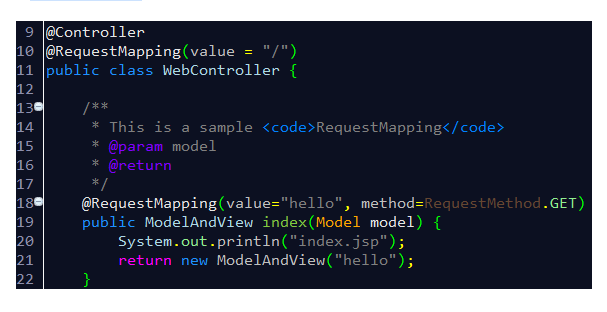
废话不说,直接入题。
方式一:替换Eclipse的配置文件
其实Eclipse的各种配置都是在文件设置里的,因此只要用一个配置好的模版来替换默认的配置文件,即可将所有配置克隆到新的Eclipse环境中。这些配置文件在workspace\.metadata\.plugins\org.eclipse.core.runtime\.settings文件夹下。
懒人直接上代码:文件org.eclipse.ui.editors.prefs:
AbstractTextEditor.Color.Background.SystemDefault=false

AbstractTextEditor.Color.Foreground.SystemDefault=false

lineNumberRuler=true

AbstractTextEditor.Color.Foreground=,,

AbstractTextEditor.Color.SelectionBackground=,,

currentLineColor=,,

printMargin=true

AbstractTextEditor.Color.Background=,,

lineNumberColor=,,

AbstractTextEditor.Color.SelectionBackground.SystemDefault=false

printMarginColor=,,

eclipse.preferences.version=

breakpointIndicationInOverviewRuler=true

occurrenceIndicationColor=,,

overviewRuler_migration=migrated_3.
文件org.eclipse.jdt.ui.prefs:
content_assist_disabled_computers=org.eclipse.jdt.ui.templateProposalCategory\u0000org.eclipse.jdt.ui.javaNoTypeProposalCategory\u0000org.eclipse.jdt.ui.javaTypeProposalCategory\u0000org.eclipse.jdt.ui.textProposalCategory\u0000

content_assist_lru_history=<?xml version\="1.0" encoding\="UTF-8" standalone\="no"?><history maxLHS\="" maxRHS\=""/>

content_assist_number_of_computers=

content_assist_parameters_background=,,

content_assist_parameters_foreground=,,

content_assist_proposals_background=,,

content_assist_proposals_foreground=,,

eclipse.preferences.version=

fontPropagated=true

java_bracket=,,

java_comment_task_tag=,,

java_default=,,

java_doc_default=,,

java_doc_keyword=,,

java_doc_keyword_bold=false

java_doc_link=,,

java_doc_tag=,,

java_keyword=,,

java_keyword_bold=false

java_keyword_return=,,

java_keyword_return_bold=false

java_multi_line_comment=,,

java_operator=,,

java_single_line_comment=,,

java_string=,,

org.eclipse.jdt.ui.editor.tab.width=

org.eclipse.jdt.ui.formatterprofiles.version=

org.eclipse.jdt.ui.javadoclocations.migrated=true

org.eclipse.jdt.ui.text.code_templates_migrated=true

org.eclipse.jdt.ui.text.custom_code_templates=<?xml version\="1.0" encoding\="UTF-8" standalone\="no"?><templates/>

org.eclipse.jdt.ui.text.custom_templates=<?xml version\="1.0" encoding\="UTF-8" standalone\="no"?><templates/>

org.eclipse.jdt.ui.text.templates_migrated=true

org.eclipse.jface.textfont=|Consolas|12.0||WINDOWS||-|||||||||||||Consolas;

proposalOrderMigrated=true

semanticHighlighting.abstractMethodInvocation.color=,,

semanticHighlighting.abstractMethodInvocation.enabled=true

semanticHighlighting.annotation.color=,,

semanticHighlighting.annotationElementReference.color=,,

semanticHighlighting.annotationElementReference.enabled=true

semanticHighlighting.autoboxing.color=,,

semanticHighlighting.autoboxing.enabled=true

semanticHighlighting.class.color=,,

semanticHighlighting.class.enabled=true

semanticHighlighting.deprecatedMember.color=,,

semanticHighlighting.enum.enabled=true

semanticHighlighting.field.color=,,

semanticHighlighting.inheritedMethodInvocation.color=,,

semanticHighlighting.inheritedMethodInvocation.enabled=true

semanticHighlighting.interface.color=,,

semanticHighlighting.interface.enabled=true

semanticHighlighting.localVariable.color=,,

semanticHighlighting.localVariable.enabled=true

semanticHighlighting.localVariableDeclaration.color=,,

semanticHighlighting.localVariableDeclaration.enabled=true

semanticHighlighting.method.color=,,

semanticHighlighting.method.enabled=true

semanticHighlighting.methodDeclarationName.bold=false

semanticHighlighting.methodDeclarationName.color=,,

semanticHighlighting.methodDeclarationName.enabled=true

semanticHighlighting.number.color=,,

semanticHighlighting.number.enabled=true

semanticHighlighting.parameterVariable.color=,,

semanticHighlighting.parameterVariable.enabled=true

semanticHighlighting.staticField.color=,,

semanticHighlighting.staticFinalField.color=,,

semanticHighlighting.staticFinalField.enabled=true

semanticHighlighting.staticMethodInvocation.color=,,

semanticHighlighting.typeArgument.enabled=true

semanticHighlighting.typeParameter.color=,,

semanticHighlighting.typeParameter.enabled=true

sourceHoverBackgroundColor=,,

sourceHoverBackgroundColor.SystemDefault=false

sp_cleanup.add_default_serial_version_id=true

sp_cleanup.add_generated_serial_version_id=false

sp_cleanup.add_missing_annotations=true

sp_cleanup.add_missing_deprecated_annotations=true

sp_cleanup.add_missing_methods=false

sp_cleanup.add_missing_nls_tags=false

sp_cleanup.add_missing_override_annotations=true

sp_cleanup.add_serial_version_id=false

sp_cleanup.always_use_blocks=true

sp_cleanup.always_use_parentheses_in_expressions=false

sp_cleanup.always_use_this_for_non_static_field_access=false

sp_cleanup.always_use_this_for_non_static_method_access=false

sp_cleanup.convert_to_enhanced_for_loop=false

sp_cleanup.correct_indentation=false

sp_cleanup.format_source_code=false

sp_cleanup.format_source_code_changes_only=false

sp_cleanup.make_local_variable_final=false

sp_cleanup.make_parameters_final=false

sp_cleanup.make_private_fields_final=true

sp_cleanup.make_type_abstract_if_missing_method=false

sp_cleanup.make_variable_declarations_final=true

sp_cleanup.never_use_blocks=false

sp_cleanup.never_use_parentheses_in_expressions=true

sp_cleanup.on_save_use_additional_actions=false

sp_cleanup.organize_imports=true

sp_cleanup.qualify_static_field_accesses_with_declaring_class=false

sp_cleanup.qualify_static_member_accesses_through_instances_with_declaring_class=true

sp_cleanup.qualify_static_member_accesses_through_subtypes_with_declaring_class=true

sp_cleanup.qualify_static_member_accesses_with_declaring_class=false

sp_cleanup.qualify_static_method_accesses_with_declaring_class=false

sp_cleanup.remove_private_constructors=true

sp_cleanup.remove_trailing_whitespaces=false

sp_cleanup.remove_trailing_whitespaces_all=true

sp_cleanup.remove_trailing_whitespaces_ignore_empty=false

sp_cleanup.remove_unnecessary_casts=true

sp_cleanup.remove_unnecessary_nls_tags=false

sp_cleanup.remove_unused_imports=false

sp_cleanup.remove_unused_local_variables=false

sp_cleanup.remove_unused_private_fields=true

sp_cleanup.remove_unused_private_members=false

sp_cleanup.remove_unused_private_methods=true

sp_cleanup.remove_unused_private_types=true

sp_cleanup.sort_members=false

sp_cleanup.sort_members_all=false

sp_cleanup.use_blocks=false

sp_cleanup.use_blocks_only_for_return_and_throw=false

sp_cleanup.use_parentheses_in_expressions=false

sp_cleanup.use_this_for_non_static_field_access=false

sp_cleanup.use_this_for_non_static_field_access_only_if_necessary=true

sp_cleanup.use_this_for_non_static_method_access=false

sp_cleanup.use_this_for_non_static_method_access_only_if_necessary=true

spelling_locale_initialized=true

tabWidthPropagated=true

useAnnotationsPrefPage=true

useQuickDiffPrefPage=true
eclipse 更改背景颜色字体的更多相关文章
- NotePad++更改背景颜色
白色的编辑框看得眼睛不舒服,怎么样更改NotePad++的背景颜色使眼睛更舒服些? 1.设置--语言格式设置 2.设置背景色 “背景色”一栏,选择背景色颜色 “使用全局背景色”一栏要打上√,否则无 ...
- echo -e "\033[字背景颜色;字体颜色m字符串\033[0m
格式: echo -e "\033[字背景颜色;字体颜色m字符串\033[0m" 例如: echo -e "\033[41;36m something here \033 ...
- Eclipse修改背景颜色(豆沙绿)
操作界面默认颜色为白色.对于我们长期使用电脑编程的人来说,白色很刺激我们的眼睛,所以我经常会改变workspace的背景色,使眼睛舒服一些.设置方法如下: 1.打开window->Prefere ...
- ActionBar更改背景颜色(主题)
1.默认是黑色的背景, 2.更改主题theme为Theme.AppCompat.Light即可,清单文件主题如下: <application android:name="com.ith ...
- table tr列 鼠标经过时更改背景颜色
<html> <head> <meta http-equiv="Content-Type" content="text/html; char ...
- Eclipse修改背景颜色
windows->peferences->General->Editors->Text EditorAppearance color options:选择Background ...
- Android Studio 中的 button 无法使用 background 更改背景颜色
•解决方案 res/values/themes.xml下的 <style name="Theme.HelloWorld" parent="Theme.Materi ...
- [转]如何在Windows 10中更改文件夹背景颜色
ini文件.我们甚至可以使用相同的技术将图片设置为文件夹背景. 已有工具可以更改Windows 7中Windows资源管理器背景的颜色,并将图像设置为Windows 7中的文件夹背景,但这些工具与Wi ...
- []如何在Windows 10中更改文件夹背景颜色
ini文件.我们甚至可以使用相同的技术将图片设置为文件夹背景. 已有工具可以更改Windows 7中Windows资源管理器背景的颜色,并将图像设置为Windows 7中的文件夹背景,但这些工具与Wi ...
随机推荐
- jquery源码解析:val方法和valHooks对象详解
这一课,我们将讲解val方法,以及对value属性的兼容性处理,jQuery中通过valHooks对象来处理. 首先,我们先来看下val方法的使用: $("#input1").va ...
- django 运行报错汇总
记录自己在使用django开发过程中遇到的问题,不间断更新. (1) 独立运行普通Python脚本调用django中定义的类报错 报错信息: django.core.exceptions.Improp ...
- Maven 依赖管理问题小计
刚学Maven,遇到点小问题,记录一下.https://maven.apache.org/ 问题的起因是项目中使用了 Hibernate Validator ,但是运行起来后总是不能按照设置的注解校验 ...
- ElasticSearch 系列随笔
1.ElasticSearch 常用设置 2.ElasticSearch 从2.2升级到6.2.4碰到的问题 3.ElasticSearch 因为磁盘空间不够引起的数据插入错误.(message [C ...
- 【JS新手教程】浏览器弹出div层1
JS中,可以弹出一个层来进行提示等作用,方法是利用css样式display样式,当display等于none时,该元素就不会在页面显示出来,而且元素也不会占空间.就是用户触发某些事件时,动态修改该样式 ...
- Python PIL库学习笔记
1.PIL简介 Python Imaging Library(缩写为PIL)(在新的版本中被称为Pillow)是Python编程语言的开源库,它增加了对打开,操作和保存许多不同图像文件格式的支持.它适 ...
- 【HNOI2019】部分题简要题解
题意懒得写了 LOJ Day 1 T1 鱼 个人做法比较猎奇,如果有哪位大佬会证明能分享一下的话感激不尽. 题解:枚举鱼尾和鱼身的交点D,将所有其他点按照到D的距离排序,距离相同的分一组. 感性的理解 ...
- Python flask Reason: image not found libmysqlclient.21.dylib
Python flask Reason: image not found libmysqlclient.21.dylib 折腾了半个下午,在这里找到了答案,在此记录一下,以免后人躺坑 错误提示: Im ...
- OAuth2.0认证和授权以及单点登录
https://www.cnblogs.com/shizhiyi/p/7754721.html OAuth2.0认证和授权机制讲解 2017-10-30 15:33 by shizhiyi, 2273 ...
- ASP.NET MVC利用ActionLink实现动态组合查询
一个文件传输数据表,内有日期.传输协议.传输方向(上传或下载).文件名等信息,完整的表内容显示如下: 现在需要分类查询,即按照协议和传输方向查询.单独的分类查询问题并不大,比如,按协议查询,在View ...