
eclipse 更改背景颜色字体
切一个自己的图:
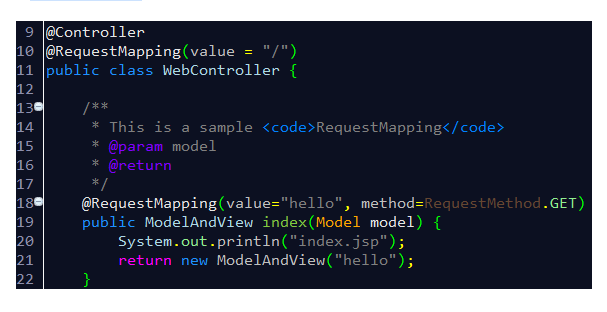
废话不说,直接入题。
方式一:替换Eclipse的配置文件
其实Eclipse的各种配置都是在文件设置里的,因此只要用一个配置好的模版来替换默认的配置文件,即可将所有配置克隆到新的Eclipse环境中。这些配置文件在workspace\.metadata\.plugins\org.eclipse.core.runtime\.settings文件夹下。
懒人直接上代码:文件org.eclipse.ui.editors.prefs:
AbstractTextEditor.Color.Background.SystemDefault=false

AbstractTextEditor.Color.Foreground.SystemDefault=false

lineNumberRuler=true

AbstractTextEditor.Color.Foreground=,,

AbstractTextEditor.Color.SelectionBackground=,,

currentLineColor=,,

printMargin=true

AbstractTextEditor.Color.Background=,,

lineNumberColor=,,

AbstractTextEditor.Color.SelectionBackground.SystemDefault=false

printMarginColor=,,

eclipse.preferences.version=

breakpointIndicationInOverviewRuler=true

occurrenceIndicationColor=,,

overviewRuler_migration=migrated_3.
文件org.eclipse.jdt.ui.prefs:
content_assist_disabled_computers=org.eclipse.jdt.ui.templateProposalCategory\u0000org.eclipse.jdt.ui.javaNoTypeProposalCategory\u0000org.eclipse.jdt.ui.javaTypeProposalCategory\u0000org.eclipse.jdt.ui.textProposalCategory\u0000

content_assist_lru_history=<?xml version\="1.0" encoding\="UTF-8" standalone\="no"?><history maxLHS\="" maxRHS\=""/>

content_assist_number_of_computers=

content_assist_parameters_background=,,

content_assist_parameters_foreground=,,

content_assist_proposals_background=,,

content_assist_proposals_foreground=,,

eclipse.preferences.version=

fontPropagated=true

java_bracket=,,

java_comment_task_tag=,,

java_default=,,

java_doc_default=,,

java_doc_keyword=,,

java_doc_keyword_bold=false

java_doc_link=,,

java_doc_tag=,,

java_keyword=,,

java_keyword_bold=false

java_keyword_return=,,

java_keyword_return_bold=false

java_multi_line_comment=,,

java_operator=,,

java_single_line_comment=,,

java_string=,,

org.eclipse.jdt.ui.editor.tab.width=

org.eclipse.jdt.ui.formatterprofiles.version=

org.eclipse.jdt.ui.javadoclocations.migrated=true

org.eclipse.jdt.ui.text.code_templates_migrated=true

org.eclipse.jdt.ui.text.custom_code_templates=<?xml version\="1.0" encoding\="UTF-8" standalone\="no"?><templates/>

org.eclipse.jdt.ui.text.custom_templates=<?xml version\="1.0" encoding\="UTF-8" standalone\="no"?><templates/>

org.eclipse.jdt.ui.text.templates_migrated=true

org.eclipse.jface.textfont=|Consolas|12.0||WINDOWS||-|||||||||||||Consolas;

proposalOrderMigrated=true

semanticHighlighting.abstractMethodInvocation.color=,,

semanticHighlighting.abstractMethodInvocation.enabled=true

semanticHighlighting.annotation.color=,,

semanticHighlighting.annotationElementReference.color=,,

semanticHighlighting.annotationElementReference.enabled=true

semanticHighlighting.autoboxing.color=,,

semanticHighlighting.autoboxing.enabled=true

semanticHighlighting.class.color=,,

semanticHighlighting.class.enabled=true

semanticHighlighting.deprecatedMember.color=,,

semanticHighlighting.enum.enabled=true

semanticHighlighting.field.color=,,

semanticHighlighting.inheritedMethodInvocation.color=,,

semanticHighlighting.inheritedMethodInvocation.enabled=true

semanticHighlighting.interface.color=,,

semanticHighlighting.interface.enabled=true

semanticHighlighting.localVariable.color=,,

semanticHighlighting.localVariable.enabled=true

semanticHighlighting.localVariableDeclaration.color=,,

semanticHighlighting.localVariableDeclaration.enabled=true

semanticHighlighting.method.color=,,

semanticHighlighting.method.enabled=true

semanticHighlighting.methodDeclarationName.bold=false

semanticHighlighting.methodDeclarationName.color=,,

semanticHighlighting.methodDeclarationName.enabled=true

semanticHighlighting.number.color=,,

semanticHighlighting.number.enabled=true

semanticHighlighting.parameterVariable.color=,,

semanticHighlighting.parameterVariable.enabled=true

semanticHighlighting.staticField.color=,,

semanticHighlighting.staticFinalField.color=,,

semanticHighlighting.staticFinalField.enabled=true

semanticHighlighting.staticMethodInvocation.color=,,

semanticHighlighting.typeArgument.enabled=true

semanticHighlighting.typeParameter.color=,,

semanticHighlighting.typeParameter.enabled=true

sourceHoverBackgroundColor=,,

sourceHoverBackgroundColor.SystemDefault=false

sp_cleanup.add_default_serial_version_id=true

sp_cleanup.add_generated_serial_version_id=false

sp_cleanup.add_missing_annotations=true

sp_cleanup.add_missing_deprecated_annotations=true

sp_cleanup.add_missing_methods=false

sp_cleanup.add_missing_nls_tags=false

sp_cleanup.add_missing_override_annotations=true

sp_cleanup.add_serial_version_id=false

sp_cleanup.always_use_blocks=true

sp_cleanup.always_use_parentheses_in_expressions=false

sp_cleanup.always_use_this_for_non_static_field_access=false

sp_cleanup.always_use_this_for_non_static_method_access=false

sp_cleanup.convert_to_enhanced_for_loop=false

sp_cleanup.correct_indentation=false

sp_cleanup.format_source_code=false

sp_cleanup.format_source_code_changes_only=false

sp_cleanup.make_local_variable_final=false

sp_cleanup.make_parameters_final=false

sp_cleanup.make_private_fields_final=true

sp_cleanup.make_type_abstract_if_missing_method=false

sp_cleanup.make_variable_declarations_final=true

sp_cleanup.never_use_blocks=false

sp_cleanup.never_use_parentheses_in_expressions=true

sp_cleanup.on_save_use_additional_actions=false

sp_cleanup.organize_imports=true

sp_cleanup.qualify_static_field_accesses_with_declaring_class=false

sp_cleanup.qualify_static_member_accesses_through_instances_with_declaring_class=true

sp_cleanup.qualify_static_member_accesses_through_subtypes_with_declaring_class=true

sp_cleanup.qualify_static_member_accesses_with_declaring_class=false

sp_cleanup.qualify_static_method_accesses_with_declaring_class=false

sp_cleanup.remove_private_constructors=true

sp_cleanup.remove_trailing_whitespaces=false

sp_cleanup.remove_trailing_whitespaces_all=true

sp_cleanup.remove_trailing_whitespaces_ignore_empty=false

sp_cleanup.remove_unnecessary_casts=true

sp_cleanup.remove_unnecessary_nls_tags=false

sp_cleanup.remove_unused_imports=false

sp_cleanup.remove_unused_local_variables=false

sp_cleanup.remove_unused_private_fields=true

sp_cleanup.remove_unused_private_members=false

sp_cleanup.remove_unused_private_methods=true

sp_cleanup.remove_unused_private_types=true

sp_cleanup.sort_members=false

sp_cleanup.sort_members_all=false

sp_cleanup.use_blocks=false

sp_cleanup.use_blocks_only_for_return_and_throw=false

sp_cleanup.use_parentheses_in_expressions=false

sp_cleanup.use_this_for_non_static_field_access=false

sp_cleanup.use_this_for_non_static_field_access_only_if_necessary=true

sp_cleanup.use_this_for_non_static_method_access=false

sp_cleanup.use_this_for_non_static_method_access_only_if_necessary=true

spelling_locale_initialized=true

tabWidthPropagated=true

useAnnotationsPrefPage=true

useQuickDiffPrefPage=true
eclipse 更改背景颜色字体的更多相关文章
- NotePad++更改背景颜色
白色的编辑框看得眼睛不舒服,怎么样更改NotePad++的背景颜色使眼睛更舒服些? 1.设置--语言格式设置 2.设置背景色 “背景色”一栏,选择背景色颜色 “使用全局背景色”一栏要打上√,否则无 ...
- echo -e "\033[字背景颜色;字体颜色m字符串\033[0m
格式: echo -e "\033[字背景颜色;字体颜色m字符串\033[0m" 例如: echo -e "\033[41;36m something here \033 ...
- Eclipse修改背景颜色(豆沙绿)
操作界面默认颜色为白色.对于我们长期使用电脑编程的人来说,白色很刺激我们的眼睛,所以我经常会改变workspace的背景色,使眼睛舒服一些.设置方法如下: 1.打开window->Prefere ...
- ActionBar更改背景颜色(主题)
1.默认是黑色的背景, 2.更改主题theme为Theme.AppCompat.Light即可,清单文件主题如下: <application android:name="com.ith ...
- table tr列 鼠标经过时更改背景颜色
<html> <head> <meta http-equiv="Content-Type" content="text/html; char ...
- Eclipse修改背景颜色
windows->peferences->General->Editors->Text EditorAppearance color options:选择Background ...
- Android Studio 中的 button 无法使用 background 更改背景颜色
•解决方案 res/values/themes.xml下的 <style name="Theme.HelloWorld" parent="Theme.Materi ...
- [转]如何在Windows 10中更改文件夹背景颜色
ini文件.我们甚至可以使用相同的技术将图片设置为文件夹背景. 已有工具可以更改Windows 7中Windows资源管理器背景的颜色,并将图像设置为Windows 7中的文件夹背景,但这些工具与Wi ...
- []如何在Windows 10中更改文件夹背景颜色
ini文件.我们甚至可以使用相同的技术将图片设置为文件夹背景. 已有工具可以更改Windows 7中Windows资源管理器背景的颜色,并将图像设置为Windows 7中的文件夹背景,但这些工具与Wi ...
随机推荐
- 基于scrapy-redis两种形式的分布式爬虫
redis分布式部署 1.scrapy框架是否可以自己实现分布式? - 不可以.原因有二. 其一:因为多台机器上部署的scrapy会各自拥有各自的调度器,这样就使得多台机器无法分配start_urls ...
- sql—常用函数
COUNT()函数 COUNT()函数返回匹配指定条件的行数 SQL COUNT(column_name) 语法 COUNT(column_name) 函数返回指定列的值的数目(NULL 不计入): ...
- idea部署tomcat:tomee required to support ear/ejb de。。
要确定artifact 的type是使用的web application :exploded类型,使用javaee application :exploded就会报这个错误.
- Enum枚举法
java enum(枚举)使用详解 + 总结 enum 的全称为 enumeration, 是 JDK 1.5 中引入的新特性,存放在 java.lang 包中. 下面是我在使用 enum 过程 ...
- Hadoop 3.1.2 下载安装和分布式搭建的准备
官方有详细文档:https://hadoop.apache.org/docs/r3.1.2/hadoop-project-dist/hadoop-common/SingleCluster.html 我 ...
- [转] Java中Comparator进行对象排序
[From] https://blog.51cto.com/thinklili/2063244 Java在8后引入了lambda表达式和流,使得排序方法有了变化 class User { int id ...
- 布局优化之ViewStub、Include、merge使用分析
布局技巧 在Android开发过程中,我们会遇到很多的问题,随着UI界面越来越多,布局的重复性.复杂度也随之增加,所幸的是,Android官方也给出了几个对布局进行优化的方法,下面根据自己的理解对官方 ...
- (转)linux运维必会MySQL企业面试题
linux运维必会MySQL企业面试题 老男孩教育运维班全体学员MySQL必会企业面试题最实战.最细致.最落地的运维实训基地,老男孩教育连续多年国内平均就业工资最高! 数据库的重要性是所有技术里最核 ...
- C#调用Dll文件中方法的简单应用
参考:http://www.cnblogs.com/Asuphy/p/4206623.html 直接看代码,最简单的引入,只需要3步: using System; using System.Colle ...
- Git的常用撤销技巧与解决冲突方法
git checkout . #本地所有修改的.没有的提交的,都返回到原来的状态 git stash #把所有没有提交的修改暂存到stash里面.可用git stash pop回复. git rese ...