
center os 7 安装 elasticSeartch
Centos7下安装配置elasticsearch 6.3.1
1)下载
Elasticsearch 6.3.1 地址:https://artifacts.elastic.co/downloads/elasticsearch/elasticsearch-6.3.1.tar.gz
2)拷贝
拷贝到服务器上,解压:tar -xvzf elasticsearch-6.3.1.tar.gz 。解压后路径:/home/elasticsearch-6.3.1
3)创建用户
创建用户,创建esdata目录,并赋予权限
[root@bogon home]# adduser esuser

[root@bogon home]# cd /home

[root@bogon home]# mkdir -p esdata/data

[root@bogon home]# mkdir -p esdata/log

[root@bogon home]# chown -R esuser elasticsearch-6.3.1

[root@bogon home]# chown -R esuser esdata
4)配置es

[root@bogon esdata]# cat /home/elasticsearch-6.3.1/config/elasticsearch.yml

# ======================== Elasticsearch Configuration =========================

#

# NOTE: Elasticsearch comes with reasonable defaults for most settings.

#       Before you set out to tweak and tune the configuration, make sure you

#       understand what are you trying to accomplish and the consequences.

#

# The primary way of configuring a node is via this file. This template lists

# the most important settings you may want to configure for a production cluster.

#

# Please consult the documentation for further information on configuration options:

# https://www.elastic.co/guide/en/elasticsearch/reference/index.html

#

# ---------------------------------- Cluster -----------------------------------

#

# Use a descriptive name for your cluster:

#

cluster.name: my-application

#

# ------------------------------------ Node ------------------------------------

#

# Use a descriptive name for the node:

#

node.name: node-1

#

# Add custom attributes to the node:

#

node.attr.rack: r1

#

# ----------------------------------- Paths ------------------------------------

#

# Path to directory where to store the data (separate multiple locations by comma):

#

path.data: /home/esdata/data

#

# Path to log files:

#

path.logs: /home/esdata/log

#

# ----------------------------------- Memory -----------------------------------

#

# Lock the memory on startup:

#

bootstrap.memory_lock: true

#

# Make sure that the heap size is set to about half the memory available

# on the system and that the owner of the process is allowed to use this

# limit.

#

# Elasticsearch performs poorly when the system is swapping the memory.

#

# ---------------------------------- Network -----------------------------------

#

# Set the bind address to a specific IP (IPv4 or IPv6):

#

network.host: 0.0.0.0

#

# Set a custom port for HTTP:

#

http.port: 9200

#

# For more information, consult the network module documentation.

#

# --------------------------------- Discovery ----------------------------------

#

# Pass an initial list of hosts to perform discovery when new node is started:

# The default list of hosts is ["127.0.0.1", "[::1]"]

#

discovery.zen.ping.unicast.hosts: ["host1", "host2"]

#

# Prevent the "split brain" by configuring the majority of nodes (total number of master-eligible nodes / 2 + 1):

#

#discovery.zen.minimum_master_nodes:

#

# For more information, consult the zen discovery module documentation.

#

# ---------------------------------- Gateway -----------------------------------

#

# Block initial recovery after a full cluster restart until N nodes are started:

#

gateway.recover_after_nodes: 3

#

# For more information, consult the gateway module documentation.

#

# ---------------------------------- Various -----------------------------------

#

# Require explicit names when deleting indices:

#

action.destructive_requires_name: true
5)配置系统
[root@bogon bin]#  vim /etc/security/limits.conf(在文件最后添加)

esuser hard nofile 65536

esuser soft nofile 65536

esuser soft memlock unlimited

esuser hard memlock unlimited
以上配置解决问题:
max file descriptors [4096] for elasticsearch process is too low, increase to at least [65536]

memory locking requested for elasticsearch process but memory is not locked
[root@bogon bin]# sysctl -w vm.max_map_count=262144

vm.max_map_count = 262144

[root@bogon bin]# more /proc/sys/vm/max_map_count

262144
以上配置解决问题:
max virtual memory areas vm.max_map_count [65530] is too low, increase to at least [262144]
[root@bogon logs]# visudo

。。。。。。。。

## Allow root to run any commands anywhere

root    ALL=(ALL)       ALL

esuser  ALL=(ALL)       ALL

。。。。。。。。
以上配置解决某些情况下无法读写的问题
6)启动
[root@bogon ~]# cd /home/elasticsearch-6.3.1/bin/

[root@bogon bin]# su esuser

[esuser@bogon bin]$ ./elasticsearch

[2018-07-17T10:17:30,139][INFO ][o.e.n.Node               ] [node-1] initializing ...

[2018-07-17T10:17:30,234][INFO ][o.e.e.NodeEnvironment    ] [node-1] using [1] data paths, mounts [[/ (rootfs)]], net usable_space [22.1gb], net total_space [27.6gb], types [rootfs]

[2018-07-17T10:17:30,234][INFO ][o.e.e.NodeEnvironment    ] [node-1] heap size [1007.3mb], compressed ordinary object pointers [true]

[2018-07-17T10:17:30,236][INFO ][o.e.n.Node               ] [node-1] node name [node-1], node ID [cb69e4JjSBKeHJ9y-q-hNA]

[2018-07-17T10:17:30,236][INFO ][o.e.n.Node               ] [node-1] version[6.3.1], pid[26327], build[default/tar/eb782d0/2018-06-29T21:59:26.107521Z], OS[Linux/3.10.0-514.6.1.el7.x86_64/amd64], JVM[Oracle Corporation/Java HotSpot(TM) 64-Bit Server VM/1.8.0_92/25.92-b14]

[2018-07-17T10:17:30,236][INFO ][o.e.n.Node               ] [node-1] JVM arguments [-Xms1g, -Xmx1g, -XX:+UseConcMarkSweepGC, -XX:CMSInitiatingOccupancyFraction=75, -XX:+UseCMSInitiatingOccupancyOnly, -XX:+AlwaysPreTouch, -Xss1m, -Djava.awt.headless=true, -Dfile.encoding=UTF-8, -Djna.nosys=true, -XX:-OmitStackTraceInFastThrow, -Dio.netty.noUnsafe=true, -Dio.netty.noKeySetOptimization=true, -Dio.netty.recycler.maxCapacityPerThread=0, -Dlog4j.shutdownHookEnabled=false, -Dlog4j2.disable.jmx=true, -Djava.io.tmpdir=/tmp/elasticsearch.F1Jh0AOB, -XX:+HeapDumpOnOutOfMemoryError, -XX:HeapDumpPath=data, -XX:ErrorFile=logs/hs_err_pid%p.log, -XX:+PrintGCDetails, -XX:+PrintGCDateStamps, -XX:+PrintTenuringDistribution, -XX:+PrintGCApplicationStoppedTime, -Xloggc:logs/gc.log, -XX:+UseGCLogFileRotation, -XX:NumberOfGCLogFiles=32, -XX:GCLogFileSize=64m, -Des.path.home=/home/elasticsearch-6.3.1, -Des.path.conf=/home/elasticsearch-6.3.1/config, -Des.distribution.flavor=default, -Des.distribution.type=tar]

[2018-07-17T10:17:33,136][INFO ][o.e.p.PluginsService     ] [node-1] loaded module [aggs-matrix-stats]

[2018-07-17T10:17:33,136][INFO ][o.e.p.PluginsService     ] [node-1] loaded module [analysis-common]

[2018-07-17T10:17:33,137][INFO ][o.e.p.PluginsService     ] [node-1] loaded module [ingest-common]

。。。。。。
7)验证
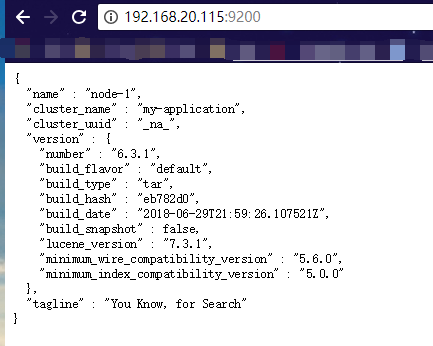
浏览器访问:http://192.168.20.115:9200/ (192.168.20.115是es服务器的IP,另外请确保9200端口能够被外部访问),返回:
{

  "name" : "node-1",

  "cluster_name" : "my-application",

  "cluster_uuid" : "_na_",

  "version" : {

    "number" : "6.3.1",

    "build_flavor" : "default",

    "build_type" : "tar",

    "build_hash" : "eb782d0",

    "build_date" : "2018-06-29T21:59:26.107521Z",

    "build_snapshot" : false,

    "lucene_version" : "7.3.1",

    "minimum_wire_compatibility_version" : "5.6.0",

    "minimum_index_compatibility_version" : "5.0.0"

  },

  "tagline" : "You Know, for Search"

}
当然最方便的安装方法还是下载docker镜像,官方安装手册:https://www.elastic.co/guide/en/elasticsearch/reference/current/docker.html 步骤:
1)下载镜像:docker pull docker.elastic.co/elasticsearch/elasticsearch:6.3.1
2)运行容器:docker run -p 9200:9200 -p 9300:9300 -e "discovery.type=single-node" docker.elastic.co/elasticsearch/elasticsearch:6.3.1
ElasticSearch Head安装
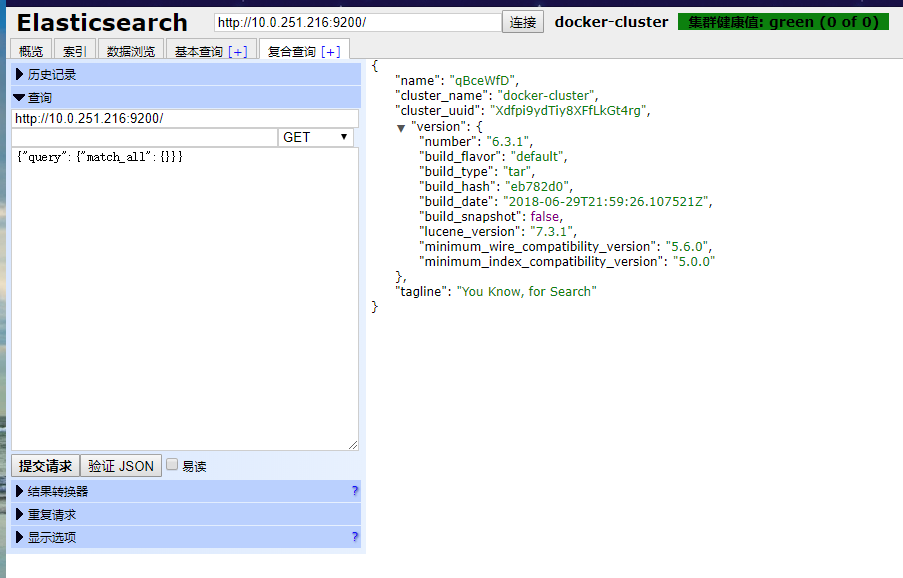
官方的模拟工具是控制台的curl,不是很直观,可以在chrome浏览器中安装head插件来作为请求的工具:head插件的地址:https://chrome.google.com/webstore/detail/elasticsearch-head/ffmkiejjmecolpfloofpjologoblkegm/


center os 7 安装 elasticSeartch的更多相关文章
- Center OS 7安装 Apollo
声明: 每个人的情况都不一样,所以大家在看教程的时候自行斟酌,最好先扫一遍,再来根据自身情况进行操作.同时,遇到的问题也可能不尽相同,要灵活处理. 了解: Apollo是从原始ActiveMQ的基础构 ...
- Center OS mongodb安装
一.下载 1.#cd /usr/local/src 2.#wget http://fastdl.mongodb.org/linux/mongodb-linux-x86_64-2. ...
- Center OS 7 安装 $$
资料来自网络,收集整理做个备忘 1. 安装Python # yum install python-setuptools && easy_install pip 2. 安装$$ # pi ...
- center os
CentOS.Ubuntu.Debian三个linux比较异同 Center OS 7 安装 $$ center os 安装mysql5.6 Linux学习之Center os网络配置 Cent Os ...
- 【我的Android进阶之旅】解决Center OS 64位系统编译Android APP报错error=2和finished with non-zero exit value 127
一.错误描述 1.问题 java.io.IOException: error=2, 没有那个文件或目录 今天在刚重新搭建好的64位的Center OS上安装好了Android SDK,Jenkins, ...
- Center OS 7 通过Docker部署yapi
Center OS 7 通过Docker部署yapi 版本要求 Linux Center OS 7 安装Docker #Docker 要求 CentOS 系统的内核版本高于 3.10 ,查看本页面的前 ...
- center os 安装mysql5.6
软件 MySQL-server-5.6.13-1.el6.x86_64.rpm MySQL-client-5.6.13-1.el6.x86_64.rpm 安装命令 rpm -ivh MySQL-ser ...
- center os 7最小化安装后按table无法补全命令的问题
闲来无趣,这两天huskiesir又重新安装了下center os 7操作系统,结果呢,发现一个问题:按table键无法补全命令啊. 咦,奇怪了,这次怎么回事,完全没遇到过啊.哦,回想了一下,和以往的 ...
- Center OS 7 Apache安装配置
感谢:https://blog.csdn.net/u014157384/article/details/79497761 该作者的帮助. 自己购买了国外的服务器,想把我的网页放到服务器,网页是以web ...
随机推荐
- 国内外有名的java论坛
国内: www.chinajavaworld.com-论坛人很多,高手也多,不过好像都在潜水 www.cn-java.com -也很不错,文章很好,但是就是商业性浓了点. www ...
- Linux命令行bash批量重命名文件
本文介绍下,在linux下使用shell批量重命名文件的例子,有需要的朋友参考下吧. 在linux中,重命名文件名,需要用到mv命令.如果需要批量重命名名一批文件,就需要写bash脚本或命令行了. 例 ...
- android toast使用方法
1.默认展示 // 第一个参数:当前的上下文环境.可用getApplicationContext()或this // 第二个参数:要显示的字符串.也可是R.string中字符串ID // 第三个参数: ...
- Vue之自定义组件的v-model
最近在学习vue,今天看到自定义事件的表单输入组件,纠结了一会会然后恍然大悟...官方教程写得不是很详细,所以我决定总结一下. v-model语法糖 v-model实现了表单输入的双向绑定,我们一般是 ...
- win10_64位系统下安装ALM12.01(QC),笔者只在Win10平台上试过,大家也可以在win7的平台上试一下,一个道理!(Alpha)
HP的ALM是一个非常全面的缺陷管理系统,但安装学习的非常的麻烦,以前学的是ALM,好久没用带今天想学习一下发现安装的非常的困难 !发现网上对ALM的系统安装的介绍非常少,也非常琐碎!今天就借着自己学 ...
- maven(12),排除冲突JAR包
JAR包冲突 <dependencies> <dependency> <groupId>org.springframework</groupId> ...
- eclipse 乱码问题总结
Eclipse 的控制台必须用GBK编码.所以条件1和条件4必须同时满足否则运行的还是乱码.才能保证不是乱码. 条件1,Window | Preferences | Workspace | T ...
- 爬虫入门之scrapy模拟登陆(十四)
注意:模拟登陆时,必须保证settings.py里的COOKIES_ENABLED(Cookies中间件) 处于开启状态 COOKIES_ENABLED = True或# COOKIES_ENABLE ...
- 四、并行编程 - 并行LINQ(PLINQ) 的使用。AsParallel
用于对内存中的数据做并行运算,也就是说其只支持 LINQ to Object 的并行运算 一.AsParallel(并行化) 就是在集合后加个AsParallel(). 例如: , ); == ); ...
- 异常处理与MiniDump详解(3) SEH(Structured Exception Handling)
write by 九天雁翎(JTianLing) -- blog.csdn.net/vagrxie 讨论新闻组及文件 一. 综述 SEH--Structured Exception Handlin ...