
Java之解压流(ZipInputStream)
一、ZipInputStream相对于ZipOutputStream而言,使用上面简单的多了,相对的,既然存在压缩流,就会存在,解压的方式。
二、解压文件,流的使用过程中也是很常用的,在读取文件,根据文件类型进行处理,这样,就可以做到,最低成本的数据传输了
三、解压例子
/**

     * 提供给用户使用的解压工具

     * @param srcPath

     * @param outPath

     * @throws IOException

     */

    public static void decompressionFile(String srcPath, String outPath) throws IOException {

        //简单判断解压路径是否合法

        if (!new File(srcPath).isDirectory()) {

            //判断输出路径是否合法

            if (new File(outPath).isDirectory()) {

                if (!outPath.endsWith(File.separator)) {

                    outPath += File.separator;

                }

                //zip读取压缩文件

                FileInputStream fileInputStream = new FileInputStream(srcPath);

                ZipInputStream zipInputStream = new ZipInputStream(fileInputStream);

                //解压文件

                decompressionFile(outPath, zipInputStream);

                //关闭流

                zipInputStream.close();

                fileInputStream.close();

            } else {

                throw new RuntimeException("输出路径不合法!");

            }

        } else {

            throw new RuntimeException("需要解压的文件不合法!");

        }

    }

    /**

     * ZipInputStream是逐个目录进行读取,所以只需要循环

     * @param outPath

     * @param inputStream

     * @throws IOException

     */

    private static void decompressionFile(String outPath, ZipInputStream inputStream) throws IOException {

        //读取一个目录

        ZipEntry nextEntry = inputStream.getNextEntry();

        //不为空进入循环

        while (nextEntry != null) {

            String name = nextEntry.getName();

            File file = new File(outPath+name);

            //如果是目录,创建目录

            if (name.endsWith("/")) {

                file.mkdir();

            } else {

                //文件则写入具体的路径中

                FileOutputStream fileOutputStream = new FileOutputStream(file);

                BufferedOutputStream bufferedOutputStream = new BufferedOutputStream(fileOutputStream);

                int n;

                byte[] bytes = new byte[];

                while ((n = inputStream.read(bytes)) != -) {

                    bufferedOutputStream.write(bytes, , n);

                }

                //关闭流

                bufferedOutputStream.close();

                fileOutputStream.close();

            }

            //关闭当前布姆

            inputStream.closeEntry();

            //读取下一个目录,作为循环条件

            nextEntry = inputStream.getNextEntry();

        }

    }
四、测试:
public static void main(String[] args) throws IOException {

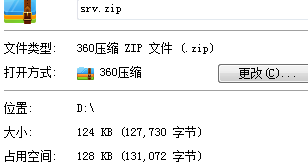
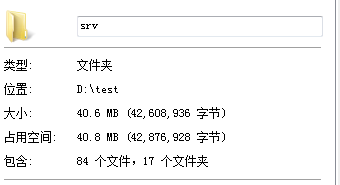
        decompressionFile("D:\\srv.zip", "D:\\test");

}
Java之解压流(ZipInputStream)的更多相关文章
- java批量解压文件夹下的所有压缩文件(.rar、.zip、.gz、.tar.gz)
// java批量解压文件夹下的所有压缩文件(.rar..zip..gz..tar.gz) 新建工具类: package com.mobile.utils; import com.github.jun ...
- Java压缩/解压.zip、.tar.gz、.tar.bz2(支持中文)
本文介绍Java压缩/解压.zip..tar.gz..tar.bz2的方式. 对于zip文件:使用java.util.zip.ZipEntry 和 java.util.zip.ZipFile,通过设置 ...
- 原生java 压缩解压zip文件
import java.io.BufferedInputStream; import java.io.BufferedOutputStream; import java.io.File; import ...
- Java动态解压zip压缩包
import java.io.BufferedOutputStream; import java.io.File; import java.io.FileNotFoundException; impo ...
- JDK 自带压缩解压流
代码如下 package com.test.java.zip; import java.io.BufferedInputStream; import java.io.BufferedOutputStr ...
- Java压缩包解压到指定文件
在获得一个以Zip格式压缩的文件之后,需要将其进行解压缩,还原成压缩前的文件.若是使用Java自带的压缩工具包来实现解压缩文件到指定文件夹的功能,因为jdk提供的zip只能按UTF-8格式处理,而Wi ...
- JAVA压缩解压ZIP文件,中文乱码还需要ANT.JAR包
package zip; import java.io.BufferedOutputStream; import java.io.File; import java.io.FileInputStrea ...
- java代码解压zip文件
import java.io.File; import java.io.FileOutputStream; import java.io.IOException; import java.io.Inp ...
- Java 压缩/ 解压 .Z 文件
1.问题描述 公司项目有需要用 JAVA 解压 .z文件. .z 是 unix 系统常见的压缩文件. 2.源码 import com.chilkatsoft.CkUnixCompress; impor ...
随机推荐
- Flask: socket.error: [Errno 48] Address already in use 问题
参考: Mac OSX 解决socket.error: [Errno 48] Address already in use问题 Mac OS X中解决socket.error: [Errno 48] ...
- Python的hasattr() getattr() setattr() 函数使用方法详解--转载
hasattr(object, name)判断一个对象里面是否有name属性或者name方法,返回BOOL值,有name特性返回True, 否则返回False.需要注意的是name要用括号括起来 1 ...
- python 字典的合并
d1 = {, } d2 = {, } d = d1.copy() d.update(d2) print(d)
- Java 集合-Collections工具类
2017-11-05 23:41:53 Collections类 Collections类:Collections类是针对集合进行操作的工具类,都是静态方法. 常用方法: public static ...
- RoR unobtrusive scripting adapter--UJS(一些Javascript的语法糖)
Learn how the new Rails UJS library works and compares with the old version of jquery_ujs that it re ...
- hdu2516斐波那契博弈
刚开始想用sg函数做,想了半天没一点思路啊. 原来这是一个新题型,斐波那契博弈 斐波那契博弈模型:有一堆个数为 n 的石子,游戏双方轮流取石子,满足:1. 先手不能在第一次把所有的石子取完:2. 之后 ...
- UVA-1613 K-Graph Oddity (着色问题)
题目大意:一张n个顶点.m条边的无向连通图,用k种颜色着色(相邻顶点颜色不能相同),其中k为不小于点的最大度数的最小奇数. 题目分析:水题一道.建张图深搜一下就行了. # include<ios ...
- 升级安装windows8.1以后windowsphone8不能启动虚拟机的办法
如果之前在的虚拟机是OK的话,VS2012需要安装update3补丁才可以. 下载地址:http://download.microsoft.com/download/D/4/8/D48D1AC2-A2 ...
- Nginx安装配置详解
http://nginx.org/download/ 下载对应的Nginx 安装nginx之前需要安装依赖包 yum install gcc gcc-c++ zlib-devel pcre-devel ...
- wbr 视机而动
链接 在适当的时候, 除非能容下整个单车, 才保留一行: 缩放浏览器, 试试这段就知道了 <p>To learn AJAX, you must be familiar with the X ...