
Spring MVC-视图解析器(View Resolverr)-内部资源视图解析器(Internal Resource View Resolver)示例(转载实践)
以下内容翻译自:https://www.tutorialspoint.com/springmvc/springmvc_internalresourceviewresolver.htm
说明:示例基于Spring MVC 4.1.6。
InternalResourceViewResolver用于将提供的URI解析为实际的URI。以下示例显示如何使用Spring Web MVC框架使用InternalResourceViewResolver。InternalResourceViewResolver允许使用请求映射网页。
package com.tutorialspoint;

import org.springframework.stereotype.Controller;

import org.springframework.web.bind.annotation.RequestMapping;

import org.springframework.web.bind.annotation.RequestMethod;

import org.springframework.ui.ModelMap;

@Controller

@RequestMapping("/hello")

public class HelloController{

   @RequestMapping(method = RequestMethod.GET)

   public String printHello(ModelMap model) {

      model.addAttribute("message", "Hello Spring MVC Framework!");

      return "hello";

   }

}
<bean class="org.springframework.web.servlet.view.InternalResourceViewResolver">

   <property name="prefix" value="/WEB-INF/jsp/"/>

   <property name="suffix" value=".jsp"/>

</bean>
例如,使用上面的配置,如果是URI
/hello被请求,DispatcherServlet将请求转发到前缀+ view-name + suffix = /WEB-INF/jsp/hello.jsp。
首先,让我们使用Eclipse IDE,并按照以下步骤使用Spring Web Framework开发基于动态窗体的Web应用程序:
| 步骤 | 描述 |
|---|---|
| 1 | 创建一个名为TestWeb的项目,在一个包com.tutorialspoint下,如Spring MVC - Hello World Example章节所述。 |
| 2 | 在com.tutorialspoint包下创建一个Java类HelloController。 |
| 3 | 在jsp子文件夹下创建一个视图文件hello.jsp。 |
| 4 | 最后一步是创建所有源和配置文件的内容并导出应用程序,如下所述。 |
HelloController.java
package com.tutorialspoint;

import org.springframework.stereotype.Controller;

import org.springframework.web.bind.annotation.RequestMapping;

import org.springframework.web.bind.annotation.RequestMethod;

import org.springframework.ui.ModelMap;

@Controller

@RequestMapping("/hello")

public class HelloController{

   @RequestMapping(method = RequestMethod.GET)

   public String printHello(ModelMap model) {

      model.addAttribute("message", "Hello Spring MVC Framework!");

      return "hello";

   }

}
TestWeb-servlet.xml
<beans xmlns="http://www.springframework.org/schema/beans"

   xmlns:context="http://www.springframework.org/schema/context"

   xmlns:xsi="http://www.w3.org/2001/XMLSchema-instance"

   xsi:schemaLocation="

   http://www.springframework.org/schema/beans

   http://www.springframework.org/schema/beans/spring-beans-3.0.xsd

   http://www.springframework.org/schema/context

   http://www.springframework.org/schema/context/spring-context-3.0.xsd">

   <context:component-scan base-package="com.tutorialspoint" />

   <bean class="org.springframework.web.servlet.view.InternalResourceViewResolver">

      <property name="prefix" value="/WEB-INF/jsp/" />

      <property name="suffix" value=".jsp" />

   </bean>

</beans>
hello.jsp
<%@ page contentType="text/html; charset=UTF-8" %>

<html>

<head>

<title>Hello World</title>

</head>

<body>

   <h2>${message}</h2>

</body>

</html>
完成创建源文件和配置文件后,导出应用程序。右键单击应用程序并使用Export > WAR File选项,并将您的TestWeb.war文件保存在Tomcat的webapps文件夹中。
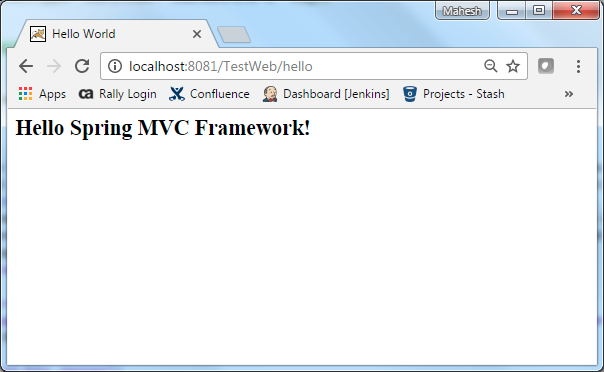
现在启动您的Tomcat服务器,并确保您可以使用标准浏览器从webapps文件夹访问其他网页。现在尝试访问URL http://localhost:8080/TestWeb/hello,如果您的Spring Web应用程序一切正常,您应该看到以下结果:
Maven示例:
https://github.com/easonjim/5_java_example/tree/master/springmvc/tutorialspoint/test1
Spring MVC-视图解析器(View Resolverr)-内部资源视图解析器(Internal Resource View Resolver)示例(转载实践)的更多相关文章
- spring mvc:内部资源视图解析器2(注解实现)@Controller/@RequestMapping
spring mvc:内部资源视图解析器2(注解实现) @Controller/@RequestMapping 访问地址: http://localhost:8080/guga2/hello/goo ...
- spring mvc:内部资源视图解析器(注解实现)@Controller/@RequestMapping
spring mvc:内部资源视图解析器(注解实现)@Controller/@RequestMapping 项目访问地址: http://localhost:8080/guga2/hello/prin ...
- Spring MVC内部资源视图解析器
InternalResourceViewResolver用于将提供的URI解析为实际URI.下面的示例演示如何在Spring Web MVC框架中使用SpringResultViewResolver. ...
- Spring MVC-视图解析器(View Resolverr)-资源包视图解析器(Resource Bundle View Resolver)示例(转载实践)
以下内容翻译自:https://www.tutorialspoint.com/springmvc/springmvc_resourcebundleviewresolver.htm 说明:示例基于Spr ...
- Spring MVC-视图解析器(View Resolverr)-XML视图解析器(Xml View Resolver)示例(转载实践)
以下内容翻译自:https://www.tutorialspoint.com/springmvc/springmvc_xmlviewresolver.htm 说明:示例基于Spring MVC 4.1 ...
- springmvc:BeanNameViewResolver访问内部资源视图对象和访问外部资源视图对象
<!-- 处理器映射器 --> <bean class="org.springframework.web.servlet.handler.SimpleUrlHandlerM ...
- 解决 spring mvc 3.0 结合 hibernate3.2 使用<tx:annotation-driven>声明式事务无法提交的问题(转载)
1.问题复现 spring 3.0 + hibernate 3.2 spring mvc使用注解方式:service使用@service注解 事务使用@Transactional 事务配置使用 < ...
- SpringMvc之handler深入AbstractControllerhe和MultiActionController和内部资源视图解析器
AbstractControllerhe 若处理器继承自AbstractController类,那么该控制器就具有了一些新功能.因为AbstractController类还继承自一个父类WebCont ...
- spring mvc: 多解析器映射(资源绑定视图解析器 + 内部资源[普通模式/]视图解析器)
spring mvc: 多解析器映射(资源绑定视图解析器 + 内部资源[普通模式/]视图解析器) 资源绑定视图解析器 + 内部资源(普通模式)视图解析器 并存方式 内部资源视图解析器: http:// ...
随机推荐
- php获得两个字符串公共最大子串的函数
<?php header("Content-type: text/html; charset=utf-8"); function search($str1,$str2) { ...
- unittest举例
步骤:1.先导入unittest2.编写一个测试类(继承unittest.TestCase)3.编写测试用例类,一个方法就是一条用例4.加载测试用例,有三种方式:加载测试方法,加载测试类,加载测试模块 ...
- akka设计模式系列-Backend模式
上一节我们介绍了Akka使用的基本模式,简单点来说就是,发消息给actor,处理结束后返回消息.但这种模式有个缺陷,就是一旦某个消息处理的比较慢,就会阻塞后面所有消息的处理.那么有没有方法规避这种阻塞 ...
- Python基础类型(二) str 字符串
字符串str ' ' 字符串+ 都是字符串的时候才能相加 a = 'alex' b = 'wusir' print(a+b) #字符串拼接 字符串* 字符串和数字相乘 a = 6 b = 'alex' ...
- BZOJ 4867 分块+神tm卡常
思路: 注意到len<=10 按照权值max-min<=sqrt(n)*len 分块 记一下前缀和 每修改sqrt(n)次以后重新分块 修改的时候整块打标记 两边重构 (这题常数卡 ...
- JAVA中list,set,map与数组之间的转换详解
package test; import java.util.*; /** * Created by ming */ public class Test { public static void ma ...
- cms中某些标题链接的单独写法
href="{$CATEGORYS[45][url]}" 链接写法, {$CATEGORYS[45][catname]} 标题写法 在show页面中 src="{$thu ...
- 【SQLite】select into 语句
sqlite不支持类似sqlserver中的select into 语法 在SQL Server中,我们要将一个表中的数据复制到一个新表中,可以这样写: SELECT * INTO newtable ...
- dnn 添加图片
public string fileUpload() { if (fuPhoto.PostedFile != null && fuPhoto.P ...
- JAVA和JVM运行原理揭秘
这里和大家简单分享一下JAVA和JVM运行的原理,Java语言写的源程序通过Java编译器,编译成与平台无关的‘字节码程序’(.class文件,也就是0,1二进制程序),然后在OS之上的Java解释器 ...