
WPF 循环显示列表
原文:WPF 循环显示列表
项目需要类似手机上设置时间的控件,可以一直滚动显示的内容连续的。在WPF中找到的列表控件只能滚到最后再反向滚动。
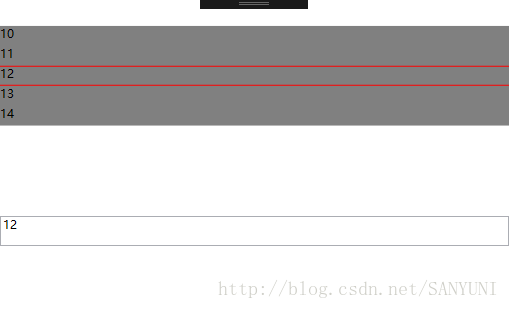
基于ScrollViewer和StackPanel来改造,Xaml如下:
<Grid>

        <Grid.RowDefinitions>

            <RowDefinition/>

            <RowDefinition Height="{Binding RelativeSource={RelativeSource AncestorType=local:ScrollList},Path=ItemHeight}"/>

            <RowDefinition/>

        </Grid.RowDefinitions>

        <ScrollViewer x:Name="tt" Grid.RowSpan="3" PreviewMouseWheel="tt_PreviewMouseWheel"  ScrollViewer.VerticalScrollBarVisibility="Hidden" >

            <StackPanel x:Name="stacktt"  Background="Gray">

            </StackPanel>

        </ScrollViewer>

        <Rectangle Height="1" Fill="Red" Grid.Row="1" VerticalAlignment="Top"/>

        <Rectangle Height="1" Fill="Red" Grid.Row="1" VerticalAlignment="Bottom"/>

    </Grid>
cs代码如下:
    public partial class ScrollList : UserControl

    {

        public ScrollList()

        {

            InitializeComponent();

            this.Loaded += ScrollList_Loaded;

        }

        private void ScrollList_Loaded(object sender, RoutedEventArgs e)

        {

            stacktt.Children.Clear();

            for (int index = 0; index < ShowItemCount; index++)

            {

                TextBlock text = new TextBlock() { Height=ItemHeight};

                stacktt.Children.Add(text);

            }

            RefreshData();

        }

        public List<int> DataSource

        {

            get { return (List<int>)GetValue(DataSourceProperty); }

            set { SetValue(DataSourceProperty, value); }

        }

        // Using a DependencyProperty as the backing store for DataSource.  This enables animation, styling, binding, etc...

        public static readonly DependencyProperty DataSourceProperty =

            DependencyProperty.Register("DataSource", typeof(List<int>), typeof(ScrollList), new PropertyMetadata(new List<int>()));

        public int SelectData

        {

            get { return (int)GetValue(SelectDataProperty); }

            set { SetValue(SelectDataProperty, value); }

        }

        // Using a DependencyProperty as the backing store for SelectData.  This enables animation, styling, binding, etc...

        public static readonly DependencyProperty SelectDataProperty =

            DependencyProperty.Register("SelectData", typeof(int), typeof(ScrollList), new PropertyMetadata(0));

        public int ItemHeight

        {

            get { return (int)GetValue(ItemHeightProperty); }

            set { SetValue(ItemHeightProperty, value); }

        }

        // Using a DependencyProperty as the backing store for ItemHeight.  This enables animation, styling, binding, etc...

        public static readonly DependencyProperty ItemHeightProperty =

            DependencyProperty.Register("ItemHeight", typeof(int), typeof(ScrollList), new PropertyMetadata(20));

        int ShowItemCount { get {

                return (int)ActualHeight / ItemHeight;

            } }

        int startIndex = 0;

        private void tt_PreviewMouseWheel(object sender, MouseWheelEventArgs e)

        {

            Console.WriteLine("TimeStap={0} Delta={1}", e.Timestamp, e.Delta);

            if (DataSource.Count == 0)

                return;

            if (e.Delta > 0)

            {

                if ((startIndex + ShowItemCount) < DataSource.Count)

                {

                    startIndex += 1;

                }

                else

                {

                    startIndex = 0;

                }

            }

            else

            {

                if ((startIndex - ShowItemCount) < 0)

                {

                    startIndex = DataSource.Count - 1;

                }

                else

                {

                    startIndex -= 1;

                }

            }

            RefreshData();

        }

        private void RefreshData()

        {

            if (DataSource.Count > 0)

            {

                int count = 0;

                foreach (var item in stacktt.Children)

                {

                    if ((startIndex + count) > (DataSource.Count - 1))

                    {

                        (item as TextBlock).Text = DataSource[startIndex + count - DataSource.Count].ToString();

                    }

                    else

                    {

                        (item as TextBlock).Text = DataSource[startIndex + count].ToString();

                    }

                    count += 1;

                }

                TextBlock selectText = (TextBlock)VisualTreeHelper.GetChild(stacktt, ShowItemCount / 2);

                if (ShowItemCount%2 != 0)

                {

                    selectText = (TextBlock)VisualTreeHelper.GetChild(stacktt, ShowItemCount / 2+1);

                }

                SelectData = Convert.ToInt32(selectText.Text);

            }

        }

    }
WPF 循环显示列表的更多相关文章
- wpf image控件循环显示图片 以达到动画效果 问题及解决方案
1>最初方案: 用wpf的image控件循环显示图片,达到动画效果,其实就是在后台代码动态改变Image.Source的值,关键代码: ; i < ; i++)//六百张图片 { Bitm ...
- Jquery制作--循环滚动列表
自己模仿JQ插件的写法写了一个循环滚动列表插件,支持自定义上.下.左.右四个方向,支持平滑滚动或者间断滚动两种方式,都是通过参数设置.JQ里面有些重复的地方,暂时没想到更好的方法去精简.不过效果还是可 ...
- NeHe OpenGL教程 第十二课:显示列表
转自[翻译]NeHe OpenGL 教程 前言 声明,此 NeHe OpenGL教程系列文章由51博客yarin翻译(2010-08-19),本博客为转载并稍加整理与修改.对NeHe的OpenGL管线 ...
- WinForm LED循环显示信息,使用定时器Threading.Timer
原文:WinForm LED循环显示信息,使用定时器Threading.Timer 这里用一个示例来演示timer如何使用.示例:LED屏幕显示描述:这个示例其实很简单,LED屏幕上显示3个信息: ...
- [OpenGL] 斯坦福兔子与显示列表
1.调整桌子的大小. 在OpenGL绘制长方体,能够通过函数: glutSolidCube(Size) 绘制得到的是一个正方体,再利用缩放矩阵使其变成长方体.使得桌子 ...
- 在WPF中显示动态GIF
在我们寻求帮助的时候,最不愿意听到的答复是:很抱歉,在当前版本的产品中还没有实现该功能... 在WPF中显示动态的GIF图像时便遇到了这样的问题,WPF中强大的Image控件却不支持动态的GIF(其只 ...
- Python基础、判断、循环、列表、字典,day1
一.Python 简介 1.介绍 Python 是一个高层次的结合了解释性.编译性.互动性和面向对象的脚本语言. Python 的设计具有很强的可读性,相比其他语言经常使用英文关键字,其他语言的一些标 ...
- for循环、列表的切片、元组
一.遍历整个列表 使用for语句循环将列表每取出一个变量,然后存储在中间变量中,打印中间变量:循环取出: 1.简单for循环 示例: carssa = ['richan','fengtian','be ...
- 2018-8-10-WPF-鼠标移动到列表上-显示列表图标
title author date CreateTime categories WPF 鼠标移动到列表上 显示列表图标 lindexi 2018-08-10 19:16:51 +0800 2018-2 ...
随机推荐
- 【5001】n皇后问题
Time Limit: 10 second Memory Limit: 2 MB 在n*n的棋盘上放置n个皇后(国际象棋中的皇后,n≤10)而彼此不受攻击(即在棋盘的任一行,任一列和任一对角线上不能放 ...
- js中退出语句break,continue和return 比较 (转)
在 break,continue和return 三个关键字中, break,continue是一起的,return 是函数返回语句,但是返回的同时也将函数停止 首先:break和continue两个一 ...
- 【HDU】病毒侵袭(AC自己主动机模板题)
AC自己主动机的模板题.因为输入的字符串中的字符不保证全为小写字母.所以范围应该在130之前,而前31位字符是不可能出如今字符串的(不懂得查下ACSII表即可了).所以仅仅须要开的结点数组大小为130 ...
- Tidhy
JavaBean.hbm.xml(hibernate配置方面的): <?xml version="1.0" encoding="UTF-8"?> & ...
- 【53.57%】【codeforces 722D】Generating Sets
time limit per test2 seconds memory limit per test256 megabytes inputstandard input outputstandard o ...
- 【基础练习】【线性DP】codevs3641 上帝选人题解
这道题目的数据最后一个有问题,特殊处理了 上题目 题目描写叙述 Description 世界上的人都有智商IQ和情商EQ.我们用两个数字来表示人的智商和情商,数字大就代表其对应智商或情商高. 如今你面 ...
- kernel build & preempt-rt patch & xenomai
提前准备好 linux 内核源代码,假设是 x86 系统.能够去下载原生内核(Vanilla kernel): wget https://www.kernel.org/pub/linux/kernel ...
- Hadoop1.2.1伪分布模式安装指南 分类: A1_HADOOP 2014-08-17 10:52 1346人阅读 评论(0) 收藏
一.前置条件 1.操作系统准备 (1)Linux可以用作开发平台及产品平台. (2)win32只可用作开发平台,且需要cygwin的支持. 2.安装jdk 1.6或以上 3.安装ssh,并配置免密码登 ...
- ServerSocketChannel API用法
java.nio.channels 类 ServerSocketChannel java.lang.Object java.nio.channels.spi.AbstractInterruptible ...
- jquery-12 jquery常用动画效果有哪些
jquery-12 jquery常用动画效果有哪些 一.总结 一句话总结:jquery可以用户animate()自定义动画,也可以slide和fade系列方法来设置动画. 1.动画效果如何设置执行时间 ...