
Spring Boot 定时任务单线程和多线程
Spring Boot 的定时任务:
第一种:把参数配置到.properties文件中:
代码:
-
package com.accord.task;
-
-
import java.text.SimpleDateFormat;
-
import java.util.Date;
-
-
import org.springframework.scheduling.annotation.Scheduled;
-
import org.springframework.stereotype.Component;
-
-
/**
-
* 从配置文件加载任务信息
-
* @author 王久印
-
* 2018年3月1日
-
*/
-
@Component
-
public class ScheduledTask {
-
-
private static final SimpleDateFormat dateFormat = new SimpleDateFormat("HH:mm:ss");
-
-
//@Scheduled(fixedDelayString = "${jobs.fixedDelay}")
-
@Scheduled(fixedDelayString = "2000")
-
public void getTask1() {
-
System.out.println("任务1,从配置文件加载任务信息,当前时间:" + dateFormat.format(new Date()));
-
}
-
-
@Scheduled(cron = "${jobs.cron}")
-
public void getTask2() {
-
System.out.println("任务2,从配置文件加载任务信息,当前时间:" + dateFormat.format(new Date()));
-
}
-
}
application.properties文件:
-
jobs.fixedDelay=5000
-
jobs.cron=0/5 * * * * ?
SpringBootCron2Application.java中:
-
package com.accord;
-
-
import org.springframework.boot.SpringApplication;
-
import org.springframework.boot.autoconfigure.SpringBootApplication;
-
import org.springframework.scheduling.annotation.EnableScheduling;
-
-
@SpringBootApplication
-
@EnableScheduling
-
public class SpringBootCron2Application {
-
public static void main(String[] args) {
-
SpringApplication.run(SpringBootCron2Application.class, args);
-
}
-
}
注:@EnableScheduling 这个一定要加上;否则,不会定时启动任务!
@Scheduled中的参数说明:
-
@Scheduled(fixedRate=2000):上一次开始执行时间点后2秒再次执行;
-
-
@Scheduled(fixedDelay=2000):上一次执行完毕时间点后2秒再次执行;
-
-
@Scheduled(initialDelay=1000, fixedDelay=2000):第一次延迟1秒执行,然后在上一次执行完毕时间点后2秒再次执行;
-
-
@Scheduled(cron="* * * * * ?"):按cron规则执行。
在线Cron表达式生成器:http://cron.qqe2.com/
第二种定时任务:单线程和多线程
1、创建定时任务:
-
package com.accord.task;
-
-
import org.slf4j.Logger;
-
import org.slf4j.LoggerFactory;
-
import org.springframework.scheduling.annotation.Scheduled;
-
import org.springframework.stereotype.Component;
-
-
/**
-
* 构建执行定时任务
-
* @author 王久印
-
* 2018年3月1日
-
* TODO
-
*/
-
@Component
-
public class ScheduledTask2 {
-
-
private Logger logger = LoggerFactory.getLogger(ScheduledTask2.class);
-
-
private int fixedDelayCount = 1;
-
private int fixedRateCount = 1;
-
private int initialDelayCount = 1;
-
private int cronCount = 1;
-
-
@Scheduled(fixedDelay = 5000) //fixedDelay = 5000表示当前方法执行完毕5000ms后,Spring scheduling会再次调用该方法
-
public void testFixDelay() {
-
logger.info("===fixedDelay: 第{}次执行方法", fixedDelayCount++);
-
}
-
-
@Scheduled(fixedRate = 5000) //fixedRate = 5000表示当前方法开始执行5000ms后,Spring scheduling会再次调用该方法
-
public void testFixedRate() {
-
logger.info("===fixedRate: 第{}次执行方法", fixedRateCount++);
-
}
-
-
@Scheduled(initialDelay = 1000, fixedRate = 5000) //initialDelay = 1000表示延迟1000ms执行第一次任务
-
public void testInitialDelay() {
-
logger.info("===initialDelay: 第{}次执行方法", initialDelayCount++);
-
}
-
-
@Scheduled(cron = "0 0/1 * * * ?") //cron接受cron表达式,根据cron表达式确定定时规则
-
public void testCron() {
-
logger.info("===initialDelay: 第{}次执行方法", cronCount++);
-
}
-
-
}
使用 @Scheduled来创建定时任务 这个注解用来标注一个定时任务方法。
通过看 @Scheduled源码可以看出它支持多种参数:
(1)cron:cron表达式,指定任务在特定时间执行;
(2)fixedDelay:表示上一次任务执行完成后多久再次执行,参数类型为long,单位ms;
(3)fixedDelayString:与fixedDelay含义一样,只是参数类型变为String;
(4)fixedRate:表示按一定的频率执行任务,参数类型为long,单位ms;
(5)fixedRateString: 与fixedRate的含义一样,只是将参数类型变为String;
(6)initialDelay:表示延迟多久再第一次执行任务,参数类型为long,单位ms;
(7)initialDelayString:与initialDelay的含义一样,只是将参数类型变为String;
(8)zone:时区,默认为当前时区,一般没有用到。
2、开启定时任务:
-
package com.accord;
-
-
import org.springframework.boot.SpringApplication;
-
import org.springframework.boot.autoconfigure.SpringBootApplication;
-
import org.springframework.scheduling.annotation.EnableScheduling;
-
-
@SpringBootApplication
-
@EnableScheduling
-
public class SpringBootCron2Application {
-
public static void main(String[] args) {
-
SpringApplication.run(SpringBootCron2Application.class, args);
-
}
-
}
注:这里的 @EnableScheduling 注解,它的作用是发现注解 @Scheduled的任务并由后台执行。没有它的话将无法执行定时任务。
引用官方文档原文:
@EnableScheduling ensures that a background task executor is created. Without it, nothing gets scheduled.
3、执行结果(单线程)
就完成了一个简单的定时任务模型,下面执行springBoot观察执行结果:
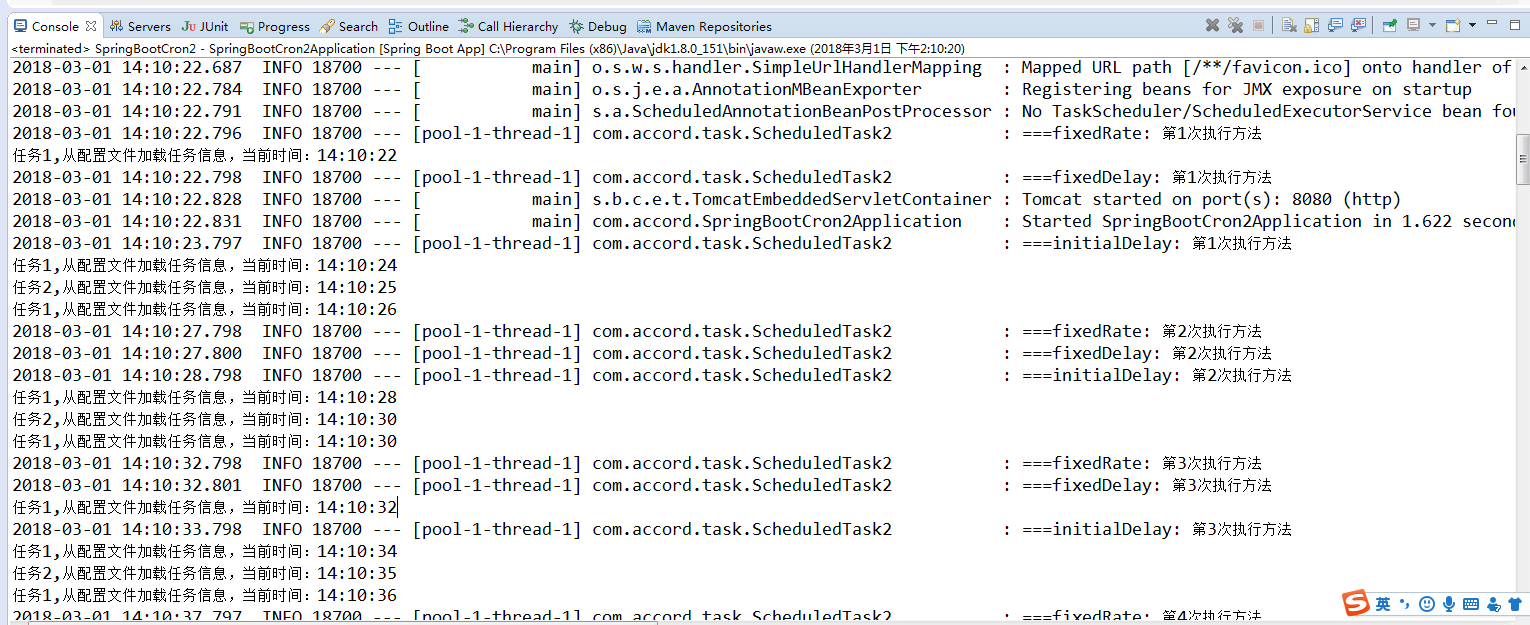
从控制台输入的结果中我们可以看出所有的定时任务都是在同一个线程池用同一个线程来处理的,那么我们如何来并发的处理各定时任务呢,请继续向下看。
4、多线程处理定时任务:
看到控制台输出的结果,所有的定时任务都是通过一个线程来处理的,我估计是在定时任务的配置中设定了一个SingleThreadScheduledExecutor,于是我看了源码,从ScheduledAnnotationBeanPostProcessor类开始一路找下去。果然,在ScheduledTaskRegistrar(定时任务注册类)中的ScheduleTasks中又这样一段判断:
-
if (this.taskScheduler == null) {
-
this.localExecutor = Executors.newSingleThreadScheduledExecutor();
-
this.taskScheduler = new ConcurrentTaskScheduler(this.localExecutor);
-
}
这就说明如果taskScheduler为空,那么就给定时任务做了一个单线程的线程池,正好在这个类中还有一个设置taskScheduler的方法:
-
public void setScheduler(Object scheduler) {
-
Assert.notNull(scheduler, "Scheduler object must not be null");
-
if (scheduler instanceof TaskScheduler) {
-
this.taskScheduler = (TaskScheduler) scheduler;
-
}
-
else if (scheduler instanceof ScheduledExecutorService) {
-
this.taskScheduler = new ConcurrentTaskScheduler(((ScheduledExecutorService) scheduler));
-
}
-
else {
-
throw new IllegalArgumentException("Unsupported scheduler type: " + scheduler.getClass());
-
}
-
}
这样问题就很简单了,我们只需用调用这个方法显式的设置一个ScheduledExecutorService就可以达到并发的效果了。我们要做的仅仅是实现SchedulingConfigurer接口,重写configureTasks方法就OK了;
-
package com.accord.task;
-
-
import org.springframework.context.annotation.Configuration;
-
import org.springframework.scheduling.annotation.SchedulingConfigurer;
-
import org.springframework.scheduling.config.ScheduledTaskRegistrar;
-
-
import java.util.concurrent.Executors;
-
-
/**
-
* 多线程执行定时任务
-
* @author 王久印
-
* 2018年3月1日
-
*/
-
@Configuration
-
//所有的定时任务都放在一个线程池中,定时任务启动时使用不同都线程。
-
public class ScheduleConfig implements SchedulingConfigurer {
-
@Override
-
public void configureTasks(ScheduledTaskRegistrar taskRegistrar) {
-
//设定一个长度10的定时任务线程池
-
taskRegistrar.setScheduler(Executors.newScheduledThreadPool(10));
-
}
-
}
5、执行结果(并发)
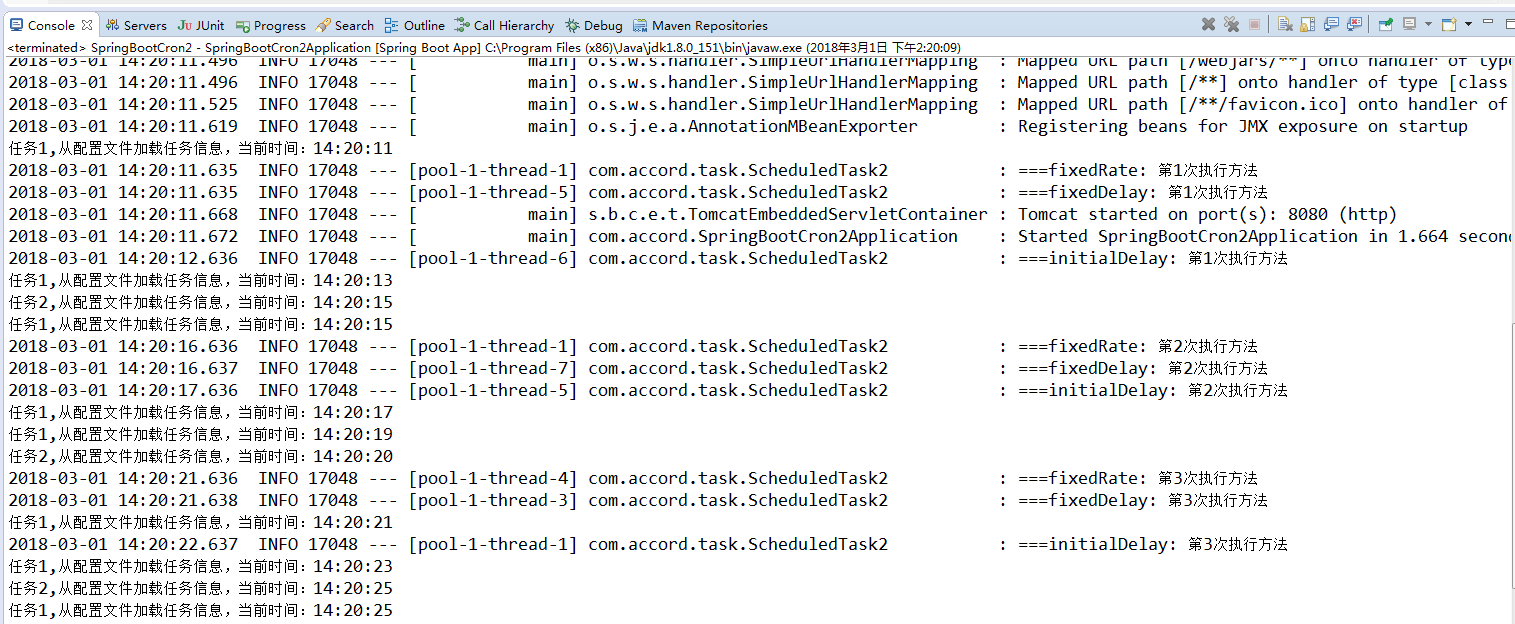
通过控制台输出的结果看出每个定时任务都是在通过不同的线程来处理了。
Spring Boot 定时任务单线程和多线程的更多相关文章
- Spring Boot定时任务应用实践
在Spring Boot中实现定时任务功能,可以通过Spring自带的定时任务调度,也可以通过集成经典开源组件Quartz实现任务调度. 一.Spring定时器 1.cron表达式方式 使用自带的定时 ...
- Spring Boot定时任务运行一段时间后自动关闭的解决办法
用Spring Boot默认支持的 Scheduler来运行定时任务,有时在服务器运行一段时间后会自动关闭.原因:Schedule默认是单线程运行定时任务的,即使是多个不同的定时任务,默认也是单线程运 ...
- spring boot 定时任务
定时任务实现方式 三种: 1) Java自带的java.util.Timer类,这个类允许你调度一个java.util.TimerTask任务. 最早的时候就是这样写定时任务的. 2) 开源的第三方框 ...
- spring boot.定时任务问题记录(TaskScheduler/ScheduledExecutorService异常)
一.背景 spring boot的定时任务非常简单,只需要在启动类中加上@EnableScheduling注解,然后在对应的方法上配置@Scheduled就可以了,系统会自动处理并按照Schedule ...
- (14)Spring Boot定时任务的使用【从零开始学Spring Boot】
本文介绍在 Spring Boot 中如何使用定时任务,使用非常简单,就不做过多说明了. com.kfit.base.scheduling.SchedulingConfig: package com. ...
- Spring Boot (十一): Spring Boot 定时任务
在实际的项目开发工作中,我们经常会遇到需要做一些定时任务的工作,那么,在 Spring Boot 中是如何实现的呢? 1. 添加依赖 在 pom.xml 文件中只需引入 spring-boot-sta ...
- Spring Boot 定时任务 @Scheduled
项目开发中经常需要执行一些定时任务,比如在每天凌晨,需要从 implala 数据库拉取产品功能活跃数据,分析处理后存入到 MySQL 数据库中.类似这样的需求还有许多,那么怎么去实现定时任务呢,有以下 ...
- Spring Boot 定时任务 Quartz 使用教程
Quartz是一个完全由java编写的开源作业调度框架,他使用非常简单.本章主要讲解 Quartz在Spring Boot 中的使用. 快速集成 Quartz 介绍 Quartz 几个主要技术点 Qu ...
- spring -boot定时任务 quartz 基于 MethodInvokingJobDetailFactoryBean 实现
spring 定时任务 quartz 基于 MethodInvokingJobDetailFactoryBean 实现 依赖包 如下 <dependencies> <depende ...
随机推荐
- C# 数据库备份与还原 小妹做了一个winform系统,需要对sql2000数据库备份和还原(小妹妹你太狠了)
成功了,把代码帖出来给大家看看,跟我刚开始帖出来的差不多,是需要杀掉进程的,我之前调用的存储过程,可能有点问题,现在改成sql了/// <summary> /// 数据库 ...
- 我在Suse 11 Sp3上使用anaconda安装TensorFlow的过程记录
我在Suse 11 Sp3上使用anaconda安装TensorFlow的过程记录 准备安装包: gcc48 glibc--SP4-DVD-x86_64-GM-DVD1.iso tensorflow_ ...
- bzoj 2252 [ 2010 Beijing wc ] 矩阵距离 —— 多源bfs
题目:https://www.lydsy.com/JudgeOnline/problem.php?id=2252 又没能自己想出来... 一直在想如何从每个1开始广搜更新答案,再剪剪枝,什么遇到1就不 ...
- git常见冲突及解决办法
1.内容冲突 产生冲突的原因:两个用户修改了同一个文件的同一块区域,git会报告内容冲突.我们常见的都是这种. 解决冲突的办法:编辑冲突文件,修改冲突. 例如:冲突文件test.c test.c发生冲 ...
- MarkDown流程图概要
要素 流程元素定义: 名称=>类型: 显示名称 控制流程定义: 名称1([yes,no],right)->名称2 注意事项 流程元素定义在代码上部, 流程走向定义在代码下部 名称可以取中文 ...
- POJ 2342 Anniversiry Party(TYVJ1052 没有上司的舞会)
题意: P1052 没有上司的舞会 描述 Ural大学有N个职员,编号为1~N.他们有从属关系,也就是说他们的关系就像一棵以校长为根的树,父结点就是子结点的直接上司.每个职员有一个快乐指数.现在有个周 ...
- .net中实现aspnetpager分页
第一步首先导入aspnetpager控件,然后再把他从工具箱中拖出,代码如下: <webdiyer:AspNetPager ID="aspnetpager1" runat= ...
- codechef MAY18 div2 部分题解
T1 https://www.codechef.com/MAY18B/problems/RD19 刚开始zz了,其实很简单. 删除一个数不会使gcd变小,于是就只有0/1两种情况 T2 https:/ ...
- Java基础12一IO流
1.IO流的原理 利用数据通道实现程序和数据源之间数据的的读写操作. 2.IO流分类 输入流.输出流.字节流.字符流.节点流.过滤流 3.InputStream 字节输入流 实现类FileInpu ...
- 编码的来历和使用 utf-8 和GB2312比较
经常我们打开外国网站的时候出现乱码,又或者打开很多非英语的外国网站的时候,显示的都是口口口口口的字符, wordpress程序是用的UTF-8,很多cms用的是GB2312. ● 为什么有这么多编码? ...